
An app by Flavio
Joiner for GoPro
Your GoPro cut one long recording into chapters. Joiner for GoPro puts them back together into one video on your Mac, straight from the card, without losing quality or the GPS data.
Buy Joiner for GoPro · $20One-time purchase. Tax included.
macOS 14 or later · Apple silicon and Intel
You filmed one long ride, one dive or one ski run, and the GoPro card has three files for it. The camera cuts a long recording into chapters, about 4 GB each on most GoPros and about 12 GB on the newest ones, so 26 minutes can come back as GX010141.MP4, GX020141.MP4 and GX030141.MP4. You want the one video you recorded.
$20 including tax, paid once.
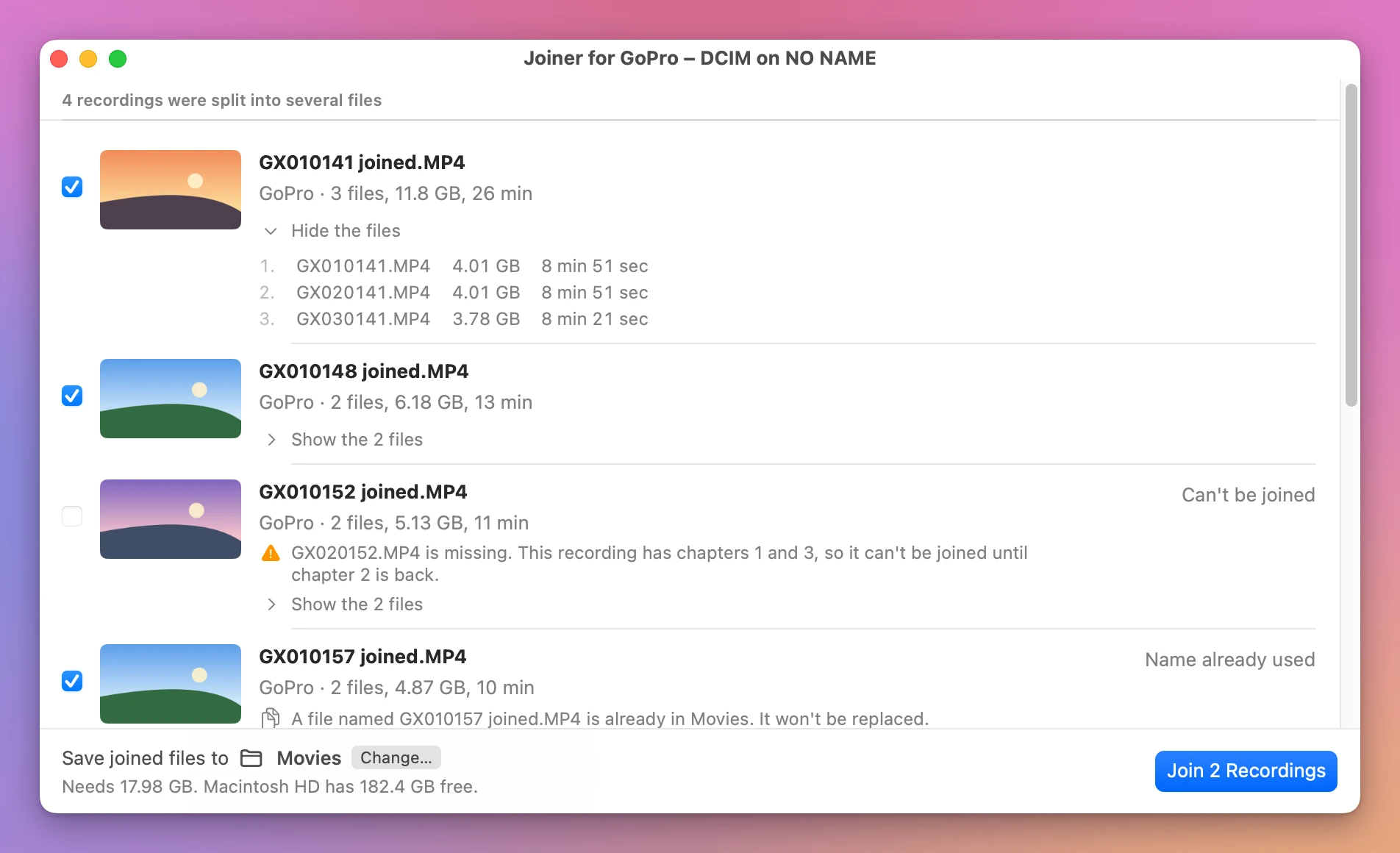
Joiner for GoPro is a Mac app that puts the chapters back together. Plug in the card and every recording shows up as one row, already ticked. Click Join, and one video per recording lands on your Mac. The picture and the sound are copied exactly as the GoPro recorded them, so nothing loses quality.
How a GoPro names its chapters
The chapters of one recording share the last four digits. The two digits after GX are the chapter number. That’s why the Finder never lists them in order: it puts every first chapter together, then every second one.
| File on the card | What it is |
|---|---|
GX010141.MP4 | Recording 0141, chapter 1 |
GX020141.MP4 | Recording 0141, chapter 2 |
GX030141.MP4 | Recording 0141, chapter 3 |
GX010148.MP4 | Recording 0148, chapter 1, a different recording |
GX010141.THM | The thumbnail of chapter 1 |
GL010141.LRV | The small, low-quality copy of chapter 1, for the GoPro phone app |
GX010141 joined.MP4 | What you get on your Mac: recording 0141 in one file |
Joiner for GoPro reads those names for you and groups the chapters into recordings. Older GoPros name them GOPR0141.MP4, then GP010141.MP4 and GP020141.MP4, and the app knows those too.
If a chapter is missing, the recording isn’t joined, and the row says which file to look for: “GX020152.MP4 is missing. This recording has chapters 1 and 3, so it can’t be joined until chapter 2 is back.”
Straight from the card
The app reads the chapters where they are, on the card, and saves the joined video on your Mac. Nothing is copied first, so there’s no second set of files to clean up.
Here’s how it goes:
- Put the card in your Mac. The start screen gets a button with the card’s name, like Scan NO NAME.
- The app lists each recording as one row, ticked. Click Show the 3 files on a row to see its chapters.
- The joined videos go to your Movies folder unless you click Change…. Click Join.
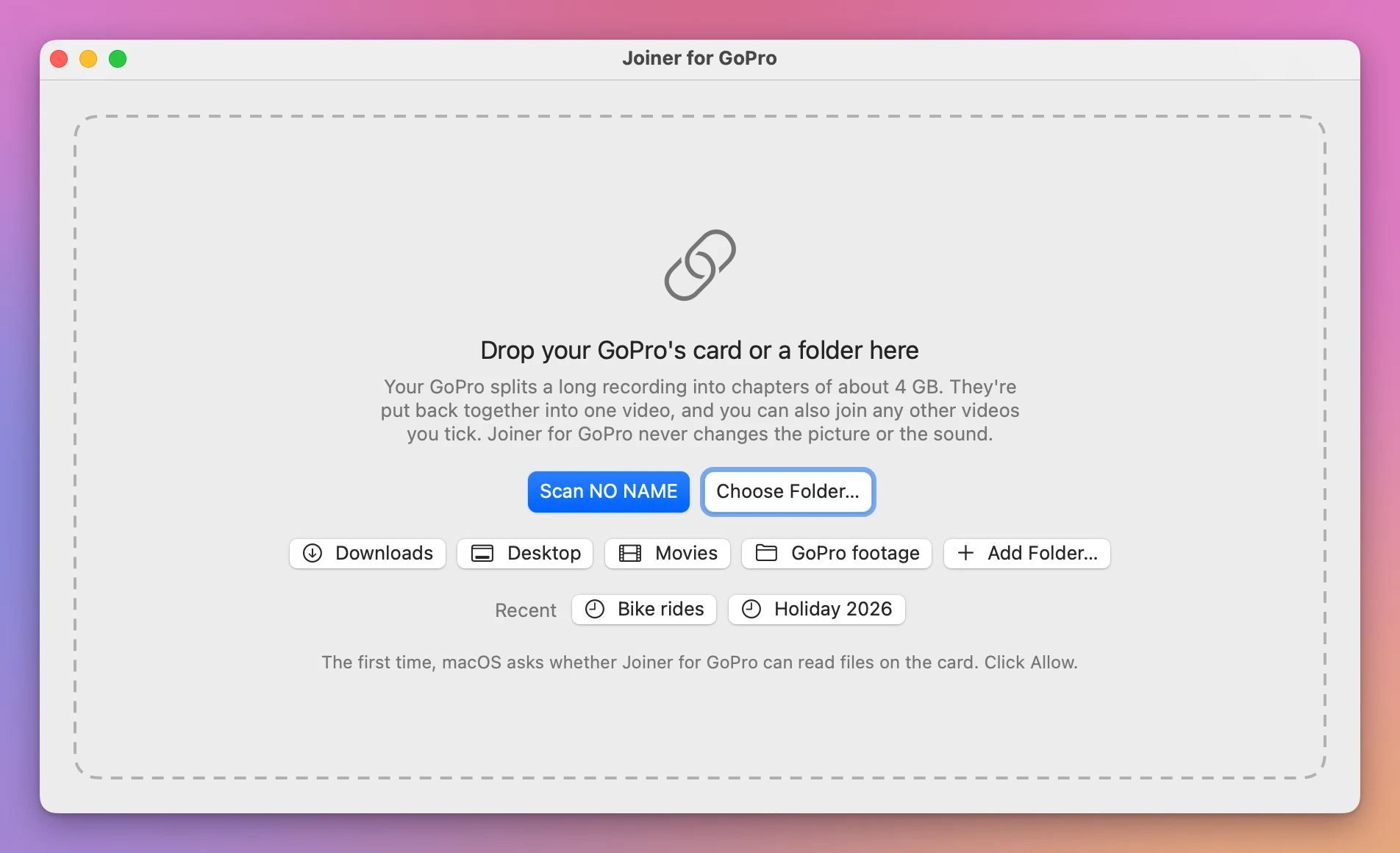
The first time, macOS asks whether Joiner for GoPro can read the card. Click Allow.
Chapters you already copied to your Mac work the same way. Drop the folder on the window, or click Downloads, Desktop or Movies.
The GPS and motion data stay
A GoPro records more than the picture and the sound. It saves its GPS position, its speed and its motion sensors in the video file, and apps that draw your route or your speed on the video read it from there.
Many joiners drop that data. Joiner for GoPro keeps it, chapter after chapter, so the joined video still has the whole ride in it.
Nothing loses quality
Most apps that join videos rebuild every frame. That takes a long time, and the picture comes out a little worse than it went in.
Joiner for GoPro doesn’t touch the frames. It puts the chapters one after the other, as they are. Before it says it’s done, it compares the joined video with the chapters, piece by piece, then asks macOS to open it. If anything is off, the joined file is thrown away and your chapters are where they were.
It never replaces a file either. When a name is taken, it offers the next free one, like GX010157 joined 2.MP4.
Short clips too
The videos your GoPro didn’t split are listed under the recordings, oldest first. Tick two or more to make one video out of them, like the five short clips of a weekend. They’re named after the days they were recorded, like 2026-10-08 to 2026-10-15.MP4.
Click a video to watch it in a small panel in the corner of the window. Drag a row to change the order.
Then free the card, small files included
Next to every chapter, a GoPro saves two small files: a .THM thumbnail and an .LRV low-quality copy for its phone app. Once the video is gone, they’re clutter. Delete the chapters in the Finder and they stay behind.
After a join that says Joined and checked, click Move Originals to Trash…. The confirmation has a box, ticked for you, that takes the small files of those chapters with them.
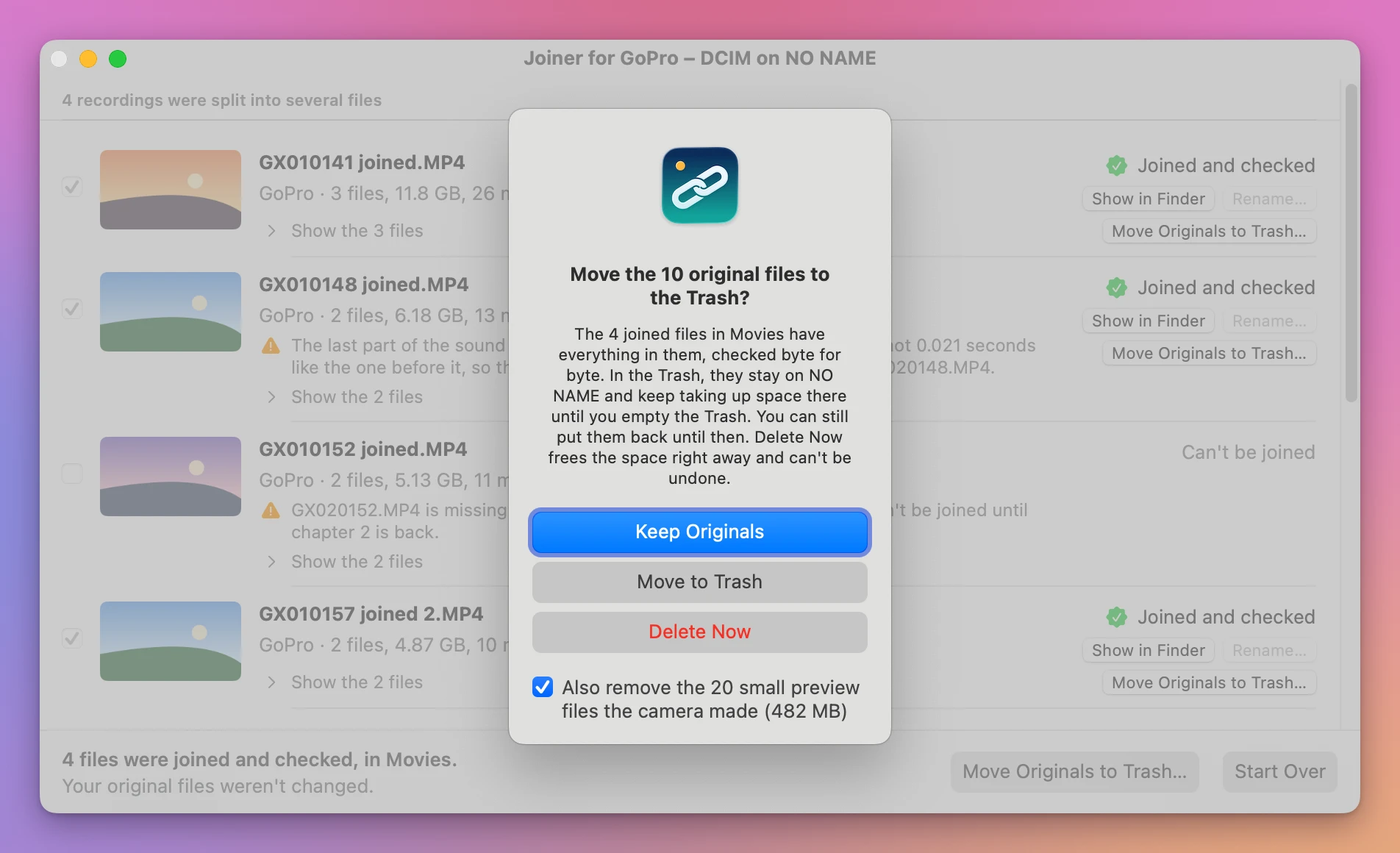
Only the small files of the chapters being removed go, matched by name. Untick the box to keep them.
Nothing happens until you confirm, and Keep Originals is the default button, so pressing Return never removes anything.
On a memory card, the Trash is on the card. macOS keeps a card’s trashed files in a hidden folder on the card itself, so they keep taking up space until you empty the Trash. The confirmation says so, and adds Delete Now, which frees the space right away and can’t be undone.
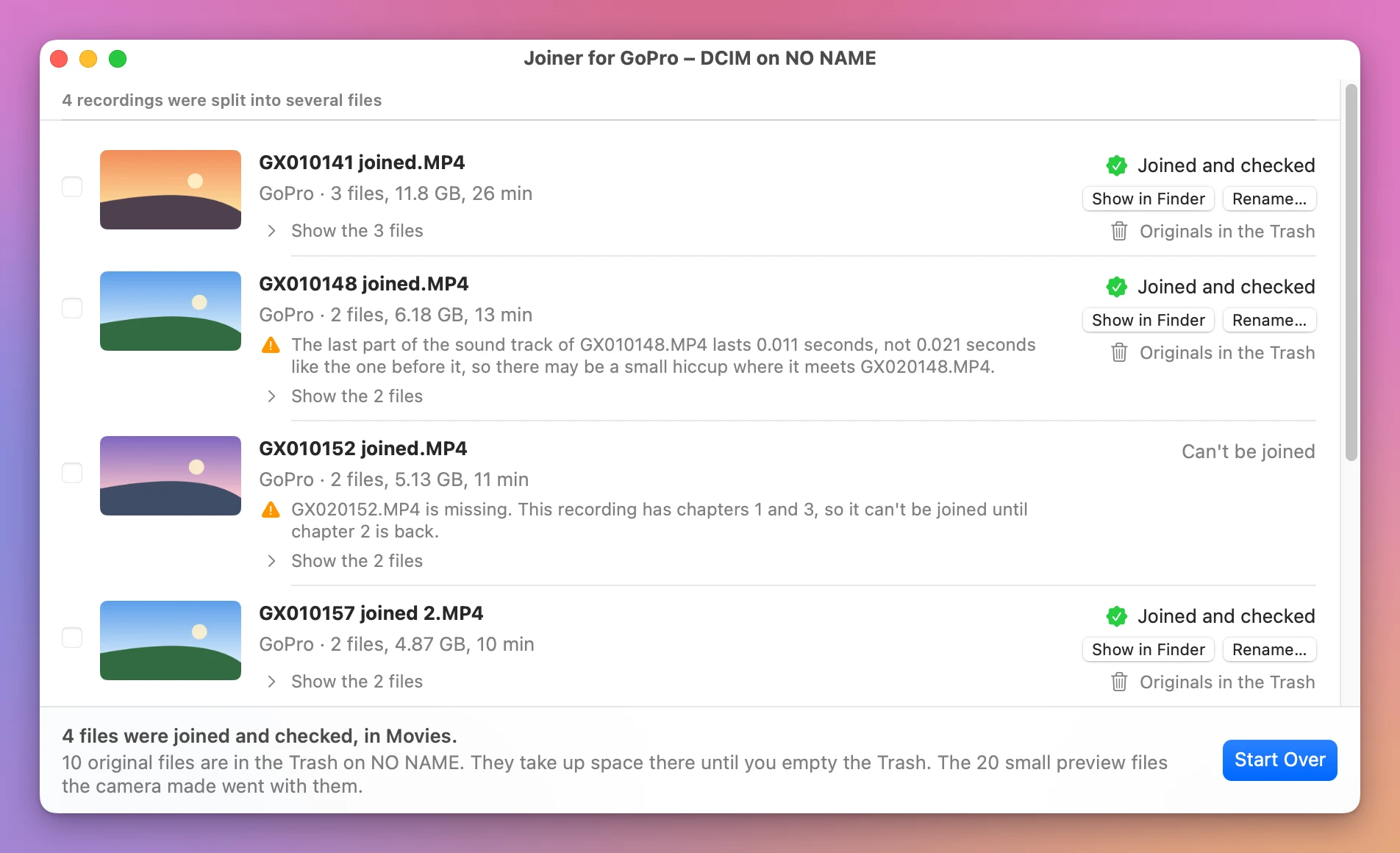
Right before it removes anything, the app looks at the joined video once more. If you moved it or edited it in the meantime, the chapters stay and the app tells you why.
Good to know
Joiner for GoPro is my own app. It’s not made by, affiliated with or endorsed by GoPro.
The app checks every join before it offers to remove anything, but I’m not responsible for lost videos. Keep a backup of footage you care about, and play the joined video before you delete the chapters.
A GoPro plugged into the Mac with its cable doesn’t show up as a disk, so the app can’t see it. Take the card out and put it in a card reader.
It doesn’t read the .360 videos of a 360 camera. It lists them and leaves them alone.
It doesn’t trim or convert videos.
It reads MP4, MOV and AVI videos. Videos from another camera in the same folder are listed too, and you can join them the same way.
The card sets the speed. Expect about the time it takes to read the chapters twice: once to join them and once to check them.
Buy Joiner for GoPro and get started
Joiner for GoPro costs $20 including tax, paid once. There’s no subscription.
After buying, your receipt has the app and a license key. Unzip the app and drag Joiner for GoPro to your Applications folder. It runs on macOS 14 Sonoma or later, on Apple silicon and Intel Macs. It’s signed with my Apple Developer ID and checked by Apple, so it opens like any other app you download.
Enter the license key in Joiner for GoPro → License… to get updates automatically. A key works on 3 Macs. Once a day, Joiner for GoPro checks for a new version, shows what’s new, and installs it with Install and Relaunch. Your receipt always has the latest version, too.