
How to find missing frames in an image sequence
By Flavio
A render left gaps, empty frames or a half-written frame in a folder of numbered images. In the Finder you can find them by reading the list, sorted by name with the sizes showing. Here's how, and the faster way for thousands of frames.
You rendered a sequence of numbered frames, plane_0001.png to plane_0096.png, and something went wrong partway. Some frames never got written, one is empty, and one may be cut in half. You want to know which frame numbers to render again.
On a Mac you can find them in the Finder: list view, sorted by name, with the Size column. You scroll and look for a jump in the numbers and for “Zero bytes”. For a few dozen frames that works. For thousands, Image Sequence Checker reads the folder for you and gives you the list.
The frames here are made up: 92 small PNG files in a folder called “Paper plane renders”, made for this test. Frames 41 to 44 are missing, frame 58 is empty, frame 71 is cut in half, and frame 30 has a Finder copy next to it. The screenshots are from macOS 15 Sequoia.
How do I see the frames in order in the Finder?
Open the folder of frames in the Finder and choose View › as List. Click the Name column header so the files are sorted by name. Because the frame numbers have the same number of digits (0001, 0002…), sorting by name puts them in frame order.
List view shows Date Modified, Size and Kind next to the name. You need the Size column.
How do I spot a missing frame?
Read the numbers down the list. A missing frame is a jump. Here the list goes from plane_0040.png straight to plane_0045.png, so frames 41, 42, 43 and 44 are missing.
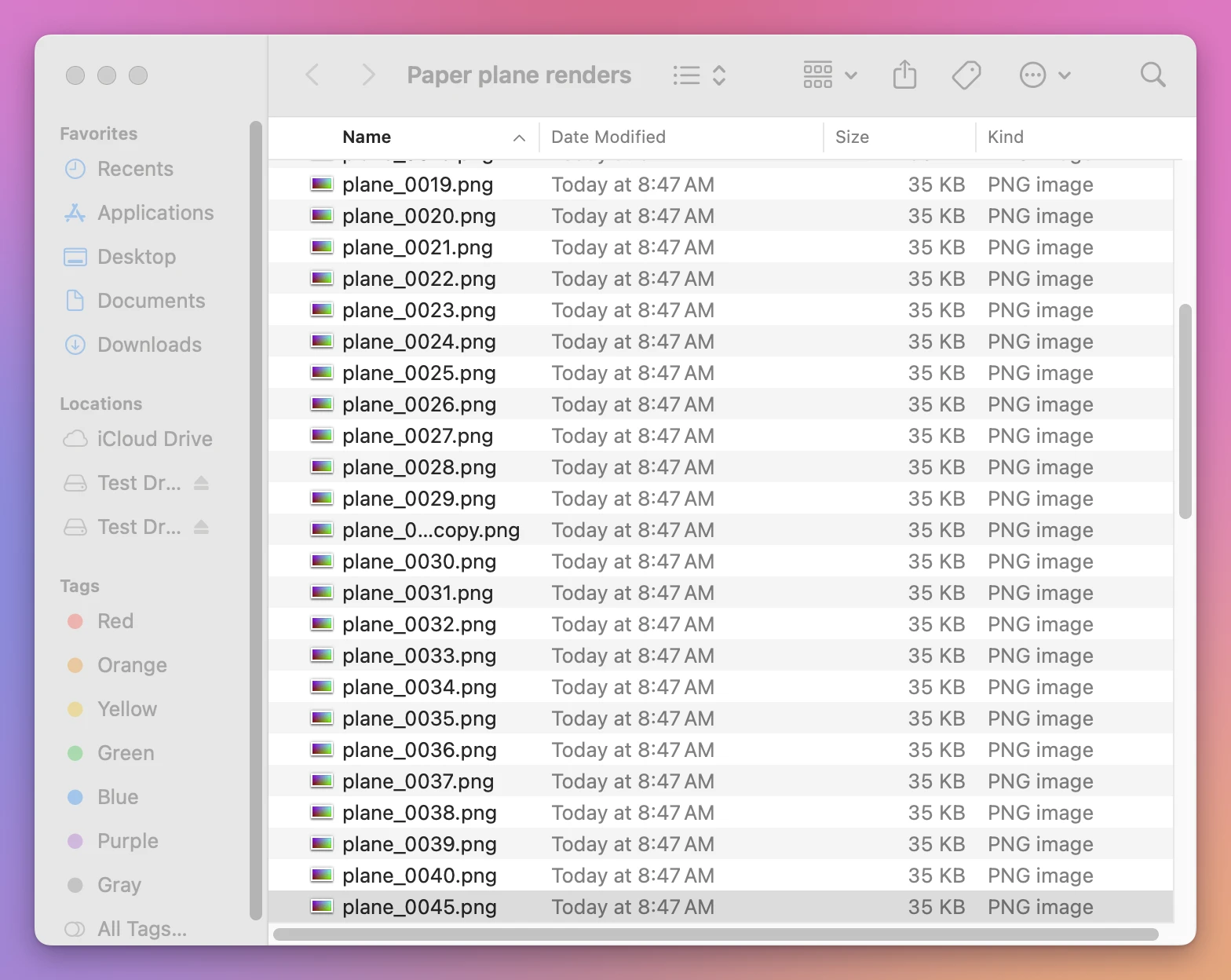
Notice the plane_0…copy.png line too. It’s plane_0030 copy.png, a second copy of frame 30 made in the Finder. Many editing and compositing apps get confused by an extra file like that in a sequence, so move it out of the folder.
How do I find empty or broken frames?
Look at the Size column. An empty frame says Zero bytes, like plane_0058.png here. A crash or a full disk usually leaves one of these.
A frame cut in half is harder. plane_0071.png is 18 KB while the frames around it are 35 KB, and its little icon is black. Nothing else in the Finder says it’s broken: it has a normal name and a size that could be real. On a render with real pictures, a frame half the size of its neighbours can also be a legitimate fade to black, so you’d have to open it and look.
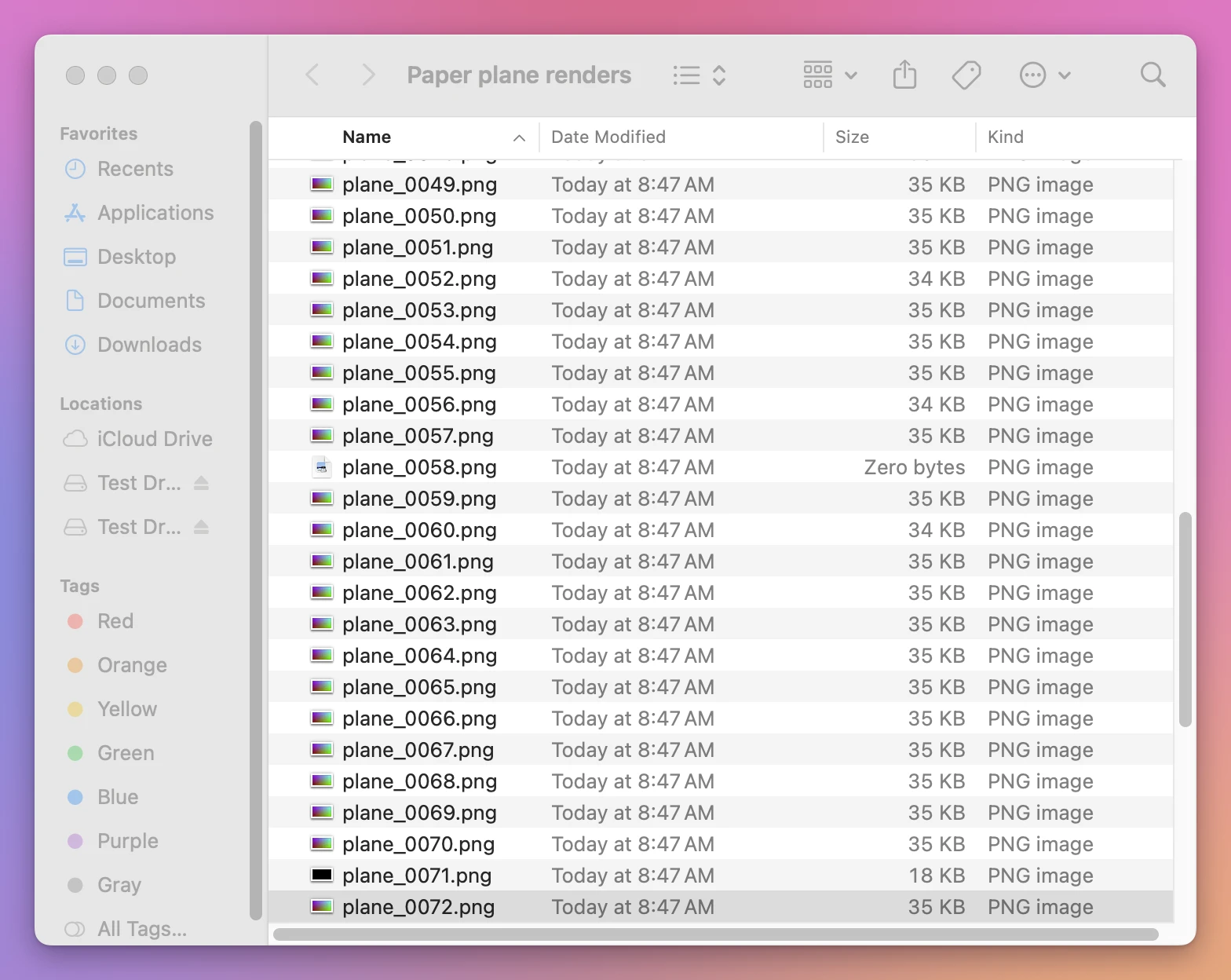
When you’ve read the whole list, you write down the frames to render again: 41-44, 58 and 71. With 96 frames that’s a couple of minutes. With 2,400 frames and three passes in three folders, it’s a long scroll, and a gap of one frame is easy to miss.
The faster way with Image Sequence Checker
Image Sequence Checker is a Mac app I made for this. It costs $19, paid once. It only reads the frames, it never changes, moves or deletes one.
- Open the app and click Choose a Folder…, then pick the folder of frames. You can also drag the folder onto the window. Folders inside it, like one per render pass, are read too.
- The app reads the names, then opens every frame to check it isn’t empty or cut short.
- The window lists what it found, with the frames to render again at the bottom.
On the “Paper plane renders” folder it found one sequence, plane_####.png, frames 1 to 96, and said “6 frames need rendering again”. The rows say “Frames 41-44 are missing”, “Frame 58 is empty (0 bytes)”, “Frame 71 stops partway” and “Frame 30 is there twice: plane_0030.png and plane_0030 copy.png”. The list to render again reads 41-44,58,71.
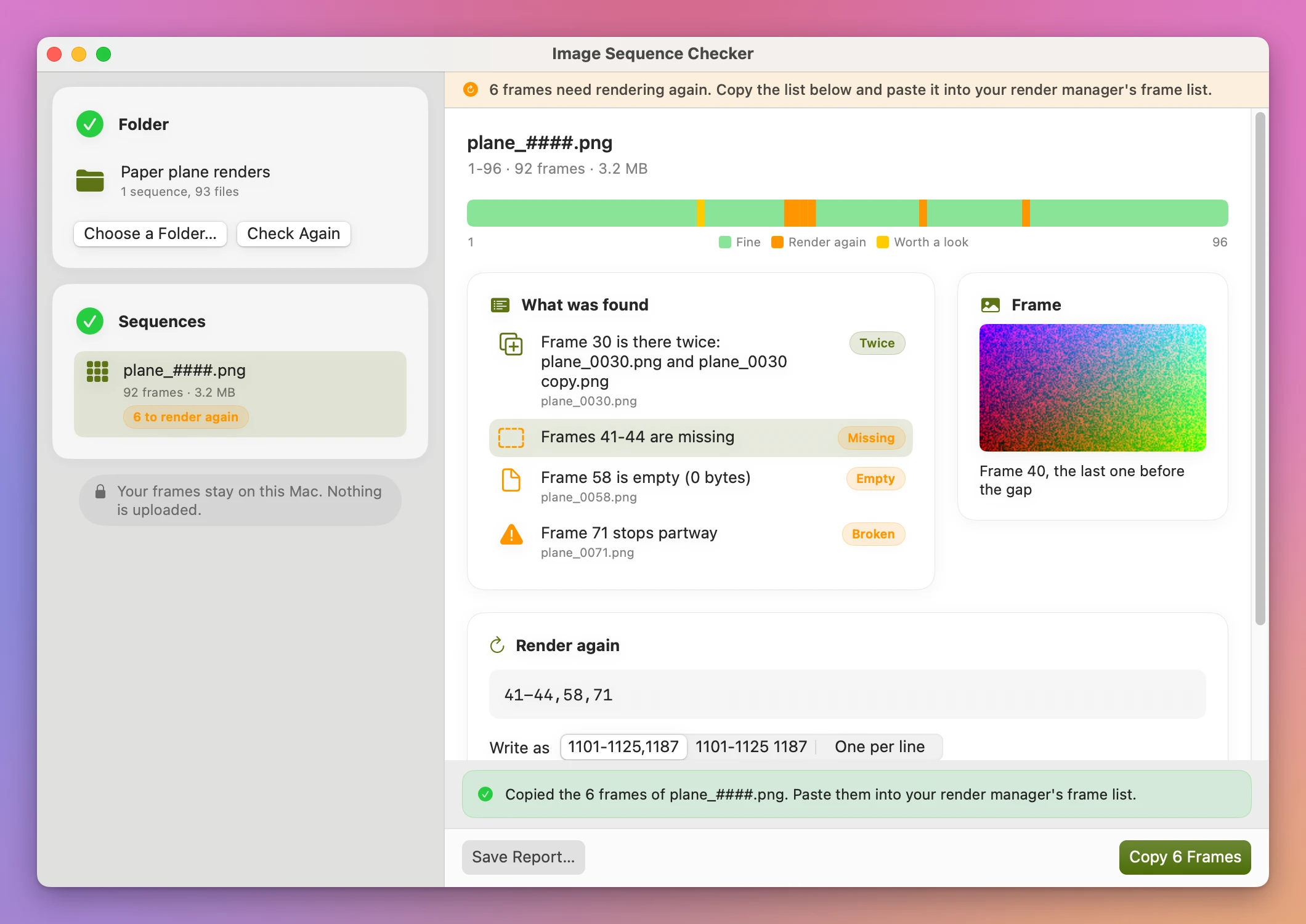
Frame 71 counts as broken because the app reads each frame to the end, so a file that stops halfway shows up even though its size looks fine in the Finder.
Click Copy 6 Frames and paste the list into the frame list of your render manager or render settings. Under Write as you can switch to spaces or one range per line. If the render should have gone further than the last file, type the last frame under Frames the render should have: with 1 to 100, the list became 41-44,58,71,97-100.
Finder or app?
| The Finder | Image Sequence Checker | |
|---|---|---|
| Missing frames | Read the list for jumps in the numbers | Listed as ranges, like 41-44 |
| Empty frames | Look for Zero bytes in the Size column | Listed as empty |
| A frame cut in half | A smaller size and a dark icon, if you notice | Opened and read to the end, listed as broken |
| A Finder copy | A “copy” name somewhere in the list | Listed with both file names |
| Frames missing at the end | You need to know the last frame | Type the range the render should have |
| Several passes | One folder at a time | Every sequence in the folder at once |
| The list to render again | Written by hand | Copied, ready to paste |
For a short sequence, the Finder is enough. For long renders, several passes or frames you can’t open one by one, the app saves the scroll and catches the half-written frame the Finder makes look normal.
Get Image Sequence Checker
Choose a folder of rendered frames and see every missing, empty, broken or doubled frame of each numbered sequence, with frame numbers padded differently and frames that look wrong. Copy the exact frames to render again, like 1101-1125,1187, for your render manager, and save a report. Your frames are never changed.
See Image Sequence Checker → · Read the docs · $19. See the app page for tax details.