
How to calculate your adjusted cost basis on the wheel strategy
By Flavio
Subtract every premium the wheel collected, net of fees, from what you paid for the shares, then divide by the shares. Here's a full wheel worked out by hand, with the return on capital and the annualized return, and how to keep it up to date on a Mac.
You sold a put, it got assigned, and now you hold 100 shares and sell calls on them. Your broker says the shares cost you the strike price. But you also collected premium on the put, maybe on a roll, and on every call since. What did the shares really cost you?
The short answer: take what you paid for the shares, subtract every premium the wheel collected (net of fees and of anything you paid to buy options back), and divide by the number of shares. That’s the adjusted cost basis, or basis after premiums.
This is the arithmetic on trades already made, not a suggestion to run the wheel. The trades below are made up. And it isn’t a tax figure: brokers and tax rules handle option premium in their own way.
Two kinds of cost basis
Broker basis is what you paid for the shares you hold, divided by the shares. If a 50 put is assigned, it’s 50.00 a share, and it stays 50.00 however many calls you sell.
Basis after premiums subtracts the premium, so it goes down with every option that brings money in. It’s the price at which selling the shares would leave the whole wheel at zero, while the broker basis is what you actually paid for them.
A full wheel, worked out by hand
One contract is 100 shares, and each option trade costs 0.65 in fees, except the roll, which is two trades and costs 1.30.
- January 5: sell a 50 put at 1.20. 1.20 × 100 = 120, minus 0.65 in fees: +119.35.
- February 13: roll it. Buy the put back at 0.90 (−90) and sell a March 50 put at 1.30 (+130). That’s a net credit of 40, minus 1.30 in fees: +38.70. Premium so far: 158.05.
- March 20: assigned. You buy 100 shares at 50 and pay 5,000. Broker basis: 50.00. Basis after premiums: (5,000 − 158.05) ÷ 100 = 48.42.
- March 23: sell a 52 call at 0.80, which expires worthless in April: +79.35. Premium 237.40, basis after premiums 47.63.
- April 20: sell another 52 call at 0.70: +69.35. Premium 306.75, basis after premiums 46.93.
- May 15: called away at 52. You receive 5,200. Against the 5,000 you paid, that’s +200 on the shares.
The return on the cash it tied up
The realized profit is the premium plus the gain on the shares: 306.75 + 200 = 506.75.
To turn that into a return, divide by the most cash the wheel tied up at once. While the put was open, 5,000 had to stay set aside to buy the shares. After assignment, the shares cost 5,000. So the capital at risk is 5,000, and the return is 506.75 ÷ 5,000 = 10.135%.
From January 5 to May 15 is 130 days. The simple annualized return is 10.135% × 365 ÷ 130 = 28.46%. Simple means not compounded: it’s what the same pace would give over a year, not a forecast.
Doing it in a spreadsheet
Most people track this in Numbers, Excel or Google Sheets, and it’s free. One row per trade with the date, the event, contracts, strike, premium and fees, a column for the cash of each row, and a running total under it. The basis after premiums is a formula that divides the share cost minus the running premium by the shares.
It works, and it’s exactly as good as the formulas. The usual trouble spots:
- The roll is two trades. Put them on two rows and the running total is right, but the open option column now has to know which put is still open.
- Assignment has to bring the premium collected so far into the basis. Start a new sheet for the shares and that link is lost.
- Annualized needs the right start date and the most capital at once, not the cash today.
- Editing an old trade means checking that every formula below it picked up the change.
Doing it with Covered Call Tracker
Covered Call Tracker is a Mac app I built for this. Each stock is a campaign, and each trade is an event you pick from a menu: Sell put, Roll, Put assigned, Sell call, Expired worthless, Called away. It costs $19, paid once, and the trades stay in a file on your Mac. The screenshots use made-up data.
Click New Campaign, type the ticker, and Create and Add First Trade opens the event sheet. For the first trade, pick Sell put and fill in the contracts, strike, expiry, premium per share and fees. A line under the form shows what the event does, like ”+$119.35”, before you save.
The campaign page then lists the open put with Expired, Assigned, Roll… and Buy to Close… next to it. Roll… asks for the price paid to close and the new strike, expiry and premium, and records the roll as one event with its net credit.
Entered in the app, the wheel above ends with $306.75 of premium, a realized P&L of $506.75, a 10.14% return on capital at risk and 28.46% annualized, the same as by hand.
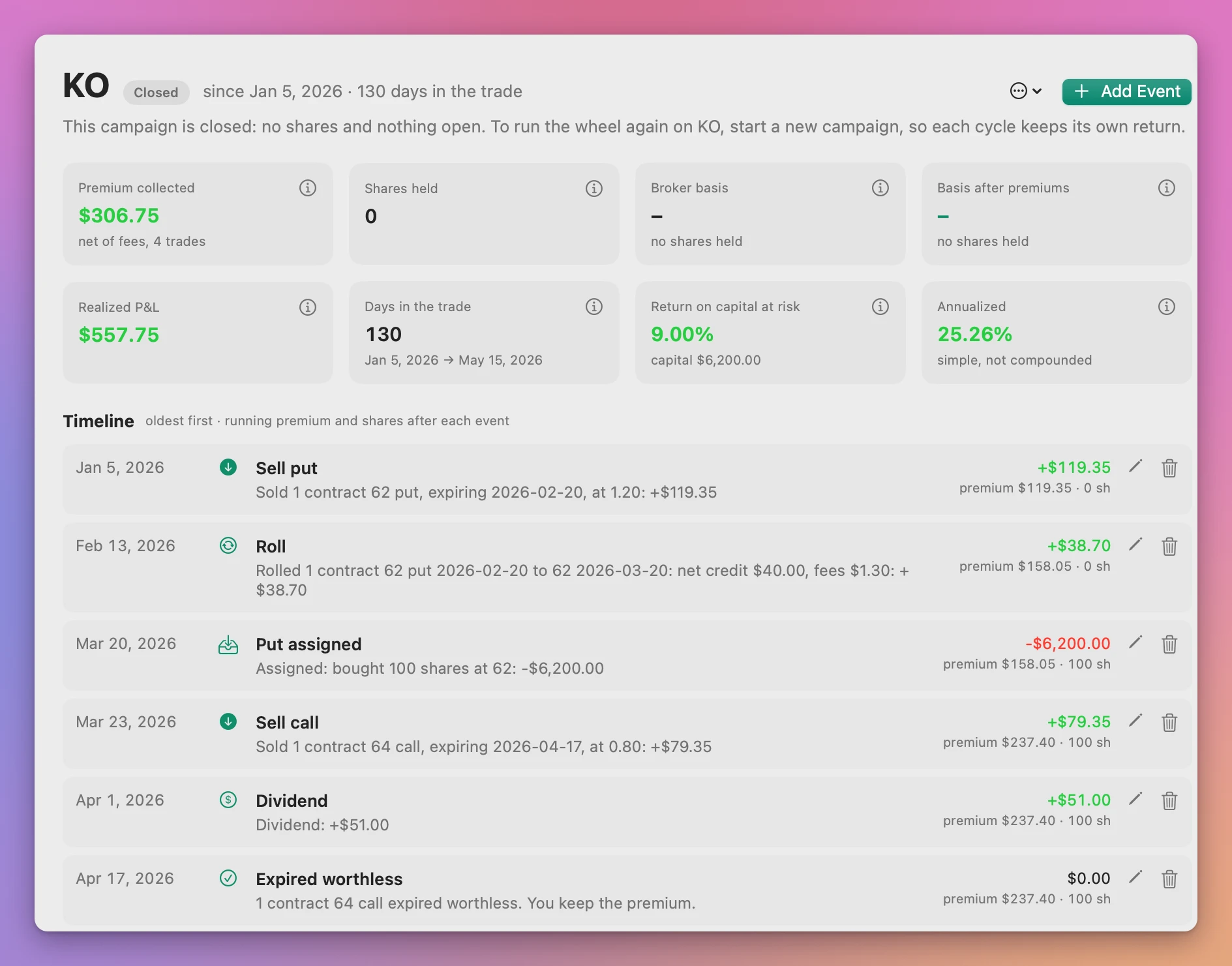
The screenshot below shows the same wheel, with the same dates and premiums, on another stock: a 62 put, 64 calls, and a $51 dividend in April. Same formulas, and a dividend counts like premium, so the realized P&L is 306.75 + 51 + 200 = $557.75, and on $6,200 of capital that’s 9.00%, 25.26% annualized.
While the shares are still held, the cards show Broker basis and Basis after premiums side by side. Here’s an open campaign, 200 shares assigned at 22 with four option trades so far:
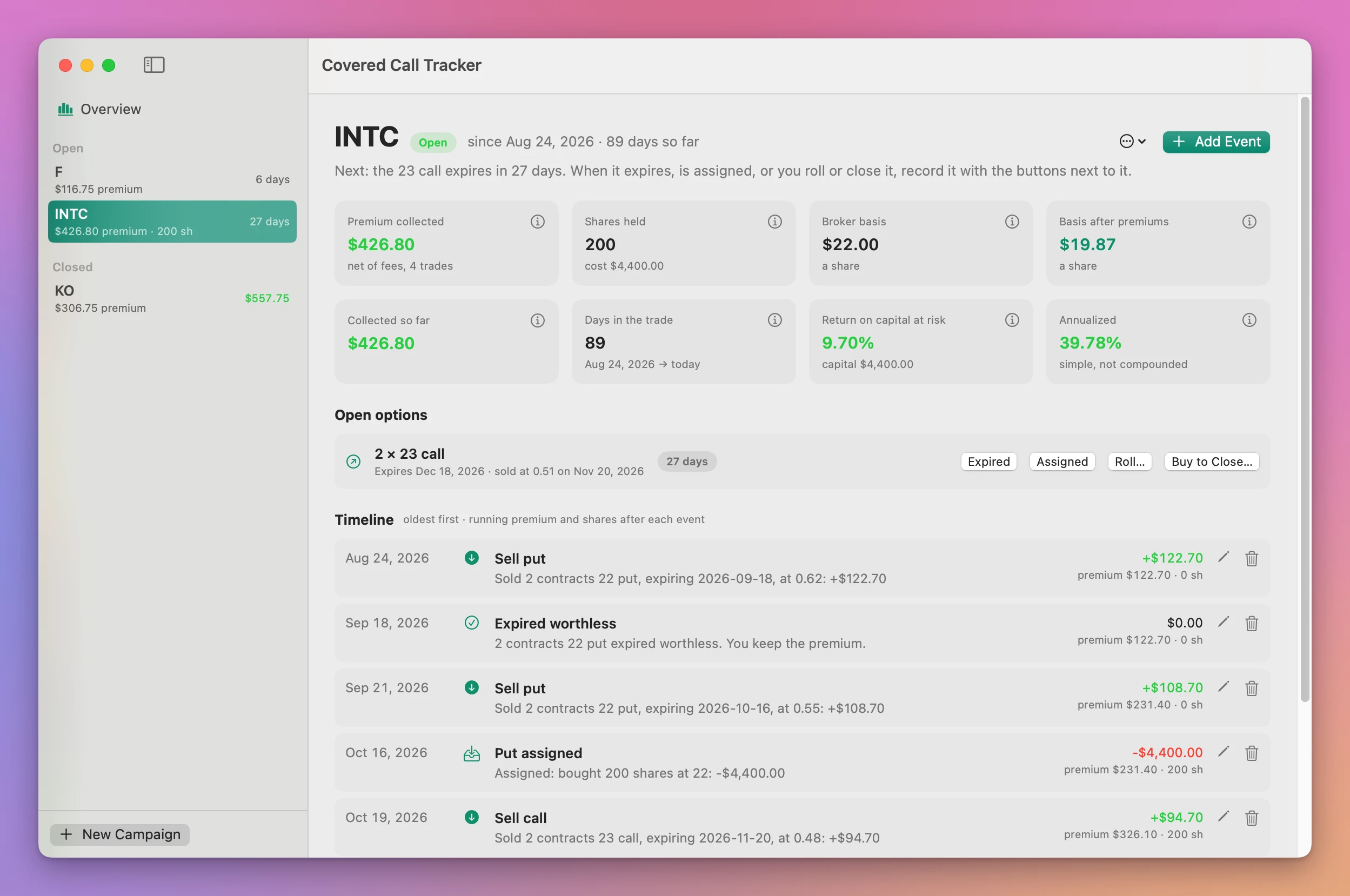
Each card has an ⓘ button. It opens “How this is worked out”, with the formula filled in with that campaign’s numbers, so you can check the app the same way you checked the hand math. Change an old trade with the pencil next to it and every number after it is worked out again.
Spreadsheet or app
| By hand | Spreadsheet | Covered Call Tracker | |
|---|---|---|---|
| Basis after premiums | Redo after each trade | A formula you maintain | Next to the broker basis |
| A roll | Two trades to net out | Two rows | One Roll event |
| Return on capital at risk, annualized | Work out the capital and days | More formulas | On every campaign |
| Editing an old trade | Start over | Check the formulas below | Everything after it is redone |
| Live prices, value of shares held | No | If you add them | No |
| Tax lots, wash sales | No | If you build them | No, average cost only |
| Cost | Free | Free | $19 once |
For one wheel, the hand math above is enough. The app is for when you have a few stocks going at once and want the numbers up to date after every trade. It only tracks options you sell (no bought options or spreads), it doesn’t fetch prices, and it’s record keeping, not a tax report.
Get Covered Call Tracker
Record the wheel for each stock and see the premium collected, the basis after premiums and the return on capital.
See Covered Call Tracker → · Read the docs · $19. See the app page for tax details.
More trading and investing tutorials → · All app tutorials →