# All the things a Google AI Ultra subscription gives you
> Every perk bundled inside Google AI Ultra (5x at $99.99/mo and 20x at $199.99/mo): Gemini 4, Antigravity, $100/mo API credits, 2,000 Colab GPU units, 30 TB storage, YouTube Premium Family, and the full 25-item breakdown.
Author: [Flavio Copes](https://flaviocopes.com/about/) | Published: 2026-11-25 | Updated: 2026-11-25 | Topics: [AI](https://flaviocopes.com/tags/ai/) | Canonical: https://flaviocopes.com/google-ai-ultra/
When you pay $199.99 a month for **Google AI Ultra (20x)**, you usually sign up for one reason: higher limits on Gemini 4 and Google Antigravity.
I did the same thing. Then I opened Google's official benefits page for the plan and realized I was ignoring most of what I was already paying for.
Google does not just sell you chat and coding quotas at that price. It packs **25 separate products, credit pools, and household subscriptions** into one Google One plan, including recurring Google Cloud and Gemini API credits, 2,000 monthly Google Colab GPU compute units, 30 TB of storage, and a YouTube Premium Family plan.
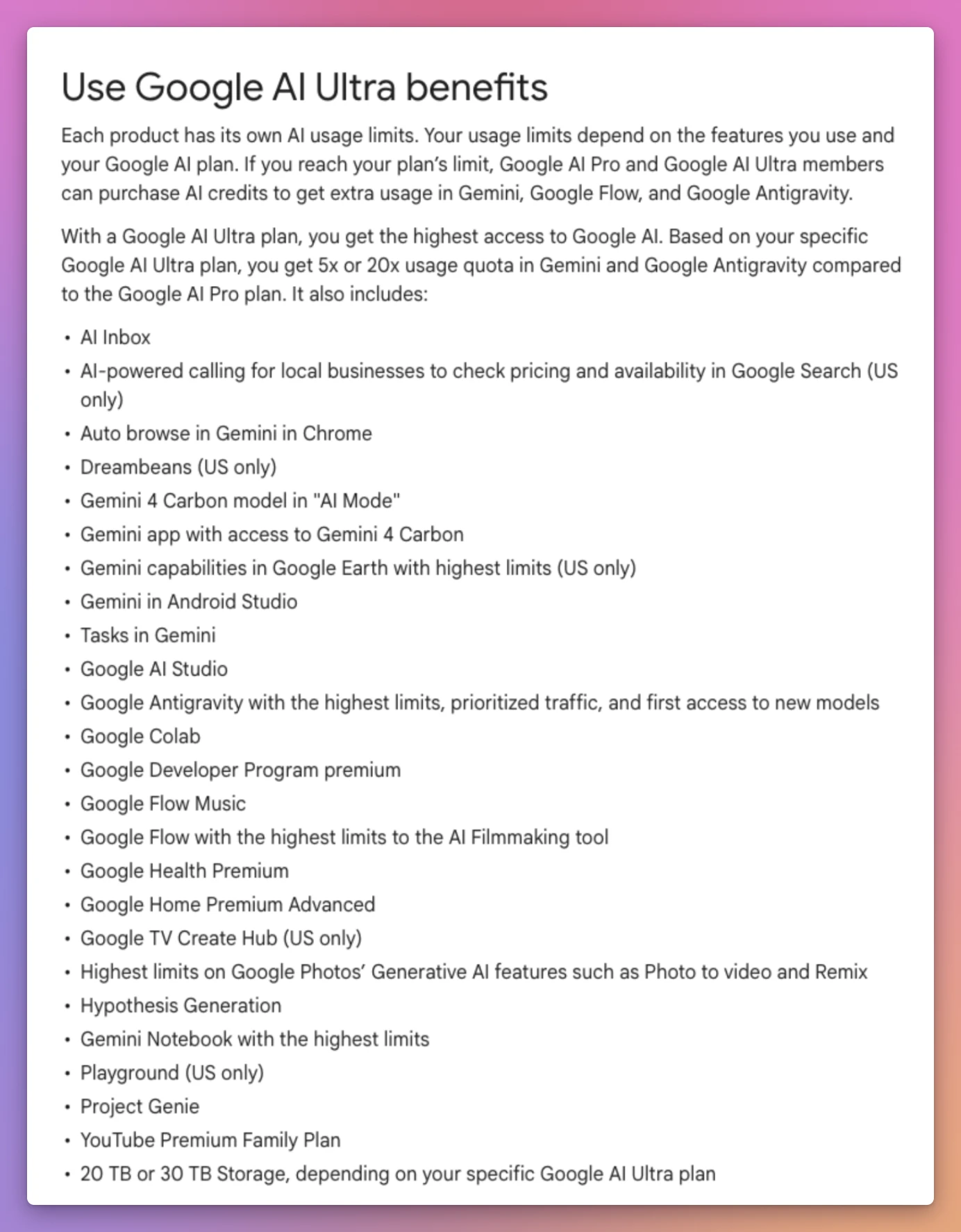
Here is every single perk on that list, what each one is worth on its own, which ones need manual activation, and which ones you can share with your family.
## Ultra 5x vs Ultra 20x, and what the perks cost separately
Google sells two Google AI Ultra tiers through [Google One](https://one.google.com/about/google-ai-plans/): **Ultra 5x** at **$99.99/month** and **Ultra 20x** at **$199.99/month** (down from the original $249.99 launch price). Both include the full list of products above, with four main differences in quota and capacity:
| Benefit | Google AI Ultra 5x ($99.99/mo) | Google AI Ultra 20x ($199.99/mo) | Standalone price (US) |
| --- | --- | --- | --- |
| Gemini & Antigravity quota | 5x Google AI Pro | 20x Google AI Pro | Included |
| Google Cloud / Gemini API credits | $40/mo (valid 12 months) | $100/mo (valid 12 months) | $40 to $100/mo value |
| Google Colab compute units | 2,000/mo (90-day rollover) | 2,000/mo (90-day rollover) | ~$200/mo at Pay-As-You-Go ($9.99 / 100 CU) |
| Google One cloud storage | 20 TB (up to 6 people) | 30 TB (up to 6 people) | Bundled in Ultra tiers |
| YouTube Premium Family | Included (up to 6 people) | Included (up to 6 people) | $26.99/mo (€29.99/mo in EU) |
| Google Flow creative credits | 10,000/mo | 25,000/mo | Bundled |
| Google Home Premium Advanced | Included | Included | $20/mo ($200/yr) |
| Google Health Premium | Included | Included | $9.99/mo ($99/yr) |
Add up only the items with a clear standalone dollar value on Ultra 20x: $100 in Cloud/API credits, $26.99 for YouTube Premium Family, $20 for Google Home Premium Advanced, and $9.99 for Google Health Premium. That is **$156.98 a month** before you count 30 TB of family cloud storage, 2,000 monthly Colab GPU units, or a single Gemini 4 prompt.
Notice the surprise on the $99.99 Ultra 5x tier too. You still get the full 2,000 monthly Colab compute units, YouTube Premium Family, Google Home Premium Advanced, and Google Health Premium for half the price. Paying the extra $100 for Ultra 20x buys you 4x the Gemini and Antigravity quota (20x vs 5x), $60 more per month in Google Cloud credits ($100 vs $40), 10 TB more storage (30 TB vs 20 TB), and 25,000 Flow credits instead of 10,000.
```mermaid
flowchart TD
accTitle: How Google AI Ultra splits across 5 perk groups and family sharing
accDescr: A Google AI Ultra subscription unlocks five benefit buckets: frontier models and quotas, developer compute and credits, Workspace and research tools, creative and Labs experiments, and household subscriptions plus storage. Storage, YouTube Family, and pooled AI access share with up to 5 family members, while Cloud credits, Colab compute units, and Google Home stay on the primary account.
A[Google AI Ultra
5x $99.99 or 20x $199.99] --> B[Models & quotas
Gemini 4, AI Mode, AI credits]
A --> C[Developer compute
Antigravity, AI Studio, Colab, Android Studio]
A --> D[Workspace & research
AI Inbox, Auto browse, Tasks, Notebook, Hypothesis]
A --> E[Creative & Labs
Flow, Flow Music, Photos, Genie, Playground, Dreambeans, TV]
A --> F[Household & storage
20-30 TB Drive, YouTube Family, Home, Health]
C --> G[Primary account only
Cloud credits & 2,000 Colab CU]
F --> H[Shared with up to 5 family members
20-30 TB storage & YouTube Family]
F --> I[Primary account only
Google Home Premium Advanced]
```
Let's go through all 25 items on Google's list, grouped by what you use them for.
## 1. Frontier models, quotas, and AI credits
This is the core layer most people buy Ultra for.
### 5x or 20x usage quota over Google AI Pro
Google uses rolling compute windows rather than a rigid daily message count. Ultra 5x gives you 5x the quota of Google AI Pro ($19.99/month) across the Gemini app and Google Antigravity, while Ultra 20x gives you 20x. In my breakdown of [the best value AI subscription](https://flaviocopes.com/best-value-ai-subscription/), Priors data put Ultra 20x at roughly **48x** its subscription fee in API-equivalent Gemini 4 Neon tokens if you push the quota hard.
### Gemini app with access to Gemini 4 Carbon
You get the full Gemini 4 family in the Gemini app, including **Gemini 4 Carbon** (Google's heavy reasoning model) alongside Neon, Argon, and Hydrogen. If the periodic-table names still trip you up, I mapped every model and price in [AI model names explained](https://flaviocopes.com/ai-model-names/), and tested how Neon compares against Carbon and Opus 5.5 in my [Gemini 4 Neon review](https://flaviocopes.com/gemini-4-neon-review/).
### Gemini 4 Carbon in "AI Mode"
Inside Google Search, AI Mode switches from the default faster model to **Gemini 4 Carbon** for harder multi-step search queries, deep comparisons, and research threads directly from the search bar.
### Purchasable AI credits for overflow
If you hit your rolling plan ceiling in the Gemini app, Google Flow, or Google Antigravity, Pro and Ultra members can buy extra **AI credits** on demand instead of sitting locked out until the next window resets.
## 2. Developer perks, API credits, and cloud GPUs
If you write code, this group is where the subscription quietly pays for itself. Most of it does not turn on automatically until you go look for it.
### Google Antigravity (highest limits, priority traffic, first access)
**Google Antigravity** is Google's agentic coding platform. Ultra gives you the highest usage limits, prioritized traffic during busy hours, and first access to new models before Pro or free users. You can run it through Google's own app or inside [T3 Code](https://flaviocopes.com/t3-code/) alongside Claude Code and Codex.
### Google Developer Program premium and Google AI Studio
Google retired the standalone paid Google Developer Program membership and folded its premium perks directly into Google AI Pro and Ultra.
The headline perk is recurring **Google Cloud and Gemini API credits**: **$40/month** on Ultra 5x and **$100/month** on Ultra 20x. Each monthly grant stays valid for **12 months** and stacks if you do not spend it right away. You can spend those credits on paid Gemini API keys (like `gemini-4-neon` or `gemini-4-carbon`), Vertex AI, Cloud Run, Firebase, or Compute Engine.
They do not activate by themselves. When I opened [Google AI Studio](https://aistudio.google.com/) on my Ultra 20x account, I found **$110 in unclaimed credits** sitting in the bottom-left sidebar, which turned into **€98.8** on my euro billing account the moment I clicked **Redeem all** and checked **Auto apply future offers**. I documented the exact clicks and screenshots in [how to claim your free Gemini API credits with Google AI Ultra](https://flaviocopes.com/google-ai-ultra-api-credits/). One small rule to know: if your Cloud Billing account uses Google's Prepay model, you need at least a $5 cash deposit on file, though Google burns your promotional credits first.
### Google Colab (2,000 monthly GPU compute units)
Both Ultra tiers include **2,000 Google Colab compute units every month**, priority access to datacenter GPUs, and up to **24-hour background execution** so jobs keep running after you close your laptop. Unused units roll over for **90 days** (oldest consumed first), letting you bank up to 6,000 units across quiet months.
You do not need to work inside a browser notebook anymore. Google ships an official [`google-colab-cli`](https://github.com/googlecolab/google-colab-cli) tool, a VS Code extension, and a Colab skill inside Antigravity. When I ran `colab usage` on my own Ultra account, I found **2,501.69 compute units** waiting:
```bash
colab usage
```
```text
Current balance: 2501.69 compute units
Usage rate: 0.00/hr
Active assignments: 0
```
When I probed the live runtimes from my terminal, the **Tesla T4 (16 GB)** burned `1.15 CU/hr`, the **NVIDIA L4 (24 GB, 12 cores, 52 GiB RAM)** burned `1.94 CU/hr`, and the **NVIDIA G4 (RTX PRO 6000 Blackwell, 96 GB VRAM, 48 cores, 176 GiB RAM)** burned `10.05 CU/hr`. That gives you roughly **199 hours per month on a 96 GB GPU** or over **1,000 hours on an L4**. Embedding all 2,217 posts on this site took **2.03 seconds** on a T4 and used under 0.02 units. I wrote up the full CLI workflow, SSH tunneling setup, and caveats in [what you can actually do with Google Colab](https://flaviocopes.com/google-colab/).
### Gemini in Android Studio
If you build Android apps, Ultra unlocks top-tier Gemini assistance directly inside Android Studio for code generation, refactoring, layout previews, and crash debugging without separate billing.
## 3. Workspace, Chrome, and research tools
These perks sit inside the Google apps you already open every day, plus two deeper research tools.
### AI Inbox
**AI Inbox** brings agentic Gemini features directly into Gmail. Instead of summarizing one email at a time, you can query your inbox conversationally, pull AI overviews across long threads, surface urgent messages, and triage routine mail.
### Auto browse in Gemini in Chrome
**Auto browse** turns the Gemini side panel in Chrome into a browser agent that reads page layouts and executes multi-step web tasks for you, such as comparing prices across tabs, pulling structured details from multiple sites, or walking through multi-page forms while you watch.
### Tasks in Gemini
**Tasks in Gemini** switches Gemini from passive chat to an active agent that runs multi-step or scheduled workflows across the web and your connected Google apps, like compiling a daily briefing or tracking down openings and appointments. Ultra raises the active task limits well above free and Pro accounts.
### Gemini Notebook with the highest limits
**Gemini Notebook** (bridging Gemini with NotebookLM) lets you drop PDFs, docs, URLs, and notes into dedicated project notebooks to ask grounded questions, generate reports and slide decks, and build Audio Overviews. Ultra unlocks the maximum source counts, daily queries, and audio generation quotas.
### Hypothesis Generation
**Hypothesis Generation** comes out of Google's AI Co-Scientist work. It runs a multi-agent research loop over papers and data to synthesize prior work, challenge assumptions, and propose structured, testable hypotheses for scientific or technical problems.
### Gemini capabilities in Google Earth (US only)
Powered by Google's Earth AI models, this lets you query satellite imagery, environmental patterns, and geospatial data inside Google Earth in plain English with Ultra's highest limits. Currently US only.
### AI-powered calling for local businesses in Google Search (US only)
Right from Google Search, you can ask Google's AI to phone local businesses on your behalf to check real-time pricing, stock, or appointment availability and report back without you sitting on hold. Currently US only.
## 4. Creative studios and Google Labs experiments
Google uses AI Ultra as the VIP pass for its heavy video, audio, and world-model tools because their inference cost is too high for a $20 plan.
### Google Flow (highest limits for AI filmmaking)
**Google Flow** is Google's AI filmmaking studio powered by Veo and Gemini image models, with camera controls, scene continuity, text-to-video, image-to-video, and high-resolution upscaling. Ultra 5x includes **10,000 monthly credits**, and Ultra 20x includes **25,000 monthly credits**, with top-priority rendering queues.
### Google Flow Music
**Google Flow Music** runs on Google's **Lyria** audio models. Ultra unlocks the top tier for generating full tracks from prompts or lyrics, editing individual sections through a conversational AI producer, splitting multi-track stems, and rendering synced Veo music videos.
### Google Photos Generative AI (Photo to video and Remix)
Inside Google Photos, Ultra lifts the limits on generative tools like **Photo to video** (animating still photos into short clips) and **Remix** (relighting, restyling, or changing backgrounds on personal photos and clips through prompts).
### Project Genie
**Project Genie** is DeepMind's real-time interactive world model on Google Labs. Give it a text prompt and it generates a playable 3D-like environment with live physics, camera control, and native audio that responds as you move through it.
### Playground (US only)
**Playground** is a Google Labs browser studio where you create, tweak, and share playable video games using conversational prompts with no code required. Currently US only.
### Dreambeans (US only)
**Dreambeans** is an experimental Google Labs mobile app that connects to your Gmail, Calendar, Photos, YouTube, and Search history overnight to build a short, finite, illustrated morning digest of personalized stories and reminders. Currently US only.
### Google TV Create Hub (US only)
**Google TV Create Hub** puts generative video and image remixing tools directly onto Gemini-enabled Google TVs for living-room creation. Currently US only.
## 5. Household subscriptions and cloud storage
This is the bucket that makes Ultra completely different from Claude Ultra or ChatGPT Pro. OpenAI and Anthropic only sell you AI usage and API credits; Google replaces consumer bills your household may already pay.
### 20 TB or 30 TB of Google One storage
Ultra 5x includes **20 TB** and Ultra 20x includes **30 TB** of cloud storage across Google Drive, Gmail, and Google Photos. You can share the whole pool with up to five family members (six accounts total). If you shoot raw video, back up Mac machines, or store model checkpoints from Colab in Drive, 30 TB removes storage anxiety completely.
### YouTube Premium Family Plan
Both Ultra tiers bundle a full **YouTube Premium Family Plan** for up to six household members: ad-free YouTube on every device, background play, offline downloads, and YouTube Music. On its own, that costs **$26.99/month** in the US or **€29.99/month** in Europe.
### Google Home Premium Advanced
Formerly Nest Aware Plus, **Google Home Premium Advanced** costs **$20/month** ($200/year) standalone. It covers compatible cameras across your home with 24/7 continuous video history, rich Gemini event descriptions, and smart-home automations.
### Google Health Premium
Formerly Fitbit Premium, **Google Health Premium** costs **$9.99/month** ($99/year) standalone and adds Gemini health coaching, sleep and recovery tracking, and adaptive fitness plans.
## The catches: family sharing, US-only perks, and manual setup
Google's marketing page lists all 25 benefits together, which hides three practical limits you only discover after subscribing.
| Category | Which perks are affected | What to expect |
| --- | --- | --- |
| **Needs manual activation** | Google Cloud / API credits, Google Colab CLI, YouTube Premium Family, Home, Health | Credits sit unclaimed in [Google AI Studio](https://aistudio.google.com/) until you click Redeem and toggle **Auto apply future offers**. Check your Google One benefits page to link YouTube, Home, and Health if you were paying for them separately. |
| **Primary account only (no family sharing)** | $40/$100 Cloud credits, 2,000 Colab compute units, Google Home Premium Advanced, Google Store credit | Only the plan manager can claim and spend these. Invited family members do not get their own API credits or Colab GPUs. |
| **Shared or pooled across family** | 20/30 TB storage, YouTube Premium Family, shared AI access (Gemini, Antigravity, Flow) | Up to 5 family members share the storage pool and YouTube Family. High-end AI tool quotas like Flow and Antigravity pull from one shared family pool rather than multiplying per seat. |
| **US only (5 of 25 perks)** | Local business calling, Dreambeans, Google Earth Gemini, Google TV Create Hub, Playground | Unavailable if your Google account is outside the US (including Europe). |
If you were already paying separately for YouTube Premium Family, Google Home, or Google Health, check your billing page after upgrading to Ultra so you do not keep paying twice for the same subscription.
## How I use Google AI Ultra (and when to skip it)
I pay for **Google AI Ultra 20x** from Italy as part of my full-time AI stack (I broke down the whole monthly setup in [the best value AI subscription](https://flaviocopes.com/best-value-ai-subscription/) and [one-person business costs](https://flaviocopes.com/one-person-business-costs/)).
Out of the 25 perks on Google's list, five carry almost all of the real value for me:
- **Gemini 4 Neon and Carbon through Antigravity and T3 Code** for long-context coding sessions and second opinions alongside Claude and Codex.
- **The $100/month Google Cloud credits** claimed in AI Studio, which fund my Gemini API scripts, evals, and side projects without touching my card.
- **The 2,000 monthly Colab compute units**, which give me on-demand L4 and 96 GB G4 GPUs from my Mac terminal whenever I need CUDA, embeddings, or Whisper transcription.
- **30 TB of Google One storage** shared across family devices and backups.
- **YouTube Premium Family** (€29.99/month saved right away).
I completely ignore the five US-only Labs perks because I cannot even open them from Europe, and I barely touch Flow Music, Google Health, or Google Home. Even throwing away two-thirds of the bullet list, those five perks alone easily clear the $199.99 price tag for my workflow.
If you are deciding whether it makes sense for you, two rules make the choice easy:
- **Look hard at Ultra 5x ($99.99/month) before paying $199.99.** If you do not max out Antigravity all day, Ultra 5x still hands you the exact same 2,000 Colab GPU units, YouTube Premium Family, 20 TB of storage, Home, Health, and $40/month in Cloud credits for half the money.
- **Skip Ultra completely if you live outside Google's ecosystem.** If you do not want Google Drive storage, YouTube Premium, Colab GPUs, or Google Cloud credits, and you only care about coding agents, putting $100 or $200 into Claude Max/Ultra or ChatGPT Pro gives you more pure coding headroom. And if you are just getting started with LLMs and APIs, start with a $20 plan or free tiers first ([AI fundamentals](https://flaviocopes.com/ai-fundamentals/)).
If you already pay for Google AI Ultra and never looked past the Gemini chat box, do two things right now: open [Google AI Studio](https://aistudio.google.com/) to claim your waiting Cloud credits, and install `google-colab-cli` to run `colab usage` and see how many GPU hours are sitting idle on your account.