How to list all users in PostgreSQL
By Flavio
Published · Updated
Tagged: Database
Learn how to list all users in PostgreSQL by running the du command in the psql interface, which also shows each role's attributes and group memberships.
To list all users in PostgreSQL, connect with psql and run the \du command.
First open the interface, for example connecting as the postgres superuser:
psql -U postgresThen run:
\du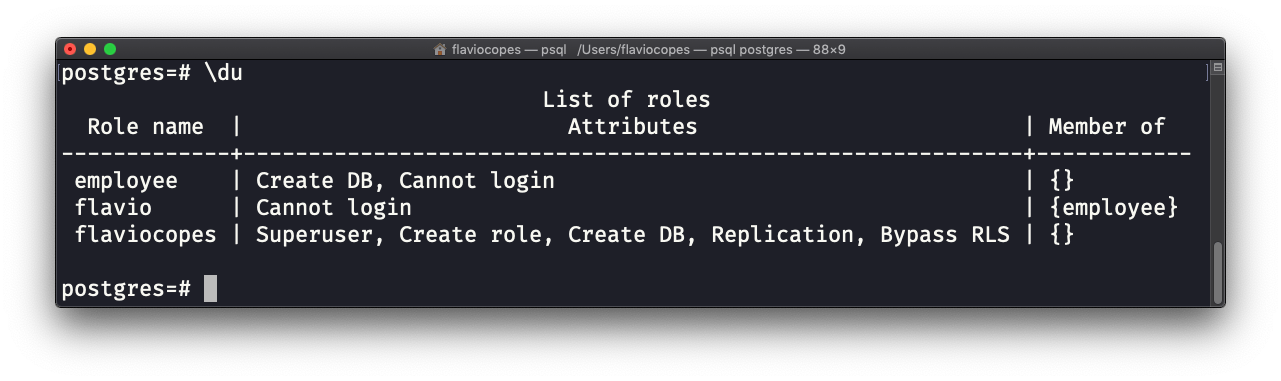
This will give you the list of all users in the system, plus their role attributes and the list of role groups they are member of.
Add a + to also see the description set for each role:
\du+Users are roles
PostgreSQL doesn’t really have a separate concept of “users”. Everything is a role. A user is a role with the LOGIN attribute, which allows it to connect to the database.
That’s why the \du output has a “Role name” column, and next to it attributes like Superuser, Create role, or Create DB. Those attributes tell you what each role is allowed to do. The last column shows which groups the role belongs to, since roles can be members of other roles.
What if you’re not inside psql?
\du is a psql shortcut, not SQL. It won’t work from application code, or from a GUI client. In that case, query the pg_roles catalog directly:
SELECT rolname FROM pg_roles;That returns every role. To only get the ones that can actually log in, the “users”:
SELECT rolname FROM pg_roles WHERE rolcanlogin;There’s also an older view called pg_user, which only lists roles with login access:
SELECT usename FROM pg_user;Be careful with that column name. It’s usename, not username. The missing “r” has cost me a few error messages over the years.
One thing you won’t find here
None of these commands show passwords. Passwords are stored hashed in the pg_authid catalog, and only superusers can read that table. If someone lost their password, you can’t recover it, but a superuser can set a new one:
ALTER ROLE flavio WITH PASSWORD 'new-password-here';Want me to talk about your product? You can sponsor this site.
Related posts about database: