# How to send email properly, for developers and AI agents
> Subdomains, SPF, DKIM, DMARC, alignment, the message itself, bounces and abuse, with the real records behind flaviocopes.com and the rules I give an AI agent that sends email.
Author: [Flavio Copes](https://flaviocopes.com/about/) | Published: 2026-11-13 | Topics: [Networking](https://flaviocopes.com/tags/network/), [AI](https://flaviocopes.com/tags/ai/) | Canonical: https://flaviocopes.com/send-email-properly/
Sending an email is one API call. Getting it into the inbox is everything around that call: the domain you send from, three DNS records, how the domains in the message line up, what the message contains, and what you do when an address bounces.
flaviocopes.com sends three kinds of email, from three different setups. I'll use their real DNS records to go through each piece, then look at what changes when an AI agent does the setup or the sending.
For a deep dive on the three DNS records alone, see [SPF, DKIM, and DMARC explained](https://flaviocopes.com/spf-dkim-dmarc-explained/). For picking a provider, see [Email for developers and AI agents](https://flaviocopes.com/email-for-developers/). This post is about getting all the pieces right together.
## Three kinds of email, three setups
Here's what sends email for my domain:
| | Personal mail | Site forms | Newsletter |
| --- | --- | --- | --- |
| Provider | Fastmail | Resend | Sendy on Amazon SES |
| From address | `flavio@flaviocopes.com` | `flavio@resend.flaviocopes.com` | `flavio@mail.flaviocopes.com` |
| SPF | `include:spf.messagingengine.com ~all` | `include:amazonses.com -all` on `send.resend.flaviocopes.com` | `include:amazonses.com ~all` on `send.mail.flaviocopes.com` |
| DKIM selectors | `fm1`, `fm2`, `fm3` (CNAMEs to Fastmail) | `resend` | three CNAMEs from SES |
| DMARC | `p=quarantine` | inherited from `flaviocopes.com` | `p=quarantine` |
| Replies go to | Fastmail | `flavio@flaviocopes.com` via Reply-To | `flavio@flaviocopes.com` via Reply-To |
Each one is a different job with a different risk. Personal mail is low volume and goes to people who know me. The site forms send course access links and sponsorship requests, one at a time, when someone fills a form. The newsletter goes to a big list once a week, and that's the one most likely to get spam complaints.
## Don't run your own mail server
Before any DNS, pick a provider. Sending from your own VPS with Postfix means getting a clean IP, setting a PTR record, warming the IP up slowly, and watching blocklists forever. Providers like Resend, Postmark, SES or Cloudflare Email Service already have warm IPs, PTR records, TLS and bounce processing.
What stays your job is the domain. Providers can't publish DNS records for you.
## Send from a subdomain
Notice that the site forms and the newsletter don't send from `flaviocopes.com`. They use `resend.flaviocopes.com` and `mail.flaviocopes.com`.
Mailbox providers track reputation per domain, and subdomains get their own. If a newsletter issue gets a lot of spam complaints, `mail.flaviocopes.com` takes the hit, and my personal email and the course access emails keep landing.
The other reason is SPF. Every provider you add to the root domain's SPF record costs DNS lookups, and SPF breaks at 10. A subdomain gets its own SPF record, so providers don't pile up in one place.
My advice is one subdomain per kind of email: one for transactional, one for marketing, and one for an agent if you have one.
## SPF lives on the bounce domain
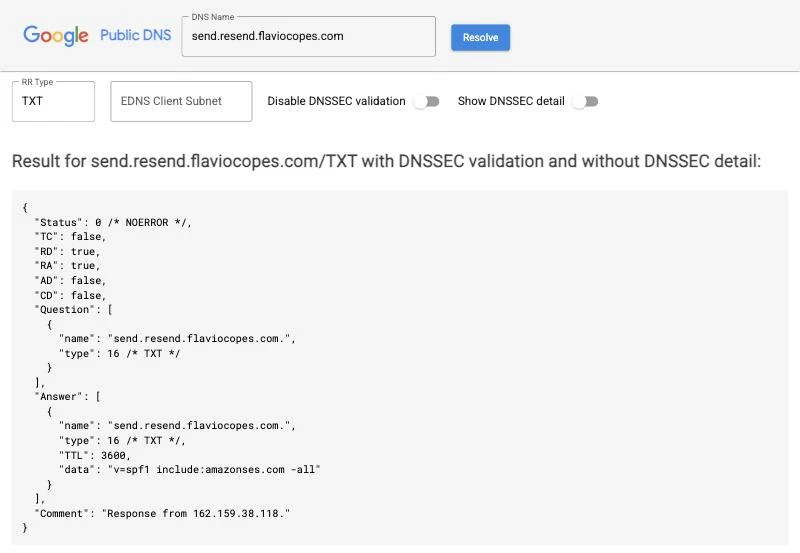
You can look up any of these records with `dig`:
```bash
dig TXT send.resend.flaviocopes.com +short
```
```txt
"v=spf1 include:amazonses.com -all"
```
Notice the name: `send.resend.flaviocopes.com`, not `resend.flaviocopes.com`. SPF doesn't check the From address you see in your email client. It checks the **envelope sender**, the address the receiving server sees during the SMTP conversation, which is also where bounces go (the Return-Path).
Resend sends through Amazon SES and uses `send.resend.flaviocopes.com` as the envelope sender. The SPF record there says "only SES may send for this name, reject everything else" (`-all`). The same name has an MX record so bounce reports have somewhere to go:
```bash
dig MX send.resend.flaviocopes.com +short
```
```txt
10 feedback-smtp.eu-west-1.amazonses.com.
```
The subdomain I send from has no SPF record at all:
```bash
dig TXT resend.flaviocopes.com +short
```
That returns nothing, and that's correct. Nothing ever uses `resend.flaviocopes.com` as an envelope sender.
## DKIM selectors and key rotation
DKIM signs each message with a private key held by the provider. The public key is in DNS under a **selector**, a name you'll see in the `DKIM-Signature` header as `s=`.
Fastmail gives you three selectors, as CNAMEs pointing to its own DNS:
```bash
dig CNAME fm1._domainkey.flaviocopes.com +short
```
```txt
fm1.flaviocopes.com.dkim.fmhosted.com.
```
With CNAMEs, Fastmail can rotate keys on its side without me touching my DNS. Right now `fm2` holds the active key, and `fm1` and `fm3` are empty on purpose:
```bash
dig TXT fm1._domainkey.flaviocopes.com +short
```
```txt
fm1.flaviocopes.com.dkim.fmhosted.com.
"v=DKIM1; k=rsa; n=Intentionally_Left_Blank_As_Per_DKIM_Rotation_BCP; p="
```
An empty `p=` revokes the key. Any message still signed with it fails DKIM. SES works the same way, with three CNAMEs to random-looking selectors.
Resend uses a plain TXT record on the subdomain:
```bash
dig TXT resend._domainkey.resend.flaviocopes.com +short
```
```txt
"p=MIGfMA0GCSqGSIb3DQEBAQUAA4GNADCBiQKBgQDvUbnG466LTgHLP8lio8Gi6yCQa+N0PM..."
```
That record name tells you the signing domain (`d=` in the signature) is `resend.flaviocopes.com`, the same domain as the From address. This matters for DMARC.
## DMARC and alignment
DMARC is the record that ties it together:
```bash
dig TXT _dmarc.flaviocopes.com +short
```
```txt
"v=DMARC1; p=quarantine; rua=mailto:6f96aac0f0a2489c9fd237e7ebb48187@dmarc-reports.cloudflare.net;"
```
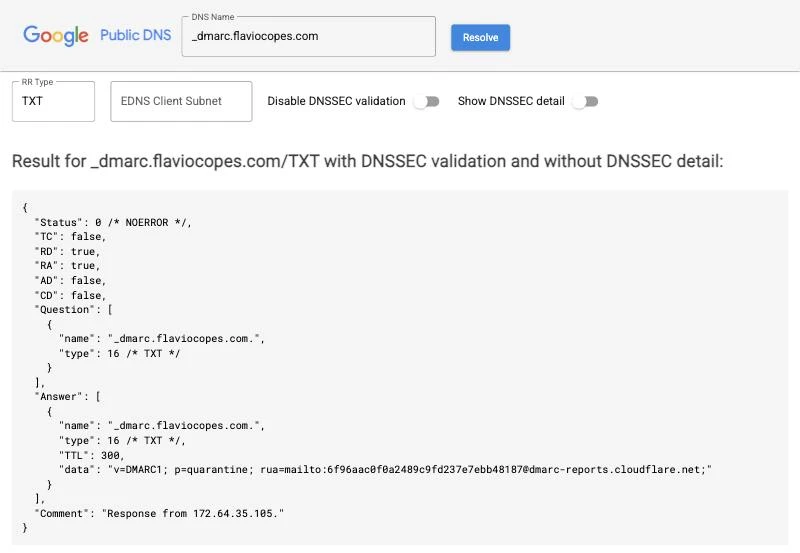
SPF and DKIM can both pass for a message that's still forged. A spammer can sign with their own domain and send from their own servers, while showing your address in From. DMARC adds **alignment**: SPF or DKIM must pass for a domain that matches the From domain.
Here's how a site form email from my domain lines up:
```mermaid
flowchart LR
accTitle: DMARC alignment for an email sent through Resend
accDescr: The From domain resend.flaviocopes.com is checked against the DKIM signing domain resend.flaviocopes.com, which is an exact match, and against the SPF envelope domain send.resend.flaviocopes.com, which shares the organizational domain flaviocopes.com. Both align, and DMARC uses the policy published at _dmarc.flaviocopes.com.
From["From header
resend.flaviocopes.com"]
DKIM["DKIM d=
resend.flaviocopes.com"]
SPF["SPF envelope sender
send.resend.flaviocopes.com"]
Org["Organizational domain
flaviocopes.com"]
Policy["_dmarc.flaviocopes.com
p=quarantine"]
DKIM -- "exact match" --> From
SPF -- "same flaviocopes.com, relaxed match" --> From
From --> Org --> Policy
```
DKIM aligns exactly. SPF aligns in relaxed mode, the default, because both names belong to `flaviocopes.com`. DMARC needs only one of the two.
Notice also that there's no `_dmarc.resend.flaviocopes.com` record. When a subdomain has no DMARC record, receivers fall back to the organizational domain and use its `sp=` policy, or `p=` when there's no `sp=`. So my Resend mail gets `p=quarantine` from the root, and its reports go to the root's `rua=` address.
The `rua=` part is new. Until I wrote this post the record was only `v=DMARC1; p=quarantine;`, so nobody sent me aggregate reports, and if a forgotten service had started sending as my domain and failing DMARC, I wouldn't have known. The reports are gzipped XML files that mailbox providers send once a day, listing every server that sent mail as your domain and whether it passed.
My DNS is on Cloudflare, which reads those reports for free with DMARC Management. I turned it on with Cloudflare's `cf` CLI, which added the `rua=` address to the root record:
```bash
cf email-auth dmarc-reports edit -z 8d351836d0af1c552189197f58bb1721 --enabled --skip-wizard
```
`mail.flaviocopes.com` has its own `_dmarc` record, and a subdomain with its own record doesn't use the root's `rua=`. Without the same address there, I'd get reports for Fastmail and Resend and none for the newsletter, so I added it to that record too.
Since the reports go to another domain, receivers first check that the other domain agrees to get them, with a TXT record under `_report._dmarc`. Cloudflare publishes it for both of my names:
```bash
dig TXT mail.flaviocopes.com._report._dmarc.dmarc-reports.cloudflare.net +short
```
```txt
"v=DMARC1;"
```
The DMARC Management page in the Cloudflare dashboard starts with an overview of the root domain's records:
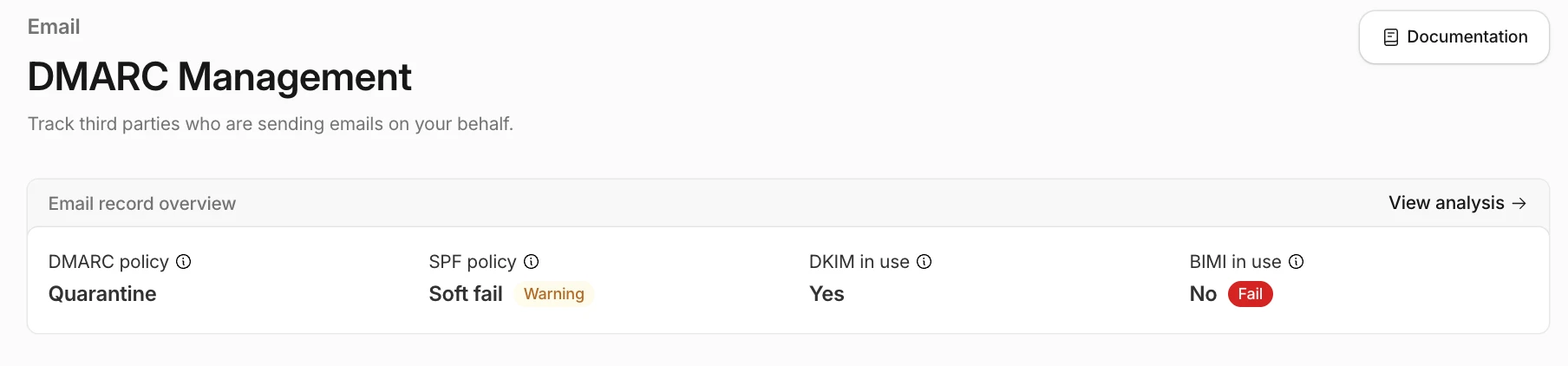
The SPF warning is about the `~all` in my root record. Cloudflare would like `-all`. With a DMARC policy in place, receivers decide on DMARC and the difference is small, and `~all` is a bit kinder to forwarded mail. I'll switch once the reports show that only Fastmail sends from the root domain.
BIMI is the standard that shows your logo next to your emails in Gmail, Yahoo and Apple Mail, and the "Fail" only means it isn't set up. It doesn't affect delivery. On top of DMARC at `quarantine` or `reject`, Gmail and Apple Mail want a paid certificate for the logo, a VMC or a CMC, so I'm skipping it.
The reports show up under **View analysis** a day or two after you turn it on, grouped by the service that sent the mail.
Big senders publish their own choices. These are their records today:
| Domain | Policy | Subdomains | Reports |
| --- | --- | --- | --- |
| `google.com` | `reject` | same as `p` | `rua` |
| `yahoo.com` | `reject` | same as `p` | `rua` and `ruf` |
| `github.com` | `quarantine` | `sp=reject` | `rua` and `ruf` |
| `gmail.com` | `none` | `sp=quarantine` | `rua` |
| `flaviocopes.com` | `quarantine` | same as `p` | `rua` |
`gmail.com` stays at `none` because a lot of Gmail users' mail goes through forwarders and mailing lists that break SPF and DKIM. An app that sends its own mail through one provider can go stricter.
## What Gmail, Yahoo and Outlook require
Since 2024 the big mailbox providers enforce rules that used to be best practice. Gmail's line for "bulk sender" is about 5,000 messages a day to Gmail addresses, and Microsoft uses the same number for Outlook.com.
| Requirement | Everyone | Bulk senders |
| --- | --- | --- |
| SPF or DKIM | Yes | Both |
| DMARC record | No | Yes, `p=none` is enough |
| From domain aligned with SPF or DKIM | No | Yes |
| PTR record and TLS | Yes | Yes |
| One-click unsubscribe | No | Yes, on marketing mail |
| Spam complaint rate | Under 0.3% | Under 0.3%, aim for 0.1% |
With a provider, SPF, DKIM, PTR and TLS are covered once you publish their records. Alignment and the unsubscribe headers depend on how you set things up. The complaint rate depends on who you email and what you send them.
## The message itself
This is roughly how my course access form sends its email, with Resend from a Cloudflare Pages Function:
```js
const { error } = await resend.emails.send({
from: 'Flavio Copes ',
replyTo: 'flavio@flaviocopes.com',
to: email,
subject: 'Your course access links',
html: `Hi!
Here are your course access links: ...
`,
})
if (error) throw new Error(error.message)
```
- The From name is a person, and it's the same name on every email.
- Replies go to my real inbox through `replyTo`, so a reply to a transactional email reaches me instead of bouncing.
- Resend returns errors instead of throwing them, so the code checks `error`. Without that line, a failed send looks like a success.
What's missing is a plain-text version. This email is HTML only, and adding `text` is a quick fix:
```js
await resend.emails.send({
from: 'Flavio Copes ',
to: email,
subject: 'Your course access links',
html,
text: `Here are your course access links:\n\n${links}`,
})
```
My newsletter has the text part. These are the headers of last week's issue, as Gmail received them:
```txt
From: Flavio Copes
Reply-To: Flavio Copes
Subject: AI this week
X-Mailer: Sendy (https://sendy.co)
List-Unsubscribe-Post: List-Unsubscribe=One-Click
List-Unsubscribe:
Content-Type: multipart/alternative; boundary="b1_0b43af9761d507254b44e2a1aa7f4b8c"
```
`multipart/alternative` means the email carries a `text/plain` part and a `text/html` part, and the client picks one.
The two `List-Unsubscribe` headers are what marketing mail needs on top of everything else. They let Gmail and Yahoo show an unsubscribe button that works with one click (RFC 8058). The mailbox provider sends a POST to that URL, and you must unsubscribe the person right away, with no login and no confirmation page.
That URL only has the campaign ID because this copy was a Sendy test send. In the real send, Sendy puts a different URL in each email, `/unsubscribe/` followed by the encrypted address, list and campaign, so the POST knows who to remove.
A newsletter tool adds these headers for you. If you send marketing mail through a transactional API, you add them yourself with the `headers` option. Transactional mail like a password reset doesn't need them.
Be careful with user input in the HTML. If a form field ends up in the body, escape it, or your email form becomes a way to send someone else's HTML and links from your domain.
## Bounces and complaints
When an address hard bounces (the mailbox doesn't exist), stop sending to it. When someone marks you as spam, stop sending them marketing mail. Providers report both as webhooks, and most also keep a suppression list that blocks sends to those addresses.
Repeatedly sending to dead addresses is one of the fastest ways to ruin a domain's reputation. I wrote about [tracking delivery events, bounces and complaints](https://flaviocopes.com/track-transactional-email-delivery/) in detail.
## Protect the form that sends email
Any endpoint that sends email to an address someone typed is a target. Bots use it to flood a victim's inbox with your email, and the complaints land on your domain.
My course access form checks a [Cloudflare Turnstile](https://developers.cloudflare.com/turnstile/) token and rate limits by IP before it sends anything:
```js
const rateLimit = await checkRateLimit(env, request, 'course-access')
if (!rateLimit.allowed) {
return json({ ok: false, error: 'Too many retrieval attempts.' }, 429)
}
if (!(await verifyTurnstile(env, request, turnstileToken))) {
return json({ ok: false, error: 'Verification failed.' }, 403)
}
```
`checkRateLimit` allows 5 attempts per IP every 10 minutes and keeps the counter in Cloudflare KV, with the IP hashed.
## When an AI agent sets up the DNS
Agents are good at this job. They can read the provider's docs, run `dig`, and edit DNS with Wrangler or a provider's CLI. Most mistakes come from writing records without reading what's already there.
These are the rules I give an agent for email DNS:
1. Read the current records first, for the root and for the subdomain: `TXT`, `MX`, `_dmarc`, and the DKIM selectors the provider lists.
2. Never add a second `v=spf1` record. Two SPF records on the same name is an error, and SPF fails for every message. Merge the new `include:` into the existing one, or use a subdomain.
3. Count SPF lookups after the change. Each `include:` costs at least one, and nested includes count too. The limit is 10.
4. Don't touch the DMARC policy without asking. Going from `none` to `quarantine` or `reject` can send real mail to spam, and that's my call.
5. Verify with `dig` against a public resolver, not the local one, which may still have the old answer cached.
For that last point:
```bash
dig @1.1.1.1 TXT _dmarc.flaviocopes.com +short
```
I ask the agent to paste the `dig` output in its final message, so I can check the records in a few seconds.
## When an AI agent sends the email
An agent that can send email can email anyone, as you, at any time. I set it up the same way I'd set up a new transactional stream, with a few extra limits.
Give it its own subdomain. If the agent misbehaves, the damage stays on that subdomain's reputation and doesn't reach your password resets.
Wrap the provider in one function the agent calls as a tool, and put the rules in the function, not in the prompt:
```js
import { Resend } from 'resend'
const resend = new Resend(process.env.RESEND_API_KEY)
const allowed = ['flavio@flaviocopes.com']
export async function sendEmail({ to, subject, text, runId }) {
if (!allowed.includes(to)) {
throw new Error(`Not allowed to email ${to}`)
}
const { data, error } = await resend.emails.send(
{
from: 'Flavio Copes Agent ',
to,
subject,
text,
},
{ idempotencyKey: `${runId}:${to}:${subject}` }
)
if (error) throw new Error(error.message)
return data.id
}
```
The recipient allowlist is code, so a prompt injection can't talk the agent into emailing a stranger the way it could talk past an instruction in the prompt.
The idempotency key matters more with agents than with normal code. Agents retry: a tool call times out, the agent tries again, and without a key the person gets the same email twice. Resend sends the key as an `Idempotency-Key` header and drops the duplicate.
The rest:
- Plain text only, unless you need HTML. It's harder to hide a link in plain text.
- A daily cap per run and per recipient.
- A human approval step for any recipient outside the allowlist.
- Never take recipients, links or attachments from an email the agent received. Inbound email is untrusted input, and it's where an attacker would put instructions for your agent.
- Log every send with the provider's message ID, so you can trace a complaint back to the run that caused it.
The [email for developers post](https://flaviocopes.com/email-for-developers/#guardrails) has more on agents that receive email or own an inbox.
## Check a real message
DNS lookups tell you what you published. To see what a receiver decided, send a message to a Gmail address and open **Show original** from the three-dots menu. Gmail lists SPF, DKIM and DMARC at the top with `PASS` or `FAIL`:
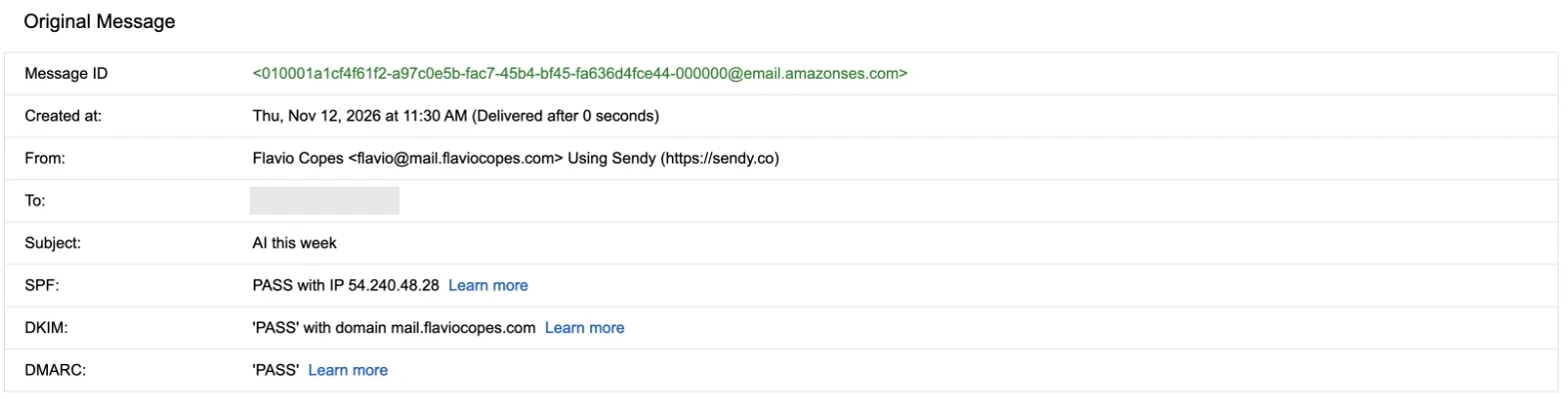
Three passes don't tell you which domain each check passed for. For that, read the `Authentication-Results` header below the summary. This is the one from the same email, shortened a bit:
```txt
Authentication-Results: mx.google.com;
dkim=pass header.i=@mail.flaviocopes.com header.s=m4ix5zc7xwi5xicvbrlhvw2fpvmlawef;
dkim=pass header.i=@amazonses.com header.s=224i4yxa5dv7c2xz3womw6peuasteono;
spf=pass smtp.mailfrom=010001a1cf4f61f2-...-000000@amazonses.com;
dmarc=pass (p=QUARANTINE sp=QUARANTINE dis=NONE) header.from=mail.flaviocopes.com
```
There are two DKIM signatures, one for my domain and one that SES adds for its own. SPF passed too, but for `amazonses.com`: SES uses its own bounce address unless you configure a custom MAIL FROM domain, and I had never done it.
So SPF passed without aligning with `mail.flaviocopes.com`, and DMARC passed on the DKIM signature alone. That's allowed, since DMARC needs one aligned pass. But if that signature ever broke, for example after a DNS change to the SES selectors, the newsletter would fail DMARC and land in spam because of my own `p=quarantine`.
Resend sets up `send.resend.flaviocopes.com` as the bounce domain by default, so both checks align. I did the same in SES while writing this post. In the identity settings I set the custom MAIL FROM domain to `send.mail.flaviocopes.com`, and added the two records SES asked for:
```txt
send.mail.flaviocopes.com. MX 10 feedback-smtp.us-east-1.amazonses.com.
send.mail.flaviocopes.com. TXT "v=spf1 include:amazonses.com ~all"
```
SES needs the MAIL FROM domain to be a subdomain of the identity, and it can't be `mail.flaviocopes.com` itself, because that name's MX records already point to Fastmail for replies.
Then I sent a test campaign from Sendy to a list with only me on it. Now SPF passes for my domain too:
```txt
Authentication-Results: mx.google.com;
dkim=pass header.i=@mail.flaviocopes.com header.s=m4ix5zc7xwi5xicvbrlhvw2fpvmlawef;
dkim=pass header.i=@amazonses.com header.s=224i4yxa5dv7c2xz3womw6peuasteono;
spf=pass smtp.mailfrom=010001a1d3f048aa-...-000000@send.mail.flaviocopes.com;
dmarc=pass (p=QUARANTINE sp=QUARANTINE dis=NONE) header.from=mail.flaviocopes.com
```
My Gmail forwards everything to my HEY address, so the same test also shows why DKIM matters more than SPF. This is what HEY saw after the forward:
```txt
Authentication-Results: home-mx.app.hey.com;
dkim=pass header.d=mail.flaviocopes.com header.s=m4ix5zc7xwi5xicvbrlhvw2fpvmlawef;
dkim=pass header.d=amazonses.com header.s=224i4yxa5dv7c2xz3womw6peuasteono;
dmarc=pass (policy=quarantine) header.from=mail.flaviocopes.com;
arc=pass ("google.com:s=arc-20260327:i=2");
spf=pass smtp.mailfrom="...@gmail.com"
```
Gmail resent the message from its own servers, with a Gmail bounce address, so SPF now passes for `gmail.com` and doesn't align. The DKIM signature survived the forward unchanged, and DMARC passed on that. The `arc=pass` line is Gmail's own record of the checks it ran before forwarding, sealed with its signature, which a receiver can choose to trust when a forward breaks SPF.
If DMARC fails while SPF and DKIM pass, it's the same story taken one step further: both passed for the provider's domain instead of yours. Check the `header.i=` of each DKIM result and the `smtp.mailfrom=` domain against the `header.from=` domain.