# Using Astro locals
> Learn how to use Astro locals to share data between middleware and pages via context.locals, and how to type them in env.d.ts to fix the TypeScript error.
Author: Flavio Copes | Published: 2024-03-15 | Canonical: https://flaviocopes.com/using-astro-locals/
[Astro](https://flaviocopes.com/astro-introduction/) locals are a great way to share variables between middleware and page components (note: not layouts, as discussed in another post).
You can add a property in the `src/middleware.ts` file:
```javascript
import type { MiddlewareHandler } from 'astro'
export const onRequest: MiddlewareHandler = async (context, next) => {
context.locals.test = 'test'
return await next()
}
```
and access it in the page component:
```javascript
---
console.log(Astro.locals.test)
---
....
```
…this unlocks a few useful scenarios.
Mostly setting some property in a page, and using it in the middleware.
Note that if you add a property in the middleware you’ll see this TS issue:
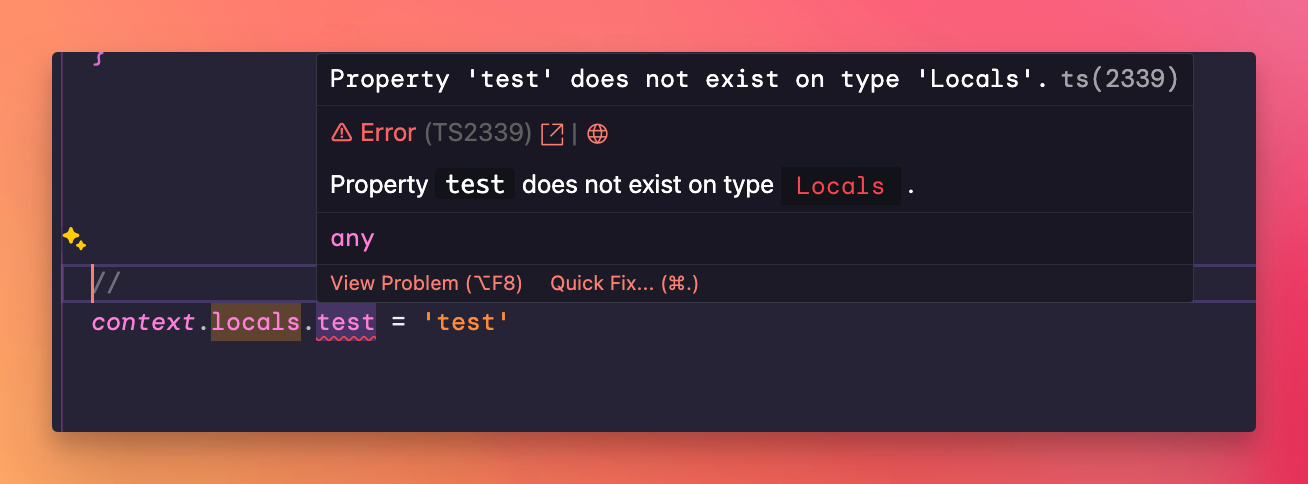
To fix this problem, add to `src/env.d.ts` the type of the new property:
```javascript
///
declare namespace App {
interface Locals {
test: string
}
}
```
and define your middleware in this way:
```ts
import { defineMiddleware } from 'astro:middleware'
export const onRequest = defineMiddleware(async (context, next) => {
context.locals.test = 'test'
return await next()
})
```
UPDATE: somehow this didn't work for me recently, I used this instead (src ):
```ts
///
declare global {
namespace App {
interface Locals extends Record {
test: string
}
}
}
```