
An app by Flavio
Album Spread Proofer
Look through a folder of album spreads as a book, with the fold, the gutter and the safe margin drawn on every spread. Find the wrong size, too few pixels, a missing or repeated spread number and duplicate files, then save a proof PDF for the couple to sign off. Your files are never changed.
Buy Album Spread Proofer · $19One-time purchase. Plus tax where it applies.
macOS 14 or later · Apple silicon and Intel
Latest version 1.0.0, released November 24, 2026
You finished designing a 10 × 10 wedding album and exported 24 spreads for the lab. Before you click Order, you want to see it the way the couple will turn the pages, and you want them to sign it off.
By hand that means opening every spread in Preview, checking the pixel size of each one against a calculator, looking at the middle of each spread to guess what disappears into the binding, and scrolling the folder for gaps in the numbering. At 24 spreads it’s an evening, and it’s easy to miss the one spread that came out at 4,000 pixels instead of 6,000, or the Spread_11_v2.jpg sitting next to Spread_11.jpg.
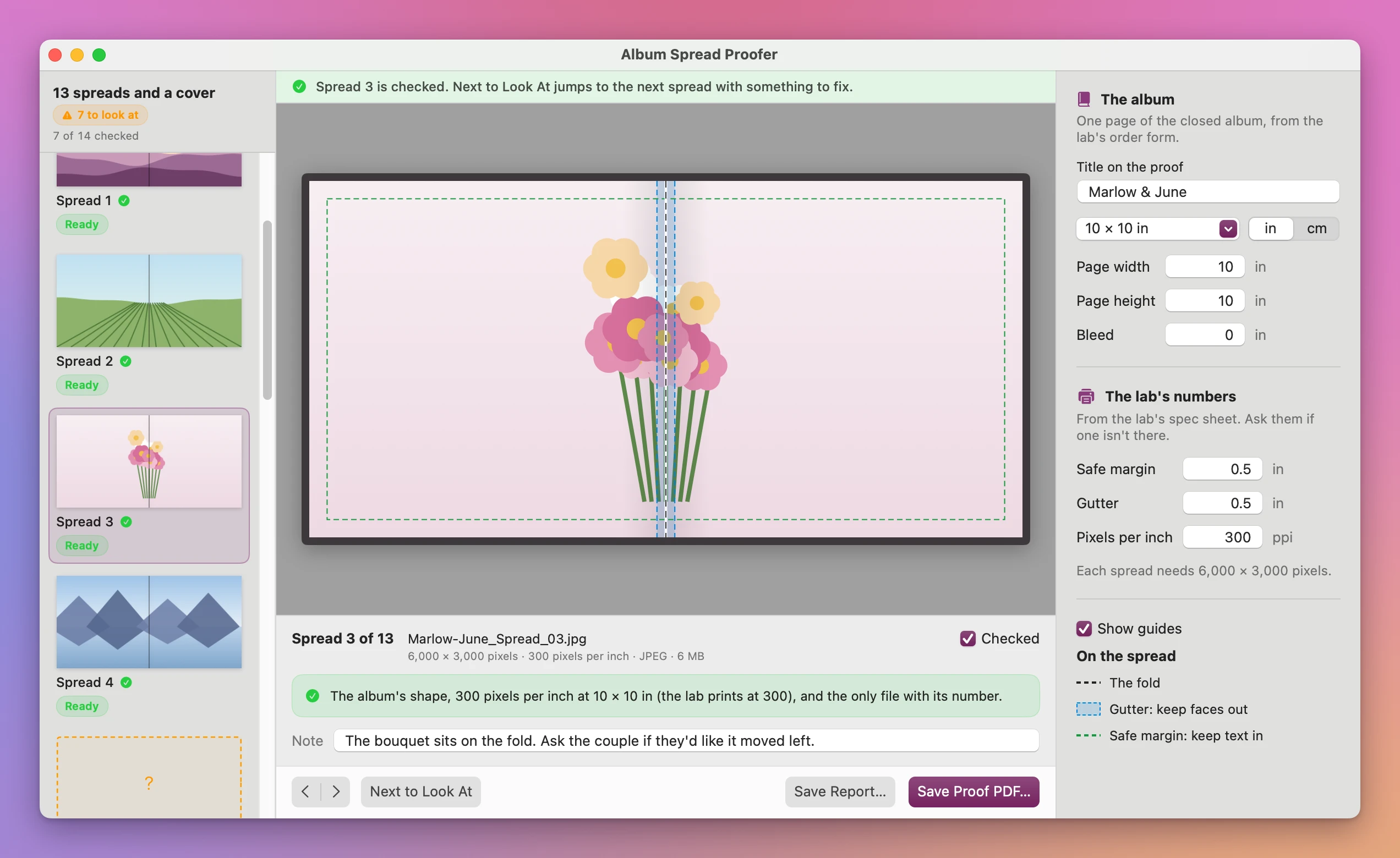
Album Spread Proofer reads the folder and shows the album as a book: the cover, then every spread in order, with the fold drawn down the middle, the gutter and the safe margin marked. It flags what would come back from the lab, lets you tick each spread as checked, and saves a proof PDF with numbered spreads and a sign-off page for the couple.
Watch a 30-second demo of Album Spread Proofer:
Who it’s for
- Wedding photographers who design their own albums. You export 20 to 40 spreads at the end of the season and order from the lab the same night. The app catches the missing spread 14 and the spread 15 that’s there twice before the lab does.
- Family and portrait photographers selling an album add-on. Your lab rejects files under 300 pixels per inch. One spread was exported after a crop at the wrong size, and the app tells you it’s 200 pixels per inch at a 10 × 10 album.
- Second shooters and studio assistants who build the album files. You hand the folder to the lead photographer with a plain-text report: every spread, its pixels, what was checked and your notes.
- Album designers who design for other photographers. You need the couple’s written approval before anything is printed. The proof PDF has a sign-off page, a box to tick under every spread and a line for changes.
- Photographers switching labs. The new lab wants bleed and a wider gutter. Type the new numbers and see which spreads now have a face too close to the fold.
How it works
- Export the spreads from your album design app as JPEG or TIFF, one file per spread, with the spread number in each name. Name the cover file with “cover” in it.
- Click Choose a Folder of Spreads…, or drag the folder onto the window.
- Pick the album’s size, or type the width and height of one page, and the bleed. Under The lab’s numbers, type the safe margin, the gutter and the pixels per inch.
- Look through the album. Next to Look At jumps to the next spread with something to fix.
- Tick Checked on each spread you’ve looked at, and write a note when you want one on the proof.
- Click Save Proof PDF… for the couple, and Save Report… for yourself or the lab.
What you get
The album as a book
The list on the left is the album in reading order: the cover first, then every spread by its number. Each spread sits on the album’s dark boards with a soft shade where the pages bend into the binding. Turn off Show guides and you see the spread the way the couple will. Turn them on and the fold is a dashed line, the gutter a blue band where faces shouldn’t go, and the safe margin a green dashed line. With bleed, the part the lab cuts off is dimmed.
Seven checks on every spread
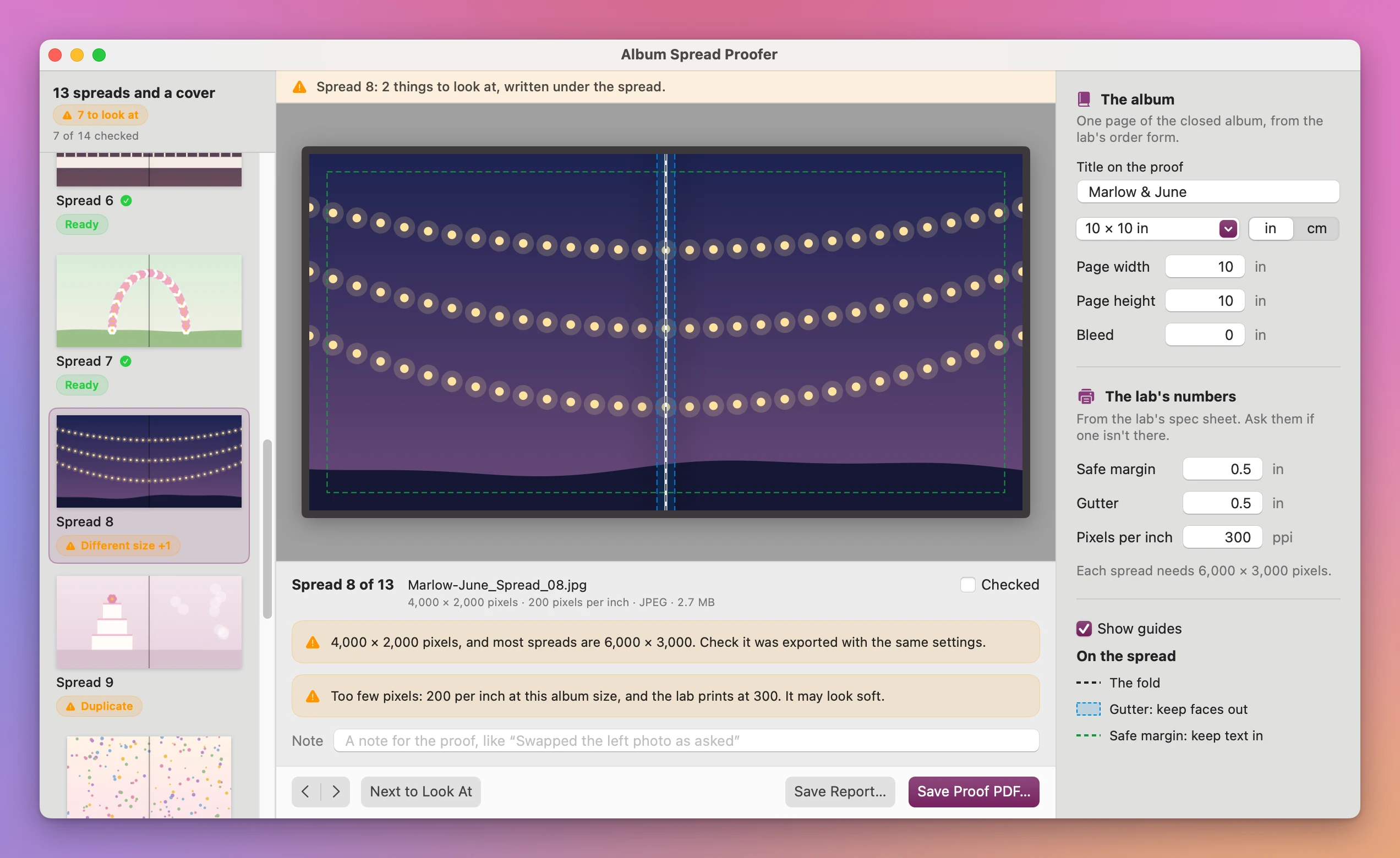
- Wrong shape: the picture isn’t as wide, compared with its height, as two pages side by side plus the bleed.
- Different size: the shape is right but the pixels aren’t the ones most spreads have.
- Too few pixels: fewer pixels per inch than the lab prints at, at your album’s size. The “300 dpi” written inside a file doesn’t count, only its real pixels.
- Missing: a spread number with no file, like spread 5 between 4 and 6. Its place is kept in the book, so you see the jump.
- Number repeated: two files with the same number, like
Spread_11.jpgandSpread_11_v2.jpg. - Duplicate: two files that are the same, byte for byte, exported under two numbers.
- No number: a file whose name has no number, shown at the end.
Each one is a sentence under the spread, with the real numbers.
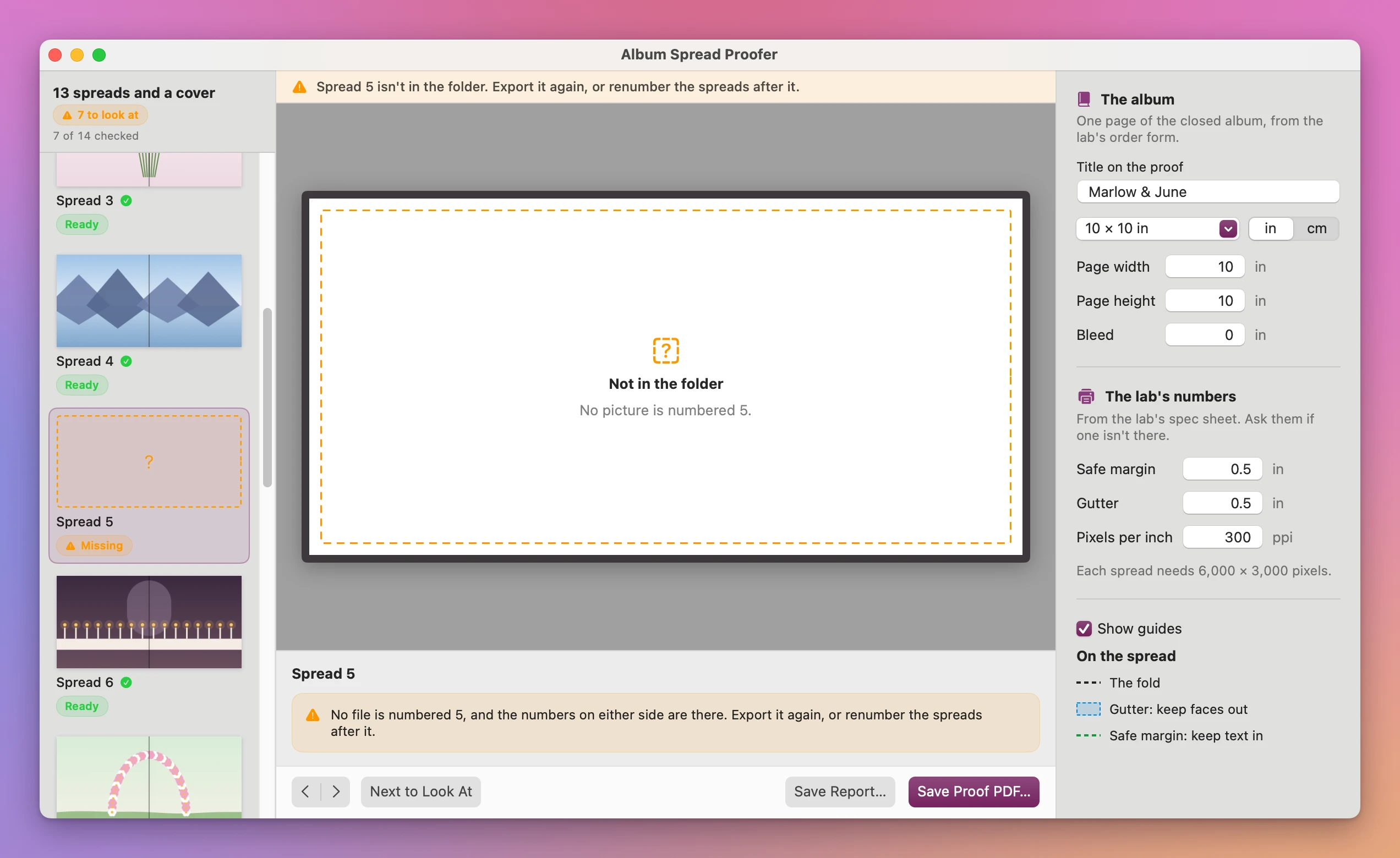
Checks and notes that stay with the album
Tick Checked once you’ve looked at a spread, and write a note like “Swapped the left photo for the one from the vineyard, as you asked.” Close the app and they come back the next time you open the same folder. A spread you export again is unchecked again, so you look at the new version before it goes out.
A proof the couple can sign
Save Proof PDF… writes a landscape PDF, on A4 or US Letter following your Mac’s region. The first page has the album’s title, the number of spreads, how to read the proof and a sign-off box: “I approve every spread as shown”, “I approve the album with the changes written on these pages”, lines for the spreads to change, name, signature and date. Then the cover and every spread on its own page, “Spread 3 of 13”, with the fold drawn, a box to tick, a line for changes and your note. Nothing technical is printed for the couple. The 14 pictures of the made-up album make a proof of about 1 MB, small enough to email.
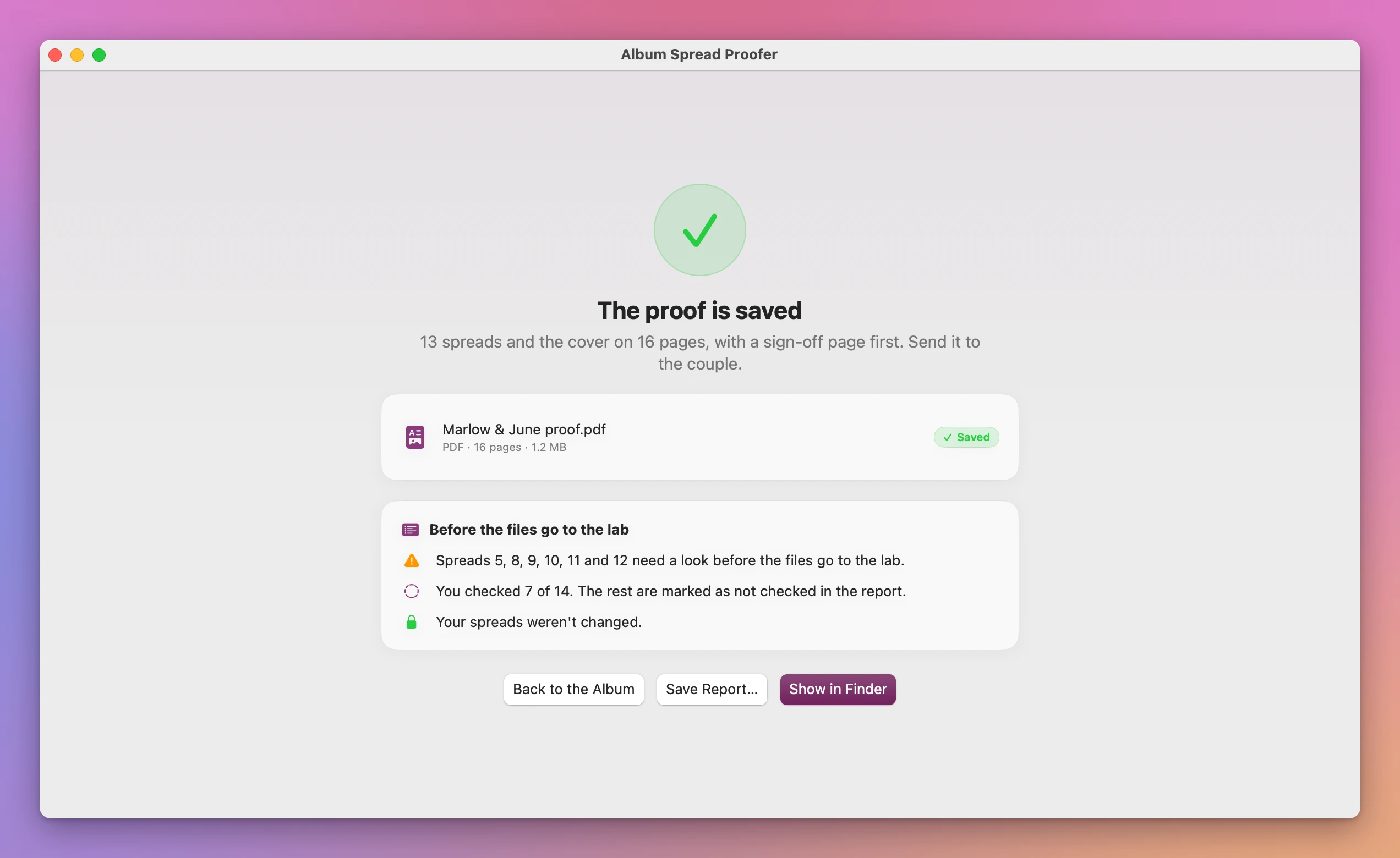
A short report
Save Report… writes plain text you can paste into an email: the album and the lab’s numbers, every problem as a sentence, and every spread with its pixels, its pixels per inch, whether you checked it and your note.
Why not do it by hand
| What you have for free | Album Spread Proofer | |
|---|---|---|
| Looking through the spreads | Finder’s Gallery view or Quick Look, one picture at a time | The album as a book, in reading order |
| The fold and the margins | Imagine where they fall | The fold, the gutter, the safe margin and the trim drawn on every spread |
| Pixel size | Get Info or Preview’s Inspector, one file at a time | Every spread against the album’s size and the lab’s pixels per inch |
| Gaps and repeats in the numbering | Read the folder’s list carefully | Missing and repeated numbers flagged, the gap kept in the book |
| Duplicate files | Not found | Flagged, byte for byte |
| The couple’s approval | An email thread | A proof PDF with a sign-off page |
Finder and Preview show you every file, and for a five-spread album they’re enough. Album design apps have their own proofing too, usually a web gallery with a subscription, and it shows the layout as designed. Album Spread Proofer checks the files you exported, which are the ones the lab prints.
What it doesn’t do
- It doesn’t design, crop, resize or fix spreads. Fix them in your album design app and export again.
- It doesn’t find faces or text on the fold. It draws the fold so you can see what falls on it.
- It reads one picture per spread, from one folder, not its subfolders. JPEG, TIFF and PNG.
- It doesn’t measure the cover against the album’s size. The cover is shown first and only checked for being a copy of a spread.
- It doesn’t check colors, profiles or sharpness.
- It doesn’t upload anything to a lab.
Questions
Does it change my files?
No. The pictures are only read. The proof and the report are new files, saved where you choose, and the app refuses to save over a spread. Your checks and notes are kept in the app’s own folder on your Mac, never in the album folder.
Does anything get uploaded?
Nothing. The album is checked on your Mac. The app connects to the internet only to check for updates.
Which album design apps does it work with?
Any app that exports one JPEG or TIFF per spread with the number in the file name. The app reads names like Spread_03.jpg, 03.tif or Album 2026 spread 3.jpg, and leaves out version marks like v2 and Finder’s copy 2.
What it needs
macOS 14 Sonoma or later, on Apple silicon and Intel Macs. If the folder is in Desktop, Documents, Downloads or on an external disk, macOS may ask once whether the app can read it.
Album Spread Proofer isn’t made by, affiliated with or endorsed by any album company, photo lab or album design app.
Buy Album Spread Proofer
$19 plus tax where it applies, paid once.
Download the app from the order page or your Creem receipt, unzip it and move it to Applications. I sign the app with my Apple Developer ID, and Apple notarizes the download.
The app checks for updates once a day. When a new version is ready, click Install and Relaunch. The first time, it asks for the license key from your Creem receipt, and remembers it. To check anytime, choose Album Spread Proofer → Check for Updates….