
An app by Flavio
Color Profile Checker
Before you send a folder of photos to a print lab or a client, see which ones carry sRGB, Adobe RGB, Display P3, ProPhoto RGB or the lab's own profile, which carry another one and which have none, read from the profile inside each file. Save a PDF and CSV report. Your photos are never changed.
Buy Color Profile Checker for Mac · $19Buy Color Profile Checker for Windows · $19One-time purchase. Plus tax where it applies. Mac and Windows versions are sold separately.
macOS 14 or later · Apple silicon and Intel
Windows 10 and Windows 11 · Intel, AMD and Arm PCs
Latest Mac version 1.0.0, released November 26, 2026
The lab’s order form says “sRGB, embedded profile”. You export 48 photos for a wedding album and upload them. A week later the sample prints come back, and three of them look dull and a little green.
The files didn’t carry the profile the lab asked for. Two were still in Adobe RGB from an edit, one came from a phone in Display P3, and one had no profile at all. You could have checked: open each photo in Preview or ColorSync Utility and read the profile name. For 48 photos that’s 48 windows. And for a photo with no profile at all, ColorSync Utility shows “sRGB IEC61966-2.1”, the profile it assumes.
Color Profile Checker checks the whole folder at once. Pick the profile the lab asked for and it lists every photo: Matches, Different profile with the real name of the profile inside, or No profile. It reads the name from the profile data embedded in each file, not from the EXIF tag a camera writes, and it tells you when those two disagree. Then it saves a report to keep with the order.
Watch a 30-second demo of Color Profile Checker:
Who it’s for
- Wedding and event photographers. The album lab wants sRGB. You edited the ceremony in Adobe RGB and the reception in sRGB, and you want to know which of the 300 exports slipped through before you pay for the prints.
- Fine art photographers. The lab sent its own printer profile, “convert your files to this before upload”. You converted twenty TIFFs last night, and you want to be sure the other four got it too.
- Portrait and school photographers. You send hundreds of files at once. Opening each one in Preview isn’t an option, and a single wrong file means a reprint.
- Photographers who mix a camera and a phone. iPhone photos usually carry Display P3. A lab that asks for sRGB may print them flat or off, and they look fine on your screen.
- Retouchers and studio assistants. You hand a finished set to a client or a printer and want a PDF that shows what profile every file carried when it left.
How it works
- Click Choose a Folder…, or drag the folder onto the window. Subfolders are included.
- Under The profile asked for, pick sRGB, Adobe RGB (1998), Display P3, ProPhoto RGB, or The lab’s own profile file and choose the .icc file they sent.
- Read the list. The photos that need work come first. Click one to see the profile inside, its EXIF tag and what to do.
- Fix those photos in your editing app, then click Check Again.
- Click Save PDF Report… or Save CSV….
What you get
Every photo, against the profile asked for
Each photo gets a pill: Matches, Different profile, No profile or Can’t read. The line at the top sums it up, like “6 of 48 photos don’t carry sRGB: 4 have another profile and 2 have none.” To fix shows only those six.
It reads JPEG, TIFF, PNG and HEIC. Raw files are counted and skipped, since they carry no embedded profile, and photos still in iCloud are counted so you know they weren’t checked.
The real name of the profile inside
The name comes from the profile embedded in the file: “Adobe RGB (1998)”, “Display P3”, “ProPhoto RGB”, “Northlight Lab RGB”. The match is made on the profile’s contents, so “sRGB IEC61966-2.1” and “sRGB built-in” both count as sRGB, and a profile with sRGB’s colors but another tone curve, like Rec. 709, doesn’t.
When the EXIF tag and the profile disagree
Cameras and some apps write an EXIF color tag that says sRGB or Adobe RGB. Some apps trust the tag, others the profile. When they disagree, the row says Tag disagrees and the details explain it.
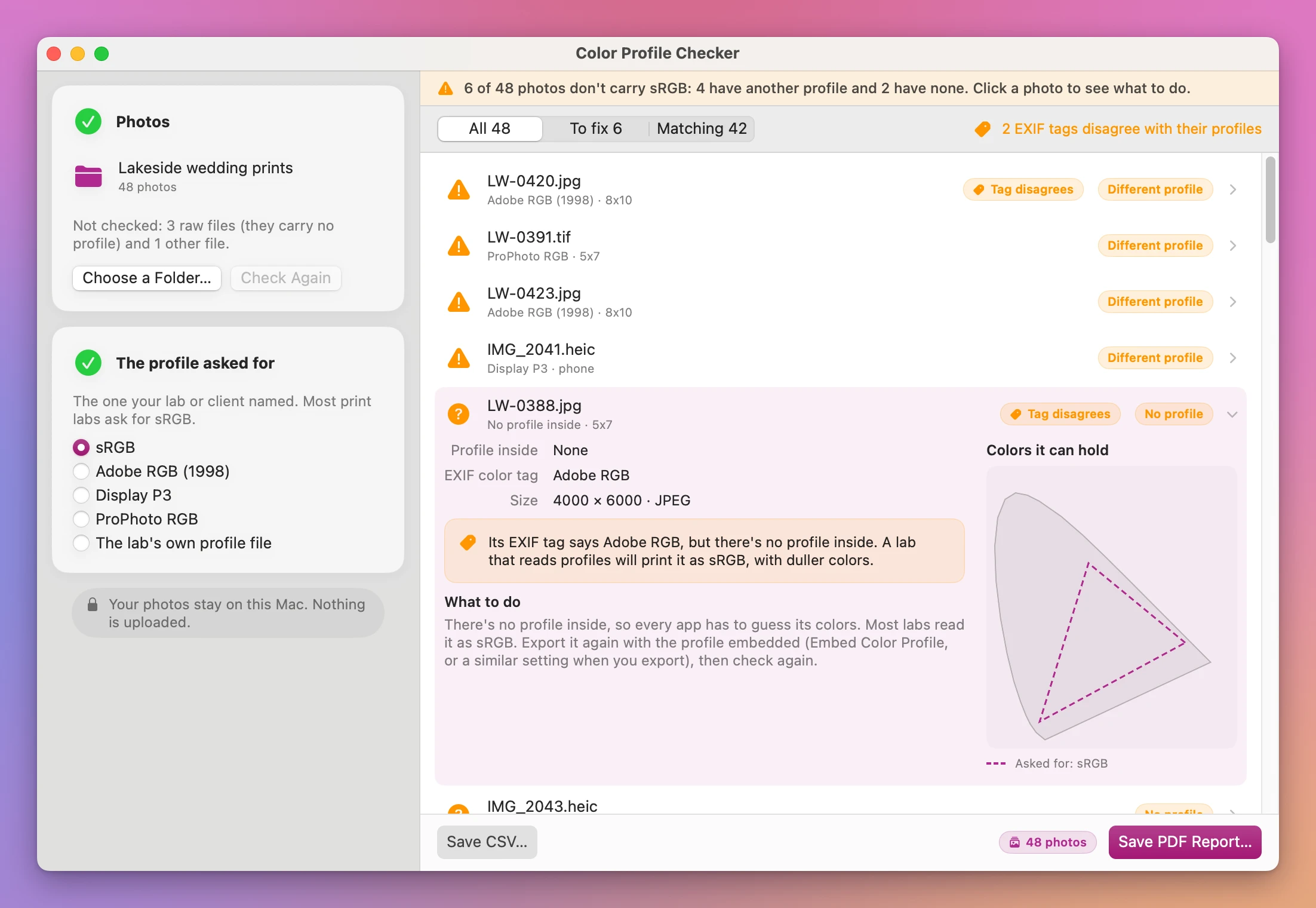
The colors each photo can hold
A small diagram draws the profile asked for as a dashed triangle, and the photo’s own triangle over it. An Adobe RGB photo in an sRGB order shows a wider triangle: those extra greens and cyans are what a lab that reads the file as sRGB gets wrong.
The lab’s own profile
If the lab sent an .icc or .icm file, pick The lab’s own profile file and choose it. A photo matches when it carries that exact profile. If the lab’s file turns out to be a plain sRGB or Adobe RGB profile, photos in that color space match too. If it’s a printer profile, the app says that some labs want photos converted to it and others only use it to preview, so you ask.
A report for the order
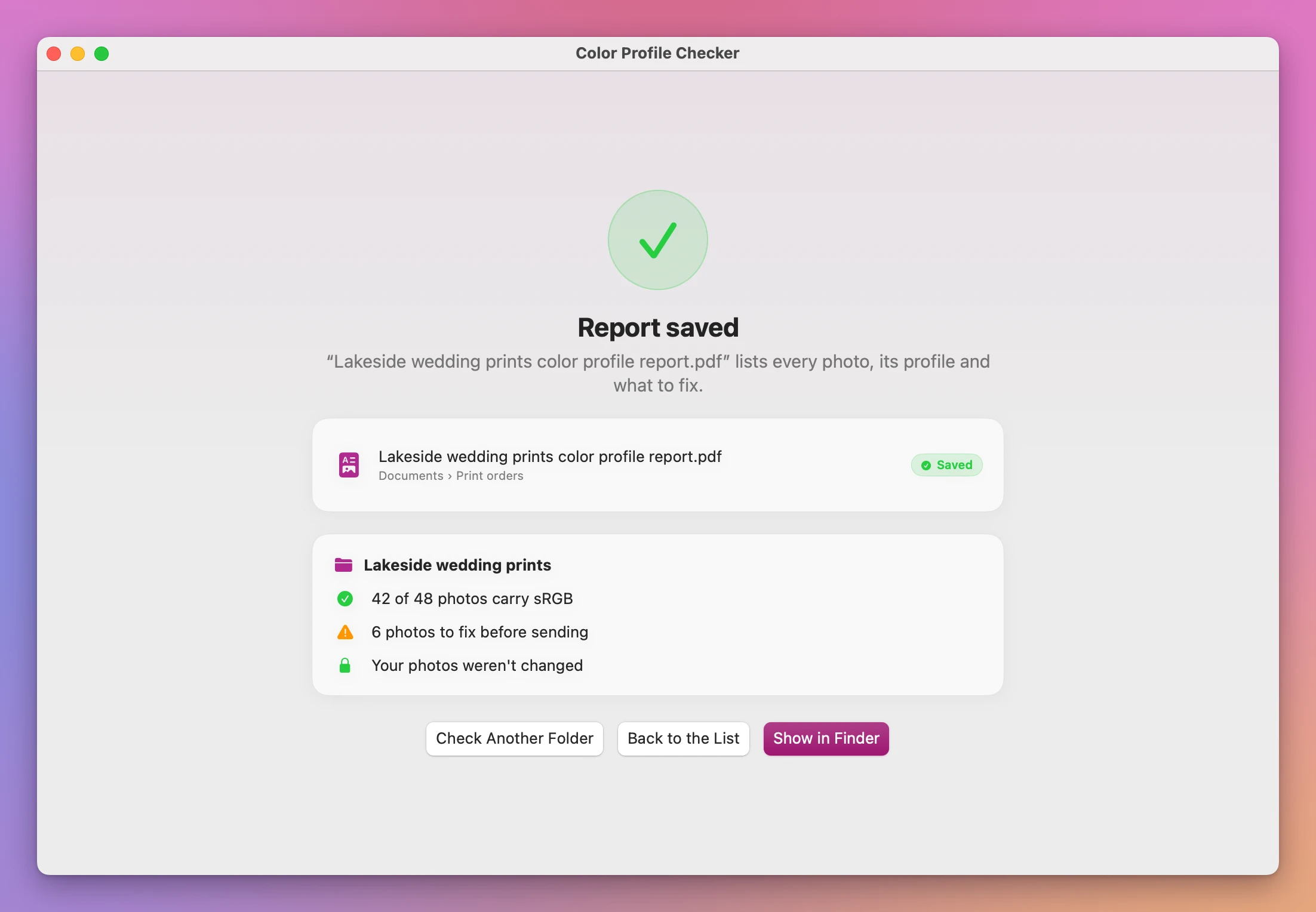
Save PDF Report… writes a PDF with the profile asked for, the summary and a row for every photo: the file and its folder, the profile inside, the EXIF tag and the result. Save CSV… writes the same as a spreadsheet, with the pixel size and the profile’s kind.
Why not do it by hand
Your Mac can show the profile of one photo. In Preview, choose Tools › Show Inspector and look for ColorSync profile. ColorSync Utility shows it under Image Info. That’s fine for one file.
| Preview or ColorSync Utility | Color Profile Checker | |
|---|---|---|
| Photos checked | One at a time, one window each | A whole folder and its subfolders |
| Against the profile the lab asked for | You compare the names yourself | Matches or not, on the profile’s contents |
| A photo with no profile | ColorSync Utility shows the sRGB it assumes | Says No profile |
| EXIF tag against the profile | Not shown | Tag disagrees |
| A report for the order | No | PDF and CSV |
Lightroom and Photoshop are where you set the profile on export, and where you fix a wrong one. They don’t check a folder of files that someone else exported, or that you exported three weeks ago.
What it doesn’t do
- It doesn’t convert or assign profiles. It only reads. To fix a photo, convert it in your editing app (Convert to Profile, or the color space setting when you export), then check again.
- It doesn’t read raw files, PDFs, PSDs, WebP or AVIF. JPEG, TIFF, PNG and HEIC only.
- It doesn’t look at the pixels. A photo can carry the right profile and still be too dark or the wrong crop.
- It doesn’t soft-proof against the lab’s printer.
- It doesn’t download photos from iCloud. It counts the ones still there so you can download them first.
Questions
Does it change my photos?
No. It reads each photo’s header and writes only the report, where you save it.
Does anything get uploaded?
Nothing. Everything happens on your Mac. The app connects to the internet only to check for updates.
What it needs
macOS 14 Sonoma or later, on Apple silicon and Intel Macs. When you choose a folder on an external drive, or in Desktop, Documents or Downloads, macOS may ask whether the app can read it. Click Allow.
Color Profile Checker isn’t made by, affiliated with or endorsed by Apple, Adobe, the International Color Consortium or any print lab.
Buy Color Profile Checker
$19 plus tax where it applies, paid once.
Download the app from the order page or your Creem receipt, unzip it and move it to Applications. I sign the app with my Apple Developer ID, and Apple notarizes the download.
The app checks for updates once a day. When a new version is ready, click Install and Relaunch. The first time, it asks for the license key from your Creem receipt, and remembers it. To check anytime, choose Color Profile Checker → Check for Updates….