
An app by Flavio
Family Photo List Maker
Paste the couple's list of family groups. The app orders them so as few people as possible come and go between photos, does the grandparents and small children first, says who to bring in and who can go after each photo, and saves a checklist PDF for your clipboard or your phone.
Buy Family Photo List Maker for Mac · $19Buy Family Photo List Maker for Windows · $19One-time purchase. Plus tax where it applies. Mac and Windows versions are sold separately.
macOS 14 or later · Apple silicon and Intel
Windows 10 and Windows 11 · Intel, AMD and Arm PCs
Latest Mac version 1.0.0, released November 26, 2026
The ceremony ends and eighteen relatives gather on the steps. You have twenty minutes, a couple of hours of light left, and a list the couple emailed you two weeks ago: sixteen groups, written in the order they came to mind.
Shoot them in that order and Grandma Rose stands for the fourth and fifth photos, sits down, and gets called back for the seventh and again for the thirteenth. Ava’s parents arrive five separate times. In the made-up wedding in the screenshots below, the couple’s own order means calling someone back 44 times.
Family Photo List Maker reorders the list. You paste the groups, mark the grandparents and small children to do first, and it finds the order where as few people as possible come and go: 11 callbacks instead of 44 for that same list, with the grandparents free to sit down after photo 4. Each photo says who to bring in, who can go, and who steps aside until a later photo. Then you save a checklist with a box to tick for each photo.
Watch a 30-second demo of Family Photo List Maker:
Who it’s for
- Wedding photographers. The couple sends 15 to 25 groups by email, with names like “Couple with Ava’s parents and grandparents”. You want an order that lets Grandma sit down after the third photo, not the fifteenth, and a list you can read at arm’s length on the day.
- Second shooters and assistants who run the formals. You hold the clipboard and call the names. You need to know who to bring in for the next photo and who can go back to the drinks, without working it out while thirty people wait.
- Wedding planners and coordinators. You gather the families on the steps and plan the drinks around the photos. The checklist says how long it takes, with a clock time for each photo, and opens on your phone.
- Portrait photographers doing family reunions and milestone birthdays. Twelve combinations of siblings, cousins and grandchildren on a Sunday afternoon, with a baby who won’t last an hour.
- Couples putting together the list. You can send your photographer a list that’s already in a sensible order, with a realistic time next to it.
How it works
- Click New Family Photo List, or Open the Example to look around first.
- Type the couple’s names, how many minutes one photo takes, and the start time if you want clock times on the checklist.
- Click Paste a List… and paste the groups, one per line:
Couple with Ava's parents: Ava, Noah, Linda and Mark. Names can be separated by commas, “and”, ”&” or “with”, and “Everyone” makes a photo of everyone. - Paste the people with their side, or click a person to set it, and tick Do first for the grandparents and small children.
- Read the running order. Drag a photo to move it, and the line at the top says what your order costs.
- Choose File → Save to keep the list, and click Save Checklist… for the PDF.
What you get
An order where people come once and leave once
The app looks at who’s in each photo and puts photos with the same people next to each other, so the people who arrive stay for every photo they’re in and then leave for good. It keeps the do-first people’s photos early, so they can sit down. Most real lists can’t avoid every callback (an “Everyone” photo ties the two families together), so the app finds the order with the fewest and tells you how many there are. The same list always gives the same order.
Who joins and who leaves, at every photo
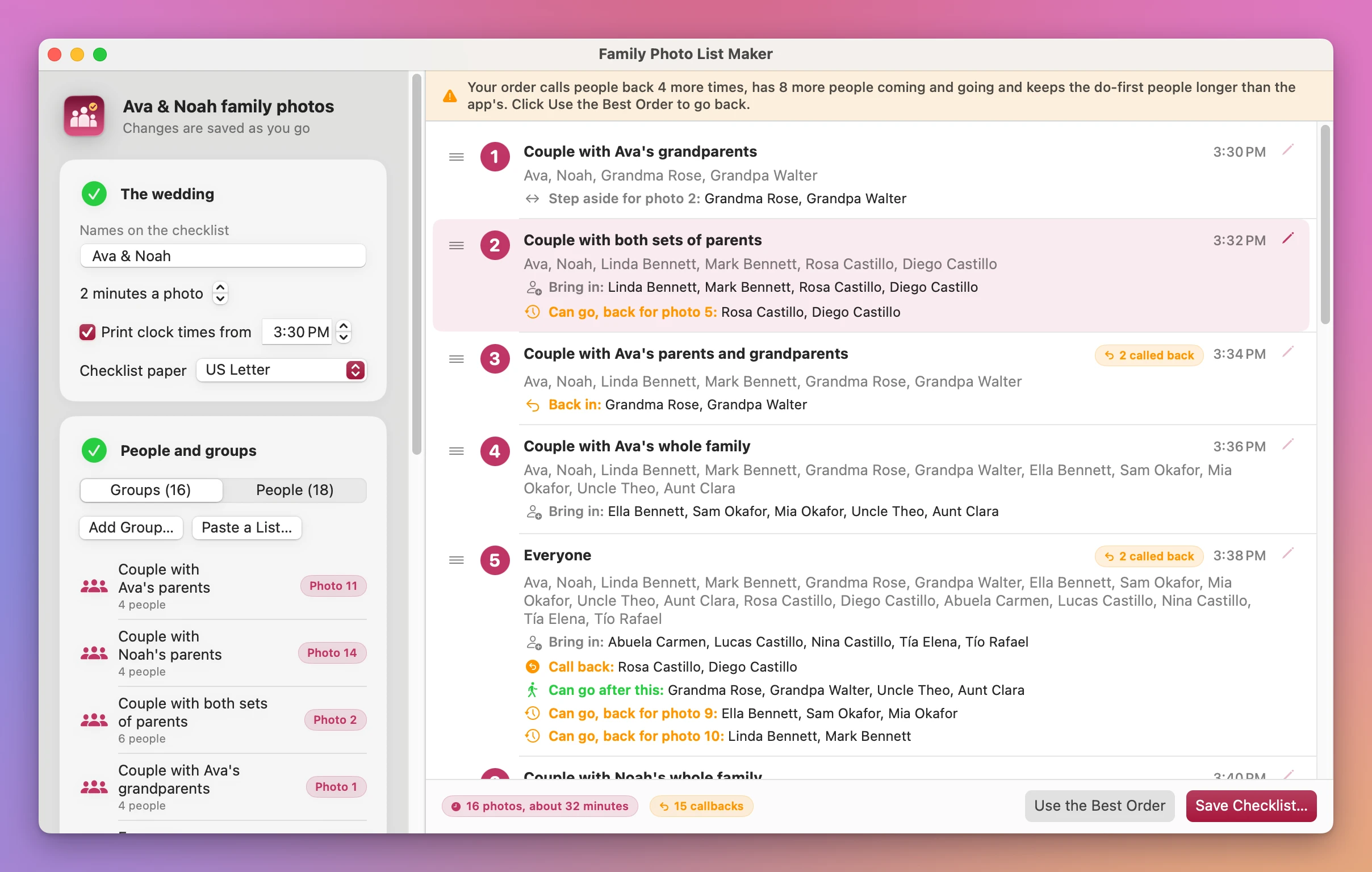
Each photo lists the people in it, then a line for each change: Bring in Linda and Mark, Can go after this Grandma Rose and Grandpa Walter, Step aside for photo 11 Noah, Can go, back for photo 15 Lucas and Nina, Call back Rosa and Diego. A group with the same people as the one before says so.
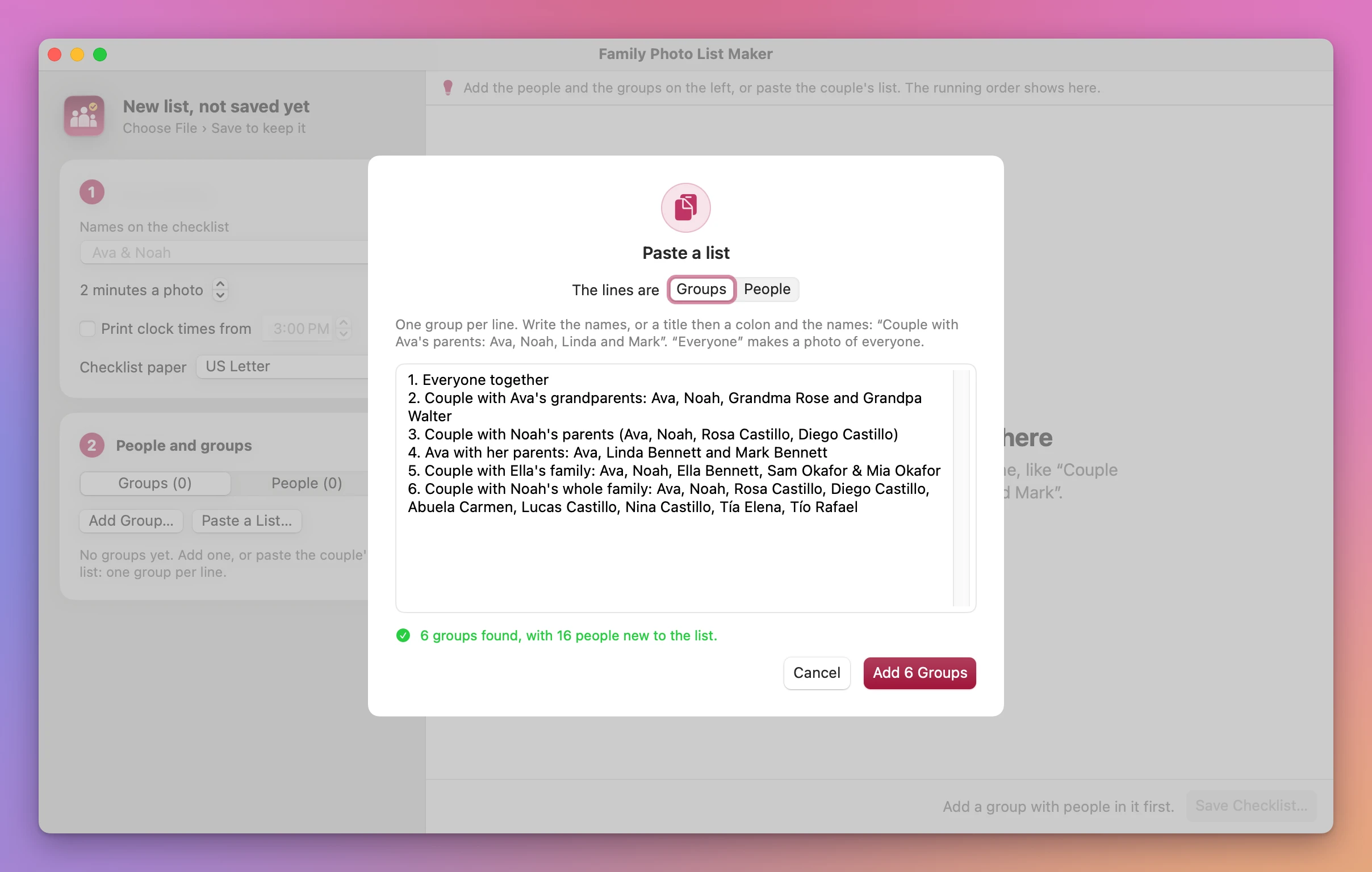
Paste the list the couple sent
One group per line, the way couples write them. A title and a colon, a title with the names in brackets, or just the names. Numbers and bullets at the start of a line are ignored, and a name written twice is one person. Before you add anything, the sheet counts the groups and the new people it found.
Your own order, with its cost
Maybe the couple wants the photo with both sets of parents early. Drag it by its handle, and the line at the top says what it costs: “Your order calls people back 4 more times, has 8 more people coming and going and keeps the do-first people longer than the app’s.” Use the Best Order puts it back.
A checklist for the clipboard or the phone
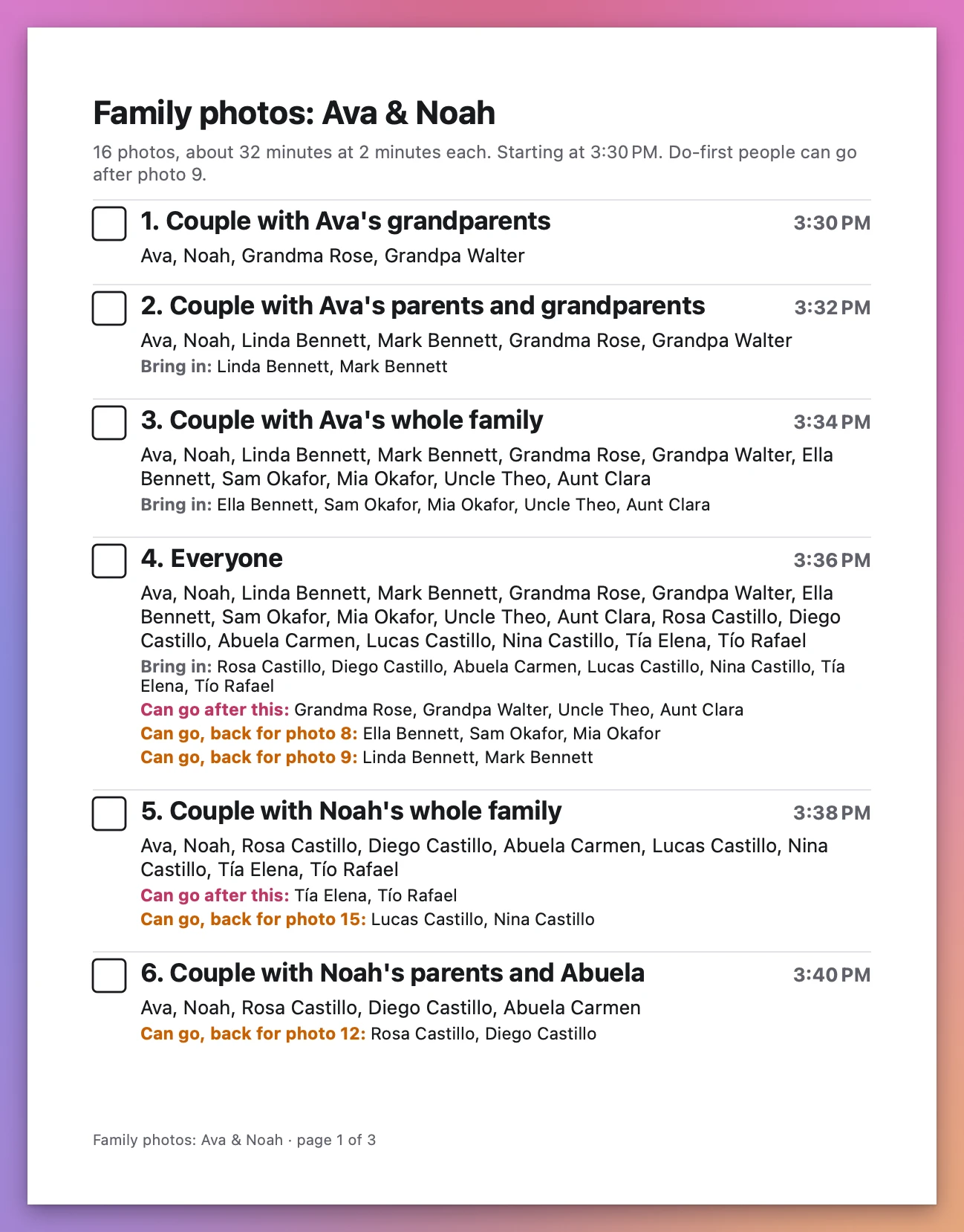
Save Checklist… writes a PDF with a box to tick for each photo, its number, title and start time, the people in it, who to bring in and who can go. At the end, “Who’s in which photo” lists every person by side, with their photo numbers and when they can leave. Pick A4, US Letter, or Phone screen, a tall page that fills a phone so the type stays large. A plain text copy is saved next to the PDF, to paste into a message to the coordinator.
The list is a file
Each wedding is one file you keep with the rest of the job. Once it’s saved, every change is saved as you go. A group with nobody in it stays in the list but out of the order, and a note says which one.
Why not do it by hand
Most photographers keep the list in Notes, a Word document or a spreadsheet, and order it by hand with a rule of thumb: everyone first, then whittle down. That works for eight groups. With sixteen, and an aunt who’s in photos 2 and 9, you can’t see the callbacks until you’re standing there.
| A list in Notes or a spreadsheet | Family Photo List Maker | |
|---|---|---|
| The order | By hand, from memory | Computed so people come once and leave once |
| Grandparents and small children | You remember to put them early | Marked once, kept early |
| Who joins and who can go | Worked out on the day | Written under every photo |
| Moving a photo | Cut and paste, then hope | Drag it and see what it costs |
| Time | A guess | Minutes per photo, with clock times |
| On the day | Small type, no boxes | A PDF with a box per photo, for paper or a phone |
Notes and Numbers can sort a list alphabetically, and a spreadsheet can count rows, and that’s as far as they go: neither knows that “Couple with Ava’s grandparents” should sit next to “Couple with Ava’s parents and grandparents”. Studio management services have shot list templates, but they’re web services with a subscription, and they keep the groups in the order you typed them.
What it doesn’t do
- No photos. It plans the list. It doesn’t take, import or look at pictures.
- No calendar, no sharing service, no accounts. The checklist is a PDF and a text file you send or print yourself.
- One wedding per file. There’s no library of events: keep each file with the job.
- One length for every photo. Minutes per photo applies to the whole list, so a big group doesn’t get extra time.
- It won’t promise zero callbacks. When the groups make it impossible, it finds the fewest and says how many.
Questions
Do my clients’ names leave my Mac?
No. The list is a file on your Mac, and nothing is uploaded. The app connects to the internet only to check for updates.
Can I use it on my phone?
The app runs on the Mac. Save the checklist with the Phone screen paper size and open the PDF on your phone, or copy the text into a message.
What it needs
macOS 14 Sonoma or later, on Apple silicon and Intel Macs. It asks macOS for no permission.
Family Photo List Maker isn’t made by, affiliated with or endorsed by Apple or any maker of photography or wedding planning software.
Buy Family Photo List Maker
$19 plus tax where it applies, paid once.
Download the app from the order page or your Creem receipt, unzip it and move it to Applications. I sign the app with my Apple Developer ID, and Apple notarizes the download.
The app checks for updates once a day. When a new version is ready, click Install and Relaunch. The first time, it asks for the license key from your Creem receipt, and remembers it. To check anytime, choose Family Photo List Maker → Check for Updates….