
An app by Flavio
Photo License Tracker
Keep every license you've granted to a client with its photos, uses, territory, dates and fee. See what ends in the next 30, 60 and 90 days, and save a renewal note and a calendar reminder for the client.
Buy Photo License Tracker · $19One-time purchase. Plus tax where it applies.
macOS 14 or later · Apple silicon and Intel
Latest version 1.0.0, released November 24, 2026
In February you shot the spring menu for a bakery and licensed four photos for a year: their website, social media and the printed menus, in the United States, for $1,200. The license ends on December 10.
Nobody will remind you. The bakery won’t write to say the year is up, and the photos will stay on their website and their menus. The end date is in an email from February, or in the invoice, or in the agreement PDF in a folder named after the shoot. Multiply that by fifteen clients a year, each with a different end date, and renewals slip by.
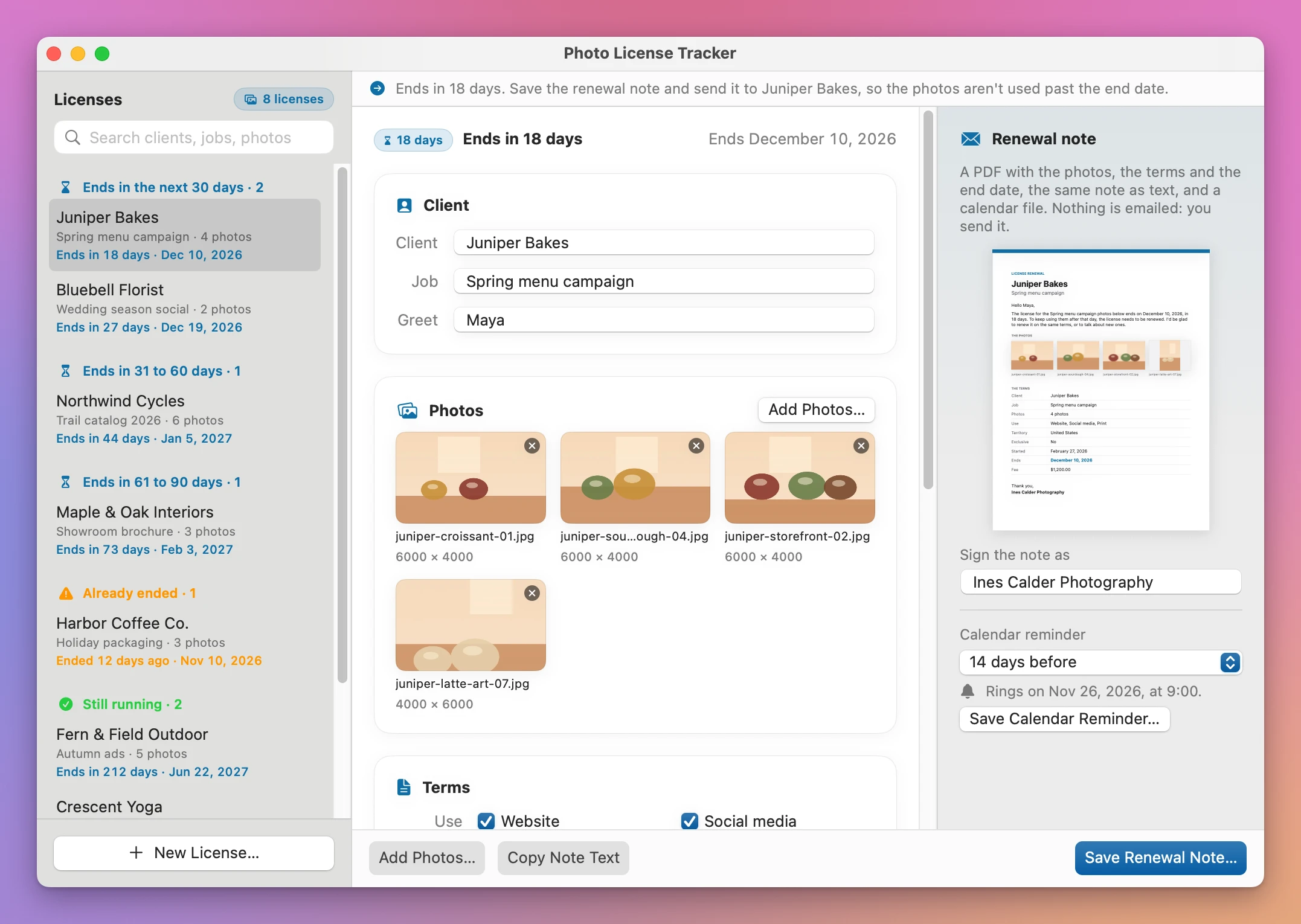
Photo License Tracker keeps every license you’ve granted in one list, grouped by when it ends: in the next 30 days, in 31 to 60, in 61 to 90, already ended, and still running. For a license about to end, click Save Renewal Note… and you get a note for the client with the photos, the terms and the end date, as a PDF and as text, plus a calendar file that reminds you before the day.
Watch a 30-second demo of Photo License Tracker:
Who it’s for
- Commercial photographers who shoot for restaurants, shops and small brands. You license a dozen shoots a year for one or two years each. The end dates live in emails and invoices, and the client never writes to say the year is up.
- Product and packaging photographers. An exclusive license for a coffee bag or a cereal box ends, the packaging is still on the shelf, and the renewal is worth more than the first shoot.
- Architecture and interiors photographers. The same shoot is licensed to the architect, the builder and the furniture maker, each for a different use and a different term.
- Photographers who license for ad campaigns. Billboards and online ads run for three or six months. Miss the end date and the campaign runs on without a renewal.
- Small studios and photographers’ agents. You keep the licensing for two or three photographers and need one list of what’s ending this quarter.
From a shoot to the renewal note
- Click Choose Photos… and pick the photos you licensed, with the signed agreement if you have it. You can also drop them on the window.
- Type the client, the job and the person the note is for.
- Under Terms, tick where the client may use the photos, type the territory, tick Exclusive if it is, and set the start and end dates and the fee.
- Pick how many days before the end the Calendar reminder rings.
- When the license shows up under Ends in the next 30 days, click Save Renewal Note… and pick a folder.
What you get
Every license, grouped by when it ends
The list on the left has six groups: Ends in the next 30 days, Ends in 31 to 60 days, Ends in 61 to 90 days, Already ended in orange, Still running (more than 90 days, or no end date), and Done, not renewing for the ones you’ve let go. Each row says how many days are left and the end date, and the line at the top of the window says what to do next: “Ends in 18 days. Save the renewal note and send it to Juniper Bakes.”
The counts are worked out from today each time you open the app, so a license moves from 90 days to 60 to 30 by itself.
The terms, written down once
Each license holds the client, the job, the person to greet, the photos, the uses (Website, Social media, Online ads, Print, Packaging, Billboards and posters, TV and video, Editorial, or your own words), the territory, whether it’s exclusive, the start and end dates, the fee in its currency, notes, and a copy of the signed agreement.
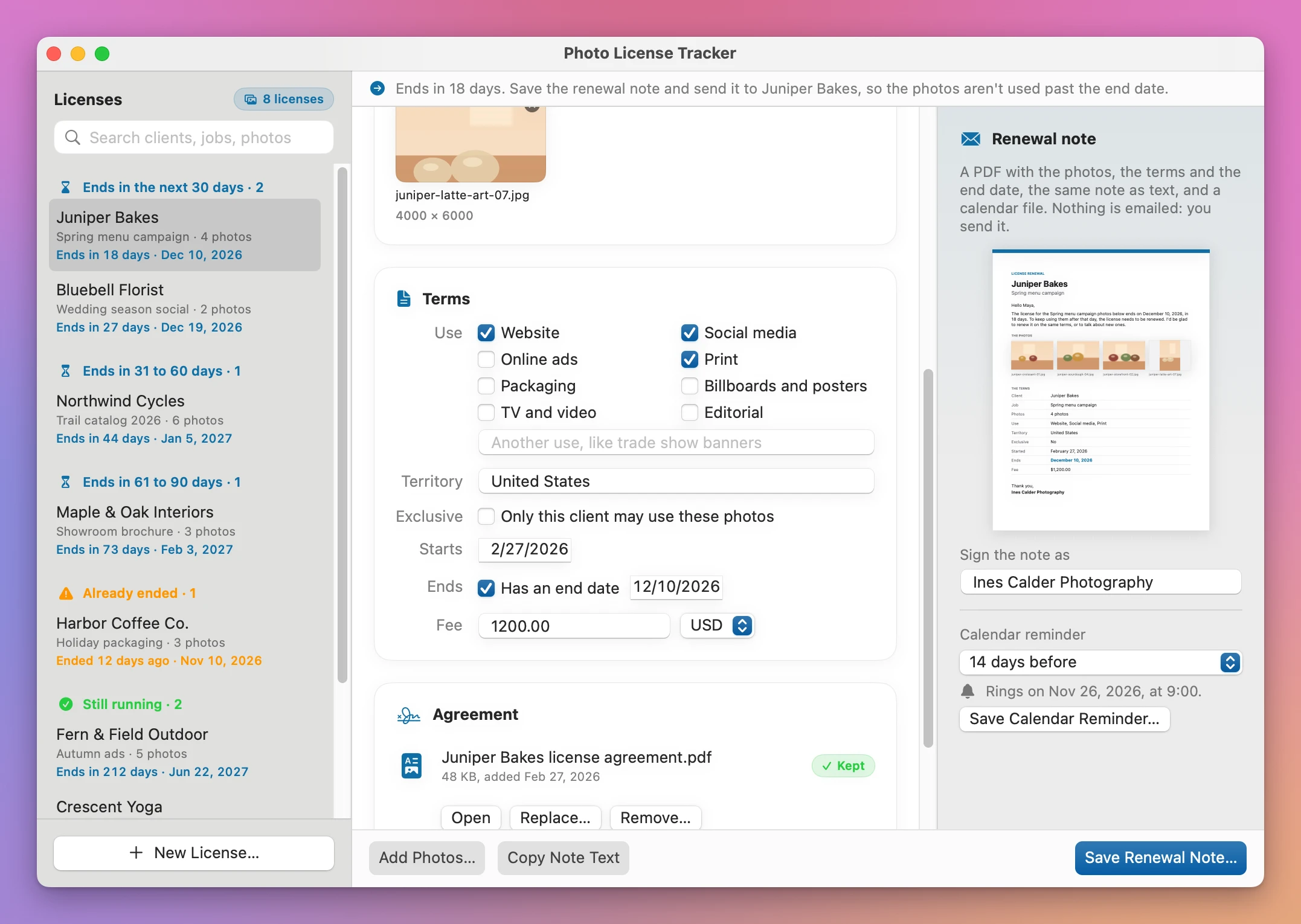
The app keeps a small preview of each photo and a copy of the agreement in its own library. Your original photos are only read, never moved or changed, so you can rename your shoot folders and the license still shows its photos.
A renewal note for the client
Save Renewal Note… makes a new folder named after the client and the job, with three files:
- a PDF that greets your contact, says when the license ends and how many days are left, shows the photos as thumbnails with their file names, lists the terms, and is signed with your name or studio;
- the same note as text, for the body of an email (Copy Note Text puts it on the clipboard too);
- a calendar file with an all-day event on the last day of the license and a reminder at 9:00 the number of days before you picked.
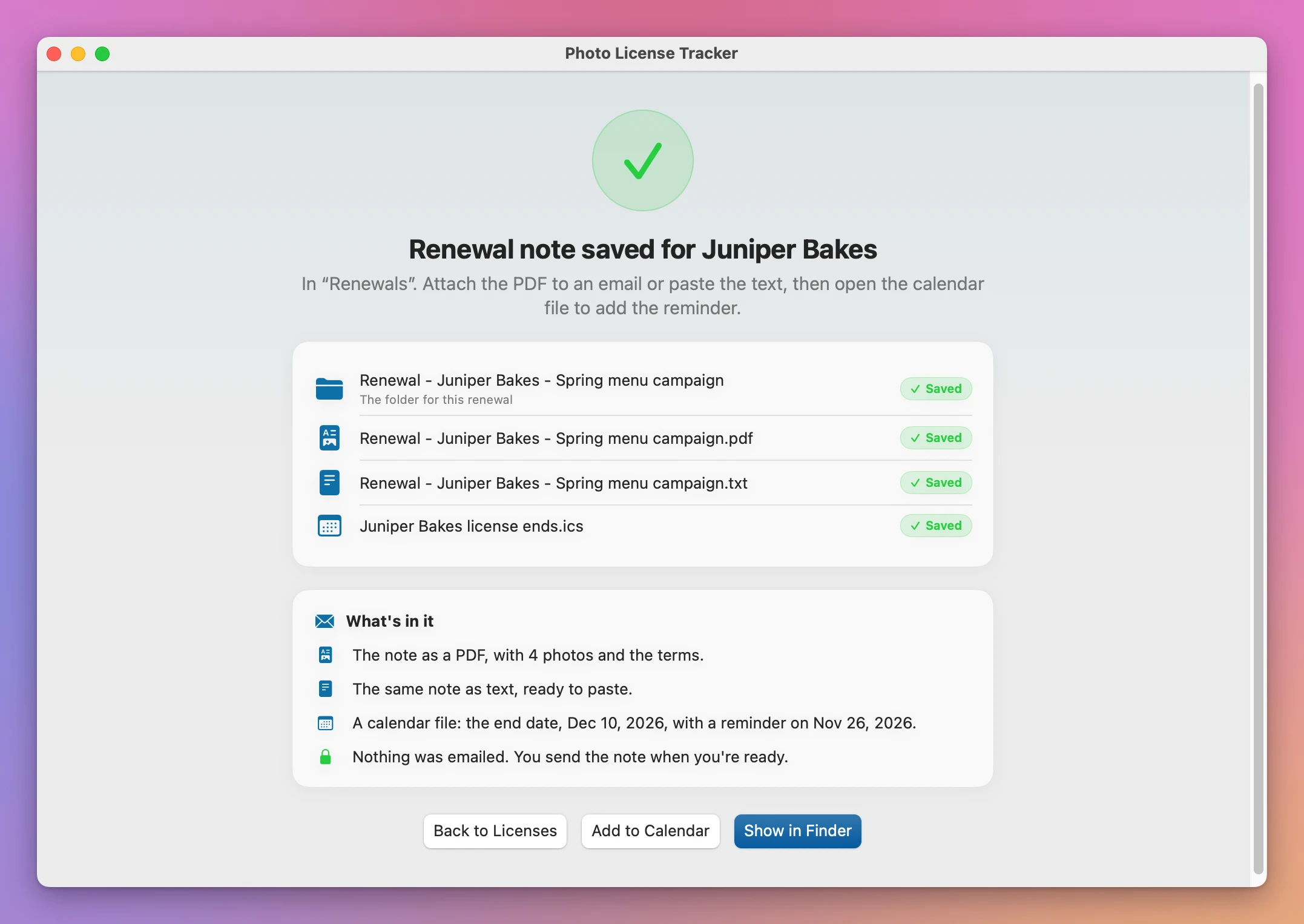
Nothing is emailed. You read the note, attach it, and send it when you’re ready.
Licenses that already ended
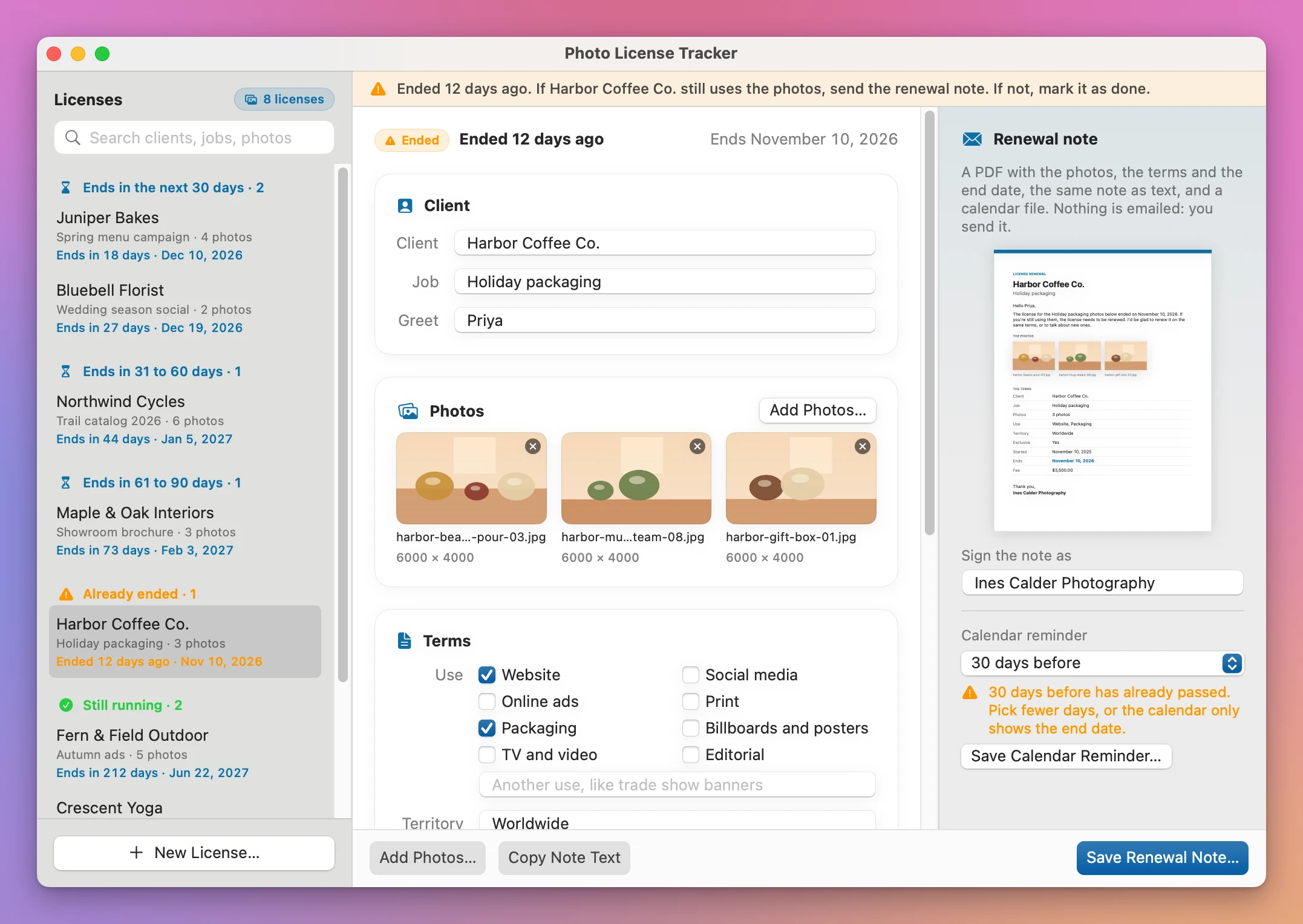
A license past its end date goes in Already ended, in orange, with how many days ago. If the client is still using the photos, the note says the license ended and needs renewing. If they’ve stopped, tick Done: this license won’t be renewed and it moves out of the way.
Why not do it by hand
Calendar can hold an end date. You make an all-day event on the right day, add an alert, and type the client’s name in the title. That works if you do it the day you sign every license, and it tells you a date. It doesn’t know the photos, the uses or the fee, and when the alert rings you still go looking for the agreement and write the email from scratch.
A spreadsheet in Numbers or Excel can list every license with its end date and sort by it. It doesn’t count the days for you unless you write the formula, it doesn’t hold the photos or the agreement, and nothing rings.
Asset management services for brands have license alerts. They’re subscriptions built for the company that bought the photos, not for the photographer who sold them.
| Calendar | Spreadsheet | Photo License Tracker | |
|---|---|---|---|
| Cost | Free | Free | $19 once |
| A list of what ends in 30, 60 and 90 days | Scroll ahead month by month | With a formula you write | Yes, grouped |
| Keeps the photos and the agreement | No | No, links at best | Previews and a copy |
| Keeps the uses, territory and fee | In the notes, if you type them | Yes, one column each | Yes |
| Reminds you before the end | Yes, if you added the alert | No | A calendar file with the reminder |
| Writes the note to the client | No | No | PDF and text, with the photos |
| Works offline | Yes | Yes | Yes |
What it doesn’t do
- It doesn’t email the client. You send the note yourself.
- It doesn’t make invoices or quotes.
- It doesn’t search the web for photos used without a license.
- It doesn’t keep model releases.
- It doesn’t sync between Macs or share a list with a team. The library is a folder on this Mac, so back it up with your other files.
- It isn’t legal advice, and it doesn’t say whether a use is covered by a license. It keeps the terms you type.
Questions
Does it change my photos?
No. The app reads each photo once to make a small preview, and keeps a copy of the agreement. The originals stay where they are, untouched.
Does it upload anything?
No. Your licenses stay on your Mac. The app connects to the internet only to check for updates.
Which photos can I add?
JPEG, HEIC, PNG, TIFF and the raw files macOS can open. A file that isn’t a photo is skipped, with a sentence that says why.
Where are my licenses kept?
In a library folder in your user Library. File → Show Library in Finder opens it.
What it needs
Photo License Tracker runs on macOS 14 Sonoma or later, on Apple silicon and Intel Macs.
Buy Photo License Tracker
$19 plus tax where it applies, paid once.
Download the app from the order page or your Creem receipt, unzip it and move it to Applications. I sign the app with my Apple Developer ID, and Apple notarizes the download.
The app checks for updates once a day. When a new version is ready, click Install and Relaunch. The first time, it asks for the license key from your Creem receipt, and remembers it. To check anytime, choose Photo License Tracker → Check for Updates….
Photo License Tracker is an independent app. It’s not made by, affiliated with or endorsed by Apple or any photo agency or stock site.