
An app by Flavio
Pre-Market Checklist
Write your pre-market routine once, fill it in each morning before the session, and see plainly when you skipped the items you said matter, with a daily log, streaks and an optional recap.
Buy Pre-Market Checklist · $19One-time purchase. Plus tax where it applies.
macOS 14 or later · Apple silicon and Intel
Latest version 1.0.1, released November 22, 2026
You have a rule written somewhere: no trading on bad sleep, not before reading the economic calendar, not without a max loss for the day. On a good morning you follow it. On the morning after a losing day, or when you wake up late, you open the charts and the rule never comes up.
A note with the routine doesn’t know what time it is. Nothing tells you at 9:30 that you never wrote down your key levels, and nothing counts how many times you skipped the news last month.
Pre-Market Checklist turns your routine into a checklist you fill in before the session starts. When every item you marked Must do is done before the start, the day is Ready. When it isn’t, the day is Not today, the app tells you which item is missing, and the menu bar icon turns red. It keeps a log of every morning, so you can see your streak and how often each item was really done.
A checklist for your own routine and numbers, not financial advice. The starter routine is plain habits (sleep, the news, your key levels, your max loss), and nothing in the app says what or when to trade. “Not today” is a reminder you set for yourself: the app never blocks other apps, your broker or your charts.
Who it’s for
- Day traders with a written rule they keep breaking. Your rule is “no trading on less than 6 hours of sleep or without a max loss for the day”. You want the morning to show plainly when that rule was broken, instead of finding out at the end of a bad week.
- Futures traders who write key levels before the open. You note the levels you’re watching every day, and a month later you want to find what you had on the day of the gap fill. Search your notes in History finds it.
- Part-time traders with a day job. You trade the US open from Europe, so your session starts at 15:30 your time. You want a reminder at 14:30 and a red menu bar icon when the routine wasn’t done by the start.
- Traders working with a coach or in a prop-firm evaluation. You have to show a daily pre-market routine and a post-session recap. Export Markdown… and Export CSV… give you the log to send.
- Anyone who wants an honest mirror. You think you always read the news before trading. The stats say you did it 18 of 19 days, and the calendar shows which day you didn’t.
From your routine to a Ready morning
- Start with the starter routine. The first time you open the app, it lists the starter routine and the reminder and session times. Click Start with this routine. macOS asks whether the app can show notifications.
- Make the routine yours. On the Routine page, edit each item’s title and type (a tick box, a number with a unit like
$, a short text, a rating from 1 to 5, or yes/no), mark the ones that are Must do, reorder them, remove them, or click Add an item. Changes apply from today. Past days keep the list they had. - Set your times. In Settings, pick your trading days (Monday to Friday by default), the reminder time and the session start. The defaults are 8:30 and 9:30, in your Mac’s time zone. Add holidays and days off by hand.
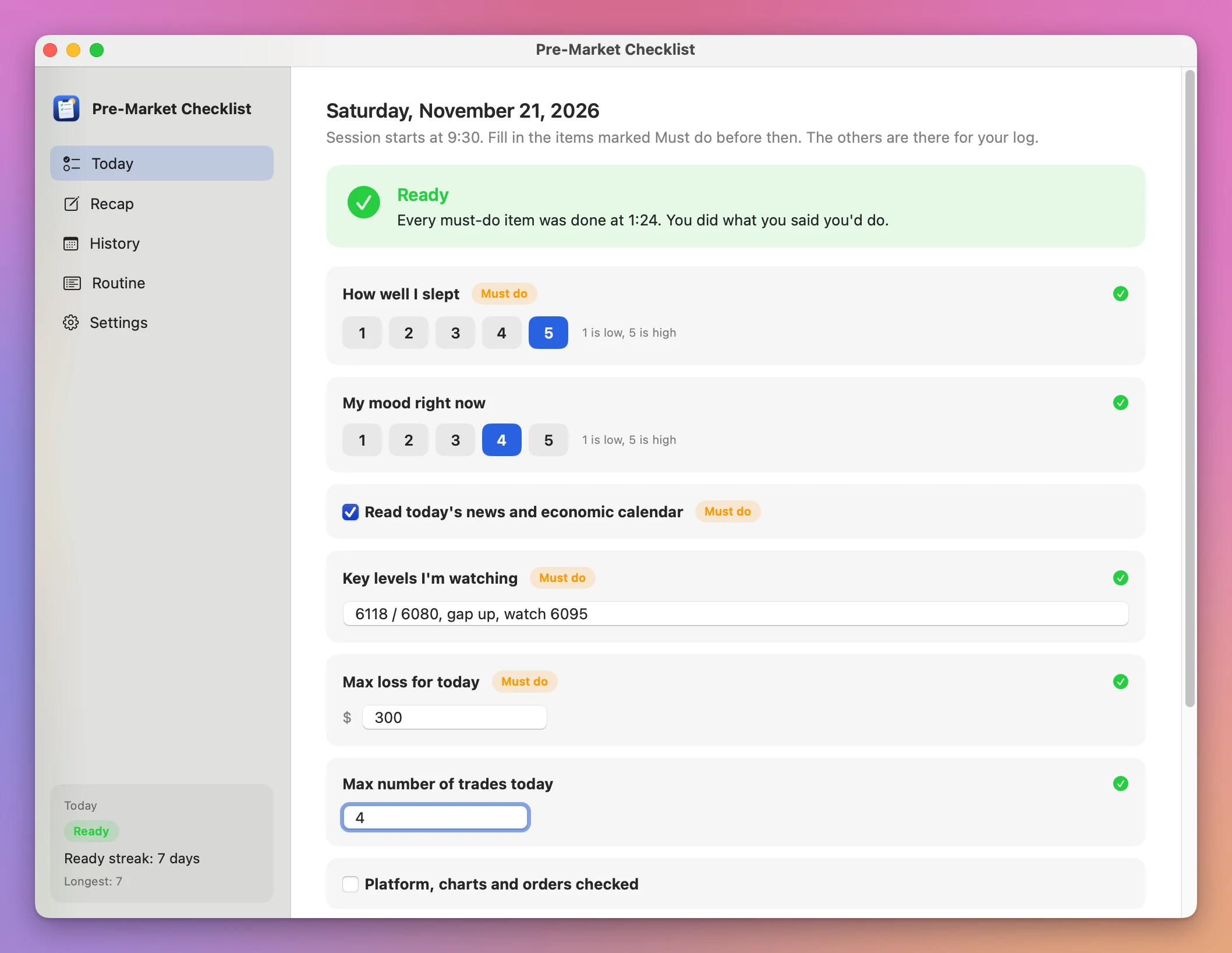
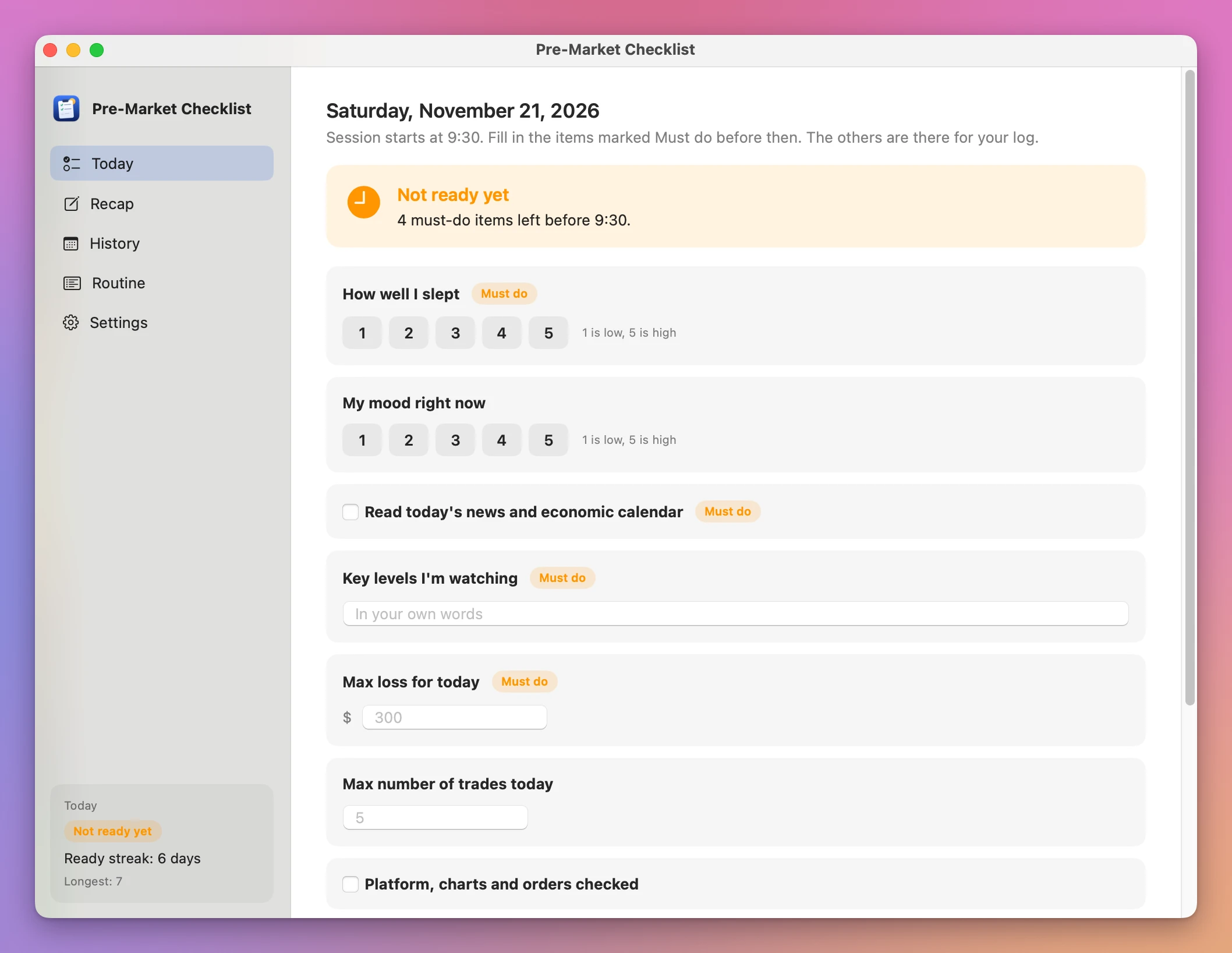
- Fill it in each morning. The Today page shows “Session starts at 9:30. Fill in the items marked Must do before then.” and an orange Not ready yet banner that counts the must-do items left. Everything saves as you type. The main button reads Go to: and the first missing item, and scrolls to it.
- See the day turn Ready. Once every must-do item is done, the banner turns green and says when: “Every must-do item was done at 8:43”. The buttons change to Write the recap after the session and Close the window.
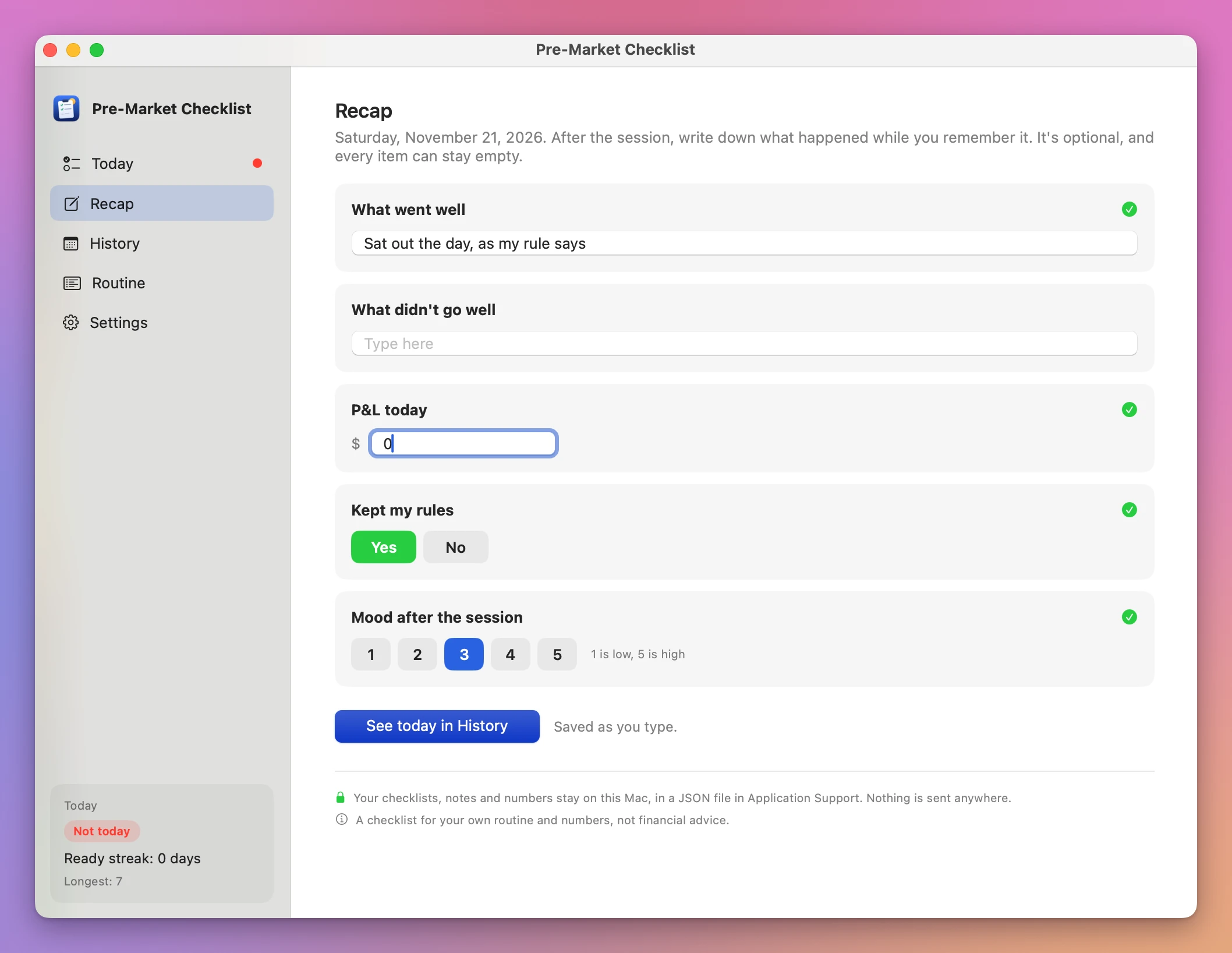
- Write the recap if you want. After the session, the Recap page asks what went well, what didn’t, your P&L, whether you kept your rules, and your mood. Every item can stay empty, and you can turn the recap off in Settings.
What you get
A clear “Not today”
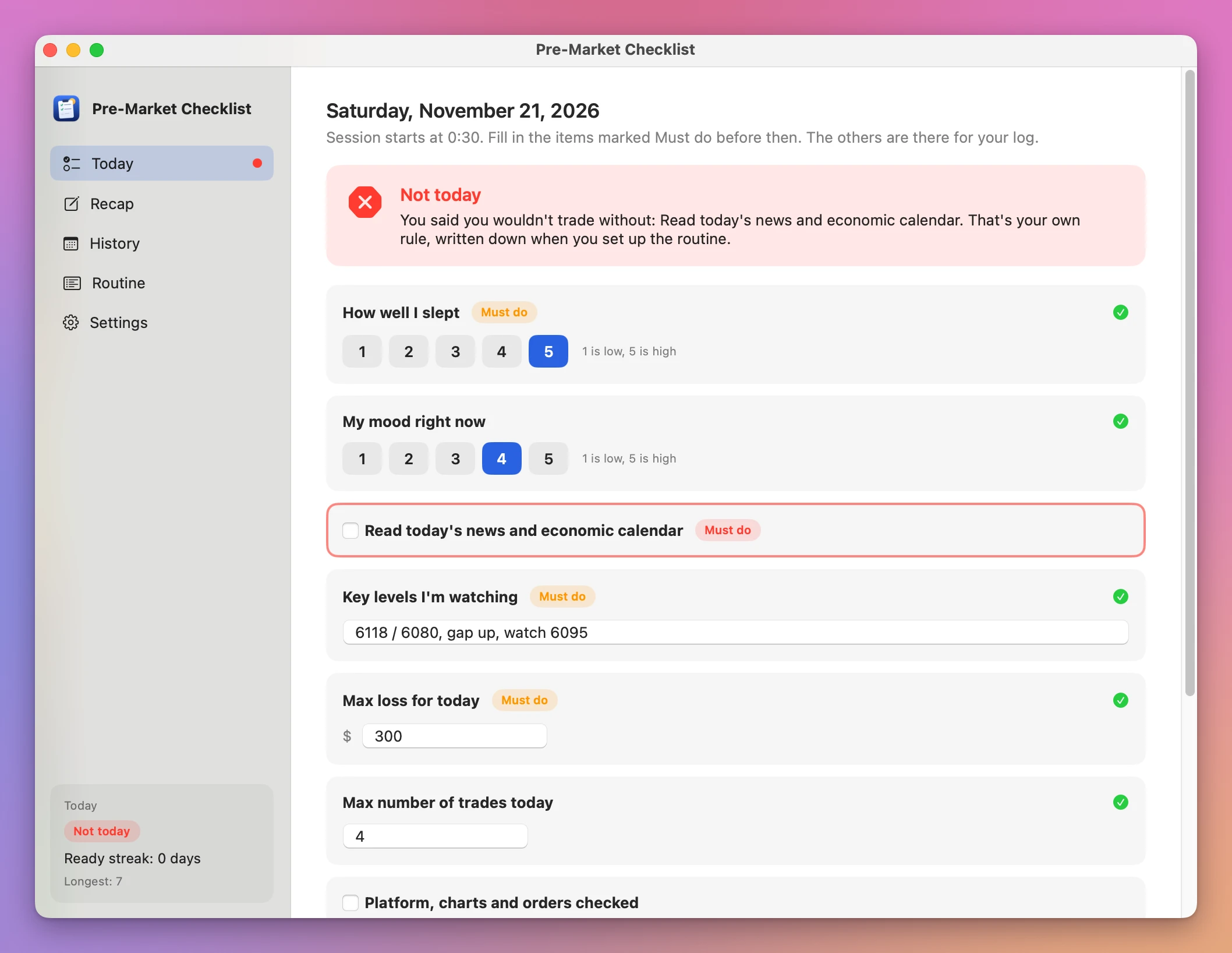
If the session starts and a must-do item is still empty, the day becomes Not today. The banner turns red and names what’s missing, like “You said you wouldn’t trade without: Read today’s news and economic calendar. That’s your own rule, written down when you set up the routine.” The missing item gets a red outline, and the sidebar and the menu bar icon turn red. If you finish everything after the start, the day is still Not today, and the app says you finished late.
That’s all it does. It doesn’t close your charts, block your broker or stop you from trading. It shows you, in plain words, that today you broke the rule you wrote.
A log of every morning
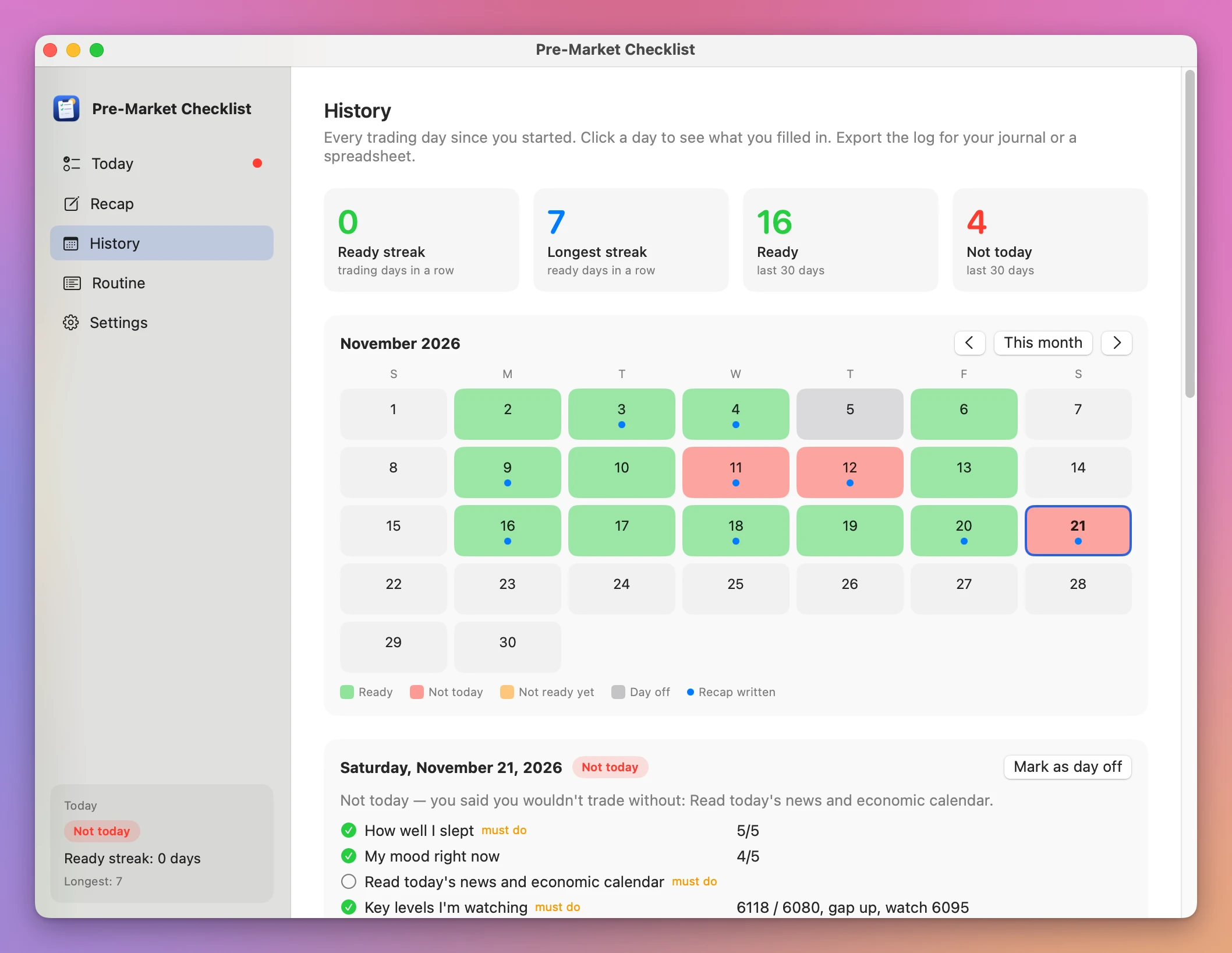
History shows your current ready streak, your longest streak, and how many days were Ready and Not today in the range you pick. A month calendar colors each trading day green for Ready, red for Not today, orange for Not ready yet and grey for a day off, with a blue dot when you wrote a recap. Click a day to see every answer.
Under the calendar, How often each item was done lists each item as “done X of Y, skipped N”, with the average for numbers and ratings and the total for recap numbers like your P&L. Pick 30 days, 90 days, 12 months or everything.
Past days are read-only, so the record stays honest. The only thing you can change on a past day is whether it counts as a day off.
An optional recap
The starter recap has What went well, What didn’t go well, P&L today, Kept my rules and Mood after the session. You can edit it like the checklist. The numbers are added up in History, so the P&L shows a total for the range.
A reminder you set
In Settings you can turn on a notification at the reminder time on trading days, and have the checklist window open by itself at that time if the day isn’t ready yet. You can also set a reminder for the recap. Days off and holidays get no reminder.
In the menu bar
The app keeps a checklist icon in the menu bar, and stays there when you close the window. The icon shows a green check when the day is Ready and a red octagon when it’s Not today. Its menu has today’s state, your streak, Open Checklist, Write Recap, History, Skip Today and Launch at Login.
Exports and backups
Export Markdown… writes a readable log, day by day, with every answer. Export CSV… writes one row per answer, for a spreadsheet or a trading journal. Export Backup… and Import Backup… save and restore everything, and an import keeps a copy of your current data first.
Why not use a note or a recurring reminder
A paper checklist, a note in Apple Notes or a sticky on the monitor is free, and fine for writing the routine down. None of them knows the time. Nothing turns red at 9:30 because you skipped your key levels, and nothing counts how often you skipped the news last month. You’d have to keep a dated copy every day to have a log at all.
A recurring to-do in Reminders can nag you at 8:30 every weekday, and that part is free too. But it’s one tick, not a list with a max-loss number, your key levels and a sleep rating. It doesn’t know when your session starts, so it can’t say “Not today”.
A spreadsheet is better than this app for analysing numbers, and that’s why the app exports CSV. As a morning routine it has no reminder, no “done before 9:30” rule and no menu bar state, and on a bad morning nobody opens it.
Trading journals like Edgewonk and TraderSync are built to analyse your trades, and some include a daily checklist or a pre-market plan. If you already pay for one and use its checklist every day, you don’t need this. Pre-Market Checklist does only the routine: no trade import, no broker connection, no subscription, and your data stays in one file on your Mac.
| Note or paper | Recurring reminder | Spreadsheet | Trading journal | Pre-Market Checklist | |
|---|---|---|---|---|---|
| Your routine as a list | Yes | One tick | Yes | Often | Yes, with numbers, text, ratings |
| Knows your session start | No | No | No | Depends | Yes, Ready or Not today |
| Reminder | No | Yes | No | Depends | Yes, a notification and the window |
| Dated log of each morning | By hand | No | By hand | Yes | Yes, with a calendar |
| How often each item was done | No | No | With formulas | Depends | Yes |
| Trade analysis | No | No | Yes | Yes | No |
| Cost | Free | Free | Free | A subscription | $19, paid once |
What it doesn’t do
- It isn’t advice. It doesn’t suggest what to trade, when to trade or how much. The routine and the numbers are yours.
- It doesn’t block anything. “Not today” is a label and a red icon. Your broker, charts and every other app keep working.
- It doesn’t know about trades or prices. There’s no market data, no broker connection and no trade import. The P&L in the recap is a number you type.
- It has one time zone: your Mac’s. There’s no exchange time zone setting. If you trade New York from Rome, set the session start to 15:30. The session start is the same time on every trading day.
- It has no holiday calendar. Add market holidays as days off by hand.
- It doesn’t convert currencies. The
$next to a number is a label you can change.
Questions
Is this financial advice?
No. It’s a checklist for your own routine. The starter items are plain habits, and you write the rules.
What happens when I’m not ready at the session start?
The day becomes Not today, the app names the missing must-do items, and the menu bar icon turns red. Nothing else happens. You decide what to do with it.
Can I skip a day?
Click Skip today (day off) on the Today page or Skip Today in the menu bar, and Count today again to undo it. A skipped day doesn’t count for or against your streak. Add holidays ahead of time in Settings.
What if I change my routine?
Changes apply from today. Past days keep the list they had, so your history still shows what you were checking back then.
Does anything get uploaded?
Your checklists, notes and numbers stay in one JSON file in Application Support on your Mac. The app uses the internet only to check for and download updates.
What it needs
Pre-Market Checklist runs on macOS 14 Sonoma or later, on Apple silicon and Intel Macs.
The Pre-Market Checklist guide walks through each page and setting.
Buy Pre-Market Checklist
$19 plus tax where it applies, paid once.
Download the app from the order page or your Creem receipt, unzip it and move it to Applications. I sign the app with my Apple Developer ID, and Apple notarizes the download.
The app checks for updates once a day. When a new version is ready, click Install and Relaunch. To check anytime, choose Pre-Market Checklist → Check for Updates….