
An app by Flavio
Revision Round Tracker
Write down how many rounds of revisions the deal includes and what an extra one costs, then log each round with its date, version, the client's notes and files. The app says "Round 4 of 2" and what the extra rounds cost, and saves a dated, polite PDF of every round to send with your quote, plus a record of the final approval.
Buy Revision Round Tracker · $19One-time purchase. Plus tax where it applies.
macOS 14 or later · Apple silicon and Intel
Latest version 1.0.1, released November 24, 2026
You quoted a 60-second promo with two rounds of revisions. The first notes came on a Monday, the second set on Friday, then “one small thing” the week after, and a new idea from someone on the client’s team after that. Now you’re cutting v6, and you’d like to bill the extra rounds. You’d also like to do it without an argument about what counted.
By hand, that means scrolling back through email and chat to rebuild the story: which notes arrived when, which version answered them, and which change was your own typo fix that shouldn’t count. Then you write it up in a document the client will believe.
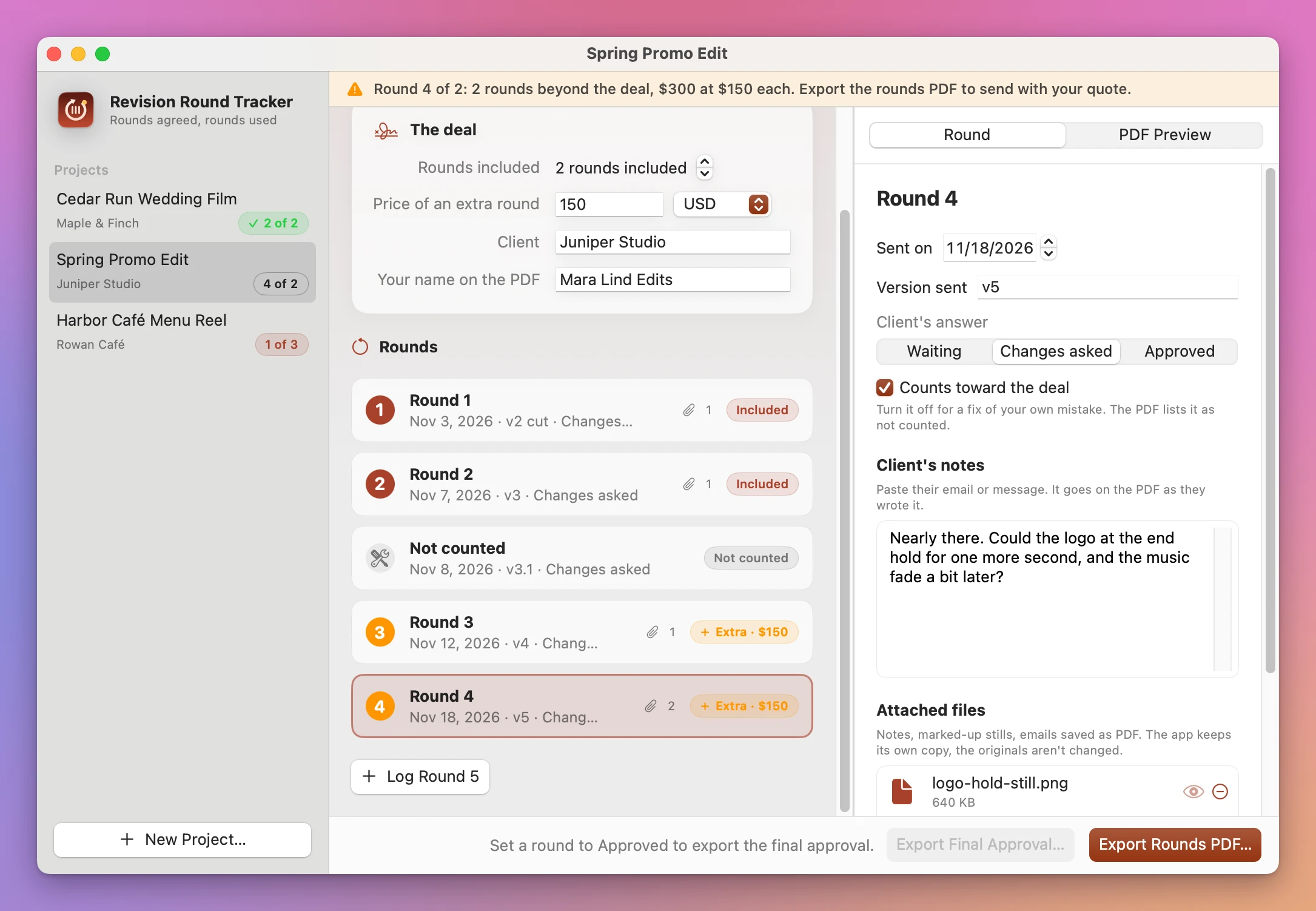
Revision Round Tracker keeps that story as it happens. You set the deal once, log each round in a few seconds, and the window always says where you stand: “Round 4 of 2: 2 rounds beyond the deal, $300 at $150 each.” When it’s time to quote the extra rounds, one click saves a dated PDF with every round, polite and factual, to send with your quote.
Watch a 30-second demo of Revision Round Tracker:
Who it’s for
- Freelance video editors. Your quote says “two rounds of revisions”, and the client is on round five. You want to send a quote for three extra rounds with a record they can check, not a vague “we’ve gone a bit over”.
- Motion designers. The contract includes three rounds of animation changes. When the client says “it’s just a small tweak”, you have the date and their own words for each of the rounds before it.
- Small video teams. The producer sends the invoice, not the editor. Both look at the same project and see which rounds were included, which were extra, and which version answered which notes.
- Editors working for YouTubers. You edit at a fixed rate per video with one round of changes included. Every “can you also…” message gets logged, and the second one is visibly extra.
- Wedding filmmakers. Two rounds of changes are part of the package. When the couple writes “this is perfect, we approve it”, you save the final approval with their words and the date.
How it works
- Click New Project…, type the project and the client, set Rounds included to what the deal says, and type the Price of an extra round.
- When the client sends changes, click Log Round 1. Set Sent on, type the Version sent, choose the Client’s answer and paste their message under Client’s notes.
- Drop the files that go with it on Attached files: their notes as a PDF, a marked-up still, an email saved as PDF.
- Keep logging rounds. Past the deal, they’re marked Extra with the price.
- Click Export Rounds PDF… and send the PDF with your quote. When the client approves, click Export Final Approval….
What you get
Where you stand, all the time
The line at the top of the window says it in words: “Round 1 of 3. 2 included rounds are left”, or “Round 4 of 2: 2 rounds beyond the deal, $300 at $150 each”. Each round in the list has a pill: Included, Extra · $150 or Not counted. The project list on the left shows the count for every job, like “4 of 2” in orange.
Rounds that don’t count
Sometimes a new version is your fix, not the client’s change: a typo in a lower third, a missing frame. Turn off Counts toward the deal and the round stays in the list, with no number, as “Not counted”. The PDF lists it too, and says it was a fix on your side.
A dated PDF, polite and factual
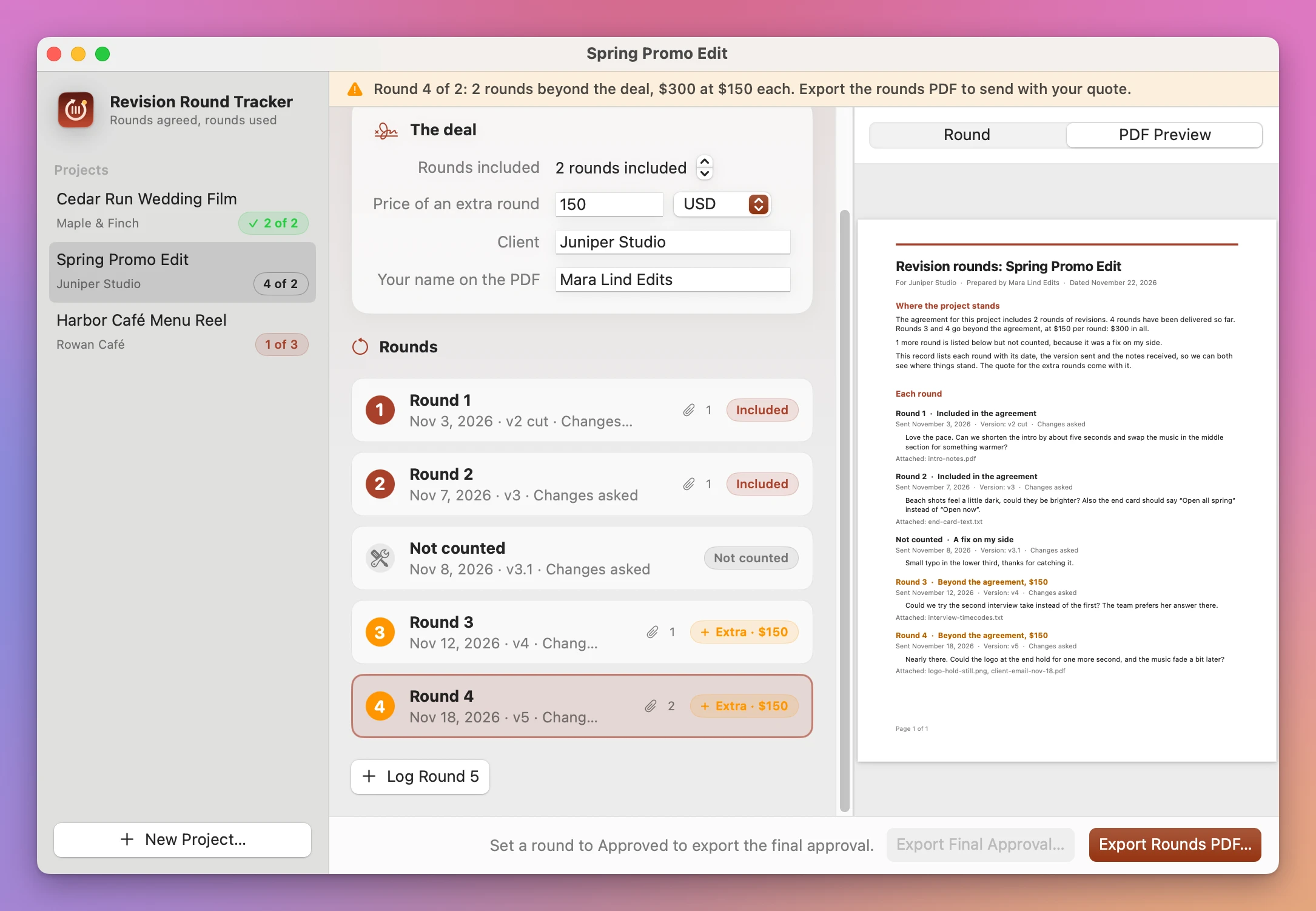
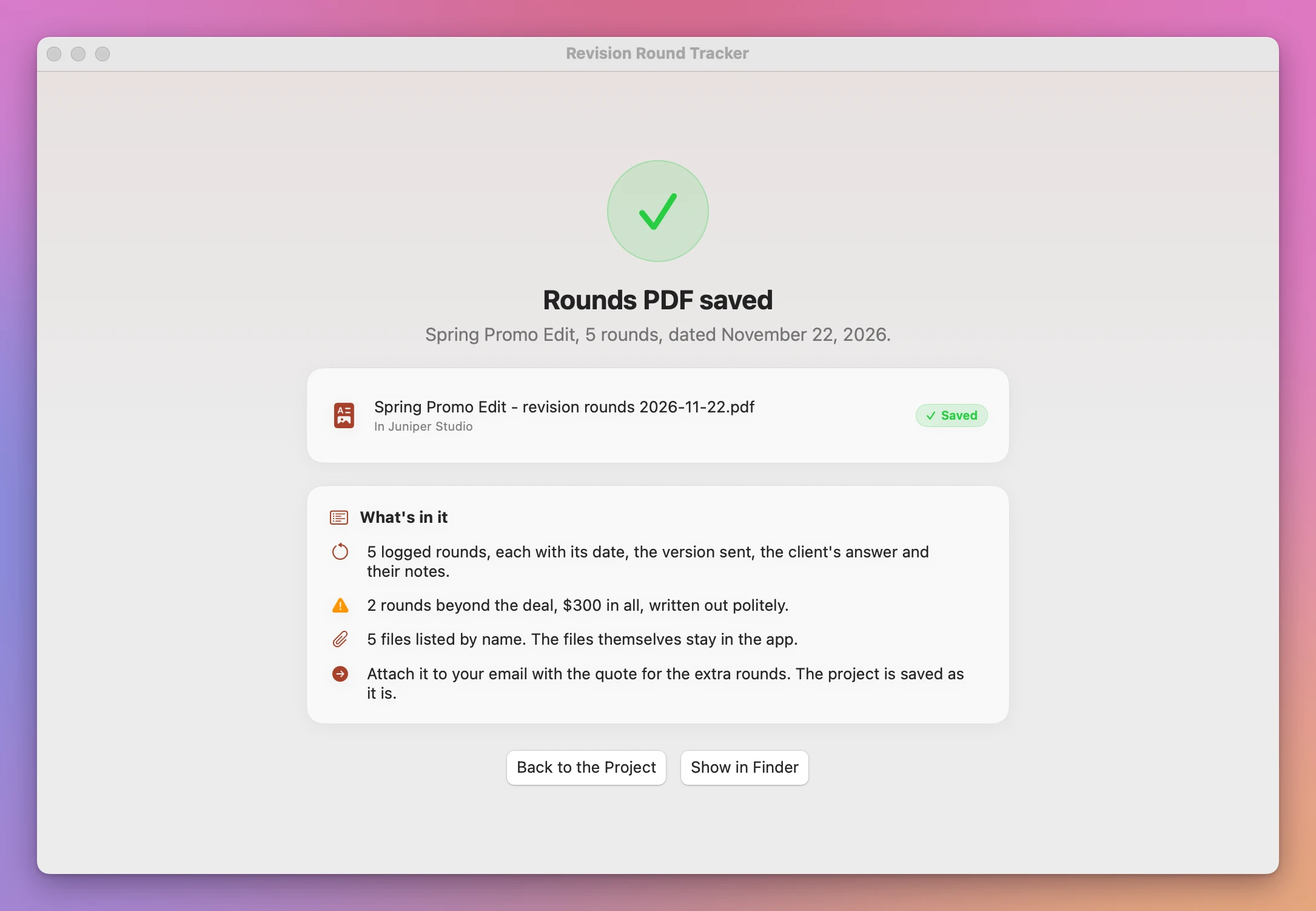
Export Rounds PDF… saves a PDF with the project, the client, your name and the date. It starts with where the project stands, in plain sentences: “The agreement for this project includes 2 rounds of revisions. 4 rounds have been delivered so far. Rounds 3 and 4 go beyond the agreement, at $150 per round: $300 in all.” Then every round, with its date, the version sent, the client’s answer, their notes as they wrote them, and the names of the attached files. PDF Preview shows it in the window before you save.
The final approval, on record
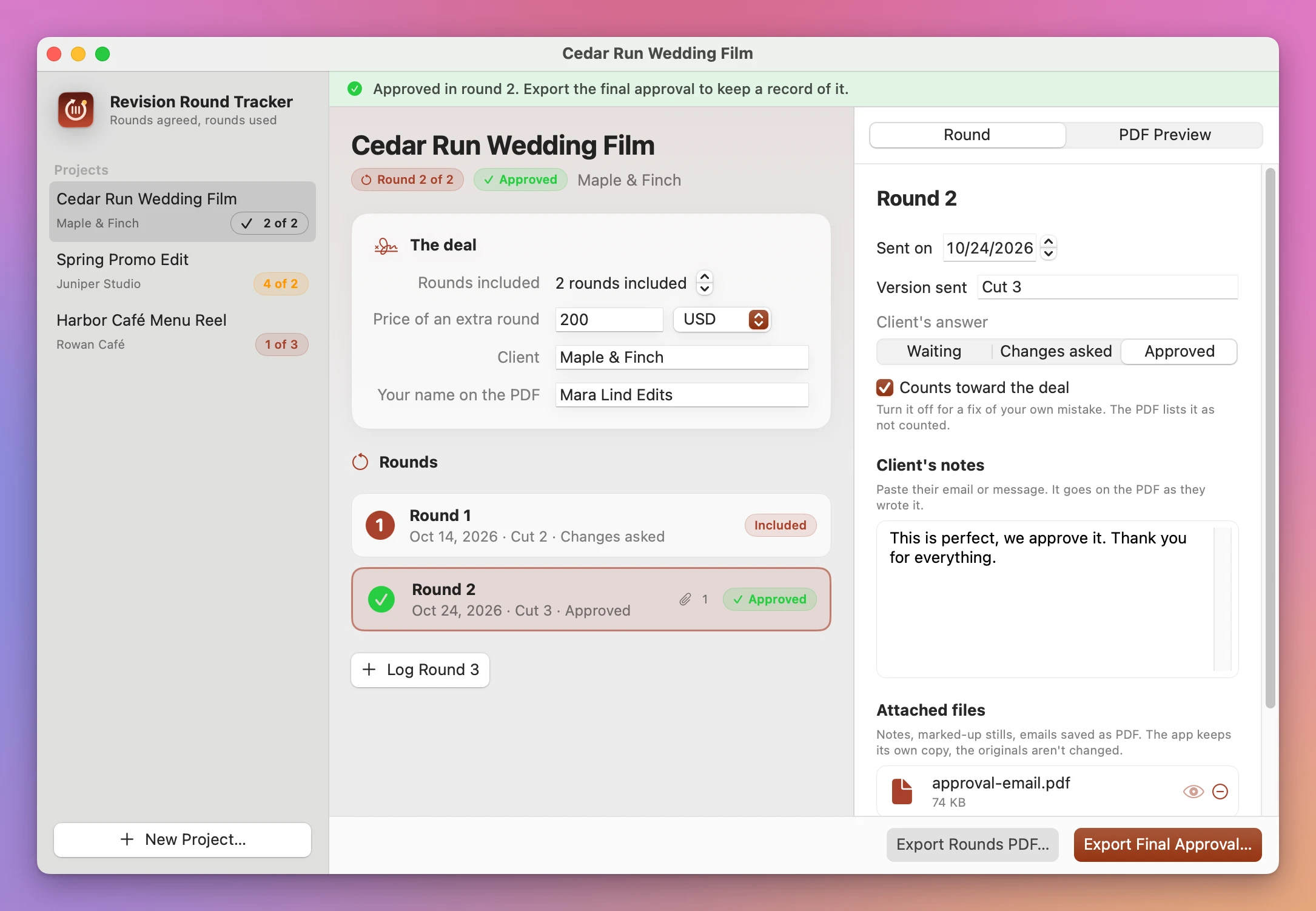
When a round’s answer is Approved, Export Final Approval… becomes the main button. It saves a PDF that says which round and which version was approved, on which day, with the client’s words, followed by every round before it.
The files stay with the rounds
Attached files are copied into the app’s own folder, so the client’s notes PDF is still there after you clean up Downloads. Your originals are only read, never moved or changed. Show Project Folder in Finder opens a project’s folder.
Why not do it by hand
The free tools you already have can hold this information. Mail and Messages keep every note the client sent, with its date. A note in Notes or a spreadsheet can count rounds, and TextEdit can export a page as a PDF.
What they don’t do is keep the count for you. The notes are spread across threads, so you rebuild the story when you need it, usually when you’re already annoyed. Nothing marks round three as the first extra one, or knows that the v3.1 fix shouldn’t count. And the document you send has to be written each time, in a tone that’s firm without sounding cross.
| By hand | Revision Round Tracker | |
|---|---|---|
| Which round are we on? | Scroll back through email and chat | ”Round 4 of 2” at the top of the window |
| What the extra rounds cost | Count, then multiply | ”2 rounds beyond the deal, $300 at $150 each” |
| A fix of your own | Remember to leave it out | Turn off Counts toward the deal |
| The client’s notes and files | In threads and Downloads | With each round, files copied into the app |
| Something to send with the quote | Write it up each time | A dated PDF with every round, in one click |
| The final approval | An email somewhere | A PDF with the round, the date and their words |
What it doesn’t do
- It doesn’t read your email or chat. You paste the client’s notes and attach files yourself.
- It doesn’t make the quote or the invoice. The rounds PDF goes with the quote you send from your usual invoicing tool.
- It doesn’t put attached files inside the PDF. It lists them by name, so the PDF stays small enough to email.
- It doesn’t sync or share. Projects live on this Mac. There’s no client login and no team account.
- The approval record isn’t a signature. It records what the client wrote and when, nothing more.
Questions
Does anything get uploaded?
No. Projects, notes and attached files stay on your Mac, in the app’s own folder. The app connects to the internet only to check for updates.
Does the client need the app?
No. They get a normal PDF.
What currencies does it use?
You pick the currency for each project: US dollars, euros, pounds, Canadian and Australian dollars, yen and ten more. Prices are shown the way your Mac writes money.
What paper size is the PDF?
Letter in the United States and Canada, A4 everywhere else.
Does it work with my editing app?
It doesn’t need to talk to it. You log versions by the name you gave them, like “v3 cut”, from Premiere Pro, Final Cut Pro, DaVinci Resolve or anything else. Revision Round Tracker isn’t made by, affiliated with or endorsed by Apple, Adobe, Blackmagic Design or any other company whose apps you edit with.
What it needs
macOS 14 Sonoma or later, on Apple silicon and Intel Macs. The app asks macOS for no permission.
Buy Revision Round Tracker
$19 plus tax where it applies, paid once.
Download the app from the order page or your Creem receipt, unzip it and move it to Applications. I sign the app with my Apple Developer ID, and Apple notarizes the download.
The app checks for updates once a day. When a new version is ready, click Install and Relaunch. To check anytime, choose Revision Round Tracker → Check for Updates….