
An app by Flavio
Second Shooter Sorter
Choose a job folder shot on several cameras. The app groups the photos by camera body serial number, you name the photographer once per camera, and it copies the photos into a folder per photographer with a PDF and CSV credit report. Your originals are never changed.
Buy Second Shooter Sorter · $19One-time purchase. Plus tax where it applies.
macOS 14 or later · Apple silicon and Intel
Latest version 1.0.0, released November 24, 2026
The wedding is over. Three of you shot it on five cameras, and every card is now in one folder: 1,840 photos called KX5_0001.JPG, RDG0001.JPG and IMG_0001.JPG. Before the edit, you need to know which 412 of them the second shooter took, and which body the assistant borrowed for the first dance.
The camera that took each photo is written inside the photo, with the body’s serial number. Preview shows it one photo at a time: Tools › Show Inspector, then the Exif tab, where it says Body Serial Number. Sorting by card doesn’t work either, as soon as cards move between bodies.
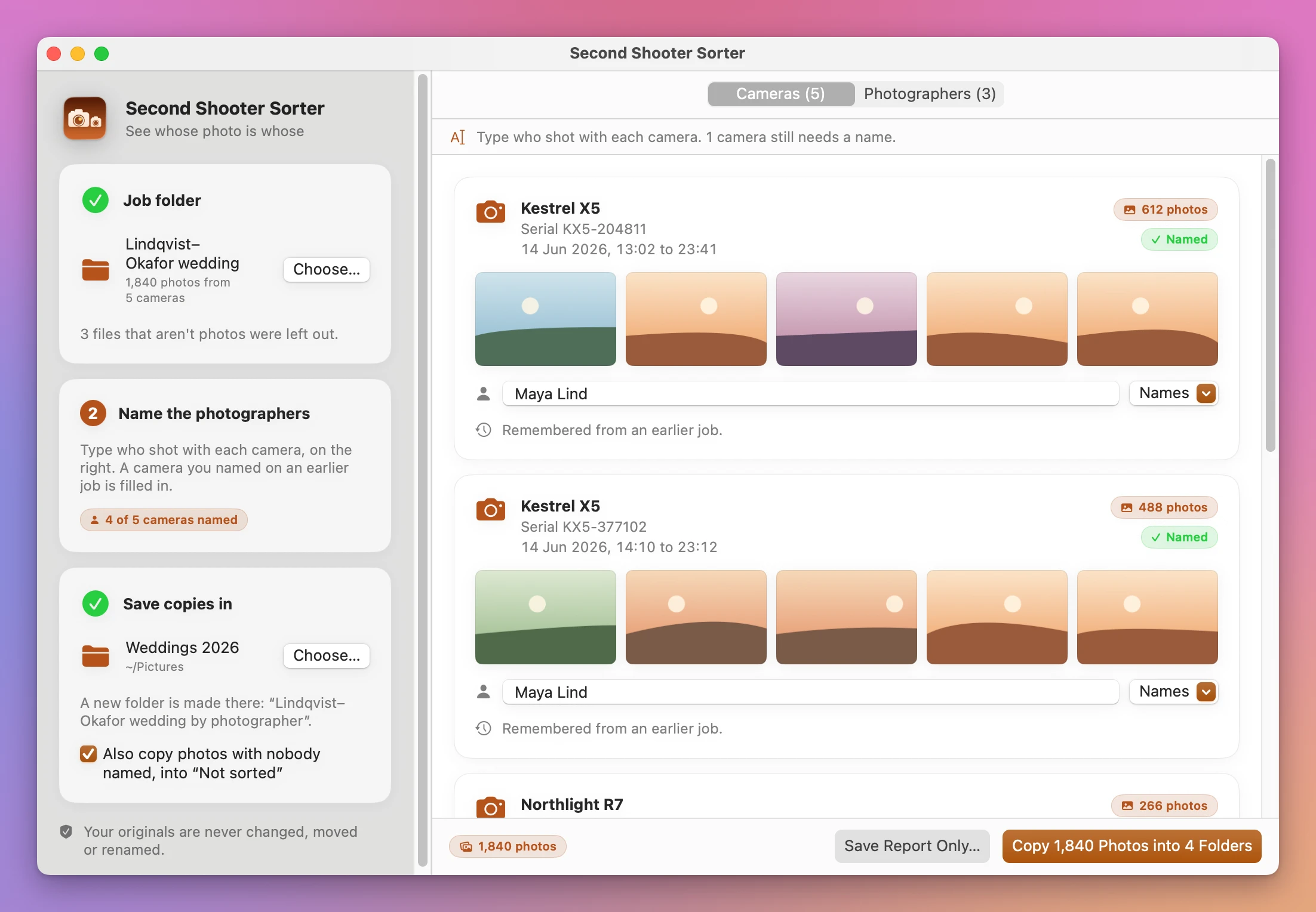
Second Shooter Sorter reads all of them at once. It groups the photos by camera body, shows you each body with its photo count, its first and last photo of the day and a few thumbnails, and asks who shot with it. Then it copies the photos into one folder per photographer, and writes a credit report. The next job, it already knows your cameras.
Watch a 30-second demo of Second Shooter Sorter:
Who it’s for
- Wedding photographers who hire second shooters. All the cards come back at the end of the night. You need each shooter’s frames apart, for the credit line, the contract that pays per image, or the album that names who took what.
- Second shooters working for several studios. You keep a copy of every job you worked on. You want your own frames out of the merged delivery for your portfolio, with a report that shows what you shot and when.
- Event and conference teams. Four photographers on four bodies, plus someone’s phone. The client’s press office wants a credit for every photo they publish.
- Studio managers and photo editors. Freelancers hand over one merged folder and invoice per photographer. You want the count per person before you pay.
- School and sports crews sharing cameras. The bodies stay with the studio and the people change. Name a body once, and every job after that knows it.
How it works
- Copy every card from the job into one folder, in any subfolders.
- Click Choose the Job Folder…, or drag the folder onto the window. The app reads the camera details of every JPEG, HEIC, TIFF and raw photo in it.
- On the Cameras tab, type the photographer’s name under each camera and press Return. When the photos already carry a name in their Creator field, Use “Ana Ruiz” fills it in.
- Check the Photographers tab.
- Click Copy 1,840 Photos into 4 Folders (the numbers are yours).
What you get
Every camera body, told apart
The app reads the body serial number each camera writes into its photos, so two bodies of the same model stay two cameras: Maya’s Kestrel X5 ending 4811 and her second Kestrel ending 7102. Each card shows the model, the serial number, how many photos it took, its first and last photo of the day, and five thumbnails spread over the day, so you recognize the ceremony angle or the dance floor at a glance.
Names it remembers
The names you give bodies with a serial number are saved on your Mac. Open the next wedding and the cameras you know are already filled in, marked “Remembered from an earlier job”. You only type the new ones, and Names lists everyone you’ve named before.
What needs a look before you copy
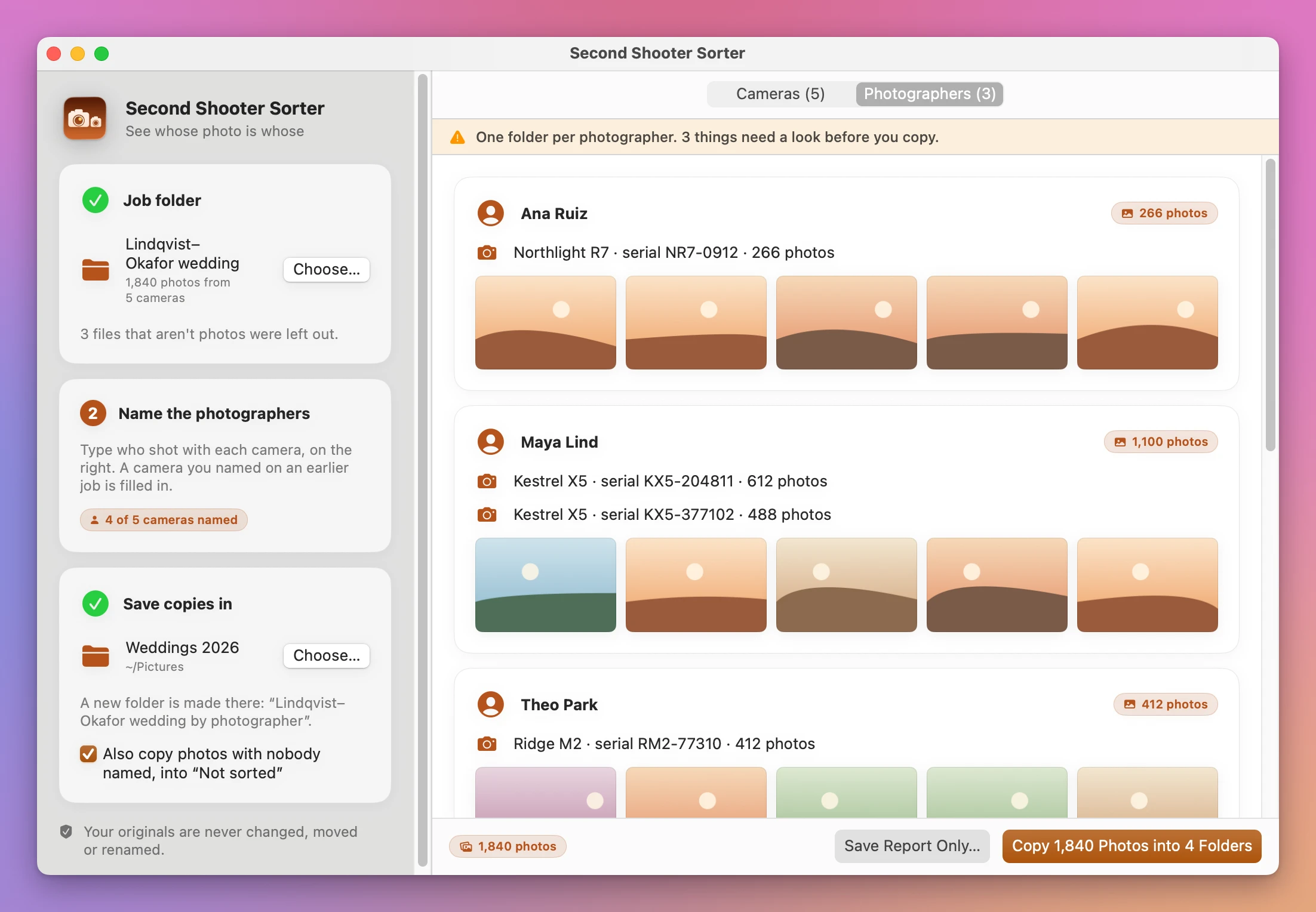
The Photographers tab shows each photographer with their cameras and photos. Under them it lists what you’d want to check by hand:
- the cameras nobody is named for yet,
- the photos with no serial number, which is most phones: they’re grouped by model, and the app says so,
- the photos whose Creator field names someone other than the camera’s photographer, like the three frames Ana took on Theo’s camera.
One folder per photographer, nothing overwritten
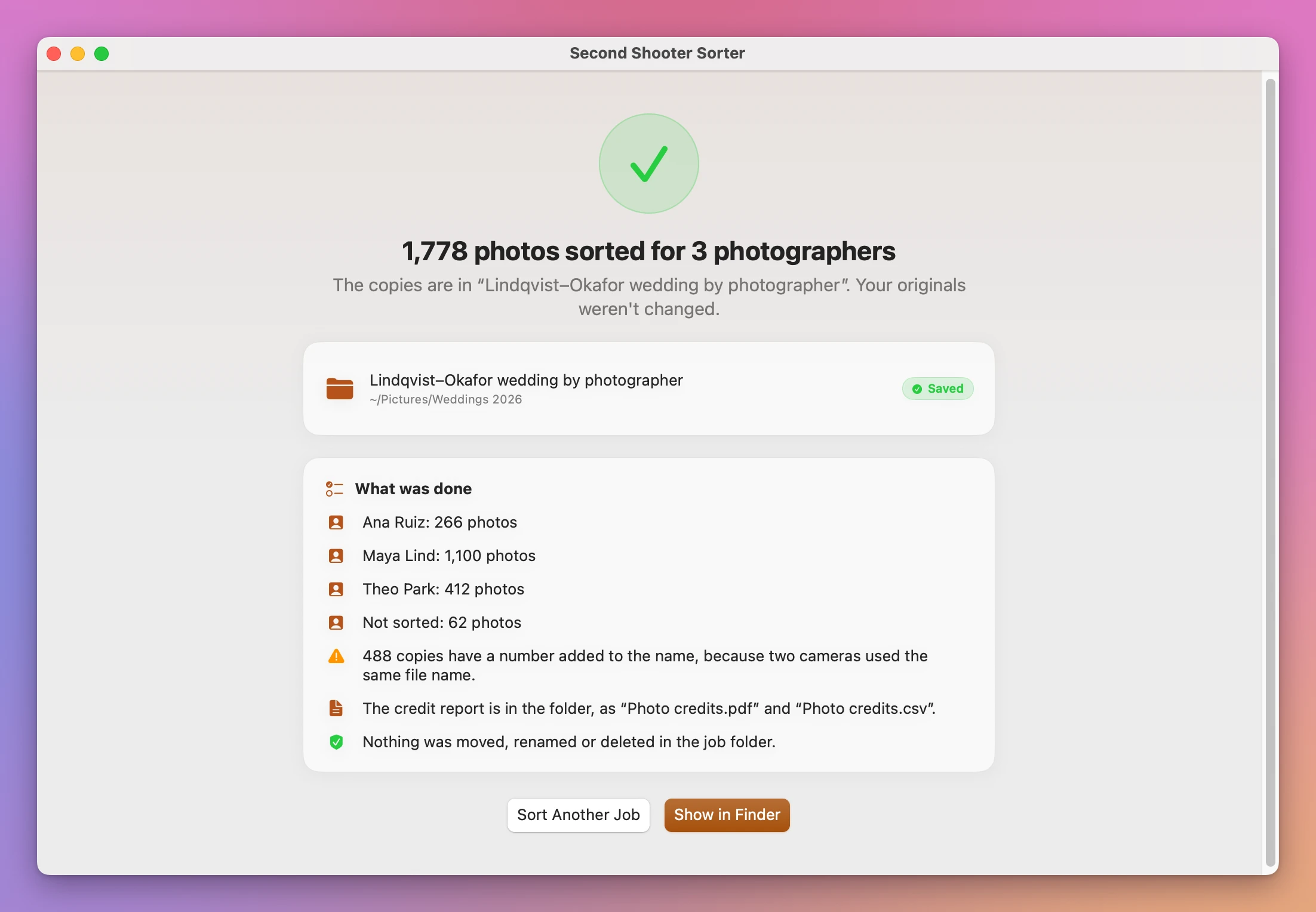
The copy goes into a new folder next to the job, Lindqvist–Okafor wedding by photographer, with a folder for each person. Two bodies of the same brand often use the same file names: the second copy becomes KX5_0001 (2).JPG, so nothing is overwritten. Tick Also copy photos with nobody named and the rest go into Not sorted. The originals are only read.
A credit report
Photo credits.pdf lists each photographer with their cameras, serial numbers, photo counts and times, then the cameras with nobody named, the photos with no serial number and the Creator mismatches. Photo credits.csv has one row per photo: the file, the photographer, the camera, the serial number, when it was taken, the Creator field and where its copy went. Save Report Only… writes the two files without copying anything.
Why not do it by hand
| By hand | Second Shooter Sorter | |
|---|---|---|
| See which camera took a photo | Preview’s Inspector, one photo at a time | Every photo of the job at once, grouped by body |
| Two bodies of the same model | Look up the serial number photo by photo | Kept apart by serial number |
| Sort by card | Breaks when cards or bodies are swapped | Follows the body, whatever card it wrote to |
| Next job | Start over | The bodies you named are filled in |
| Credit list | Typed by hand | A PDF and a CSV, one row per photo |
Photos on the Mac can make a smart album by Camera Model, after you import the whole job into your library. Its smart album conditions have no serial number, so two bodies of the same model are one camera to it, and it doesn’t make folders or a report. A catalog app like Lightroom Classic is a subscription, and it works on the photos you import into its catalog. This app works on the folder as it is, and gives you the folders and the credit report at the end.
What it doesn’t do
- It doesn’t change your photos. Nothing in the job folder is renamed, moved or deleted, and it doesn’t write a name or a copyright into any photo.
- It doesn’t fix camera clocks. Times are what each camera’s clock wrote, and it doesn’t line up bodies whose clocks disagree.
- It can’t tell two phones apart. Cameras that write no serial number (most phones) land in one group per model, named for that job only.
- It reads photos, not videos. JPEG, HEIC, TIFF, and the raw formats your Mac opens (DNG, CR2, CR3, NEF, ARW, RAF, ORF, RW2 and more). A RAW and JPEG pair counts as two photos.
- It doesn’t rename files. The copies keep their names, with a number added only when a name is already taken in that folder.
Questions
Where does it get the serial number?
From the photo itself. Most cameras write the body’s serial number into every photo’s metadata, next to the model and the time. The app reads it, along with the Creator field, without opening the image itself, so a large job is read quickly.
Does anything get uploaded?
No. Everything is read and copied on your Mac. The names you give cameras are saved on your Mac with each camera’s model and serial number. The app connects to the internet only to check for updates.
What it needs
macOS 14 Sonoma or later, on Apple silicon and Intel Macs. If the job is on a card, a drive or a network folder, or in your Desktop, Documents or Downloads folder, macOS may ask once whether the app can read it, after you choose it.
Second Shooter Sorter isn’t made by, affiliated with or endorsed by Apple, Adobe or any camera maker. The camera models and people in the screenshots are made up.
Buy Second Shooter Sorter
$19 plus tax where it applies, paid once.
Download the app from the order page or your Creem receipt, unzip it and move it to Applications. I sign the app with my Apple Developer ID, and Apple notarizes the download.
The app checks for updates once a day. When a new version is ready, click Install and Relaunch. The first time, it asks for the license key from your Creem receipt, and remembers it. To check anytime, choose Second Shooter Sorter → Check for Updates….