
An app by Flavio
Setlist Pack
Put each song's chart, backing tracks and cues in the order you'll play them. Rehearse from the charts full screen and export one numbered PDF and a folder of tracks for the band.
Buy Setlist Pack · $19One-time purchase. Plus tax where it applies.
macOS 14 or later · Apple silicon and Intel
Latest version 1.0.1, released November 22, 2026
It’s Friday night and the bride’s running order just changed. The charts for the eight songs are in four folders, two of them are photos you took of a paper chart, and the backing tracks are still in Downloads with names like Marigold Avenue - backing track.wav. The bass player needs to know that song 2 now starts with his riff, alone, for four bars.
By hand that’s a new combined PDF in Preview, page by page, a setlist typed in a notes app, and tracks renamed one at a time so they sort in the new order. Then the order changes again at soundcheck, and you start over.
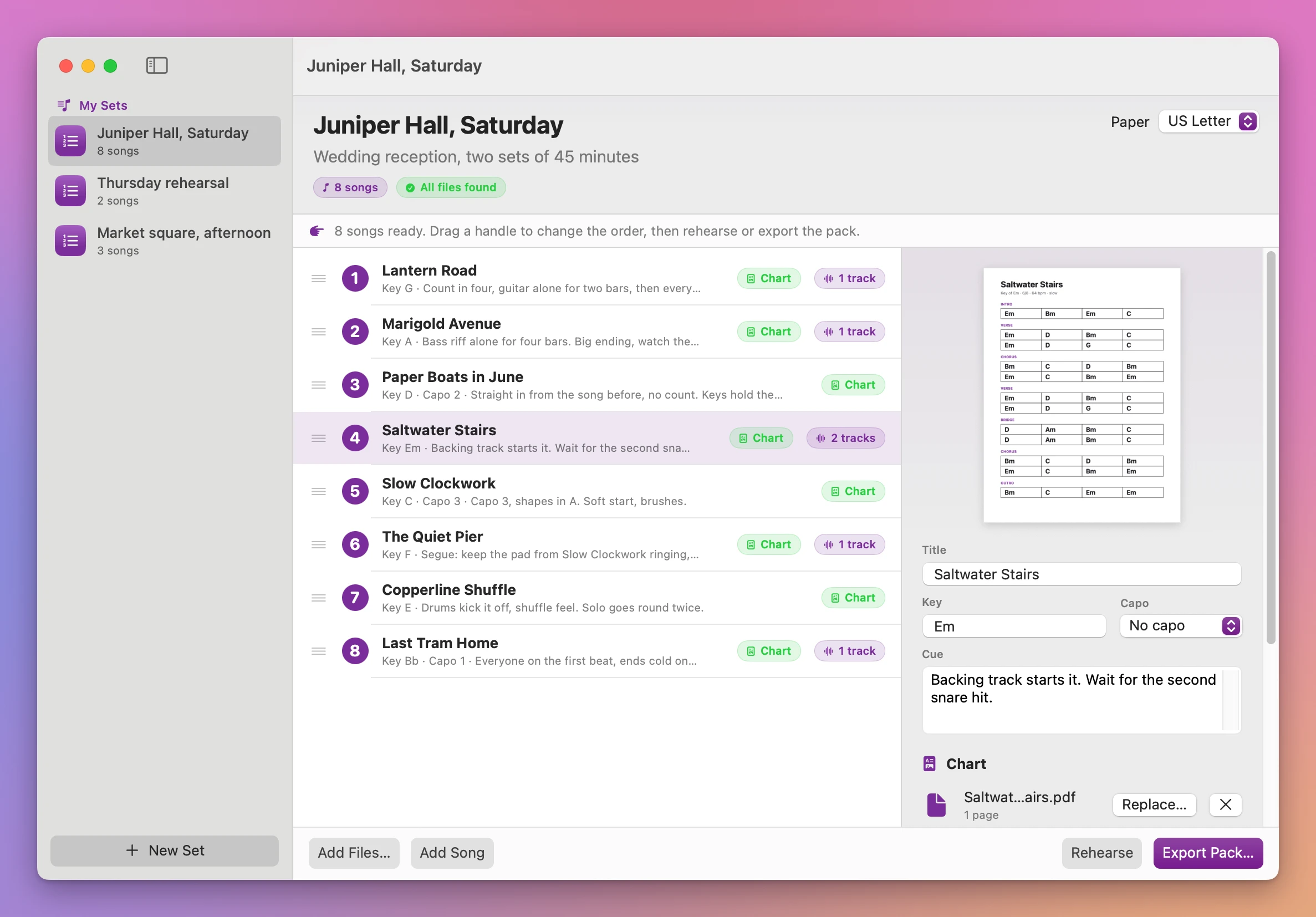
Setlist Pack keeps each song with its chart, its tracks and a cue about the key, the capo or the transition. You drag a song to its new place, and the export follows: one numbered PDF with every cue, and a folder of tracks numbered in running order.
Who it’s for
- Function and wedding band players. The couple sends the running order the night before, with a first dance in the middle and a song moved to the encore. You need the charts in that order and the tracks numbered to match, by tomorrow afternoon.
- Worship leaders. The set changes on Thursday. On Sunday morning the keys player and the guitarist need to see, on the page, that the third song is in D with a capo on 2 and comes straight in from the one before.
- Solo singers who play to backing tracks. A bar gig of 25 songs, charts on a tablet, tracks on a USB stick. The track for song 14 has to be the 14th file, not whatever Finder sorted first.
- Music teachers. A student concert with twelve pieces, each with a PDF and an accompaniment track, handed to a pianist who has never seen them.
- Dep players. You’re filling in for someone tonight. A page that says “Next: 4. Saltwater Stairs, key Em, backing track starts it, wait for the second snare hit” is worth more than any rehearsal you didn’t get.
From a pile of files to a pack
- Click Choose Charts and Tracks… and pick your charts (PDFs, or photos and scans in PNG, JPEG or HEIC) and your backing tracks. You can also drag them onto the window. Each chart becomes a song, and a track joins the song with the same name.
- Type the name of the set and where you’re playing.
- Drag the songs into running order by their handles, or use Move Up and Move Down.
- Click a song and fill in its Key, Capo and Cue: how it starts, the transition, who counts in.
- Click Rehearse to read the charts full screen.
- Click Export Pack… and choose a folder.
When the order changes again, move the song and export again. Every number, page and track name follows the new order.
What you get
A numbered PDF the band can read
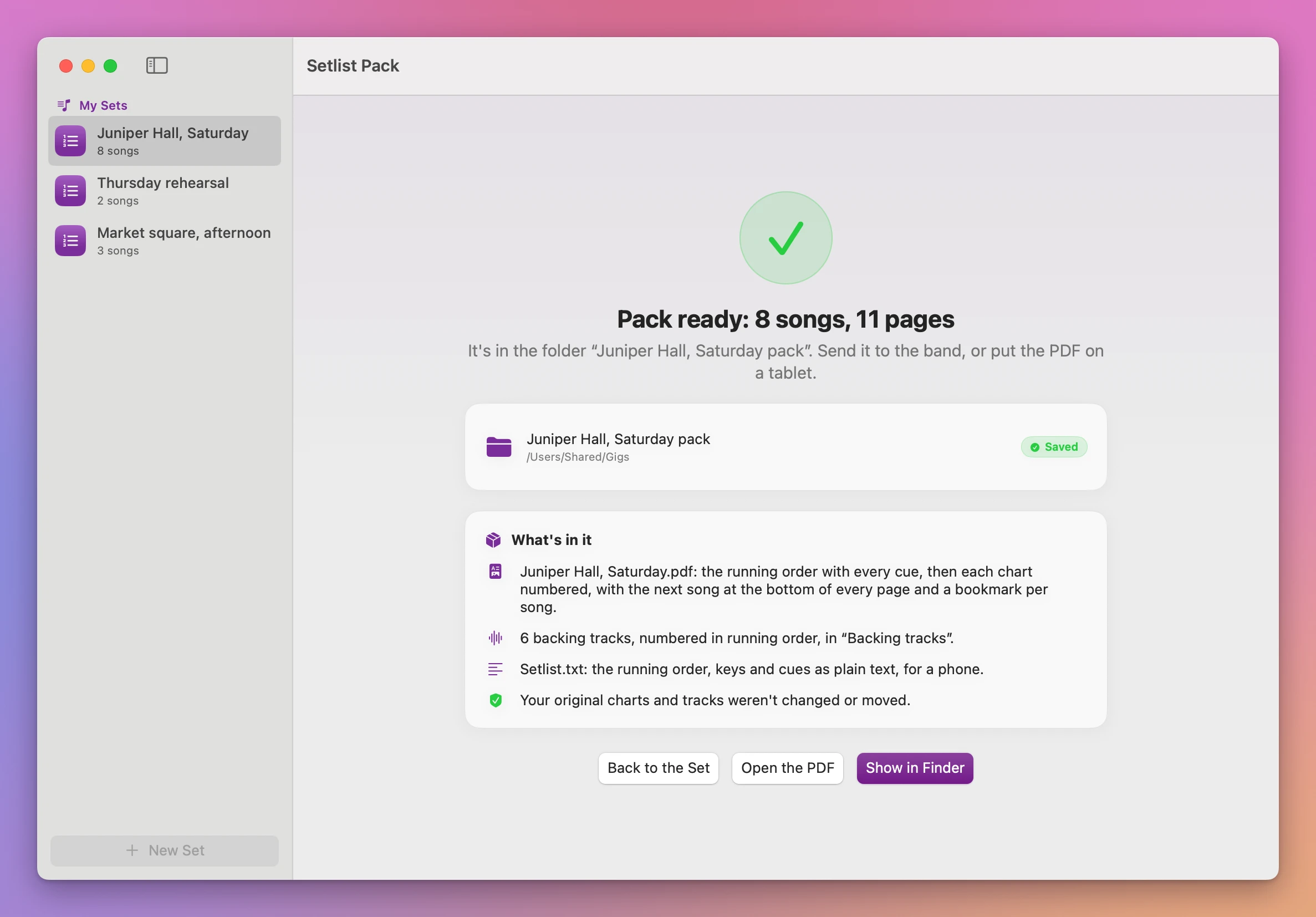
The first page is the running order: each song with its number, key, capo, cue and the page its chart is on. Then come the charts, each with its number, title and key at the top and its cue right under them. At the bottom of every page is the next song, with its key and its cue, so whoever is reading knows what’s coming before they turn the page. Each song has a bookmark, so a tablet’s PDF reader jumps straight to it.
A song with no chart still gets a page, with its cue, so the numbers never skip.
The backing tracks, in order
The pack’s Backing tracks folder has a copy of every track, named after its song and numbered in running order: 02 Marigold Avenue.wav, 04 Saltwater Stairs - click.wav. Copy the folder to a USB stick or a playback app and the order is right. There’s also Setlist.txt, the running order with keys and cues as plain text, to paste in the band chat.
Rehearsal, full screen
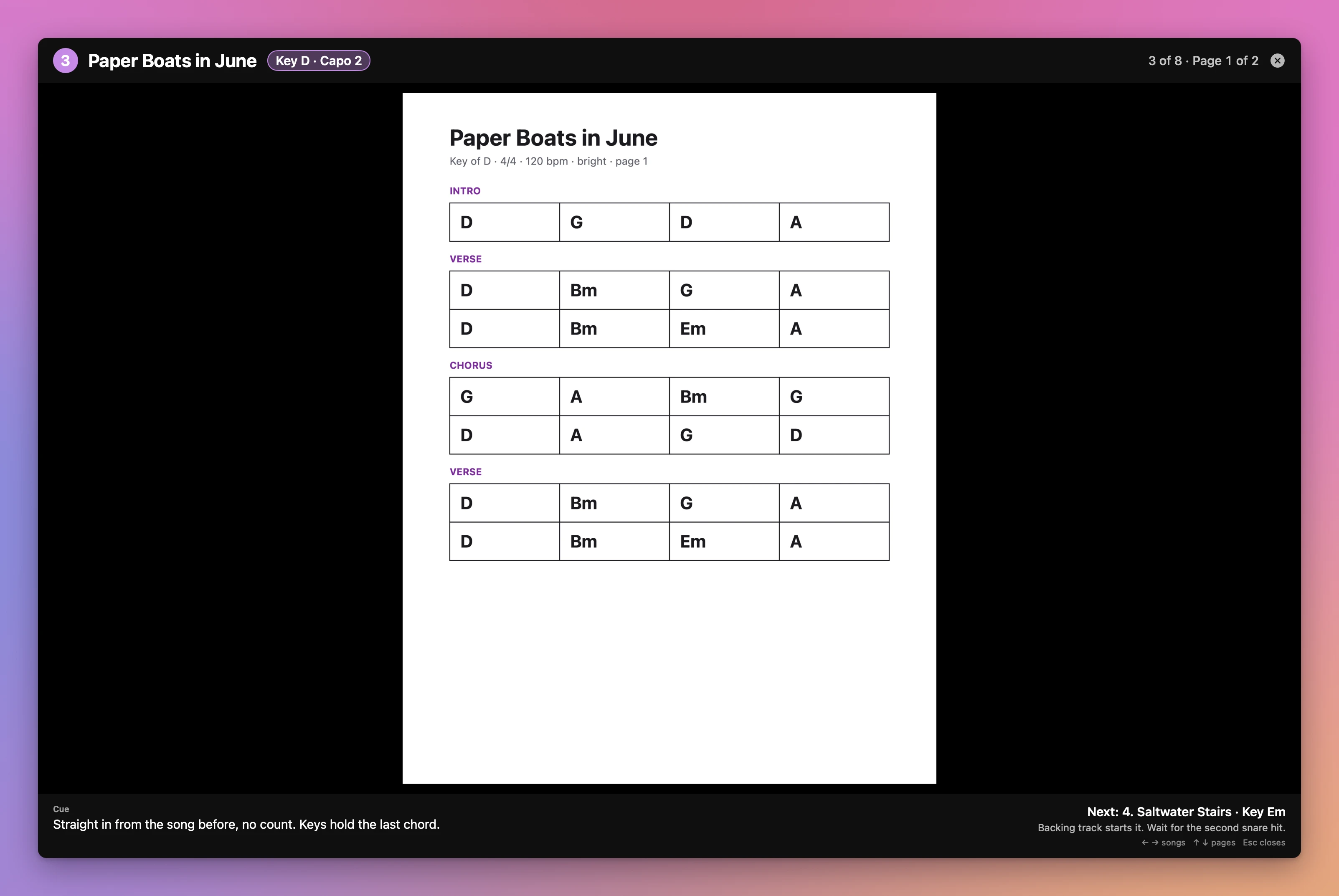
Rehearse fills the screen with the chart, the song’s number, key and capo at the top, its cue and the next song at the bottom. The left and right arrows move between songs, up and down between the pages of a chart, Escape closes it.
Missing charts, caught before the show
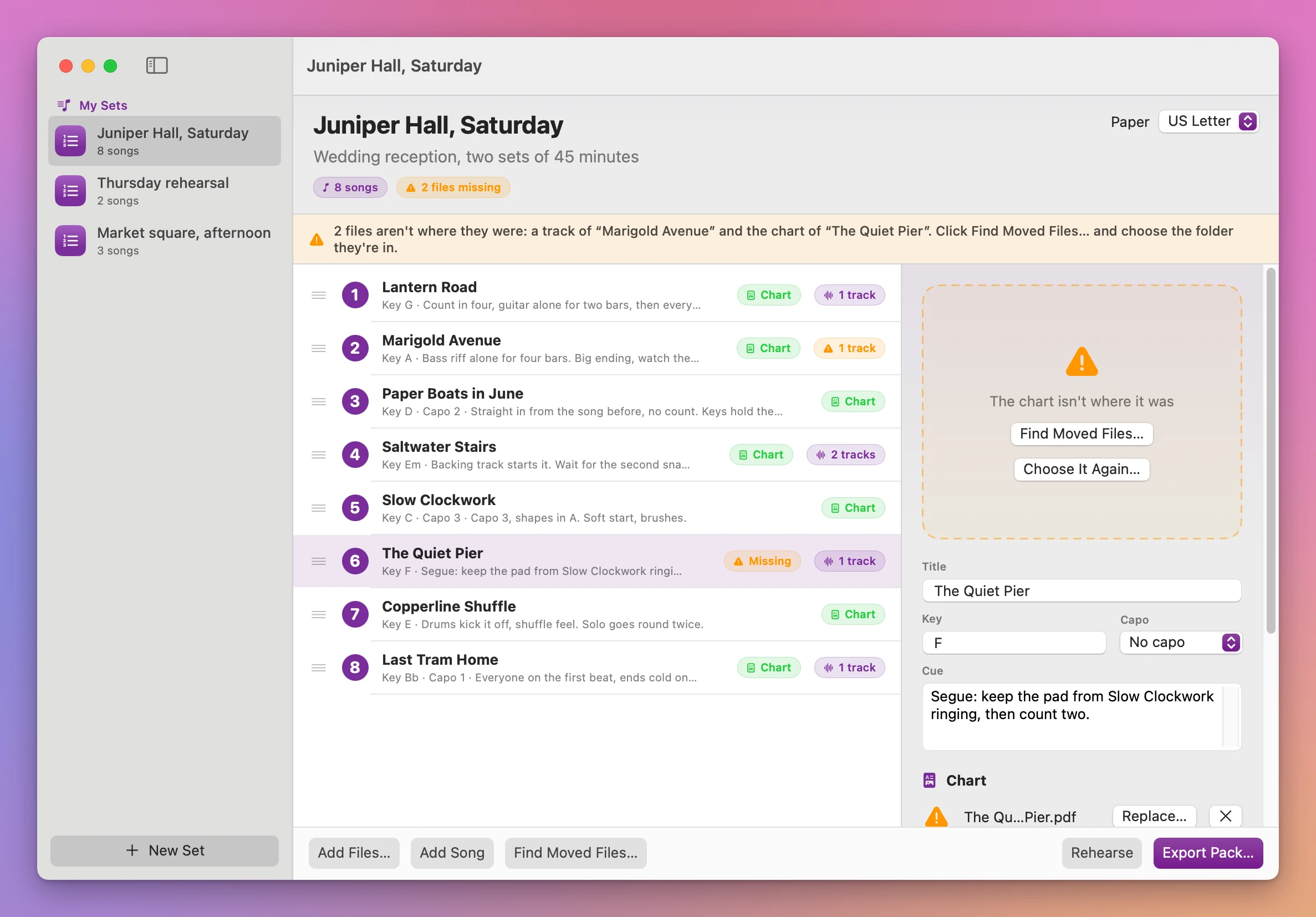
Every time you come back to the app, it looks for each chart and track again. A file you moved to another folder on the same disk is found again by itself. One that’s gone shows an orange Missing pill on its song, and the line under the set’s name says which file it is. Find Moved Files… looks for them in a folder you choose.
Why not do it by hand
Preview can combine PDFs: open the first chart, show the thumbnails, and drag the other PDFs into the sidebar in the order you want. Finder can rename the tracks with numbers in front. Both work, and for a set that never changes they’re enough.
The trouble starts with the second change. Preview gives you one big PDF with no numbers, no keys and no cues on the pages, and moving song 6 to second place means dragging pages around again, chart by chart. Unless you duplicated the first chart before you started, Preview saves the combined pages into it. The renamed tracks need renaming again. The cues live in a note nobody else in the band sees. And nothing tells you that a chart moved to another folder until you open the PDF at the gig.
| Preview, Finder and a notes app | Setlist Pack | |
|---|---|---|
| Change the running order | Drag pages again, rename tracks again | Drag the song, export again |
| Song number, key and cue on each chart | Not on the page | At the top of every page |
| What comes next | Turn the page and look | At the bottom of every page, with its cue |
| Jump to a song on a tablet | Scroll | One bookmark per song |
| Tracks in running order | Rename each file by hand | Numbered copies in the pack |
| A chart that moved or disappeared | Found at the gig | Flagged in the app, found again if it moved |
| Your original files | The first chart is changed unless you duplicated it | Never changed, moved or renamed |
Dedicated gig apps for tablets keep a set inside their own library. Setlist Pack makes a PDF and a folder that anyone can open, so the rest of the band doesn’t need an app.
What it doesn’t do
- It doesn’t play the backing tracks or sync them to a click. Use your playback app with the numbered folder.
- It doesn’t transpose a chart or read the chords in it. The key you type is a note on the page.
- It doesn’t find or download charts. It works with files you already have and are allowed to use.
- It reads PDFs and pictures (PNG, JPEG, HEIC, TIFF), not Word, Pages or music notation files. Save those as PDF first.
- It doesn’t sync sets between band members’ Macs. Send them the pack.
- A locked PDF can’t be read. Save an unlocked copy and choose that one.
Questions
Are my charts and tracks changed?
No. The app reads them and makes copies in the pack. The originals stay where they are, with their names.
Does anything get uploaded?
No. Your sets and files stay on your Mac. The app goes online only to check for updates.
What happens to a song without a chart?
It keeps its number and gets a page in the PDF with its cue, so a medley or a song everyone knows by heart still fits the order.
Can I keep more than one set?
Yes. Each set is in the list on the left: Saturday’s wedding, Thursday’s rehearsal, the acoustic afternoon. Duplicate Set copies one, to start next week’s from this week’s.
What paper size is the PDF?
US Letter or A4, from the Paper menu at the top of the set. Charts are scaled to fit the page.
Buy Setlist Pack
$19 plus tax where it applies, paid once. Download the app from the purchase page or your Creem receipt.
Unzip the download and drag the app to Applications. It runs on macOS 14 Sonoma or later on Apple silicon and Intel Macs. I sign the app with my Apple Developer ID, and Apple notarizes it.
The app checks for updates once a day. When a new version is ready, click Install and Relaunch. To check anytime, choose Setlist Pack → Check for Updates….
Setlist Pack isn’t made by, affiliated with or endorsed by Apple or any maker of music software or instruments.