
An app by Flavio
Stock License Binder
Keep stock music, footage and photo licenses with the asset, the site, the date and the videos that used them. When a claim comes in, search for the track or the video and export the evidence for that one asset, in a folder and a ZIP.
Buy Stock License Binder · $19One-time purchase. Plus tax where it applies.
macOS 14 or later · Apple silicon and Intel
Latest version 1.0.1, released November 22, 2026
In March you bought a track called Morning Coffee Groove for your vlog intro. In November a copyright claim lands on episode 14. The track was licensed, and the dispute form wants the license and the order number.
The license PDF is in Downloads, maybe. It’s called license (3).pdf, or LicenseCertificate_48213.pdf, next to two hundred other downloads. Searching for “Morning Coffee” finds nothing, because the file name has the track’s number and not its name. The receipt is in an email from a site you haven’t logged into since spring.
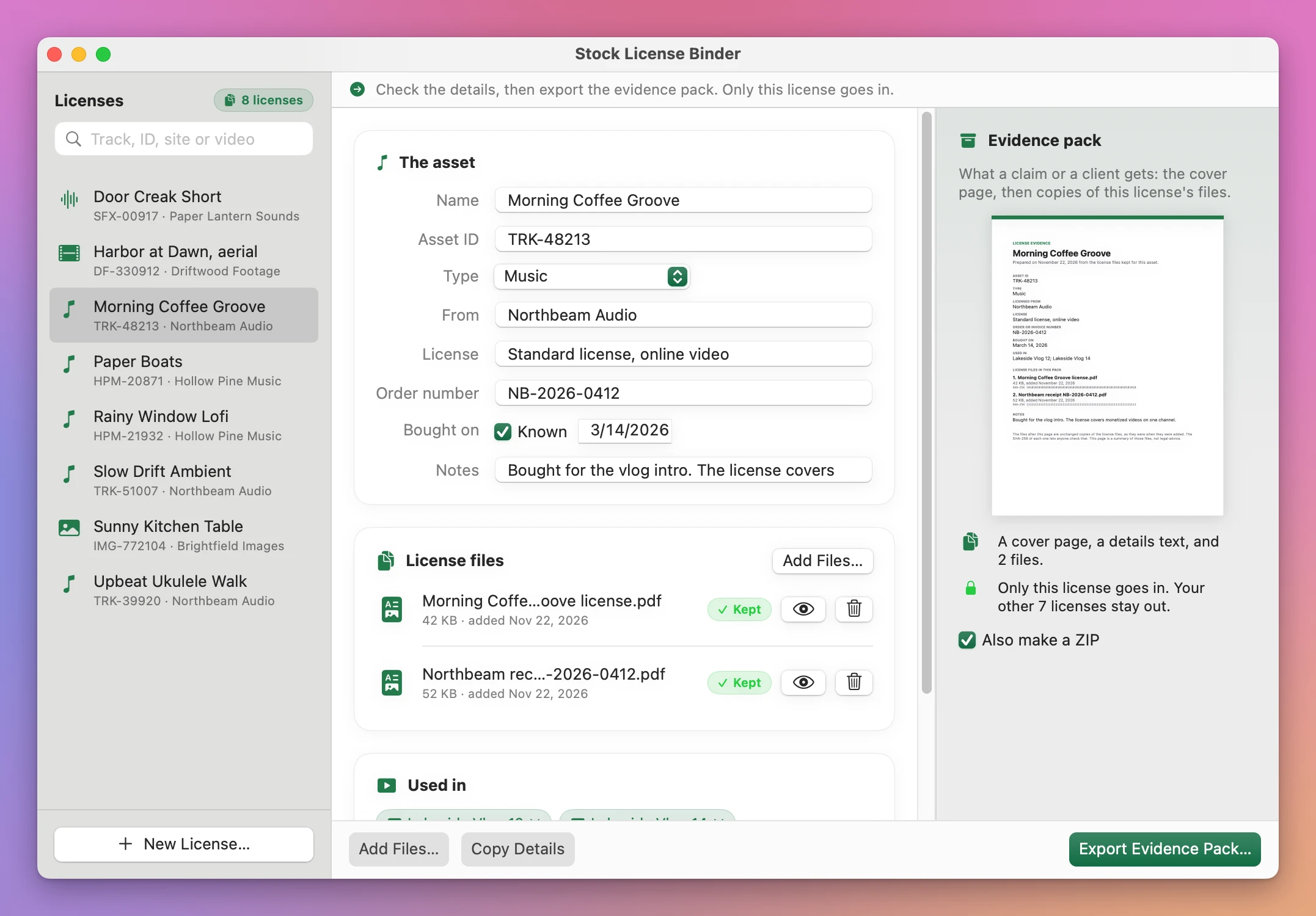
Stock License Binder keeps each license file with the track it’s for, its ID, the site, the day you bought it and the videos that used it. Type “vlog 14” and the tracks of that episode show up. Click Export Evidence Pack… and you get a folder and a ZIP with a cover page that lists the license, plus the license files of that one track, ready to attach to the dispute or send to a client.
Watch a 30-second demo of Stock License Binder:
Who it’s for
- YouTubers who use stock music. A Content ID claim shows up on a video from eight months ago. You need the license for that track and its order number now, not after an hour in Downloads.
- Freelance video editors. A client asks for proof that the music and footage in their promo are licensed, at delivery or a year later. You send the pack for the assets in their video, and no other client’s licenses go with it.
- Small video teams and agencies. Three people buy tracks and clips on different accounts. Every license goes in one library with the campaign it was bought for, so anyone can find it.
- Wedding and event videographers. A couple’s film gets muted on a platform. You show the song was licensed for that film, with the receipt.
- Course creators. The same five tracks play in forty lessons. When a site changes its terms, a search by track lists every lesson it’s in.
From a download to the proof
- Click Add License Files… and choose the license PDF and the receipt, or drag them onto the window. The app keeps a copy of each. Your files are never changed.
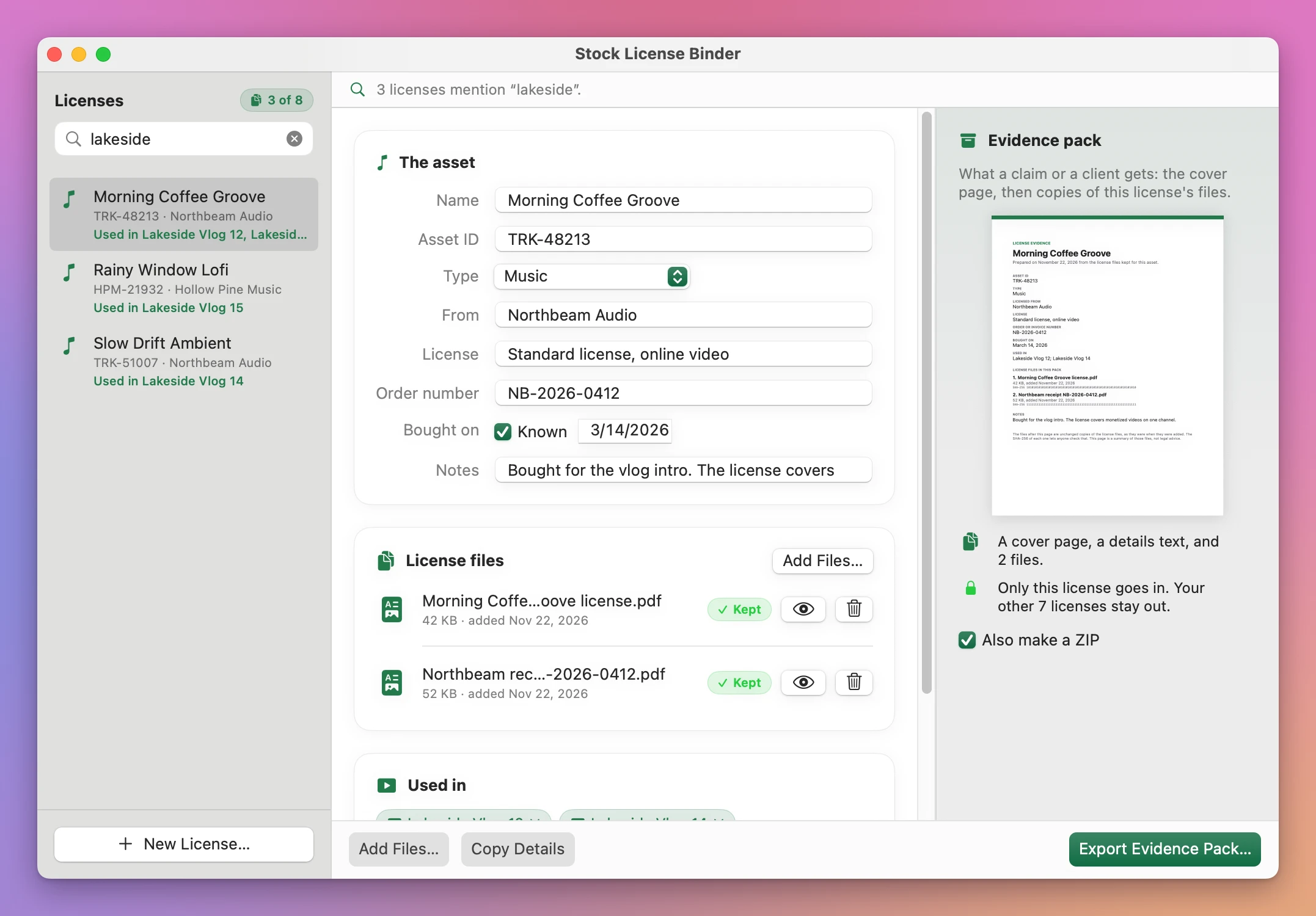
- Check the name, the asset ID and the day, which the app guesses from the file name. Add the site, the license and the order number.
- Under Used in, add each video that uses the track.
- When a claim comes in, type the track’s name, its ID or the video’s name in the search field.
- Click Export Evidence Pack… and choose a folder.
What you get
Every license in one place, with the videos that used it
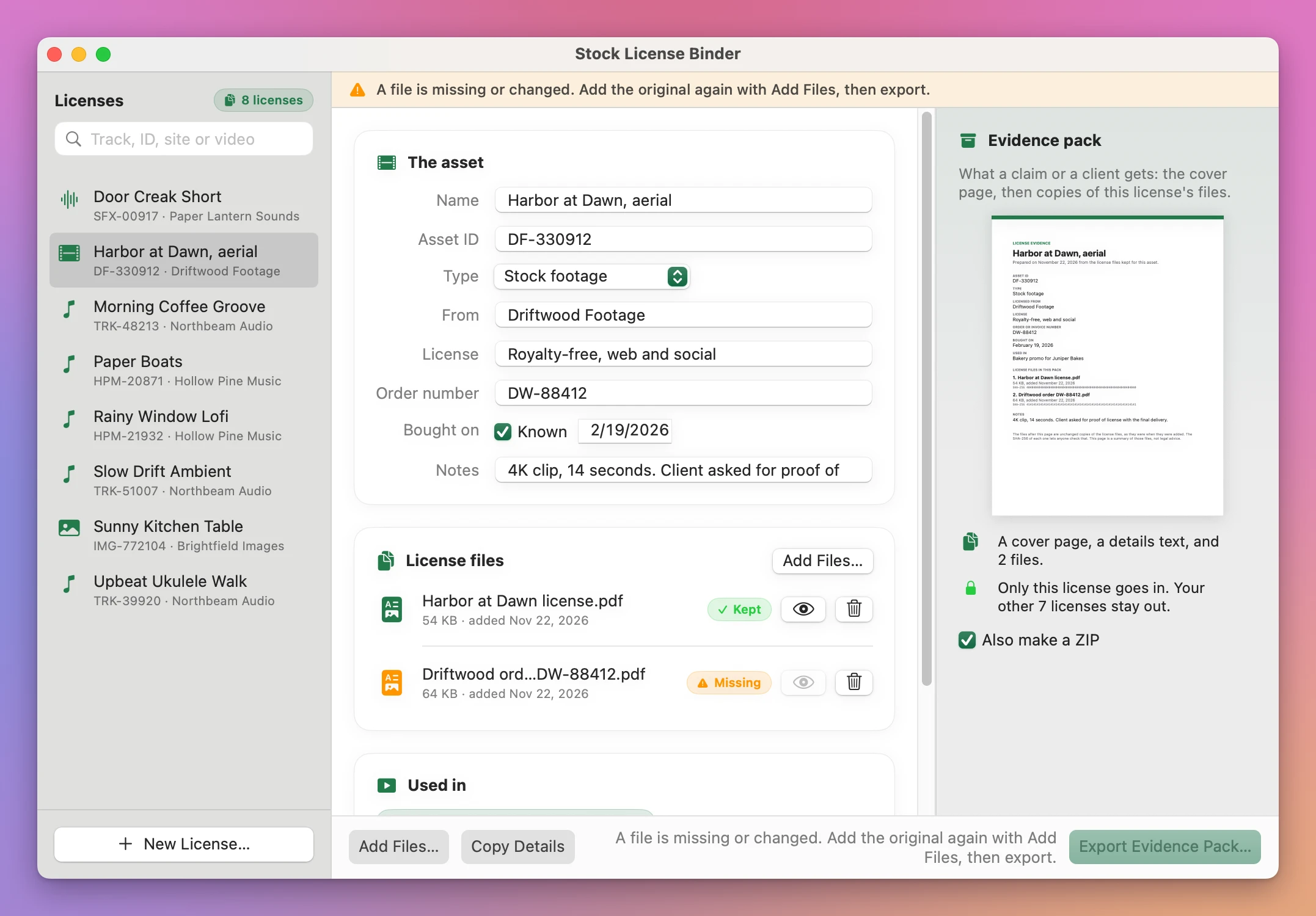
Each license holds the asset’s name, its ID on the site, its type (music, sound effect, stock footage, photo, template, font), where it came from, the license’s name, the order or invoice number, the day you bought it, your notes, and its files: PDFs, receipts, screenshots of the license page, any file you have.
The app reads the file name to start the details for you. morning_coffee_groove_license_TRK-48213_2026-03-14.pdf becomes Morning Coffee Groove, TRK-48213, March 14, 2026.
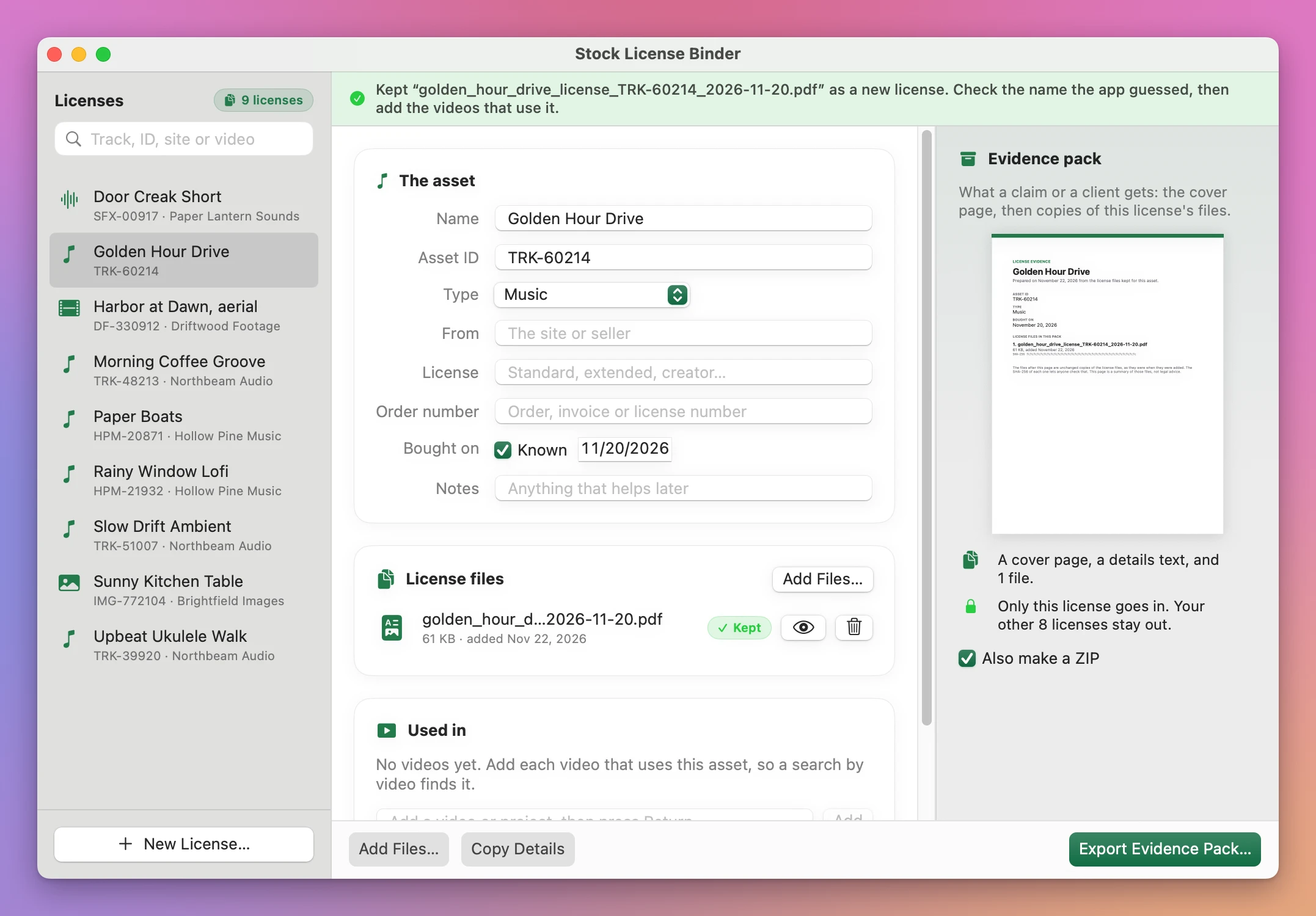
Search by track, ID, site or video
The search looks at everything: names, IDs, sites, order numbers, notes, file names and videos. When it matches a video, the list says which one.
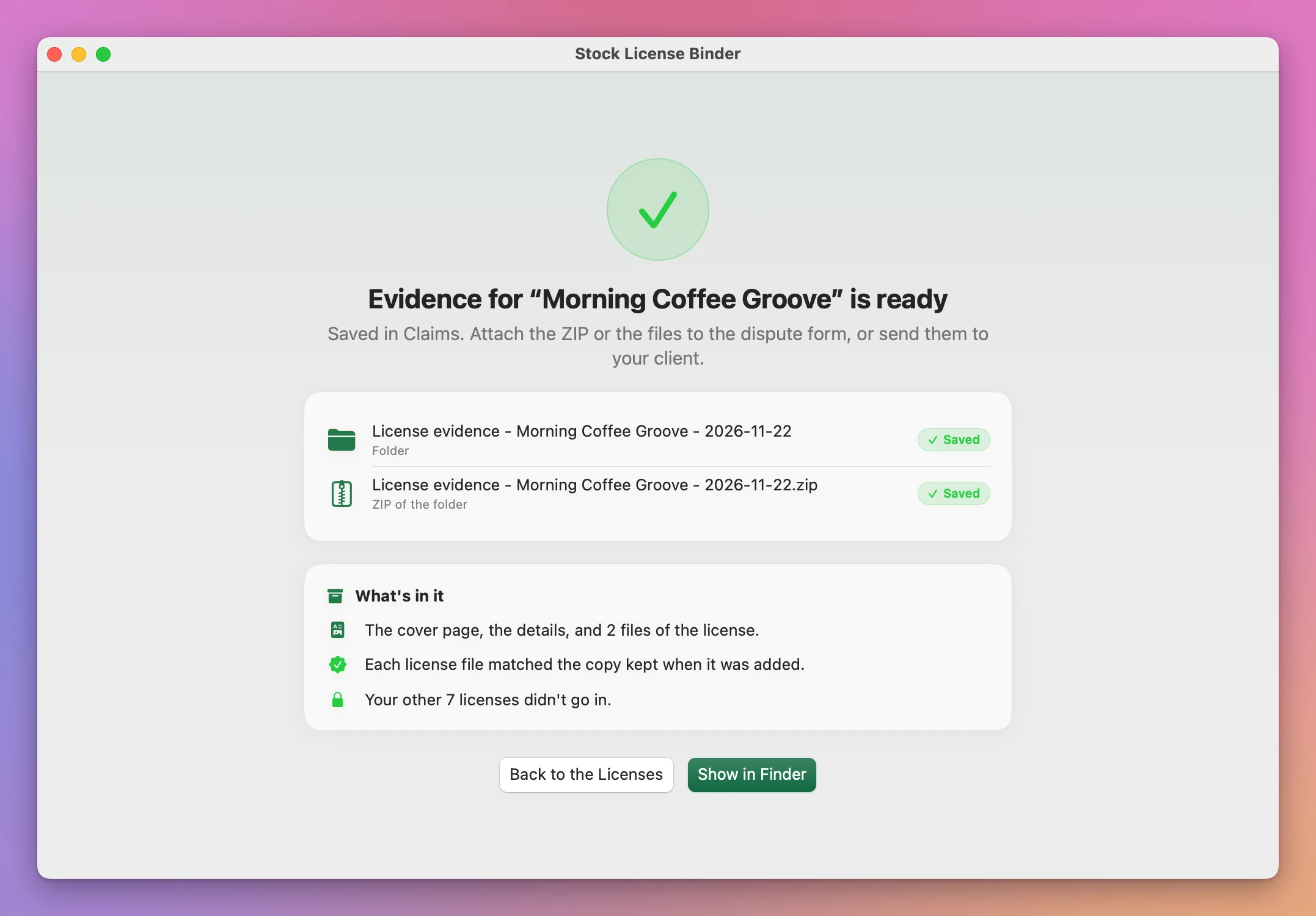
An evidence pack for one asset
Export Evidence Pack… makes a new folder named after the asset and the day, with:
Cover page.pdf, one page with the asset, its ID, the site, the license, the order number, the day it was bought, the videos that used it, and each license file with its size and SHA-256 fingerprint;Details.txt, the same facts as plain text;- copies of the license’s files, under their original names.
With Also make a ZIP ticked, there’s a ZIP of the folder next to it. Only that license goes in. Copy Details puts the same facts on the clipboard for a form that only takes text.
A copy that stays as it was
The app copies each file into its library when you add it, and notes its fingerprint. If a kept copy goes missing or changes later, the file gets an orange pill and the app won’t make a pack from it until you add the original again, which puts the copy back. Removing a file or a license asks first, and moves the copies to the Trash.
Why not do it by hand
Finder and Spotlight can search your Downloads folder. That works when the file name has the track’s name in it. Stock sites name their files license.pdf, LicenseCertificate_48213.pdf or Invoice-0412.pdf, and no file name tells you which video used it.
A folder per video with the licenses inside works for a while. Then a track goes into three videos, and you either copy the PDF three times or remember which folder has it. A spreadsheet can list the track, the ID and the videos, but it doesn’t hold the files, and nothing tells you when the PDF it points to was moved or deleted.
The stock site’s download history shows what you bought while you have the account and the site keeps it. It doesn’t know your videos.
When the claim comes in, you still build the pack yourself: find the files, copy them to a new folder, write a summary, compress it, and check you didn’t drag in another client’s license.
| Finder search | Folder per video | Spreadsheet | Stock site history | Stock License Binder | |
|---|---|---|---|---|---|
| Cost | Free | Free | Free | Free with the account | $19 once |
| Finds a license by track name | Only if the file name has it | If you know the folder | Yes | Yes | Yes |
| Finds every license of a video | No | Yes | Yes | No | Yes |
| Keeps the license files | They stay where they are | Yes, copied by hand | No | While the account lasts | Yes, a copy of each |
| Notices a missing or changed file | No | No | No | No | Yes |
| Makes a pack for one asset | By hand | By hand | By hand | Download again | One click, with a cover page |
| Works offline | Yes | Yes | Yes | No | Yes |
What it doesn’t do
- It doesn’t check your licenses with any site, or read their terms. It isn’t legal advice, and it doesn’t tell you whether a license covers a use.
- It doesn’t file a dispute or watch your channel for claims.
- It doesn’t read your editing app’s project to find the music you used. You add the videos yourself.
- It doesn’t download licenses from your stock accounts. You add the files you have.
- It doesn’t write credits or attribution text.
- It doesn’t sync between Macs. The library is a folder on this Mac, so back it up with your other files.
Questions
Does it change my files?
No. The app copies each file into its library and only reads the original. Exporting makes new files in the folder you pick.
Does it upload anything?
No. Your licenses stay on your Mac. The app connects to the internet only to check for updates.
Where are my licenses kept?
In a library folder in your user Library. File → Show Library in Finder opens it, so you can see it and back it up.
What files can I add?
Any file: PDFs, receipts saved as PDF, screenshots, images, saved web pages, emails. Files larger than 200 MB, empty files and folders are skipped, with a sentence that says why.
What it needs
Stock License Binder runs on macOS 14 Sonoma or later, on Apple silicon and Intel Macs.
Buy Stock License Binder
$19 plus tax where it applies, paid once.
Download the app from the order page or your Creem receipt, unzip it and move it to Applications. I sign the app with my Apple Developer ID, and Apple notarizes the download.
The app checks for updates once a day. When a new version is ready, click Install and Relaunch. To check anytime, choose Stock License Binder → Check for Updates….
Stock License Binder is an independent app. It’s not made by, affiliated with or endorsed by Apple, YouTube, Google, Meta, TikTok, Vimeo or any stock music, footage or photo site.