
Forex and stock market hours in your time zone on a Mac
By Flavio
The Mac's World Clock tells you the time in New York, not whether the market there is open. Here's how to work out market hours in your own time, and how to keep the sessions, overlaps and early closes in the menu bar.
You live in Europe or Asia and want to know when the New York stock market opens in your time, or when the London and New York forex sessions overlap.
The short answer: take the exchange’s hours in its own time zone and convert them to yours. The NYSE opens at 09:30 New York time, which is 15:30 in Rome for most of the year. The catch is the weeks when one country has changed its clocks and the other hasn’t, and the days an exchange closes early or not at all.
How do I see the time in New York on my Mac?
macOS has world clocks built in. Open the Clock app and add New York, London or Tokyo, or add the World Clock widget to your desktop or Notification Center. Both are free, and both follow daylight saving time for each city.
What they show is the time in a city. To know if the market is open, you still need to know its hours and do the sum yourself:
| Exchange | Hours in its own time | In Rome (usual) |
|---|---|---|
| NYSE / Nasdaq | 09:30–16:00 New York | 15:30–22:00 |
| London Stock Exchange | 08:00–16:30 London | 09:00–17:30 |
| Tokyo Stock Exchange | 09:00–11:30 and 12:30–15:30 Tokyo | 01:00–03:30 and 04:30–07:30 in winter |
| CME equity index futures | 17:00–16:00 Chicago, Sunday evening to Friday | Around the clock, with a one-hour break |
Free market-hours websites do the sum for you in a browser tab. Some use fixed offsets, which are an hour off in the gap weeks below, and many leave out the early closes.
Why does the overlap change in March and November?
The US and Europe change their clocks on different dates. In 2026 the US moved forward on 8 March and the UK on 29 March. In autumn the UK moved back first, on 25 October, and the US a week later, on 1 November.
In those gap weeks every US open is an hour earlier for someone in Europe. The London Stock Exchange and the NYSE usually overlap for two hours, from 14:30 to 16:30 London time. In a gap week the NYSE opens at 13:30 London time, and the overlap is three hours.
What about holidays and early closes?
Every exchange publishes its own calendar, and they don’t match. The London Stock Exchange closes for UK bank holidays and shuts at 12:30 on Christmas Eve. The NYSE closes on Thanksgiving and at 13:00 New York time the day after. Tokyo and Hong Kong have a lunch break every day, and Hong Kong has half days around Lunar New Year.
A world clock has no holiday dates. You’d need each exchange’s holiday page open, or a calendar subscription for each one, and you’d still convert the early-close times yourself.
Keep it in the menu bar with Trading Session Clock
Trading Session Clock is a Mac app I made for this. It sits in the menu bar and reads like “NYSE opens in 20m” or “London closes in 14m”. It costs $19, paid once.
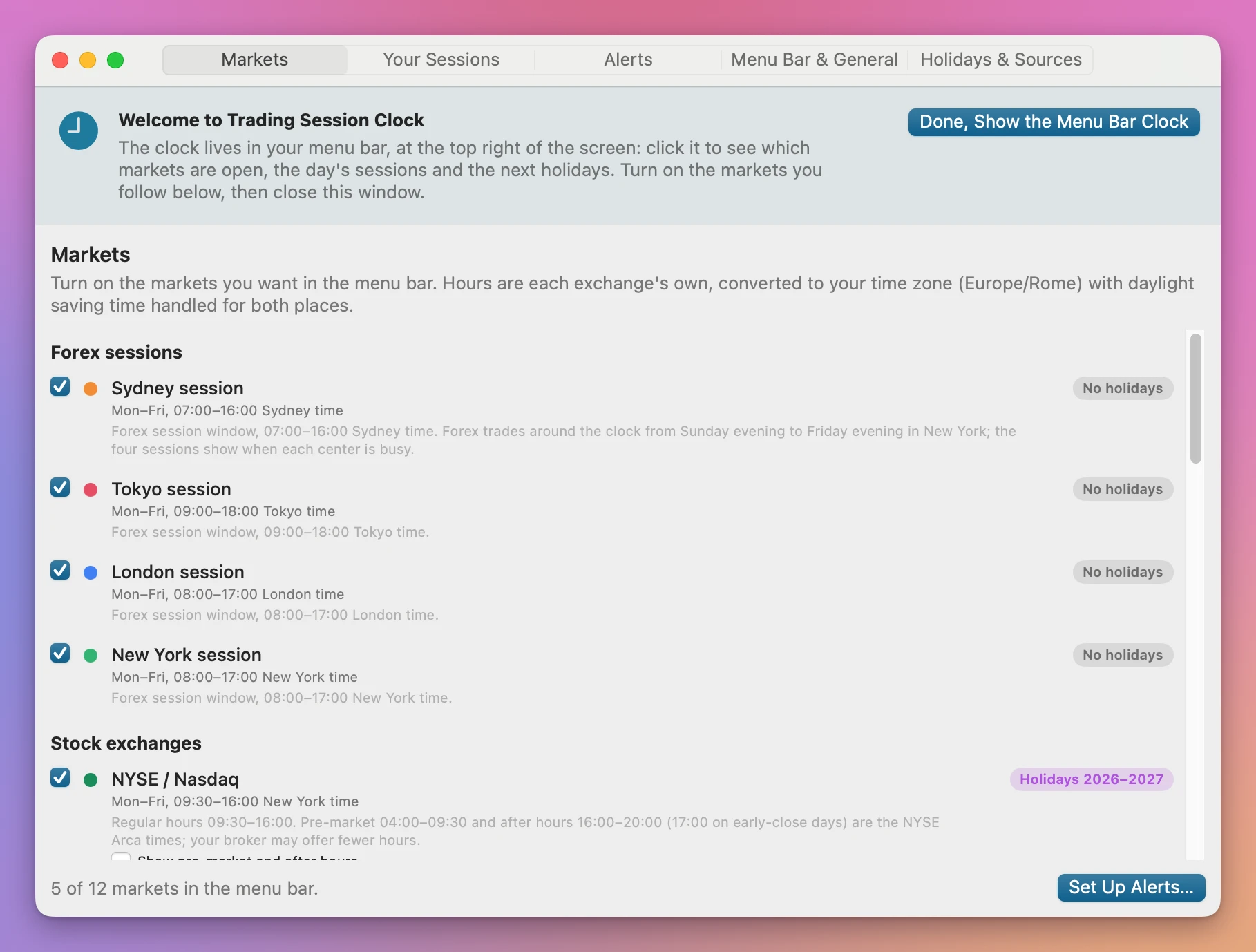
The first time it opens, the Markets tab asks you to turn on the markets you follow. The four forex sessions and NYSE / Nasdaq are on to start with. Click Done, Show the Menu Bar Clock and the clock moves to the top right of the screen. The app has no Dock icon.
Click the clock to see your day. Each market has a lane on a 24-hour bar of your own time, with a red line for now and a yellow Overlaps lane under them. The screenshots are from a test Mac set to Rome, at fixed dates.
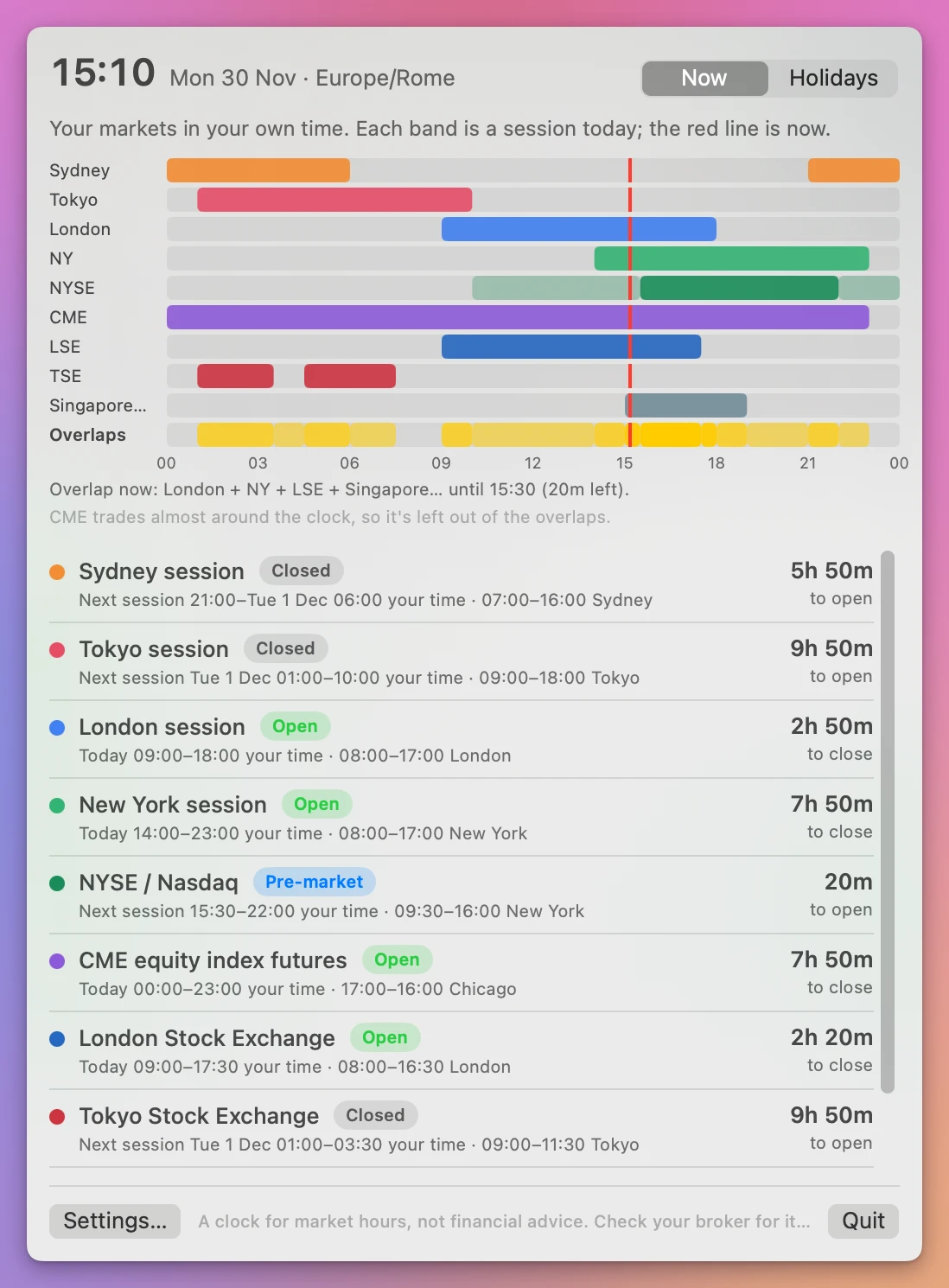
Here it’s 15:10 in Rome. NYSE / Nasdaq shows Pre-market and opens in 20 minutes, at 15:30 your time and 09:30 New York time. The Tokyo Stock Exchange row shows its morning session only, 09:00–11:30 Tokyo time, because the lunch break splits the day in two.
The day after Thanksgiving
On Friday 27 November 2026 the NYSE closes at 13:00 New York time. The app’s row says Open · early close and “Early close today: Day after Thanksgiving, 13:00 New York time”. CME’s row says 12:15 Chicago time.
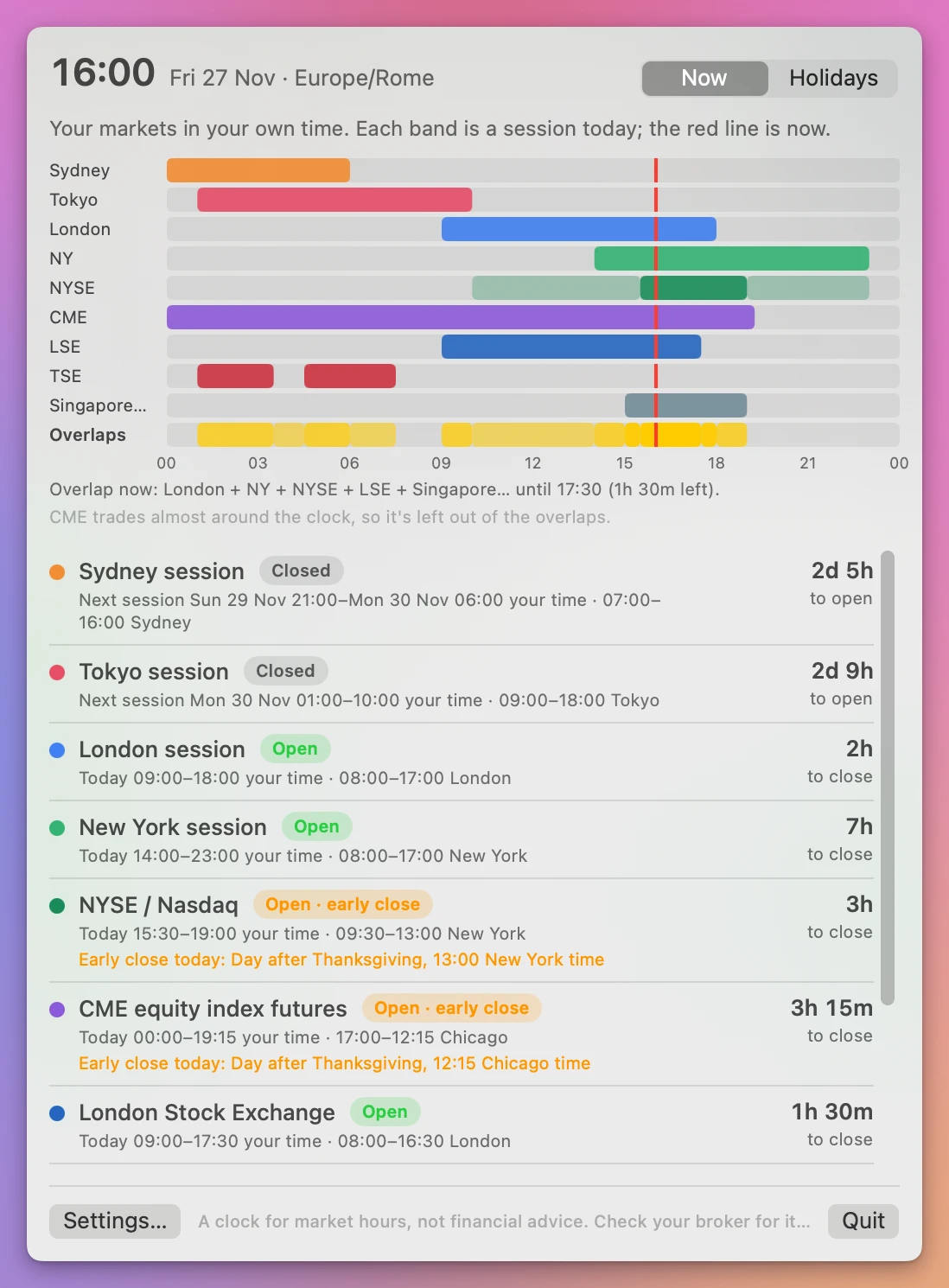
The same afternoon, seen from London at 15:00, the NYSE closes at 18:00 London time, three hours later. Once it closes, the next open is Monday 30 November at 14:30 London time, 09:30 in New York.
What’s coming up
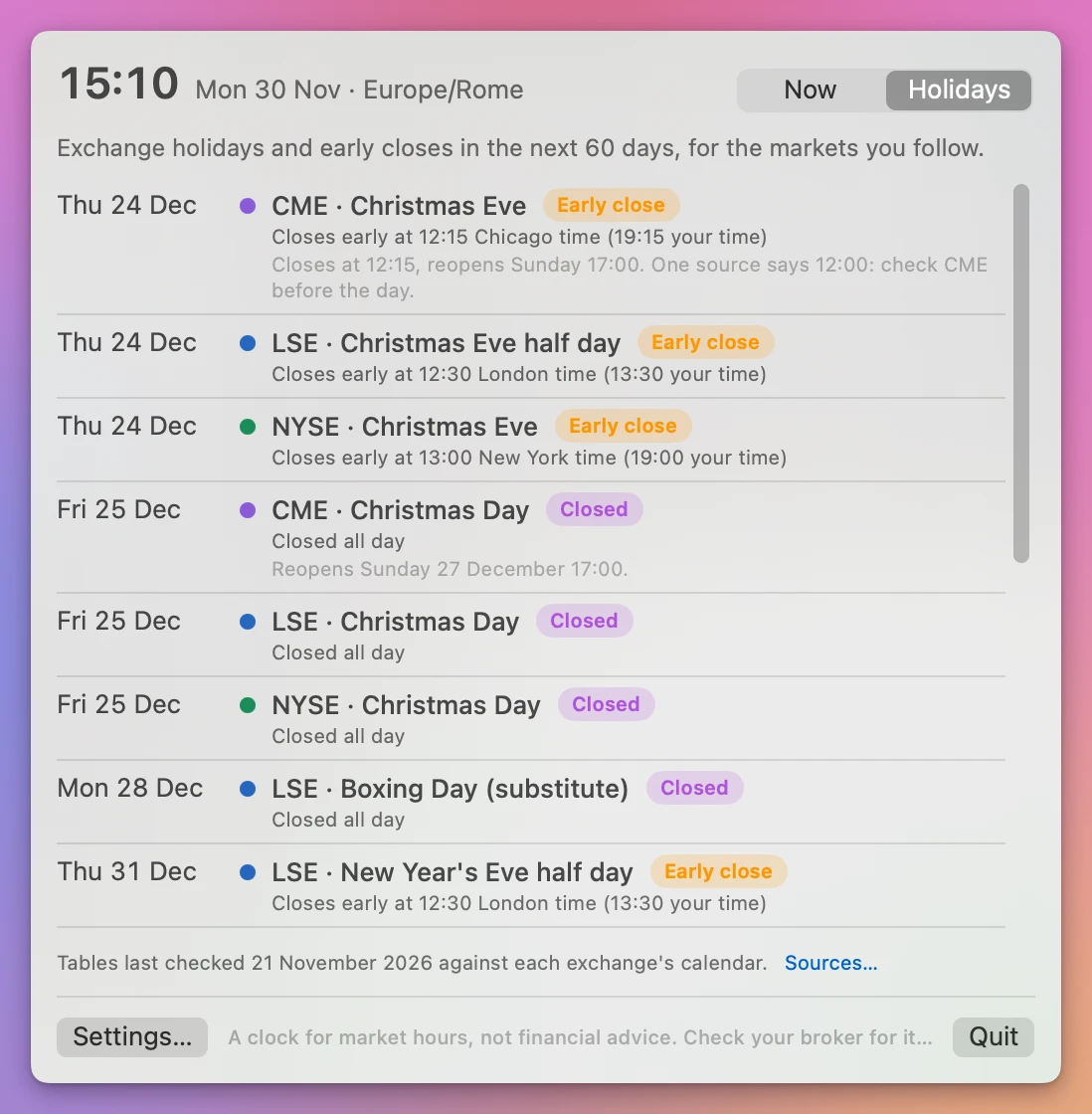
The Holidays tab lists the next 60 days for the markets you follow, with each close time in the exchange’s time and yours. The tables cover 2026 and 2027, and Settings… › Holidays & Sources lists the pages they were copied from and the date they were last checked. A few early closes weren’t published yet, and the notes say which.
In Settings… › Alerts you can get a notification or a sound a few minutes before a market opens or closes. Alerts fire only while the app runs, so turn on Launch at login in Menu Bar & General. If the Mac was asleep at that moment, the alert is skipped.
Which way should you use?
| Clock app / World Clock widget | Market-hours website | Trading Session Clock | |
|---|---|---|---|
| Time in another city | Yes | Yes | Yes |
| Is the market open now | You work it out | Yes | Yes, in the menu bar |
| Lunch breaks | No | Sometimes | Tokyo and Hong Kong |
| Holidays and early closes | No | Often missing | 2026 and 2027, with sources |
| Alert before an open | No | No | Yes, while the app runs |
| Cost | Free | Free | $19, paid once |
If you check one market once a week, the Clock app and the exchange’s holiday page are enough. If you follow several markets every day, having the status in the menu bar saves the sums.
Trading Session Clock is a clock for market hours, not financial advice. Check your broker for its own hours.
Get Trading Session Clock
A menu bar clock that shows which markets are open, when sessions overlap and the time to the next open or close, with exchange holidays and early closes.
See Trading Session Clock → · Read the docs · $19. See the app page for tax details.
More trading and investing tutorials → · All app tutorials →