
How to sort a wedding shot on several cameras by photographer
By Flavio
Two or three photographers, four or five cameras, one folder of cards. Sorting by card works until a card or a camera changes hands. Here's how to split the photos by the camera body that took them, and give each photographer their own folder.
You shot a wedding with a second shooter, maybe a third, on four or five cameras. At the end of the night every card went into one folder on your Mac, and now you need each person’s photos apart: for the credit line, for the shooter who wants their frames, or to count what you pay for.
The short answer: sort by the camera body, not by the card. Every camera writes its model and, on most cameras, its body serial number into each photo. Second Shooter Sorter reads that from every photo of the job, lets you name the photographer once per camera, and copies the photos into a folder for each of them.
The job here is made up: a small wedding of 43 photos from four cameras and a phone, shot by photographers called Maya, Theo and Ana. The screenshots show the app’s own larger made-up example, a wedding of 1,840 photos, so the numbers in them are bigger.
Can’t I just sort by card?
That’s the free way, and it’s where most people start. Copy each card into its own folder, named after whoever shot on it:
- In the Finder, make a folder for the job, like
Harbor wedding. - Put each card in the reader and drag its
DCIMfolder into a new folder inside the job:Card A,Card B, and so on. - Rename each card’s folder after the photographer:
Card AbecomesMaya,Card CbecomesTheo.
It costs a few minutes and works when every photographer used one camera and one card all day.
It breaks in the cases weddings are full of:
- Someone swaps a full card for a spare from the shared bag, and the spare goes back with someone else’s photos on it.
- The lead shoots on two bodies, so their photos are on two cards that look like two people.
- An assistant borrows a camera for the first dance, and those frames sit on the owner’s card.
- The phone photos come from a shared folder, with no card at all.
The card tells you where a photo was stored. The camera body tells you which camera took it, and that’s what follows the photographer.
How does a camera say which body took a photo?
Inside each photo there’s a block of details the camera writes: the make and model, the time by the camera’s clock, the exposure, and on most cameras the body serial number, a number unique to that camera. Two cameras of the same model have different serial numbers, so they can be told apart even if they write the same file names.
Phones are the exception: most don’t write a serial number, so two phones of the same model look like one camera.
Sort the job with Second Shooter Sorter
Second Shooter Sorter is a Mac app that does the grouping for you. It costs $19, paid once.
Copy every card into one folder, in any layout. Then click Choose the Job Folder… and pick it, or drag the folder onto the window.
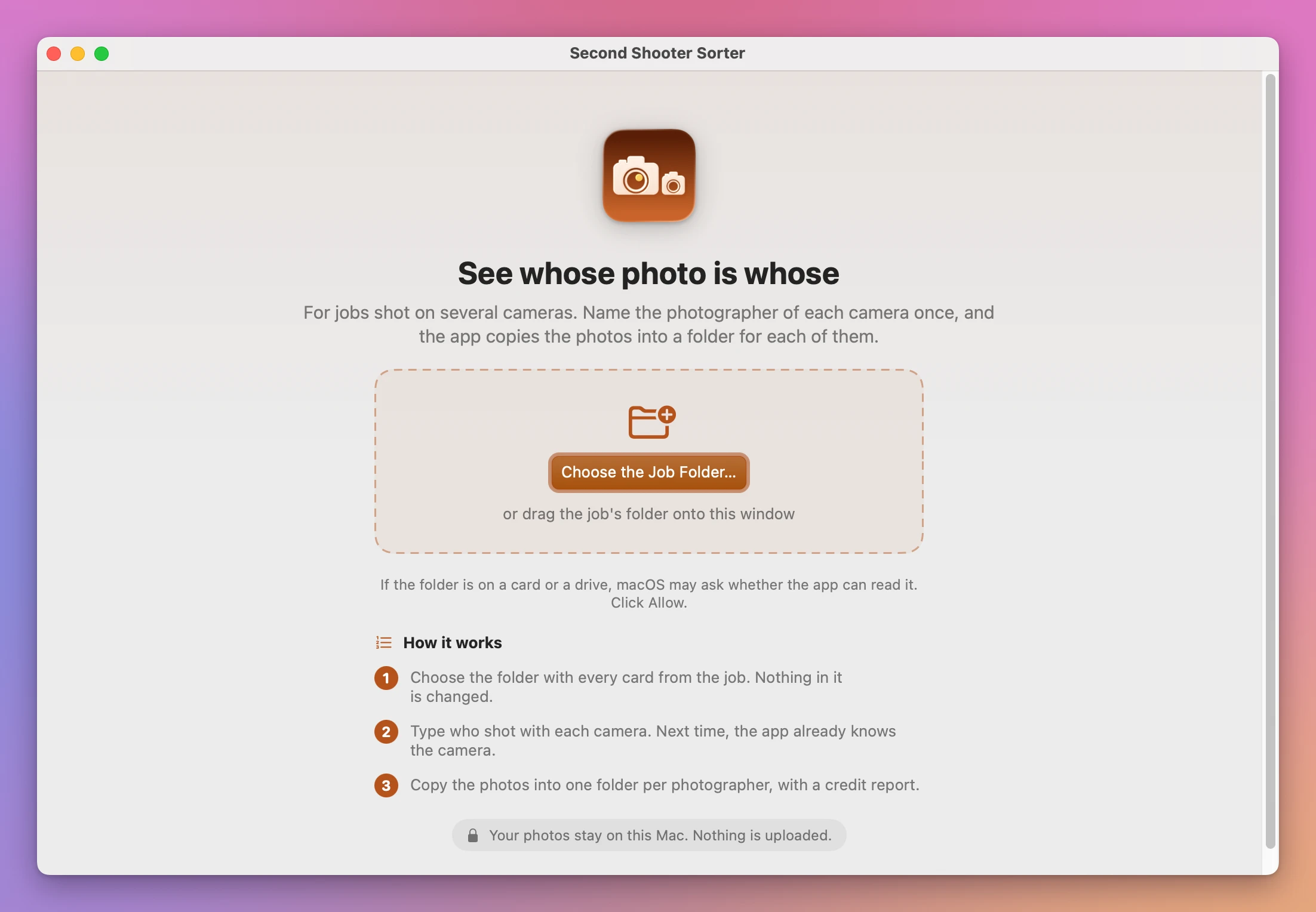
The app reads the camera details of every JPEG, HEIC, TIFF and raw photo in the folder and its subfolders, without changing anything. Here, 43 photos from five cameras took a moment. It also noted one broken file it couldn’t read and two files that aren’t photos.
The Cameras tab shows a card for each body: the model, the serial number, how many photos it took, its first and last photo of the day, and five thumbnails. Type the photographer under each camera and press Return. When the photos already carry a name in their Creator field, a button like Use “Theo Park” fills it in.
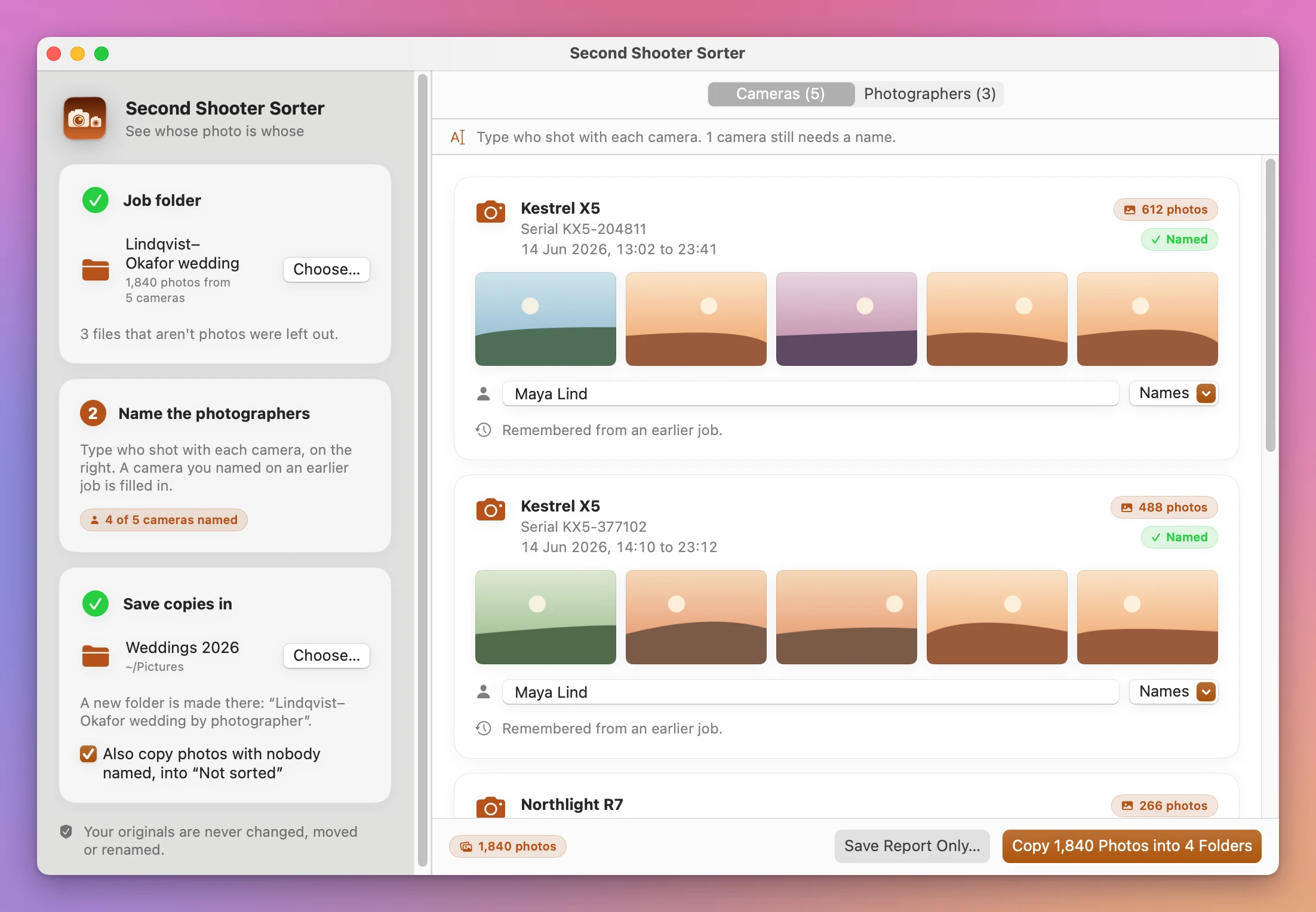
Give two bodies the same name and they go to the same photographer. The names are remembered by serial number, so the next wedding opens with your cameras already named.
Check what needs a look
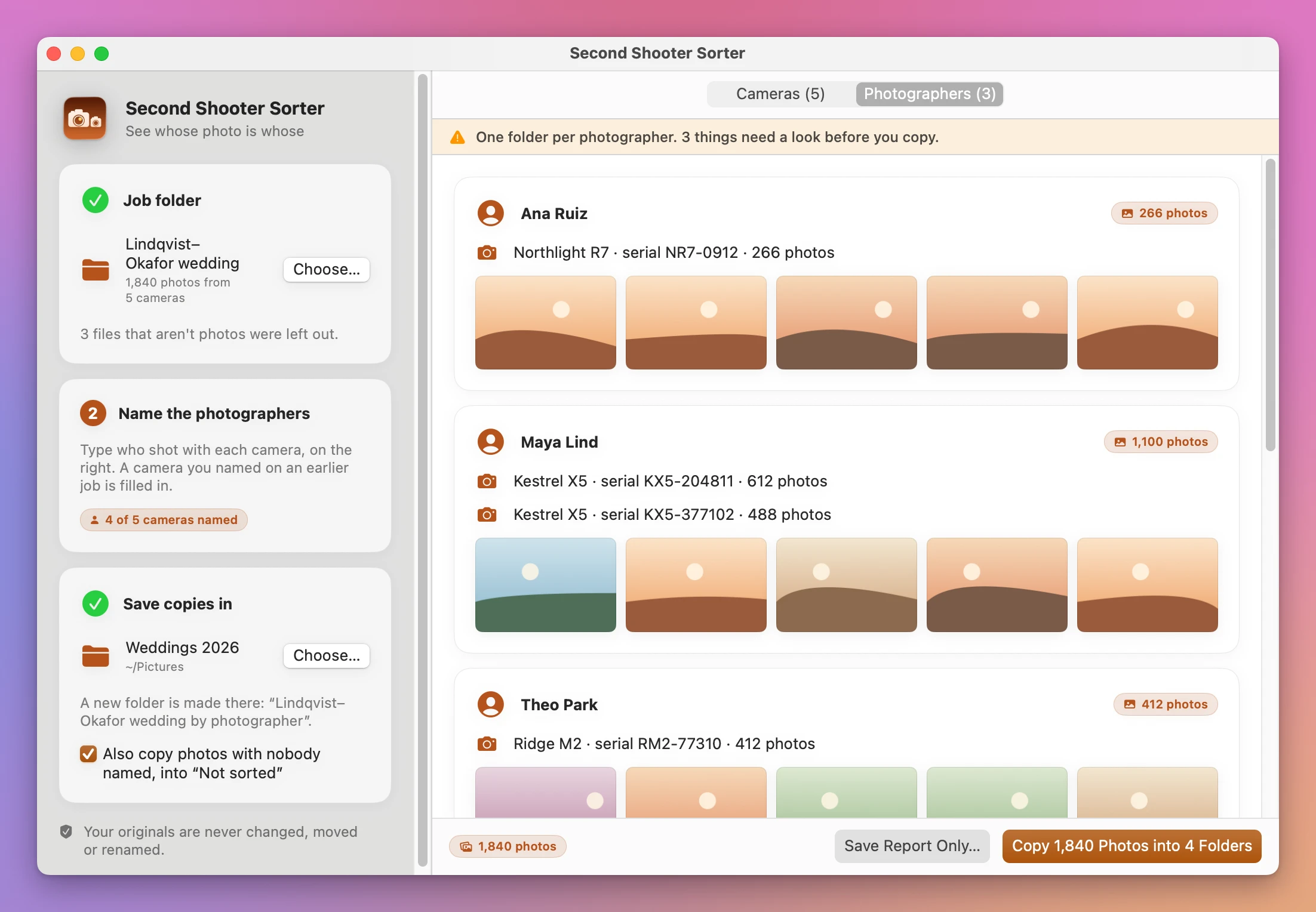
Before you copy, open the Photographers tab. It shows each photographer with their cameras and photo count, then three lists:
- cameras nobody has named yet,
- photos with no serial number, grouped by model (the phone),
- photos whose Creator field names someone other than the camera’s photographer. Here, two frames from Theo’s camera said “Ana Ruiz”: she’d borrowed it.
Copy the photos into a folder per photographer
The copies go next to the job folder unless you pick another place. Click Copy 43 Photos into 3 Folders (your numbers will differ).
The app makes a new folder called Harbor wedding by photographer, with a folder for Maya, one for Theo and, because the box was ticked, Not sorted for the cameras nobody named. Maya’s two bodies both wrote KX5_0001.JPG, so the second copy became KX5_0001 (2).JPG. Nothing was overwritten, and nothing in the job folder changed.
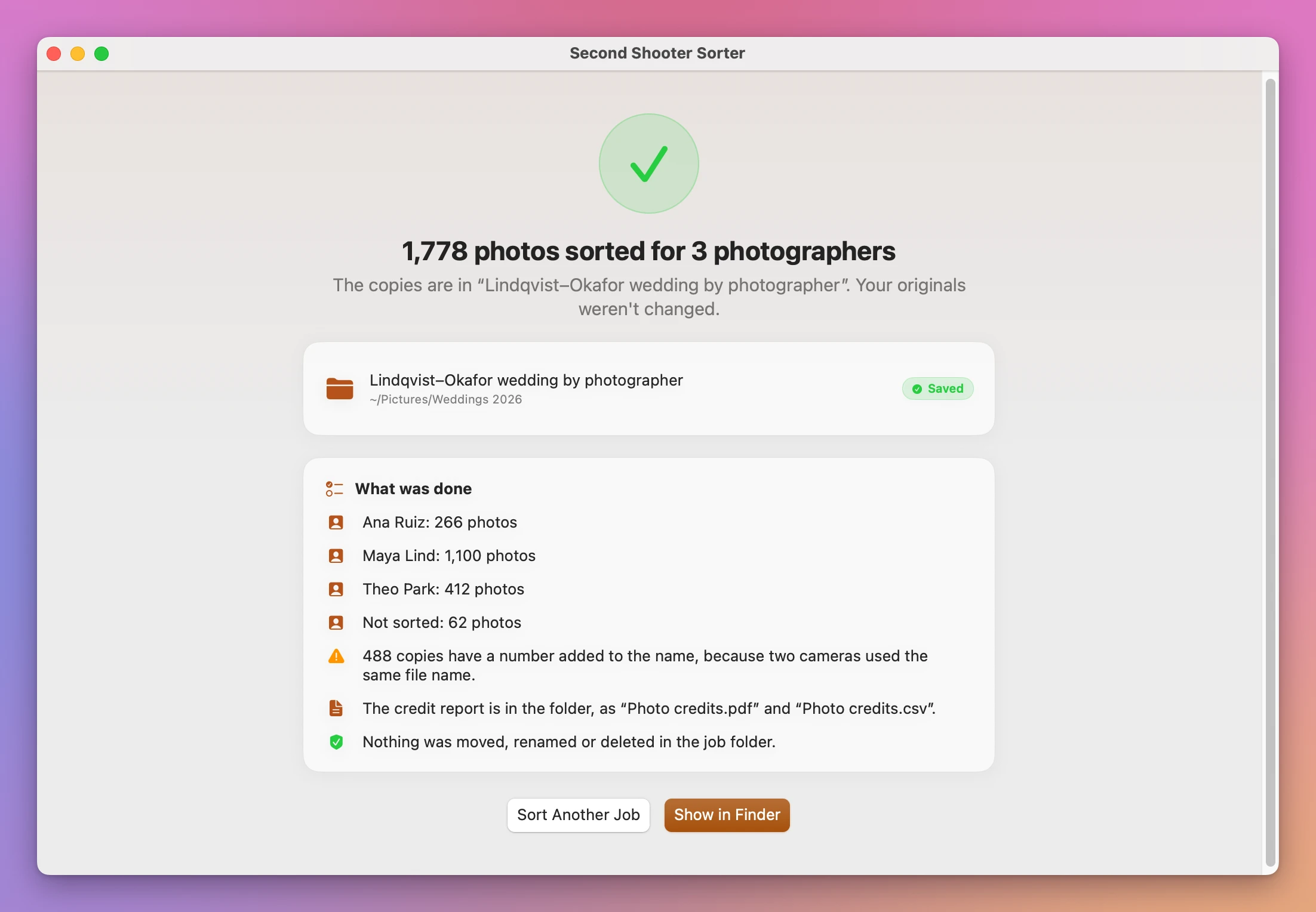
The same folder gets Photo credits.pdf and Photo credits.csv: each photographer’s cameras, serial numbers, counts and times, and one row per photo.
| Sort by card folder | Second Shooter Sorter | |
|---|---|---|
| A photographer on two bodies | Two folders to merge by hand | One photographer, both bodies |
| A card or camera that changed hands | Photos land with the wrong person | Follows the camera body |
| Two bodies of the same model | Only the card tells them apart | Kept apart by serial number |
| Phone photos | Wherever you put them | One group per model, flagged |
| A credit list | Typed by hand | PDF and CSV |
| Cost | Free | $19, paid once |
The app doesn’t fix camera clocks, rename files or write anything into the photos. If two cameras disagree about the time, the times you see are each camera’s own.
Get Second Shooter Sorter
Choose a job shot on several cameras. The app groups the photos by camera body serial number, you name the photographer once per camera (remembered for the next job), and it copies the photos into one folder per photographer, never overwriting, with a PDF and CSV credit report. It flags cameras with nobody named, photos with no serial number and Creator fields that name someone else. Your originals are never changed.
See Second Shooter Sorter → · Read the docs · $19. See the app page for tax details.
More for working photographers tutorials → · All app tutorials →