
An app by Flavio
Video Editing Quote Builder
Save your editing rates once. For each job, pick the deliverables: the length, the cutdowns, the 9:16 and 1:1 versions, captions and color. See the total as you type and save a PDF quote that lists each item, the rounds of changes included and what costs extra.
Buy Video Editing Quote Builder · $19One-time purchase. Plus tax where it applies.
macOS 14 or later · Apple silicon and Intel
Latest version 1.0.1, released November 22, 2026
A bakery asks for “a two-minute film for the spring menu”. You quote the film. By delivery it’s the film, three 15-second cutdowns for ads, a vertical and a square version of each for social, captions on all of them and a quick grade. That’s 12 video files for the price of one, plus the round of changes nobody counted.
You can work it out in a spreadsheet, if you remember every item while the client waits for an answer. Most freelance editors underprice in exactly this spot: the cutdowns, the extra shapes, the captions, the third round of notes.
Video Editing Quote Builder keeps your rates and counts the files for you. Type the length, set the cutdowns, tick 9:16 and 1:1, and the total on the right shows 8 versions at your price, not 2. Then save a clean PDF quote with each deliverable itemized, the rounds of changes included and what costs extra.
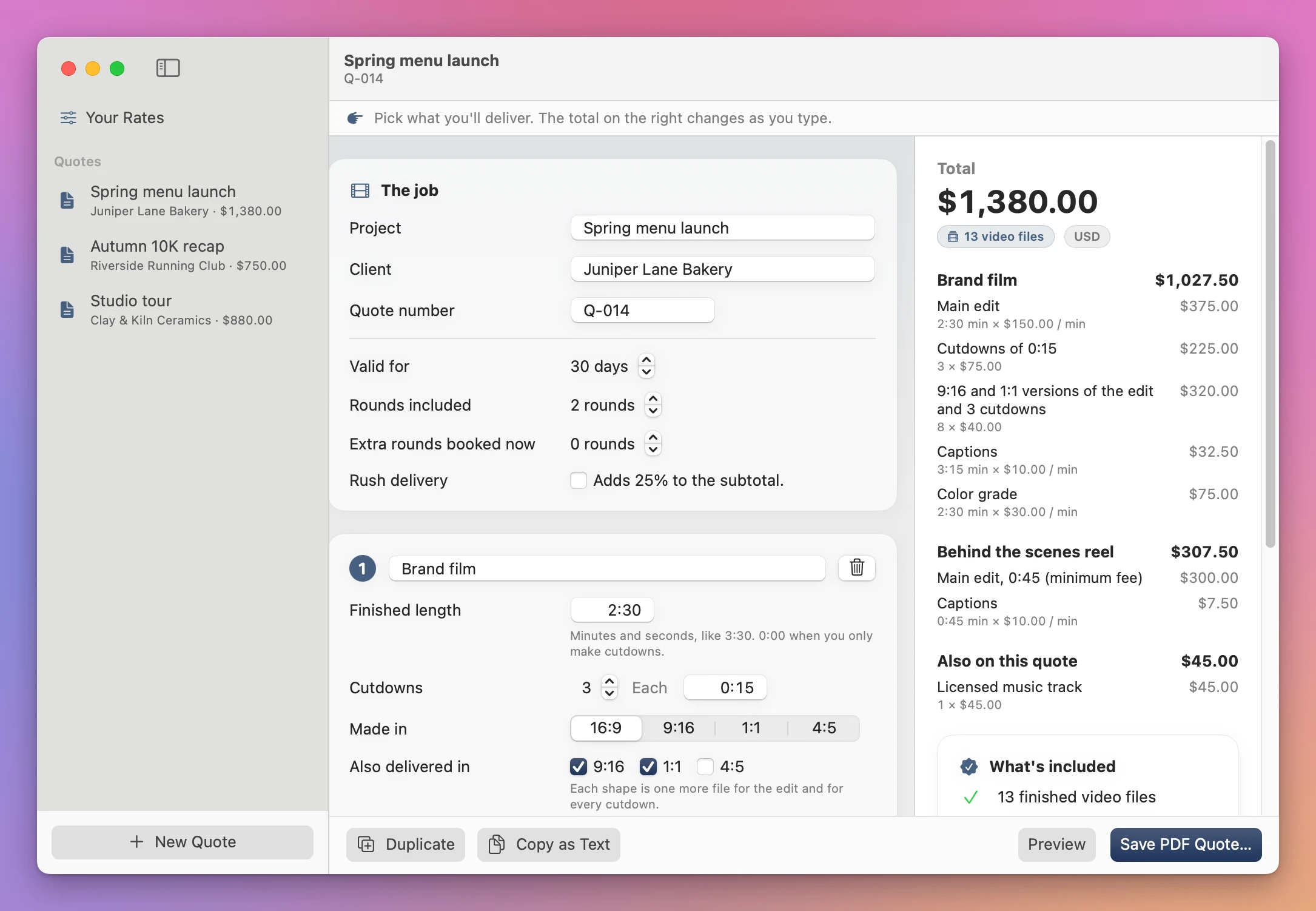
Watch a 30-second demo of Video Editing Quote Builder:
Who it’s for
- Freelance editors who quote by the job. A client sends a brief on a Friday and wants a number on Monday. You open the last similar quote, click Duplicate, change the length and the client, and the PDF is ready in five minutes.
- Editors cutting social ads. One 30-second spot becomes 15- and 6-second cutdowns in 9:16, 1:1 and 4:5. The quote lists every one of those files, so the client sees why the price isn’t the price of one spot.
- YouTube editors who work for creators. A monthly package of long videos with captions and a vertical short from each. Save the package once as a quote and duplicate it each month.
- Small video teams and solo studios. Everyone quotes from the same rates, with the same minimum, the same rush fee and the same line about extra rounds.
- Motion designers and animators who quote extra versions and rounds of changes the same way, and need the “each round after the 2 included” line on paper before the work starts.
From a brief to a PDF quote
- Click Set Your Rates the first time. Type what you charge per finished minute, the least an edit costs, each cutdown, each extra aspect ratio, captions and color per minute, each extra round of changes and the rush percentage. Pick your currency and paper size.
- Click New Quote and type the project and the client.
- For each deliverable, type the finished length, set the cutdowns and their length, pick the shape it’s made in and tick the shapes it’s also delivered in, captions and color grade.
- Add anything with its own price under Other items: a music licence, a title animation.
- Set the rounds of changes included, and tick Rush delivery for a rush job.
- Click Preview to see the page, then Save PDF Quote….
What you get
Your rates, once
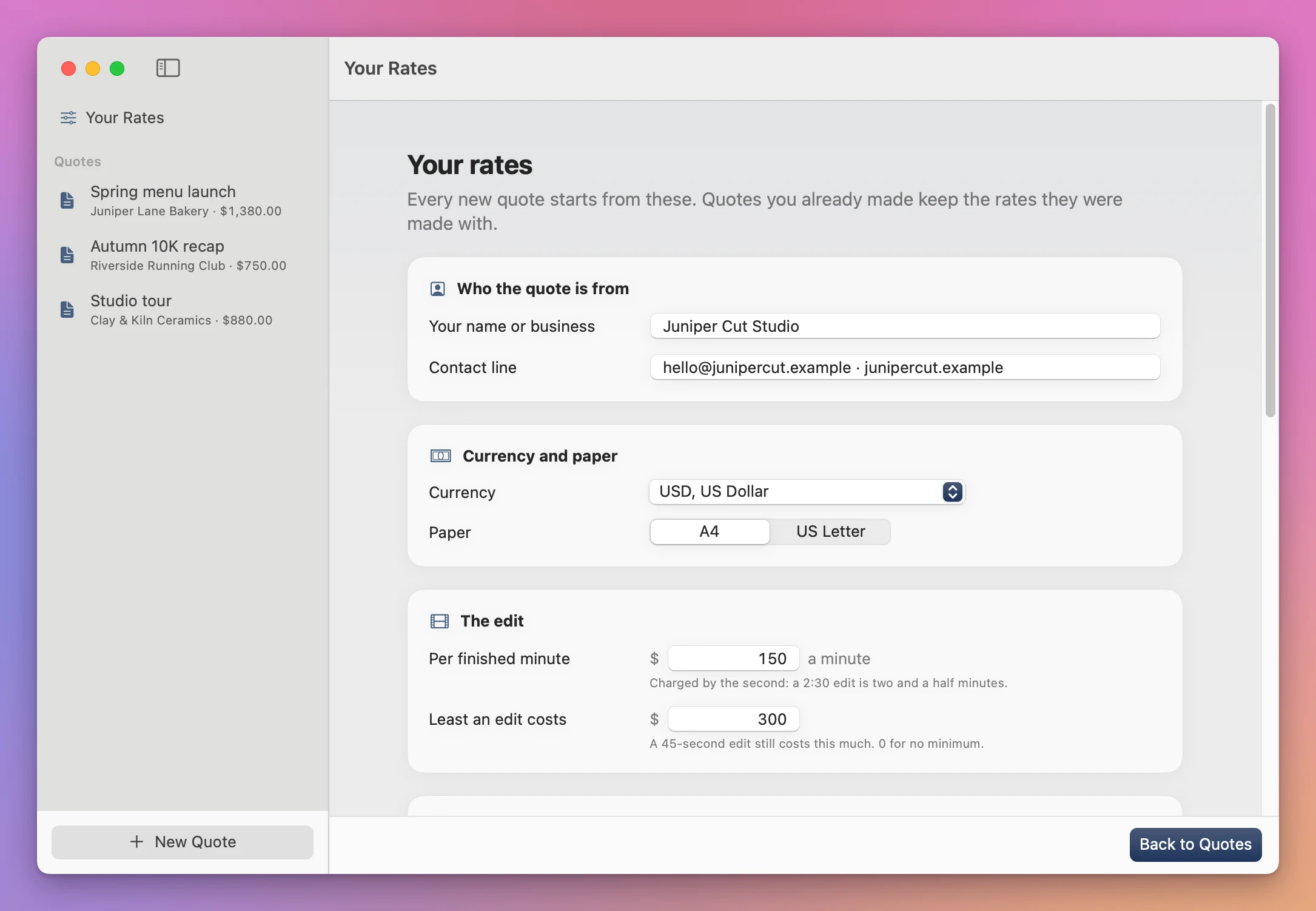
Every rate has a sentence under it that says how it’s charged: a 2:30 edit is two and a half minutes, a 45-second edit still costs the minimum, each extra aspect ratio counts once for the edit and once for every cutdown. Set a rate to 0 to leave it off. Your rates go into new quotes. A quote you already sent keeps the rates it was made with, and Use My Current Rates prices it again if you want.
A quote the client can read
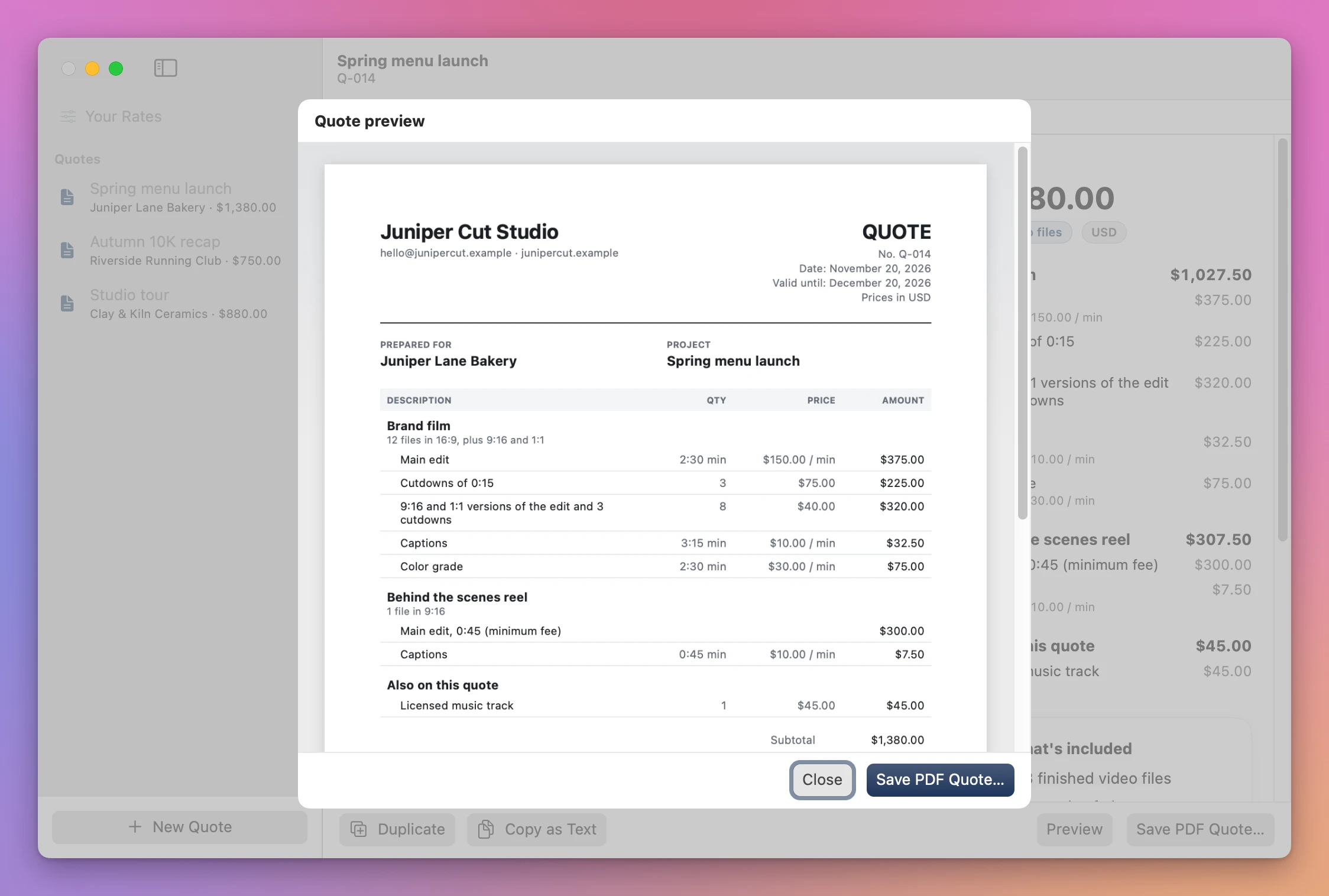
The PDF has your name and contact line, the client, the quote number, the date and the date it’s valid until. Each deliverable has its own heading with the number of files and their shapes, then its lines with the quantity, the price and the amount. Under the total, What’s included says how many files and rounds of changes the price covers, and What costs extra lists what a longer edit, another cutdown, another version, another round or a rush would cost. Your payment terms go at the bottom.
Rush jobs and extra rounds
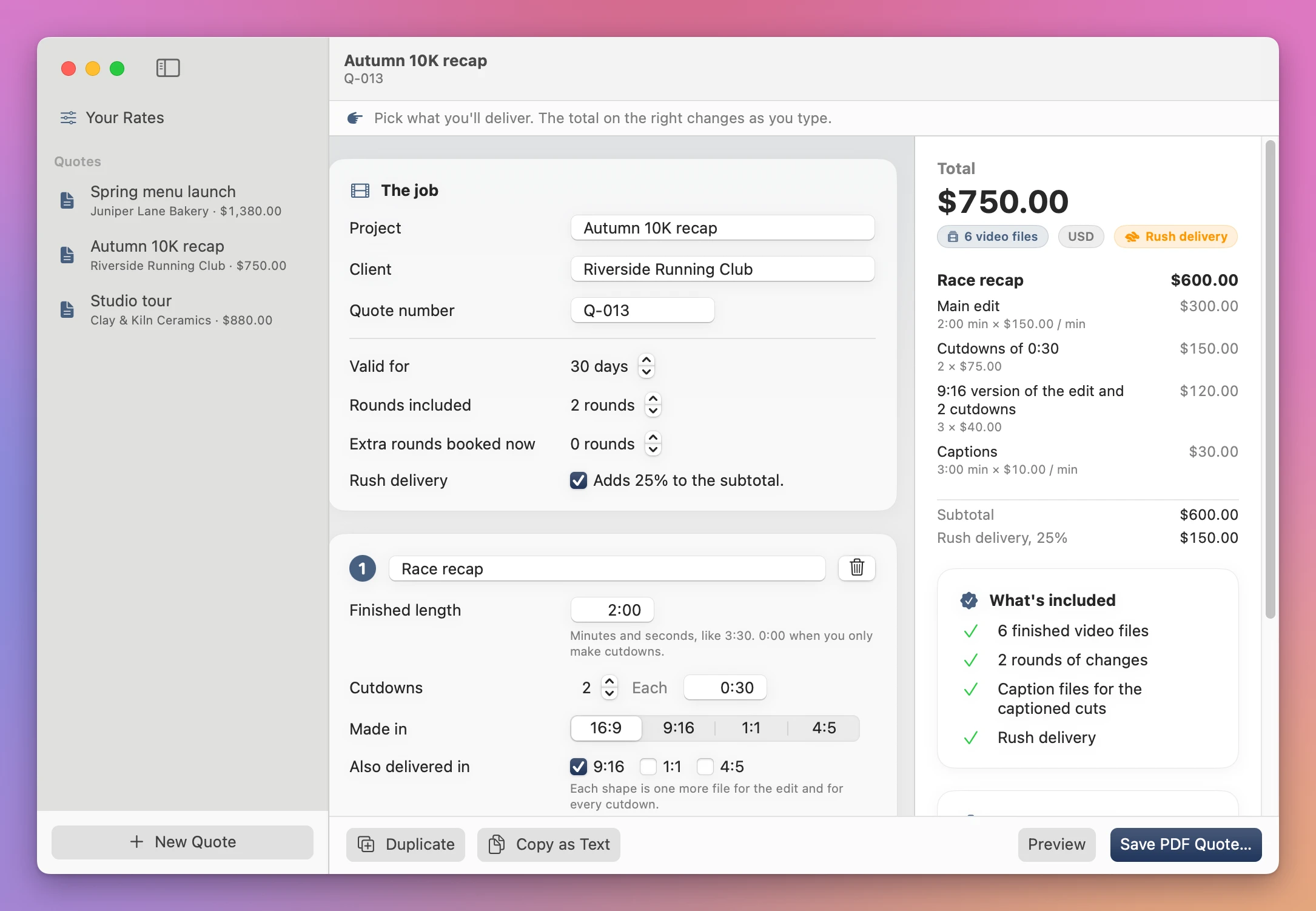
Tick Rush delivery and your rush percentage goes on top of the subtotal as its own line. If the client books extra rounds of changes now, they’re priced on the quote, and the “costs extra” line moves to count from the last round booked.
Exact money
Amounts are kept as exact decimals, never as rounded floating numbers. Each line is rounded to the cent, the total is the sum of those lines, and a rush fee is the rounded percentage of that sum, so the PDF always adds up. Yen and other currencies without cents are rounded to whole units.
Why not do it by hand
The free way is a spreadsheet in Numbers or Excel, or a template in Pages or Word. A spreadsheet can do all of this maths: you build the rows, the formulas, the per-minute rates and the rounding, and it works for as long as you remember to add the row for the 4:5 version. A text template looks good but adds nothing up.
General invoicing apps price hours and items well. They don’t know that 3 cutdowns in two more shapes is 8 extra files, and they’re made for billing after the job, not quoting before it.
| Spreadsheet | Document template | Invoicing app | Video Editing Quote Builder | |
|---|---|---|---|---|
| Adds up the lines | Yes, with your formulas | No | Yes | Yes |
| Counts versions of the edit and of every cutdown | Only if you build it | No | No | Yes |
| Per-minute pricing by the second, with a minimum | Only if you build it | No | Partly, as hours | Yes |
| Lists the included rounds and what costs extra | By hand | By hand | Usually not | Yes, from your rates |
| Old quotes keep their old rates | Only if you copy the file | Yes | Varies | Yes |
| Starts the next quote from an old one | Copy the file | Copy the file | Varies | Duplicate |
| Cost | Free | Free | Often a subscription | $19 once |
What it doesn’t do
- It doesn’t send invoices, track payments, taxes or expenses. It’s for the price you agree before the job.
- It doesn’t add tax. Write your tax line in the notes if your quotes need one.
- It doesn’t convert currencies. Each quote is in the currency you pick.
- It doesn’t track rounds of changes once the job starts.
- It doesn’t sync between Macs or send the quote for you. Attach the PDF to your own email, or paste the text from Copy as Text.
- There’s one layout for the PDF, with your name and contact line at the top. No logo, colours or other templates.
Questions
Where are my quotes kept?
On your Mac, in your Library folder. Nothing is uploaded. The app connects to the internet only to check for its own updates.
Can I change a quote after I’ve sent it?
Yes. Every change is saved as you type. Save the PDF again when you’re done, or Duplicate it first to keep the old one.
What currencies does it have?
US, Canadian, Australian, New Zealand, Singapore and Hong Kong dollars, euros, pounds, Swiss francs, Swedish, Norwegian and Danish crowns, Polish zloty, Czech koruna, yen, Indian rupees, Brazilian reais, Mexican pesos and South African rand. Amounts are written the way your Mac’s region writes numbers.
Does it need a permission?
No. It saves a PDF only where you pick in the save window.
The app isn’t made by, affiliated with or endorsed by Adobe, Apple, Blackmagic Design, YouTube, TikTok or Meta.
Buy Video Editing Quote Builder
Video Editing Quote Builder costs $19 plus tax where it applies, paid once. You get the signed and notarized Mac app for macOS 14 Sonoma or later, on Apple silicon and Intel, and it updates itself when a new version comes out.