
An app by Flavio
XMP Sidecar Checker
Check a photo job before you move or archive it. See which raw files have no .xmp sidecar, which sidecars have no raw file and which matches are ambiguous, read each sidecar's stars, colour label and develop settings, compare with the copy on your archive drive, and save a PDF and CSV report. It only reads your files.
Buy XMP Sidecar Checker for Mac · $19Buy XMP Sidecar Checker for Windows · $19One-time purchase. Plus tax where it applies. Mac and Windows versions are sold separately.
macOS 14 or later · Apple silicon and Intel
Windows 10 and Windows 11 · Intel, AMD and Arm PCs
Latest Mac version 1.0.0, released November 26, 2026
Latest Windows version 1.0.0, released November 26, 2026
You shot a wedding, rated and edited it in Lightroom, and now the job goes to the archive drive. Your stars, colour labels and develop settings travel in small .xmp files next to the raws, one per photo. If one is missing, that photo arrives without its edits, and you find out months later when a client asks for a reprint.
Sidecars go missing more often than you’d think. Lightroom Classic only writes them when Automatically write changes into XMP is on, or when you choose Metadata › Save Metadata to File. A copy made in a hurry can leave some behind. A camera that saves a JPEG next to each raw makes two files share one name, and an app may give the sidecar to the wrong one.
You can check by hand in the Finder, sorted by name, looking for a raw without its .xmp under it. In a folder of 2,000 raws spread over five subfolders, nobody spots the 7 gaps that way.
XMP Sidecar Checker reads the whole job, subfolders included, and lists every raw file with its sidecar. The raw files with no sidecar, the sidecars with no raw file and the matches that aren’t clear-cut come first. For each sidecar you see what it holds, and once you choose the copy on your archive drive, whether the copy has the same one. Then you save a PDF and a spreadsheet. Nothing in the job is ever written, moved or deleted.
Watch a 30-second demo of XMP Sidecar Checker:
Who it’s for
- Wedding and event photographers. A wedding is 1,500 to 4,000 raws. Before you wipe the working drive, you want to know that every edited raw has its sidecar on the archive drive.
- Lightroom Classic users whose sidecars stopped being written. Ratings and edits are in the catalog, and the folder on disk has old sidecars, empty ones or none. The list shows which raws have nothing, and which sidecars are empty.
- Photographers moving between apps. Going from Lightroom to Capture One or darktable, or handing files to someone who uses Bridge, you want to know which raws carry their stars and labels in a sidecar the next app can read.
- Studio managers and digital techs. A job leaves on a drive for a retoucher or a client. The PDF says what’s in the folder and what isn’t, and goes on the drive with it.
- Second shooters. You send your raws to the lead photographer after culling. The report shows that your ratings and colour labels went with them.
How it works
- Click Choose a Job Folder…, or drag the shoot’s folder onto the window or onto the app’s icon in the Dock.
- The list opens on the files that need a look. Click a number above the list (Raw files, No sidecar, Ambiguous, No raw file) to see the others.
- Click a file to see why it’s listed and what its sidecar holds. Show in Finder takes you there.
- If you copied the job, click Choose the Copy… and pick the copy on the other drive.
- Click Save Report… for a PDF and a spreadsheet with the same name.
Fixed something in Lightroom? Click Check Again and the folder is read afresh.
What you get
Every raw file with its sidecar
The app pairs IMG_0412.CR3 with IMG_0412.xmp, the name Lightroom, Bridge and Capture One use, or with IMG_0412.CR3.xmp, the name darktable uses, in any upper or lower case. It knows CR2, CR3, NEF, ARW, RAF, ORF, RW2, DNG, PEF, IIQ, 3FR, SRW, X3F and the other common raw formats, 30 in all.
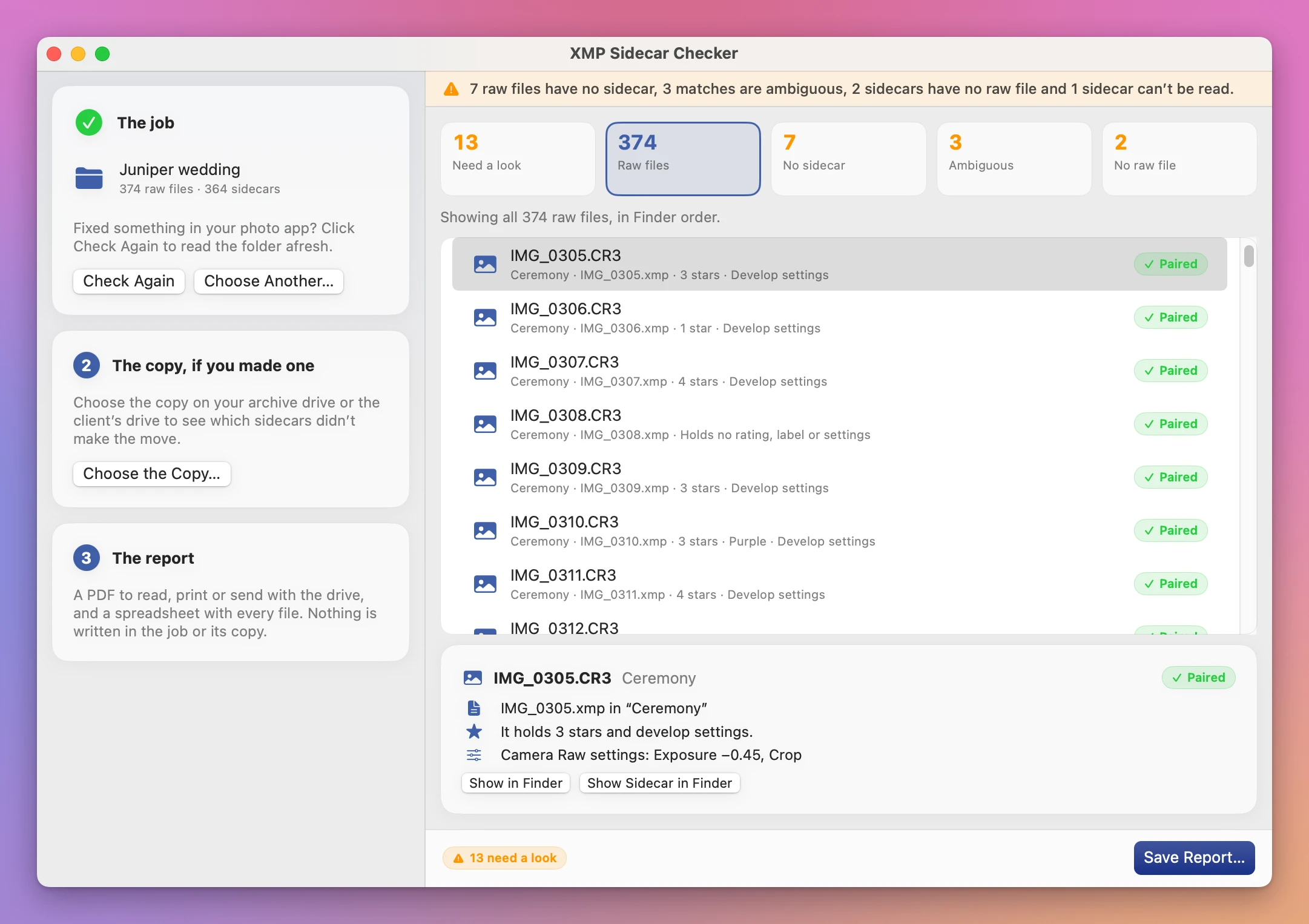
What each sidecar holds
For each sidecar the app reads the stars (and a reject), the colour label, the number of keywords, and whether it holds develop settings. Develop settings means Adobe Camera Raw settings, which Lightroom Classic, Lightroom and Camera Raw write, or a darktable history. The card names a few of them, like the exposure and whether there’s a crop. A sidecar that’s empty, or damaged so it can’t be read, gets its own orange pill.
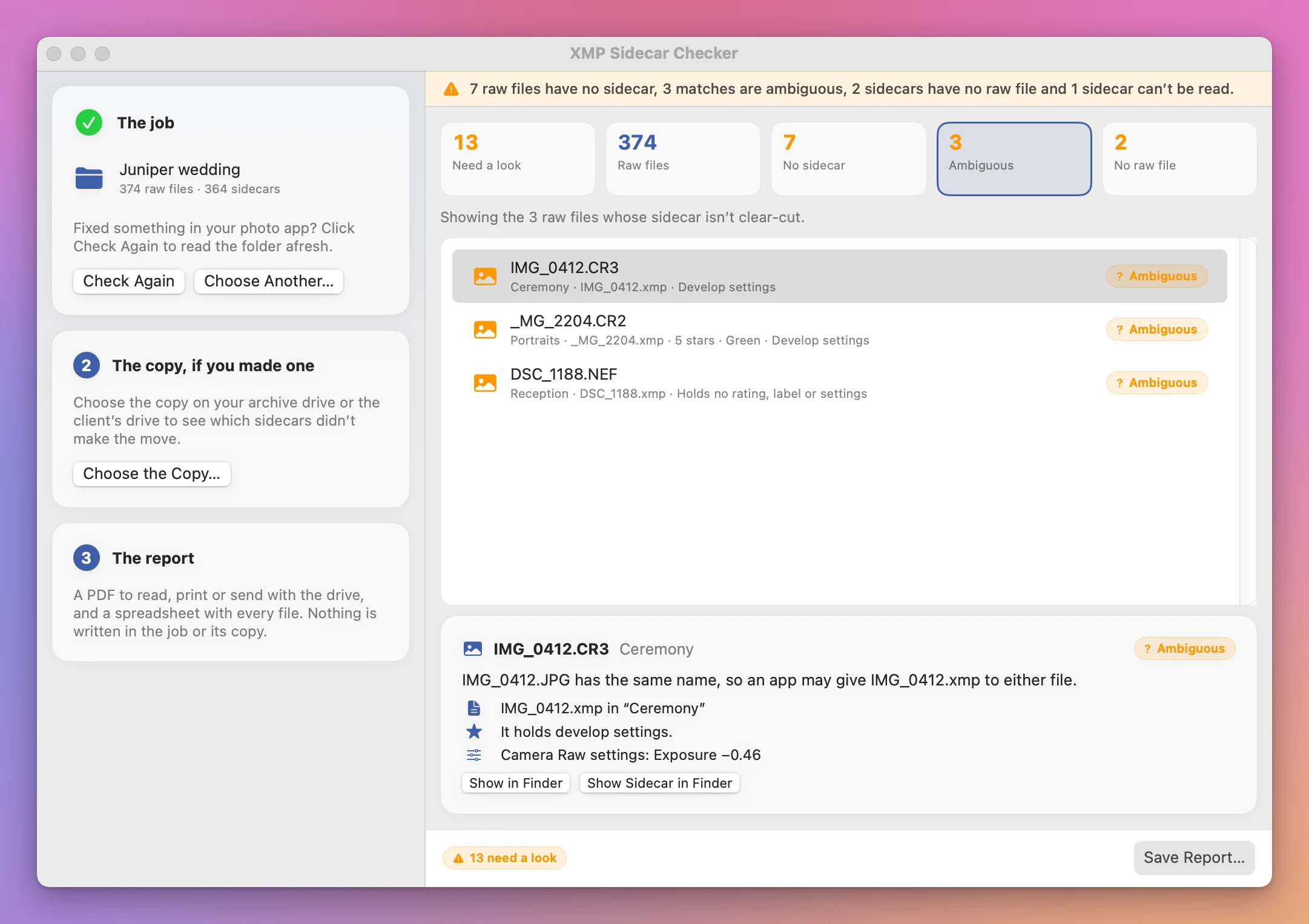
The matches that aren’t clear-cut
Three cases make a sidecar’s owner unclear, and the app explains each in a sentence:
IMG_0412.JPGsits next toIMG_0412.CR3, soIMG_0412.xmpcould belong to either.- There are two sidecars for one raw,
IMG_0412.xmpandIMG_0412.CR3.xmp, and two apps may read different ones. - The raw file has no sidecar next to it, and the only one with its name is in another folder.
DNG files usually keep their edits inside the file, so a DNG with no sidecar is listed as DNG, no sidecar and isn’t counted as missing.
The copy, compared
Choose the copy of the job and every sidecar gets a second pill: In the copy, Not in copy, Different (the copy has another version, often an older one) or Moved (the same file ended up in another folder of the copy). If you pick the archive folder that holds the copy instead of the copy itself, the app finds the job’s folder inside it.
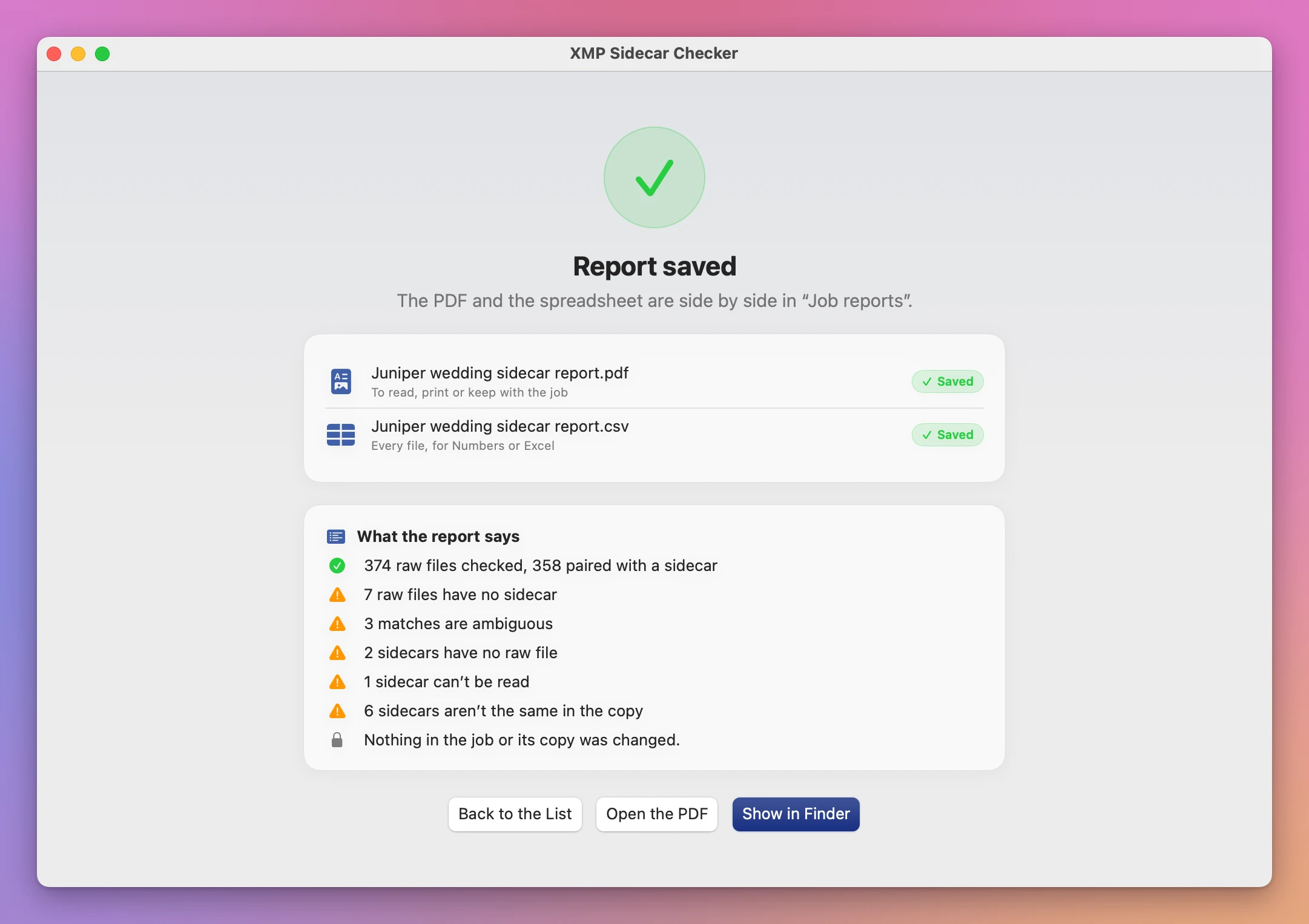
A report to keep with the job
Save Report… writes a PDF with the verdict, the counts, every problem with a sentence, and a table of every raw file, plus a spreadsheet (CSV) with one row per file: its folder, state, sidecar, rating, colour label, develop settings, keywords, when the sidecar last changed and, after a copy check, what the copy has.
Why not do it by hand
The Finder can show you the pairs. Open a folder in list view, sort by name, and each IMG_0412.xmp sits under its IMG_0412.CR3. Sort by Kind and you can count the raws and the sidecars. That works for one folder of a few dozen photos. For a job with five folders and 2,000 raws, you’re reading names for an hour, and the Finder tells you nothing about what each sidecar holds.
Lightroom Classic marks a photo whose metadata on disk is out of date, but only inside the catalog that edited it, and only while that catalog still exists. It doesn’t look at a copy on another drive. Bridge shows the stars and labels it reads from sidecars, one photo at a time.
Copy Verification Report, another of my apps, compares two folders file by file, which tells you a copy is complete. It doesn’t know which files are sidecars or which raw they belong to. XMP Sidecar Checker does the pairing and reads what’s inside.
| The Finder | Lightroom Classic | XMP Sidecar Checker | |
|---|---|---|---|
| Raw files with no sidecar | You read every name | Only for photos in its catalog | Listed, across all subfolders |
| Sidecars with no raw file | You read every name | No | Listed, with what they hold |
| A JPEG sharing the raw’s name | You notice it, or not | Shown as one photo with the raw | Flagged as ambiguous |
| Stars, labels, develop settings | No | Yes, from its catalog | Read from each sidecar |
| The copy on another drive | Open both and compare | No | Every sidecar checked |
| A report | No | No | PDF and CSV |
What it doesn’t do
- It doesn’t change anything. It doesn’t write, repair, rename, move or delete sidecars, and it never writes into the job or the copy. Fix things in your photo app, then click Check Again.
- It doesn’t read a Lightroom catalog or a Capture One session. So it can’t tell whether a sidecar is older than the edits in the catalog.
- It doesn’t read metadata inside the files. Edits stored in a DNG, a JPEG or a TIFF aren’t read.
- It doesn’t read Capture One’s adjustments. Capture One keeps them in its own files. Its sidecars show the rating and the colour label.
- It compares only the sidecars with the copy. For a check of every file, raws included, use a folder comparison.
Questions
Does it change my photos or sidecars?
It only reads the job and the copy. The only files it writes are the report’s PDF and spreadsheet, where you choose, and it refuses to put them inside the job or the copy.
Does anything get uploaded?
Nothing. The check and the report happen on your Mac. The app connects to the internet only to check for updates.
Which photo apps write the sidecars it reads?
Lightroom Classic, Lightroom and Camera Raw (with Bridge) write IMG_0412.xmp with ratings, labels and develop settings. Capture One writes the same name with ratings and labels. darktable writes IMG_0412.CR3.xmp with its history.
What it needs
macOS 14 Sonoma or later, on Apple silicon and Intel Macs. If the job is on an external or network drive, or in Desktop, Documents or Downloads, macOS may ask once whether the app can read it, after you choose the folder.
XMP Sidecar Checker isn’t made by, affiliated with or endorsed by Adobe, Capture One, darktable or any camera maker.
Buy XMP Sidecar Checker
$19 plus tax where it applies, paid once.
Download the app from the order page or your Creem receipt, unzip it and move it to Applications. I sign the app with my Apple Developer ID, and Apple notarizes the download.
The app checks for updates once a day. When a new version is ready, click Install and Relaunch. The first time, it asks for the license key from your Creem receipt, and remembers it. To check anytime, choose XMP Sidecar Checker → Check for Updates….