
A developer tool by Flavio
Architecture Dissector
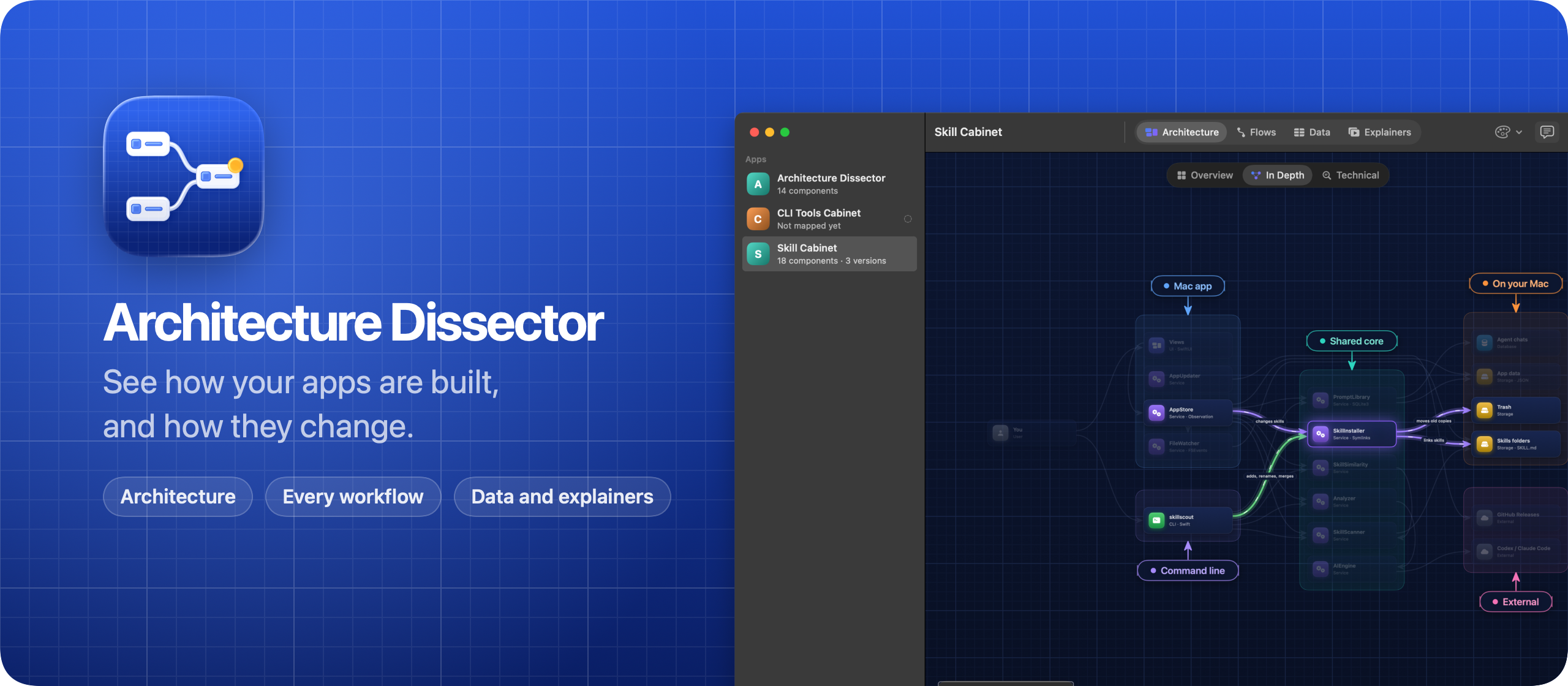
Your coding agent maps the app, Architecture Dissector draws its components, workflows and stored data, and shows what changed between versions.
Buy Architecture Dissector · $20One-time purchase. Tax included. Source code included.
macOS 14 or later · Apple silicon and Intel
Latest version 1.5.0, released November 20, 2026
$20 including tax, one-time purchase.
You shipped it, but can you explain it?
Coding agents write most of the code in my apps now. I ship a lot faster, but it gets hard to keep in my head how each app is put together: which parts talk to each other, what happens when someone clicks a button, and what ends up in the database.
You open a project you haven’t touched in two months, and you don’t remember where the billing logic lives. Reading 80 files to find out takes an afternoon.
Architecture Dissector draws it for you. Your agent maps each app with a small command, and Architecture Dissector draws its components, every workflow that goes through it, and the data it stores. When the code moves on, it tells you which parts changed, and it shows what changed between any two versions.
Here it is in a minute and a half, on a test Mac. Tidy Invoices, the app it maps in the video, is made up:
Who it’s for
- Indie developers with a dozen side projects. Each one was built in bursts, mostly by agents. Before you touch one again, you want a two-minute refresher on what’s in it, not an afternoon of reading code.
- People who built an app with a coding agent and aren’t developers. The app works, and you’d like to know how. The Overview level explains it in a few blocks named in plain words, like “The app on your Mac”, each with a sentence about what it does for you.
- Developers who let agents work overnight. In the morning, the sidebar shows how many files changed in each app since the last map, and the affected components are marked. You know where to look before you read the diff.
- Freelancers handing a project to a client or another developer. Take the Tour walks through how the app works, step by step, on the real diagram. The Data tab shows every table and field the app keeps.
- Anyone shipping releases. Save the map at each version, then compare 1.0 with 2.0. New components show in green, changed ones in amber and removed ones in red, and the Data tab shows schema changes field by field.
Your first map, start to finish
- Open Architecture Dissector. The welcome screen walks you through the setup.
- Choose Install Command Line Tool… and Install Agent Skill… from the app menu. The skill works with Claude Code, Cursor and Codex.
- Drop your app’s folder on the window, or press ⌘O and choose it. Tracking a folder only reads it.
- Open your coding agent in that app’s folder and paste the prompt from the welcome screen. It asks the agent to run
blueprint guideand follow it. - The agent reads the code and saves the map. The diagram shows up as soon as it arrives.
- Start in Overview, then click Take the Tour. Switch to In Depth and Technical for the details, and open the Flows and Data tabs.
- Press ⌘S and name the version, like
1.0.0, so you can compare against it later.
Start with a project you know well, so you can judge the first map.
The architecture
Every app is a set of components in groups: a screen, a module, a worker, a database, a third-party service. Each group is a box, and the connections say who calls, reads or writes what.
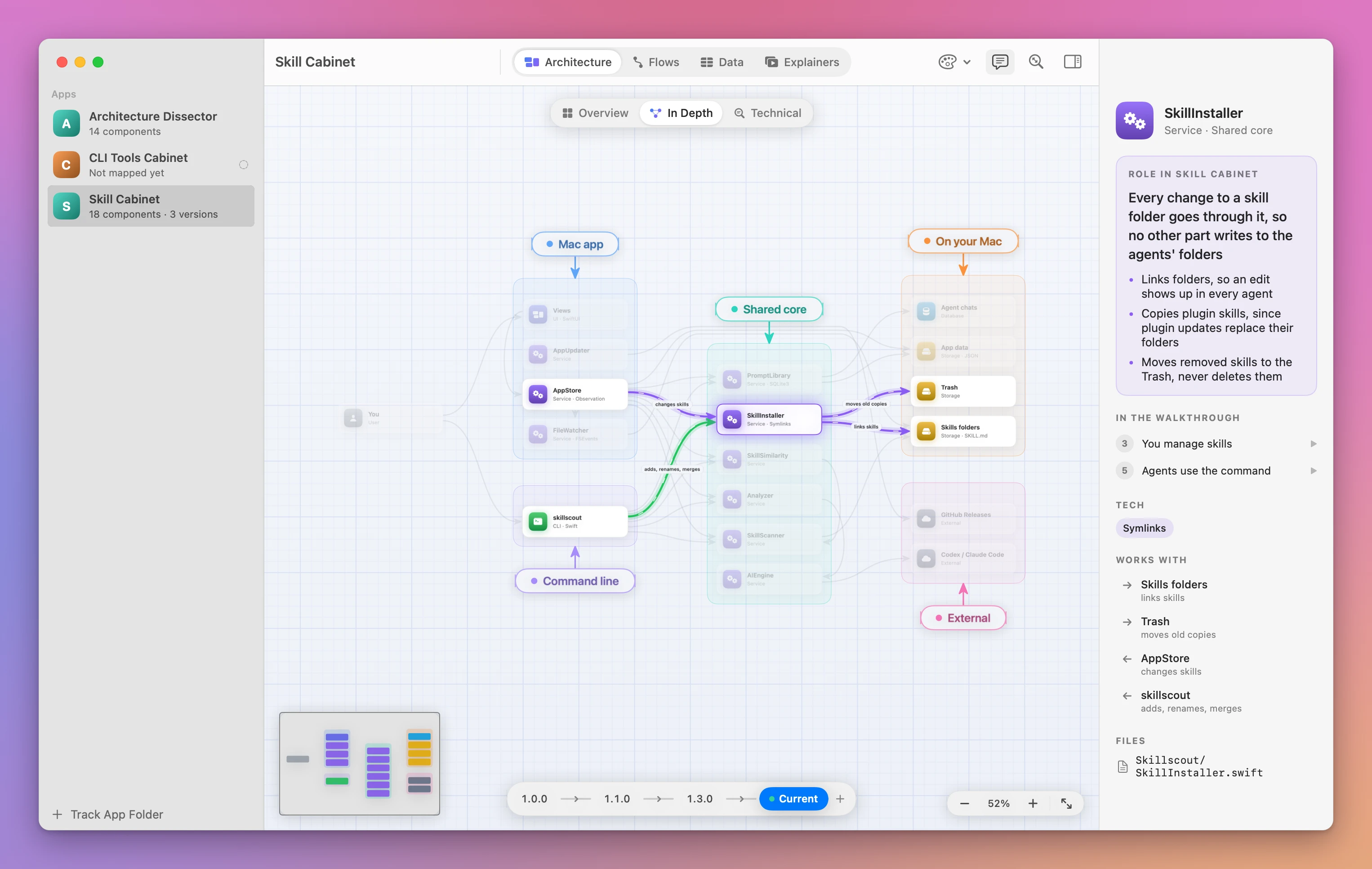
A diagram alone doesn’t explain much, so the words get as much space as the boxes. When you open an app, the inspector says what it does in a sentence or two, then how it works in a few short steps. Click a step, or Take the Tour, and the canvas zooms to the components involved while data flows between them.
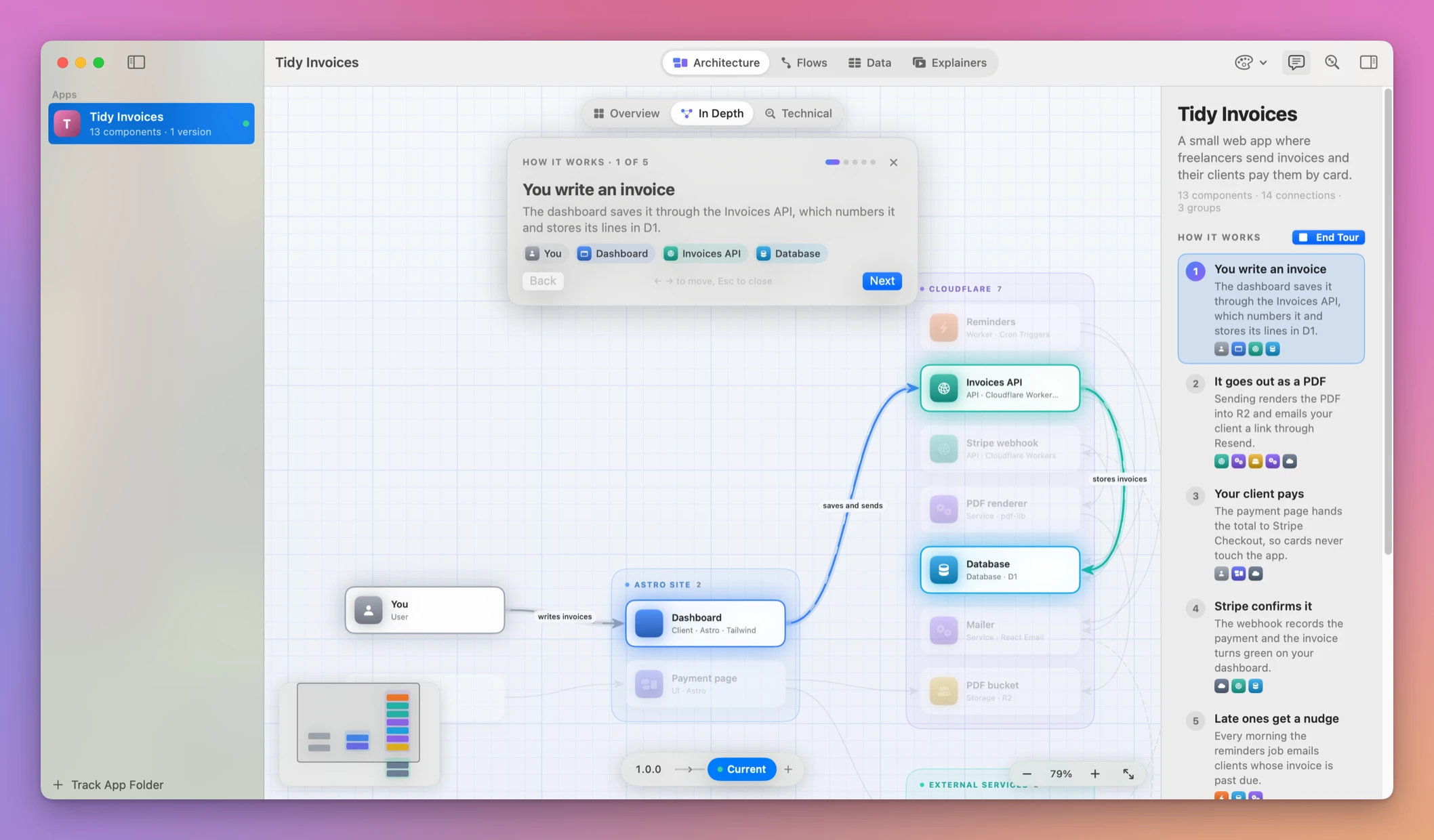
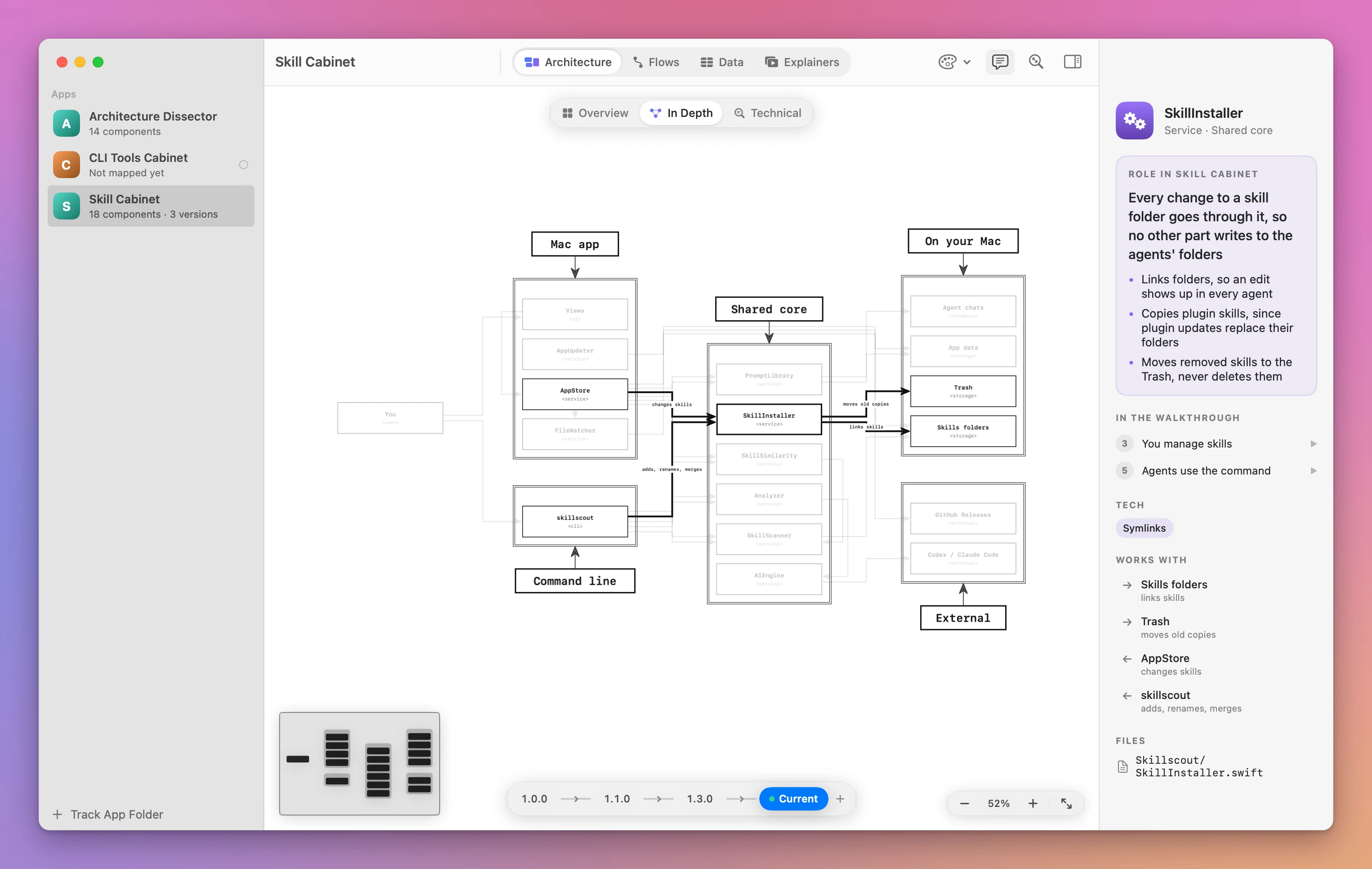
Click a component and you get its role in the app in large type, a few points that make it precise, its tech, its files and what it works with. In the screenshot it’s the part of Skill Cabinet that every change to a skill folder goes through.
Three levels
The Architecture tab opens on Overview, a few blocks in plain words. Click a block to see its components. In Depth shows every component and connection. Technical puts each component’s role, key points and files on its card, and writes next to each arrow what travels over it, like “POST /api/signups with the email as JSON, on submit”. ⌥⌘1, ⌥⌘2 and ⌥⌘3 switch levels.
Every workflow
The Flows tab draws the workflows of the app as flowcharts: steps from top to bottom, one column for each actor, and decisions that branch.
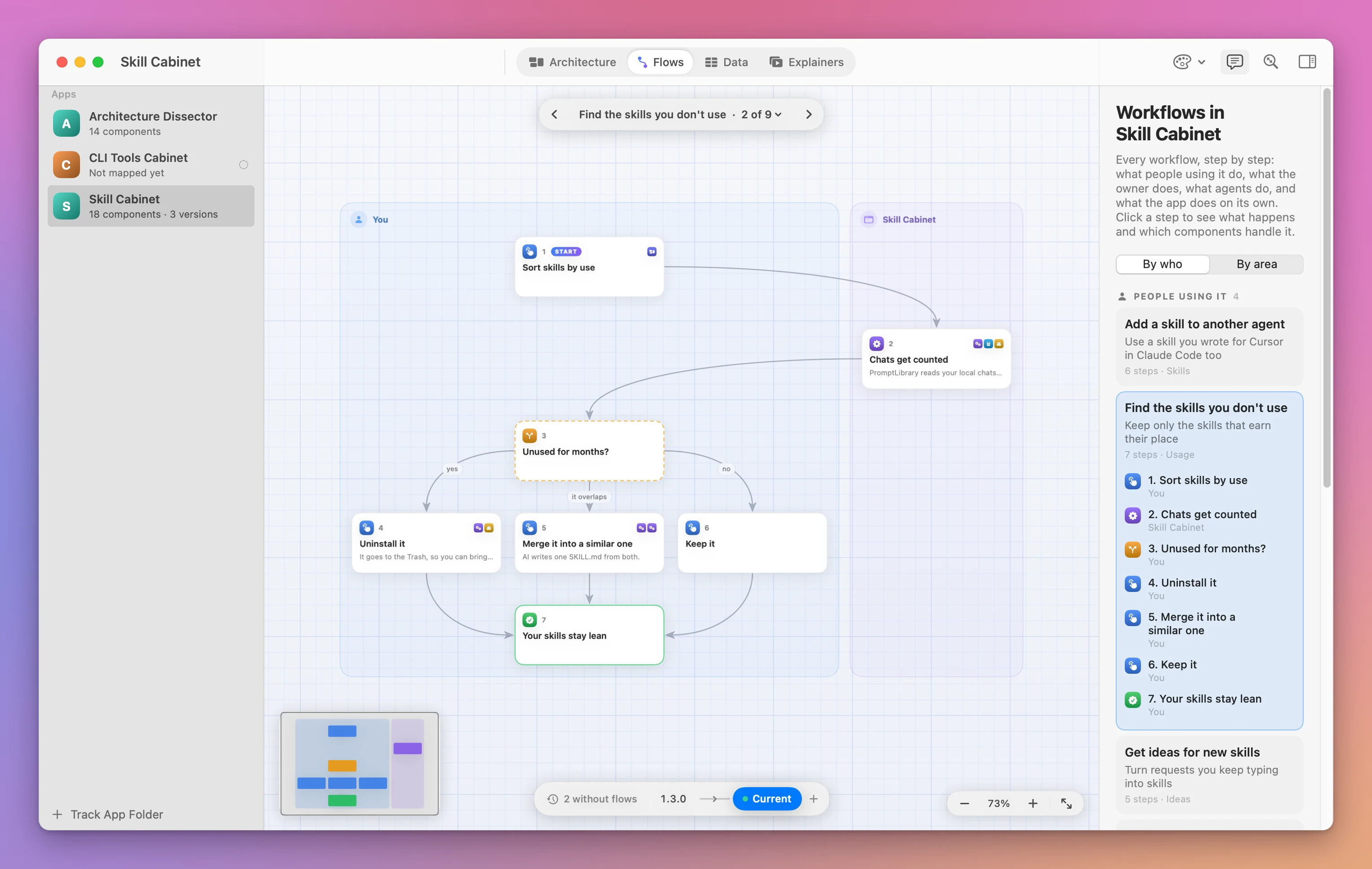
Each flow says whose it is: people using the app, its owner, an agent working through its CLI, or the app on its own. It also says which area of the app it belongs to, and the inspector groups the flows either way. Click a step to see what happens there and which components handle it.
The data it stores
The Data tab draws what the app keeps: database tables, collections, JSON files and settings. Each store is a box and each table is a card with a row per field. Keys are marked, and a line runs from every field that points to another table.
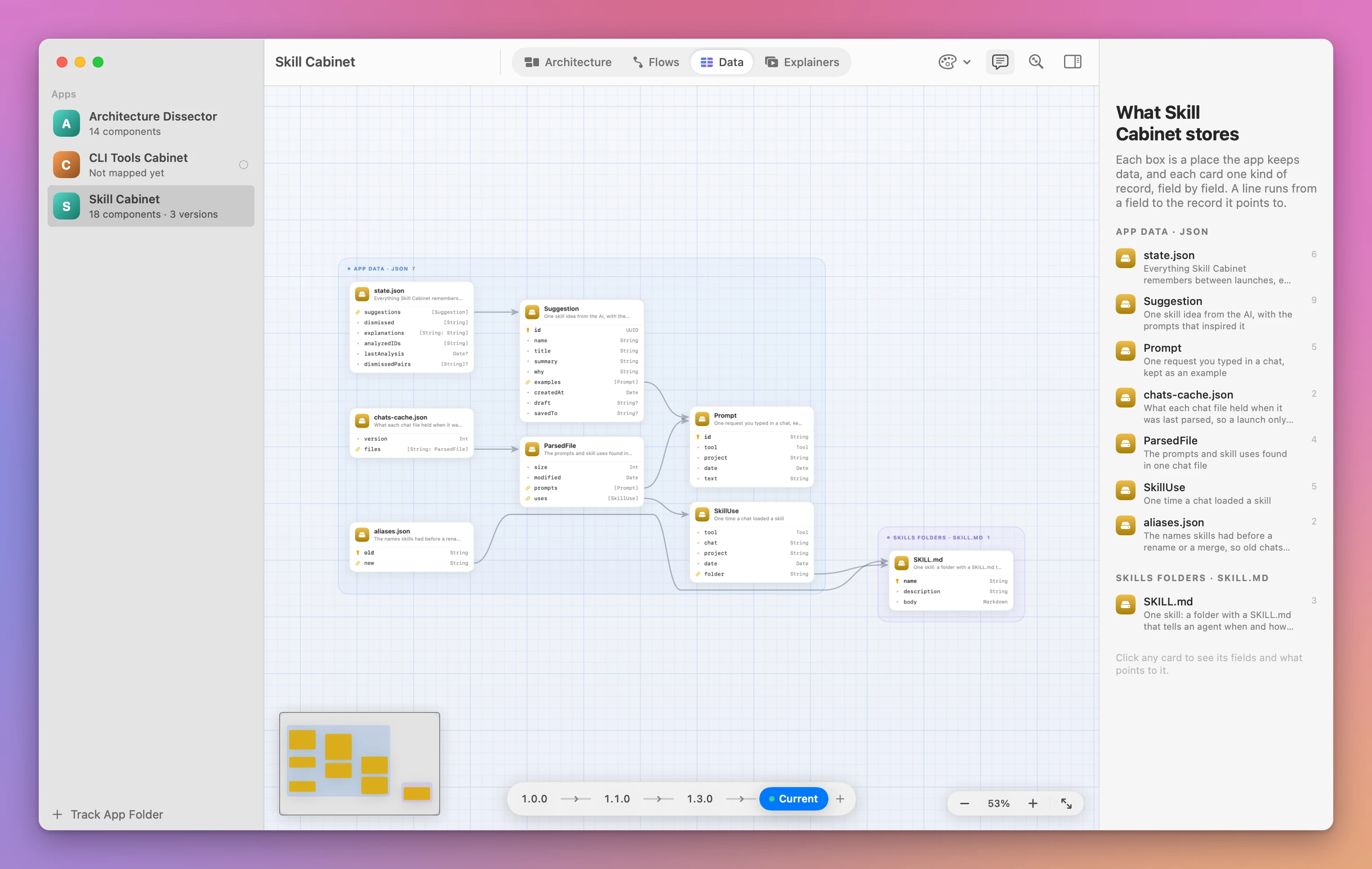
Agents can read the same schema as JSON before they change the code:
blueprint show --data --jsonExplainers
Explainers are short videos about how one part of an app works, like “How skill use is counted” in Skill Cabinet.
The agent writes the scenes: a title, a sentence or two, and which components, flow steps or tables each scene shows. Architecture Dissector plays them on the real diagrams, with the camera gliding to each part, a caption, and sound effects for what happens on screen. Agents never render a video file, so the explainers of every app look the same.
What changed
When an agent saves a map, Architecture Dissector records a hash of every file in the app’s folder. From then on it knows which files changed, committed or not, and it marks the components they belong to. In the sidebar, each app shows how many of its files changed.
When I ship a release, the agent saves the map as that version. The timeline compares any two versions: new components in green, changed ones in amber, removed ones in red. In the Data tab, you see how the schema changed, field by field.
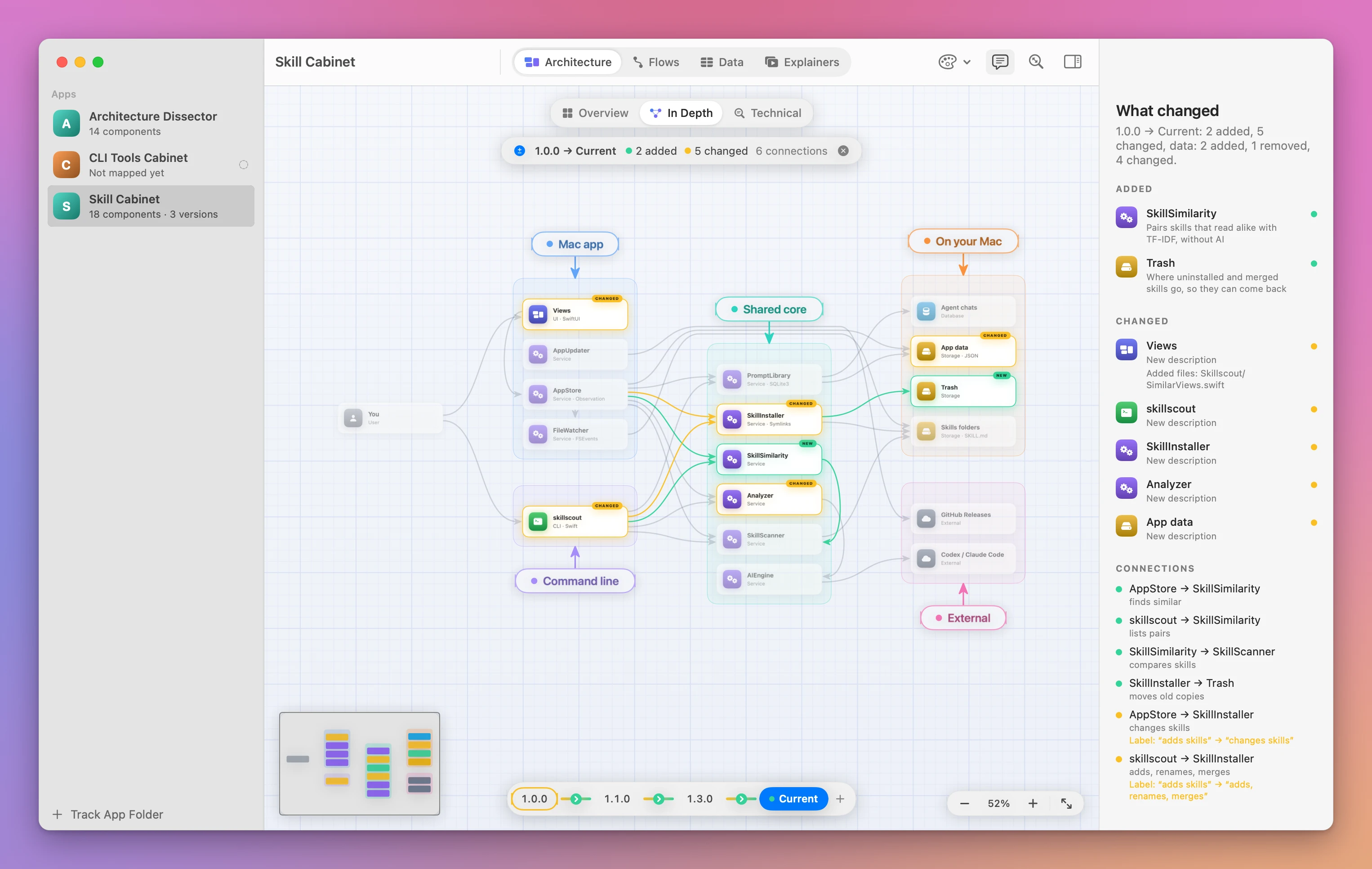
The changed-file marker tells you the map is behind the code. It doesn’t rewrite the map. Ask the agent to run blueprint status, update the sections that changed, and save.
Agents do the mapping
I don’t draw anything in Architecture Dissector, and it doesn’t read the code to guess the architecture. Agents write the map, and Architecture Dissector draws it.
They do it with the blueprint command that comes with the app. blueprint guide explains how to map an app, blueprint set saves the map as JSON, and blueprint status says what changed in the code since the last save.
The prompt from the welcome screen looks like this:
Add this app to Architecture Dissector and map it, including its past releases. Run `blueprint guide` and follow it.The welcome screen also has a short snippet for the app’s AGENTS.md, so every agent that works on it reads the map first and updates it after a change.
Flows, data and explainers came after the first maps, so my apps didn’t have them. blueprint list shows what each app is missing, and blueprint list --missing data lists only the apps without their data. I asked my agents to fill in what was missing, and they went through every app I track.
Architecture Dissector lays out every map on its own, and every layout is checked against hundreds of random maps for overlaps.
Themes
The palette button restyles every diagram without moving anything. Architecture Dissector is the default, Terminal is green on black, Minimal has hairlines and no grid, and ASCII looks like a diagram drawn in Monodraw.
Why not ask the agent for a Mermaid diagram
You can. Ask your agent to draw the architecture in Mermaid or write an ARCHITECTURE.md, and you get something useful in a minute. For one app you look at once, that’s enough.
It falls apart over time. Each request gives you a new diagram with different names and a different layout, so you can’t compare last month’s with today’s. A big Mermaid chart turns into a tangle of crossing lines. Nothing tells you the document went stale after last week’s changes. And the workflows and the database schema end up in separate files, if anyone writes them.
| Mermaid or a hand-drawn diagram | Architecture Dissector | |
|---|---|---|
| Who writes it | You, or the agent from scratch each time | The agent, through one format and a guide |
| Layout | Crossing lines in big apps | Laid out for you, checked for overlaps |
| Out of date | You find out the hard way | Changed files and components are marked |
| Comparing versions | Two images side by side | Added, changed, removed, field by field |
| Workflows and data | Separate documents, if any | Flows and Data tabs from the same map |
| Readable by agents | Text to parse | blueprint show --json |
What it doesn’t do
- It doesn’t analyze your code itself. A coding agent writes the map. Without an agent, there’s nothing to draw.
- It doesn’t keep the map current on its own. It marks what changed. The agent updates the map when you ask.
- It’s only as accurate as the map. Check the first one against an app you know well.
- It doesn’t export diagrams as images or PDF. You explore them in the app.
- It doesn’t change your project. It reads the folder with read-only git commands and never writes to it.
Questions
Which agents work with it?
The agent skill installs for Claude Code, Cursor and Codex. The blueprint guide command explains the map format to the agent, so the instructions travel with the tool.
Does my code leave my Mac?
Architecture Dissector itself doesn’t send your code anywhere. It reads your folders and saves the maps locally. Your coding agent reads the code the way it always does, under that agent’s own rules.
What languages and frameworks does it support?
Architecture Dissector doesn’t parse code, so it isn’t tied to a language. The map describes components, connections, flows and data, and the agent writes it from whatever code it can read.
Can I map versions I shipped before I bought it?
Yes. Ask the agent to map the past releases. When older versions miss something, the timeline gives you a prompt that has the agent fill them in from the git history.
Is the source code included?
Yes. The purchase page delivers a source ZIP with the app.
The tutorials show it on real projects: an architecture diagram of an app an AI built, a map of the database schema, and comparing the architecture between versions.
Buy Architecture Dissector and get started
Architecture Dissector costs $20 including tax, paid once. The purchase includes the signed Mac app and automatic updates.
After purchase, download the signed and notarized Mac app ZIP from your purchase page.
Architecture Dissector checks for updates once a day. Choose Architecture Dissector → Check for Updates… to check now and Install and Relaunch to install.
Unzip the app, and drag Architecture Dissector to your Applications folder. It runs on macOS 14 Sonoma or later, on Apple silicon and Intel Macs. It’s signed with my Apple Developer ID and notarized by Apple, so it opens like any other app you download.
Architecture Dissector only reads your app folders, with read-only git commands, and never writes to them. Your maps stay in ~/Library/Application Support/Blueprint.
The docs cover setup and commands.