
Mac & Windows app by Flavio
Audio Drift Checker
Open the host and guest recordings of a double-ender. Audio Drift Checker measures the offset at the start, middle and end, says whether the guest track drifts, jumps or stays in sync, and gives you the exact stretch, markers and a corrected guest track.
Buy Audio Drift Checker for Mac · $19Buy Audio Drift Checker for Windows · $19Buy once, use forever. Up to 3 computers you own (license). Plus tax where it applies. Mac and Windows versions are sold separately.
macOS 14 or later (Apple silicon and Intel) · Windows 10 and Windows 11 (x64 and ARM64)
Latest Mac version 1.0.0, released November 28, 2026
A remote interview, recorded as a double-ender: you on your mic, your guest on their own recorder, 58 minutes. You slide the guest track so the first “hi” lines up, and it sounds great. Then at minute 40 you hear the guest twice, a slap-back echo that gets worse until the end.
That’s clock drift. The guest’s recorder didn’t run at exactly 48,000 samples a second, so their track slowly slips. The fix is a tiny stretch, something like 99.99483% of its length. But before you stretch anything you need to know the number, and whether it really is drift: if the guest’s connection dropped at minute 23 and their recorder lost two seconds, the offset jumps once instead of growing, and stretching the whole track makes it worse.
Audio Drift Checker opens the two tracks and measures the offset at five places along the episode, to a fraction of a millisecond. It tells you which case you have, plays both tracks together so you can hear it, and saves a report with the stretch settings for your editor, markers for every check and, if you want, a corrected guest track you drop at 0:00.
Watch a 30-second demo of Audio Drift Checker:
Who it’s for
- Podcast editors who get double-enders from clients. A 60-minute interview where the guest’s laptop recorded at 48,002 Hz instead of 48,000. You want the stretch number in two minutes, not after half an hour of zooming into waveforms.
- Hosts who record remote guests on a local recorder each, and want to check the pair before sending it to an editor, so nobody discovers the echo at minute 50.
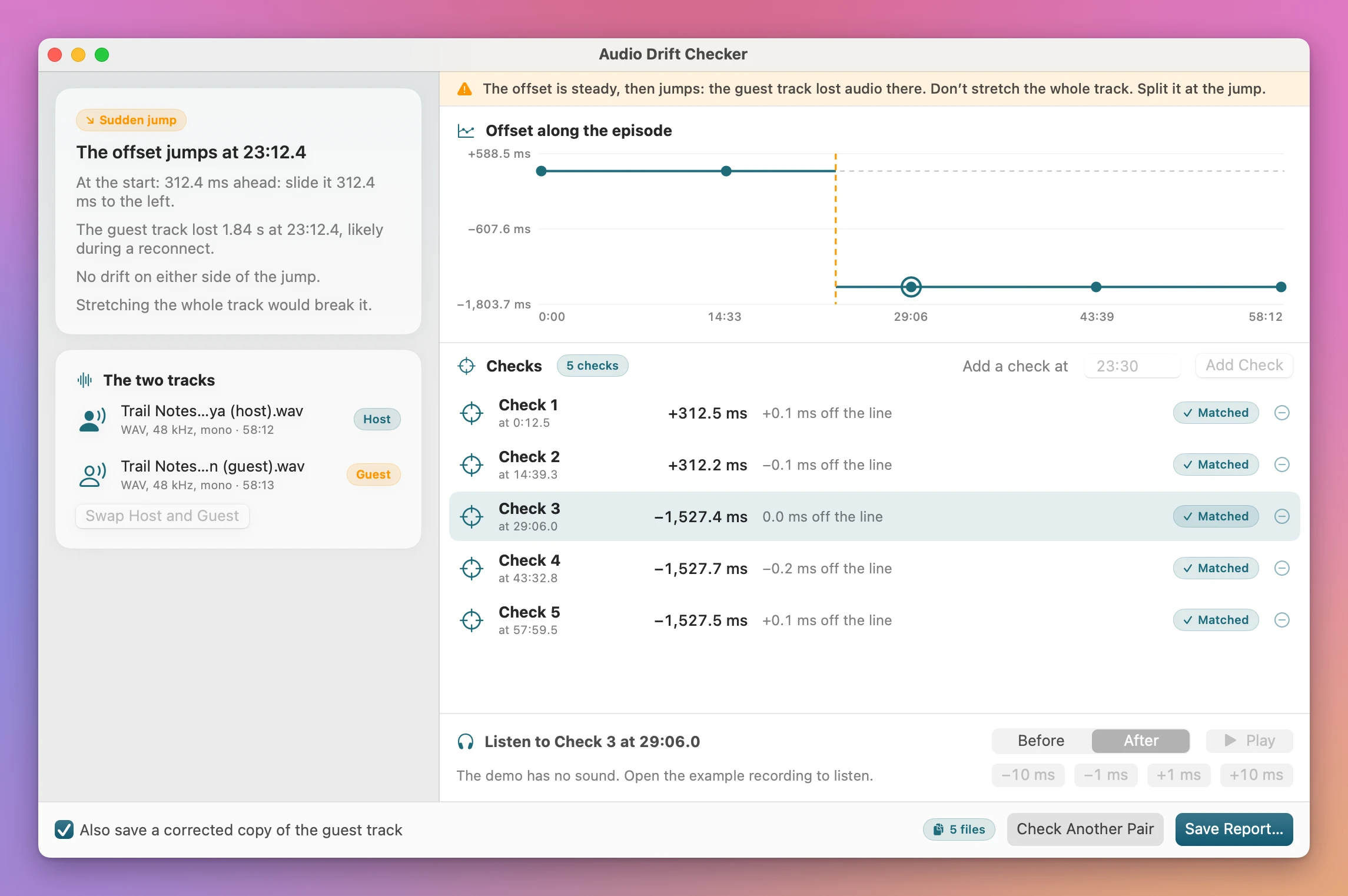
- Editors who already stretched a track and made it worse. The guest’s connection dropped at 23:12 and their recorder skipped 1.84 seconds. The app shows the jump on a chart and tells you to split there instead.
- Producers who need to explain the problem to a guest or a client. The PDF report says how far apart the tracks are at each check, how fast they drift, and what the guest’s recorder really ran at.
- Audio drama and audiobook editors syncing a remote actor’s track to the session recording, where a few milliseconds of drift turn into lips that don’t match.
How it works
- Click Choose Two Tracks… and pick the host’s recording and the guest’s recording (WAV, AIFF, M4A, MP3, FLAC or CAF), or drag both onto the window.
- The app reads both and measures the offset at five checks, from the first minute to the last.
- Read the verdict: In sync, Steady drift or Sudden jump, with the numbers.
- Click a check, choose Before or After, and click Play to hear both tracks together.
- Click Save Report…, choose a folder and click Save Here.
Want to see it first? Click Try Example Recording on the start screen. It opens Trail Notes, Episode 42, two made-up tracks where the guest drifts.
What you get
The offset at every check, in milliseconds
Each check compares 15 seconds of the two tracks and finds where the same sound is in both, to a fraction of a millisecond. The list shows the offset, how far it is from the line through the other checks, and whether the match was clear. Type a time in Add a check at to measure anywhere else, like the minute where the echo bothers you.
Drift, jump or in sync
When the checks fall on a straight rising line, it’s drift, and the app gives you the stretch: REAPER’s item playback rate, the track rate to set in Audacity, the tempo change for Logic Pro’s Time and Pitch Machine, and the new length in samples for any other editor. A step is a jump, with the moment it happened and how much audio the guest’s track lost. With a flat line the tracks are in sync: one slide by the start offset and you’re done, within ±5 ms.
Listen before you trust a number
Before plays the guest slid once to match the start, the way it sits in your editor now, so you hear the echo at the late checks. After plays it slid by the offset measured at that check, and the two voices land as one. If a check sounds off, move it by 1 or 10 ms and it’s marked as set by ear.
A report folder for your editor
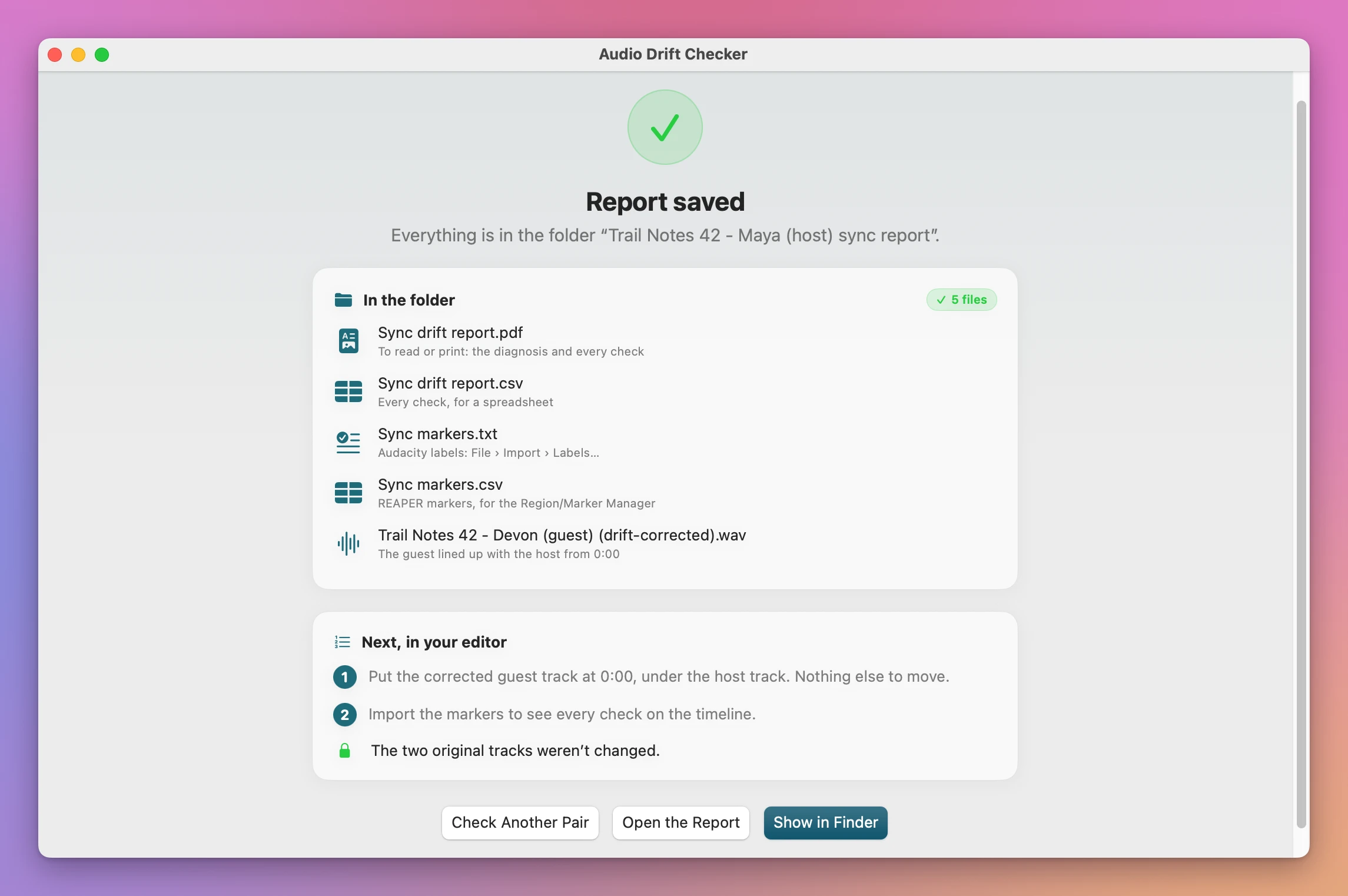
Save Report… makes a new folder with Sync drift report.pdf (the verdict, the stretch settings, the chart and every check), Sync drift report.csv, Sync markers.txt for Audacity’s File › Import › Labels…, and Sync markers.csv for REAPER’s Region/Marker Manager. Leave Also save a corrected copy of the guest track on to get a 24-bit WAV of the guest, stretched, slid and with silence where audio was lost, that lines up with the host from 0:00.
Your recordings stay as they are
The app only reads the two tracks. Everything it makes goes into a new folder you choose.
Why not do it by hand
You can measure drift in any multitrack editor. Zoom into a sharp sound near the start, slide the guest until it lines up, write down the offset. Do the same near the end. Subtract, divide by the minutes in between, and work out the stretch percentage.
It works, and for one episode it’s free. Here’s where it gets slow:
| By hand in your editor | Audio Drift Checker | |
|---|---|---|
| Offset at the start and end | Zoom and slide, twice | Measured in seconds |
| Precision | As good as your zoom, often ±5 ms | A fraction of a millisecond |
| Checks in the middle | Only if you remember to | Five by default, add more |
| Drift or a jump? | Two measurements can’t tell | Shown on a chart, with where it jumped |
| Stretch for REAPER, Audacity, Logic | Work it out yourself | Written for you |
| A corrected guest track | Stretch and export it yourself | One checkbox |
| Something to send the guest | A screenshot | A PDF report |
The trap is the jump. If you only measure at the start and the end, a recorder that lost 1.84 seconds at minute 23 looks like drift, and the stretch you calculate puts the first half out of sync too.
What it doesn’t do
- It doesn’t edit your episode. It measures and gives you the numbers, markers and an optional corrected guest track.
- It needs the same sound in both tracks. The host track has to have the guest in it, like the call recording or a mic that hears the guest. If each track has only its own voice, the checks come back unsure and you set them by ear.
- It doesn’t remove echo, noise or crosstalk.
- It doesn’t open video files. Export the audio first.
- Tracks can be from 20 seconds to 4 hours long.
Questions
Are my recordings uploaded anywhere?
No. Everything happens on your computer. The app only connects to my update server to check for new versions.
Does it change my files?
No. It reads the two recordings and writes a new folder with the report and, if you ask, a new copy of the guest track.
Which editors do the settings work with?
The report has the numbers for REAPER, Audacity and Logic Pro, plus the new length in samples for any editor that can stretch a clip to a length. Audio Drift Checker isn’t made by, affiliated with or endorsed by Apple, Audacity, Cockos (REAPER) or any recording service.
Will it run on my Mac?
It needs macOS 14 or later, on Apple silicon or Intel.
Buy Audio Drift Checker
$19 plus tax where it applies, paid once.
Download the app from the order page or your Creem receipt, unzip it and move it to Applications. I sign the app with my Apple Developer ID, and Apple notarizes the download.
The app checks for updates once a day. When a new version is ready, click Install and Relaunch. The first time, it asks for the license key from your purchase email. To check anytime, choose Audio Drift Checker → Check for Updates….