
Mac & Windows app by Flavio
Barcode Leading Zero Fixer
Find the barcodes in a product CSV that lost their leading zeros or turned into 8.90123E+11 in Excel or Numbers. Put back the exact barcodes from the original file, or fix missing zeros the check digit proves, then save a fixed copy and a proof report before you upload.
Buy Barcode Leading Zero Fixer for Mac · $19Buy Barcode Leading Zero Fixer for Windows · $19Buy once, use forever. Up to 3 computers you own (license). Plus tax where it applies. Mac and Windows versions are sold separately.
macOS 14 or later (Apple silicon and Intel) · Windows 10 and Windows 11 (x64 and ARM64)
Latest Mac version 1.0.0, released November 27, 2026
You export 300 products from your store, open the CSV in Excel, raise the prices for the holiday sale and save. The prices are right. The barcodes aren’t.
084712301150 is now 84712301150, because the spreadsheet decided it was a number and numbers don’t start with a zero. 860198402310 is now 8.60198E+11, and that one is worse: the file only keeps six digits, so the last six are gone. Two different candles now share the same “barcode”. Upload that file and your store, Amazon or the scanner at your market stall stops finding the products.
By hand, you’d open the original export next to the edited one and check 300 barcodes one by one, or write a formula that adds zeros to everything and hope none of them needed a different number.
Barcode Leading Zero Fixer finds every damaged barcode in the CSV. With the original file, it puts back each barcode exactly as it was, even the digits scientific notation threw away. Without it, it puts back missing zeros only when the barcode’s check digit proves the fix, and tells you which ones need the original. Then it saves a fixed copy and a proof report.
Watch a 30-second demo of Barcode Leading Zero Fixer:
Who it’s for
- Shopify store owners who edit products in a spreadsheet. You export, change 200 prices or stock counts in Excel or Numbers, and import the file back. The prices go in, and so do 200 barcodes without their leading zero.
- Amazon and eBay sellers uploading inventory files. A UPC with 11 digits or written as
8.90123E+11gets the listing rejected, or matched to a product that isn’t yours. - Wholesalers and makers sending product sheets to shops. The buyer’s system refuses a sheet with GTINs of the wrong length, and you want to send a proof that every code is right along with it.
- Bookshops and small publishers. ISBN-10s that start with 0 lose it the same way, and an ISBN-13 turns into scientific notation.
- Assistants and bookkeepers cleaning a client’s catalog. You need to show the client exactly which barcodes you changed, and that nothing else in the file moved.
How it works
- If you still have the file from before it was opened in the spreadsheet, click Compare with the Original… and choose it, then the edited file. Or drag both onto the window.
- The app matches the rows by SKU, Handle or ID and lists every barcode. The ones the spreadsheet changed are ticked, with the original’s value next to them.
- With only one file, click Choose a CSV…. Each barcode lands in a group: Fixable, Needs Original, Bad Check Digit or Valid.
- Untick anything you want to leave as it is.
- Click Save 22 Fixes and Proof… and choose a folder.
To see it first, Try Example Files opens a made-up shop’s product export and the copy a spreadsheet saved.
What you get
Every barcode put back exactly as it was
With the original file, a fix is the original’s exact text, character for character. The app compares the two files row by row, matching rows by Variant SKU, SKU, Handle, an ID or the row number, so rows you reordered still find their match, and rows you added are checked on their own. A SKU that lost its own zeros still matches.
Scientific notation gets its lost digits back from the original. A barcode that’s simply a different number from the original isn’t ticked, because you may have changed it on purpose. The pill says Changed on purpose? and you decide. If it fails its check digit while the original passes, it was a typo, and the app ticks it for you.
Missing zeros fixed even without the original
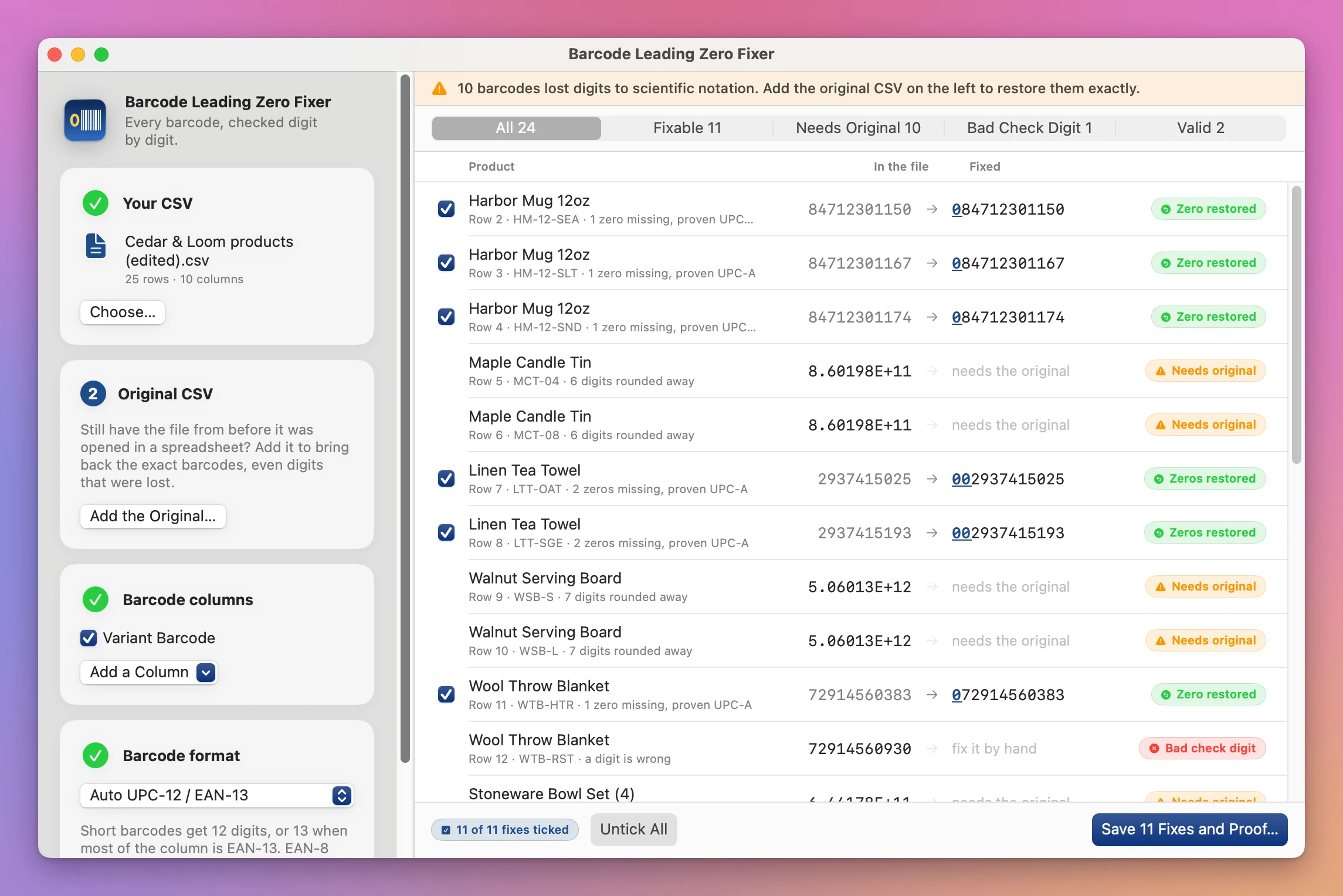
Every UPC, EAN and GTIN ends with a check digit, calculated from the other digits. Leading zeros don’t change it, so 84712301150 with a zero in front either passes the check or it doesn’t. When it passes, the app puts the zero back and shows it underlined. When it doesn’t, the barcode goes in Bad Check Digit, because a digit is wrong somewhere and adding zeros won’t fix it.
Pick the Barcode format your store expects: UPC-A (12), EAN-13 (13), GTIN-14 (14), EAN-8 (8), or Auto UPC-12 / EAN-13, which pads to 13 when most of the column is EAN-13. Spaces, hyphens, a .0 at the end or Excel’s ="…" come off too.
An honest answer about lost digits
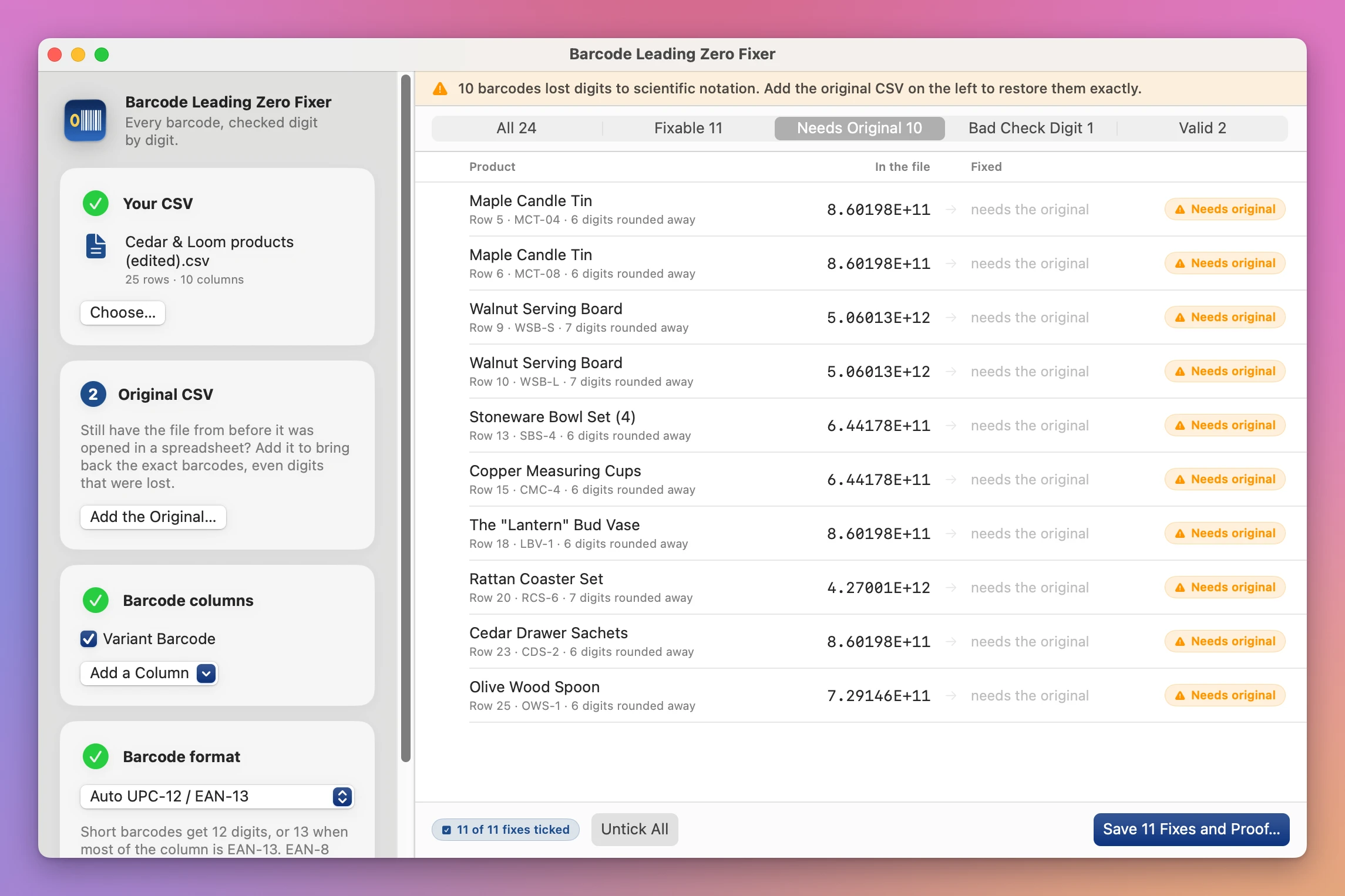
8.60198E+11 kept six of twelve digits. No app can know the other six, and this one doesn’t guess. Those barcodes go in Needs Original, with how many digits were rounded away, and the hint tells you to add the original file to restore them.
A fixed copy and a proof report
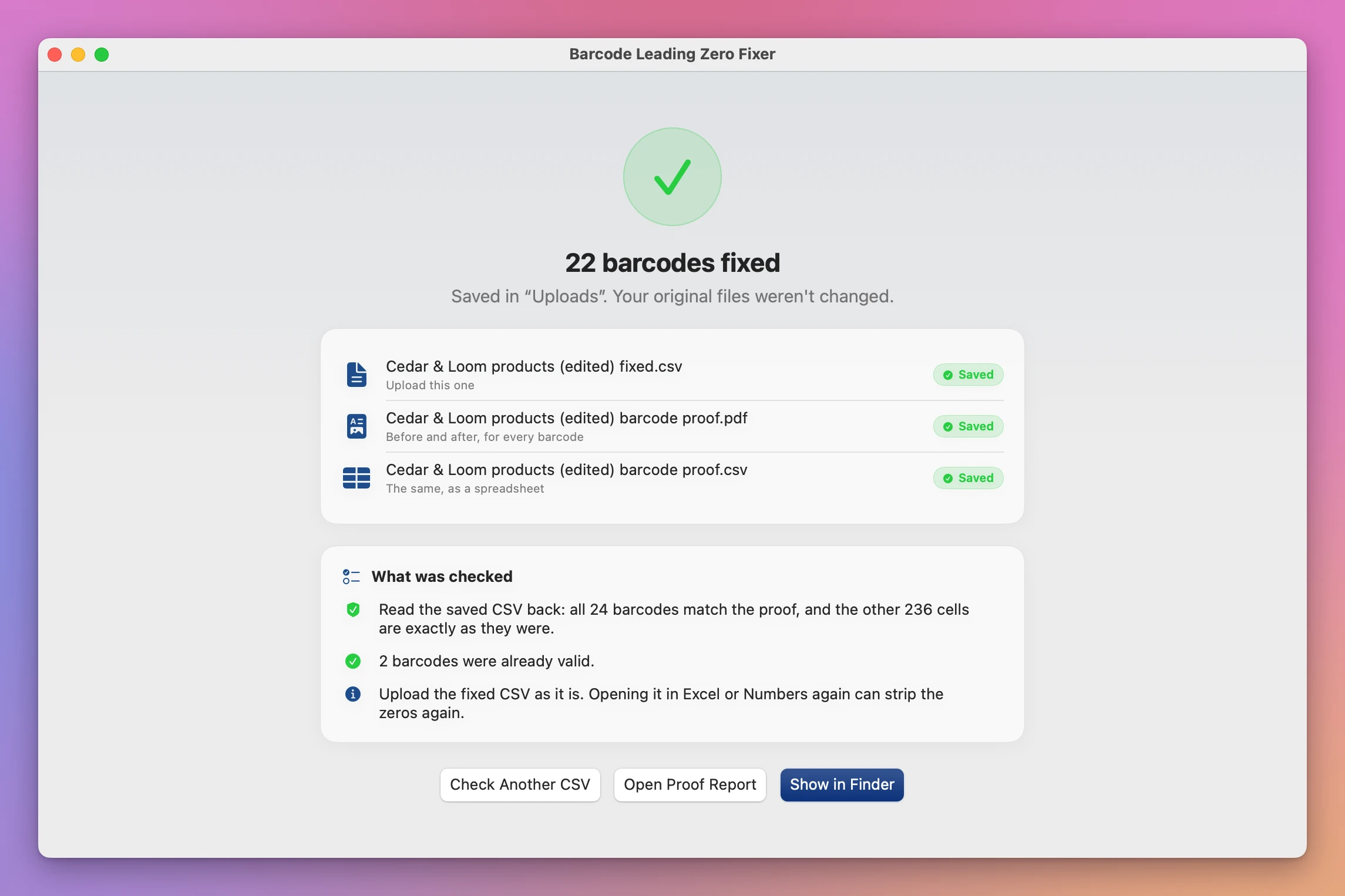
Save Fixes and Proof… saves three files in the folder you choose:
… fixed.csv, your file with the ticked barcodes fixed. Every other cell stays exactly as it was, including the prices you changed and descriptions with commas and line breaks.… barcode proof.pdf, every barcode before and after, what was fixed, what still needs a look and why.… barcode proof.csv, the same, one row per barcode.
Before it says it’s done, the app reads the saved CSV back and checks every cell. Your original files are never changed, and nothing is replaced: if a name is taken, the new files get a number.
Why not do it by hand
Excel can keep the zeros if you bring the CSV in through its text import and set the barcode column’s type to Text. It works when you remember it before you open the file. Once the file has been saved with 8.60198E+11 in it, those digits are gone from that file, and no setting brings them back.
The usual repair is a formula like =TEXT(A2,"000000000000"). It pads every value, including ones that weren’t barcodes or needed 13 digits, and it never checks a check digit. The scientific ones still need a VLOOKUP against the original, and then you check by eye that nothing else in the file changed.
| By hand in a spreadsheet | Barcode Leading Zero Fixer | |
|---|---|---|
| Missing leading zeros | A padding formula on every cell | Put back only when the check digit proves it |
| Scientific notation | VLOOKUP against the original | Restored from the original, or flagged |
| Typos in barcodes | Not noticed | Bad Check Digit |
| The rest of the file | Hope the formula touched nothing else | Read back and checked, cell by cell |
| Proof for your client or buyer | None | A PDF and a CSV, before and after |
What it doesn’t do
- It doesn’t invent digits. Barcodes that lost digits to scientific notation need the original file.
- It doesn’t look barcodes up. It checks the GS1 check digit, so it knows a number is a well-formed barcode, not that it belongs to your product.
- It doesn’t open Excel or Numbers files. Export a CSV first.
- It only changes barcode columns. Prices, titles and everything else stay as they are in your file.
- It doesn’t upload anything to your store or marketplace.
- It doesn’t make new barcodes. To get barcodes for new products, you need GS1 or your marketplace.
Questions
What if I open the fixed file in Excel again?
The zeros can go again. Upload the fixed CSV as it is. The barcodes in it are written as text in quotes, which is what store importers read.
Which files does it read?
CSV files exported from Shopify, Amazon, eBay, WooCommerce, Etsy, a supplier or a spreadsheet, with commas, semicolons or tabs, in UTF-8 or an older encoding. It finds the barcode columns by name: Barcode, Variant Barcode, UPC, EAN, GTIN or ISBN. You can tick any other column too.
Does anything get uploaded?
Nothing. Your files stay on your Mac. The app connects to the internet only to check for updates.
What it needs
macOS 14 Sonoma or later, on Apple silicon and Intel Macs. It asks macOS for no permission: it reads the files you choose or drag onto its window.
Barcode Leading Zero Fixer isn’t made by, affiliated with or endorsed by Apple, Microsoft, GS1, Amazon, Shopify or eBay. Excel is a trademark of Microsoft. The shop, products and barcodes in the screenshots are made up.
Buy Barcode Leading Zero Fixer
$19 plus tax where it applies, paid once.
Download the app from the order page or your Creem receipt, unzip it and move it to Applications. I sign the app with my Apple Developer ID, and Apple notarizes the download.
The app checks for updates once a day. When a new version is ready, click Install and Relaunch. The first time, it asks for the license key from your Creem receipt, and remembers it. To check anytime, choose Barcode Leading Zero Fixer → Check for Updates….