
Mac & Windows app by Flavio
Bulk Error Retry for eBay
Open the CSV you uploaded to eBay Seller Hub and its results file. See the failed rows grouped by error, fix them in the app, and save a clean retry CSV with only those rows, so the items that went live aren't listed twice.
Buy Bulk Error Retry for eBay for Mac · $19Buy Bulk Error Retry for eBay for Windows · $19Buy once, use forever. Up to 3 computers you own (license). Plus tax where it applies. Mac and Windows versions are sold separately.
macOS 14 or later (Apple silicon and Intel) · Windows 10 and Windows 11 (x64 and ARM64)
Latest Mac version 1.0.0, released November 28, 2026
You upload 100 listings to eBay Seller Hub from a CSV. A few minutes later the results file says 86 went live and 14 didn’t: six have no brand, four titles are over 80 characters, two point at a shipping policy called “USPS Ground 1 lb” that doesn’t exist, one quantity says “2 pcs” and one price says “12,50”.
Uploading the whole file again lists the 86 a second time. So you open the results in Excel, find each failed line number, scroll the original to that line, copy the row to a new sheet, keep the #INFO lines and the header at the top, fix the values and export a CSV. With 14 rows it takes most of an hour. Then Excel turns the SKU 00412 into 412, or the results counted the header as line 1 and you copied the wrong row.
Bulk Error Retry for eBay reads both files, matches every result line back to its row, and shows only the rows that failed, grouped by error. Click a row, type the fix on the right, and save a retry file that keeps eBay’s #INFO lines and header exactly as they were, with only the failed rows under them.
Watch a 30-second demo of Bulk Error Retry for eBay:
Who it’s for
- Resellers who list from a spreadsheet. You keep your stock in Numbers or Excel, export a few hundred rows a week to Seller Hub’s template, and every upload comes back with a handful of rows refused for a missing item specific or a title that’s three characters too long.
- Small shops moving their catalogue to eBay. You exported 2,000 products from your own shop and 300 failed because eBay wants a Brand or a Type for that category. You need them grouped, so you fix “missing Brand” once for 120 rows instead of reading 300 messages.
- Virtual assistants and listing services. You upload for several sellers and each one wants to know what failed and why. The error review is a spreadsheet and a PDF you can send them.
- Sellers whose results have warnings too. Some rows went live with a warning about a missing item specific. They’re already on eBay, and uploading them again with Add lists them twice. The app keeps them out unless you choose otherwise.
- Anyone who has been burned by Excel. Leading zeros dropped from SKUs and barcodes, long numbers turned into
1.2E+11, a description with a line break split across two rows. The app never opens your file in a spreadsheet, so none of that happens.
How it works
- In Seller Hub, go to Reports, then Uploads, and download the results file of your upload.
- Open the app and click Choose Your Two Files…: the CSV you uploaded and the results file, at once or one after the other. Or drag them onto the window.
- Click an error on the left to see its rows. Click a row and fix it on the right, under The error is about.
- Click Save Retry File with 14 Rows… and upload that file in Seller Hub the same way you uploaded the first one.
To see it first, click Try Example Files on the start screen. It opens a made-up upload of 100 camera and watch parts with 14 errors.
What you get
The failed rows, grouped by error
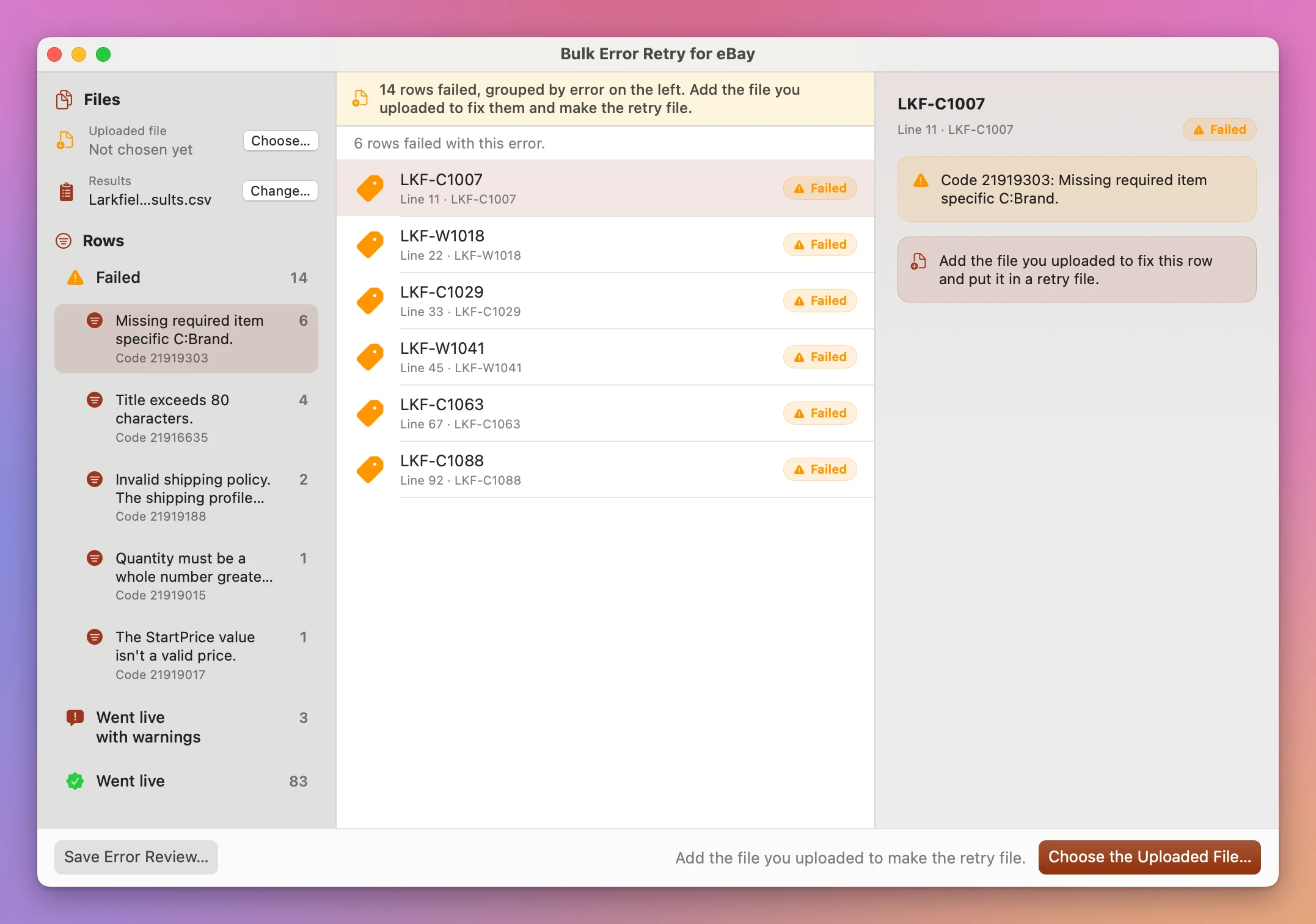
The sidebar lists each error with its code and how many rows it hit, biggest first: Missing required item specific C:Brand. 6, Title exceeds 80 characters. 4, and so on. Under each one it names the column the message is about, like C:Brand or Title. Below them, Went live with warnings and Went live show the rest of the upload, so you can check nothing is missing.
Fix each row where the error is
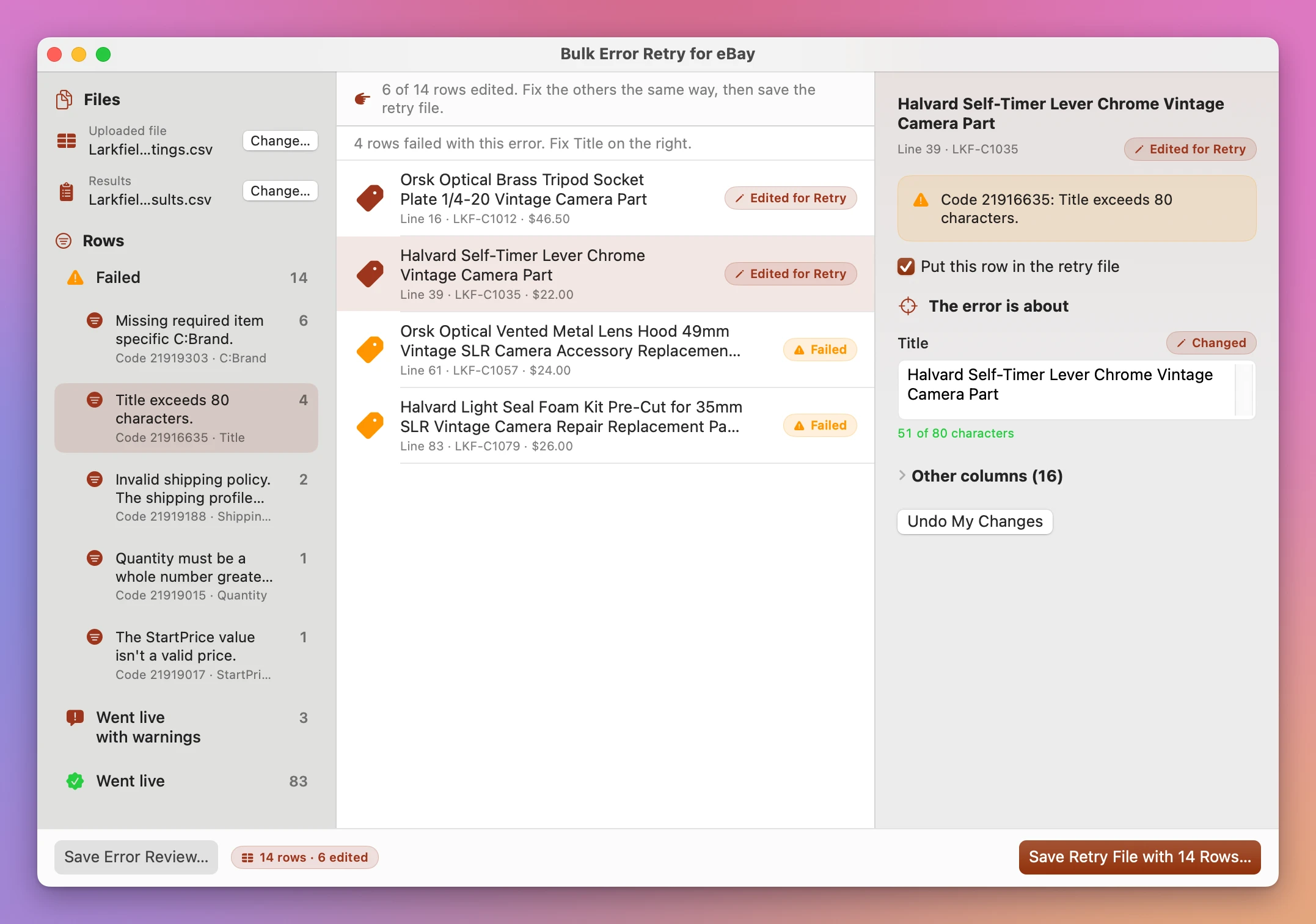
Click a row and the right side shows eBay’s message for it, then the columns that message names, ready to edit. A title shows its length against eBay’s 80 characters as you type. Every other column of the row is under Other columns, in case the fix is somewhere else. A row you changed is marked Edited for Retry, and Undo My Changes puts the original values back.
Your changes are kept as you type. Close the window, open the same file next week, and they’re still there.
Rows that went live stay out
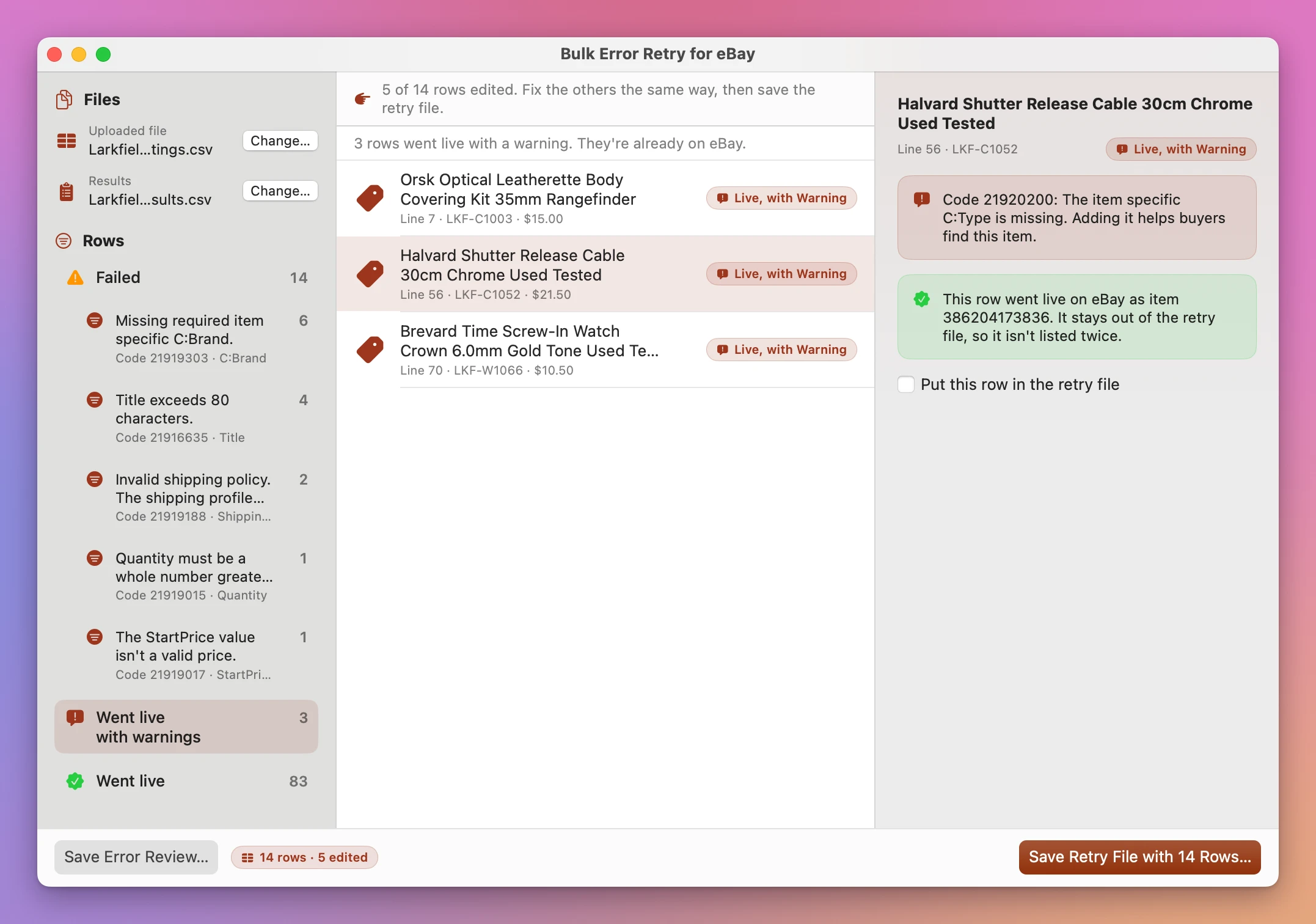
A row that went live is never put in the retry file, so nothing gets listed twice. A row that went live with a warning is already on eBay too, so it stays out unless you tick Put this row in the retry file, and then the app reminds you that an Add row creates a second listing. You can also leave a failed row out, if you decide not to list that item after all.
A retry file Seller Hub reads like the first one
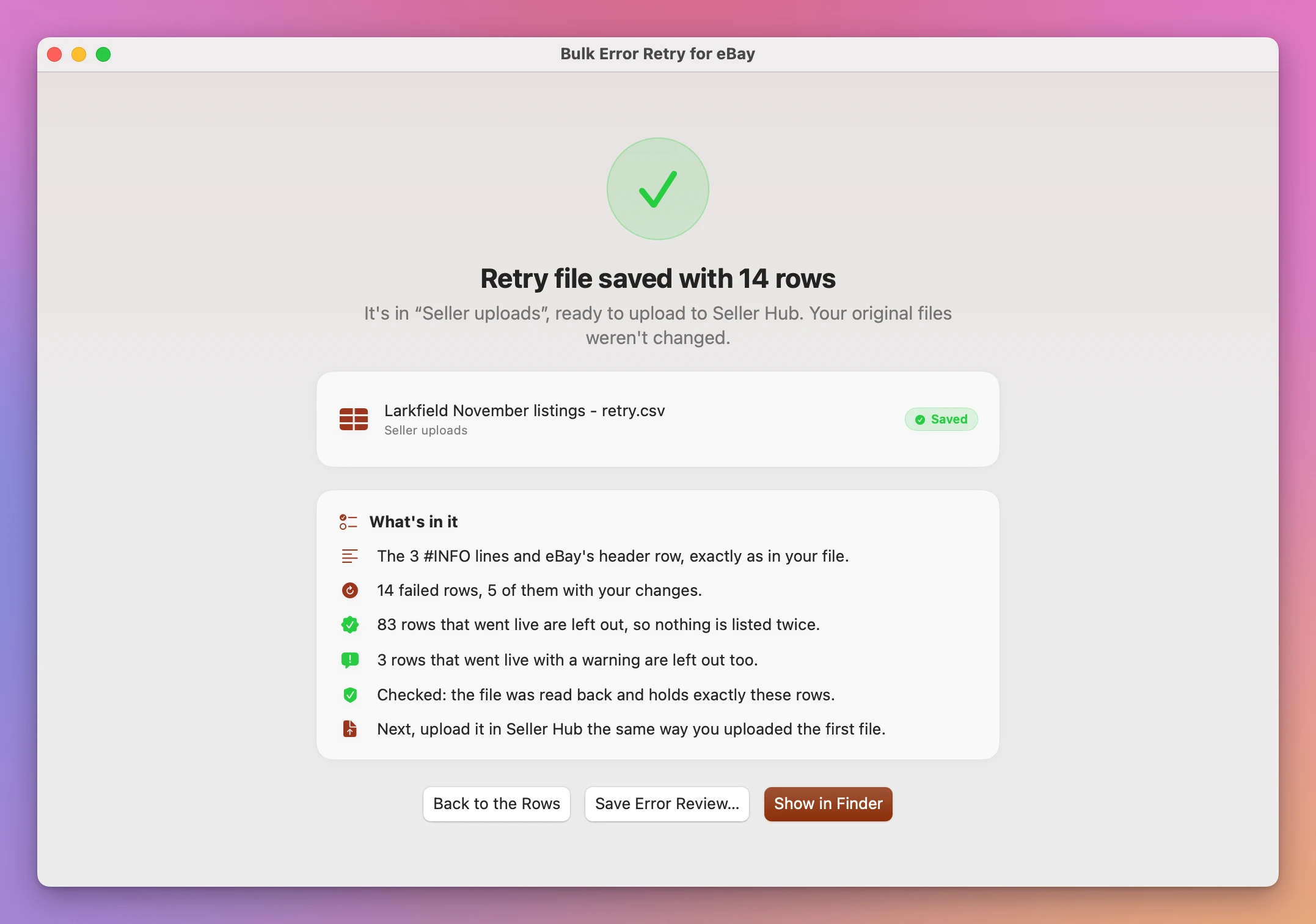
The retry file keeps the #INFO lines at the top and eBay’s header row (the one that starts with *Action(SiteID=US|…)) exactly as they were in your file. Every row you didn’t change is copied character for character. In a row you changed, only those values are rewritten. No error column is added. After saving, the app reads the file back and checks it holds exactly those rows.
An error review to read or send
Save Error Review… saves two files: a spreadsheet with each failed row, its error code and message beside it, whether it’s in the retry file and what you changed, and a PDF that lists the same errors with their rows, ready to print or send to whoever fixes the listings.
The results file on its own
Open only the results file and the app still groups the errors, so you can see what broke before you look for the CSV you uploaded. Add that file when you’re ready to fix the rows.
Why not do it by hand
| Excel or Numbers | Bulk Error Retry for eBay | |
|---|---|---|
| Finding the failed rows | Filter the results, then look up each line number in the other file | Matched for you, checked against the custom label |
| Grouping by error | Sort the results by message | Each error with its rows and the column it’s about |
| Leading zeros and long numbers | Can turn 00412 into 412 and long numbers into 1.2E+11 | Copied as text, exactly |
#INFO lines and header | Copy them by hand, hope nothing moved | Kept byte for byte |
| Rows that went live | Easy to upload again by mistake | Never in the retry file |
| What you changed | Nothing tells you | Edited for Retry, and kept when you close the window |
Excel and Numbers open both files, and for two or three failed rows that’s fine: filter the results by status, find each line in your file, copy it to a new sheet with the header, fix it, export as CSV. The trouble starts at a dozen rows. The line numbers in the results don’t always count the same way your spreadsheet does, a copied row lands one line off, and a spreadsheet changes values as it opens a CSV, so the retry upload fails on a SKU or a barcode that was fine the first time. Seller Hub also lets you fix a failed listing in the listing form, one at a time, which doesn’t help when 40 rows have the same missing Brand.
What it doesn’t do
- It doesn’t connect to eBay. You download the results from Seller Hub and upload the retry file yourself.
- It doesn’t know eBay’s rules. It shows eBay’s own messages and the columns they name. It doesn’t check a value before you upload.
- It doesn’t fix values for you. You type each fix.
- It doesn’t revise live listings. Rows that went live stay out of the retry file.
- It reads CSV files only, not Excel workbooks. Export an
.xlsxas CSV first. - It only knows eBay’s upload files, not other marketplaces.
Questions
Does it change my files?
No. The file you uploaded and the results file are only read. The retry file and the error review are new files, saved where you choose, and the app refuses to save the retry file over either of the files you opened.
What if the line numbers in the results don’t match my file?
The app checks each line number against the custom label (or the title) in the results. When a line number points at another item, it finds the row by its custom label instead and marks it Check This Row, so you look at it before uploading.
Does anything get uploaded?
Nothing. Your files stay on your Mac. The app connects to the internet only to check for updates.
What it needs
macOS 14 Sonoma or later, on Apple silicon and Intel Macs. It asks macOS for no permission: it reads the files you choose or drag onto its window.
Bulk Error Retry for eBay isn’t made by, affiliated with or endorsed by eBay Inc. or Apple. eBay is a trademark of eBay Inc. The shop, listings, SKUs and item numbers in the screenshots are made up.
Buy Bulk Error Retry for eBay
$19 plus tax where it applies, paid once.
Download the app from the order page or your Creem receipt, unzip it and move it to Applications. I sign the app with my Apple Developer ID, and Apple notarizes the download.
The app checks for updates once a day. When a new version is ready, click Install and Relaunch. The first time, it asks for the license key from your Creem receipt, and remembers it. To check anytime, choose Bulk Error Retry for eBay → Check for Updates….