
An app by Flavio
Combined Shipping Finder
Open your unshipped orders from Shopify, Etsy, eBay, WooCommerce or a spreadsheet and see which ones go to the same buyer or address, with warnings for different shipping speeds, gift notes and different apartments. Save a packing sheet with the orders to tape together and a CSV grouped by parcel.
Buy Combined Shipping Finder · $19Buy once, use forever. Up to 3 computers you own (license). Plus tax where it applies.
macOS 14 or later · Apple silicon and Intel
Latest version 1.0.0, released November 27, 2026
A regular buyer orders a notebook on Monday and a pen clip on Wednesday. On Thursday morning you have 34 unshipped orders, and those two are a page apart in the list. One says “418 Alder Street, Apt 3B”, the other “418 Alder St., Apt. 3B” with a ZIP+4. You print two labels, pack two boxes, and pay for shipping twice.
You can catch it by hand: export the orders, sort by address in a spreadsheet, and scan for neighbours. Sorting puts “Street” and “St.” in different places, misses the apartment typed in the wrong column, and knows nothing about the buyer who also ordered on your Etsy shop. And when you do spot two orders together, you still have to check that one of them isn’t a gift going somewhere else, or paid for express.
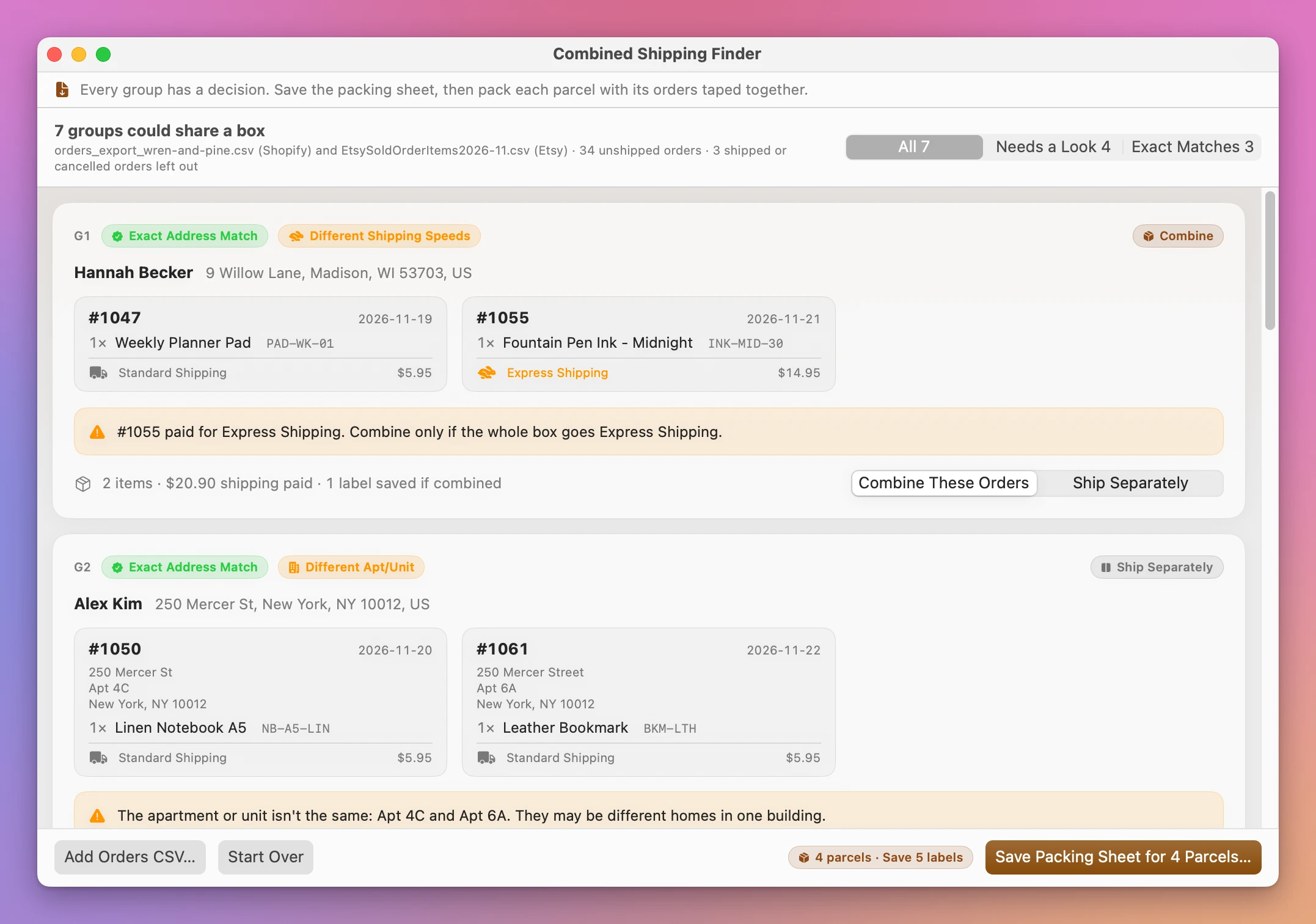
Combined Shipping Finder reads your unshipped orders, compares the addresses the way a person would, and shows each group of orders that could share a box, side by side. Exact matches are set to combine. Anything unusual (a different name at the same address, the same buyer at two addresses, a faster shipping speed, a gift note, another apartment in the same building) waits for you to choose. Then it saves a packing sheet with the orders to tape together.
Watch a 30-second demo of Combined Shipping Finder:
Who it’s for
- One-person Etsy and Shopify shops with regulars. Someone buys a candle, comes back two days later for the matching tin, and you’d rather send one box with one label than pay twice.
- Sellers on more than one marketplace. The same buyer ordered on your Etsy shop and on your own site. Neither store’s order screen looks across both, and the app reads both exports at once.
- Shops after a sale or a holiday rush. 150 orders landed in a weekend, repeat buyers are buried in the list, and their addresses are typed differently each time.
- Shops that ship a lot of gifts. One buyer sends an order to themselves and another to their grandmother. The app keeps those apart unless you decide otherwise, and puts the gift note in front of you.
- Brands that ship to offices. Three people at the same company address order separately. One box can save two labels, if the office is fine with it, so the app asks first.
How it works
- Export your unshipped orders as a CSV from Shopify, Etsy, eBay, WooCommerce or a spreadsheet.
- Click Choose Orders CSV… and pick one or more files, or drag them onto the window. Add Orders CSV… adds another store’s export.
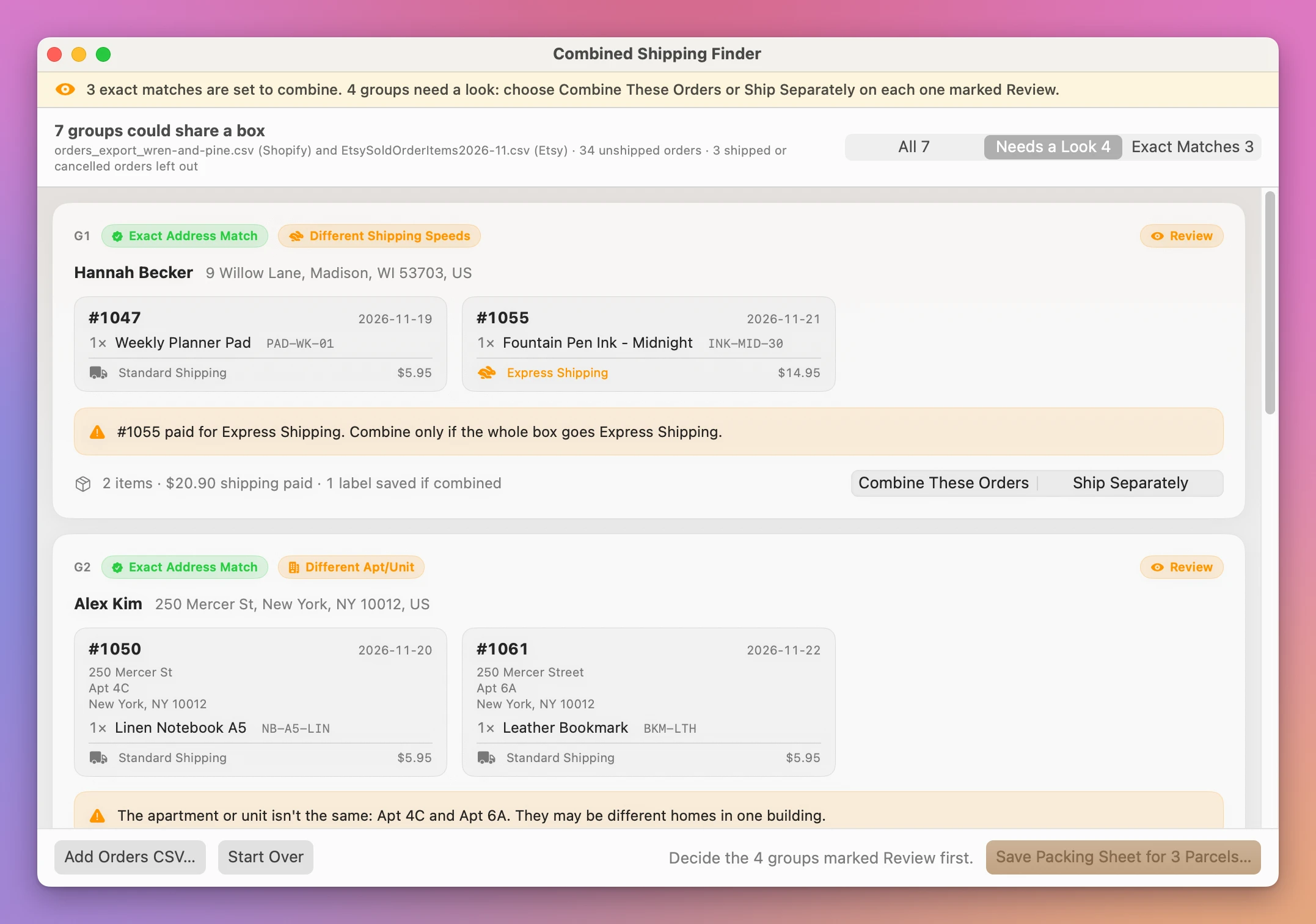
- Look at each group. Exact matches are already set to Combine These Orders. For each group marked Review, choose Combine These Orders or Ship Separately.
- Click Save Packing Sheet for 4 Parcels… and choose a folder.
There’s a Try Example Orders button on the first screen, with two made-up exports of a made-up shop, so you can see what it finds before you open your own.
What you get
Addresses compared the way you’d compare them
Before comparing, the app ignores case, punctuation and extra spaces, treats Street and St., Avenue and Ave., Road and Rd., Boulevard and Blvd., Drive and Dr., Lane and Ln. as the same word, finds the apartment or unit whether it’s in the first or second address line (“Apt 3B”, “#3B”, “Unit 3-B”), uses the five-digit ZIP for a ZIP+4, puts back the leading zero a spreadsheet took off a ZIP like 06355, and knows that Connecticut is CT. It also links orders by the buyer’s email and name, across every file you open.
Three kinds of match, each with a pill
- Exact Address Match: the same address and the same name on every order. Set to combine when nothing else needs a look.
- Check Before Combining: the same address under different names. A household, an office, or a typo. You decide.
- Different Address: the same buyer sending orders to two places. Often a gift, so it’s never combined unless you choose it, and then you pick where the box goes.
On top of that, a group gets an orange warning pill when the orders paid for Different Shipping Speeds (one Standard, one Express), when there’s a Gift Note, or when the apartment is different (Different Apt/Unit). The sentence under the orders says what to check: “#1055 paid for Express Shipping. Combine only if the whole box goes Express Shipping.”
A packing sheet you can tape to the bench
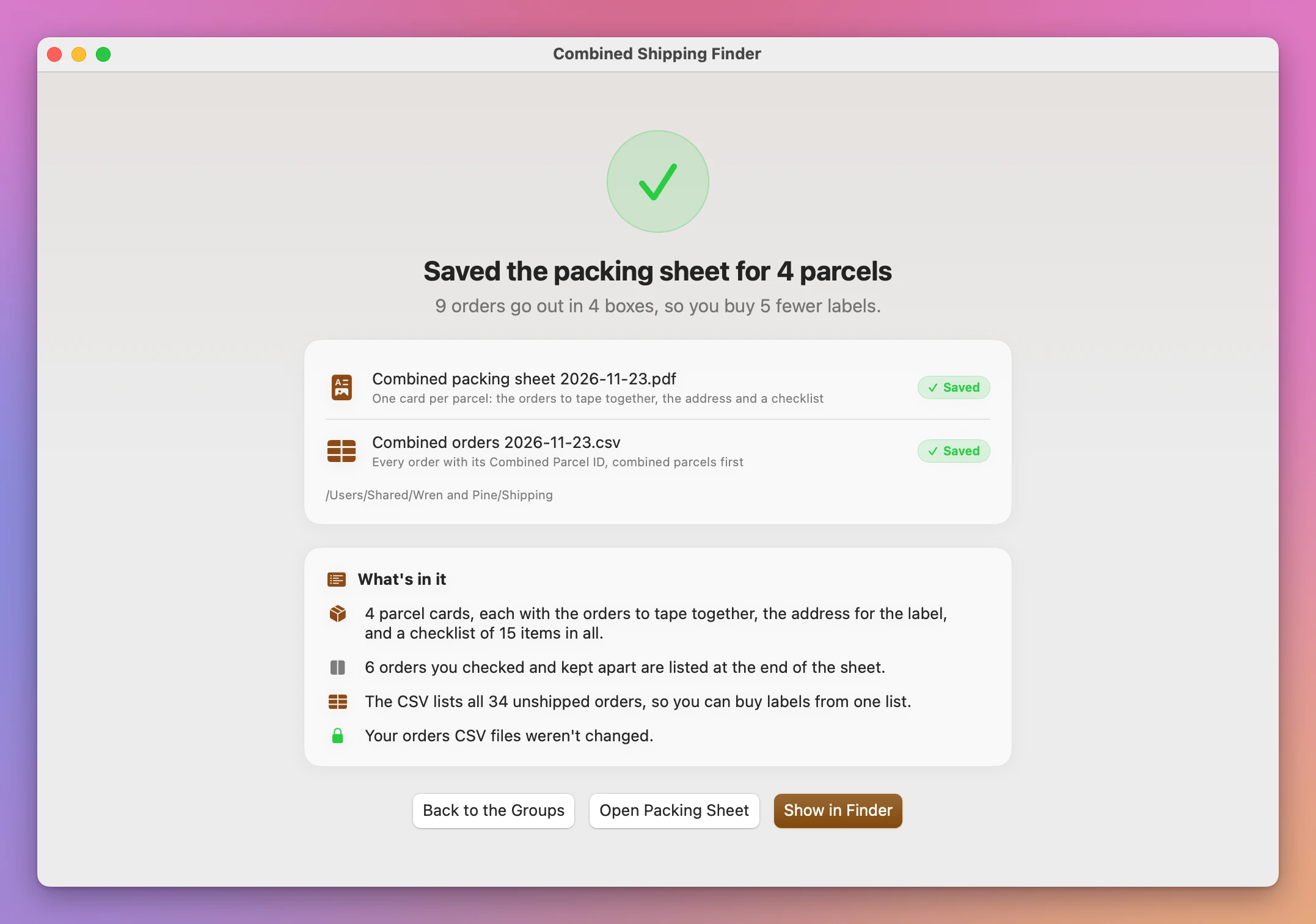
Save Packing Sheet… writes a PDF with one card per combined parcel: the order numbers to tape together, the address for the label, each order’s date, shipping method and what the buyer paid for shipping, and a checklist of every item with its SKU and quantity, added up across the orders. A postage line says what the buyers paid in total and how many labels you don’t need, so you can refund the extra if that’s how your shop works. Gift notes and speed warnings are printed on the card. The orders you checked and kept apart are listed at the end.
It also writes a CSV with every unshipped order and its Combined Parcel ID (P-001, P-002…), combined parcels first, with the label address on every row of a parcel. Your orders files are never changed.
Why not do it by hand
| By hand | Combined Shipping Finder | |
|---|---|---|
| Spotting repeat buyers | Sort a spreadsheet by address and scan | Groups found across every file you open |
| ”St.” vs “Street”, apartment in the wrong column, ZIP+4 | Missed by a sort | Normalized before comparing |
| Two stores at once | Copy one export into the other | Open both files |
| Gifts and express orders | Remember to check | Warning pills, nothing combined without your choice |
| Packing | Write the order numbers on a sticky note | A card per parcel with a checklist of items |
Your store helps a little. Etsy combines shipping when the buyer checks out once, eBay can combine purchases from the same buyer on eBay, and Shopify needs an extra app to merge orders. None of them looks across stores or at orders placed days apart. Shipping software like ShipStation can combine orders to the same address, as part of a monthly subscription with your stores connected. If you already pay for one of those and it works, you don’t need this app.
What it doesn’t do
- It doesn’t connect to your store. You export the unshipped orders as a CSV, and the app reads that file.
- It doesn’t merge or update orders in your store. Mark them shipped there, as you do today.
- It doesn’t buy or print labels, and it doesn’t refund postage. The packing sheet tells you how much the buyers paid.
- It doesn’t check addresses against a postal database. Two orders match when their addresses do, after the clean-up described above.
- It doesn’t remember your choices after you close it. Save the packing sheet before you quit.
Questions
Which files does it read?
Unshipped orders exports from Shopify, Etsy, eBay and WooCommerce, and any spreadsheet saved as CSV with an order number, a street address, and a ZIP or a city. It finds the columns by their names, like “Order #”, “Street Address”, “Apt/Line 2”, “ZIP/Postal Code”, “Shipping Method” or “Qty”. Cancelled, refunded and already shipped orders are left out when the file has a status column.
Does anything get uploaded?
Nothing. Your orders stay on your Mac. The app connects to the internet only to check for updates.
What it needs
macOS 14 Sonoma or later, on Apple silicon and Intel Macs. It asks macOS for no permission: it reads the files you choose or drag onto its window.
Combined Shipping Finder isn’t made by, affiliated with or endorsed by Shopify, Etsy, eBay, WooCommerce, ShipStation, Pirate Ship, USPS, UPS, FedEx or Apple. Their names are used only to say which files the app reads. The shop, buyers and addresses in the screenshots are made up.
Buy Combined Shipping Finder
$19 plus tax where it applies, paid once.
Download the app from the order page or your Creem receipt, unzip it and move it to Applications. I sign the app with my Apple Developer ID, and Apple notarizes the download.
The app checks for updates once a day. When a new version is ready, click Install and Relaunch. The first time, it asks for the license key from your Creem receipt, and remembers it. To check anytime, choose Combined Shipping Finder → Check for Updates….