
Mac & Windows app by Flavio
Crosslist Sold Checker
Add what sold on one marketplace and what's still listed on the others, as CSV files. Crosslist Sold Checker shows every listing that could sell twice, by SKU and by title, says whether to delist it or lower its quantity, and saves a Delist Action Sheet grouped by channel.
Buy Crosslist Sold Checker for Mac · $19Buy Crosslist Sold Checker for Windows · $19Buy once, use forever. Up to 3 computers you own (license). Plus tax where it applies. Mac and Windows versions are sold separately.
macOS 14 or later (Apple silicon and Intel) · Windows 10 and Windows 11 (x64 and ARM64)
Latest Mac version 1.0.0, released November 27, 2026
You list the same milk glass mixing bowl on eBay, Etsy, Poshmark and Mercari. It sells on eBay on Saturday morning. You meant to pull the other three listings that afternoon, but eight more things sold over the weekend, and on Monday someone buys the bowl again on Mercari. Now you’re writing an apology and taking a cancellation on your seller record.
The check itself is simple: for each item that sold, is it still listed anywhere else? Doing it by hand means opening the sold list from one marketplace and searching each item in the listings of the others, one SKU or title at a time. It works with three sales. With twenty, and a channel where your titles are shorter, or where you never added SKUs, it’s an hour of squinting, and that’s when you miss one.
Crosslist Sold Checker does that check in one go. You add the sold export from one marketplace and the active listings from the others, as CSV files. The app shows every listing that already sold elsewhere, says how sure the match is (Exact SKU, Title Match or Check Manually), and whether to Delist Now or Reduce Qty when you have more than one. You mark each one as you go, and save a Delist Action Sheet to work from.
Watch a 30-second demo of Crosslist Sold Checker:
Who it’s for
- Vintage and one-of-a-kind resellers who crosslist every piece on three or four marketplaces by hand. One sale means three listings to pull, and after a busy weekend you need the list of all of them, not a memory of which ones you already did.
- Small home goods and handmade shops with a few units of each item. Two mugs sell on eBay, and the Etsy listing should go from 6 to 4. The app says Reduce Qty to 4 when there are more units listed than sold, and Delist Now when the last one went.
- Sellers whose crosslisting tool doesn’t delist for them, because the plan doesn’t include it or it’s turned off. You export once a day and check.
- Sellers back from a trip or a fair with two weeks of sales across channels to reconcile before anything sells twice.
- Sellers with a helper who does the delisting. The printed action sheet, grouped by marketplace with a box to tick for each listing, is the to-do list you hand over.
How it works
- Download a CSV of what sold from one marketplace, and a CSV of your active listings from each of the others. An inventory spreadsheet you keep yourself works too, exported as CSV.
- Click Choose Exports… and pick them all, or drag them onto the window. The app tells sold exports from active listings and names each channel from the file name.
- Check each match. Copy the listing ID with one click, take the listing down on its marketplace, and click Mark Delisted. If it’s a different item, click Not Same Item.
- Click Save Action Sheet for 11 Listings… and choose a folder, to get a PDF and a CSV of what’s left to do.
Want to see it first? Try Example Exports on the start screen loads a made-up shop selling on four marketplaces.
What you get
Matches by SKU, by title, and the ones to check
The surest match is the same SKU, the Custom Label on eBay, on both sides. It gets a green Exact SKU pill. Many sellers don’t use SKUs on every channel, though, and titles differ: eBay allows 80 characters, other marketplaces fewer, and you wrote “Hand-Thrown Ceramic Planter, Sage Green, Medium” on one and “Hand Thrown Planter Sage Green Medium” on another.
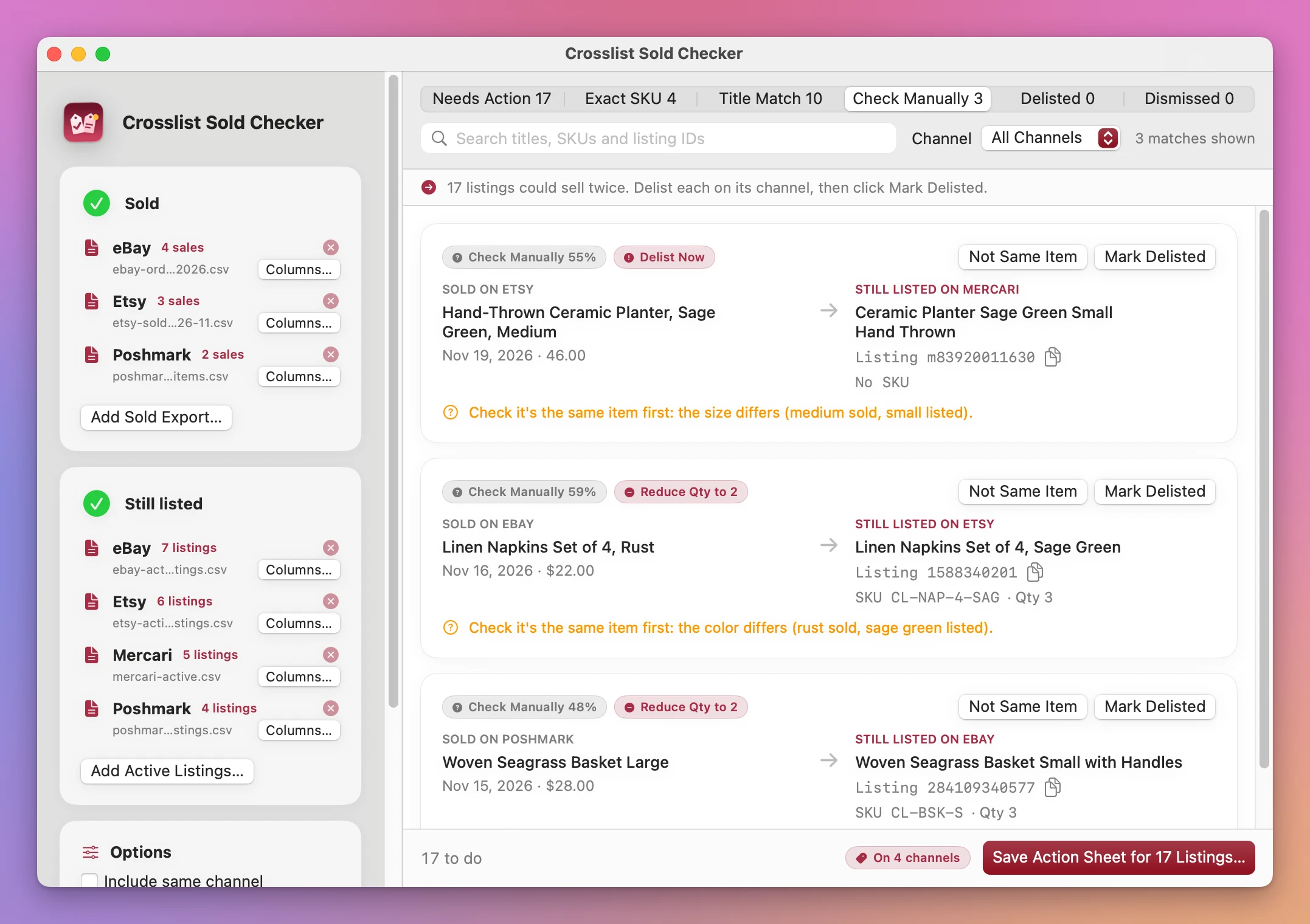
So the app also compares titles. It ignores punctuation, capitals and the filler resale titles are full of (“NWT”, “free shipping”), reads “12 oz” and “12oz” as the same thing, and gives a percentage. At 70% or more it’s a Title Match. Between 45% and 70% it’s Check Manually, and the card says why: “the size differs (medium sold, small listed)”, “the color differs (rust sold, sage green listed)” or “the SKUs are different”. A 12oz mug and a 16oz mug with the same name stay a question for you, never a silent match.
Delist Now, or Reduce Qty
When the export of active listings has a quantity column, the app compares it with what sold. One left gets Delist Now. Six left on Etsy, after 2 sold on eBay, gets Reduce Qty to 4, and the card says “Lower the quantity on Etsy from 6 to 4: 2 units sold on eBay.” Two sales of the same item add up on the same listing. Listings with nothing left in stock are skipped, since nobody can buy them.
Your progress is kept
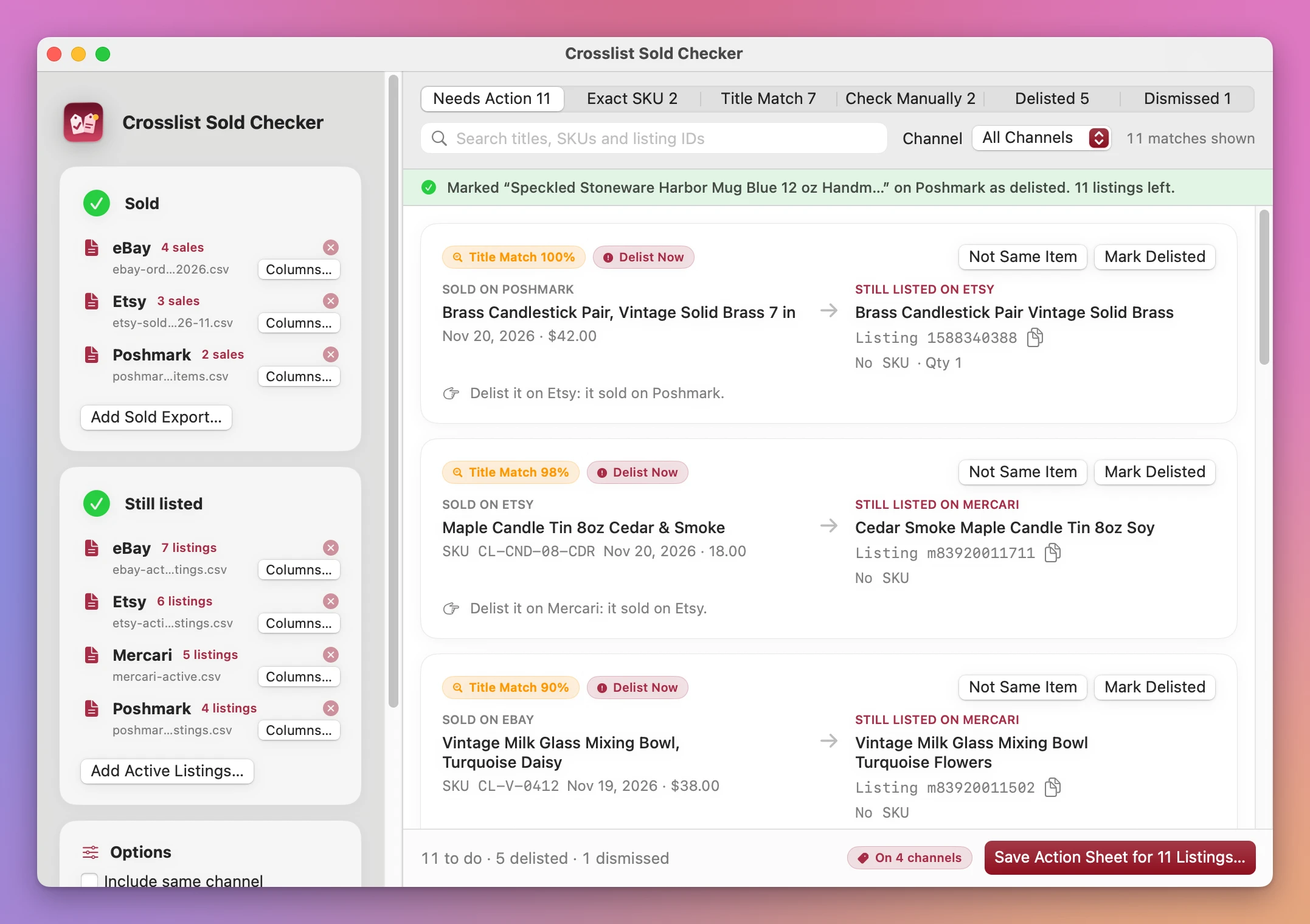
Every click on Mark Delisted or Not Same Item is saved right away. Close the app halfway through and open it tomorrow: your exports and your marks are still there, with “Picked up where you left off: 6 of 17 matches marked.” The pills at the top split the list into Needs Action, Exact SKU, Title Match, Check Manually, Delisted and Dismissed, and you can search by title, SKU or listing ID, or show one marketplace at a time.
A Delist Action Sheet to print or hand over
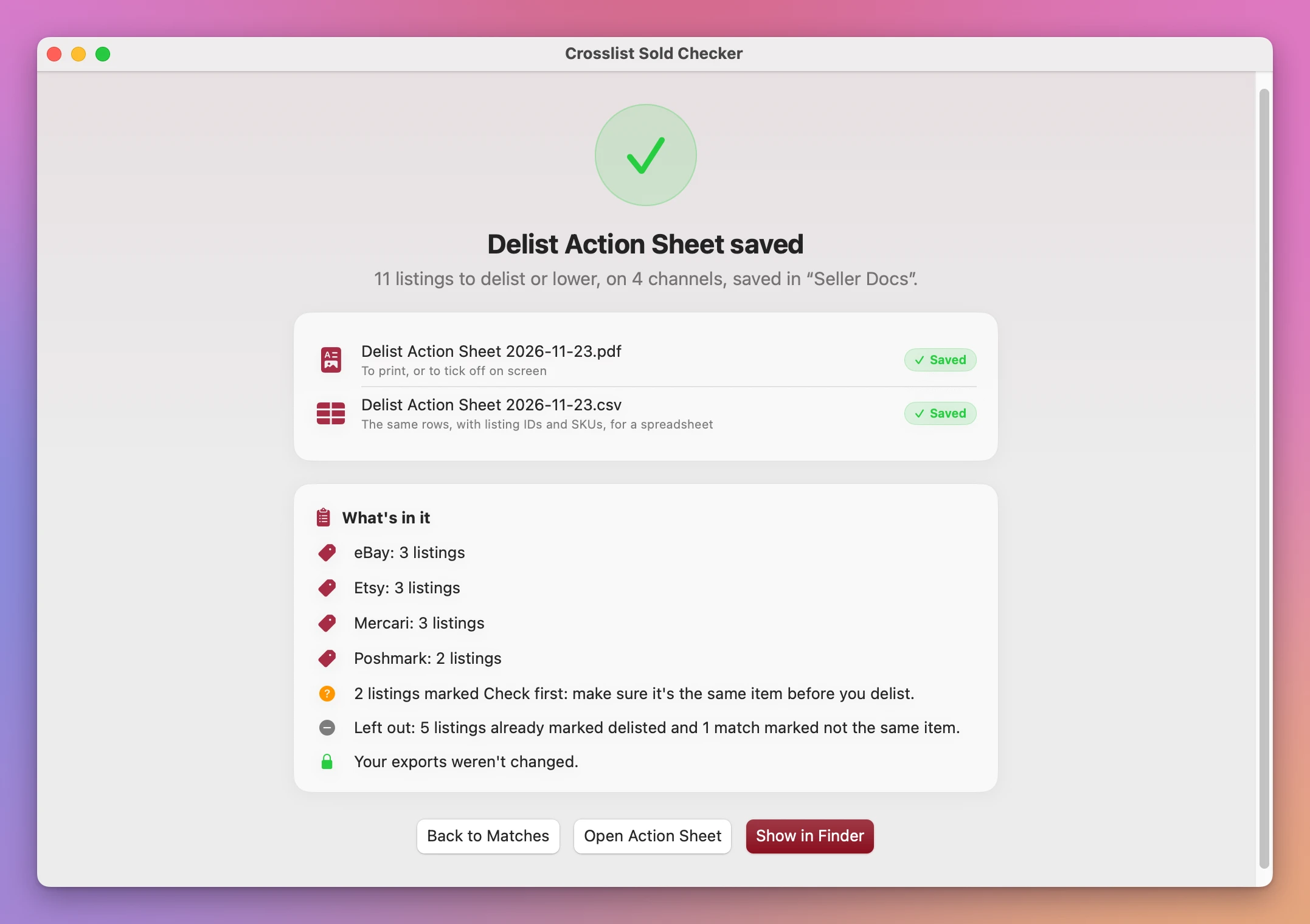
Save Action Sheet… writes two files in the folder you choose:
- A PDF grouped by marketplace, one row per listing, with a box to tick, what to do, the listing ID, the SKU, the title and what sold where. Matches to check first are marked in orange.
- A CSV with the same rows, the listing IDs and SKUs, and the new quantity, for a spreadsheet.
Listings you already marked delisted or not the same item are left out, and counted on the sheet. Saving again never replaces the earlier sheet.
It reads the CSV files you already have
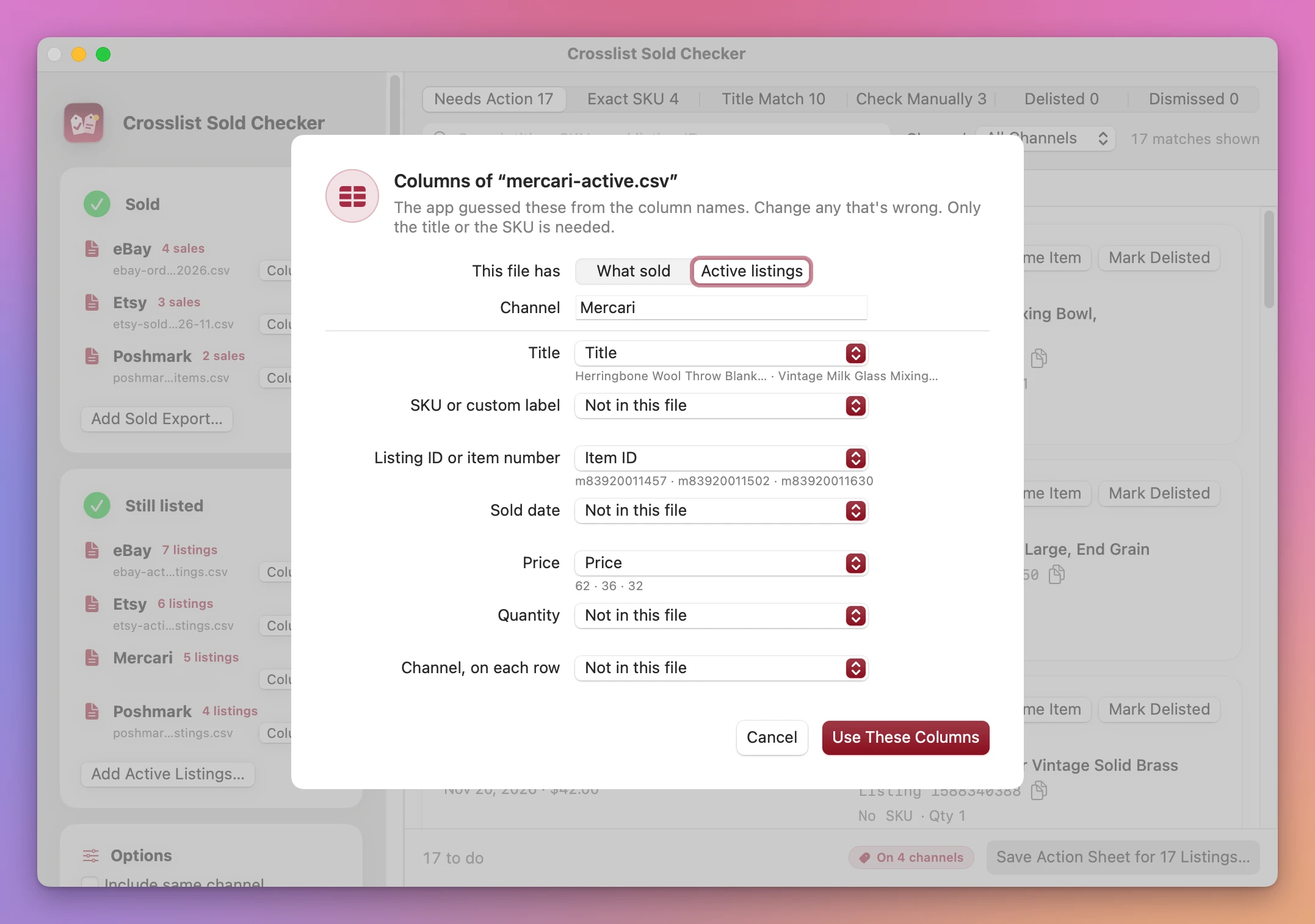
Exports don’t all look alike. Some start with a blank line, some end with a total, some write SKU and some write Custom label or LISTING_ID. The app finds the column names it knows. When it guesses wrong, open Columns… to pick the title, SKU, listing ID, sold date, price and quantity columns, or rename the channel.
Why not do it by hand
| By hand in Numbers or Excel | Crosslist Sold Checker | |
|---|---|---|
| One sale, one other channel | Search the SKU in the other sheet | The same, already done |
| Twenty sales, three other channels | Sixty searches, one window per channel | One list, sorted by what to delist first |
| Channels without SKUs | Guess a word from the title and search | Titles compared word by word, with a percentage |
| Same name, different size or color | Easy to miss | Check Manually, with what differs |
| Several units listed | Work out the new quantity | Reduce Qty to 4 |
| Remembering what you already did | A highlighter, or your memory | Marks saved at every click |
| A list for later or for a helper | Copy and paste rows | A PDF and a CSV grouped by marketplace |
A spreadsheet with a lookup formula is the right tool if every item has the same SKU everywhere and you’re comfortable writing one for each pair of channels. Crosslisting services can delist for you, on a monthly plan with access to your accounts. This app sits in between: it reads files you already have, signs in to nothing, and costs the same once.
What it doesn’t do
- It doesn’t delist anything. It never signs in to a marketplace or changes a listing. It tells you which ones to take down, and you do it.
- It doesn’t download your exports. You download them from each marketplace, your crosslisting tool or your own spreadsheet. Some marketplaces have no export of active listings; for those you need a CSV from somewhere else.
- It reads CSV files only. A Numbers or Excel file needs to be exported as CSV first.
- It doesn’t keep stock in sync between channels, or watch for new sales. You run a check when you have new exports.
- It doesn’t look at photos. Two listings with different titles and no shared SKU, where fewer than about half the words match, won’t be matched.
- Your exports are never changed. The app keeps its own copy of each one so your check comes back when you open it again.
Questions
Which marketplaces does it work with?
Any that gives you a CSV with a title or a SKU column. The app recognizes the usual column names and names eBay, Etsy, Poshmark, Mercari, Depop, Shopify and others from the file name. For anything else, type the channel’s name in Columns….
Does anything get uploaded?
Nothing is uploaded. Your exports stay on your Mac, and the app connects to the internet only to check for updates.
What does it need?
macOS 14 Sonoma or later, on Apple silicon and Intel Macs. It asks macOS for no permission: it reads the files you choose or drag onto its window.
Crosslist Sold Checker isn’t made by, affiliated with or endorsed by eBay, Poshmark, Mercari, Etsy, Depop, Shopify, Apple or any other marketplace. The shop, the items and the listing IDs in the screenshots are made up.
Buy Crosslist Sold Checker
$19 plus tax where it applies, paid once.
Download the app from the order page or your Creem receipt, unzip it and move it to Applications. I sign the app with my Apple Developer ID, and Apple notarizes the download.
The app checks for updates once a day. When a new version is ready, click Install and Relaunch. The first time, it asks for the license key from your Creem receipt, and remembers it. To check anytime, choose Crosslist Sold Checker → Check for Updates….