
An app by Flavio
Font Coverage Checker
Check that a font has every character your multilingual text needs, see each missing one with the file and line it's in, and find the installed fonts that have them.
Buy Font Coverage Checker · $20One-time purchase. Plus tax where it applies.
macOS 14 or later · Apple silicon and Intel
Latest version 1.0.1, released November 20, 2026
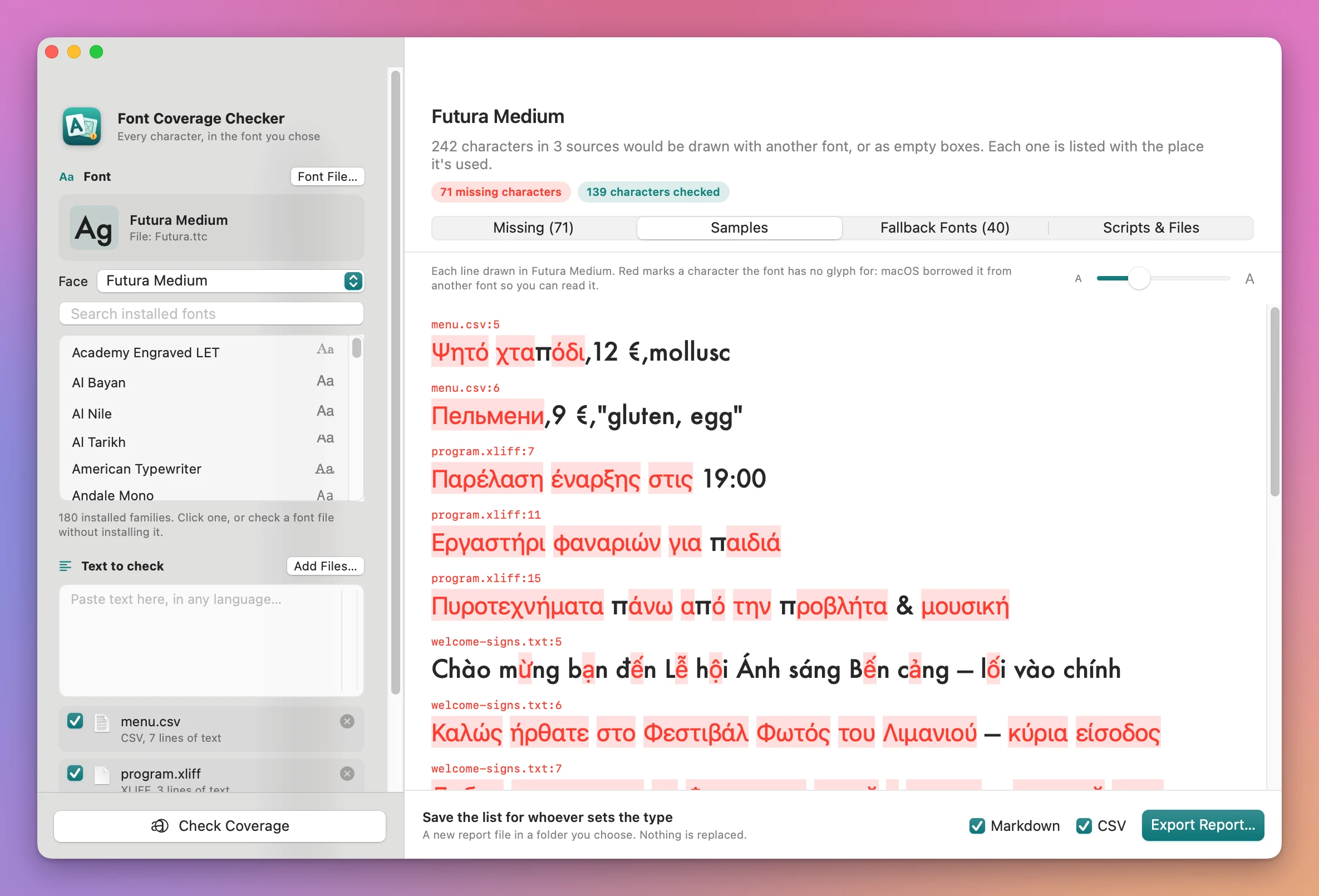
The festival signs go to the printer on Friday. They say welcome in nine languages, and the brand typeface is Futura. On your screen every line looks fine, because macOS quietly borrows a letter from another font whenever Futura doesn’t have it. On the printed sign, set in Futura alone, those letters come out as empty boxes or in the wrong typeface.
You could open Font Book and compare its grid of characters against the text, letter by letter. For a Vietnamese line with ừ and ộ, a Ukrainian line with ґ and a Greek program, that’s an afternoon, and you’d still miss one.
Font Coverage Checker does it in one go. Pick the font, paste the text or add the files it lives in, and click Check Coverage. You get every character the font has no glyph for, where each one is used, the text drawn in the font with the gaps in red, and the installed fonts that have the missing letters.
Who it’s for
- Designers of multilingual signage. A festival or museum wayfinding system in Polish, Turkish, Vietnamese, Greek and Cyrillic. Before anything is printed, you want to know which signs the brand typeface can set and which approved font covers the rest.
- Packaging designers. The ingredient and allergen copy arrives as a CSV in twelve languages. You need to show the client which lines the brand font can set and which need a companion font, with the line numbers.
- App designers and developers. A custom UI font has to cover every translation in
Localizable.stringsand the XLIFF files from the translators, including the emoji in the marketing strings, before the release goes out. - Book and magazine designers. A translated edition is coming, a Czech or Vietnamese one, and you’re choosing a typeface. Drop the manuscript text in before you pay for the font license.
- Localization project managers. You want a spreadsheet of missing characters with file and line to send to the designer, without opening a design app.
From a font and a pile of text to a list of gaps
- Pick the font. Search the list of installed fonts on the left and click one. Each family shows an “Aa” in its own letters, and a Style menu switches between its faces. To check a font you haven’t installed, click Font File… or drop a
.ttf,.otf,.ttcor.otcfile on the window. A font collection gets a Face menu. - Add the text. Paste it in the Text to check box, or click Add Files… and pick
.txt,.csv,.strings,.json,.xliffor.mdfiles, or a folder of them. Each file gets a checkbox, so you can leave one out of the check. - Click Check Coverage (Command-R). Until the app has a font and some text, a “Next: …” line under the button says what’s missing.
- Read the results. The header says how many characters are missing, with pills for missing characters, emoji that come out in pieces, and scripts that need a shaping check. Four tabs show the rest: Missing, Samples, Fallback Fonts and Scripts & Files.
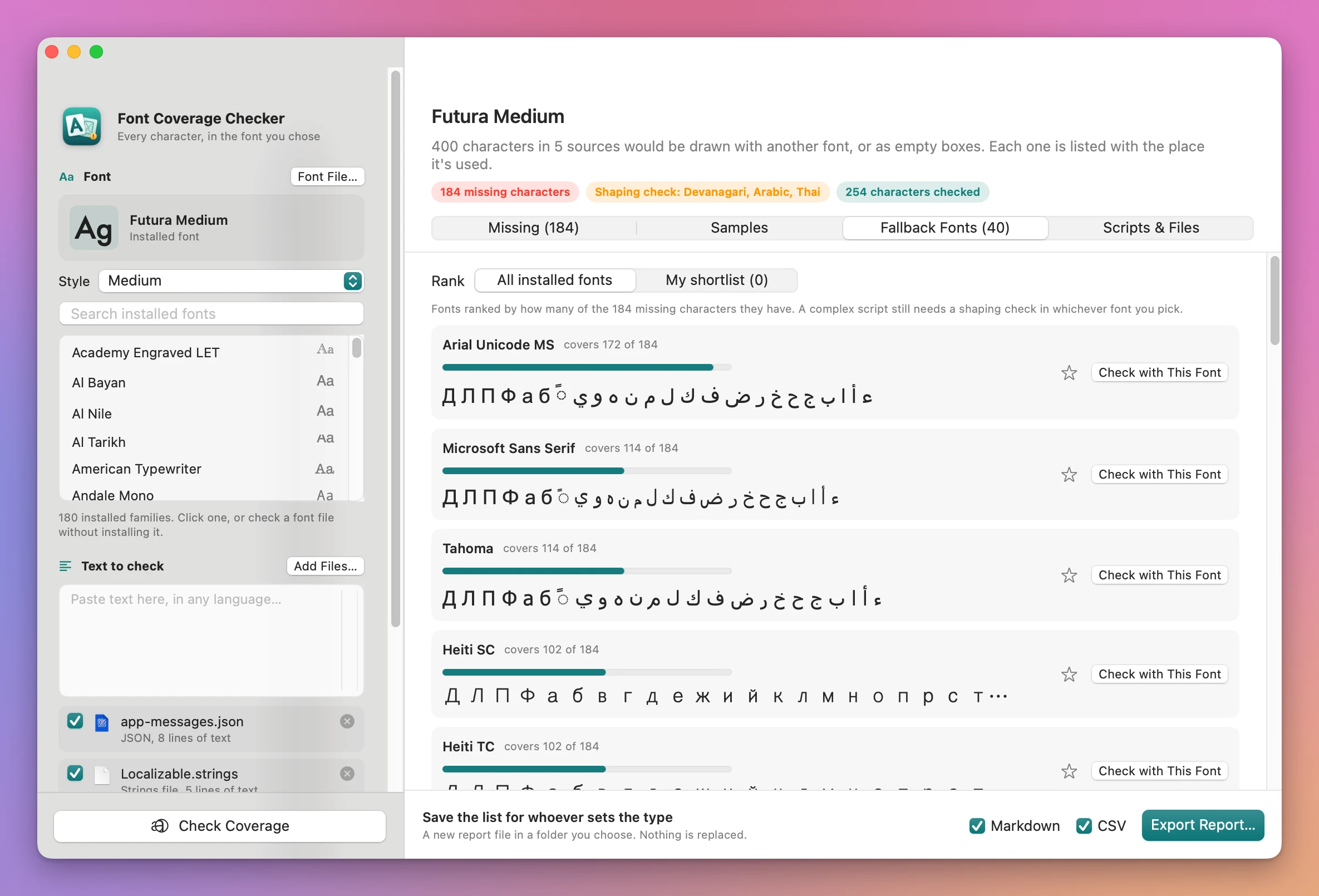
- Try another font. In Fallback Fonts, click Check with This Font on any candidate to run the same text against it.
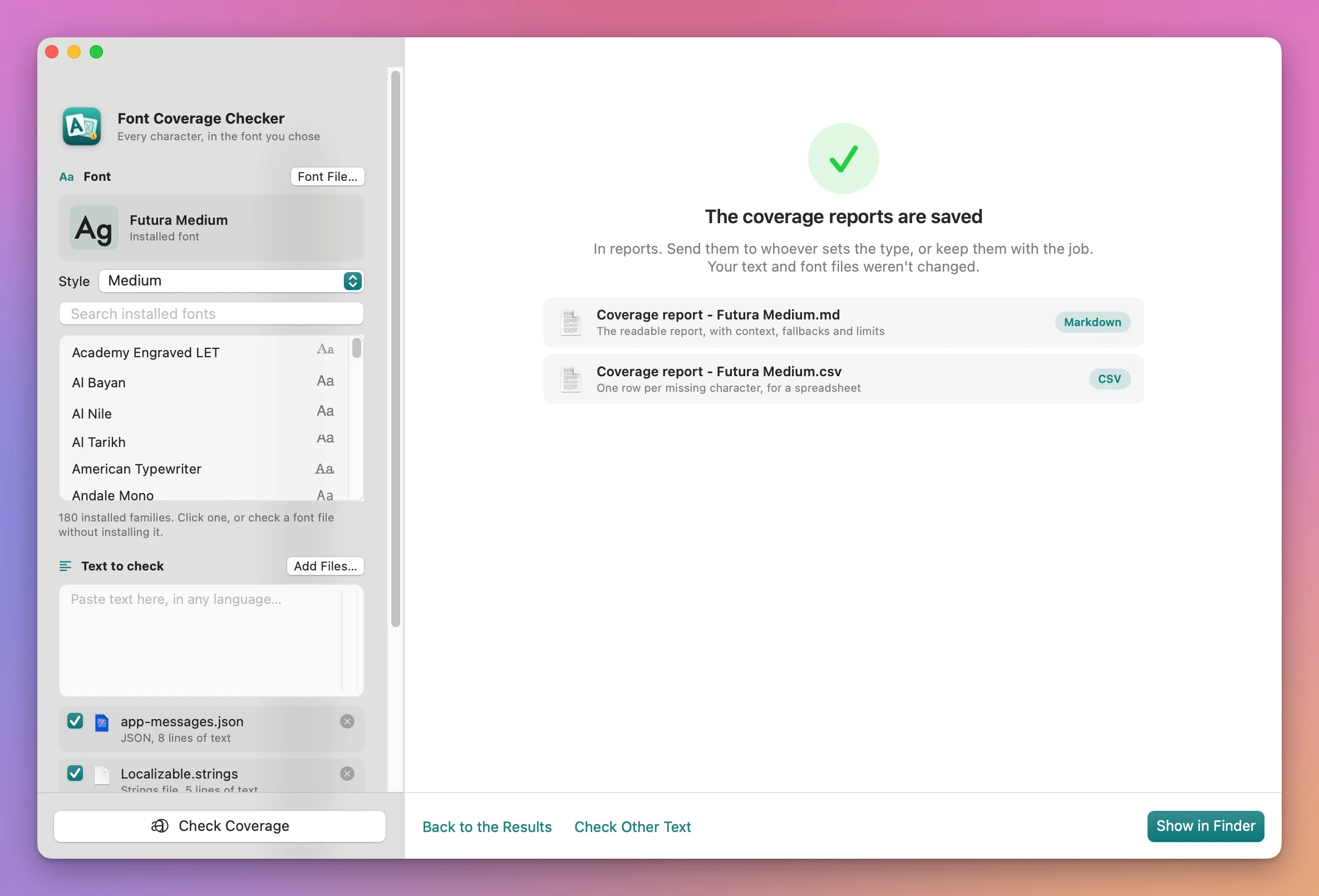
- Save a report. Tick Markdown, CSV or both and click Export Report…, then pick a folder. The done screen lists the files and has Show in Finder.
What you get
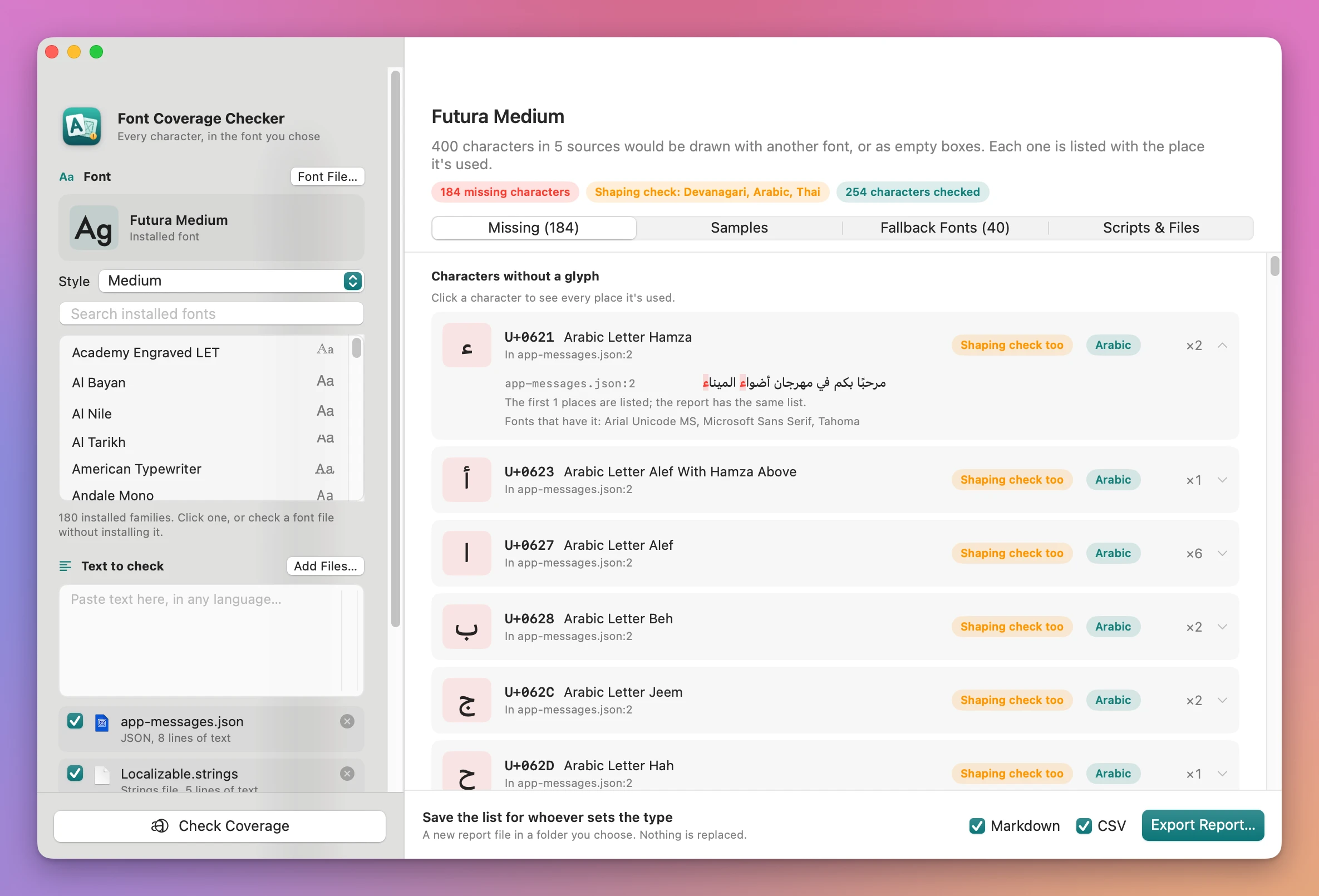
Every missing character, with where it’s used
The Missing tab has one row per character: the character itself, its code point, its Unicode name, the script it belongs to, how many times it’s used and the first places. Click a row to see every line it appears in (up to 25), with the character highlighted, and the fonts on your Mac that have it.
The text drawn in the font
The Samples tab draws each line that has a problem in the font you picked, at a size you set between 12 and 48 points. Missing characters sit in red boxes, so you see at a glance whether it’s a whole Greek line or one Vietnamese vowel.
Fonts that fill the gaps
The Fallback Fonts tab ranks the fonts installed on your Mac by how many of the missing characters they have: “covers 172 of 184”, with a bar and the missing characters drawn in each one. If your brand guidelines allow only certain fonts, star them and switch to My shortlist to rank only those.
It reads the files the text lives in
A .strings file, a JSON file or an XLIFF file from a translator has keys, comments and markup around the text. The app reads only the text: the values of .strings and JSON files, never the keys, and the <target> text of an XLIFF file (or <source> when there are no translations yet). Escapes like é are turned back into the letter. Every missing character points to the file and line it came from.
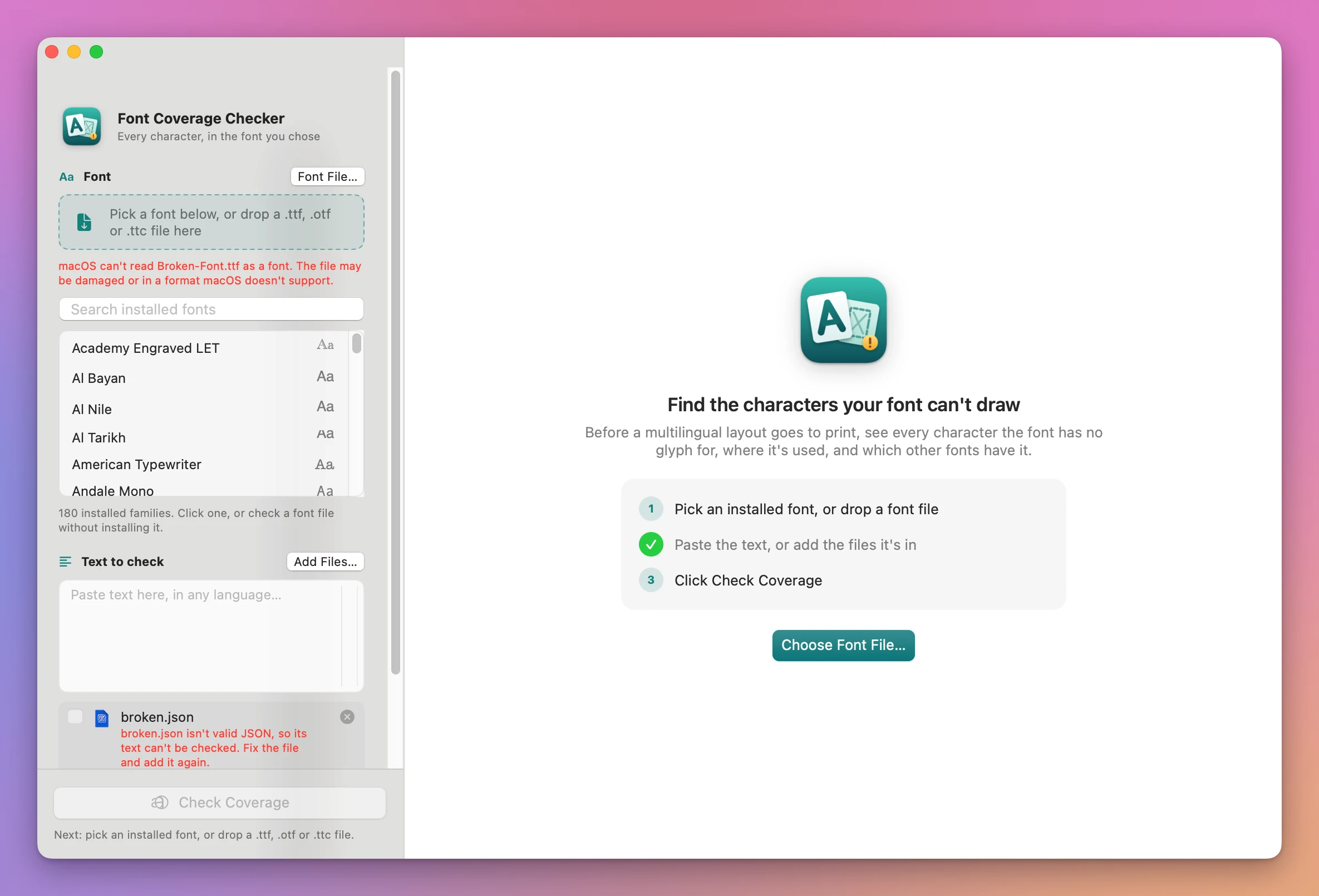
A file that can’t be read gets a plain red sentence, like “broken.json isn’t valid JSON, so its text can’t be checked”, and is left out of the check. A font file macOS can’t open gets one too.
Emoji that break apart
A family emoji or a flag is several characters joined together. If the font can’t join them, it shows them as separate pieces. The app counts the pieces macOS draws and lists each sequence that comes apart: joined emoji like the family ones, flags, keycaps like 5️⃣, and skin tones.
Complex scripts flagged, not passed
Arabic, Hebrew, Devanagari and the other Indic scripts, Thai, Khmer and a few others need more than the right letters. The letters join, change shape and reorder, and accents stack in the right place only if the font’s shaping rules are right. A character check can’t test that. So when your text has one of these scripts, the app lists it under Needs a shaping check, separately from the missing characters, and says so on screen and in the reports. The same goes for letters built from separate combining accents.
A report to hand on
Export Report… saves Coverage report - <font>.md, the readable report with the context, the fallback fonts and the limits, and Coverage report - <font>.csv, one row per missing character for a spreadsheet. If a report with that name is already in the folder, the new one gets a number, like (2), so nothing is replaced. Your text and font files are only read.
Why not do it by hand
macOS has the pieces. Font Book shows every character a font has, as a grid. It can’t take your text and tell you which of its characters are missing, or where they are. The Character Viewer (Control-Command-Space) shows which fonts have one character you pick, under Font Variation, one character at a time.
Pasting the text into Pages, TextEdit or another app looks like a test, and it isn’t one. macOS and most apps fill a missing letter from another font without telling you, so the line looks fine on screen. You find out when the text is set in the real font, or printed.
InDesign highlights missing glyphs in pink and has a missing glyphs check in its preflight. That’s for text already placed in a layout, it needs a Creative Cloud subscription, and it doesn’t suggest other fonts. Free font coverage tools exist, but they run in the Terminal or want the font uploaded to a website, check one string at a time, and don’t read .strings, JSON or XLIFF files.
| By hand | Font Coverage Checker | |
|---|---|---|
| Which letters are missing | Compare Font Book’s grid with your text | Every missing character listed, with its name and script |
| Where they’re used | Search each file for each letter | File and line for each one, with the line highlighted |
| What it looks like | Text looks fine on screen, borrowed from another font | The text drawn in the font, gaps in red |
| Which font has them | Character Viewer, one character at a time | Installed fonts or your shortlist, ranked |
| Localization files | Copy the text out of the keys and markup | .strings, JSON and XLIFF read directly |
| Complex scripts | Easy to miss | Flagged as needing a shaping check |
| Something to send | Screenshots | Markdown and CSV reports |
What it doesn’t do
- It doesn’t prove a complex script is drawn right. Arabic, Devanagari, Thai and similar scripts are flagged for a shaping check. Proof them in the font before you print.
- It doesn’t check OpenType features, kerning or line spacing. Small caps, ligatures, figure styles and vertical metrics are outside what it looks at.
- It ranks only installed fonts as fallbacks. One face per family, the most regular one. The shortlist takes installed families, not font files.
- It groups scripts by Unicode block. That’s close to the script a letter belongs to, and not always the same thing.
- It doesn’t change your files. It doesn’t install fonts or fix text. A font file you open is used only by the app while it runs.
- It doesn’t read InDesign, Word or PDF files. Copy the text out, or export it as plain text or CSV.
Questions
Does it install the font files I open?
No. A font file you open with Font File… is available only to the app, for as long as it’s open, so it can draw the samples. Nothing is installed on your Mac.
What’s a placeholder font?
Some fonts give hundreds of characters the same one or two glyphs, often an empty box, so every character looks covered. When the font you check does that, the app shows a red warning, and it leaves fonts like that out of the fallback list.
Are spaces and invisible characters counted?
Spaces, tabs, line breaks and invisible characters like zero width joiners aren’t counted as missing. A no-break space is, because a font can lack one.
Which text encodings does it read?
UTF-8 and UTF-16 files. A file that isn’t either is read as Windows Latin 1, and the file list says so, so you can check that its accented letters look right. Compiled .strings files from an app bundle are read too.
Does anything get uploaded?
No. Fonts and text are checked on your Mac. The app uses the internet only to check for and download updates.
What it needs
Font Coverage Checker runs on macOS 14 Sonoma or later, on Apple silicon and Intel Macs.
The Font Coverage Checker docs walk through each step.
Buy Font Coverage Checker
$20 plus tax where it applies, paid once.
Download the app from the order page or your Creem receipt, unzip it and move it to Applications. I sign the app with my Apple Developer ID, and Apple notarizes the download.
The app checks for updates once a day. When a new version is ready, click Install and Relaunch. To check anytime, choose Font Coverage Checker → Check for Updates….