
An app by Flavio
Headshot Delivery Checker
After a corporate or event headshot day, check that every person on the list has exactly one final photo and no photo goes to the wrong person. Import the list as CSV, choose the folder of finals, see each name next to its photo, fix a wrong match by hand, and save a delivery table and a PDF check sheet with thumbnails.
Buy Headshot Delivery Checker for Mac · $19Buy Headshot Delivery Checker for Windows · $19One-time purchase. Plus tax where it applies. Mac and Windows versions are sold separately.
macOS 14 or later · Apple silicon and Intel
Windows 10 and Windows 11 · Intel, AMD and Arm PCs
Latest Mac version 1.0.0, released November 26, 2026
Latest Windows version 1.0.0, released November 26, 2026
You photographed 120 people at an office headshot day. HR sent the list as a spreadsheet with names, emails, departments and employee IDs, and you exported the finals named after the IDs: E1042.jpg, E1043.jpg, and so on. Now each person has to get their own photo.
Before you send anything, someone has to check the list against the folder. Is there a photo for everyone? Did someone get two? Is E1204.jpg a typo for E1024? Are the two people called Sam Taylor each getting the right face? By hand, that’s a spreadsheet on one side of the screen, a Finder window on the other, and a lot of scrolling.
Headshot Delivery Checker does that check. Choose the list (a CSV file) and the folder of finals. The app matches the file names to the column you pick, puts each person’s thumbnail next to their name, and lists what needs a look: people with no photo, photos that match nobody, one photo matched to two people, two photos for one person, and people who share a name. Fix a wrong match with a click, then save a table for sending the photos and a PDF check sheet with a thumbnail of each person.
Watch a 30-second demo of Headshot Delivery Checker:
Who it’s for
- Corporate headshot photographers. You shot 80 or 300 employees in a day. HR wants each photo named after the employee ID and a file that says which photo is whose, and you want to be sure nobody was skipped before you upload the finals.
- Event and conference photographers. Speaker headshots, badge photos, a team page for an association. The list comes from the organizer with names and emails, the files carry the names, and two people with the same name are a real risk.
- School and sports picture day photographers. The office sends a roster with student IDs. A missing ID, a typo or two students called Liam O’Connor show up before the prints are made, not after a parent calls.
- HR, marketing and comms teams. A photographer hands you a folder of finals for the intranet, the ID badges or the website. Check it against your own staff list before anything goes live with the wrong face on it.
- Studio assistants and retouchers. You prepare the delivery while the photographer is on the next job. The check sheet goes to them as a PDF they can look through on a phone.
How it works
- Click Choose the List of People… and pick the CSV, or drag it onto the window. A list from Numbers, Excel or Google Sheets saved as CSV works, with commas, semicolons or tabs.
- Click Choose a Folder… and pick the folder of final headshots.
- Check the column in Photos are named after. The app picks the column that finds a photo for the most people and says how many, like Employee ID: 30 of 32 match.
- Look at Needs a Look. Fix what’s wrong with Choose Their Photo…, Give to Someone…, Looks Right, Keep Both Photos or the Fix menu.
- Click Save Table and Check Sheet… and choose where to save them.
What you get
Every name next to its photo
Each person on the list gets a row with their photo’s thumbnail, their name, their department and ID (or whatever the list has), and the file name. Click a thumbnail to see the photo bigger and who it goes to. A human can look at the faces, which is the whole point: a file name can be right and the photo still wrong.
What needs a look, in plain words
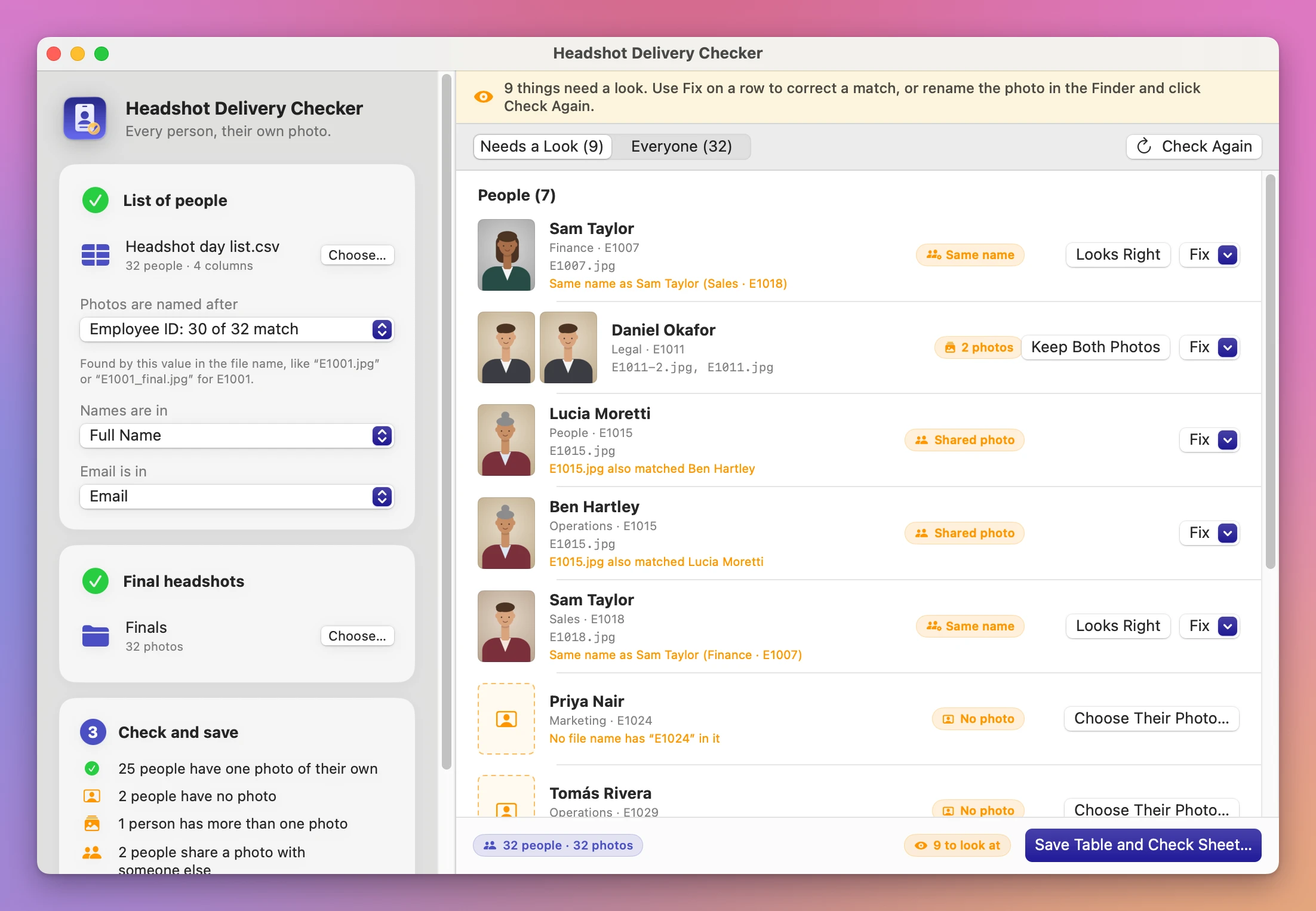
Needs a Look lists, with an orange pill and one sentence each:
- No photo: no file name has their value in it, like “No file name has “E1024” in it”.
- Shared photo: one file matched two people, usually because the list has the same ID twice.
- 2 photos: two finals for one person, like
E1011.jpgandE1011-2.jpg. - Same name: two people with the same name, shown with their department and ID so you can tell them apart.
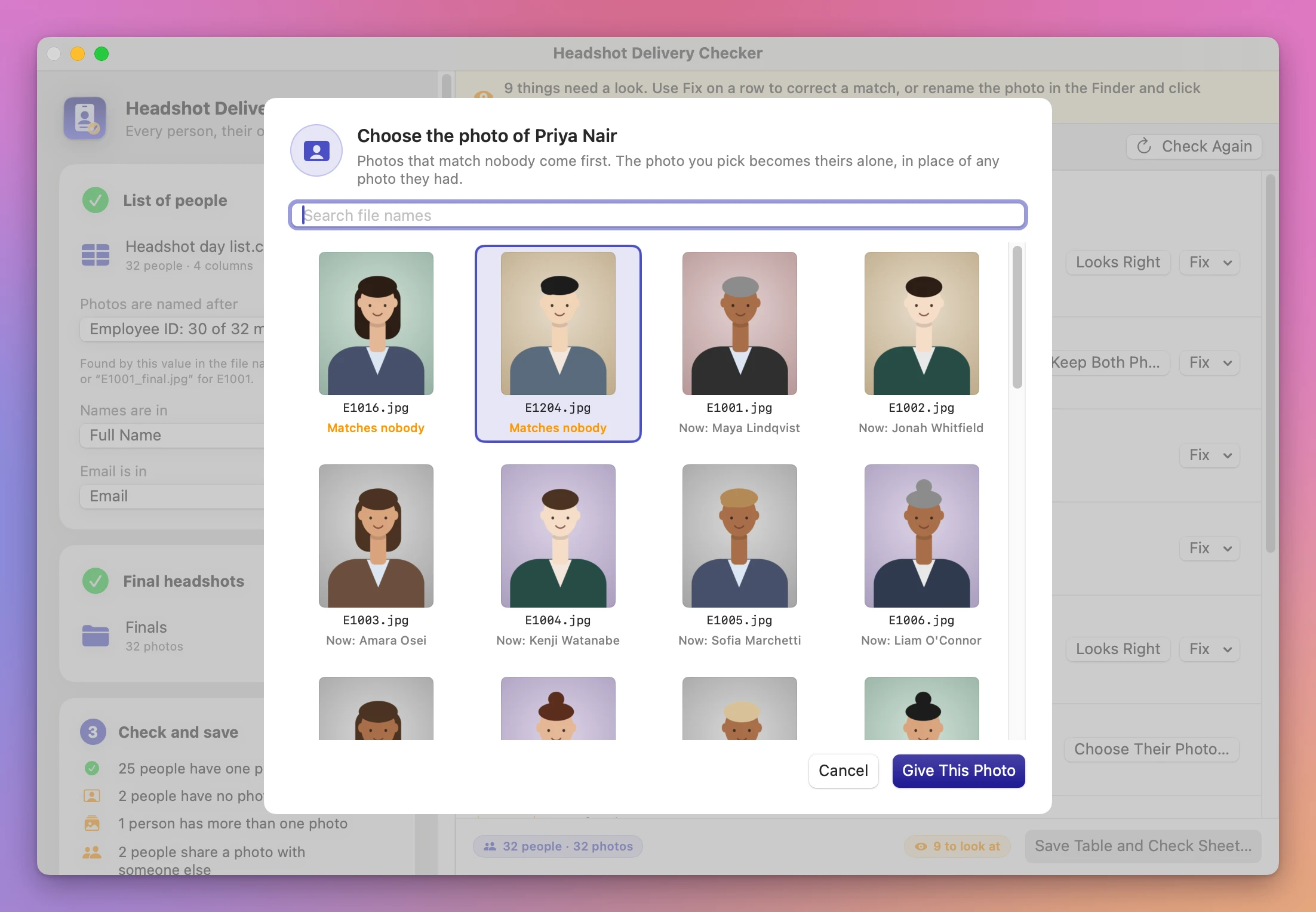
- Photos that match nobody: files no one on the list claims, with their thumbnails.
Fixes with a click
Choose Their Photo… shows every photo as a thumbnail, the ones that match nobody first, with a search field. Give to Someone… does it the other way round: the photo, big, and the people, those with no photo first. The photo you pick becomes that person’s alone. Looks Right and Keep Both Photos clear a same-name or two-photo case once you’ve looked, and the Fix menu has Not Their Photo and a way to undo your changes for one person.
Renamed a file in the Finder instead? Click Check Again and the app reads the folder again, keeping your fixes.
How the matching works
The app compares the column you pick with the file names, ignoring capitals, accents and punctuation. A photo is someone’s when its file name is their value (E1042.jpg), contains it (E1042_final.jpg), or, for a name, has all its words in any order (Dubois_Anne.jpg for Anne Dubois). An email counts by what comes before the @. Lists that keep first and last names in separate columns get a First name + Last name choice. Photos can be JPEG, HEIC, PNG, TIFF or WebP, in the folder or in folders inside it.
A table for sending, a sheet for looking
Save Table and Check Sheet… writes two files next to each other, named after your list:
- The delivery table (CSV): one row per person with their name, email, department, ID, file and status (Ready, No photo, 2 photos, Shared photo), then the photos that match nobody. Ready for a mail merge or your upload tool.
- The check sheet (PDF): a thumbnail, name, department, file and status for every person, with what needs a look first and a box to tick by hand. A4 or US Letter, from your Mac’s region.
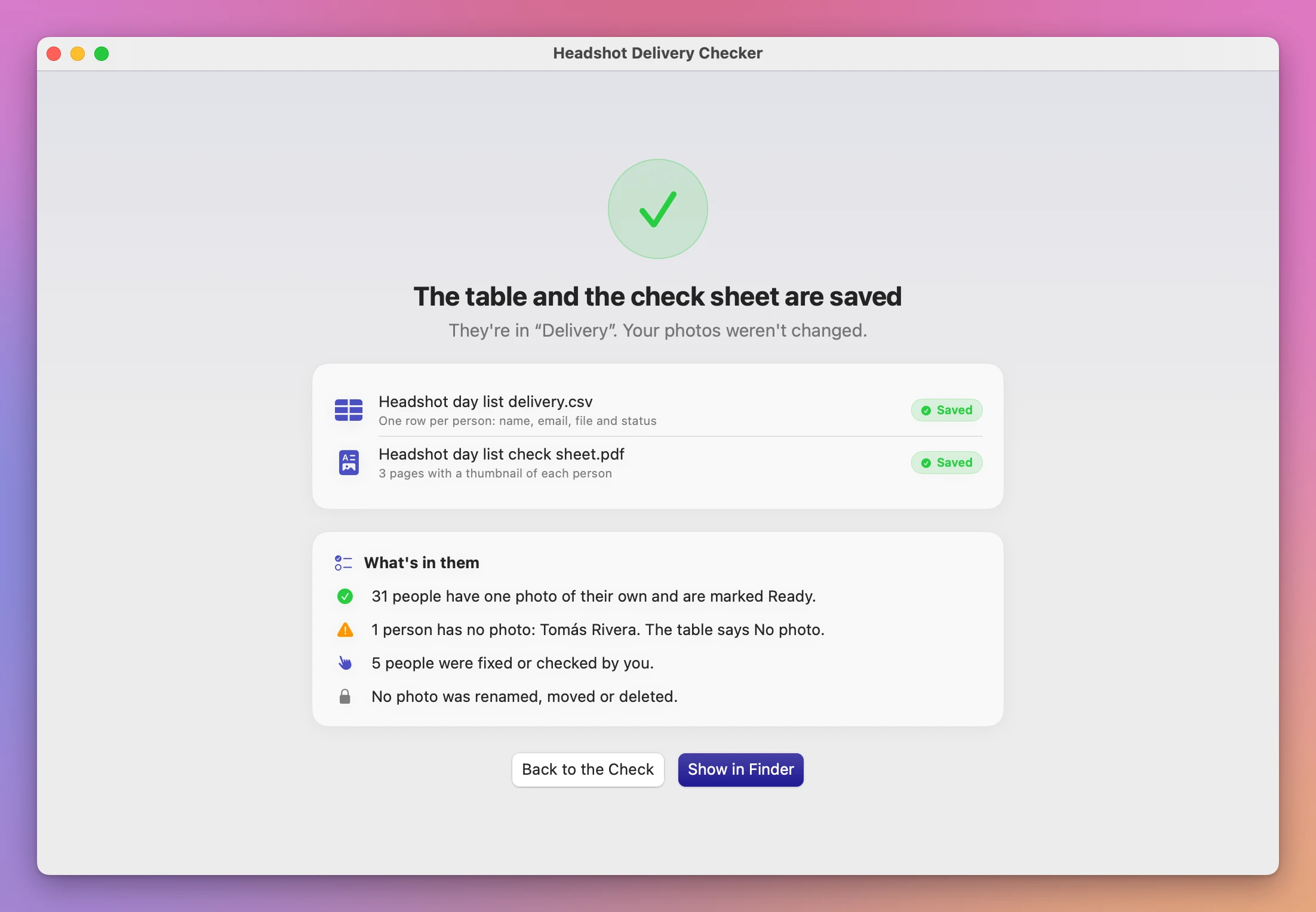
It never writes over a file: saving again adds a number to the name.
Why not do it by hand
| By hand | Headshot Delivery Checker | |
|---|---|---|
| Who has no photo | Tick off names in a spreadsheet while scrolling a Finder window | Listed, with the value the app looked for |
| A photo for nobody | Spot the odd file name in a folder of hundreds | Listed with its thumbnail, given to someone in two clicks |
| Same name twice | Easy to miss | Flagged, with department and ID next to each |
| Is it the right face? | Open each photo next to the row | Thumbnail next to every name |
| The file for sending | Type the file names into the spreadsheet | A CSV with name, email, file and status |
| Something to show the client | A screenshot | A PDF check sheet with thumbnails |
The Finder sorts the finals by name and shows a small preview of each, and a spreadsheet can count rows. For 20 people, doing it by hand is fine. Past that, the slow part is going back and forth between two windows for every name, and the risky part is the case nobody looks for: the shared ID, the twin names, the typo in one file name.
Three of my other apps sit near this job. CSV File Renamer renames copies of files from a spreadsheet of old and new names. Contact Sheet Studio makes PDF contact sheets from a folder of images, and Photo Shortlist helps you pick the best frames of a shoot. None of them knows who is on your list. Headshot Delivery Checker is the step after the picking: it checks the list against the folder of finals before you rename, print or send anything.
What it doesn’t do
- No face recognition. It matches file names against a column of your list. You look at the faces.
- It doesn’t rename, move or send the photos. The originals stay as they are. Rename in your photo app or the Finder, then click Check Again.
- No emailing. The table is ready for your mail merge or upload tool, but the app sends nothing.
- It doesn’t read spreadsheets directly. Save the list as CSV from Numbers, Excel or Google Sheets first. The first row has to hold the column names.
- No camera RAW files. Finals in CR2, NEF, ARW, DNG and the like are counted and left out. Export the finals as JPEG first.
- Your fixes last while the window is open. They go into the table and the check sheet when you save, and aren’t kept after you close the app.
Questions
Does it change my photos?
No. It reads the folder and the list and writes two new files where you tell it to. Nothing is renamed, moved or deleted.
Does anything get uploaded?
Nothing. The list and the photos are read on your Mac. The app connects to the internet only to check for updates.
What if the list has two people with the same ID?
Their photo matches both of them, and both show Shared photo. Use Choose Their Photo… on the one who has another file, and the shared one stays with the other person.
What it needs
macOS 14 Sonoma or later, on Apple silicon and Intel Macs. You choose the list and the folder yourself, and the app reads only those.
Headshot Delivery Checker isn’t made by, affiliated with or endorsed by Apple, Microsoft, Google or any camera, photo or HR software maker.
Buy Headshot Delivery Checker
$19 plus tax where it applies, paid once.
Download the app from the order page or your Creem receipt, unzip it and move it to Applications. I sign the app with my Apple Developer ID, and Apple notarizes the download.
The app checks for updates once a day. When a new version is ready, click Install and Relaunch. The first time, it asks for the license key from your Creem receipt, and remembers it. To check anytime, choose Headshot Delivery Checker → Check for Updates….