
Mac & Windows app by Flavio
Podcast Breath Reducer
Open a spoken track and the app finds the breaths between phrases. Hear each one in context, as recorded and lowered, untick the ones to keep, and export a copy where only the breaths are quieter, with an edit sheet and markers for Audacity and REAPER.
Buy Podcast Breath Reducer for Mac · $19Buy Podcast Breath Reducer for Windows · $19Buy once, use forever. Up to 3 computers you own (license). Plus tax where it applies. Mac and Windows versions are sold separately.
macOS 14 or later (Apple silicon and Intel) · Windows 10 and Windows 11 (x64 and ARM64)
Latest Mac version 1.0.0, released November 28, 2026
You recorded the intro of your episode alone at the mic, close to it, the way you’re told to. Played back on headphones, every sentence starts with a gasp. In a 40-minute solo episode that’s easily 300 breaths.
By hand, you select each breath in your editor and lower it, or draw a volume line down under it and back up. That’s three or four clicks per breath, and if the line comes back up a few milliseconds late, the first letter of the next word comes out muffled. A noise gate does it all at once, but it drops the breath to dead silence, which sounds stranger than the breath did, and it can bite into a word that starts softly.
Podcast Breath Reducer finds the breaths between phrases for you. You hear each one in its sentence, as recorded and lowered, untick the ones you want to keep, and export a copy where only the breaths are quieter. The fades happen inside each breath, so the words around it are exactly as you recorded them.
Watch a 30-second demo of Podcast Breath Reducer:
Who it’s for
- Solo podcasters who edit their own show. You record a 30-minute monologue on Sunday and edit it on Monday night. The breaths are the last thing on the list, and the one you skip. Here it’s one file in, one file out, before you start the real edit.
- Audiobook and course narrators. You record chapter by chapter, close to a condenser mic, and every page turn comes with an inhale. You want them softer, not gone: a narrator who never breathes sounds edited.
- Interview producers working on the host’s track. The guest is fine, but the host’s dialogue track breathes into the mic between every question. You lower the host’s breaths and leave the guest’s track alone.
- Editors who get files from clients. The client wants “less breathy” by Friday. You send back the lowered copy and the edit sheet as a PDF, with every breath, its time and what you did to it.
- Video creators with a voice-over. Your voice-over track goes under a tutorial screen recording, where every breath is louder than the music bed. You lower them before you drop the track in your video editor.
How it works
- Click Choose a Recording…, or drag a WAV, AIFF, M4A, MP3, FLAC or CAF file onto the window. To try it first, click Try Example Recording.
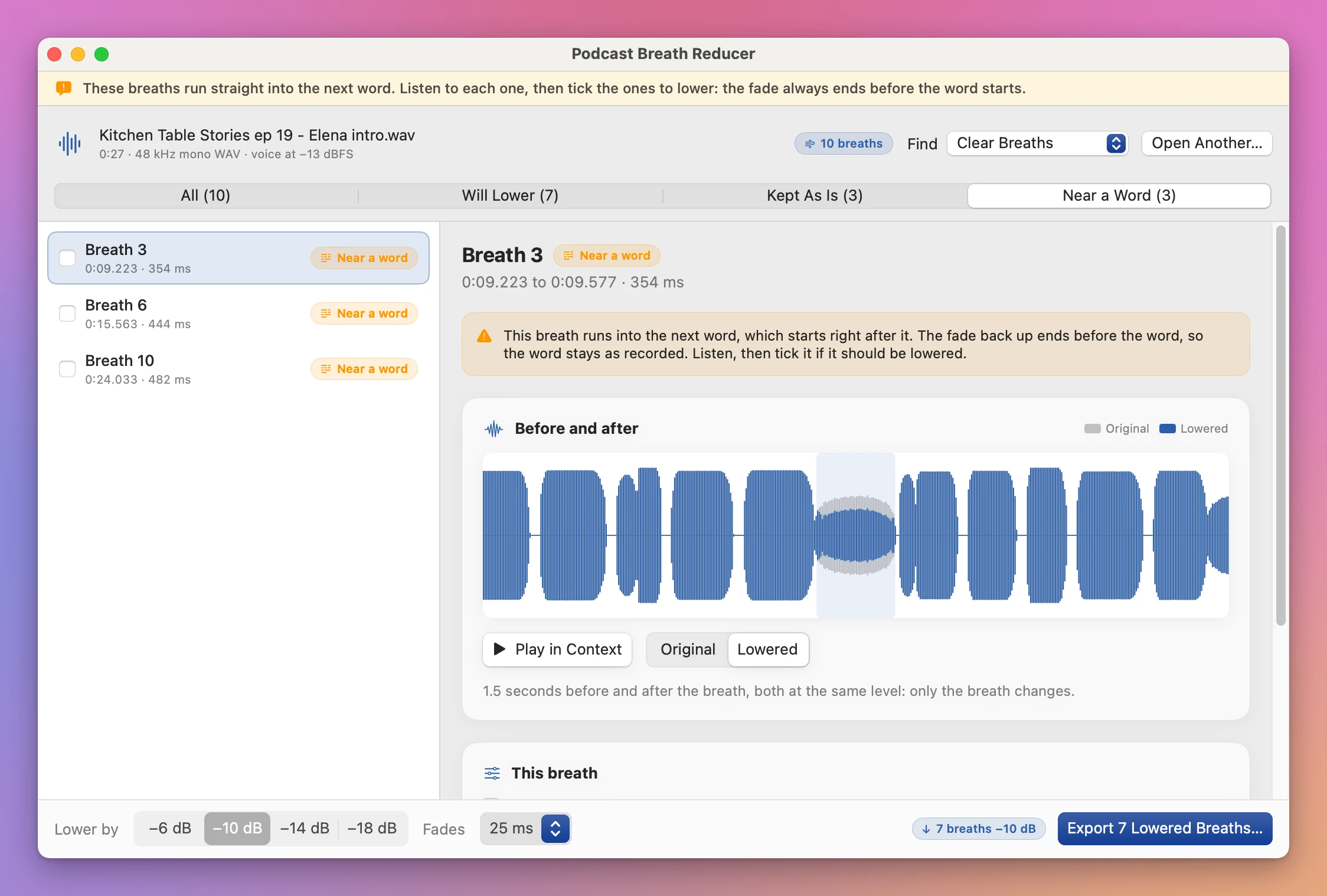
- The list shows every breath with its time and length. Breaths between phrases are ticked. Breaths that run straight into the next word are marked Near a word and left for you to decide.
- Click a breath and press Play in Context: you hear 1.5 seconds before it to 1.5 seconds after it. Switch between Original and Lowered while it plays.
- Pick how much under Lower by: −6, −10, −14 or −18 dB. Give a breath its own amount with Its own amount and the slider.
- Click Export Lowered Breaths… and choose a folder.
What you get
The breaths, found for you
The app listens for what a breath sounds like: airy, noisy, high frequencies, quieter than your voice, between 120 and 900 milliseconds long, in the gap between two phrases. A voiced word has its energy low and tonal, so the two are easy to tell apart. An “s” or an “f” inside a word is airy too, but it’s short and has words right against it on both sides, so it’s left alone.
If you speak softly or sit very close to the mic, choose Quieter Breaths Too next to Find and it looks again.
Listen before you decide
Each breath plays in its sentence. Original and Lowered play at the same moment and the same level, so when you switch, the only thing that changes is the breath. The outline above shows both: the breath as recorded in grey, the lowered one in blue inside it.
Breaths right against a word
Some inhales run straight into the next word, with no pause. These are the ones a gate clips. The app finds them, marks them Near a word in orange, and leaves them unticked. Click Near a Word to see only those, listen to each, and tick the ones that should come down. The fade back up always ends before the word starts.
A copy that’s only different where the breaths are
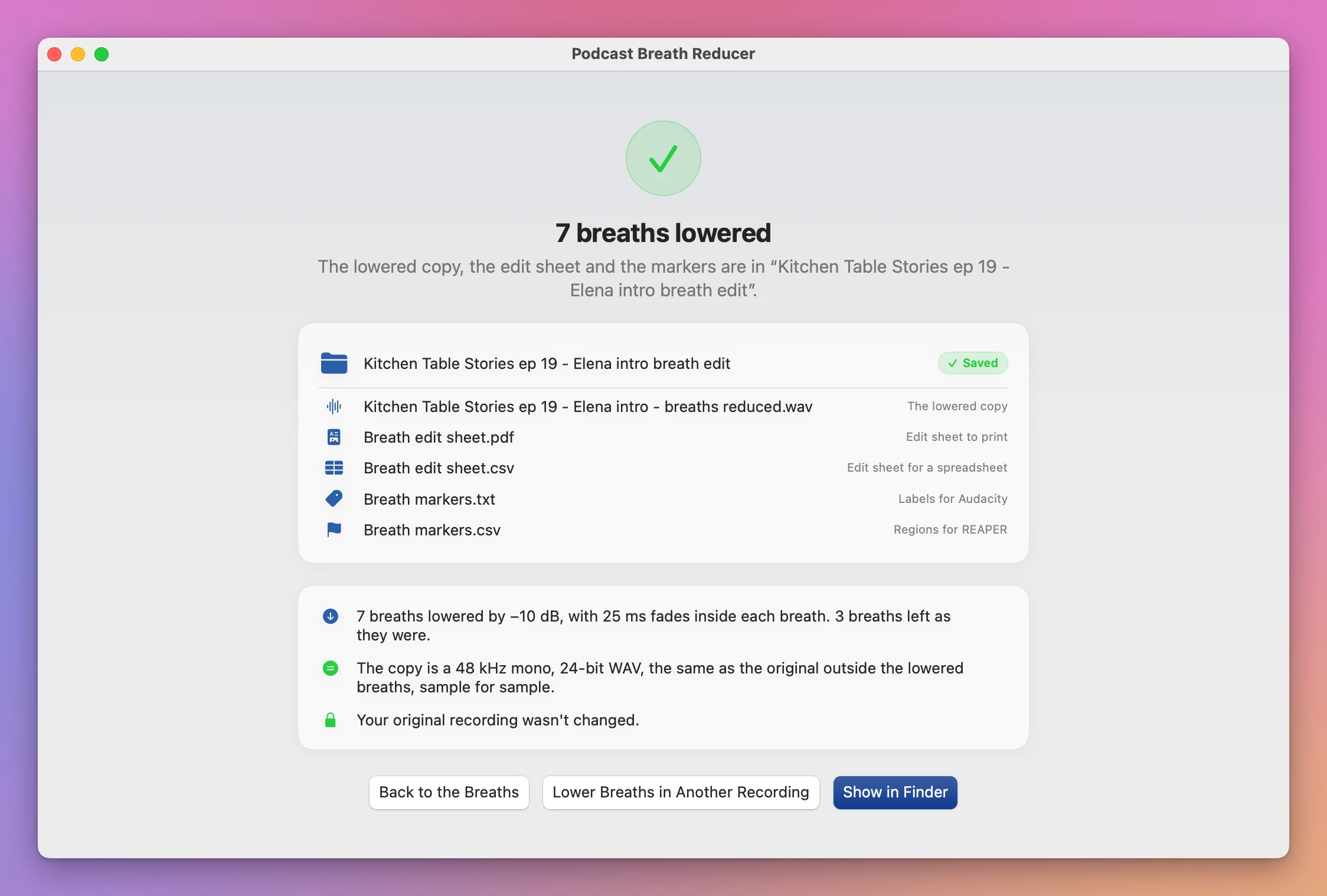
The lowered copy is a WAV at the same sample rate and channels as your recording. An MP3 or M4A comes out as a 24-bit WAV, so it loses nothing more. Outside the lowered breaths it’s the same as your original, sample for sample, and nothing in it is louder than the original, so it can’t clip. Your original isn’t changed.
An edit sheet and markers for your editor
Next to the copy, the export folder has:
- Breath edit sheet.pdf, to print or send to a client: every breath, its time, its length, how far under the voice it was, and what was done.
- Breath edit sheet.csv, the same as a spreadsheet.
- Breath markers.txt, a label track you import in Audacity with File › Import › Labels.
- Breath markers.csv, a region list in the layout of REAPER’s Region/Marker Manager.
Why not do it by hand
Any audio editor can lower a breath. Audacity is free, GarageBand comes with many Macs, and your podcast editor has a volume line. Select the breath, lower it, move on. For five breaths that’s fine.
The trouble is the count and the edges. A solo episode has hundreds of breaths, and each one takes a few clicks. Lowering a selection in most editors changes the level abruptly at both ends, which you can hear as a tiny click, unless you add a fade on each side too. Draw the volume line a little late and the next word’s first consonant gets quieter with the breath.
A noise gate is the automatic answer. It closes when the level drops below a threshold. Breaths sit between the room and the voice, so you tune the threshold until they disappear, and then the soft starts of words disappear with them. And a gate turns breaths into total silence, which sounds like a cut.
| By hand in an editor | A noise gate | Podcast Breath Reducer | |
|---|---|---|---|
| Finds the breaths | You, by ear and by eye | Anything under a threshold | Breaths between phrases, by how they sound |
| Breath after the edit | Whatever you set | Silence | Lowered by 6 to 24 dB, still natural |
| Words right after a breath | Safe if your line is precise | Can lose their first letter | Fades end before the word |
| Time for 300 breaths | An evening | Minutes, plus tuning | Minutes, with listening |
| A record of what changed | No | No | PDF and CSV sheet, markers |
What it doesn’t do
- It doesn’t remove breaths. It lowers them, so a person still sounds like a person.
- It doesn’t clean noise, hum, clicks or mouth sounds.
- It works on one spoken track. On a mixed episode with music under the voice, it gets confused. Use the dialogue track before you mix.
- A breath louder than the voice, or a voice that whispers, may not be found.
- It opens recordings up to 4 hours long.
Questions
Is my recording uploaded anywhere?
No. The app reads your recording on your computer and writes the folder where you choose. Nothing leaves the Mac. It connects to my update server only to check for new versions.
Does it change my original file?
The app only reads it. The lowered copy goes in a new folder, and a second export goes in a second folder.
Will it work with my editor?
The copy is a standard WAV, so it opens in any editor: Audacity, GarageBand, Logic, REAPER, Hindenburg, DaVinci Resolve. The labels file is in Audacity’s label format, and the region list is in the CSV layout of REAPER’s Region/Marker Manager. Podcast Breath Reducer is not made by, affiliated with or endorsed by Apple, Muse Group (Audacity) or Cockos (REAPER).
What does it need?
macOS 14 Sonoma or later, on an Apple silicon or Intel Mac.
Buy Podcast Breath Reducer
$19 plus tax where it applies, paid once. You get the app as a download, signed and notarized by Apple, and a license key for updates. The app opens and works without the key: it asks for it once, the first time it installs an update.