
An app by Flavio
Podcast Cover Art Checker
Check the cover art inside your MP3 and M4A episodes, and your show cover, against Apple Podcasts and Spotify rules: size, square shape, sRGB colour, transparency and weight. Then save fixed covers and episode copies in one click.
Buy Podcast Cover Art Checker · $19Buy once, use forever. Up to 3 computers you own (license). Plus tax where it applies.
macOS 14 or later · Apple silicon and Intel
Latest version 1.0.0, released November 29, 2026
Every episode you publish carries a picture inside the file. It’s the cover people see on their phone, in the car and in a lock screen widget, and it’s often not the one you think.
The designer delivered a CMYK file for print. Last season’s cover is still in the template your editor exports from. The cover that went in episode 44 is a 2.6 MB PNG with see-through corners, downloaded with every play. You won’t see any of it in the Finder, because the picture is hidden inside the MP3.
Podcast Cover Art Checker opens your episodes and your show cover, reads the picture inside each one, and checks it against what Apple Podcasts asks for and Spotify and Pocket Casts accept: 1400 to 3000 pixels, square, sRGB, JPEG or PNG, no see-through areas, and a weight that won’t slow every download. Then Fix & Export saves fixed covers, copies of the episodes with the fixed cover inside, and a spec sheet.
Watch a 30-second demo of Podcast Cover Art Checker:
Who it’s for
- Independent podcasters who export episodes from GarageBand, Audacity or Hindenburg and want to know the cover inside each MP3 is the right one before uploading to their host.
- Podcast editors and producers who deliver finished episodes to clients and need a spec sheet that shows every cover passed, with its exact pixel size, colour and weight.
- Shows that changed their artwork for a new season, and need to catch the episodes still carrying the old cover before listeners do.
- Networks and agencies handed a designer’s cover that turns out to be CMYK or Display P3, and need an sRGB version today, without waiting for a round trip.
- Anyone whose host rejected an upload, or whose cover shows black corners in a directory, and wants to know why.
How it works
- Click Choose Episodes or Covers…, or drag MP3 and M4A episodes, JPEG and PNG covers, or a folder onto the window. Your files are never changed.
- If you added your show cover, it becomes the Approved cover you compare against. You can change it at the top right.
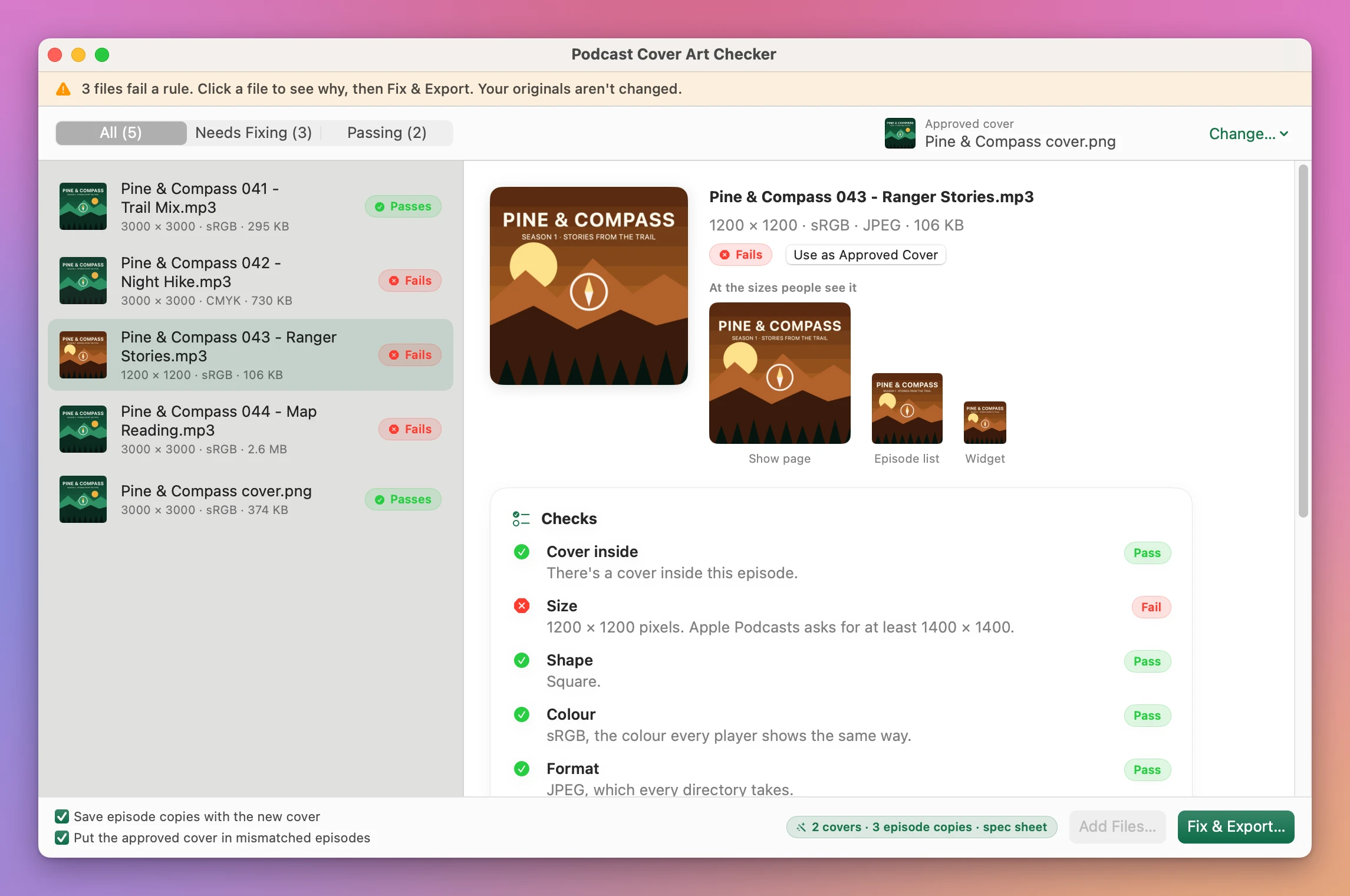
- Click a file to see its cover at the sizes people see it, and every check with a sentence that says why it passed or failed.
- Click Fix & Export… and pick a folder. The app saves a new folder with everything in it.
Not sure yet? Click Try Example Episode Covers to open Pine & Compass, a made-up show with four episodes and their cover problems.
What it checks
Size, shape and colour
Each cover gets seven checks, each with a pill that says Pass, Warning or Fail:
- Size: 1400 × 1400 pixels at least, 3000 × 3000 at most.
- Shape: exactly square.
- Colour: sRGB passes. A Display P3 or Adobe RGB cover is a warning, because its colours shift on players that ignore the profile. CMYK and grayscale fail.
- Format: JPEG or PNG.
- See-through areas: transparency turns black or white in directories, so it fails.
- Weight: under 500 KB passes, up to 1 MB is a warning, more fails. A cover inside an episode is downloaded with every play.
- Approved cover: the same picture as your show cover, or a different one, with how alike they are.
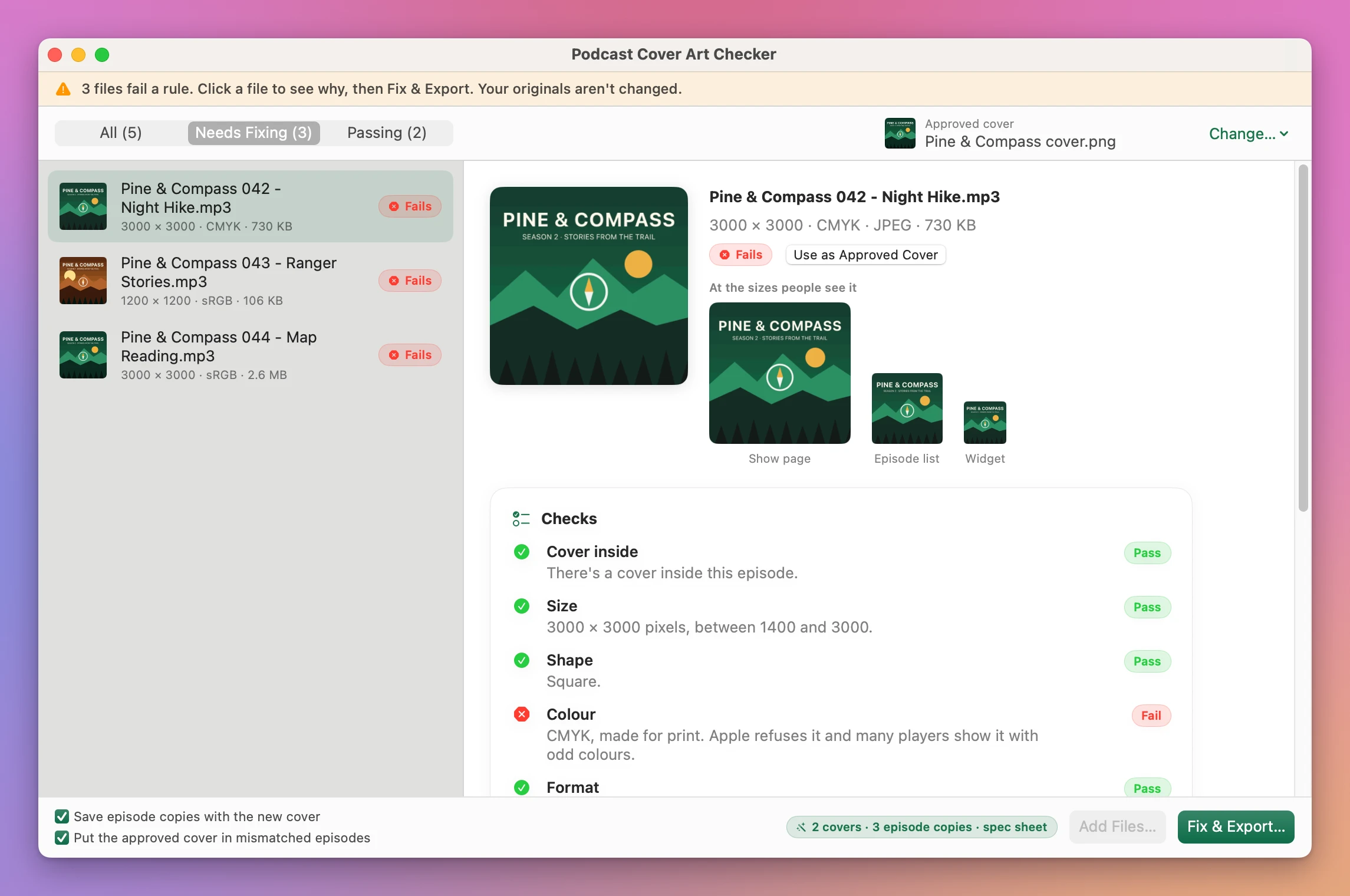
At the sizes people see it
Next to each cover you see it at 120, 60 and 36 points: a show page, an episode list, a widget. A title that looked fine at 3000 pixels can disappear at 36.
Old covers, caught
The app compares each episode’s picture with the approved cover by its fingerprint and by how it looks, so a cover saved again at another size still counts as the same picture. Last season’s artwork shows up as A different picture, with how alike it is.
What you get from Fix & Export
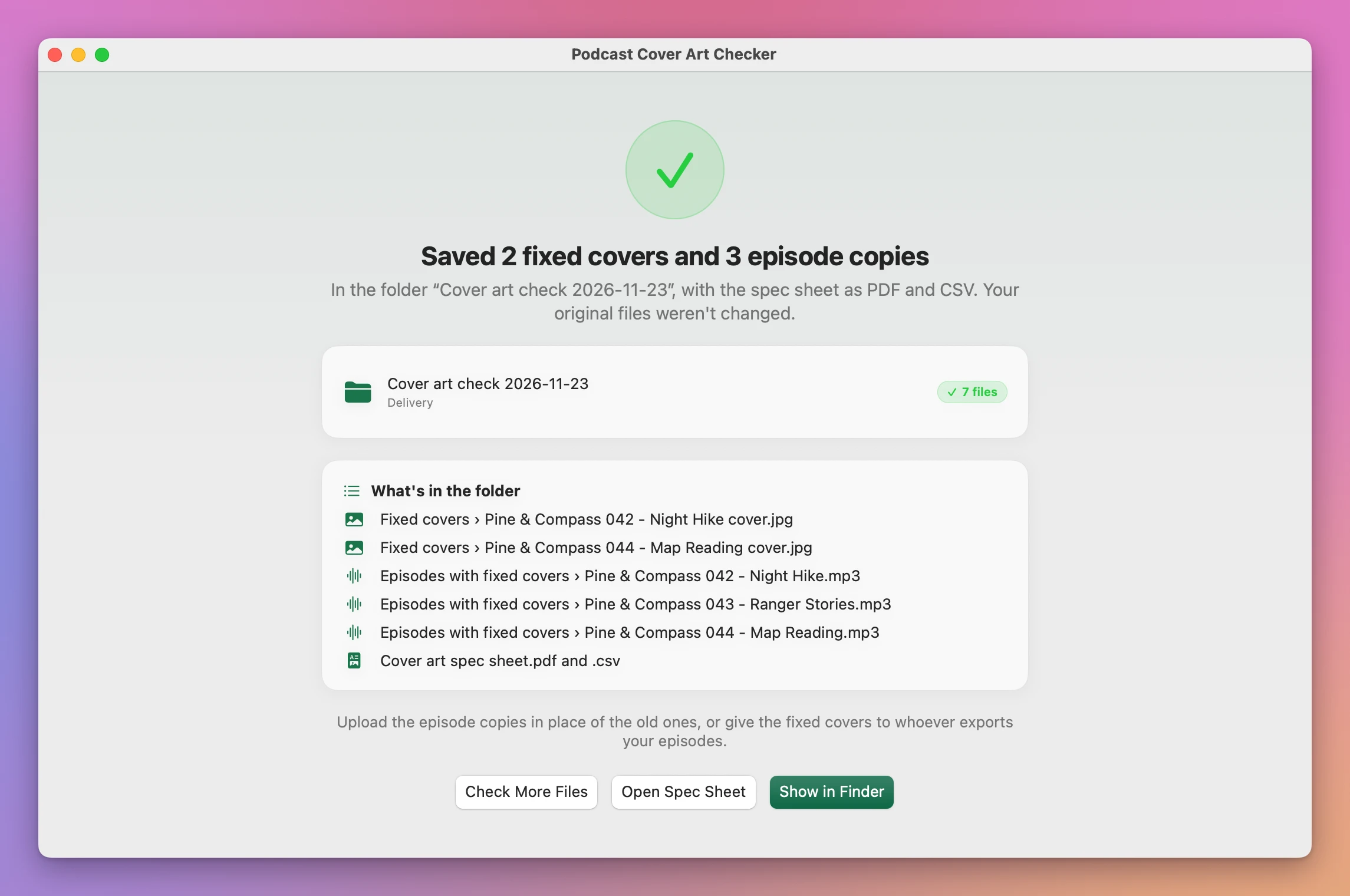
A new folder named after the day, with:
- Fixed covers: square sRGB JPEGs under 500 KB. A cover of 3000 pixels or more becomes 3000, one smaller than 1400 is enlarged to 1400 (the app tells you it may look soft), see-through areas are filled with white.
- Episodes with fixed covers: copies of your MP3 episodes with the new cover inside, in place of all the old pictures. Every other tag, like the title and episode number, stays, and the sound is copied byte for byte, so nothing is re-encoded. Episodes carrying a different picture than your approved cover get the approved one.
- Cover art spec sheet.pdf: every file with its thumbnail, exact pixel size, colour, format, weight and a pill per check, and what the export did.
- Cover art spec sheet.csv, the same in a spreadsheet.
Your original files are never changed.
Why not do it by hand
You can check a cover with what comes with your Mac. Preview’s Inspector (Tools › Show Inspector) shows a picture’s size, colour model and profile. The Music app’s Get Info shows the artwork inside an MP3.
That works for one file. For a season of episodes it means getting the picture out of each one, opening it in Preview, reading four fields, and comparing it by eye with the right cover. Fixing it means converting the colour, resizing, saving under 500 KB, and putting it back in every episode with a tag editor.
| Preview and Music | Podcast Cover Art Checker | |
|---|---|---|
| Comes with the Mac | Yes | $19, paid once |
| Cover inside an MP3 or M4A | Music shows it, Preview can’t open it | Read from the file |
| Size and colour | One file at a time in the Inspector | Every file, one list |
| Old season’s cover | Compare by eye | Compared with your approved cover |
| At phone sizes | No | 120, 60 and 36 points |
| Fix colour, size and weight | Several steps per file | Fix & Export |
| Put the cover back in the episode | A separate tag editor | MP3 copies, sound untouched |
| A record to send | Write it yourself | Spec sheet PDF and CSV |
What it doesn’t do
- It doesn’t upload anything or change your podcast feed. You upload the fixed episodes to your host.
- It doesn’t make copies of M4A episodes. M4A files get a fixed cover file to put back in the app you export with.
- It doesn’t improve a small cover. Enlarging 1200 pixels to 1400 passes the rule, but can’t add detail. Ask your designer for a bigger file when you can.
- It doesn’t check the words or the design of your cover, only the file.
- It doesn’t rewrite very old MP3 tags (ID3 version 2.2). It reads them and says so.
Questions
Does it upload my episodes?
No. Everything happens on your Mac. The app connects only to my update server, to check for new versions.
Does it change my files?
No. It reads them. Fixed covers and episode copies go in a new folder you pick.
Are these the official rules?
The size, shape, colour and format rules are Apple Podcasts’ published artwork requirements, which Spotify and Pocket Casts also accept. The 500 KB weight is a recommendation for covers inside episodes, not a directory rule.
Is it made by Apple or Spotify?
No. Podcast Cover Art Checker isn’t made by, affiliated with or endorsed by Apple, Spotify or Pocket Casts.
Buy Podcast Cover Art Checker
$19 plus tax where it applies, paid once. You get the app, signed and notarized by Apple, for macOS 14 or later on Apple silicon and Intel Macs. Updates come inside the app: the first time you install one, it asks for the license key from your receipt.