
A developer tool by Flavio
Secrets Free
Scan a project and its Git history for API keys, tokens, credentials files and identity leaks. A native Mac app and CLI that work locally.
Buy Secrets Free · $19One-time purchase. Tax included. Source code included.
macOS 14 or later · Apple silicon and Intel
Latest version 1.3.0, released November 20, 2026
You’re about to make a repository public, or push a side project you started months ago. Somewhere in there is the Stripe key you pasted to test one thing. Maybe it’s in a config file. Maybe you deleted it in August, and it’s still sitting in the first commit.
Once a key is on GitHub, you have to treat it as leaked and rotate it. Finding it before the push is the cheap version of that afternoon.
Secrets Free checks a project before an API key, token or credentials file reaches a remote repository. Pick a folder in the Mac app and get a readable list of findings. Run the secretsfree command in a pre-push hook, CI job or coding-agent workflow. Both use the same scanner.
Here’s a one-minute scan of a small web shop project, from picking the folder to the CLI in Terminal:
The project and every key in it are fictional.
Who it’s for
- Indie developers about to open-source a project. The repo has two years of history, and you once committed a
.env“just for a minute”. Turn on Git history and Secrets Free reads every commit on every branch. - Developers with a dozen side projects. Some have
.dev.vars, some have.npmrctokens, one has a Terraform state file. Scan each folder from the sidebar and Rescan them after changes. - People running coding agents. An agent wrote config files overnight and you want to know what it put in them.
secretsfree scan --jsongives the agent structured, redacted results without printing the secret values. - Small teams without a security tool. A pre-push hook with
secretsfree scan --quietstops a push when it finds a high or critical result, on every developer’s Mac. - Writers and teachers publishing example code. A tutorial repo can leak your email, your home folder path or a private IP. The Identity checks find those too.
From folder to clean push
Here’s a typical check before you push or publish a repository.
- Open Secrets Free and click Scan Folder… (
⌘O). Pick the project. - The scan reads what a push would publish: tracked and untracked files, without Git-ignored ones. Findings are listed by file, with the files holding the most severe findings first. Severities go from critical to high, medium and low.
- Turn on Git history in the options menu and click Rescan (
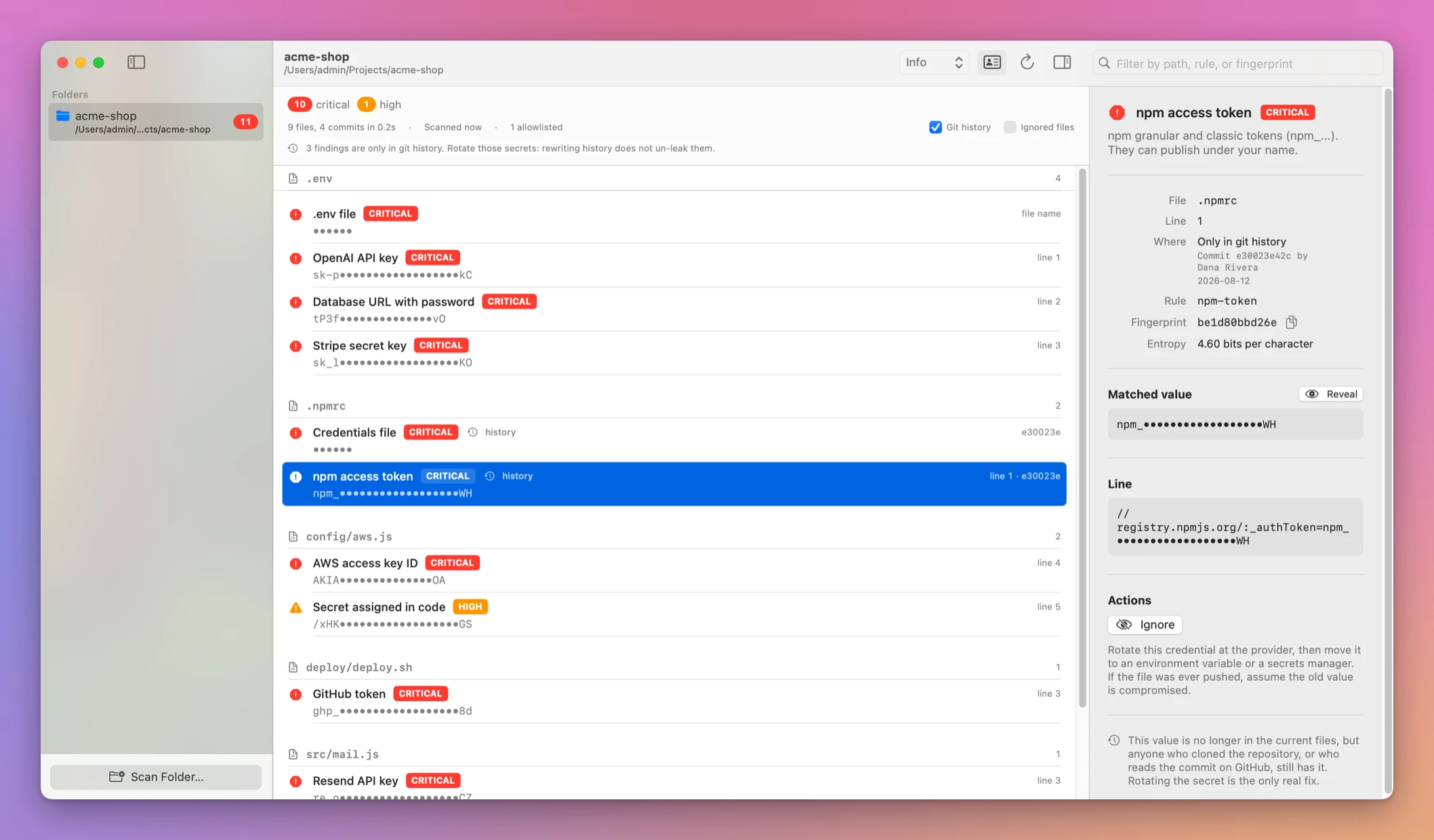
⌘R). Now old commits are checked too. - Select a finding. The inspector shows the rule that fired, the path and line, the commit, author and date for a history finding, and the context line with the secret masked.
- For a real credential, rotate it at the provider and remove it. Click Open File or Show in Finder to go to it.
- For a test fixture or a fake example key, click Ignore. Secrets Free writes it to
.secretsfree.jsonin the project. - Rescan until the list is clean, then push.
Here the npm token was deleted in August, but it’s still in the first commit. Secrets Free shows the commit, the author and the date:
Doing this by hand means a set of grep commands for every key format you can remember, then git log -p across all branches and reading the output. With the app it’s one folder pick and one toggle.
What it finds
The scanner has 69 rules for provider tokens, connection strings, private keys, JWTs, passwords, credential files and identity leaks. Provider-specific rules cover services such as GitHub, AWS, Stripe, OpenAI, Anthropic, Cloudflare, Polar, Supabase and DigitalOcean. secretsfree rules lists every rule and its severity.
Some rules look at file names, not contents. A .env or .dev.vars file, a private key file, a credentials file, a database file, a Terraform state file or a shell history file is a finding just for being there.
The Identity option controls checks for email addresses, home paths, private IPs and account IDs. Turn it off when you only care about credentials.
What it skips
By default the scan skips .git, node_modules, build folders, virtual environments and similar heavy folders. It skips binary files like images, videos and archives, and files larger than 2 MB. Ignored files includes Git-ignored files and those heavy folders when you want a wider local audit.
The placeholder filter skips common sample values, and generic rules avoid lock-file integrity hashes.
Keep the secret out of the report
Findings show a masked value, fingerprint and redacted context. Saved app reports contain redacted values. The full value can only be revealed from a live scan when you explicitly ask for it, with Reveal in the inspector.
Saved reports live in ~/Library/Application Support/SecretsFree/reports.json, so the sidebar remembers what you scanned.
Secrets Free runs on your Mac. It does not upload the project, the finding or the report to me. There is no account and no hosted scanning service.
Use it from Terminal and coding agents
The CLI prints text for people and JSON for scripts. It exits with a documented status so a hook can stop a push when it finds a high- or critical-severity result.
secretsfree scan
secretsfree scan --history
secretsfree scan --history --fail-on medium --json > secrets.json
Exit code 0 means the configured threshold was clear, 1 means a finding reached it, 2 is a usage error and 3 is a scan failure. --fail-on never keeps the command successful when another tool will decide what to do with the JSON.
A pre-push hook is two lines in .git/hooks/pre-push:
#!/bin/sh
secretsfree scan --quiet
In JSON output the secret fields stay redacted unless you pass --reveal. That’s what lets a coding agent check a project for keys without the keys ending up in its context.
Allowlist the exceptions you reviewed
Ignore one known-safe value by fingerprint, a rule, or a path glob. Secrets Free writes those choices to .secretsfree.json, which is designed to be committed with the project.
secretsfree ignore 3f9c2a1d8e7b
secretsfree ignore --rule email-address
secretsfree ignore --glob 'fixtures/**'
For a single source line, add secretsfree:ignore as a comment. Allowlisting is deliberate and visible, so the next person can see why a fixture or example remains in the repository.
The fingerprint stays the same when the line moves, so an allowlisted finding stays allowlisted after you edit the file.
Why not grep, or wait for GitHub
You can search for secrets by hand. grep -r "sk_live" finds Stripe keys, and you can add a pattern for every provider you use. It doesn’t read Git history unless you also pipe git log -p through it, and it prints the full secret into your terminal.
GitHub has its own secret scanning for known token formats. It only sees what you send to GitHub, and it doesn’t look at your other remotes or at email addresses and home paths.
| grep and git log by hand | Secrets Free | |
|---|---|---|
| Key formats checked | The ones you remember | 69 rules |
| Old commits on every branch | A separate git log -p run | Git history toggle or --history |
Files like .env or .tfstate | Another find command | Found by name |
| Secret shown on screen | Full value | Masked unless you ask |
| Known-safe fixtures | Filtered by eye every time | Allowlist committed with the project |
| Stops a push | A script you write | Exit codes for a pre-push hook |
What it doesn’t do
- It doesn’t scan remote repositories. It scans local folders. Clone the repo first.
- It doesn’t rotate or remove secrets. It tells you where they are. You rotate the key at the provider and clean up the file or the history.
- It doesn’t rewrite Git history. A secret found in an old commit stays there until you remove it with your own Git tools, and rotating it is the safer fix.
- It can’t be perfect. Pattern matching can produce a false positive, and a secret in a format no rule knows can be missed. Review a finding before removing or allowlisting it.
- It needs Git for repository scans. Git must be installed for repository-aware scans and history. The Git in Apple’s command-line developer tools is enough.
Questions
Does anything get uploaded?
Nothing from your project leaves the Mac. Scans run offline, and the only network request is the daily update check, which sends nothing from your files.
Can a coding agent use it safely?
Yes. JSON output keeps secret values redacted unless you pass --reveal, and --fail-on never lets the agent read the results without the command failing.
Can I see the full value of a finding?
Yes, from a live scan. Click Reveal in the inspector, or pass --reveal to the CLI. Saved reports keep only the redacted value.
Does it work on Intel Macs?
Yes. It runs on macOS 14 or later, on Apple silicon and Intel Macs.
Is the source included?
Yes. The purchase includes the full MIT-licensed Swift source. You need Xcode 26 or a Swift 6.2 toolchain to build it.
The documentation covers every CLI option and the pre-push hook, and the tutorial on scanning your Git history for leaked API keys walks through a full check.
What you get
The $19 one-time purchase includes the signed and Apple-notarized universal Mac app and the companion CLI. It runs on macOS 14 or later, on Apple silicon and Intel Macs.
After purchase, download the signed and notarized Mac app from your purchase page. Unzip it and move Secrets Free.app to Applications.
Secrets Free checks for updates once a day. Choose Secrets Free › Check for Updates… to check now and Install and Relaunch to install.