Scan your Git history for leaked API keys before you push
By Flavio
Updated
Scan a repo and its Git history with secretsfree, allowlist the matches you reviewed, and stop a push with a pre-push hook, with real output from a test repo.
You put an npm token in .npmrc, noticed, and replaced it with ${NPM_TOKEN} in the next commit. The file is clean now. The token is still in the first commit, and anyone who clones the repo can read it.
Secrets Free scans a local folder and, when you ask, every commit on every branch. Everything stays on your Mac: no account, no upload, and it never clones a remote. Here we’ll run its secretsfree command on a test repo, allowlist what’s fine, and add a pre-push hook.
If a key already reached GitHub, rotating it is the part that matters, and that’s in I posted my password on GitHub.
Install the command
Secrets Free runs on macOS 14 or later. The app zip in your Polar receipt has the Mac app, and the source zip has the secretsfree command. Build it with Xcode 26 or a Swift 6.2 toolchain, from the unzipped source folder:
./Scripts/install-cli.shIt builds the release binary and links it into ~/.local/bin. Pass another folder, like /opt/homebrew/bin, to link it there. Git needs to be on your PATH for the history scan.
A test repo with fake keys
To have something to find, I made a throwaway repo called shop-api with random, fake keys in it. Its history:
git log --format='%h %ad %s' --date=shortd43edd5 2026-10-02 Add GitHub API fixture and README
829a65a 2026-08-21 Read the npm token from the environment
e56c808 2026-08-03 First commitThe first commit has an npm token in .npmrc, and the second replaces it with ${NPM_TOKEN}. The third adds a test fixture with a token-shaped ghp_ string and a README that mentions AWS’s documented example key, AKIAIOSFODNN7EXAMPLE. Not committed yet: src/s3.js with an AWS access key ID, and a .env with a Stripe key, which .gitignore excludes.
Scan the files a push would publish
From the repository root:
secretsfree scanSecrets Free · /tmp/claude-501/shop-api
.npmrc
CRITICAL Credentials file file name
•••••• #c9131fd234a2
README.md
CRITICAL AWS access key ID line 3
AKIA••••••••••••••LE #c313cae4fda1
Set AWS_ACCESS_KEY_ID, for example AKIA••••••••••••••LE.
src/s3.js
CRITICAL AWS access key ID line 2
AKIA••••••••••••••S2 #fbdc393b415d
accessKeyId: 'AKIA••••••••••••••S2',
test/fixtures/github-user.json
CRITICAL GitHub token line 3
ghp_••••••••••••••••••4N #eda1530f6513
"token": "ghp_••••••••••••••••••4N"
4 critical · 6 files · 0.1sIt exits with status 1. Each finding has the severity, the rule, the line, the masked value and a 12-character fingerprint after the #. secretsfree rules lists all 69 rules with their severity.
Inside a Git repo the scan reads tracked and untracked files and skips ignored ones, which is what a push would publish plus what you haven’t committed yet. So src/s3.js shows up, and .env doesn’t.
Two findings deserve a second look:
.npmrcis flagged by its file name. The rule matches files that tools use to store logins, like.npmrc,.netrcandcredentials.json, whatever they contain. Ours only has${NPM_TOKEN}now.- The README line is AWS’s own documentation key. Secrets Free skips obvious placeholders containing words like
exampleoryour, but the AWS key rule turns that filter off, so this one gets flagged.
Scan the history
--history adds every commit on every branch:
secretsfree scan --historySecrets Free · /tmp/claude-501/shop-api
.npmrc
CRITICAL Credentials file file name
•••••• #c9131fd234a2
CRITICAL npm access token history only · line 1, commit e56c8080 by Throwaway, 2026-08-03
npm_••••••••••••••••••4l #392b9e545b10
//registry.npmjs.org/:_authToken=npm_••••••••••••••••••4l
...
5 critical · 6 files, 3 commits · 0.2s
1 finding exist only in git history. Rotating the secret is the fix; rewriting history alone does not un-leak it.There’s the token from August, with the commit, the author and the date. The app shows the same thing with Git history checked:
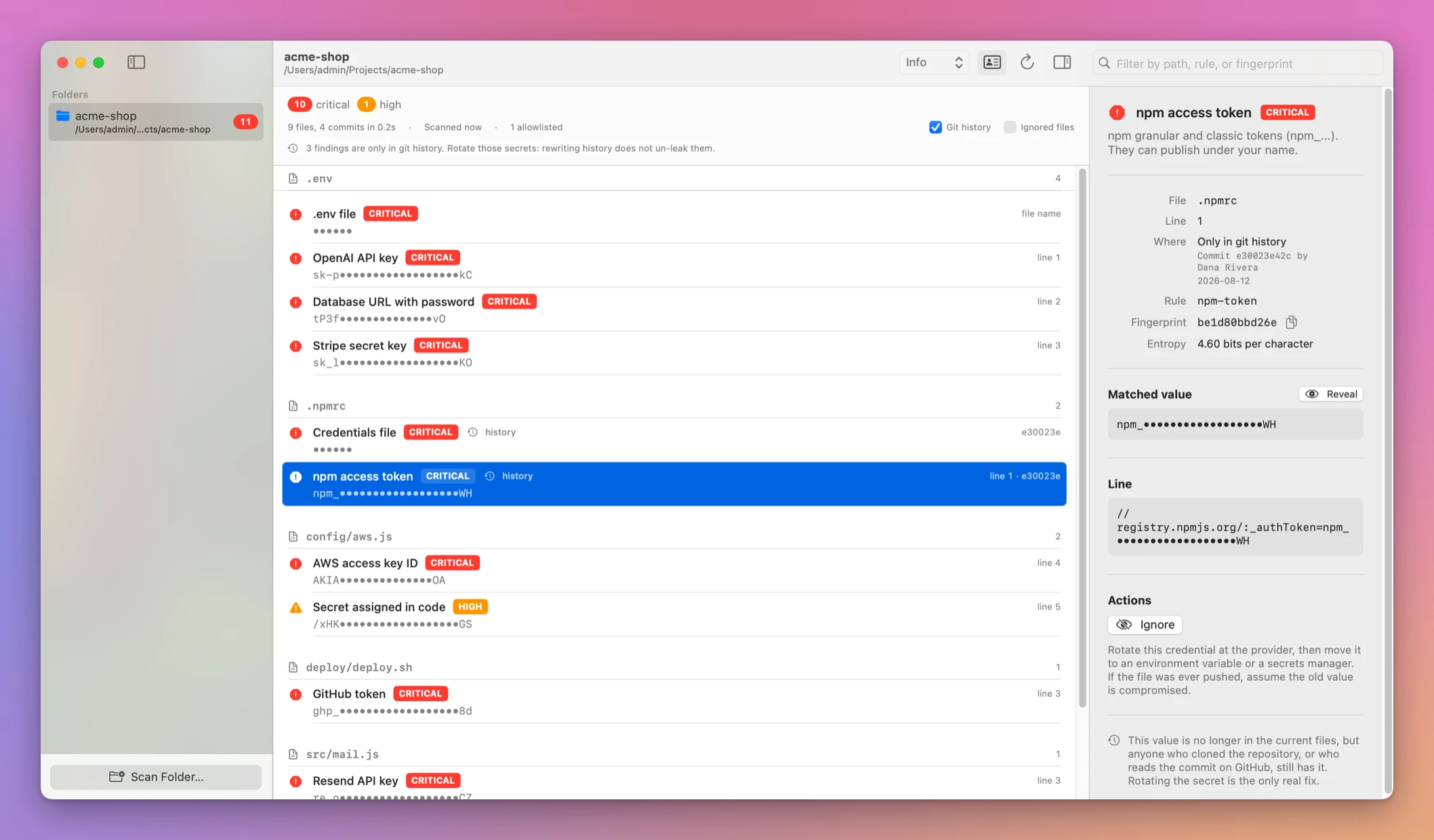
Here’s what each scan found in the test repo:
| Command | Findings | Scanned | Time |
|---|---|---|---|
secretsfree scan | 4 critical | 6 files | 0.1 s |
secretsfree scan --include-ignored | 6 critical, adding the .env file and its Stripe key | 7 files | under 0.1 s |
secretsfree scan --history | 5 critical, adding the old npm token | 6 files, 3 commits | 0.2 s |
--include-ignored also scans heavy folders like node_modules. It’s for an audit of your machine, not for checking a push.
Allowlist what you reviewed
Three of the five findings are fine. The .npmrc only has a variable now, the README key is AWS’s example, and the fixture holds a fake token. The npm token in history is different: it was real, so I’d rotate it on npmjs.com first, and only then allowlist it.
secretsfree ignore takes fingerprints, a --rule, or a --glob for paths:
secretsfree ignore c313cae4fda1 c9131fd234a2
secretsfree ignore --glob 'test/fixtures/**'
Added fingerprint c313cae4fda1, fingerprint c9131fd234a2 to /private/tmp/claude-501/shop-api/.secretsfree.json
Added paths matching test/fixtures/** to /private/tmp/claude-501/shop-api/.secretsfree.jsonThe allowlist is a JSON file in the repo root. Commit it, so everyone who clones the repo skips the same matches:
{
  "fingerprints" : [
    "c313cae4fda1",
    "c9131fd234a2"
  ],
  "paths" : [
    "test\/fixtures\/**"
  ],
  "rules" : [

  ]
}
To undo an entry, delete it from the file. A glob hides anything you add to that folder later, a real key included, so a fingerprint is the safer choice when there’s only one match. For a single line, a secretsfree:ignore comment on that line does the same.
Scan again and only src/s3.js is left:
src/s3.js
  CRITICAL AWS access key ID  line 2
           AKIA••••••••••••••S2  #fbdc393b415d
           accessKeyId: 'AKIA••••••••••••••S2',

1 critical · 6 files, 3 allowlisted · 0.1s
Stop the push with a hook
Git runs .git/hooks/pre-push before every push, and a non-zero exit cancels it. secretsfree scan exits 1 when a finding reaches --fail-on, which is high by default. Create the hook:
#!/bin/sh
secretsfree scan --quiet
--quiet prints the findings without the header and summary. Make it executable:
chmod +x .git/hooks/pre-pushHooks aren’t committed, so you add it to each clone. Now commit src/s3.js and push (the remote here is a local bare repo):
git push -u origin mainsrc/s3.js
CRITICAL AWS access key ID line 2
AKIA••••••••••••••S2 #fbdc393b415d
accessKeyId: 'AKIA••••••••••••••S2',
error: failed to push some refs to '/private/tmp/claude-501/shop-api-remote.git'Nothing left the machine. Now be careful with how you fix it. I replaced the key with process.env.AWS_ACCESS_KEY_ID in a new commit and pushed again. The hook scanned the files, found nothing, and the push went through, carrying the commit with the key:
src/s3.js
  CRITICAL AWS access key ID  history only · line 2, commit 86f068da by Throwaway, 2026-11-07
The hook checks the files, not the commits you’re pushing. When it blocks a push, fix the commit that added the key instead of adding a new one. If it’s the last commit, change the file and run git commit --amend. I did that on a fresh remote and the history scan afterwards only had the old npm token.
For a stricter hook, scan the history too:
#!/bin/sh
secretsfree scan --history --quiet
This blocks any push while an old finding is still in the history, so rotate and allowlist those first. After secretsfree ignore 392b9e545b10 for the rotated npm token, the test repo’s history scan printed ✓ No findings. and exited 0. It took 0.2 seconds for 4 commits. A repo with years of history takes longer, so time it before you put it in a hook.
Exit codes
| Exit | Meaning | Example |
|---|---|---|
| 0 | Nothing reached --fail-on | ✓ No findings. |
| 1 | A finding reached --fail-on | The scans above |
| 2 | Invalid usage | --fail-on got 'banana', expected critical, high, medium, low, or info. |
| 3 | The scan failed | /nonexistent/folder is not a folder. |
A hook that exits 2 or 3 also blocks the push, which is what you want, since the scan didn’t run.
In CI, where another step reads the results, --fail-on never always exits 0 and --json writes only JSON to standard output:
secretsfree scan --history --json --fail-on never > secrets.jsonThe values stay masked in the JSON. --reveal prints them in full, so keep it out of hooks and CI logs.
Get Secrets Free
Find API keys, tokens, credentials files and identity leaks before they ship. A native Mac app and CLI with full MIT source.
See Secrets Free → · Read the docs · $20. See the app page for tax details, with full source code.
Want me to talk about your product? You can sponsor this site.