
Mac & Windows app by Flavio
Shipping Adjustment Checker
Open the carrier adjustments CSV from your label app or carrier account and your own shipments record. See which surcharges are wrong, billed twice or fair, side by side with the weight and box size you recorded, and save a dispute summary PDF and a claim CSV.
Buy Shipping Adjustment Checker for Mac · $19Buy Shipping Adjustment Checker for Windows · $19Buy once, use forever. Up to 3 computers you own (license). Plus tax where it applies. Mac and Windows versions are sold separately.
macOS 14 or later (Apple silicon and Intel) · Windows 10 and Windows 11 (x64 and ARM64)
Latest Mac version 1.0.0, released November 28, 2026
A planter goes out in a 12 × 10 × 8 box at 4 lb 8 oz. Ten days later your label app lists an $18.40 adjustment on it: UPS says the box was 13 × 11 × 9 and billed it at 10 lb. Is that right? Another week brings fifteen more, from $1.95 to $22.35, across USPS, UPS and FedEx.
You can check them by hand. Find each tracking number in your records, look up the box you used and what it weighed, work out the weight by size (length × width × height divided by 139 for UPS, rounded up to the next pound), and compare. Ten minutes a charge, if the tracking numbers match. They often don’t: one file has spaces, the other doesn’t, and a spreadsheet turned a USPS number into 9.40011E+21.
Shipping Adjustment Checker reads the adjustments file and your shipments record, finds each parcel, and puts your record next to the carrier’s bill. It works out what your box should have been billed, the carrier’s way, and marks each charge: worth disputing, billed twice, fair, a credit, or missing from your records. Then it saves a dispute packet with the evidence.
Watch a 30-second demo of Shipping Adjustment Checker:
Who it’s for
- Small shops shipping a few hundred parcels a month. The label app adds a list of adjustments every week, $3 here and $18 there, and nobody has the afternoon to check each one against the order.
- Sellers of heavy or bulky things. Pottery, plants, books, lamps. An inch more on one side pushes a light box into dimensional weight, and one carrier measurement can add $20 to a label.
- Shops that use box presets. One wrong preset sends every parcel out with the wrong size on the label, and the adjustments arrive weeks later, one by one.
- Sellers on eBay, Shopify and Etsy at once, with labels from different places, who want one list of what was charged and what’s worth claiming back.
- Bookkeepers and assistants doing a shop’s month-end. They have the carrier’s adjustments and the shop’s records, and need a packet the owner can send without explaining it.
How it works
- Export the adjustments as a CSV from your label app (Pirate Ship, ShipStation, Shopify Shipping) or your carrier account.
- Have your shipments record as a CSV: one row per parcel with the tracking number, order number, weight, box size and service.
- Click Choose CSV Files… and pick both, or drag them onto the window. The app tells them apart by their columns.
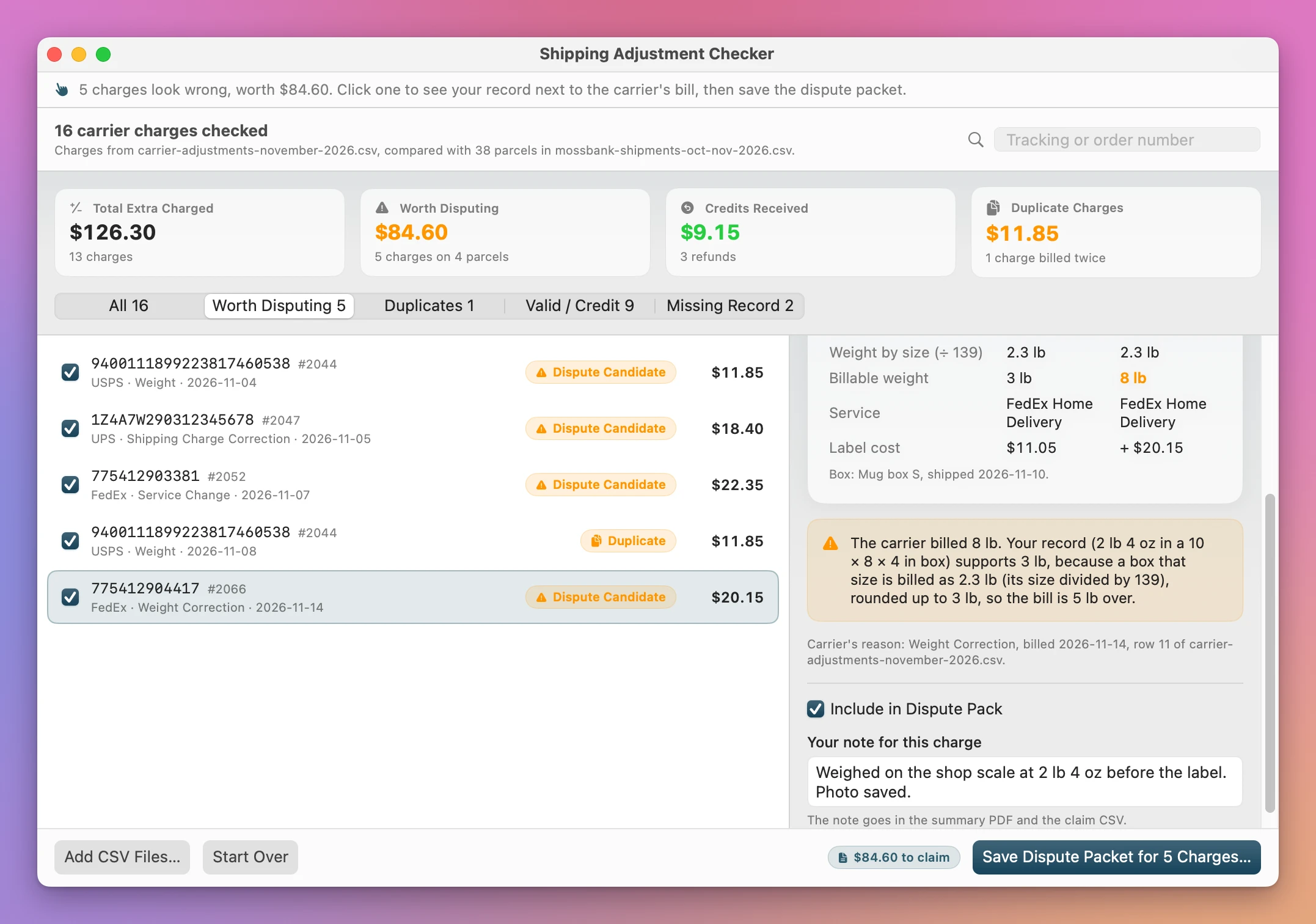
- Click a charge to see Your Record vs Carrier Billed. Tick or untick Include in Dispute Pack, and add a note if you want.
- Click Save Dispute Packet for 5 Charges… and choose a folder.
The first screen has a Try Example Adjustments button that opens a made-up month of adjustments and a shipments record from a made-up pottery shop, so you can see what the app finds before you open your own files.
What you get
Every charge joined to its parcel
The app finds each charge’s parcel by tracking number, with or without spaces and dashes, in any case, and with the routing prefix a USPS barcode scan sometimes adds. It reads weights written as 2 lb 3 oz, 35 oz, 2.19 lb, kilograms or grams, and box sizes as 12 x 10 x 8, 12×10×8 in, centimetres, or three separate columns. It finds the columns by their names, whatever the label app or the carrier called them.
What your box should have cost, the carrier’s way
For each charge, the app works out the billable weight your record supports: the larger of the weight and the weight by size, rounded up the way the carrier rounds. UPS and FedEx divide the box’s cubic inches by 139 and round up to the next pound. USPS rates a box by size only above one cubic foot, divides by 166, and rounds up to the next ounce under a pound.
That’s how it tells a wrong charge from a fair one. A 6 lb vase in a 16 × 12 × 12 box really is billed as 17 lb by UPS, so that $7.90 adjustment stays green as Matches Your Record, and you don’t waste time disputing it.
A pill and a sentence for every charge
- Dispute Candidate: billed more than half an ounce over what your record supports, a side more than half an inch longer than your box, or a different service than the one you bought. Pills say which: Weight, Box Size, Service.
- Duplicate: the same amount for the same reason, billed twice on one tracking number.
- Matches Your Record and Credit: nothing to do.
- Missing Record: the tracking number isn’t in your shipments file. If a spreadsheet turned one of your tracking numbers into 9.40011E+21, the app tells you.
Under the comparison, a sentence says why: “The carrier billed 8 lb. Your record (2 lb 4 oz in a 10 × 8 × 4 in box) supports 3 lb… so the bill is 5 lb over.” Four totals sit at the top: Total Extra Charged, Worth Disputing, Credits Received and Duplicate Charges. Filters show one kind at a time, and the search finds a tracking or order number.
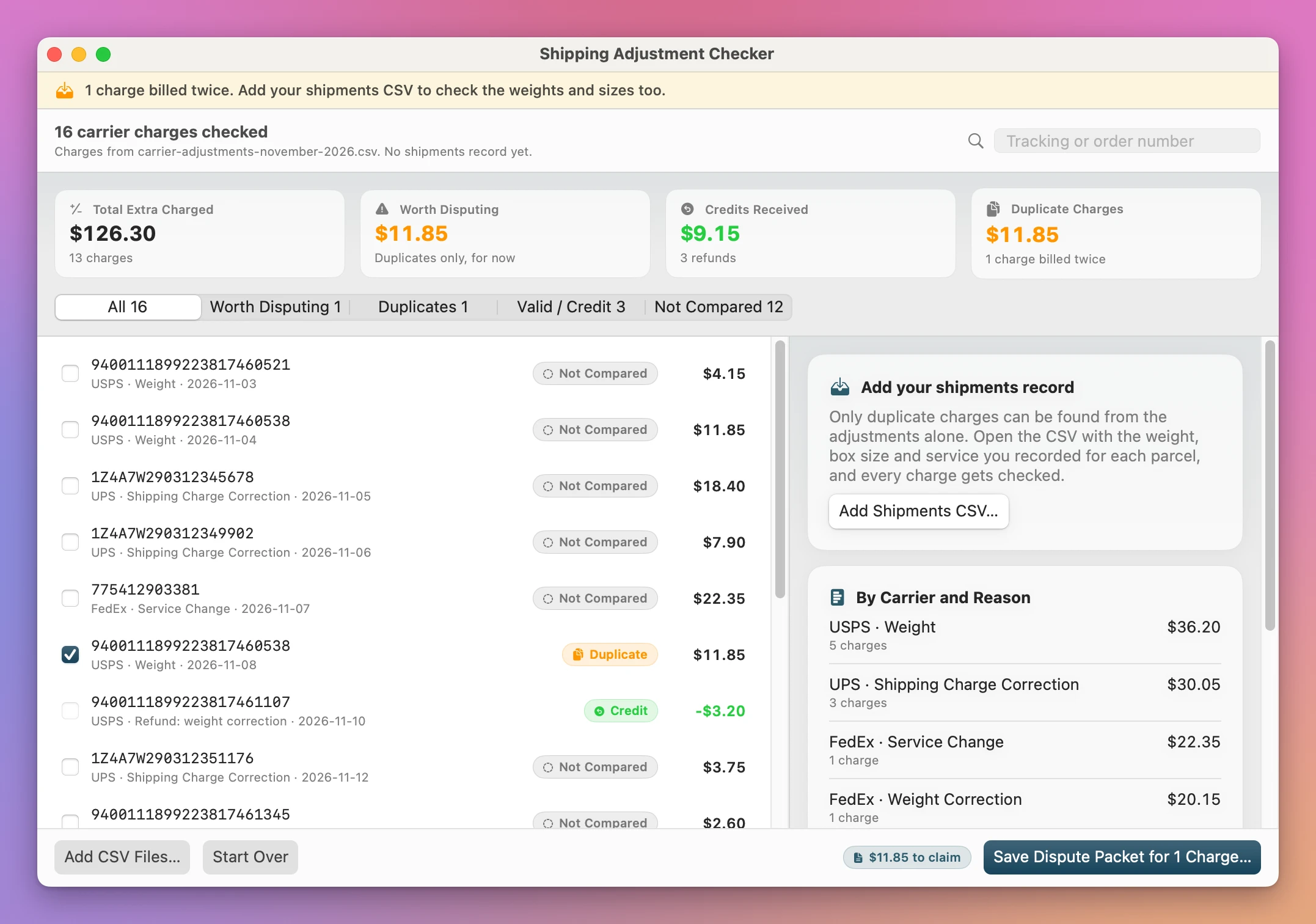
Only the adjustments file? It still helps
Open the adjustments alone and the app totals them by carrier and reason, counts the credits, and finds the charges billed twice. Add the shipments record when you have it, and every charge gets checked.
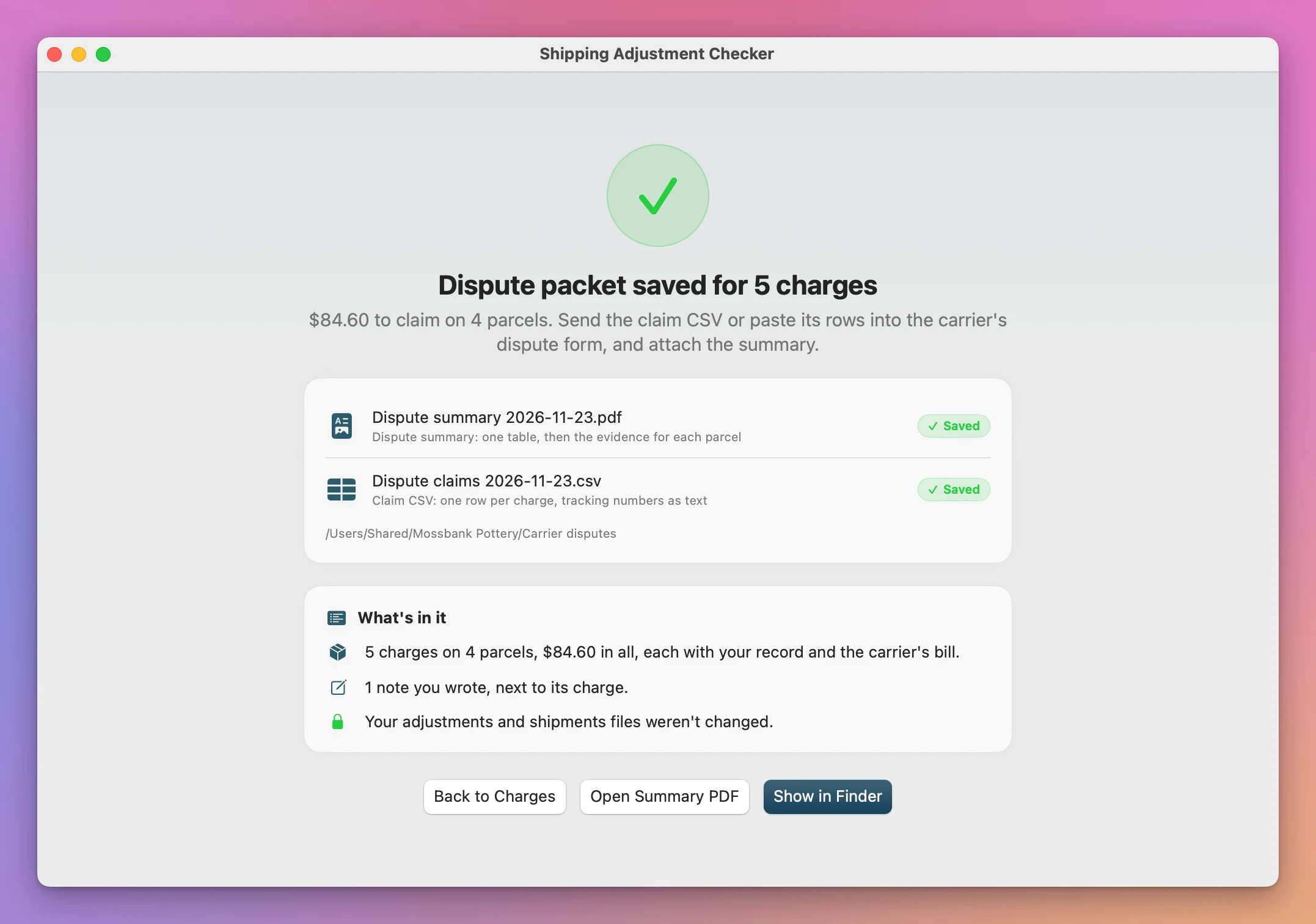
A dispute packet that explains itself
Save Dispute Packet… writes two files in the folder you choose:
- A dispute summary PDF: the total to claim, one table with each tracking number, order, carrier, what’s wrong and the amount, then one block per charge with your record and the carrier’s bill side by side, the reason in a sentence, the carrier’s own reason and dates, the box, and your note.
- A claim CSV: one row per charge, with the tracking number exactly as the carrier wrote it, the amount, both sets of measurements and the dispute reason, ready to paste into a carrier’s or label app’s dispute form.
Your CSV files are never changed.
Why not do it by hand
Label apps list each adjustment with the carrier’s reason, and often the weight and size the carrier measured, one parcel at a time. Some let you dispute from there. What they don’t do is put it next to what you recorded, work out the billable weight, or say which charges are fair.
A spreadsheet can do the matching with a lookup on the tracking number, if both files write it the same way. Then you still add the weight-by-size formula, each carrier’s rounding and divisor, and a column for every check.
| By hand | Shipping Adjustment Checker | |
|---|---|---|
| Matching tracking numbers | A lookup that breaks on spaces, dashes and 9.40011E+21 | Matched with or without them, damaged ones flagged |
| Weight by size and rounding | A formula per carrier, per row | Worked out for every charge |
| Telling fair charges from wrong ones | Your judgement, charge by charge | A pill and a sentence for each |
| Duplicate charges | Sort and scan | Found and totalled |
| Evidence for the claim | Screenshots and a written list | A summary PDF and a claim CSV |
Shipping audit services do this for big accounts, for a share of what they get back. For a shop with a few dozen adjustments a month, that’s a lot of paperwork to hand over.
What it doesn’t do
- It doesn’t file the dispute. You send the packet or paste the claim CSV into the carrier’s or label app’s form.
- It doesn’t connect to any account or download anything. You export the CSV files.
- It doesn’t decide the claim. The carrier decides by its own rules, and a charge marked fair here can still be worth asking about.
- It doesn’t know every surcharge. A residential, fuel or address correction fee measures nothing, so the app says there’s nothing to compare and leaves the call to you.
- It doesn’t remember your choices after you close it. Save the packet before you quit.
Questions
Which files does it read?
Adjustments exports from label apps like Pirate Ship, ShipStation and Shopify Shipping, and adjustment or billing exports from USPS, UPS and FedEx accounts, as long as they have a tracking number and an amount for each charge. Billed weight, box size and service make the check complete. For your records, any CSV with a tracking number per parcel and the weight, box size or service you used, from your label app’s shipment history or your own spreadsheet.
What if my weights have no unit?
The app reads units in the values (“35 oz”) and in the column names (“Weight (oz)”). A weight with no unit anywhere is read as pounds, and the detail shows it, so you’ll see if that’s wrong.
Does anything get uploaded?
Nothing. Your files stay on your Mac. The app connects to the internet only to check for updates.
What it needs
macOS 14 Sonoma or later, on Apple silicon and Intel Macs. It asks macOS for no permission: it reads the files you choose or drag onto its window.
Shipping Adjustment Checker isn’t made by, affiliated with or endorsed by USPS, UPS, FedEx, Pirate Ship, ShipStation, Shopify, eBay or Apple. Their names are used only to say which files the app reads. The shop, orders and tracking numbers in the screenshots are made up.
Buy Shipping Adjustment Checker
$19 plus tax where it applies, paid once.
Download the app from the order page or your Creem receipt, unzip it and move it to Applications. I sign the app with my Apple Developer ID, and Apple notarizes the download.
The app checks for updates once a day. When a new version is ready, click Install and Relaunch. The first time, it asks for the license key from your Creem receipt, and remembers it. To check anytime, choose Shipping Adjustment Checker → Check for Updates….