
A developer tool by Flavio
Things CLI
Create, read and update Things 3 projects and tasks from your terminal or coding agent. Import a whole project from Markdown.
Buy Things CLI · $20One-time purchase. Tax included. Source code included.
macOS · Things 3 · Node.js 20+
Latest version 0.3.0, released November 18, 2026
Things CLI is a small command-line tool for Things 3 on macOS.
I use Things to keep track of projects and tasks. But most of my work starts in a terminal or in a conversation with a coding agent, and moving a plan from there into Things meant copying every task by hand.
Picture a plan with three headings and fifteen tasks, some with a line of notes. In Things that’s a new project, three headings, fifteen to-dos typed one at a time, and the notes pasted into each. Ten minutes of copying, and you still miss one.
Now I can do it with one command. Write the plan in Markdown, or let the agent write it, run things import, and the project is in Things with its headings, tasks and notes.
Here’s the CLI at work in Terminal, from today’s list to a project imported from Markdown:
The pottery studio, its projects and its to-dos are fictional. The recording ran against a local stand-in for Things 3.
Who it’s for
- Developers who plan in a coding agent. You and Claude Code or Codex just worked out a 20-step plan for a feature. Ask the agent to turn it into a Things project and read it back to check it.
- People who live in the terminal. You want to add
Renew the domainfor tomorrow with aworktag without leaving Terminal, then get back to what you were doing. - Anyone who writes plans in Markdown. Your project notes are already
.mdfiles with headings and bullet lists.things importturns one into a project as it is. - People who script their day.
things list today --jsongives a script your Today list, so a morning script can print it, count it or pass it to another tool. - Agent users who want limits. The agent can read with
--json, add, update notes and complete tasks. Deleting only moves an item to the Trash in Things, where you can put it back.
From a conversation to a Things project
This is the workflow I wanted most.
- Talk through the work with your coding agent, or write the plan yourself.
- Save it as Markdown: the first heading is the project name, text under it becomes the project notes,
##headings group tasks, and indented lines under a task become its notes. - Run
things import plan.md. The CLI prints what it made, likeImported project "Launch newsletter redesign" (4 to-dos, 2 headings). - Run
things show "Launch newsletter redesign"to read the project back, with every to-do and its notes. - As you work,
things noteappends decisions to a task, andthings donemarks it complete.
Writing the same project in the Things window is one to-do at a time, then a click into each one to paste its notes. With the CLI it’s one file and one command, and the agent can write the file.
Import a complete project from Markdown
You can describe a project with normal Markdown:
# Launch newsletter redesign

Keep the project context here.

## Website
- Update the home page
  Add the new screenshots.
- Test the signup form

## Email
- Write the launch email
- Schedule the broadcast
Then import the file:
things import newsletter-project.mdThings creates the project with its headings, tasks, and notes in one go.
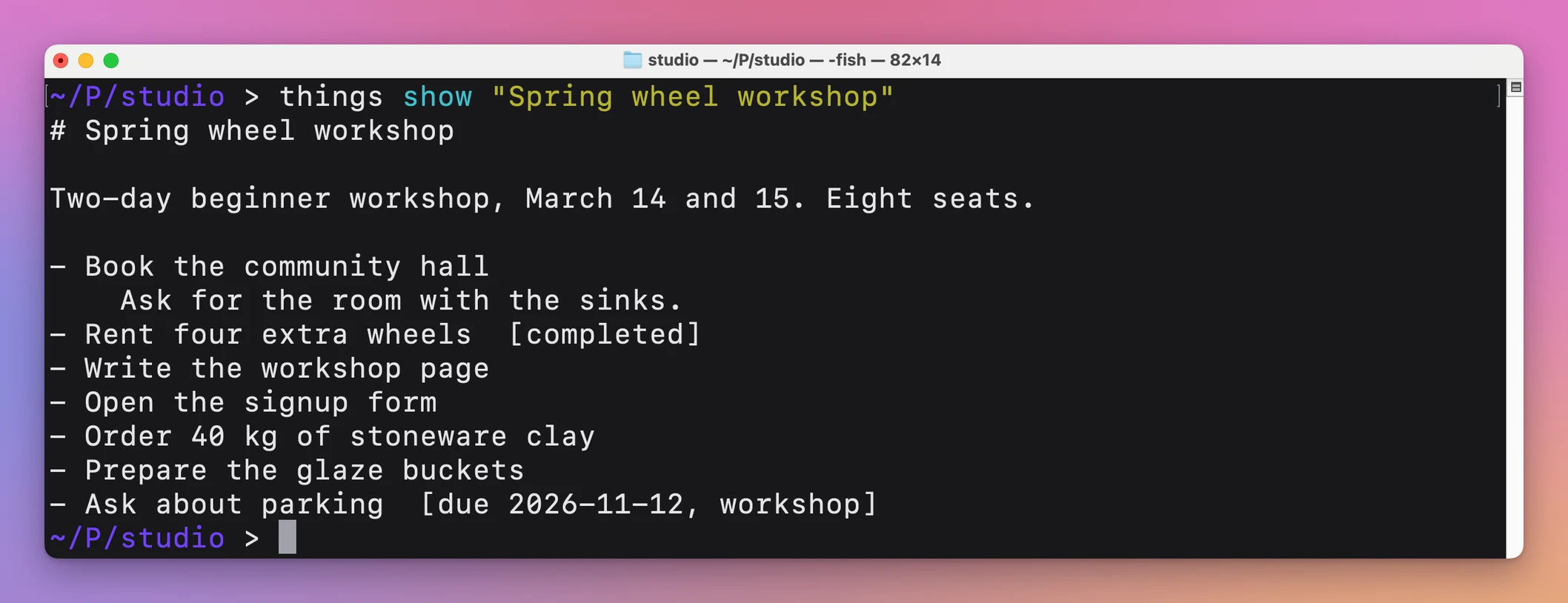
Import always creates new items. If you import the same plan twice, you get two projects, so check Things first. For anything Markdown can’t describe, things import also takes a JSON file, and things json sends a raw payload to the Things URL scheme.
Add tasks and projects
You can add a task with a date, deadline, tags, notes, and a checklist:
things add "Call the accountant" \
  --when tomorrow \
  --deadline 2026-09-12 \
  --tags work,money
--when takes today, tomorrow, evening, someday or a date. --project and --heading put the task inside an existing project, and --checklist takes a comma-separated list.
You can also create a project:
things project "Launch newsletter redesign" \
  --area "flaviocopes.com" \
  --notes "Ship by October"
These commands go through the official Things URL scheme, so they are fast and need no auth token.
Read Things from the terminal
Things CLI can show today’s tasks, projects, areas, and search results:
things list
things projects
things search "newsletter"
things show "Launch newsletter redesign"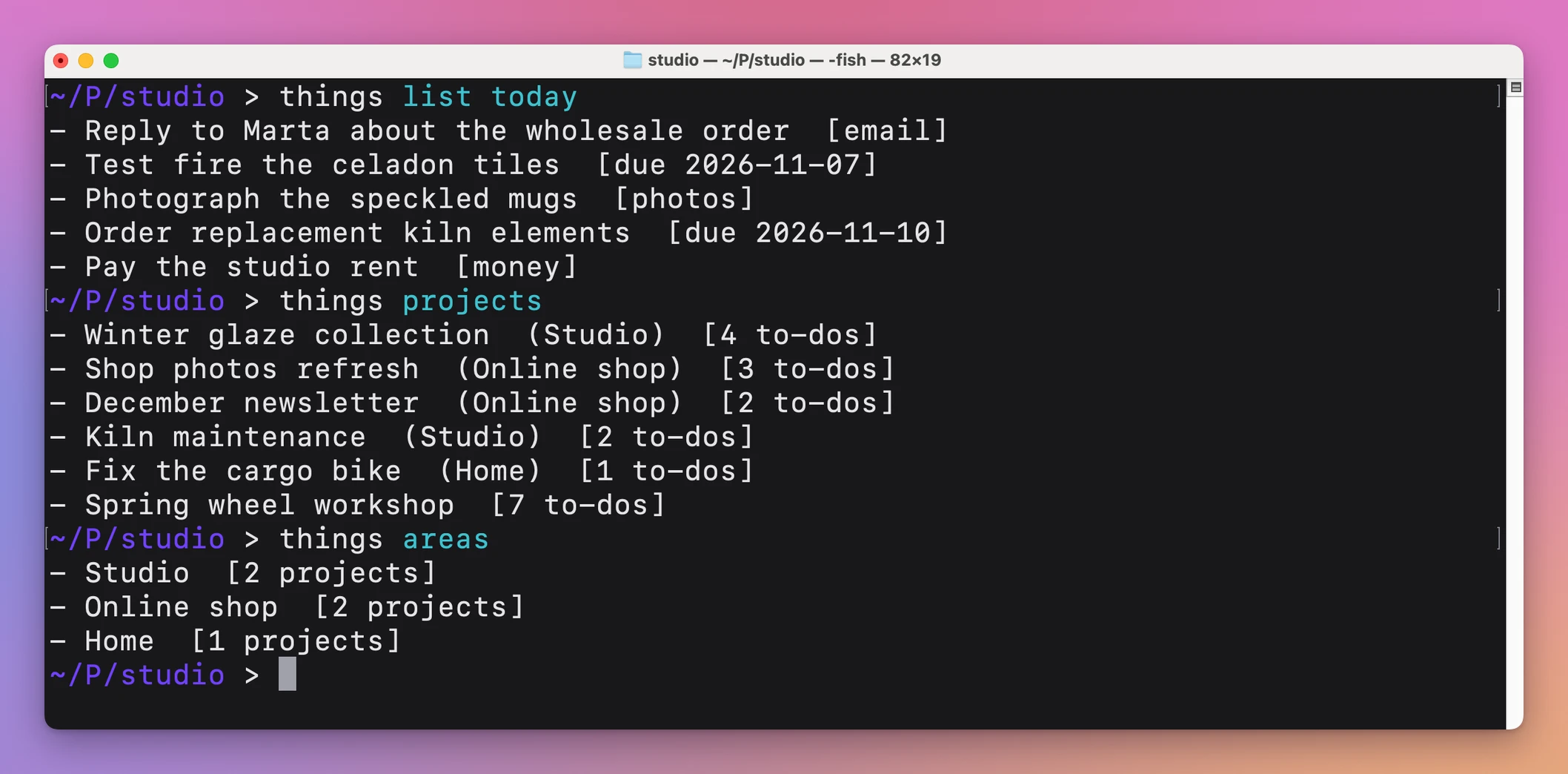
things list reads Today by default. It also reads Inbox, Upcoming, Anytime, Someday, Logbook and Trash.
Add --json when a script or coding agent needs structured data:
things list today --json
things show "Launch newsletter redesign" --json
Reading goes through JavaScript for Automation, Apple’s JavaScript interface for Apple events. That’s how the CLI gets structured data out of Things.
Update, complete and delete
The same mechanism lets it update notes and complete tasks:
things note "Launch newsletter redesign" \
  --append "Design approved"

things done "Update the home page" \
  --in "Launch newsletter redesign"
--set replaces the notes, --file reads them from a file, and - reads them from standard input, which is how an agent passes long notes without quoting problems.
Deleting moves an item to the Trash in Things. things delete takes one open to-do, and things delete-project takes a project with its to-dos. Both stop with an error when the name matches more than one item, so nothing is deleted by guess. The CLI can’t empty the Trash or restore from it. You do that in the app.
things open shows a project or list in the Things window.
Built for coding agents
The source ZIP includes an Agent Skill, .agents/skills/things/SKILL.md, that explains the safe workflow to a coding agent.
With that installed, I can ask an agent:
Turn this conversation into a Things project. Keep the background in the project notes. Group the work under headings, then verify the imported project.
Or:
Show my tasks for today and help me choose three. Do not change anything.
The agent reads with --json, imports projects from Markdown, and passes long notes through files or standard input. The skill tells it to delete only what you asked for. things capabilities --json describes the commands without opening Things.
Why not use the Things URL scheme yourself
Things has a URL scheme and AppleScript support, both free and documented. You can build a things:///add link or write a JXA script for every action. For one task it’s fine.
For a project with headings and notes, you’re writing JSON for things:///json by hand and URL-encoding it. Reading data back means writing a JXA script and turning its output into something a script can use.
| URL scheme and scripts by hand | Things CLI | |
|---|---|---|
| Add one task | Build and encode a URL | things add "Title" --when today |
| Project with headings and notes | Hand-written JSON payload | A Markdown file and things import |
| Read a project back | Your own JXA script | things show "Name" --json |
| Same task name in two projects | Your own matching logic | --in "Project" |
| Instructions for an agent | You explain it each time | An Agent Skill and capabilities |
What it doesn’t do
- It doesn’t work without Things 3. The CLI talks to the Things app on your Mac. It has no task database of its own, and Things launches when a command needs it.
- It doesn’t match names loosely. Names are exact and case sensitive. When several items share a name,
noteanddonepick the first one, so pass--infor repeated task names. - It doesn’t read custom lists or Areas with
list. Usethings areasandthings projectsinstead. - It doesn’t avoid duplicates on import. Importing the same file twice creates the project twice.
- It doesn’t empty the Trash. Deleting only moves items to the Trash.
Questions
Do I need a Things auth token?
You don’t need one. Creating items goes through the Things URL scheme, which works without a token. Reading and updating use macOS automation, so the first time macOS may ask whether your terminal or agent can control Things.
What do I need installed?
macOS, Things 3 and Node.js 20 or newer. The CLI has no npm dependencies.
Can a coding agent delete my tasks?
It can move a to-do or a project to the Trash in Things, and only one exact match at a time. You can put anything back from the Trash in the app.
How do I get updates?
Reopen your purchase page and download the newer ZIP. The CLI doesn’t update itself.
The documentation has the full command reference, and the tutorials show how to add tasks and projects from the terminal and let a coding agent turn a conversation into a Things project.
Buy Things CLI and get the source
Things CLI costs $20 including tax, paid once. The purchase includes the ready-to-install CLI ZIP.
Download the runtime ZIP from your purchase page. Reopen that page for later versions.
This purchase supplies the software source. You provide the runtime, accounts and infrastructure described below.
Install it
After downloading and unzipping the source, open Terminal in its folder and link the command:
npm install --global --prefix ~/.local .It requires macOS, Things 3, and Node.js 20 or newer. The project has no dependencies.
The source is yours to customize under the MIT license.