Contacts export on Mac is missing people? How to get every contact out
By Flavio
Contacts on the Mac can export fewer cards than you selected, with no warning, or an empty vCard file. Here's how to check the count, why it happens, and how to export everyone.
You select all your contacts on the Mac and export them as a vCard file. You import the file into a new Mac, Google Contacts or your phone, and some people aren’t there. Or you drag one contact to the desktop and get a Contact.vcf of 0 KB.
The usual cause is a damaged record in the address book. Contacts stops showing it, and its export leaves it out without saying so. Count the cards before and after, and if they don’t match, export from a tool that reads the records Contacts hides.
Check whether your export is short
- Open Contacts and click All Contacts in the sidebar.
- Click any contact and press Command-A. The right side says how many cards are selected, like 420 Cards Selected.
- Choose File → Export → Export vCard… and save the file.
- Count the cards in the file. Importing it somewhere empty and reading the total works, and so does adding it to Contact Export Rescue, which shows the number of cards as soon as you add the file.
If the two numbers match, your export is fine and you can stop here.
What a short export looks like
Here’s a test Mac with 420 made-up contacts, where 14 records were damaged the way a write-up on tinyapps.org describes: a display setting left empty in the address book database. This is the data used in the screenshots below.
| What was checked | Count |
|---|---|
| Contacts selected in Contacts | 420 Cards Selected |
| Cards in the file from Export vCard… | 406 |
| Records in the address book database | 421 |
| Cards saved by Contact Export Rescue | 421 |
Contacts counted the 14 damaged records in the selection, then left them out of the file, with no warning. The 421st record is the test Mac’s own card, which wasn’t part of that selection.
Dragging cards out of Contacts uses the same export, so it gives the same result. The tinyapps.org write-up also reports the 0 KB Contact.vcf for a damaged card dragged on its own.
The free fix, and why it’s risky
The tinyapps.org write-up fixes it by quitting Contacts and changing the database by hand from Terminal. On the test Mac that brought the 14 people back into Contacts, which confirms the cause.
It also means editing your only copy of the address book with a typed command, with no backup step, and no list of who was affected. If you’re comfortable with that, make a backup first with File → Export → Contacts Archive…. The same write-up mentions Automator’s Export vCards action and a free command line tool, abcddb2vcard. They weren’t tried here.
Export every contact with Contact Export Rescue
Contact Export Rescue is a Mac app I built for this. It only reads Contacts, finds the records Contacts hides, and saves everyone as vCards with a report. It costs $19, paid once.
- Add the old export. Under Old export to check (optional), drop the short
.vcfor click Choose…. Here it showsContacts.vcfwith 406 cards. - Keep Also look for contacts that Contacts hides ticked. It’s on by default.
- Choose where to save. Under Save in, click Choose….
- Click Read Contacts. macOS asks whether the app can access your contacts. Click Allow.

To find the hidden records, the app reads a copy of the address book database. On a normal Mac, macOS may ask you to give the app Full Disk Access for that. If the app can’t read the database, it shows an orange line with Open Full Disk Access…. Without it, the app still exports every contact Contacts lists, so you get at least what Export vCard… gives you, plus the comparison.
Check who was missing
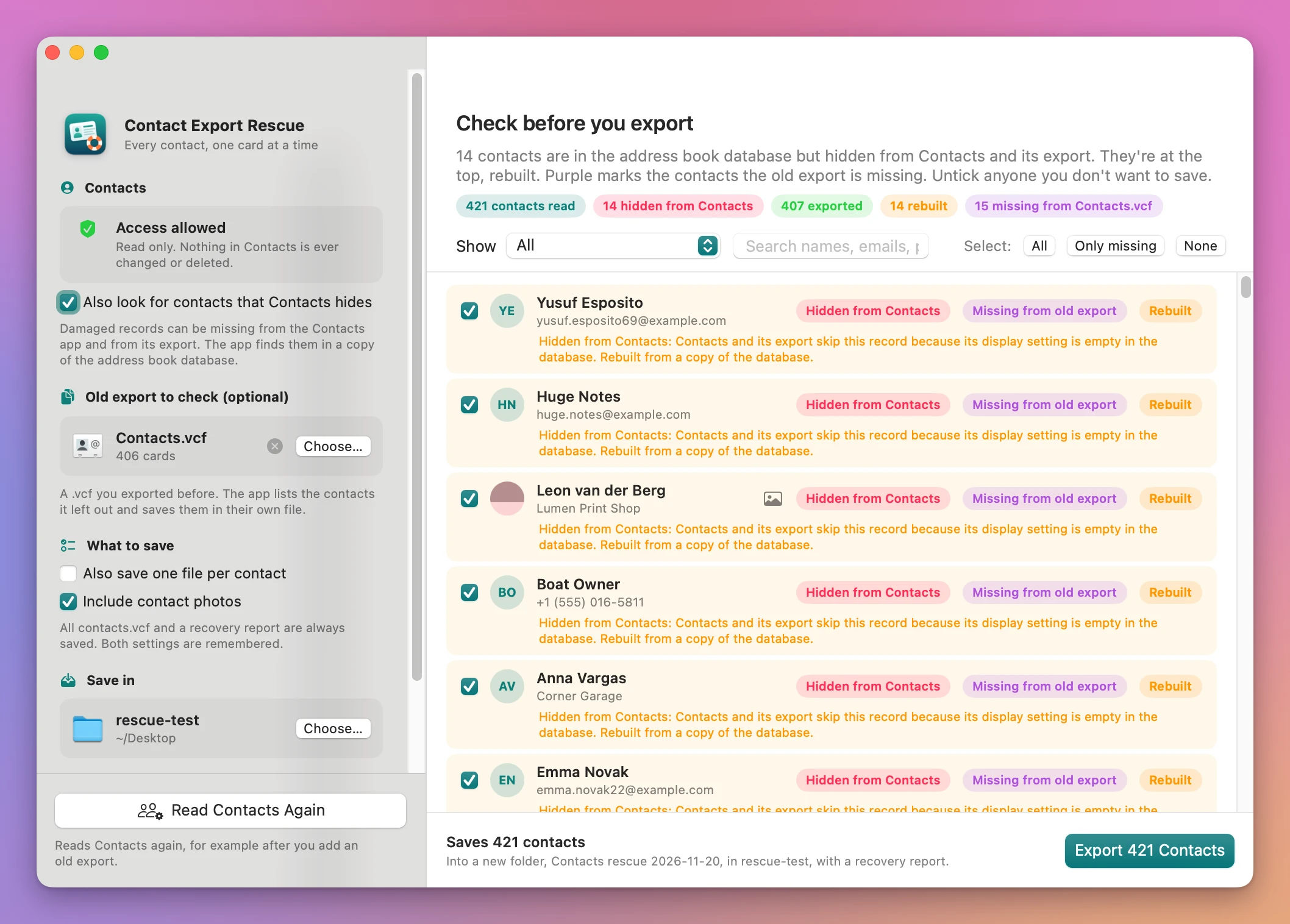
The Check before you export screen puts the hidden contacts at the top. On the test Mac it read 421 contacts and found 14 hidden from Contacts, each with a pink Hidden from Contacts pill and the reason under the name. The purple pills mark the 15 people missing from the old Contacts.vcf.
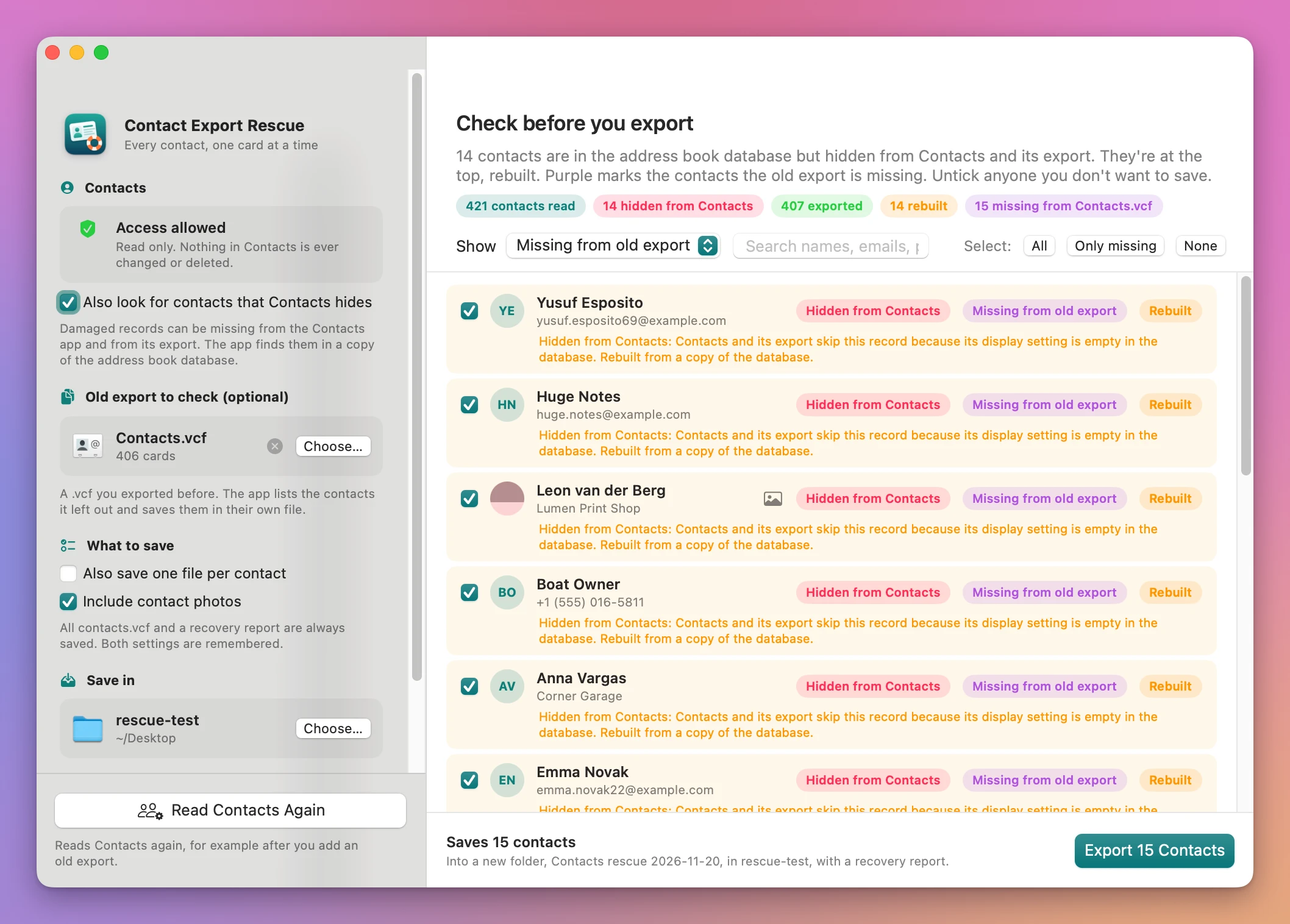
If you already imported the old file somewhere, you don’t need everyone again. Set Show to Missing from old export and click Only missing next to Select. The button changes to Export 15 Contacts.
Save and import the file
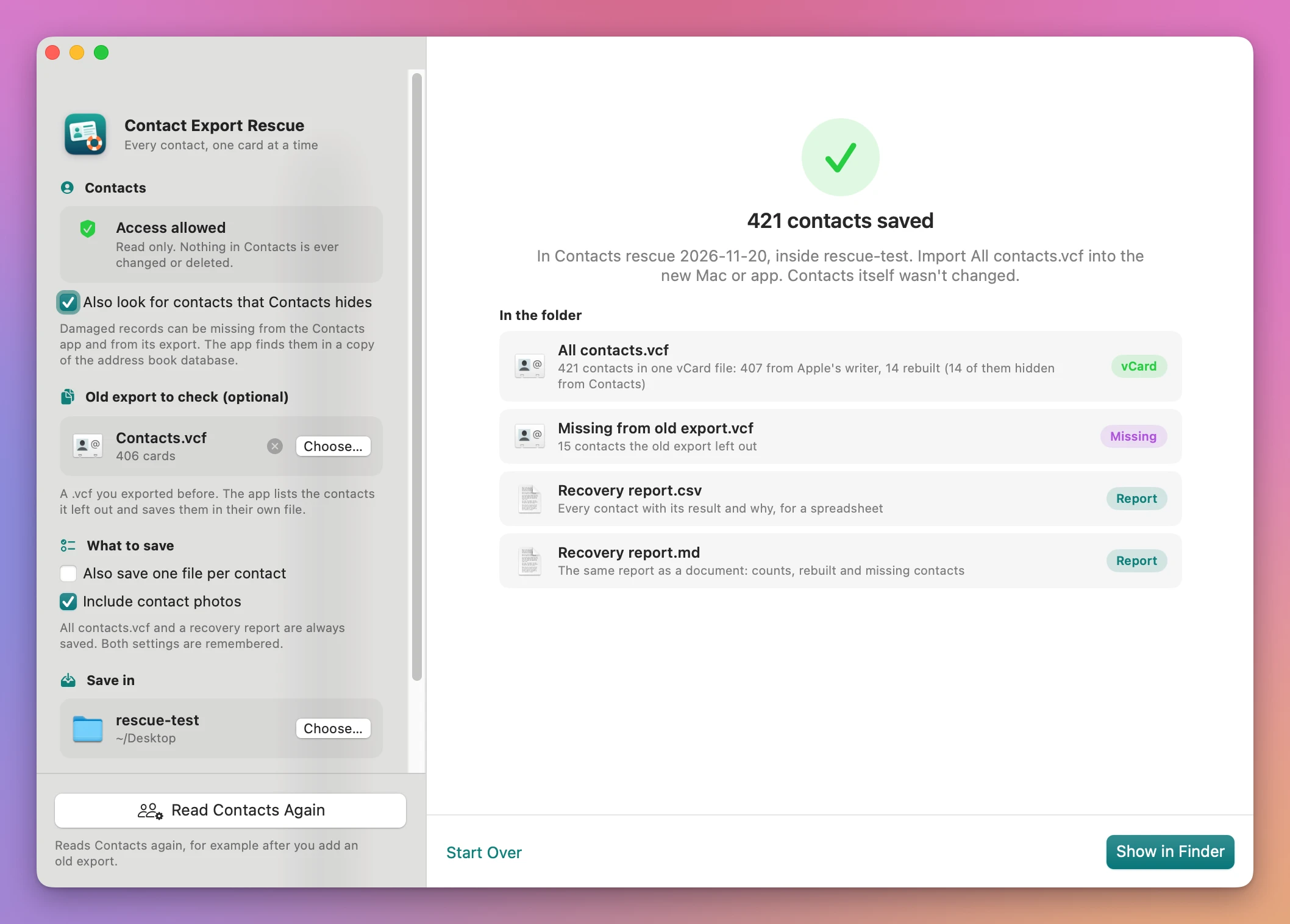
Click Export. The app makes a new folder, Contacts rescue with the date, and lists what’s in it. On the test Mac:
All contacts.vcf, 421 contacts: 407 written by Apple’s own vCard writer, 14 rebuilt.Missing from old export.vcf, the 15 people the old export left out.Recovery report.csvandRecovery report.md, every contact with its result and the reason.
Import All contacts.vcf on the new Mac or in Google Contacts, or only Missing from old export.vcf if the rest is already there. Your address book on the old Mac stays exactly as it was.
| Contacts’ Export vCard | Contact Export Rescue | |
|---|---|---|
| Cards saved on the test Mac | 406 of 420 selected | 421 |
| Hidden records | Left out, no warning | Found and rebuilt |
| Who was missing | Not shown | Listed, with a separate file |
| Changes to Contacts | None | None |
The damage tested here is the empty display setting from that write-up. If your address book is broken in another way, the report still tells you who was read and saved, so compare its counts with what Contacts shows.
Get Contact Export Rescue
Export every contact from Contacts as vCards, find the records Contacts hides, and list who an old export left out.
See Contact Export Rescue → · Read the docs · $19. See the app page for tax details.
Want me to talk about your product? You can sponsor this site.