How to find a quote in interview transcripts on a Mac
By Flavio
You have a quote from a paper edit and a folder of interview transcripts. Here's how to find where it was said with Find in TextEdit, why a quote worded a little differently isn't found that way, and how Transcript Quote Finder finds it with the file, the speaker and the time.
The producer’s paper edit says “Maria: the bakery almost closed”. You have the interview transcripts in a folder, and you need the file and the time where she says it, so you can cut it.
The free way is Find in TextEdit, one transcript at a time, searching for a few words of the quote. It works when you pick words she said exactly in that order. For a whole paper edit, or a quote written from memory, Transcript Quote Finder searches every transcript at once and finds lines worded a little differently.
The examples use made-up interviews for a short documentary about a neighbourhood bakery: four transcripts (an SRT subtitle file, a WebVTT file, a text file and a Word document) and a paper edit of fifteen quotes.
What does a transcript look like?
Transcription services and editing apps export transcripts in a few shapes. An SRT file is plain text: a number, a start and end time like 00:00:37,000 --> 00:00:43,800, and what was said, often with the speaker’s name in front. Text and Word exports usually have the speaker’s name and a time on a line, then the words.
Any of them opens in TextEdit, the text editor that comes with every Mac.
How do I search one transcript in TextEdit?
- Open the transcript in TextEdit.
- Choose Edit → Find → Find…. A search bar appears at the top of the window.
- Type words from the quote. The number at the right of the bar says how many times they’re in the file, and the first one is highlighted.
- Scroll up from the highlighted line to the nearest time. That’s roughly where it starts.
Here’s the catch. The paper edit says “the bakery almost closed”. In Maria’s transcript the line is “And the bakery, um, it almost closed.” Searching for the paper edit’s words gives 0:
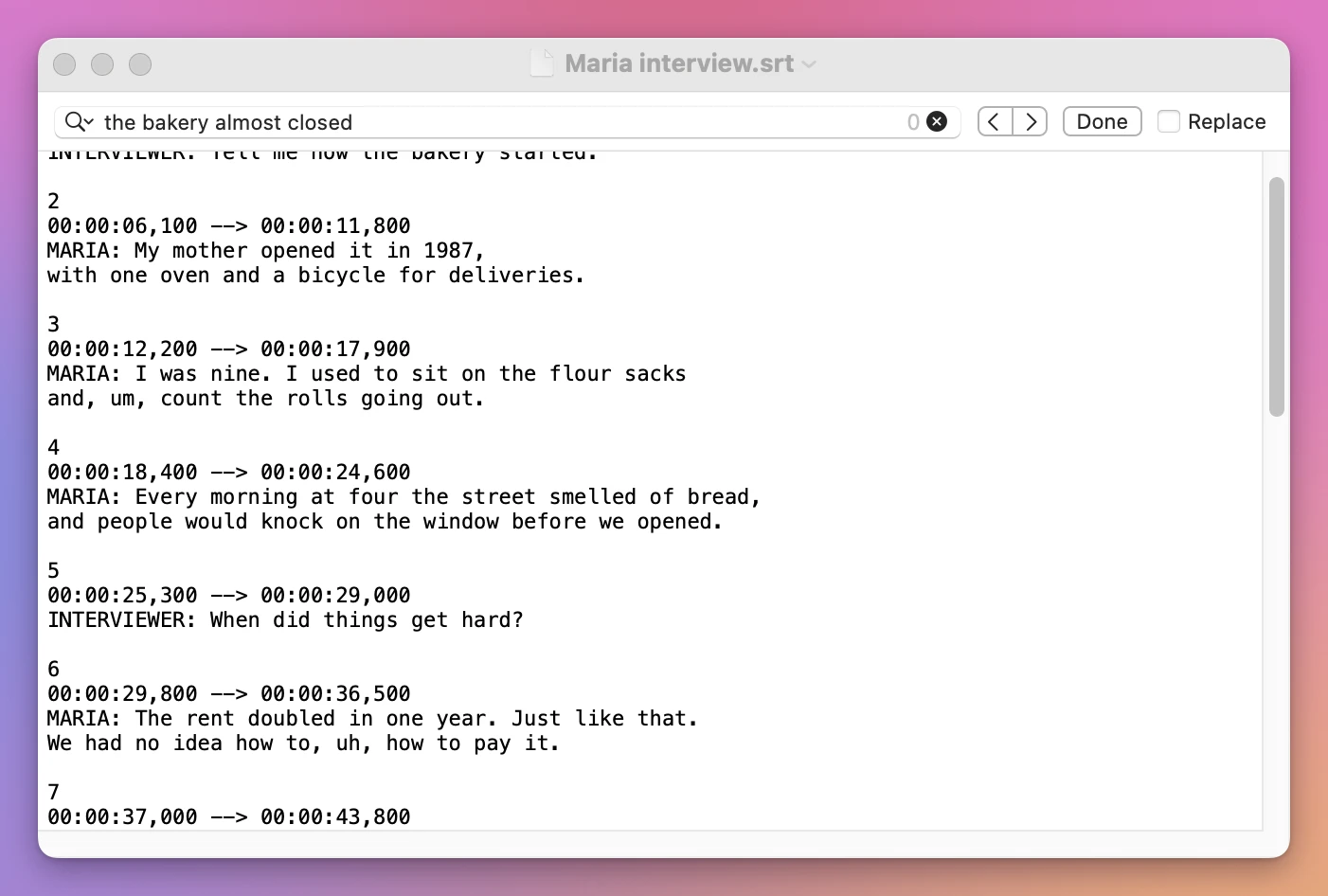
Find looks for exactly the characters you type. The comma after “bakery”, the “um” and the “it” in the middle are enough to miss it. Searching for “almost closed” alone finds it, in subtitle 7, at 00:00:37:
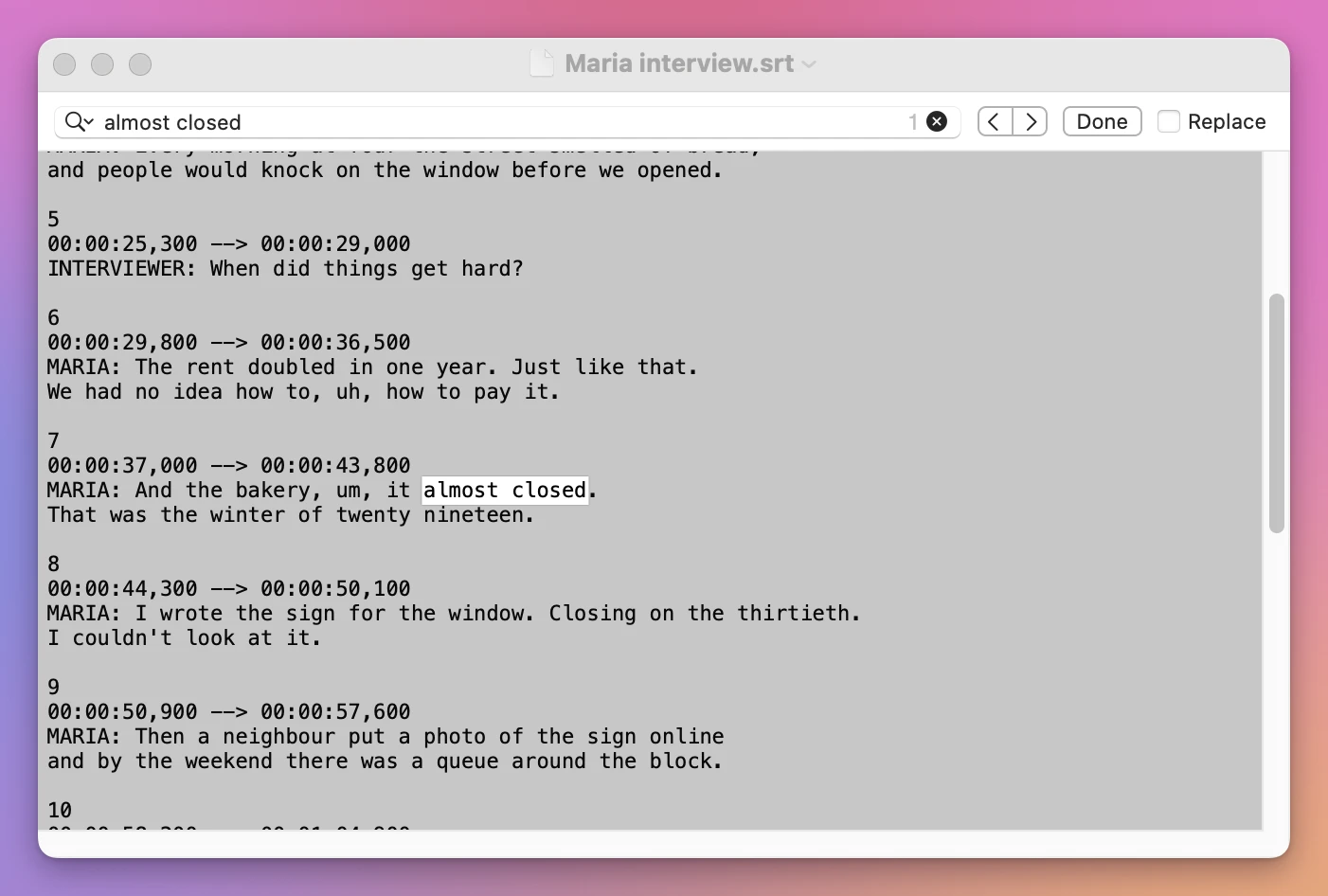
So the trick by hand is to search for two or three words that are probably exact, then read around them. It works. It’s slow when there are many quotes and many files: fifteen quotes in four transcripts is up to sixty searches, and each find still needs the time read off by eye. Numbers trip it up too: the paper edit writes “2019”, the transcript says “twenty nineteen”.
How do I find every quote at once?
Transcript Quote Finder does the whole paper edit in one go. It costs $19, paid once.
- Click Choose Transcripts… and pick the folder with the transcripts. It reads SRT, WebVTT, text and Word files, including the folders inside it.
- Paste the paper edit into Paste the quotes, one quote per line. “Maria:” at the start of a line says who says it.
- Click Find Quotes.
Every quote gets a pill: Word for word, Close or Partly with a percentage, or Not found. Under each one are the file, the speaker and the start and end time:
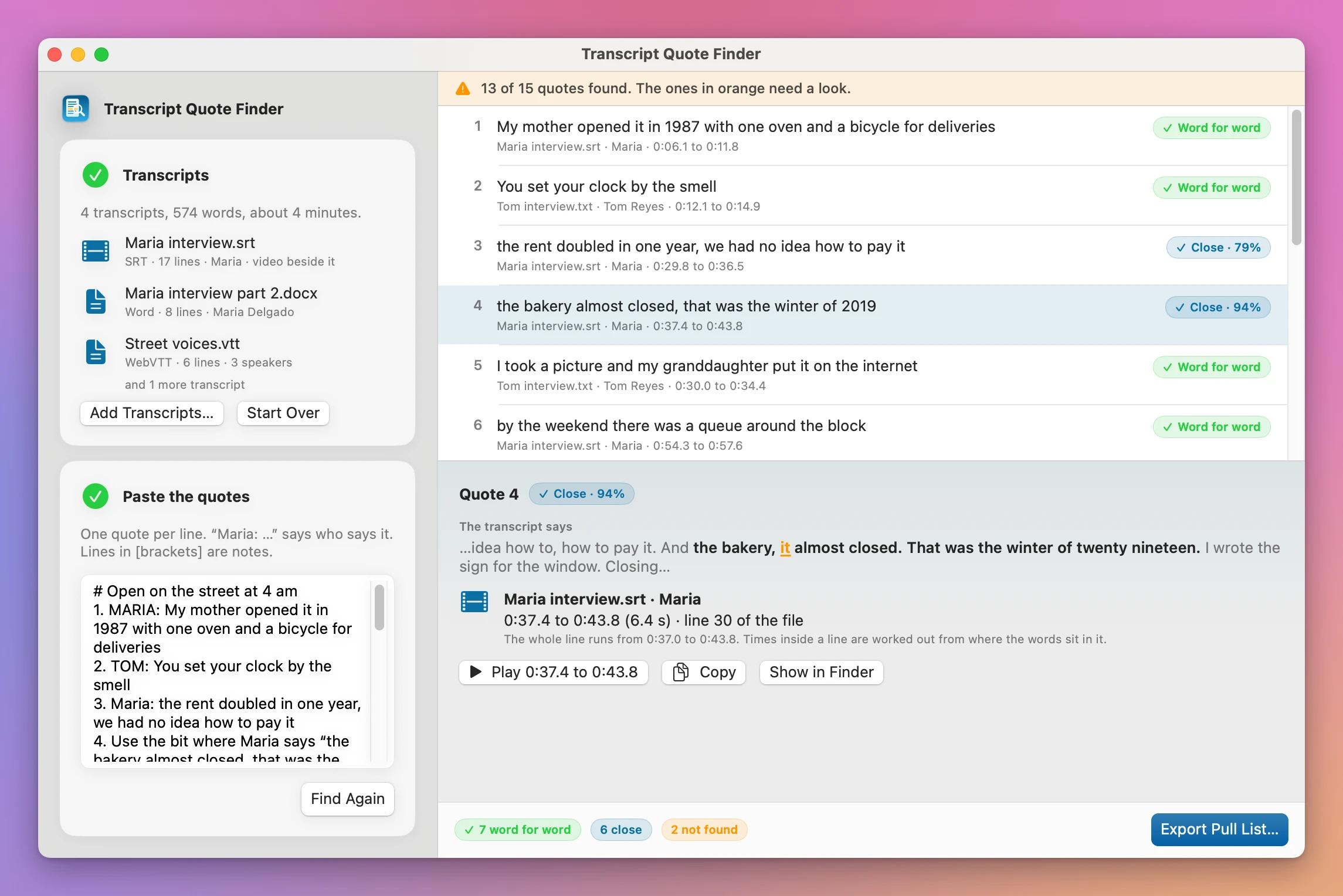
The quote TextEdit missed is quote 4. It’s found at 0:37.4 to 0:43.8, with “it” underlined because the paper edit doesn’t have it, and “2019” matches “twenty nineteen”. Capitals, punctuation, “um” and “uh” don’t count.
Click any quote to check it. Here the paper edit left out a word, and the app shows which:
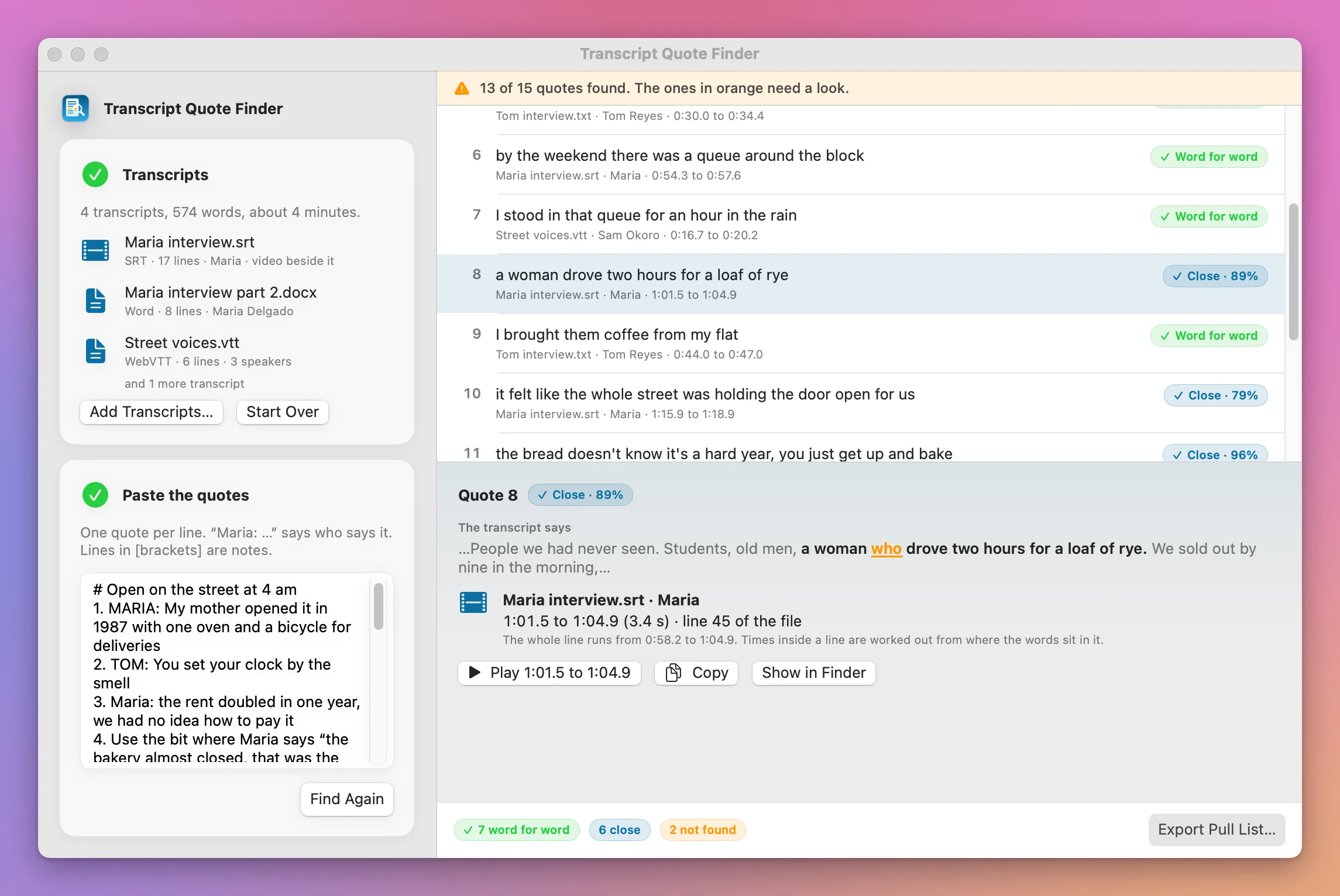
When the video with the same name is beside the transcript, Play plays just that quote. Export Pull List… saves a spreadsheet, a PDF and an edit decision list with every quote, its file and its times.
Times inside a line are worked out from where the words sit in the line, so they’re close rather than frame-exact. The whole line’s times are shown too.
Which way should I use?
| Find in TextEdit | Transcript Quote Finder | |
|---|---|---|
| Cost | Free | $19 once |
| Files searched at once | One | All |
| Quotes at once | One | The whole paper edit |
| Finds a quote worded differently | No | Yes, with a percentage |
| ”2019” and “twenty nineteen” | No | Yes |
| Gives the time | Read it off the nearest timestamp | Start and end |
| Speaker | Read it off the line | Yes |
| Pull list for the editor | Type it yourself | CSV, PDF and EDL |
For one quote you remember exactly, TextEdit’s Find is enough. For a paper edit with a dozen lines across several interviews, the app saves the searching and the copying of times.
Get Transcript Quote Finder
Choose a folder of interview transcripts and paste a paper edit. Each quote is found even when it's worded a little differently, with its file, speaker, start and end time and how close it is. Play it from the video beside the transcript and export a pull list as CSV, PDF or EDL.
See Transcript Quote Finder → · Read the docs · $19. See the app page for tax details.
Want me to talk about your product? You can sponsor this site.