Import a CSV file into Calendar on a Mac
By Flavio
Calendar on the Mac imports .ics files, not spreadsheets. Here's how to get a schedule saved as CSV into Calendar, with the dates checked and an easy way to undo it.
You have a schedule in a spreadsheet: term dates, a season of fixtures, a shift rota. You want it in Calendar on your Mac, and Calendar has File → Import….
That menu is for calendar files (.ics), not spreadsheets. So the CSV has to become events some other way: by hand, through Google Calendar, or with an app that reads the CSV for you, like Calendar CSV Importer.
Why can’t Calendar import my spreadsheet?
A CSV is just rows and columns of text. Calendar has no way of knowing which column is the title, which one is the date, and whether 03/09/2026 means the 3rd of September or March 9. An .ics file spells all of that out, so that’s what File → Import takes.
What are the free ways to do it?
Type the events in. For five events, this is the quickest way. Double-click the day in Calendar, type the title, set the times, add the location. A school term calendar is 40 to 60 rows, though, and a season of fixtures can be more.
Import it into Google Calendar. Google Calendar’s import, in its settings on the web, accepts a CSV file. Your columns need Google’s names (Subject, Start Date, Start Time and so on), and the events go into a Google calendar. To see them in Calendar on your Mac, add the Google account in System Settings → Internet Accounts. There’s no preview of each row before the import, and if it went wrong you delete the events one at a time, unless you imported them into a new calendar you can delete whole.
Use an online CSV-to-ICS converter. Upload the CSV, download an .ics, import that in Calendar. It works, but you’re uploading a schedule with names and places to a site you don’t know, and the converter doesn’t know what’s already in your calendar.
Each of these has the same weak spot: nobody checks the dates. A 31/09 that doesn’t exist, a US file read the European way, or a night shift from 22:00 to 06:00 that “ends” before it starts can go straight in.
| Type it in | Google Calendar | Online converter | Calendar CSV Importer | |
|---|---|---|---|---|
| Reads a CSV | No | Yes, with Google’s column names | Yes | Yes, matches the columns you have |
| Account needed | No | A Google account | No | No |
| Preview of every row | You see what you type | No | No | Yes |
| Wrong dates caught | If you notice | No | No | Yes, row by row |
| Duplicates checked | No | No | No | Against Calendar and the file |
| Undo | One event at a time | One event at a time, or delete the calendar | Delete the events | Undo Import, one click |
| File leaves your Mac | No | Yes | Yes | No |
How do I import a CSV with Calendar CSV Importer?
Here’s the example file, a made-up school term schedule saved from a spreadsheet as CSV. It has the columns Date, Start, End, Event, Location, Notes and Repeat, with dates written day first:
| Date | Start | End | Event | Location | Notes | Repeat |
|---|---|---|---|---|---|---|
| 01/09/2026 | First day of term | Whole school | Uniform check at the gate | |||
| 01/09/2026 | 08:45 | 09:15 | Welcome assembly | Main hall | Years 7-11 | |
| 24/09/2026 | 22:00 | 01:30 | Year 11 stargazing night | Sports field | Bring warm clothes | |
| 31/09/2026 | 10:00 | 11:00 | Fire drill | Whole school |
These are four of its nine rows. The screens are from macOS 15.
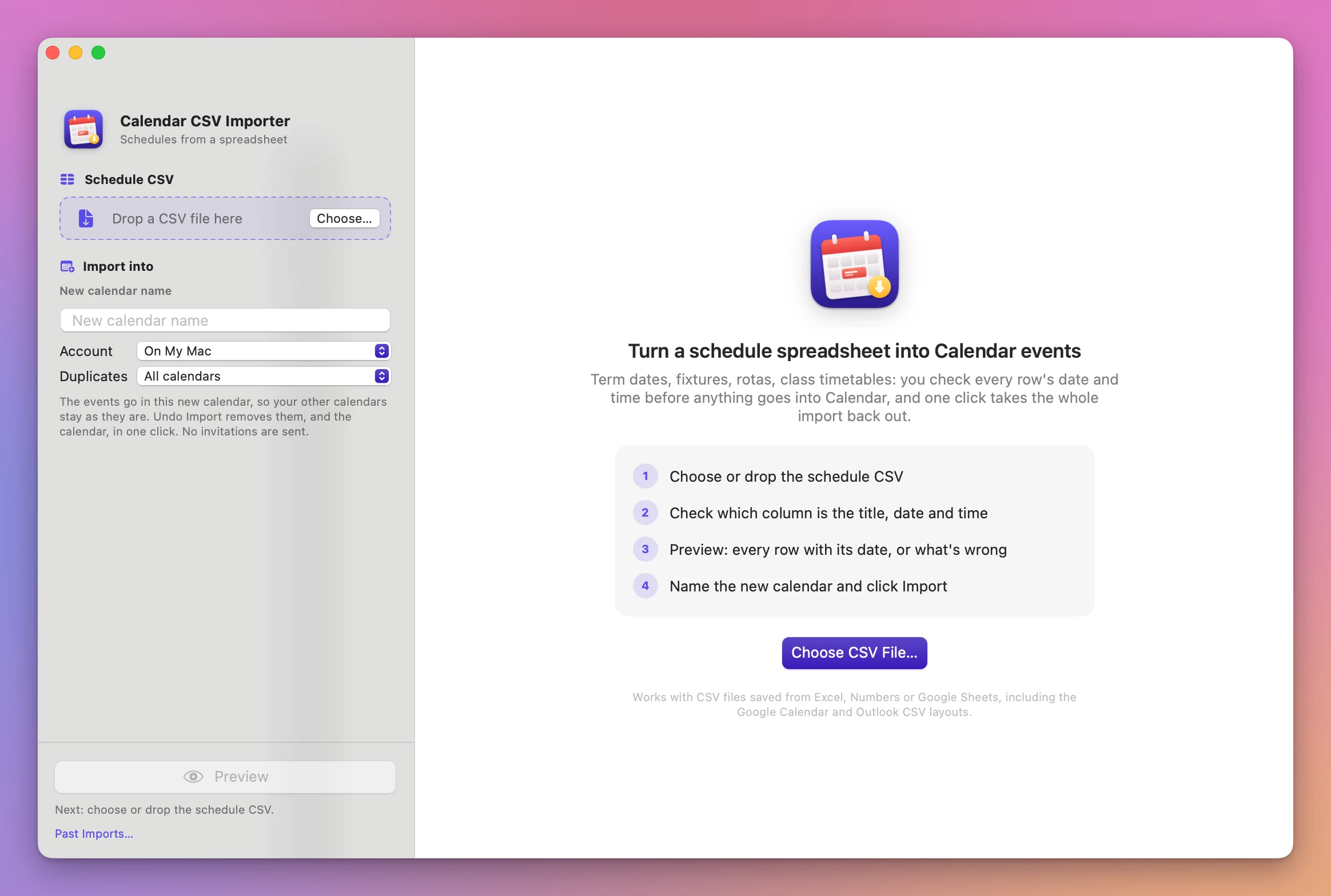
Open the app and click Choose CSV File…. The first time, click Allow Calendar Access… in the sidebar and allow full access, so the app can create the calendar and look for duplicates.
The app matches the columns by their names. In this file, Title became the Event column, Start date the Date column, Start time and End time the Start and End columns. Check them under Columns and change any that are wrong.
Under Dates and times, Date order is Automatic. The app looks at every date in the file, sees 24/09/2026, and reads the whole file as day/month/year. If your schedule was written in another time zone, pick it under Time zone.
Click Preview. Every row shows up as Calendar will have it:
- “First day of term” has no time, so it’s an all-day event.
- The PTA meeting has a start but no end, so it lasts the default hour, and the row says so.
- The stargazing night runs from 10:00 PM to 1:30 AM on Fri, Sep 25, with the note “Ends the next day.”
- The fire drill is in red: “The start date “31/09/2026” isn’t a real day. Check the day and month, and Date order.”
- A row with no title is in red too: “The title is empty.”
- A note at the top says the Repeat column isn’t imported.
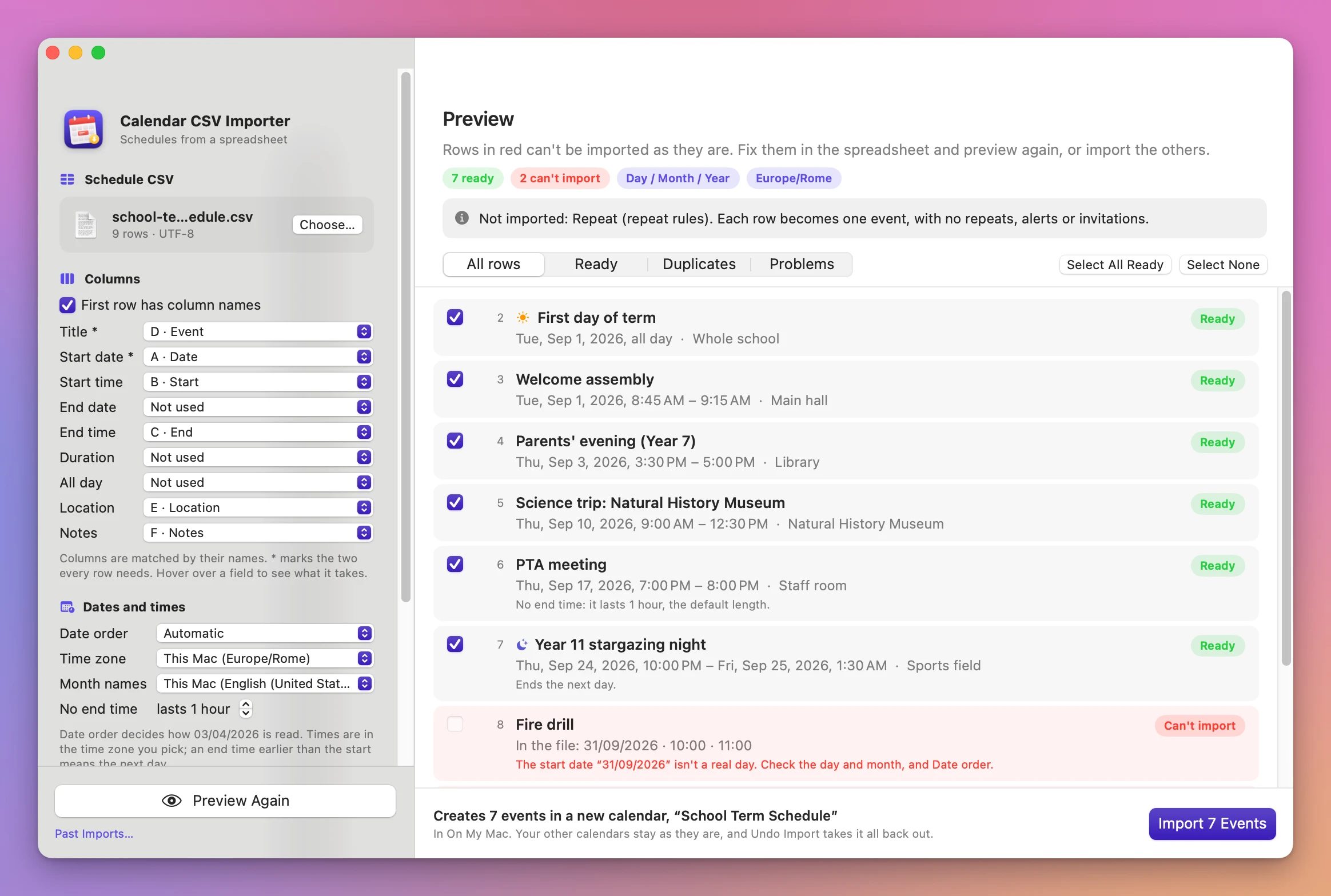
You can fix the two red rows in the spreadsheet and click Preview Again, or import the seven that are ready. The calendar name comes from the file name, “School Term Schedule”. Click Import 7 Events, then Open Calendar.
What about American dates and duplicates?
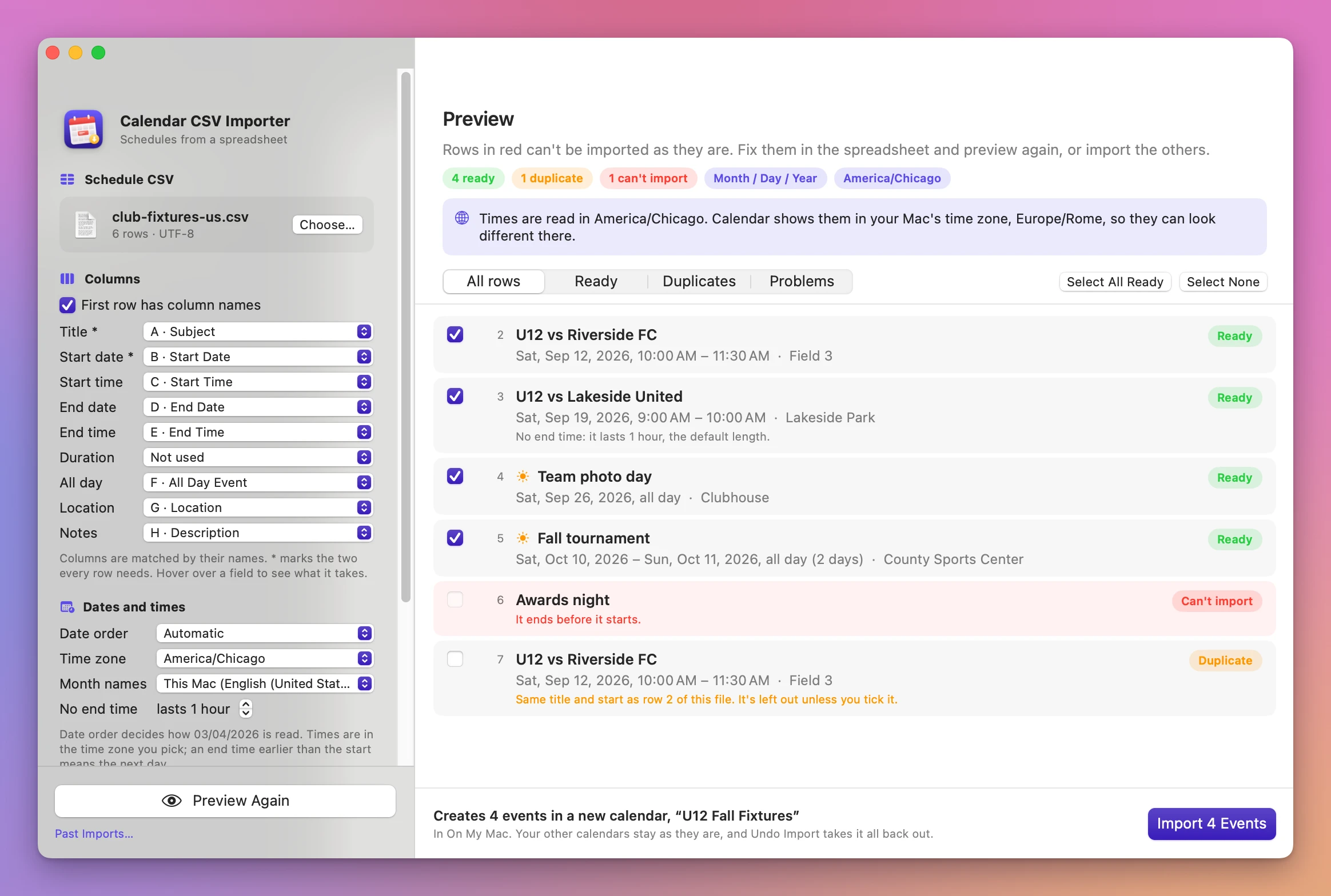
A second made-up file, a youth club’s fixtures, uses Google Calendar’s column names and US dates like 9/12/2026. The app matched Subject, Start Date, Start Time, End Date, End Time, All Day Event, Location and Description on its own, and read the dates month first.
The same match appears twice in the file, so the second copy is marked Duplicate and left unticked. The app also checks your existing calendars: a match you’d already added by hand would show “Already in Calendar” with the calendar’s name. An awards night whose end time is before its start can’t be imported, and the row says “It ends before it starts.”
How do I undo an import?
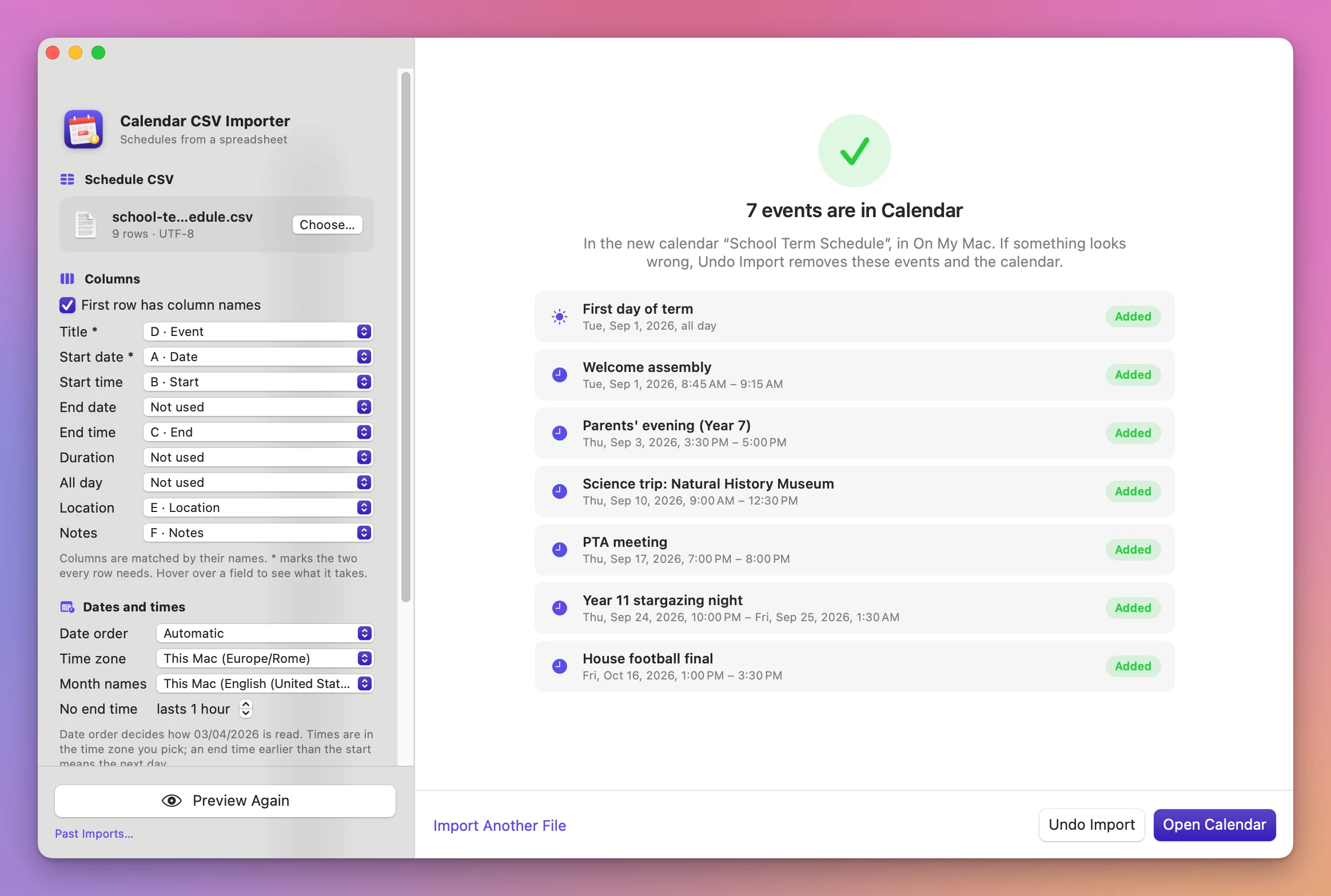
Every import goes into a new calendar, so your other calendars stay as they were. If something looks wrong in Calendar, click Undo Import. Here it removed the 7 events and the “School Term Schedule” calendar, and the CSV file stayed as it was.
For an older import, choose File → Past Imports…. Each import is listed with its calendar, the number of events and the file it came from, with an Undo button.
The app doesn’t do repeating events, alerts or invitations: each row becomes one event, and nobody gets an email. Save .xlsx and .numbers files as CSV first. Calendar CSV Importer costs $19, paid once.
Get Calendar CSV Importer
Import a schedule saved as CSV into a new calendar in Calendar. Preview every row, catch wrong dates, overnight events and duplicates, and undo the whole import in one click.
See Calendar CSV Importer → · Read the docs · $19. See the app page for tax details.
Want me to talk about your product? You can sponsor this site.