Replace the GitHub home page feed with a list of your own repositories
By Flavio
Updated
Swap the signed-in GitHub home feed for three short lists of your repositories and a search box, and see how Repo Foyer decides which repos you use the most.
Most of the time you open github.com, it’s to get to one of your repositories. The home page shows a feed of other people’s activity instead.
Repo Foyer is a Chrome extension that replaces that feed with your repositories: the ones you work on the most, the ones you created recently, and the ones getting stars this week, plus a search box that already has the focus. Everything else on GitHub stays as it is. For a tour of the rest of the site, see a developer’s introduction to GitHub.
Load the extension and paste a token
Repo Foyer isn’t on the Chrome Web Store. Download the extension zip from your Polar receipt, unzip it, and move the folder somewhere it can stay, like Documents. Then open chrome://extensions, turn on Developer mode, click Load unpacked and pick the folder.
Click the Repo Foyer icon in the toolbar. It opens the settings page, which needs a GitHub token. There are two ways to get one:
- Click Create a classic token. It opens GitHub’s new token page with the
reposcope already checked. That scope covers private repositories and the ones in your organizations. - If you use the GitHub CLI, copy the token it already has:
gh auth token | pbcopyPaste it in the GitHub token field and click Save. The extension checks it right away, and the line under the field tells you how it went:
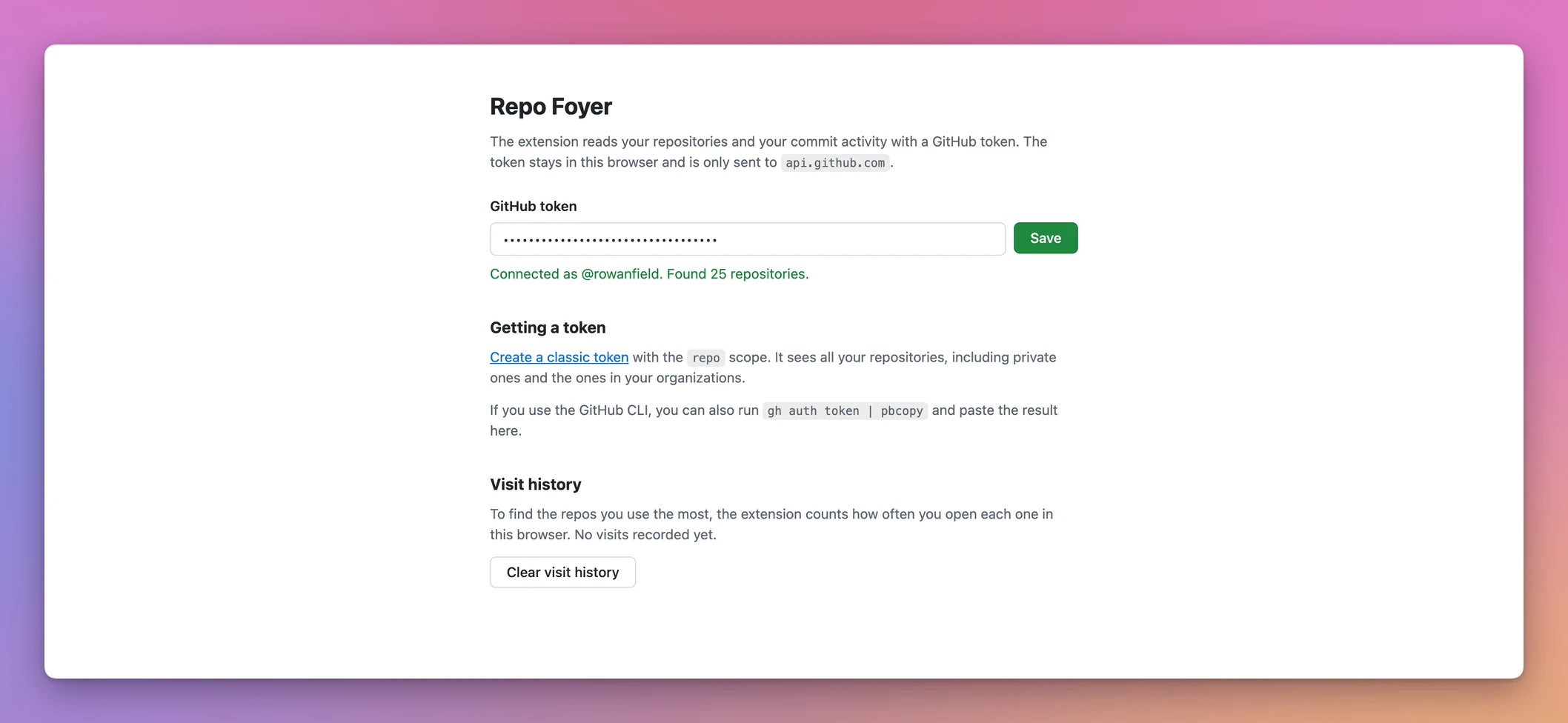
That’s a made-up demo account. A token GitHub doesn’t accept gives “GitHub rejected the token. Check it in the extension settings.” instead.
The token stays in Chrome’s extension storage and only goes to api.github.com. The visits the extension counts stay in the browser.
Open the home page
Go to github.com while signed in. The same page is also at github.com/dashboard. The feed is gone, and Your repositories is in its place:
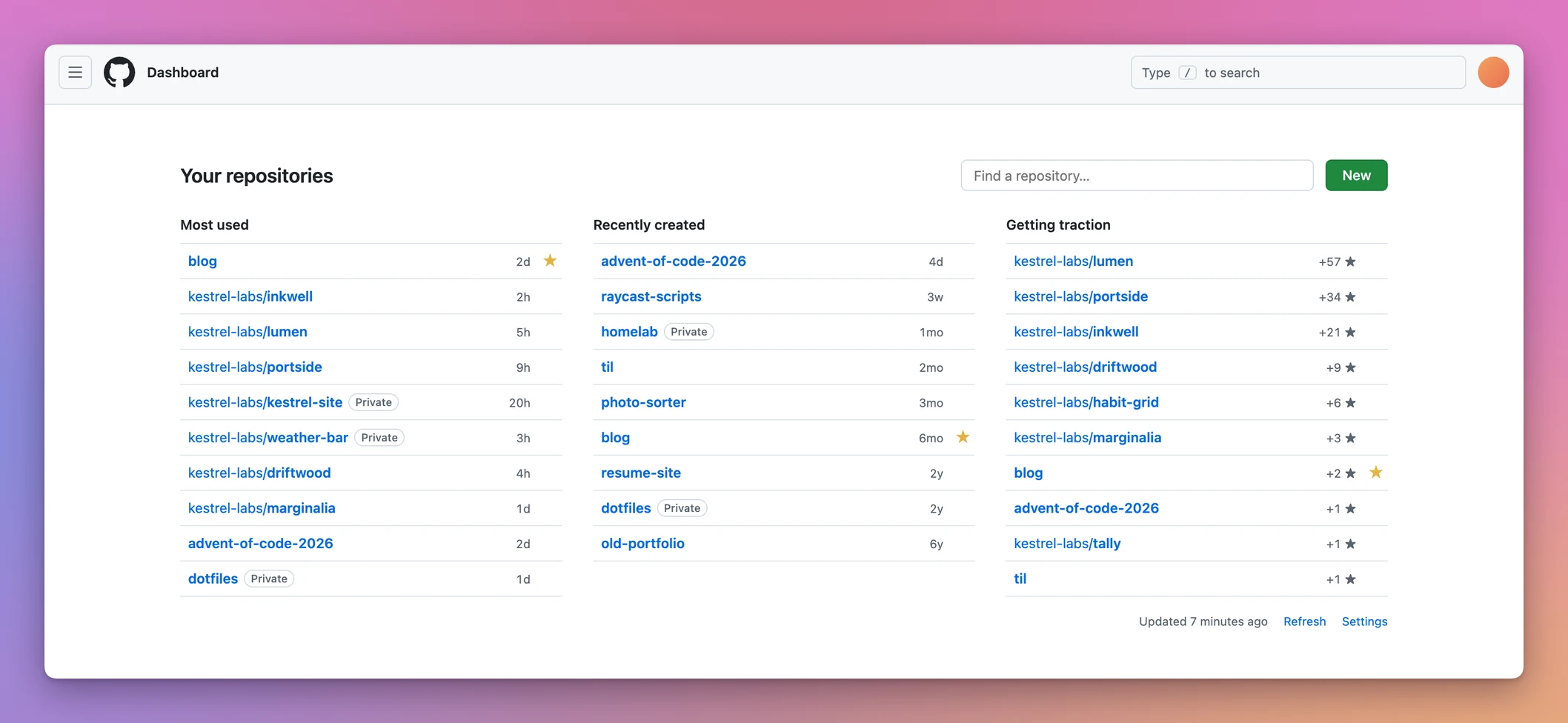
Each line is one repository. Your own repositories show only the name, and the ones owned by someone else, like an organization, show owner/name. On the right is how long ago it was pushed (in Most used and in search results), created (in Recently created), or how many stars it got this week, like +57 ★. Hover a line to read the description.
GitHub’s header stays, and the lists use GitHub’s own colors, so they follow your light or dark theme. Logged out, you see GitHub’s normal page.
Search for any repository
The search box has the focus when the page loads, so you can start typing. It looks at every repository the token can see, not only the thirty in the lists: yours, your organizations’ and the ones where you’re a collaborator.
Each word you type has to appear in the owner/name or the description. An exact name comes first, then names that start with what you typed, then names that contain it. You get up to 30 results, under Results, with the count.
| Key | What it does |
|---|---|
| Up / Down | Move the selection |
| Enter | Open the selected repository |
⌘ Enter (Ctrl Enter on Windows and Linux) | Open it in a new tab |
| Escape | Clear the search, even when the box doesn’t have the focus |
When you come back to the home page with the Back button, your last search is still there, selected, so typing replaces it.
How Most used picks its 10
Each repository gets a score from three signals:
| Signal | Points |
|---|---|
| Your commits on its default branch in the last 90 days | 1.5 × log2(1 + commits): 1 commit is 1.5, 10 are 5.2, 100 are 10.0 |
| Each time you opened it in this browser | 1, halving every 14 days |
| Its last push, by anyone | 6, halving every 7 days |
The top 10 with more than 0.5 points make the list. Archived repositories are left out.
So a repository pushed today starts at 6 points even with no commits of yours, and if nothing else happens, it drops below 0.5 about 25 days after that push. Forty commits plus a push two hours ago gives 14.
A visit is any page under github.com/owner/repo. Two visits to the same repository less than 30 minutes apart count once, so an hour spent clicking around inside one repo is a single visit. The extension keeps the last 50 visits per repository, and forgets a repository after 180 days without one. The settings page tells you how many repositories it remembers, and Clear visit history deletes them.
Commits are counted in each repository’s own history, for every repository pushed in the last 90 days. I first used GitHub’s contribution data, the one behind the green squares, but it only gave my account 260 commits in public repositories and folded 2,436 contributions in private ones into a single number, with no repository names. Most of my work is in private repositories, so that couldn’t rank them.
Keep one at the top
Hover a repository and click the ☆. It moves to the top of Most used and stays there, whatever its score. Starred repositories go first, the most recently starred at the top, and if you star more than 10, the list grows to fit them. Click the ★ to unstar it.
These stars live in the extension. They don’t star the repository on GitHub or change its star count.
The other two lists
Recently created is your 10 newest repositories. It only includes repositories under your own account, and skips forks.
Getting traction ranks repositories by the stars they got in the last 7 days, not by their total. The week I first built it, Work Tracebook got 57 new stars, Skill Cabinet 55 and Note Repo 45, while my Vue roadmap from 2018, with 527 stars in total, got none and stayed off the list.
It looks at public repositories, yours or in an organization, without forks. Two limits come from how the stars are fetched. Only repositories pushed in the last 90 days are checked, so an old repository that suddenly gets attention won’t show up until you push to it. And it reads the 100 most recent stars of each repository, so a big week shows as +100+ ★.
Refresh and turn it off
The lists come from a cache, which is why they show up instantly. When the cache is older than 5 minutes, the page asks the service worker for fresh data in the background. Click Refresh at the bottom to fetch it now. The bottom line says when the data is from, like “Updated 7 minutes ago”.
To get GitHub’s feed back, disable Repo Foyer at chrome://extensions and reload the tab. The token is still valid after that, so revoke it in GitHub’s token settings if you’re done with the extension.
If the lists are wrong or missing
If the page says Connect your GitHub account, there’s no token saved yet. Its Open settings button takes you to the settings page.
If the last refresh failed, its error shows above the lists, with a Settings button next to it. An expired or revoked token gives the “GitHub rejected the token” message. Paste a new one.
If an organization’s repositories are missing and that organization uses SAML single sign-on, the classic token needs SSO authorization for it. Being signed in to github.com doesn’t authorize the token.
An unpacked extension doesn’t update itself. When you download a new version from your Polar receipt, copy its files over the old ones in the same folder, then click the reload arrow on the Repo Foyer card. Keeping the same folder keeps the token, your stars and your visits, and the extension refreshes the cache after the update.
Get Repo Foyer
Find the GitHub repository you need with ranked lists, pinned favorites and keyboard search. A Chrome extension included.
See Repo Foyer → · Read the docs · $19. See the app page for tax details, with full source code.
Want me to talk about your product? You can sponsor this site.