
An app by Flavio
Vertical Video Safe Zones
Play a vertical video under grey blocks where TikTok, Instagram Reels, YouTube Shorts and Facebook Reels put their buttons and captions. Vertical Video Safe Zones finds the moments where your text sits under them, and saves a proof frame or a contact sheet to send to a client.
Buy Vertical Video Safe Zones · $19One-time purchase. Plus tax where it applies.
macOS 14 or later · Apple silicon and Intel
Latest version 1.0.1, released November 22, 2026
You edited a 24-second Reel for a client. At second 3, “LINK IN BIO” slides in from the right. It looks great in your editor. On the phone, it lands right under the like, comment and share buttons, and half of it is gone.
You can catch it by hand. Export, send the video to your phone, open it in the app as a draft, and watch it through, then do it again for TikTok and Shorts, where the buttons sit somewhere else. Or drop a safe-zone template over the timeline and scrub the whole thing, frame by frame.
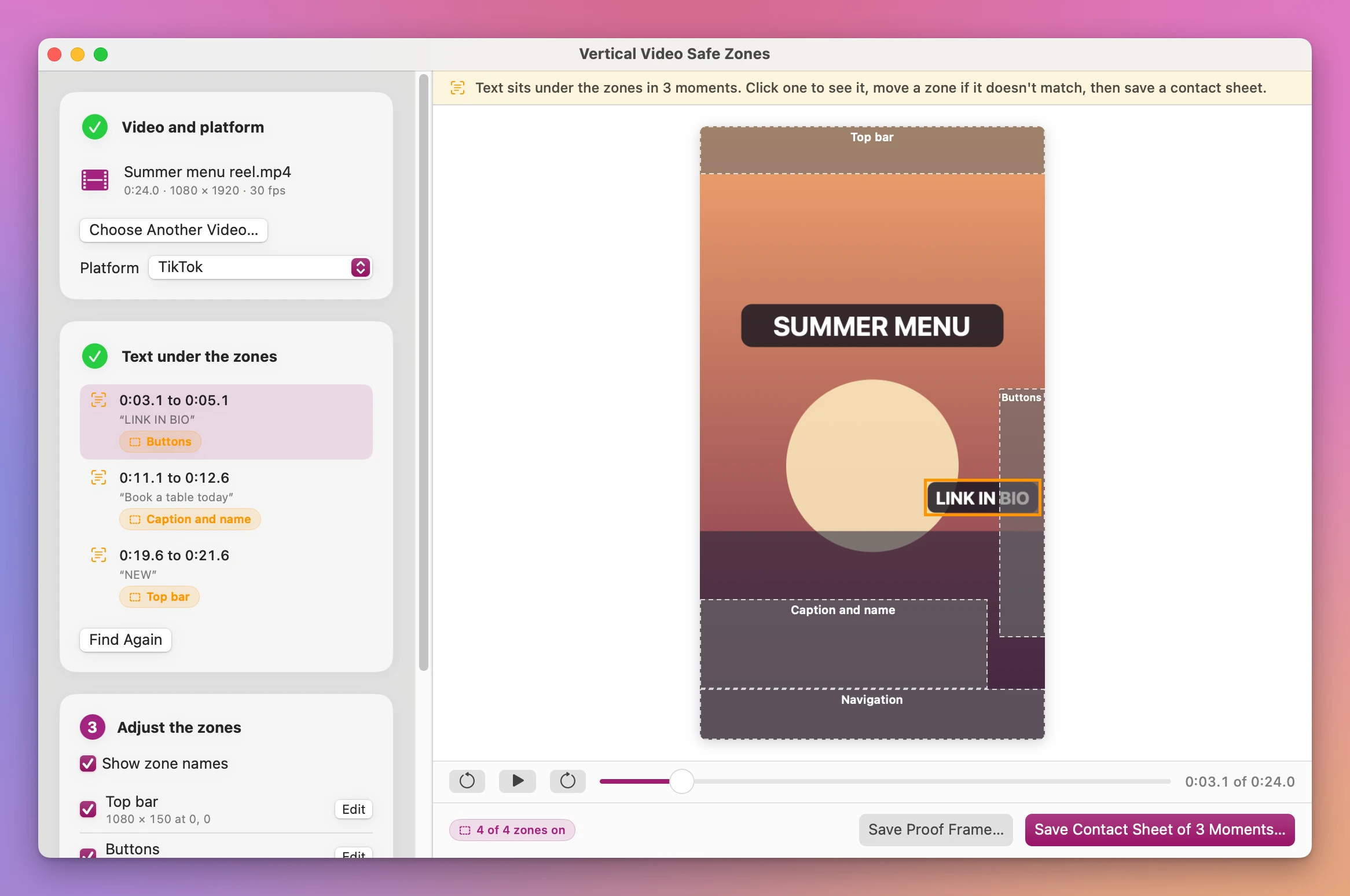
Vertical Video Safe Zones plays the video on your Mac under grey blocks where each app puts its top bar, its buttons, its caption and its navigation. Then it reads a frame every half second and lists every moment where your text sits under one of them. Click a moment to see it, and save a picture to send to the client.
Watch a 30-second demo of Vertical Video Safe Zones:
Who it’s for
- Social media managers. You post the same client video as a Reel, a TikTok and a Short. The offer code that’s fine on Shorts sits under the caption on TikTok, and you find out from a comment.
- Freelance editors cutting vertical versions. The client signs off on the draft on a laptop, full screen, with nothing on top. Send a contact sheet with it that shows every title clears the buttons on the platforms they post to.
- YouTubers who burn captions into Shorts. The Shorts title and channel name sit over the bottom of the picture. Find the lines of your captions that end up under them before you upload.
- Small agencies and marketing teams. A paid post gets checked before it goes out. The proof frame is a picture of what was checked, with the platform and the time on it, to keep with the job.
- Motion designers building lower thirds and calls to action. Check one template against four platforms in a minute instead of four test uploads.
From a video to a proof
- Click Choose a Vertical Video…, or drag a .mp4, .mov or .m4v video onto the window.
- Pick the Platform: TikTok, Instagram Reels, YouTube Shorts or Facebook Reels. Grey blocks appear over the video.
- Play it, drag the slider, or press Space and the arrow keys.
- Click Find Covered Text. The list shows each moment with text under a block, the words it read, and which block.
- Click a moment. The video jumps there and the covered text gets an orange box.
- Click Save Contact Sheet of 3 Moments… for every moment in one picture, or Save Proof Frame… for the frame on screen.
What you get
The video under each app’s interface
The four presets put four blocks over the video: Top bar, Buttons, Caption and name and Navigation. They’re plain grey blocks with plain words, the same on every platform, so you see where the interface goes without a copy of any app’s screen.
Switch the platform and the blocks move. A video that isn’t 9:16 still opens, with a note that the zones are only a rough guide for it.
Every moment with covered text
Find Covered Text reads a frame every half second with the text recognition built into macOS, on your Mac. A piece of text counts as covered when at least a quarter of it is under a block that’s on. Moments in a row are grouped, so a call to action that stays for two seconds is one line in the list, like “0:03.1 to 0:05.1, LINK IN BIO, Buttons”.
It finds text it can read: captions, titles, calls to action, prices. It doesn’t check logos, handwriting or faces.
Zones you can match to your phone
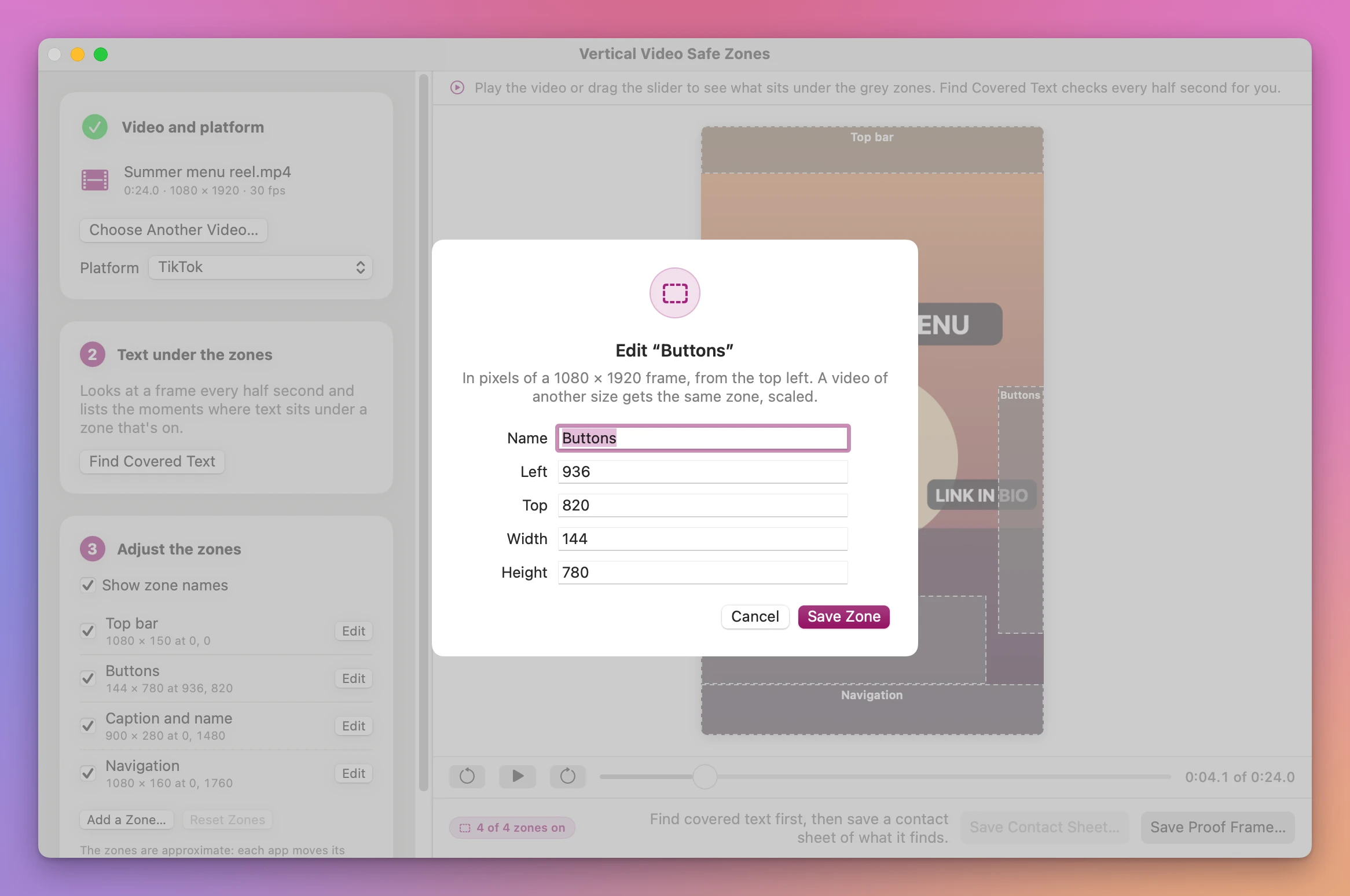
The apps move their buttons now and then, and they differ from phone to phone. So every block can be turned off, dragged on the video, or typed in pixels of a 1080 × 1920 frame. Add a Zone… marks something of your own, like a poll sticker or a product tag, so text under it gets flagged too. Reset Zones brings the built-in ones back. The app remembers your changes for each platform.
A picture to send
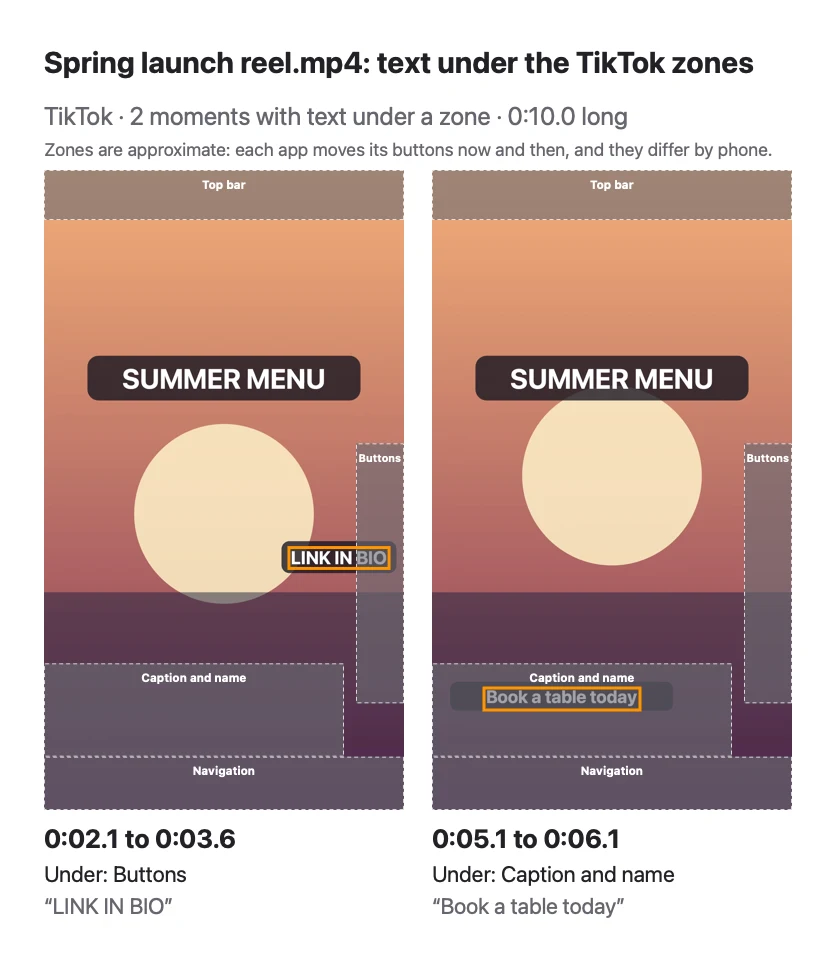
The contact sheet puts every covered moment side by side, with its time, the block and the words. The proof frame is one frame at full size. Both are PNG pictures, with the platform and the line “Zones are approximate” on them, so whoever reads them knows what they’re looking at.
Why not do it by hand
The platforms publish safe-zone guidance, mostly for ads. Meta’s Reels ad guidance, for example, asks you to keep text and logos out of the top 14%, the bottom 35% and 6% on each side. TikTok and Google have their own templates. There are free web tools that put an overlay over one frame you upload, and PNG templates you drop on a track in your editor.
They all work. The catch is time: a template shows you where the zones are, and you still scrub the whole video to find the two seconds where something slides under them, once per platform. A web tool checks one still. The real app on your phone is the final word, but it means exporting and sending the video to your phone, and you only see the platform you opened.
| Template in your editor | Free web overlay | Draft on your phone | Vertical Video Safe Zones | |
|---|---|---|---|---|
| Cost | Free | Free | Free | $19 once |
| Checks the whole video | You scrub it | One frame | You watch it | Every half second |
| Lists the covered moments | No | No | No | Yes, with the words |
| Four platforms | One template each | Usually | One app at a time | Switch in one menu |
| Zones you can adjust | You edit the template | Rarely | Exact for your phone | Drag or type |
| A picture to send | Export a frame | Screenshot | Screenshot | Proof frame or contact sheet |
| Video leaves your Mac | No | Depends on the tool | Yes | No |
What it doesn’t do
- It doesn’t move or fix anything in the video, and it doesn’t export a new one.
- The zones are approximate. They aren’t measured from your phone, and an app update can move a button. Check against the real app once for anything that matters.
- It finds text it can read. Logos, very stylized lettering and faces aren’t checked.
- It looks at a frame every half second, so text that flashes up for less than that can be missed.
- It doesn’t post to any platform or connect to any account.
- It plays only what your Mac can play: MP4, MOV and M4V.
Questions
Does it change my video?
No. The video is only read. The pictures you save are new files in the folder you pick.
Does it upload anything?
No. Playing the video and reading its text both happen on your Mac. The app connects to the internet only to check for updates.
Where do the zones come from?
From the platforms’ published safe-zone guidance and from where each app drew its interface in late 2026, measured on a 1080 × 1920 frame, with a margin. That’s why you can drag and type them: when your phone shows something different, make the block match.
What it needs
Vertical Video Safe Zones runs on macOS 14 Sonoma or later, on Apple silicon and Intel Macs.
Buy Vertical Video Safe Zones
$19 plus tax where it applies, paid once.
Download the app from the order page or your Creem receipt, unzip it and move it to Applications. I sign the app with my Apple Developer ID, and Apple notarizes the download.
The app checks for updates once a day. When a new version is ready, click Install and Relaunch. To check anytime, choose Vertical Video Safe Zones → Check for Updates….
Vertical Video Safe Zones is an independent app. It’s not made by, affiliated with or endorsed by TikTok, ByteDance, Meta, Instagram, Facebook, Google or YouTube. Their names are used only to say which apps the presets are for.