
An app by Flavio
Video Loop Checker
Open a short clip and watch it loop with no gap. Video Loop Checker puts the last and first frames side by side, scores the seam, listens for a click in the sound, suggests a better loop point and saves a trimmed copy. Your original is never changed.
Buy Video Loop Checker · $19One-time purchase. Plus tax where it applies.
macOS 14 or later · Apple silicon and Intel
Latest version 1.0.1, released November 22, 2026
You made an eight-second background loop for a homepage. The lights drift across the frame and come back to where they started. You export it, play it in QuickTime Player with View › Loop on, and every time it starts again there’s a little hitch.
Is the hitch in your clip, or in QuickTime Player? QuickTime’s loop isn’t made to be gapless, so you can’t tell. You step to the last frame with the arrow keys, take a screenshot, go back to the first frame, take another, and flip between them. Then you guess how many frames to trim, export again, and repeat.
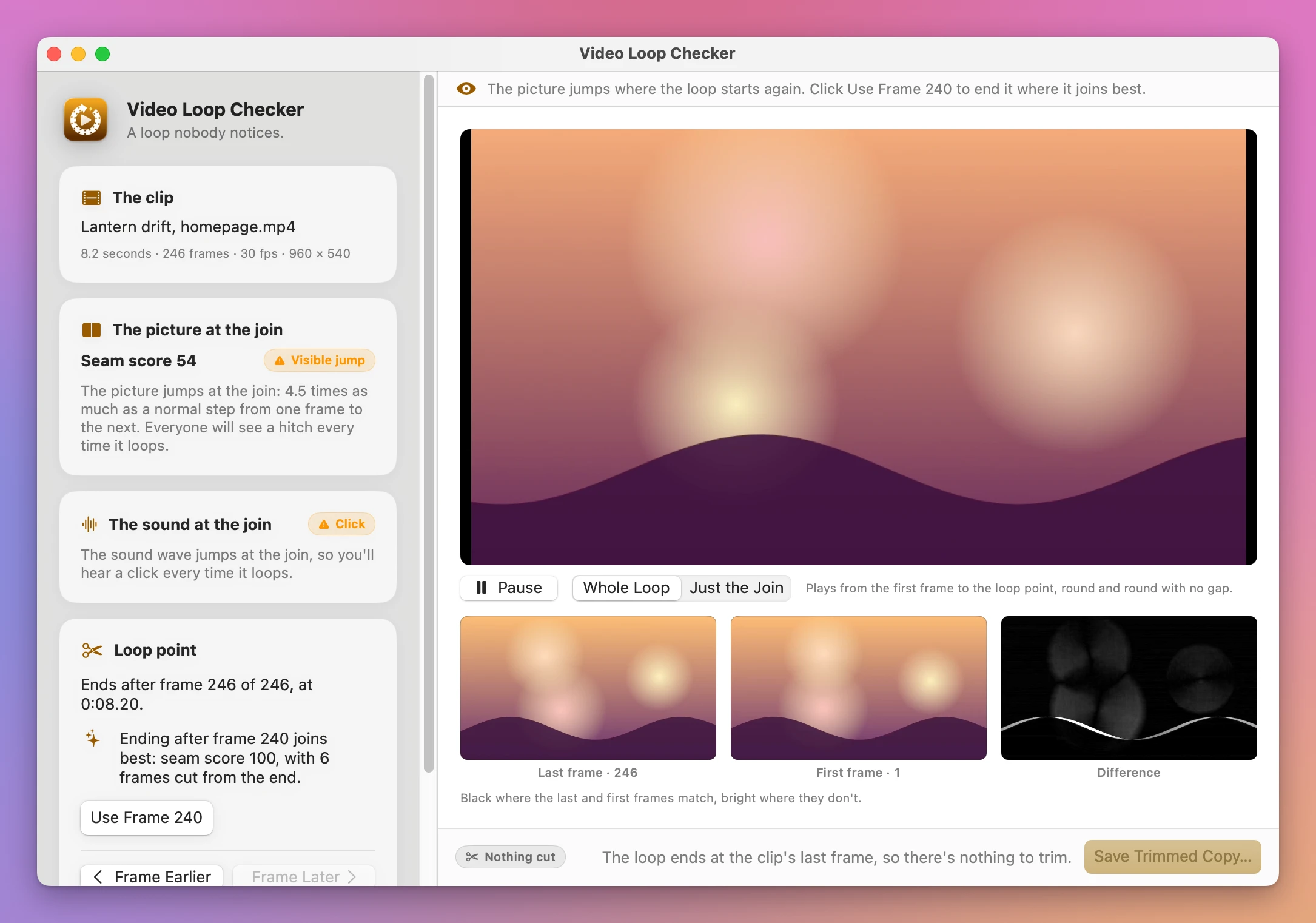
Video Loop Checker plays the clip round and round with no gap, the way a website or a stream plays it. It shows the last frame and the first frame side by side with their difference, gives the join a score out of 100, listens for a click in the sound, and finds the frame where the loop joins best. Then it saves a trimmed copy.
Watch a 30-second demo of Video Loop Checker:
Who it’s for
- Designers making a background video for a website. The browser plays it with
loopon, for every visitor, for as long as the page is open. A jump at the join shows up every eight seconds. - Musicians and labels making a short looping clip for a track. A three to eight second vertical clip repeats behind the song, so the join plays dozens of times per listen.
- Streamers with an animated background or a “starting soon” scene. It loops for an hour before the stream starts. A click in its sound every ten seconds gets annoying fast.
- Motion designers delivering loops to a client. Visualizers, cinemagraphs, social posts. Check every export before it goes out, and catch the classic mistake of a last frame that repeats the first one.
- Editors making a screen for a shop window, a lobby or a trade-show booth. The loop runs all day. The join plays thousands of times.
From a clip to a seamless loop
- Click Choose a Video Clip… and pick your loop, or drag it onto the window. QuickTime movies and MP4 files up to 3 minutes long work.
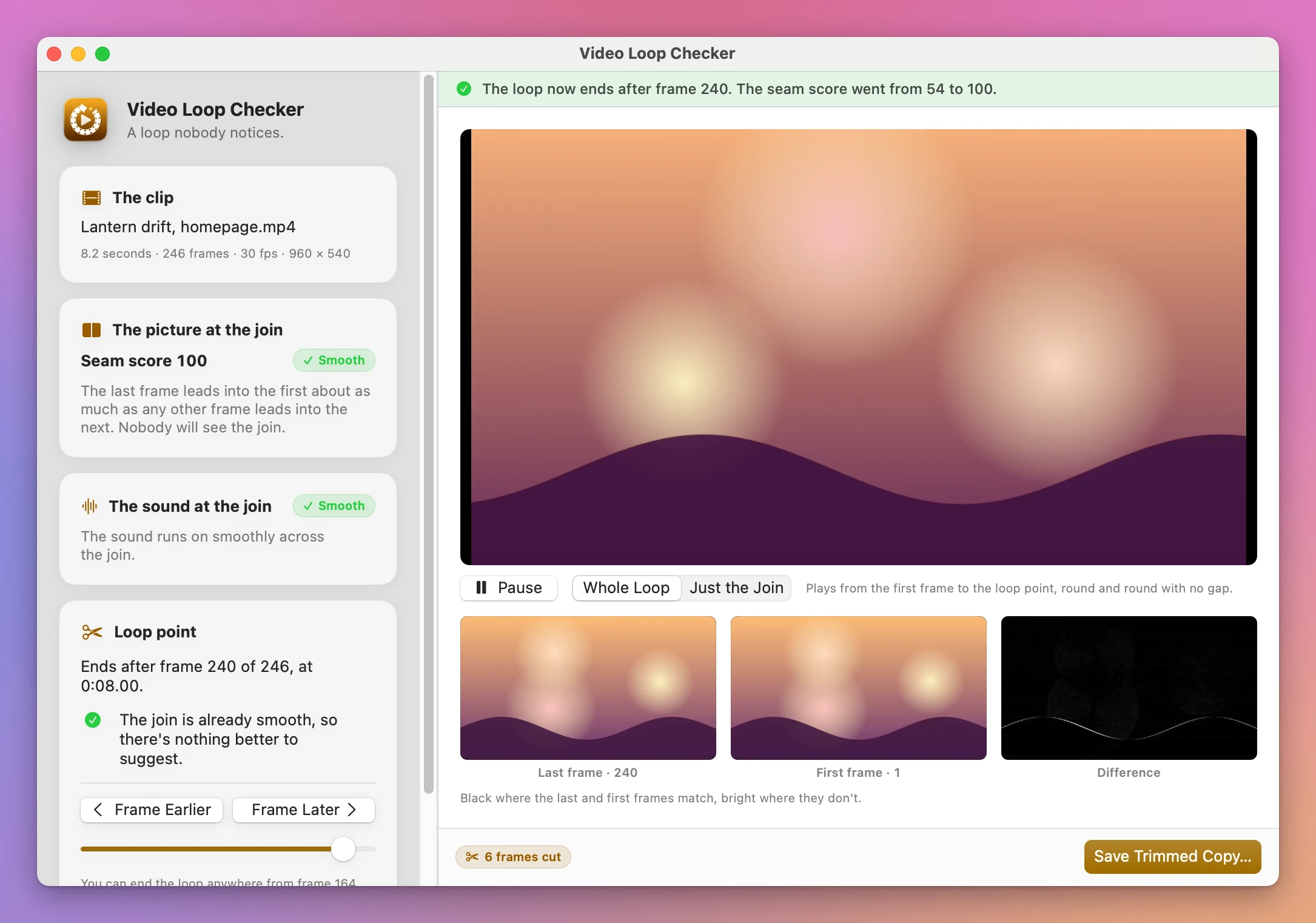
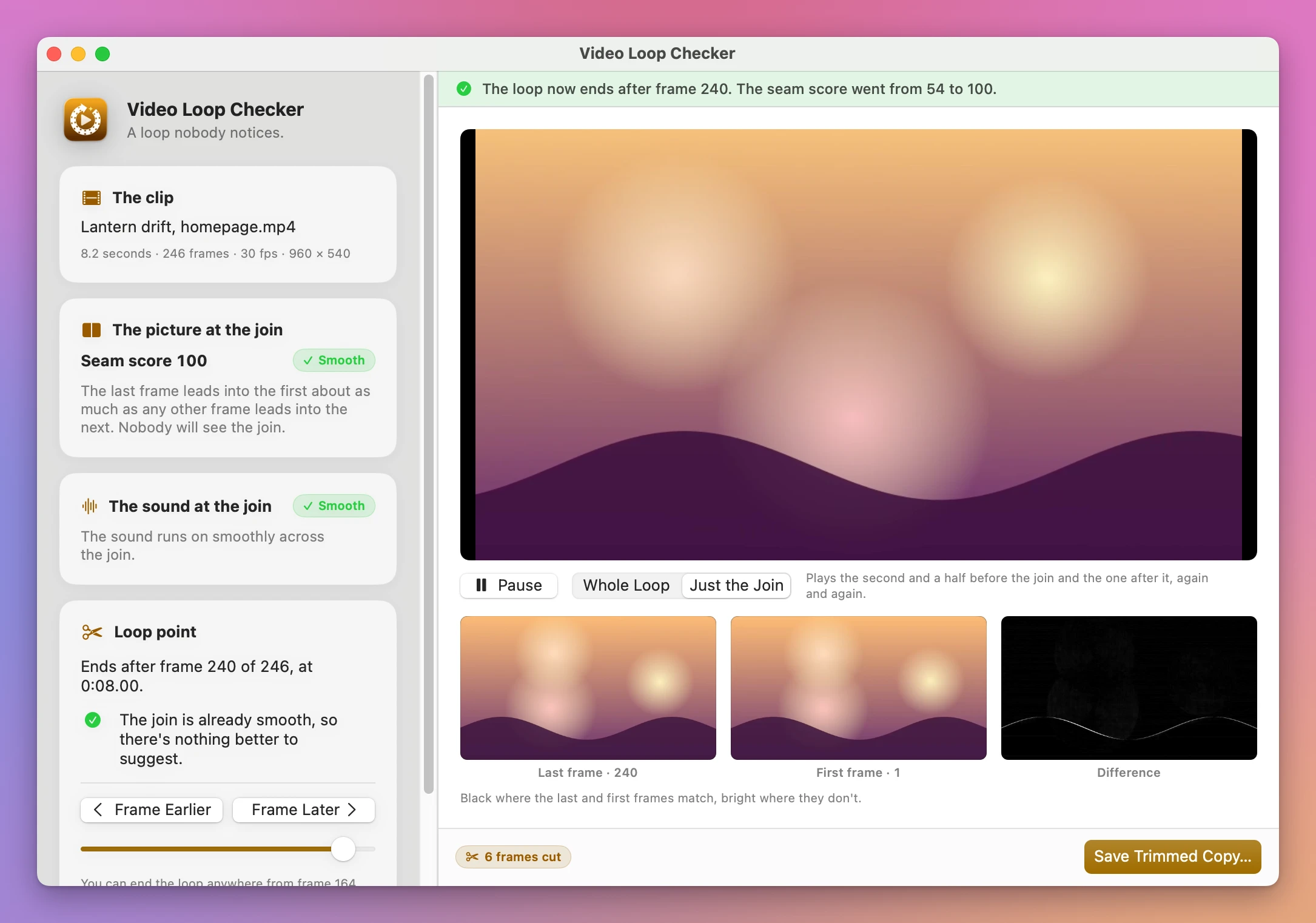
- Watch the preview. Whole Loop plays the clip round and round with no gap. Just the Join plays the second and a half before the join and the one after it, again and again.
- Read The picture at the join and The sound at the join: a seam score, a pill that says what’s wrong, and a sentence with the numbers.
- Click the suggestion, like Use Frame 240, or move the end with Frame Earlier and Frame Later and watch the score change.
- Click Save Trimmed Copy… and pick where to save it.
What you get
The loop played the way it will be shown
QuickTime Player’s loop isn’t made to be gapless, so a hitch you see there may be the player. Video Loop Checker queues the next copy before the current one ends, so the clip goes round with no gap, the way a website, a stream or a media player plays a loop. If you see a jump in the preview, it’s in the clip.
Just the Join cuts the preview down to the last second and a half followed by the first second and a half, and plays that over and over. You see and hear the seam twice every three seconds, without waiting for the rest of the clip.
The last and first frames, side by side
Under the preview, the last frame of the loop and the first frame sit next to each other, with a third picture of their difference: black where they match, bright where they don’t. When the end is in the wrong place, the difference shows exactly what moved.
A seam score, not a feeling
The app reads every frame of the clip and measures how much the picture changes from one frame to the next. Then it compares the join, the step from the last frame back to the first, with a normal step.
- Smooth means the join moves about as much as any other frame. Nobody will see it.
- Small jump and Visible jump say how many times bigger the join is than a normal step, like “4.5 times”.
- Frame shows twice means the last frame is the first frame again. It’s the mistake you get when a loop is exported one frame too long, and it makes a tiny stutter.
The score goes from 0 to 100. A slow loop with gentle motion and a fast one with lots of movement are both judged against their own normal step.
The sound at the join
If the clip has sound, the app looks at the wave right where it jumps from the end back to the start. A wave that jumps there makes a click every loop. A sudden change of level, a loud end into a quiet start, is caught too, in decibels.
A better loop point
The app looks at the last few seconds of the clip, at most a third of it, for the frame whose next frame looks most like the first one. Ending there makes the join look like any other step. It says how many frames that cuts and what the score would be, and Use Frame 240 (with your number) sets it.
You can also move the end yourself: Frame Earlier and Frame Later, or Command-Left Arrow and Command-Right Arrow, or the slider. The score, the pictures and the preview follow.
A trimmed copy, checked
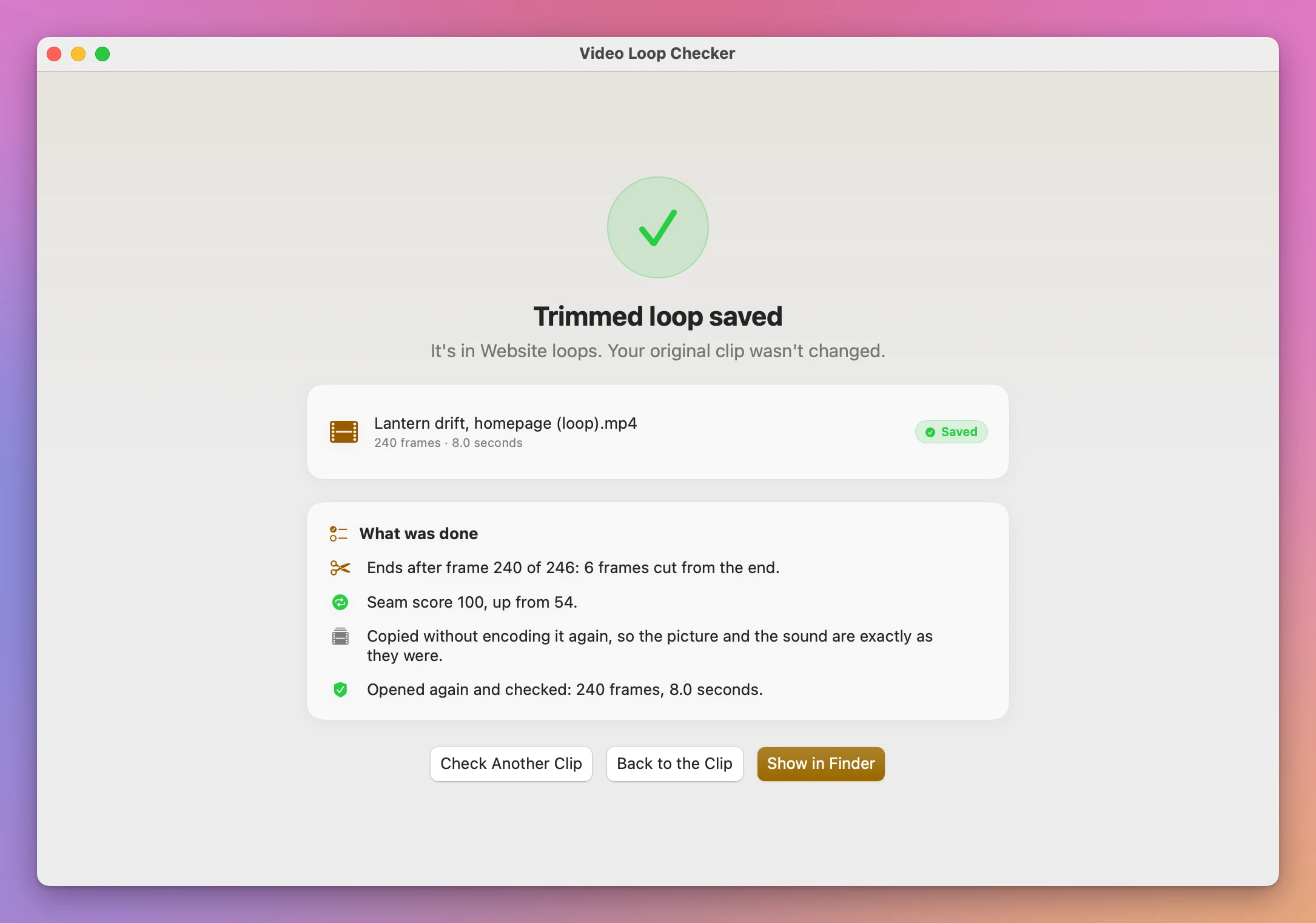
Save Trimmed Copy… writes a new file that ends after the frame you chose, named like Lantern drift, homepage (loop).mp4. When the clip allows it, the picture and the sound are copied as they are, without encoding them again, so nothing is lost. When it can’t be cut exactly at that frame that way, the app encodes it again at high quality and says so.
Then it opens the copy and counts its frames, so you know it’s the length you asked for.
Why not do it by hand
On a Mac out of the box you have QuickTime Player. View › Loop plays the clip over and over, but it isn’t made to be gapless, so a hitch at the restart may be the player and not your clip. To compare the last and first frames, you pause, press Right Arrow until the last frame, take a screenshot, go back to the start, take another, and flip between the two in Preview. That works for a visible jump. A two-frame overshoot is hard to see that way, and you still don’t know which frame to cut.
Premiere Pro, Final Cut Pro and DaVinci Resolve can loop playback and step frames, and if you made the loop there, you have one. You open a project, import the clip, set in and out points and judge by eye. None of them gives you a seam score, suggests a frame or checks the sound at the join, and it’s a lot of clicks to check one exported file.
| QuickTime Player | Your editing app | Video Loop Checker | |
|---|---|---|---|
| Cost | Free | You already pay for it | $19 once |
| Loops without a gap | Not guaranteed | Usually | Yes |
| Last and first frames side by side | Two screenshots | Two viewers, set up by hand | Yes, with their difference |
| Tells you how big the jump is | No | No | A score and “4.5 times a normal step” |
| Checks the sound at the join | By ear | By ear | Click and level jump |
| Suggests where to cut | No | No | Yes, in the last few seconds |
| Saves a trimmed copy | Edit › Trim, by eye | Export again | One click, checked frame by frame |
| Time for one clip | Minutes | Minutes, with a project | Seconds |
What it doesn’t do
- It doesn’t make a clip loop by crossfading, morphing or playing it backwards. It only finds the best place to cut.
- It always starts the loop at the first frame. It moves the end, not the start.
- It doesn’t fix a click in the sound beyond picking a better cut. If the sound never lines up, fix it in your editing app.
- It opens QuickTime movies (
.mov) and MP4 files (.mp4,.m4v) up to 3 minutes long. Not GIFs, WebM files or image sequences. - It doesn’t open copy-protected movies.
Questions
Does it change my clip?
No. Your clip is only read. The trimmed copy is a new file with a new name, and the app never saves over a file without the save panel asking first.
Does it upload anything?
No. Everything happens on your Mac. The app connects to the internet only to check for updates.
Will my trimmed copy lose quality?
Usually not. When the clip can be cut exactly at your frame without encoding it again, the picture and the sound are copied as they are, and the done screen says so. When it can’t, the app encodes it again at high quality, and the done screen says that instead.
How long does it take?
The app reads every frame when you open a clip. An 8-second clip at 1280 × 720 took about six seconds in the test Mac.
What it needs
Video Loop Checker runs on macOS 14 Sonoma or later, on Apple silicon and Intel Macs.
Buy Video Loop Checker
$19 plus tax where it applies, paid once.
Download the app from the order page or your Creem receipt, unzip it and move it to Applications. I sign the app with my Apple Developer ID, and Apple notarizes the download.
The app checks for updates once a day. When a new version is ready, click Install and Relaunch. To check anytime, choose Video Loop Checker → Check for Updates….
Video Loop Checker is an independent app. It’s not made by, affiliated with or endorsed by Apple, Adobe, Blackmagic Design, Spotify or any video platform.