
An app by Flavio
Chat to PDF for iMessage
Turn an iMessage or text message conversation into a PDF with every message, its sender, date and time, the photos where they were sent, and page numbers. For a court case, a custody file, a lawyer, or to keep.
Buy Chat to PDF for iMessage · $20One-time purchase. Tax included.
macOS 14 or later · Apple silicon and Intel
Your lawyer needs the texts with your ex about the kids’ weekends. Or you want to keep the messages of someone you lost, on paper, before a phone gets replaced. You open Messages, scroll back two years, and realize there’s no way to print a whole conversation. So you take screenshots, one after the other, and the dates get lost along the way.
$20 including tax, paid once.
Chat to PDF for iMessage is a Mac app that reads the conversations Messages keeps on your Mac and turns the one you pick into a PDF. Every message has who sent it, the date and the time. The photos are on the page, where they were sent, and every page is numbered.
How it works
- Let the app read your messages. Your Mac keeps the Messages history in a protected folder. The app asks you to turn on Full Disk Access for it in System Settings and shows you where, step by step. It only reads: it never changes, moves or deletes a message.
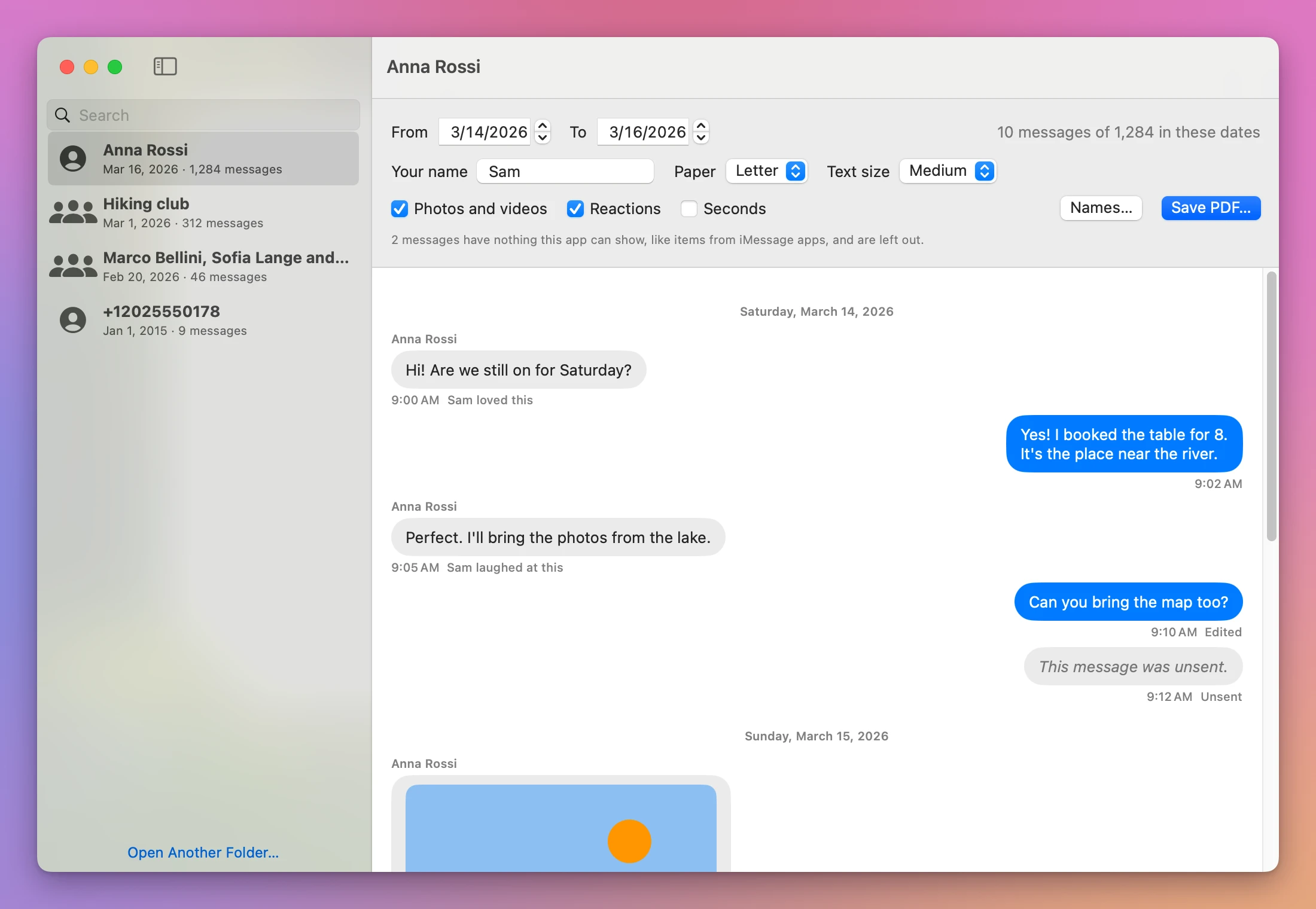
- Pick a conversation. The list shows each one with the people in it, the day of the last message and how many messages it has.
- Pick the dates and your name. Only the days you need. Your name goes on your messages, on the right.
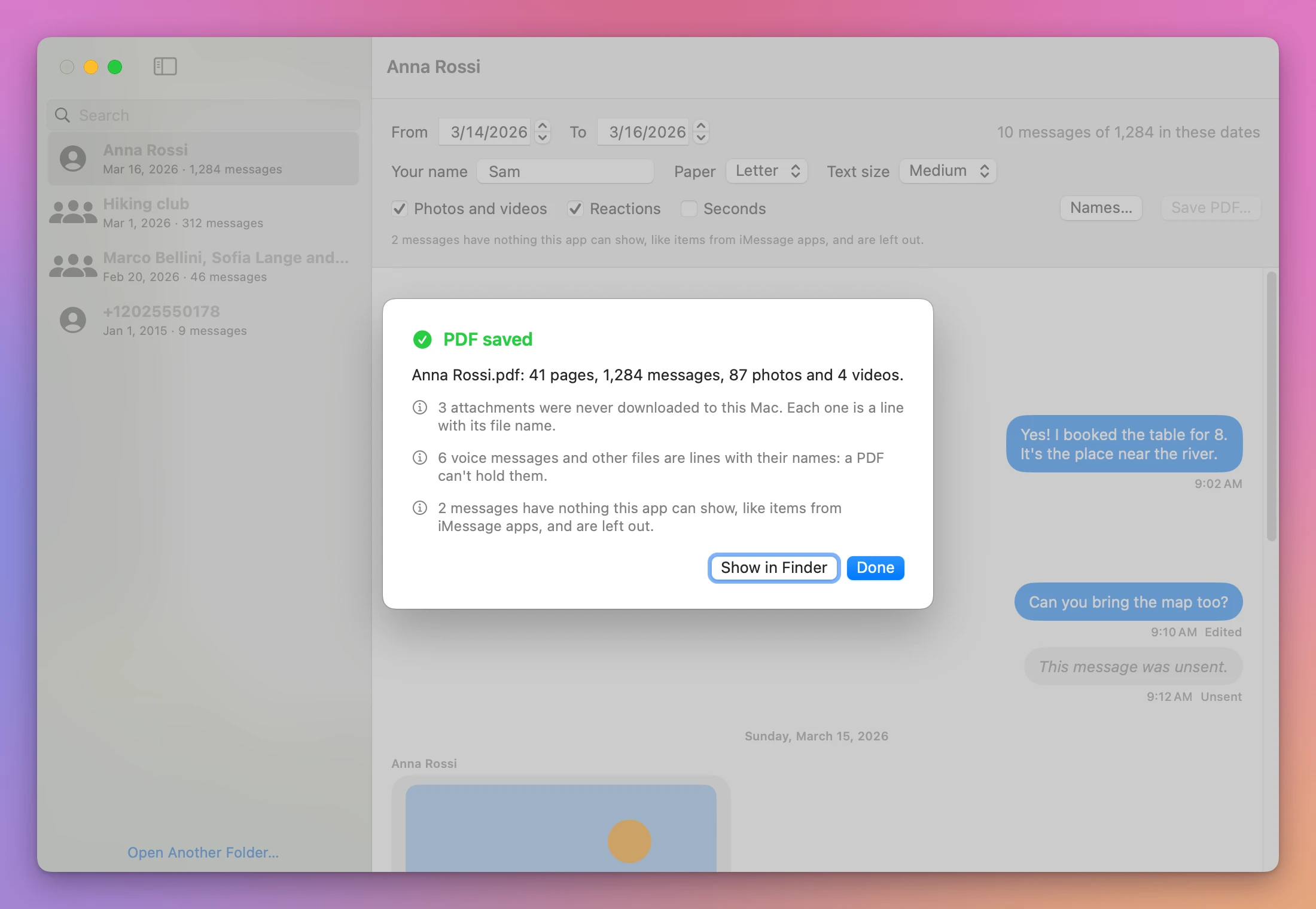
- Click Save PDF. The app tells you what’s in the PDF and what it couldn’t include, and why.
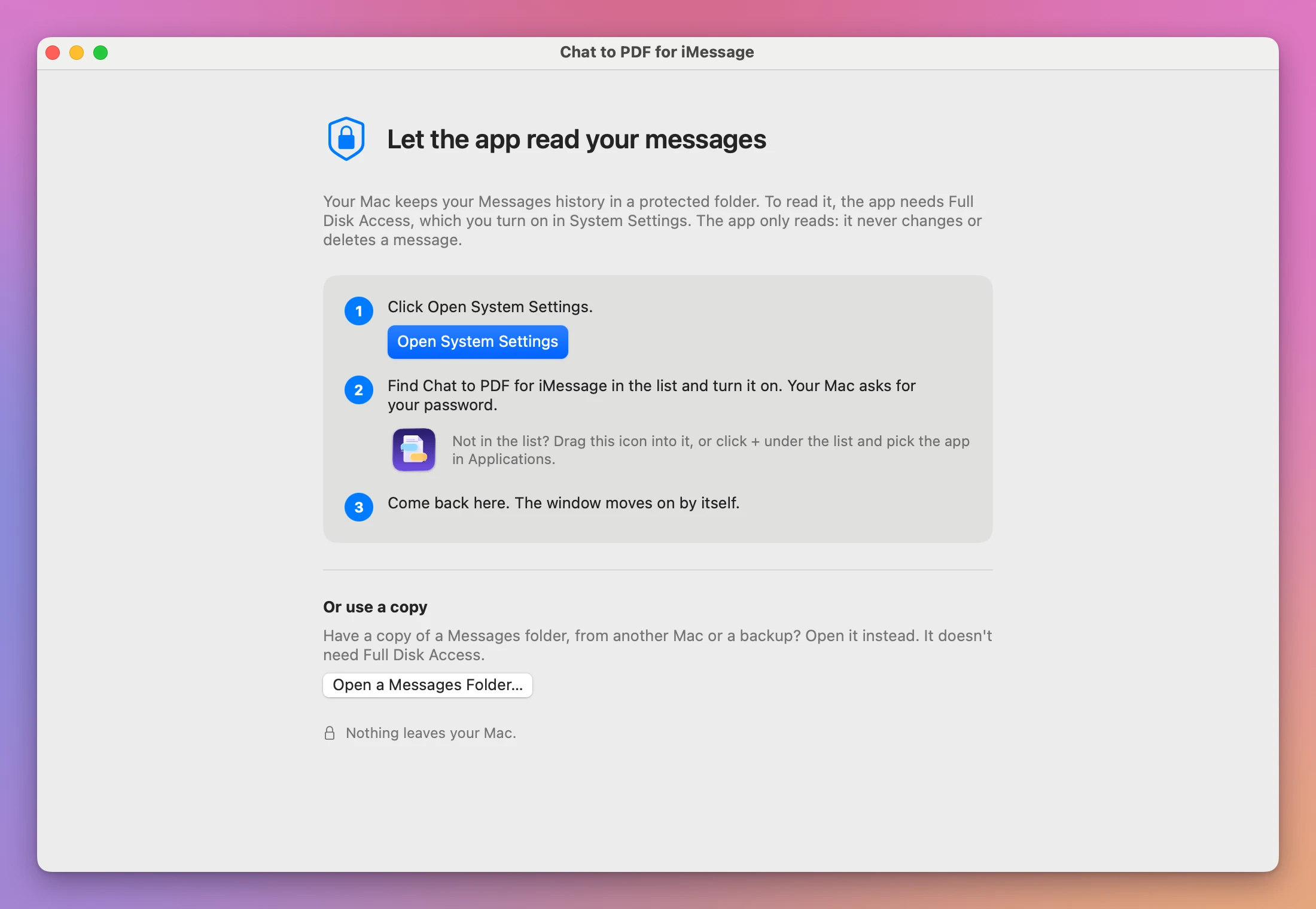
Full Disk Access sounds like a lot, and it’s fair to stop at that screen. It’s the only switch macOS has for reading the Messages history, so every app that does this needs it. You can turn it off again once your PDF is saved. If you’d rather not turn it on, the app also opens a copy of a Messages folder, from another Mac or a backup, with Open a Messages Folder…. A copy doesn’t need it.
What’s in the PDF
A first page says what the document is: the conversation’s name, the people in it, the dates it covers, the number of messages and the day you made the PDF.
Then the messages, with a heading for each day. Every message has the sender’s name and the time. Yours are on the right, like on your phone.
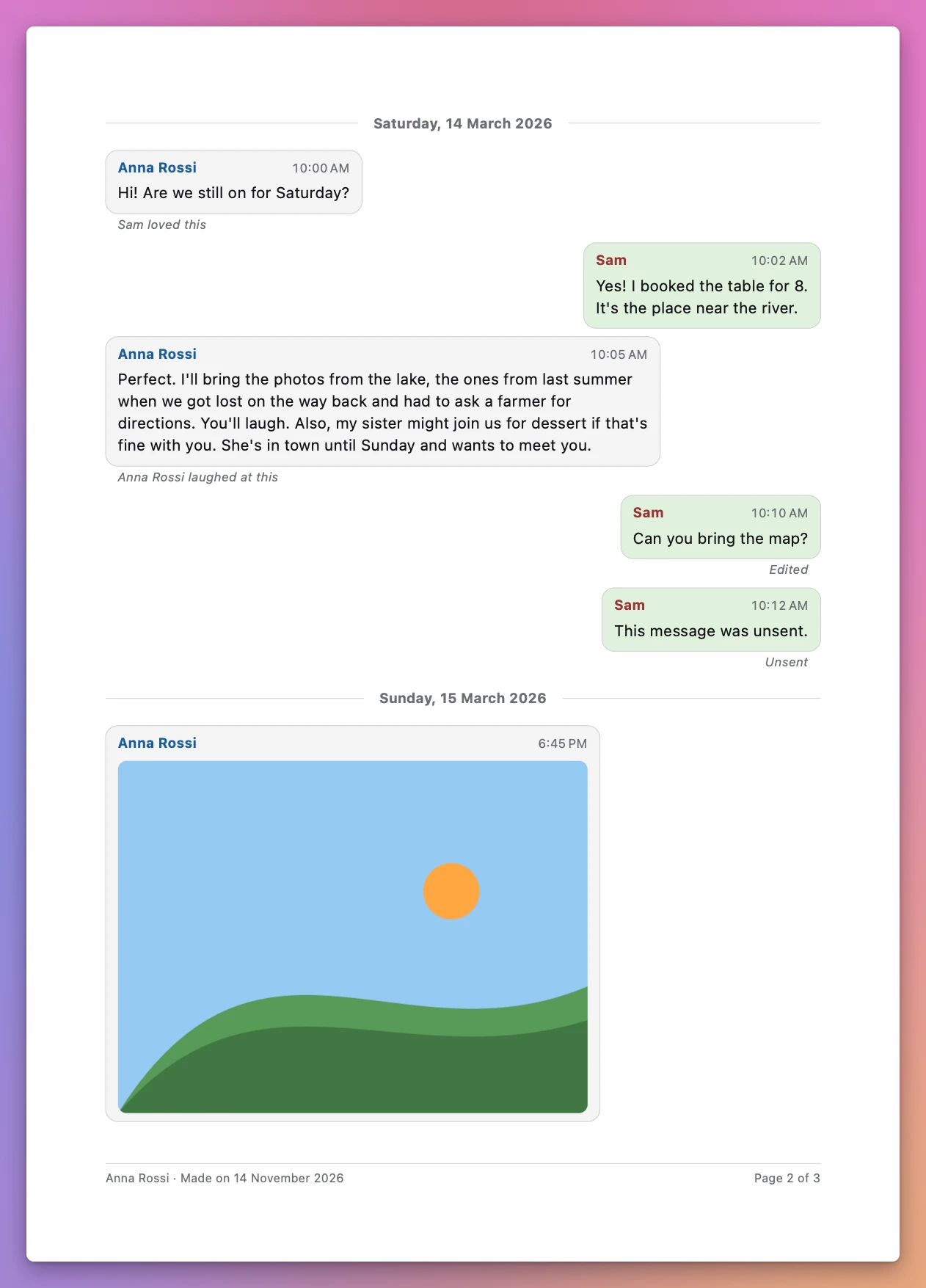
- Photos inline, at a size that prints well.
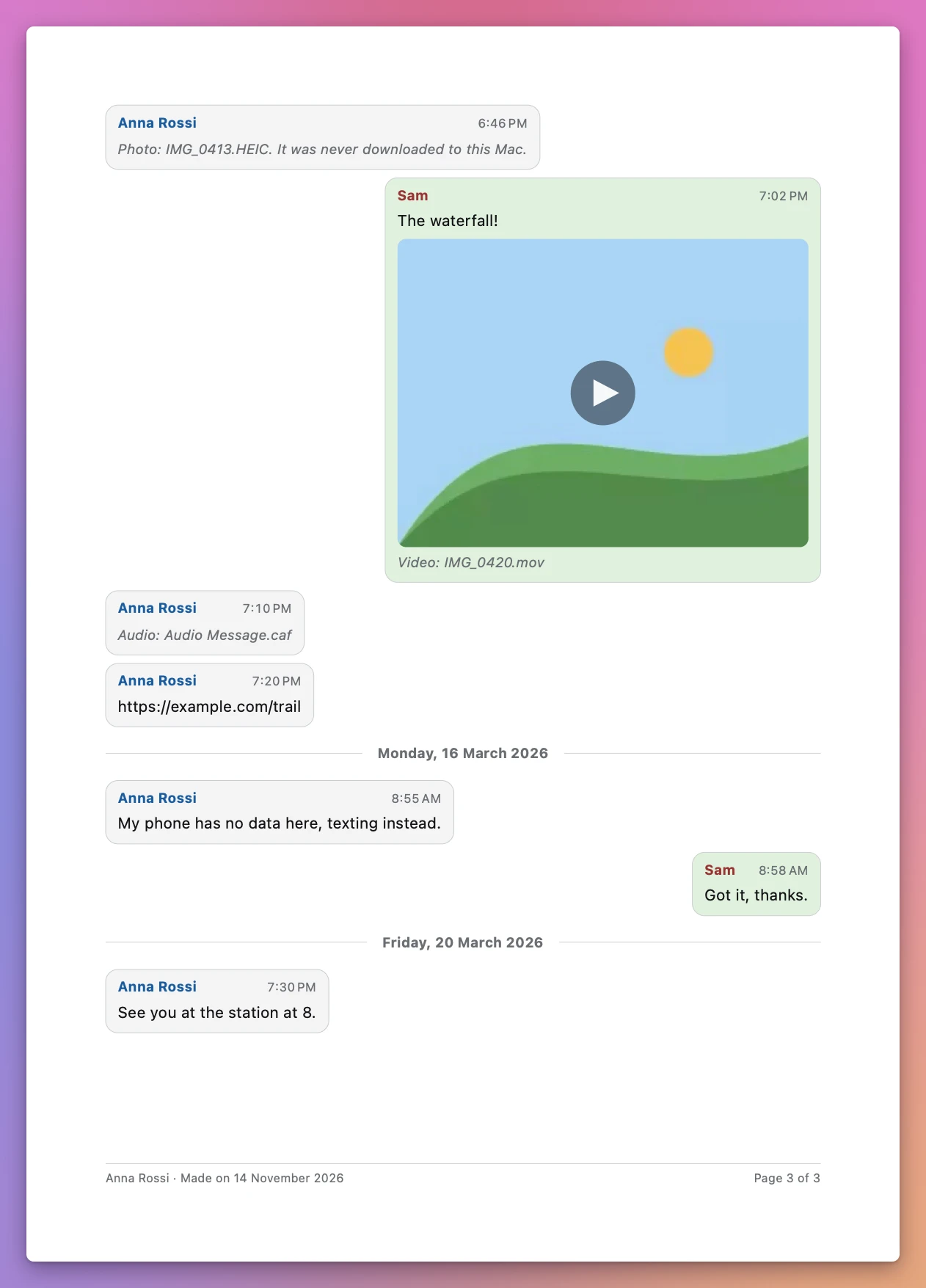
- A video is its first frame, with a play sign and its file name.
- A voice message or any other file can’t go on paper, so it’s a line with its file name.
- Reactions are a small line under the message, like “Anna loved this”. You can leave them out.
- Edited messages say so, and an unsent message says “This message was unsent.”
- Lines from Messages itself, like “Anna added Marco to the conversation.”, are centered in grey.
- On every page, at the bottom: the conversation’s name, the day the PDF was made, and “Page 3 of 41”.
Group conversations work too. When a group has no name, the app calls it by the people in it, like “Marco, Sofia and Jonas”.
Names instead of numbers
Messages keeps phone numbers and email addresses, not names. Click Names…, then Use Names from Contacts, and the app fills in the names it finds in your Contacts. macOS asks first, only after that click. Or type a name next to each number. The app remembers them for next time.
It tells you what’s missing
If you use Messages in iCloud, your Mac may keep some photos only in iCloud. Those can’t go in the PDF, so each one is a line with its file name and “It was never downloaded to this Mac.” The PDF doesn’t skip them in silence.
When the PDF is saved, the window says what’s in it and what isn’t, and why.
Screenshots, or Chat to PDF for iMessage
| Screenshots of Messages | Chat to PDF for iMessage | |
|---|---|---|
| Every message, with date and time | Dates only now and then, times when you swipe | Each message has its sender and time, under a heading for its day |
| Photos | In the screenshot, if they fit | Inside the bubble they were sent in |
| A year of messages | Hundreds of screenshots | Pick From and To |
| Who said what | Phone numbers or names, depending on your Contacts | Names you choose, yours on the right |
| What’s missing | You can’t tell | Each missing photo named, and why |
| Pages | Unnumbered images | ”Page 3 of 41” on every page |
Good to know
Chat to PDF for iMessage is my own app. It’s not made by, affiliated with or endorsed by Apple. iMessage and Messages are Apple’s names, used here only to say what the app works with.
Everything stays on your Mac. The app makes a copy of the Messages history in a temporary folder, reads the copy, and deletes it when you quit. It never changes anything in Messages, and it saves the PDF only where you pick. It asks before it replaces a file.
What it leaves out: a message from an iMessage app, like a game, has nothing the app can print, so it’s left out and the window says how many. A photo or video that stayed in iCloud is a line with its name. Voice messages are named, not transcribed.
I made this app without reading anyone’s real messages, mine included. I tested it on a Mac running macOS 15, on Messages’ own storage filled with made-up conversations: texts, group chats, reactions, edited and unsent messages, photos and videos. What I couldn’t test is a real history built up by years of iMessage, with everything Apple’s apps add to it, so a rare kind of message may show differently from what you see in Messages. Messages also changes how it stores things from one version of macOS to the next. When the app finds something it doesn’t know, on an older or a newer macOS, it stops and says so instead of making a PDF with wrong dates or missing messages. Check the PDF before you hand it to anyone, and if something’s off, let me know and I’ll fix it.
A PDF made by the app is a faithful copy of what’s on your Mac, not a certified one. If a court needs something more, ask your lawyer what they accept.
Buy Chat to PDF for iMessage and get started
Chat to PDF for iMessage costs $20 including tax, paid once. There’s no subscription.
After buying, your receipt has the app and a license key. Unzip the app and drag Chat to PDF for iMessage to your Applications folder. It runs on macOS 14 Sonoma or later, on Apple silicon and Intel Macs. It’s signed with my Apple Developer ID and checked by Apple, so it opens like any other app you download.
Enter the license key in Chat to PDF for iMessage → License… to get updates automatically. A key works on 3 Macs. Once a day, the app checks for a new version, shows what’s new, and installs it with Install and Relaunch. Your receipt always has the latest version, too.