
Mac & Windows app by Flavio
Listing Title Checker
Check every product title in your catalog CSV against a marketplace's character limit and where phones cut it short, find the titles that lose their model number or part code, fix them with a live preview, and save an updated CSV where nothing else changed.
Buy Listing Title Checker for Mac · $19Buy Listing Title Checker for Windows · $19Buy once, use forever. Up to 3 computers you own (license). Plus tax where it applies. Mac and Windows versions are sold separately.
macOS 14 or later (Apple silicon and Intel) · Windows 10 and Windows 11 (x64 and ARM64)
Latest Mac version 1.0.0, released November 28, 2026
You sell bike and camera parts, and your 600 listings were written for Etsy, where a title can be 140 characters. Now you’re listing the same products on eBay. eBay takes 80. Everything past character 80 is gone, and on most of your titles that’s where the part number was, because you put it at the end.
A buyer searching for TV-7730 won’t find the listing whose title stops at “Black Alloy Fits Most Gravel and Road Fra”. On a phone it’s worse: the search results show about 55 characters before the ”…”, so the model number has to come early to be seen at all.
You can find the long titles in a spreadsheet with a LEN() column and a filter. That tells you which titles are over 80. It doesn’t tell you which ones lose the model number, and saving the CSV back from Excel can quietly change the UPCs and SKUs in the other columns.
Listing Title Checker reads your catalog CSV, measures every title against the limit you pick, and checks that the row’s key term (the MPN, model, part number, compatibility or size from your own column) is whole inside it. You fix the titles right there, with the counter and a preview following what you type, and save a copy of the CSV where only those titles changed.
Watch a 30-second demo of Listing Title Checker:
Who it’s for
- Sellers crosslisting to another marketplace. Titles written for Etsy’s 140 characters going to eBay, Poshmark or Mercari, where 80 is the limit. You need to know which ones get cut, and where.
- Parts and accessories sellers. Buyers search by model number or by what the part fits: “TV-7730”, “fits 31.8mm bars”, “52mm”. If that’s past the cut, the listing doesn’t come up for the one search that sells it.
- Shopify store owners checking their SEO titles against the 70 characters the SEO title field takes, or a Google Shopping feed against 150.
- Anyone doing a bulk edit in Excel or Numbers before a big upload, who wants to see the problems before the marketplace rejects or chops the titles, and wants the file back without the spreadsheet touching the barcodes.
- Virtual assistants and listing services who rewrite titles for clients and hand back an audit of what was over, what changed and by how much.
How it works
- Click Choose a Catalog CSV… or drag the CSV your shop exported onto the window. To try it first, click Try Example Catalog.
- Pick the Channel: eBay, Poshmark / Mercari, Etsy, Google Shopping, Amazon or Shopify SEO Title. Or type your own Limit and Phones show numbers.
- Check the Key term column. The app guesses it from the header: MPN, Model, Part Number, Compatibility or Size.
- Click a title in Over Limit or Key Term Cut Off and edit it on the right.
- Click Save 5 Edited Titles and Audit… and choose a folder.
What you get
Every title sorted by what’s wrong with it
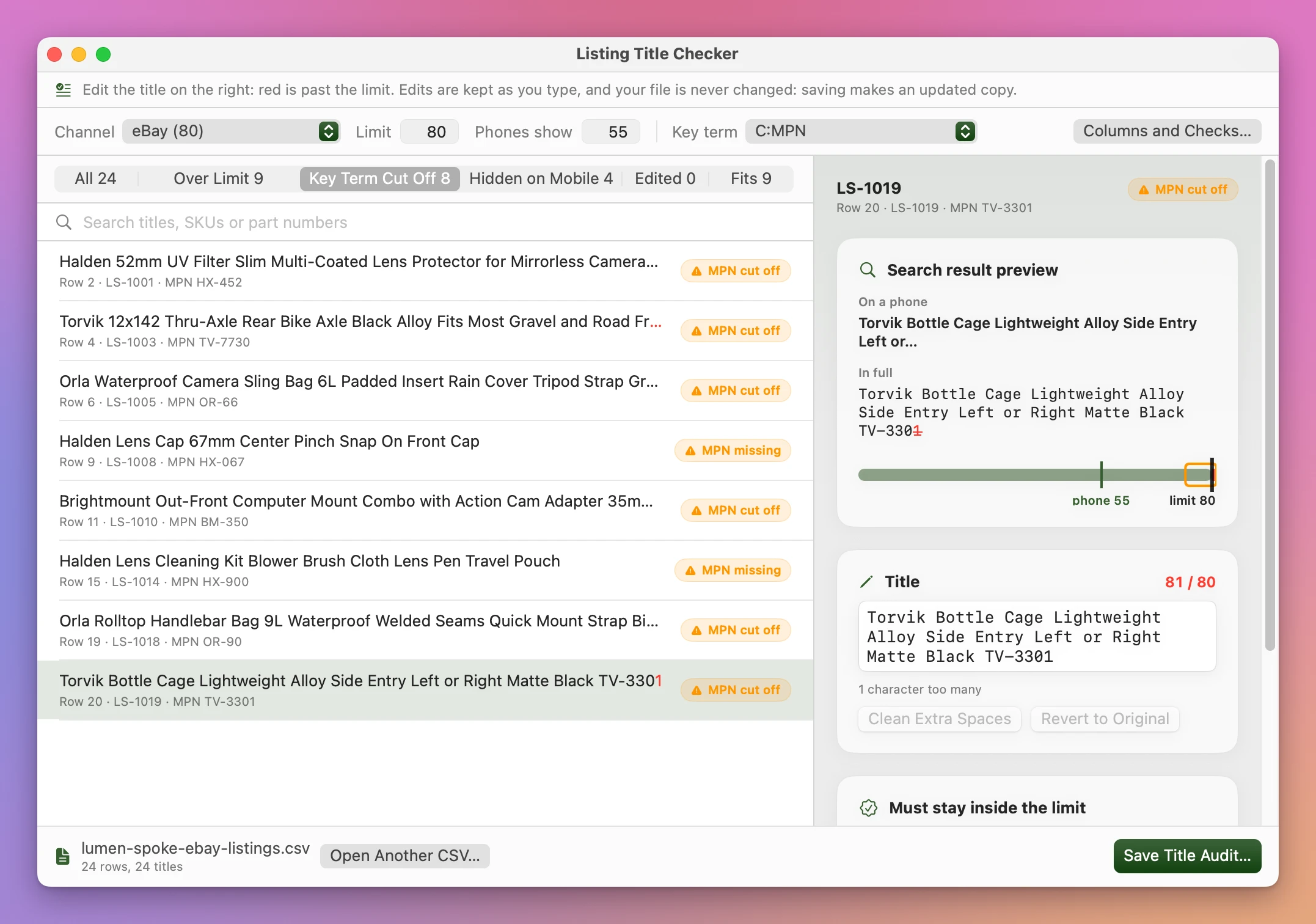
The groups at the top count your titles. Over Limit has the ones longer than the limit, with a red pill like 82 / 80 · +2 over. Key Term Cut Off has the ones where the model number ends past the limit, or isn’t in the title at all: MPN cut off, MPN missing. Hidden on Mobile has titles that fit, but whose key term sits after the point where phones show ”…”. Fits has the rest, with their length, like 76 / 80.
A title can be over the limit by one character and still lose the thing that matters. Here the last character of TV-3301 is the one that falls off:
A preview that follows what you type
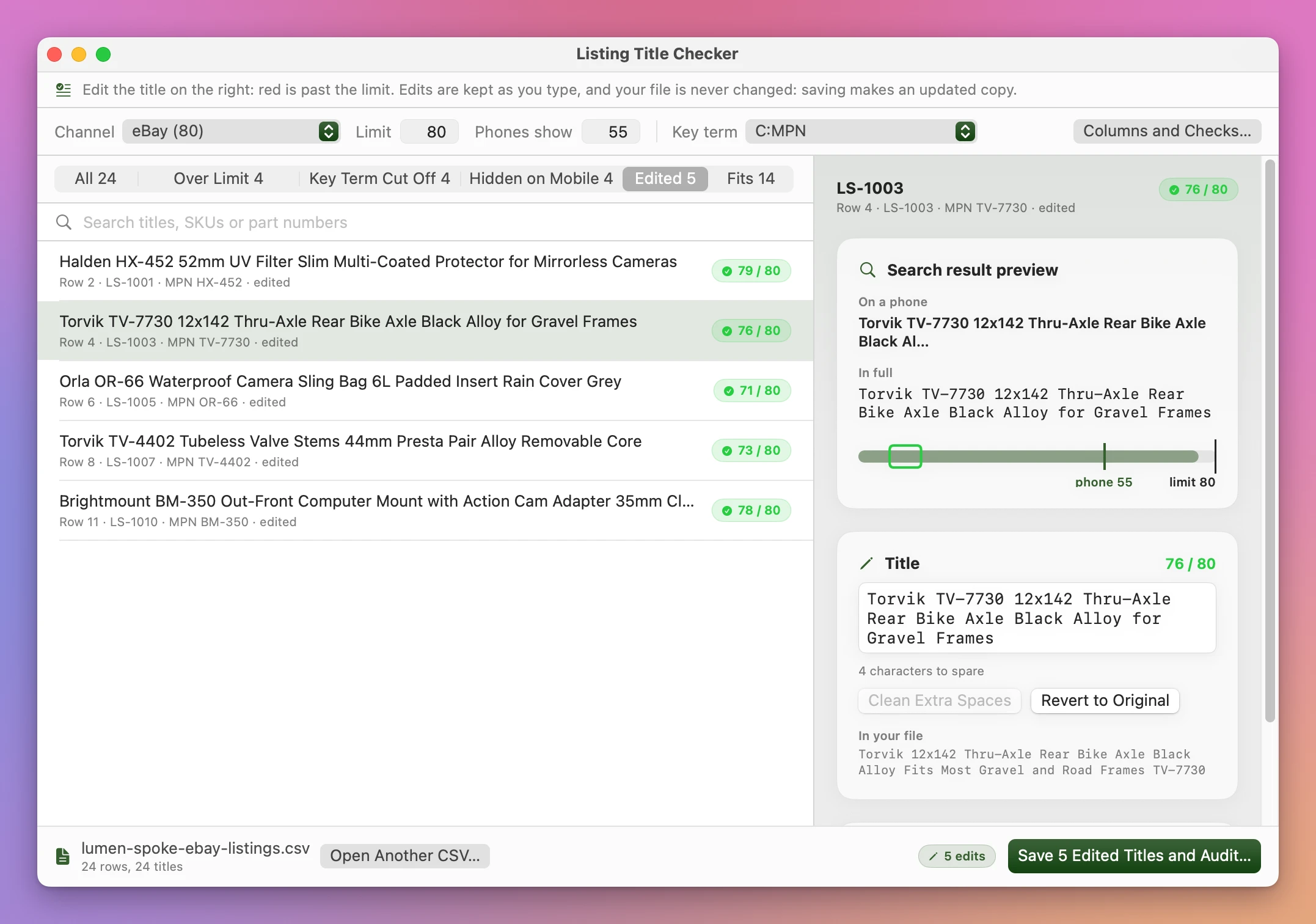
Click a title and the right side shows it the way a buyer sees it: the first 55 characters with ”…” as a phone shows them, then the whole title with the part past the limit struck out in red. Under it, a ruler draws the title as a bar, the phone cutoff as a tick, the limit as a line, and the key term outlined in green, blue or orange depending on where it ended up.
Edit the title in the field below. The counter (76 / 80), the preview, the pill and the groups all follow as you type. Clean Extra Spaces takes out double spaces and spaces at the ends, which count against the limit too, and Revert to Original puts back the title from your file, shown under the field.
The notes under the title point out what else marketplaces and buyers don’t like: words in capitals like SALE, a word repeated, filler like “L@@K” or “Free Shipping”, and the limit cutting a word in half.
An updated CSV with nothing else changed
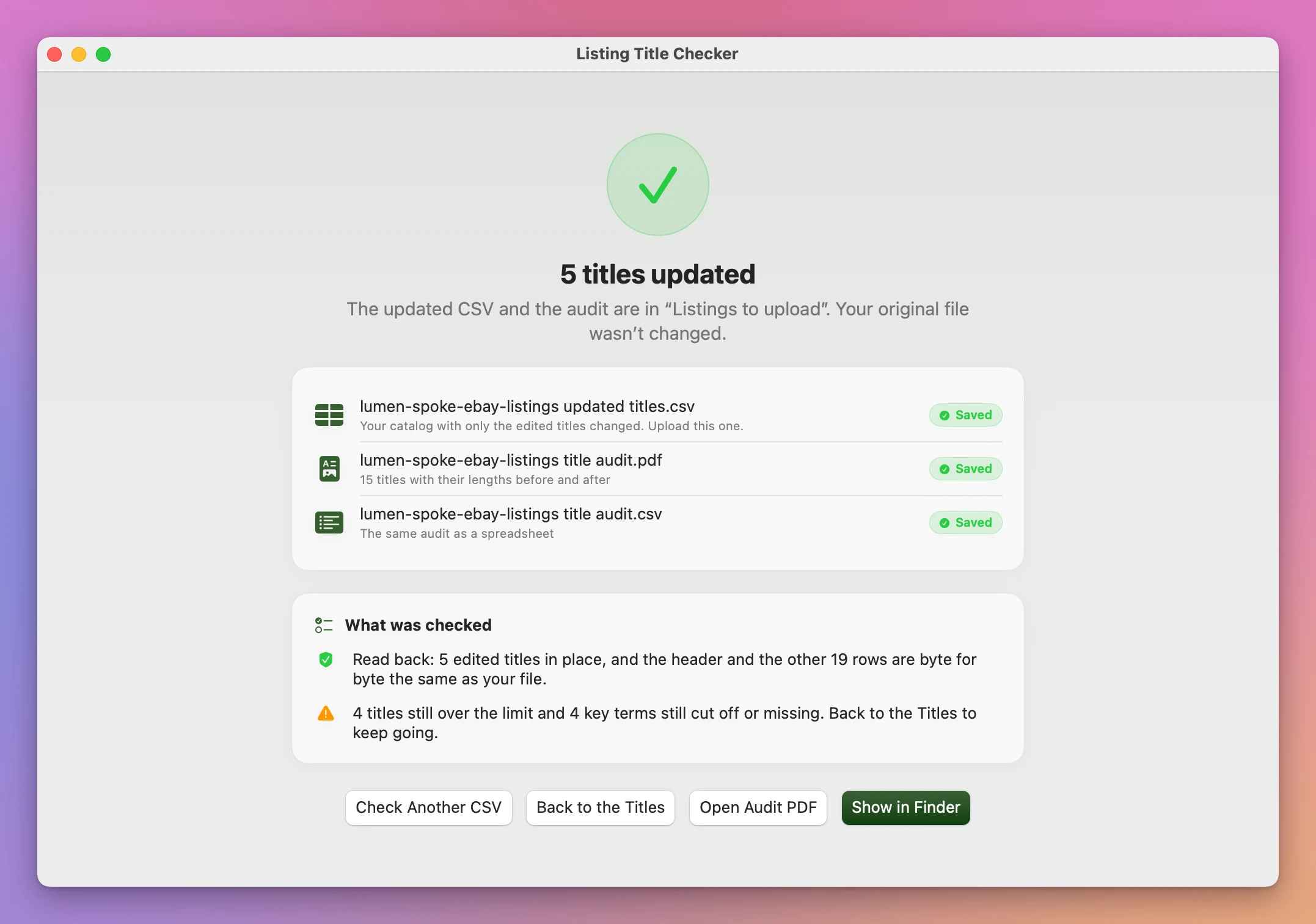
When you save, the app writes a copy of your CSV where the only difference is the titles you edited. Every other column and every other row stays exactly as it was, byte for byte: UPCs with their leading zeros, prices, descriptions with commas and line breaks, the quotes and the line endings your shop used. Then it reads the copy back and checks every cell before it says it’s saved.
Your original file is never changed. If a name is taken in the folder, the new file gets a ” 2” instead of replacing anything.
A title fit audit
With the CSV you get an audit as a PDF and as a spreadsheet: every title that was over the limit, lost its key term, hid it from phones or was edited, with its length before and after, the part past the limit in red, and what was wrong. It’s what you send a client, or keep to check the next upload against.
Why not do it in a spreadsheet
| Numbers or Excel | Listing Title Checker | |
|---|---|---|
| Find titles over the limit | A LEN() column and a filter | Counted and grouped as soon as the file opens |
| Is the model number inside the limit? | A FIND() formula per column, exact text only | Checked on every row, ignoring case, spaces and hyphens |
| Where phones cut the title | Not there | A preview and a tick on the ruler |
| Editing a title | Count by hand, or watch the LEN() cell | Live counter, preview and pill |
| Saving the file back | Can drop leading zeros from UPCs and reformat other columns | Only the edited titles change, checked by reading it back |
| A report of what changed | Build it yourself | An audit PDF and CSV |
A spreadsheet is a fine way to look at a catalog, and if you only need to know which titles are over 80, a LEN() column does it. It gets slow when the question is whether each title keeps its own model number, and risky when you save: Excel and Numbers open a CSV as numbers where they can, so a UPC like 084512300452 can come back as 84512300452.
What it doesn’t do
- It doesn’t write titles for you. No AI, no keyword suggestions. You decide what to cut.
- It doesn’t upload anything or connect to any marketplace. You upload the updated CSV the way you do today.
- It doesn’t know each category’s rules. The presets use each marketplace’s general title limit. Amazon’s 200 characters is the general limit, and some categories ask for fewer: type your category’s number in Limit.
- The phone cutoffs are approximations. Phones, apps and fonts differ, so the number is a guide you can change.
- It reads CSV and tab-separated text files, not Excel workbooks. Export the workbook as CSV first.
- It changes titles only. Every other column stays as it is in your file.
- A key term is the whole value of the column you pick. A cell with three compatible models in it counts as one term.
Questions
Which files does it read?
The CSV exports of Shopify, eBay (File Exchange and Seller Hub), Etsy, Amazon inventory files (tab-separated), WooCommerce and Google Shopping feeds, and any spreadsheet saved as CSV. The app guesses the title, SKU, key term and brand columns from the header, and Columns and Checks… lets you pick them. Shopify’s variant rows, which have no title, are skipped.
How does it count characters?
The way a marketplace’s web form does: each letter, space and punctuation mark counts as one, and an emoji counts as two.
Is my original file changed?
Never. The app saves a new file next to the audit, in the folder you choose.
Does anything get uploaded?
Nothing. Your catalog stays on your Mac. The app connects to the internet only to check for updates.
What it needs
macOS 14 Sonoma or later, on Apple silicon and Intel Macs. It asks macOS for no permission: it reads the file you choose or drag onto its window.
Listing Title Checker isn’t made by, affiliated with or endorsed by eBay, Etsy, Amazon, Google, Shopify, Poshmark, Mercari or Apple. The shop, the brands and the products in the screenshots are made up.
Buy Listing Title Checker
$19 plus tax where it applies, paid once.
Download the app from the order page or your Creem receipt, unzip it and move it to Applications. I sign the app with my Apple Developer ID, and Apple notarizes the download.
The app checks for updates once a day. When a new version is ready, click Install and Relaunch. The first time, it asks for the license key from your Creem receipt, and remembers it. To check anytime, choose Listing Title Checker → Check for Updates….