
Mac & Windows app by Flavio
Mouth Click Finder
Open a spoken track and the app lists every short mouth click, lip smack and wet tick. Hear each one up close at normal speed or slowed down, confirm or dismiss it in one click, and export a de-clicked copy, markers for Audacity and REAPER, and a report.
Buy Mouth Click Finder for Mac · $19Buy Mouth Click Finder for Windows · $19Buy once, use forever. Up to 3 computers you own (license). Plus tax where it applies. Mac and Windows versions are sold separately.
macOS 14 or later (Apple silicon and Intel) · Windows 10 and Windows 11 (x64 and ARM64)
Latest Mac version 1.0.0, released November 29, 2026
You recorded a solo episode close to a condenser mic, the way you’re told to for a warm voice. On headphones, every few sentences there’s a tiny wet tick: the tongue leaving the roof of the mouth, the lips parting before a word. Each one lasts a millisecond or two. A 30-minute episode can have a hundred of them.
By hand, you listen with the headphones turned up, stop when you hear one, zoom in until you see a single sharp spike in the waveform, select it and repair it. Then you play again from a few seconds back to find the next one. That’s slower than the rest of the edit put together, and the quiet ones slip past.
Mouth Click Finder listens to every millisecond for you and lists every click it finds. You see each one in a close-up, hear it at normal speed or slowed down to half speed, and confirm or dismiss it with one click. Then it saves a copy where only the few milliseconds around each confirmed click are redrawn, plus markers for your editor and a report.
Watch a 30-second demo of Mouth Click Finder:
Who it’s for
- Solo podcasters on a close mic. Your voice sounds great at three inches from a condenser, and so does every lip smack. You want the clicks gone before you publish, without spending an evening hunting for them.
- Audiobook and course narrators. Audiobook platforms and listeners notice mouth noise, and a chapter is an hour of close-mic voice. You get a list of every click in the chapter and repair the ones you confirm, instead of scrubbing the whole hour.
- Voice-over artists. A client sends back “a bit clicky in the second paragraph”. You find the clicks in seconds, send a clean copy, and attach the report with every click’s time.
- Podcast editors working for clients. You edit four shows a week. Mouth Click Finder does the hunting, you do the listening, and the markers drop straight into Audacity or REAPER if you’d rather fix them in your own session.
- Interview producers with a dry-mouthed guest. The guest drank coffee before the call and every answer starts with a tick. You run the guest’s track alone and leave the host’s alone.
How it works
- Click Choose a Recording…, or drag a WAV, AIFF, M4A, MP3, FLAC or CAF file onto the window. To try it first, click Try Example Recording.
- The list shows every click with its time, its length in milliseconds and how sharp it is. Clear clicks in a pause start as Confirmed. Clicks inside a word start as Needs Listen.
- Click one. Press Play at 1× to hear it with a second of speech before it, or Play at 0.5× Slow to hear it at half speed with the pitch kept. Switch between Before and Repaired while it plays.
- Click Confirm or Dismiss, or the ✓ and ✕ on the row.
- Click Export Repair Folder… and choose where to save it.
What you get
Every click in a list
The app reads the recording one millisecond at a time and looks for one thing: a single sharp edge that stands far out of the sound around it and is over within 15 milliseconds. A mouth click looks exactly like that. A “p” or a “b” is a loud puff that lasts longer and is noisy all through, and an “s” is bright from start to end, so neither stands out of its surroundings and both are left alone.
Above the list, Find sets how hard it looks. Strict lists only the sharpest clicks, Standard the ones you’d hear on headphones, Sensitive also the faint ticks 40 dB under your voice. On the example recording that’s 5, 8 and 9 clicks. What you confirmed or dismissed is kept when you switch.
Sort the list by Strongest First or Time Order, and filter it by All, Confirmed, Needs Listen and Dismissed.
A close-up of 24 milliseconds
Each click shows the 12 milliseconds before and after it, sample by sample. The recording is in grey, the repaired version in magenta on top, and the span the repair redraws is shaded. You see the spike, and you see what replaces it.
Hear it slowed down
A two-millisecond click is easy to miss at normal speed. Play at 0.5× Slow plays the same moment at half speed with the pitch of the voice unchanged, so the click lasts twice as long and stands out. Before and Repaired play together in step, so switching while it plays changes only the click.
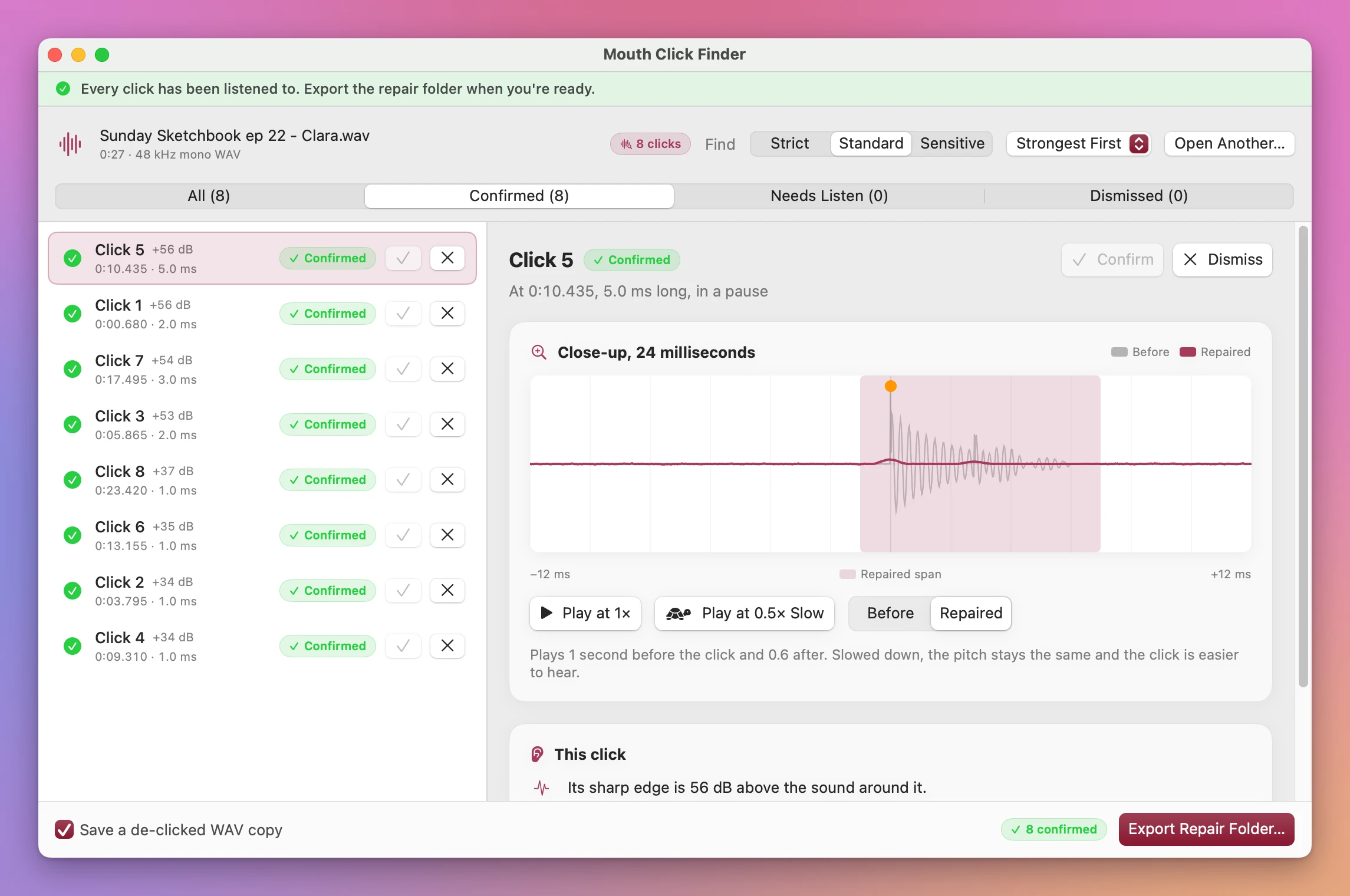
A repair that only touches the click
For each confirmed click, the copy redraws between 2 and 8 milliseconds: a smooth curve joins the samples on either side, the slow movement of the voice under the click is put back, and the edges blend in over half a millisecond. Every other sample of the copy is the same as your original. A click inside a word keeps the word’s sound around it.
Your original isn’t changed. If you’d rather fix the clicks yourself, untick Save a de-clicked WAV copy and export only the markers and the report.
Markers and a report
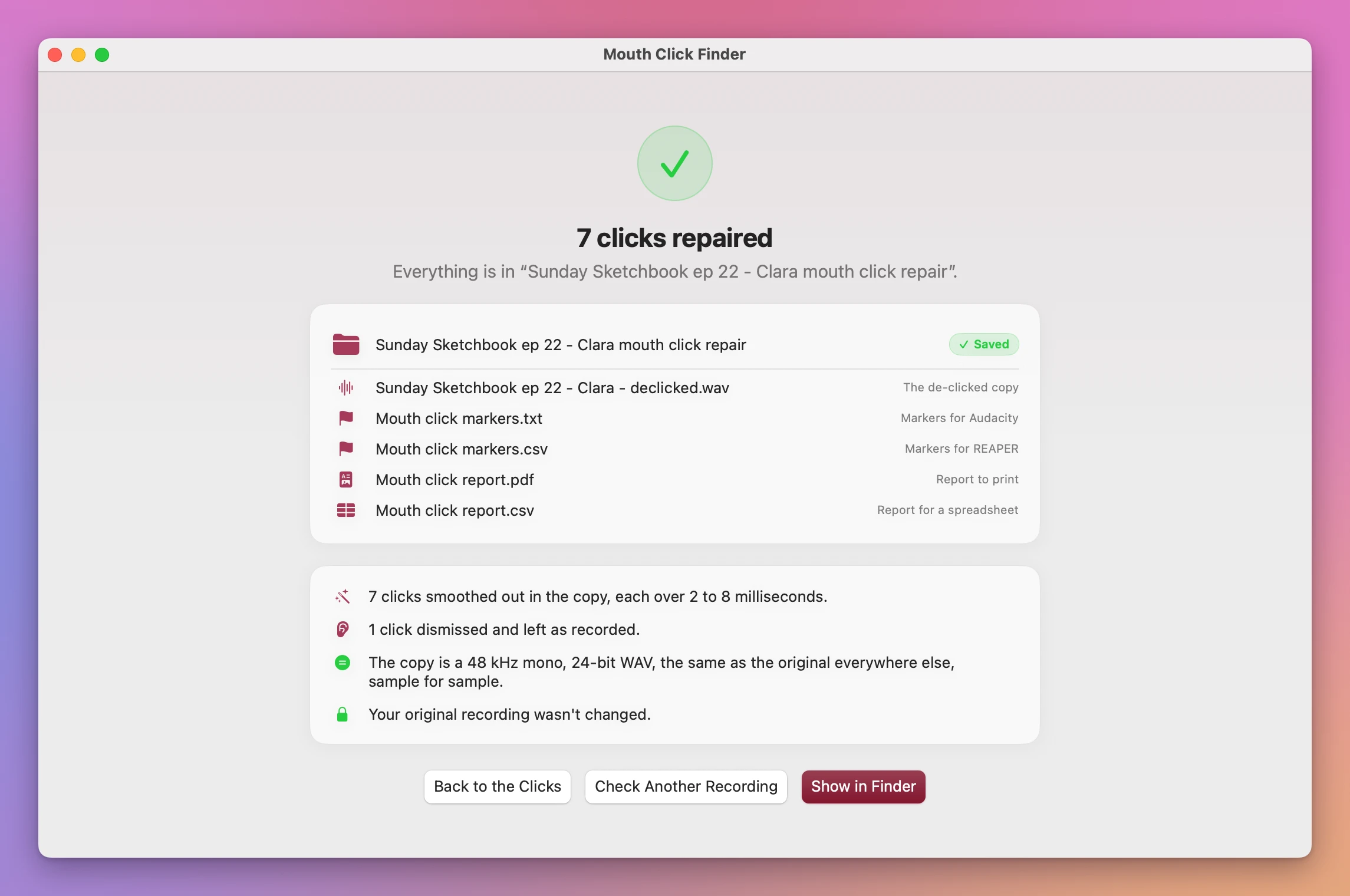
The Mouth Click Repair folder has:
- ”
- declicked.wav” , the repaired copy. - Mouth click markers.txt, the confirmed clicks as a label track for Audacity (File › Import › Labels).
- Mouth click markers.csv, the confirmed clicks as markers in the layout of REAPER’s Region/Marker Manager.
- Mouth click report.pdf and .csv, every candidate with its time, length, how sharp it was, and whether you confirmed it, dismissed it or didn’t listen yet.
Why not do it by hand
Audacity is free and has two tools for this. Click Removal works on a whole selection at once, but it was made for the crackle of a vinyl record. It changes whatever crosses its threshold in one pass, with no list of what it changed and no way to hear each one before and after. Repair fixes a click very well, but only one at a time, on a selection of at most 128 samples, after you’ve found it by ear and zoomed in to the samples. GarageBand and QuickTime can’t edit a few milliseconds at all. Paid audio repair suites have a mouth de-click module that does this well, at many times the price.
| Audacity Repair, by hand | Audacity Click Removal | Mouth Click Finder | |
|---|---|---|---|
| Finds the clicks | You, by ear | All at once, no list | Every click, in a list |
| Lets you check each one | Yes, one at a time | No | Yes, at 1× and 0.5× |
| Touches only the click | Yes | Whatever crosses its threshold | Yes, 2 to 8 ms |
| Time for 100 clicks | An evening | Minutes, then a listen | Minutes, with listening |
| A record of what changed | No | No | Markers and a report |
What it doesn’t do
- It doesn’t remove noise, hum, breaths or plosives. It leaves “p” and “b” pops alone on purpose.
- It doesn’t repair sounds longer than 15 milliseconds, like a knock on the desk or a chair creak.
- It’s made for speech. On a mixed episode with music, use the voice track before you mix.
- It works on one file at a time, up to 4 hours long.
- It never changes your original file.
Questions
Is my recording uploaded anywhere?
No. The app reads your recording on your Mac and writes the folder where you choose. Nothing leaves the Mac. It connects to my update server only to check for new versions.
Will it work with my editor?
The copy is a standard WAV, so it opens in any editor: Audacity, GarageBand, Logic, REAPER, Hindenburg, DaVinci Resolve. The labels file is in Audacity’s label format, and the marker list is in the CSV layout of REAPER’s Region/Marker Manager. Mouth Click Finder is not made by, affiliated with or endorsed by Apple, Muse Group (Audacity) or Cockos (REAPER).
Can I try it before I open my own file?
Yes. Try Example Recording opens a made-up 27-second solo segment with eight clicks and one faint tick, so you can hear what it finds and what the repair sounds like.
What does it need?
macOS 14 Sonoma or later, on an Apple silicon or Intel Mac.
Buy Mouth Click Finder
$19 plus tax where it applies, paid once. You get the app as a download, signed and notarized by Apple, and a license key for updates. The app opens and works without the key: it asks for it once, the first time it installs an update.
It doesn’t ask for any permission: it reads only the recording you choose, and writes only into the folder you pick when you export.