
A developer tool by Flavio
Local Hoster
Open your local projects at https://myapp.localhost instead of guessing ports. Local HTTPS through Caddy, cleaned up when you stop the server.
Buy Local Hoster · $20One-time purchase. Tax included. Source code included.
macOS or Unix-like system · Node.js 18+ · Caddy
Latest version 1.1.0, released November 18, 2026
Which port was that project on?
You have an Astro blog, a Vite admin and an API running on the same Mac. One is on 4321, one on 5173, one on 3001. Or was it 3000?
It gets worse when the usual port is busy. The development server picks the next one, so the shop is on localhost:4321 today and localhost:4322 tomorrow. Your browser history fills up with ports that point to different projects on different days.
Local Hoster gives every project its own address. Instead of this:
http://localhost:4321you open this:
https://myapp.localhostThe address stays the same every time you start the project. It runs over real local HTTPS, so secure cookies and service workers behave like they do in production.
Here’s a one-minute run with two projects, an Astro shop and a Vite admin, from package.json to the browser:
The projects, the shop and its orders are fictional.
I built it because I was tired of remembering port numbers. flaviocopes.com and my other projects run through it now. The URL is known before the server starts, and typing the project name in the address bar beats hunting for a port.
Who it’s for
- Indie hackers with a folder full of side projects. You come back to a project after three weeks and can’t remember its port. With Local Hoster it’s
https://projectname.localhost, and the browser autocompletes it. - Developers running a frontend and an API together. The dashboard on
dashboard.localhostand the API onapi.localhostboth start fromnpm run dev. Neither steals the other’s port when you start them in a different order. - Anyone testing login flows. Secure cookies,
SameSite=None, WebAuthn and OAuth callback URLs expect HTTPS. A stablehttps://origin means you register the callback once with your provider’s test app and stop editing it. - People building PWAs. Service workers need a secure context.
localhostgets an exception in browsers, but a real HTTPS origin behaves like production, and the origin doesn’t change when the port does, so its storage and service worker stay put. - Small teams sharing a repo. The port comes from the project’s name, so
shop.localhostmaps to the same port on every machine. Put thelocalhostfield inpackage.jsonand everyone gets the same URL.
How it works
Local Hoster is a small Node.js command. It puts Caddy in front of your development servers.
You add a localhost name to package.json and put localhoster before your normal development command:
{
  "localhost": "myapp",
  "scripts": {
    "dev": "localhoster astro dev"
  }
}
Then you run:
npm run devLocal Hoster picks a stable port for the project, adds the HTTP and HTTPS routes to Caddy, and starts the development server with --port and that number.
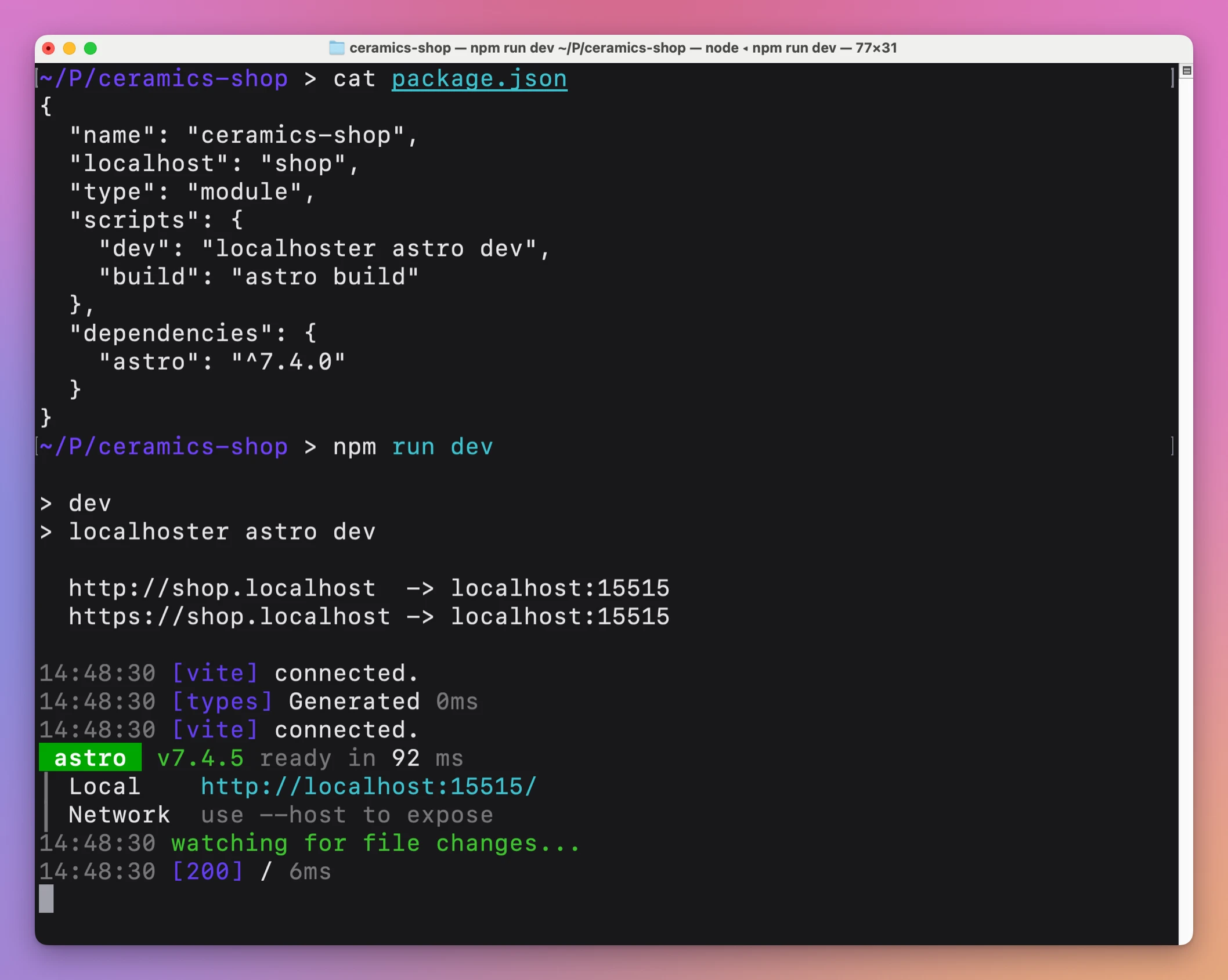
Now the project is at https://myapp.localhost.
When you stop the server with Control-C, Local Hoster removes its temporary routes and TLS configuration from Caddy. Nothing piles up between sessions.
A day with it
- Set up Caddy once: install it, start it with its admin API on
localhost:2019, and runcaddy trust. The documentation has the exact commands for Homebrew. - In each project, add a
localhostname likeshoporadmintopackage.json, and putlocalhosterin front of thedevscript. - In the morning, run
npm run devin the shop. The terminal printshttps://shop.localhost -> localhost:15515and the server starts. - Open a second terminal and run
npm run devin the admin. It gets its own name and its own port. - Open both from the address bar by name. Type
shopand the browser fills in the rest from history. - Stop either server with Control-C. Its routes disappear from Caddy, and the other project keeps running.
The setup in step 1 happens once per Mac. Step 2 takes a minute per project. After that, the time you save is every “which port was it?” lookup, every stale bookmark, and every OAuth callback you would otherwise edit after a port change.
Why .localhost?
The .localhost domain is reserved for local use (RFC 6761). Names such as app.localhost and api.localhost resolve to your own computer in the browser.
You don’t edit /etc/hosts and you don’t run a local DNS server. The project name becomes the address.
Local HTTPS
Caddy can issue locally trusted certificates through its internal certificate authority. This gives each project a real HTTPS origin in the browser.
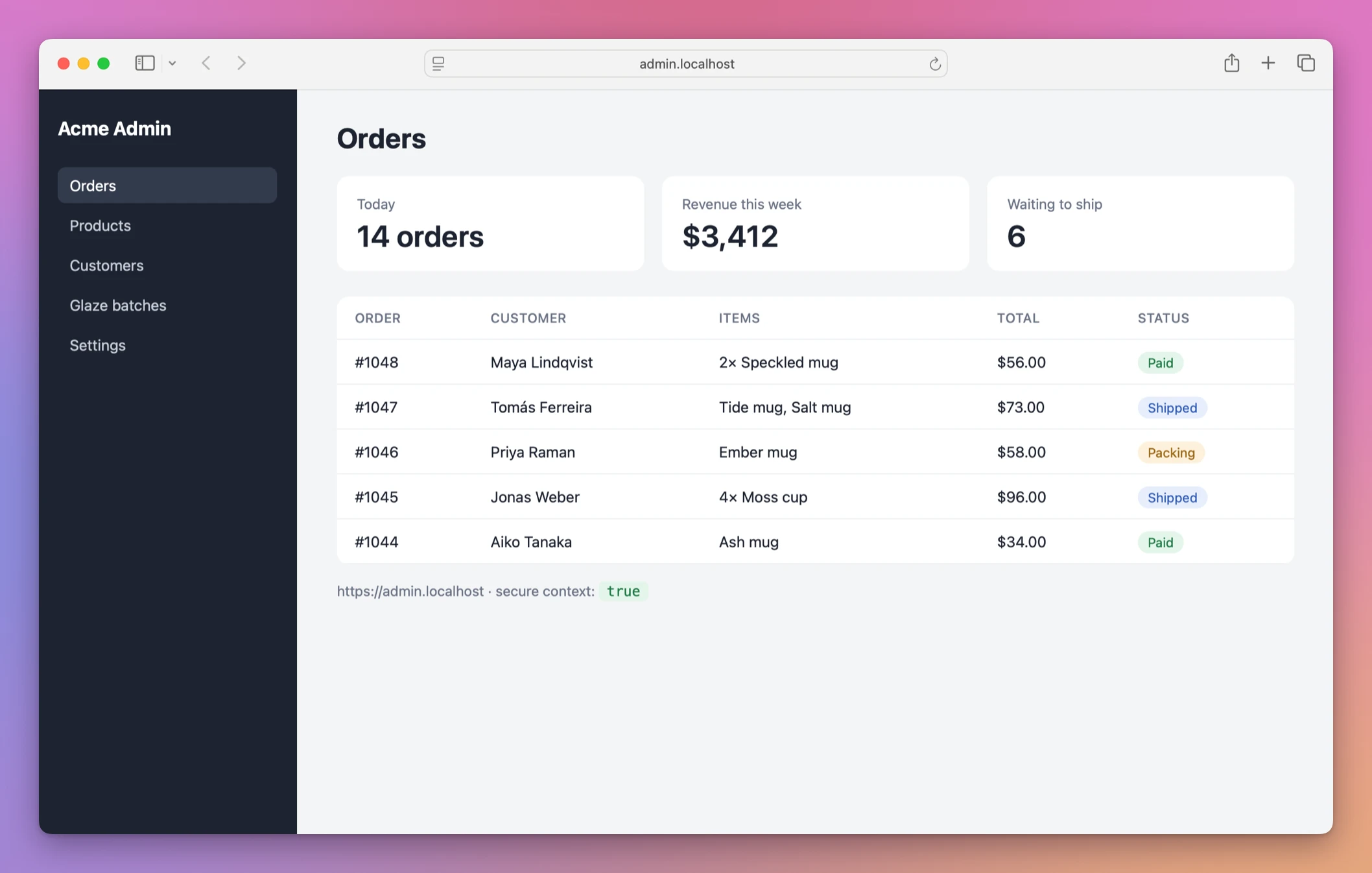
That matters when you work with:
- secure cookies
- service workers
- WebAuthn
- browser credential APIs
- OAuth callback URLs
- other features that expect HTTPS
You trust Caddy’s local certificate authority once, on purpose, with caddy trust. After that, Local Hoster asks Caddy to create the temporary TLS configuration for each project.
The certificates and addresses are local to your machine. This is not public hosting.
The details
Names and ports
Local Hoster reads the localhost field of package.json, or the package name when that field is missing. A dedicated field helps with scoped packages like @acme/shop, which aren’t valid hostnames.
Names are lowercased and get the .localhost suffix. Labels can use letters, digits and internal hyphens, and dots can separate them, so api.shop becomes api.shop.localhost. An invalid name stops the command with a clear error before Caddy is touched.
The port comes from a hash of the hostname, somewhere between 10000 and 59999. The same name always gets the same port. It isn’t a reservation, so another program could still be on it.
Several projects at once
You can start or stop several projects at the same moment. Each change to Caddy’s configuration is guarded, so if two projects write at once, the second one reads the new configuration and tries again. No project loses its routes.
If the browser hits the URL while the server is still starting, or restarting after a dependency install, Caddy keeps retrying for up to 10 seconds. You see the page load late instead of an empty 502.
What it runs
Everything after localhoster is your command. It’s started directly, without passing through a shell, and Local Hoster appends --port <number>. Project tools like astro are found in node_modules/.bin.
When the command exits, Local Hoster cleans up and returns the command’s own exit status, so scripts that check it still work.
Why not do it by hand
You can do all of this without Local Hoster. Caddy is free. You can write a Caddyfile with one site block per project, pick a fixed port for each, pass it to every dev server, and reload Caddy when something changes.
That works for one or two projects that never change. It gets tedious with ten. Each new project means editing the Caddyfile, picking a port nobody else uses, and remembering to reload. Old sites stay in the file after you stop working on a project. And the port lives in two places, the Caddyfile and the dev script, that drift apart.
The other option is /etc/hosts with names like shop.test. That needs sudo for each edit and still doesn’t give you HTTPS or a fixed port.
| By hand | Local Hoster | |
|---|---|---|
| New project | Edit the Caddyfile, pick a port, reload Caddy | Add a localhost field to package.json |
| Port | Chosen and tracked by you | Derived from the name, same on every machine |
| HTTPS | Configure TLS per site | Local certificate added for each project |
| After you stop the server | The site stays in the config | Routes and TLS policy removed |
| Two projects starting together | Fine with a static file | Changes retried so none are lost |
| Where the setting lives | Caddyfile plus package.json | Only package.json, in Git |
A small tool on purpose
Local Hoster has zero runtime npm dependencies. Node.js reads the project configuration, validates the hostname, chooses the port, talks to Caddy, starts the command and handles cleanup.
The code is small enough to read in one sitting. You could add automatic port conflict detection, support a different proxy, build a dashboard for active projects, or package your version with Homebrew.
What it doesn’t do
- It doesn’t make your project public. The addresses work only on your computer. There is no tunnel and nothing is uploaded.
- It doesn’t install or manage Caddy. You install Caddy, start it with its admin API on
localhost:2019and runcaddy trustyourself. - It doesn’t reserve ports. The port is stable, not exclusive. If something else listens on it, the server reports the conflict. Port Pilot can show you what that something is.
- It doesn’t support servers without a
--portflag as they are. You change the command or the source for those. - It doesn’t run shell expressions. Commands are started directly, so
&&or$VARinside the wrapped command need an explicit shell that you choose. - It has no GUI. It’s a command you put in your
devscript.
Questions
Which frameworks does it work with?
Any development command that accepts --port. That covers Astro, Vite, Next.js, Remix and other servers with the same flag.
What happens if Caddy isn’t running?
The command stops with an error before it starts your server, so nothing runs without its address.
Does it change my system?
Local Hoster itself only changes Caddy’s configuration through its local admin API, and removes what it added. caddy trust adds Caddy’s local certificate authority to your trust store. You run that step once, and it may ask for your administrator password.
Can I point it at a different Caddy?
Yes. Set LOCALHOSTER_CADDY_ADMIN to another admin endpoint you control. Keep it local, never a public or shared one.
Does it work on Linux?
The command runs on macOS and other Unix-like systems that Caddy supports, with Node.js 18 or newer. The setup commands in the docs use Homebrew, so on Linux you install and trust Caddy your own way.
Learn more
- HTTPS on localhost with Caddy and memorable .localhost names
- Give every project a stable .localhost URL so you stop remembering ports
- Test secure cookies and OAuth callbacks on localhost over HTTPS
What you get
The purchase includes everything needed to run and customize the command.
The download includes:
- the complete Node.js source code
- the
localhosterexecutable - automated tests
- setup and configuration instructions
- architecture and decision documents
- security and customization notes
- instructions for coding agents
- an MIT license
You need Node.js 18 or newer and a local Caddy installation with its admin API available.
The development command must accept a --port option. This works with Astro, Vite, and other compatible development servers.
Buy Local Hoster and get the source
Local Hoster costs $20 including tax, paid once. The purchase includes the ready-to-install CLI ZIP.
Download the runtime ZIP from your purchase page. Reopen that page for later versions.
This purchase supplies the software source. You provide the runtime, accounts and infrastructure described below.
Install the command
After downloading the source, unzip it, open Terminal in the unzipped folder and run:
npm install --global --prefix ~/.local .Install and start Caddy with its local admin API enabled, then trust its local certificate authority using caddy trust. The README covers the setup. Add the hostname and development command to your project as shown above.