
An app by Flavio
Passport Photo Sheet
Take a photo at home, pick your document, and save a 4 × 6 sheet of passport or visa photos at the exact size the rule asks for, to print at a photo kiosk for a few cents.
Buy Passport Photo Sheet · $20One-time purchase. Tax included.
macOS 14 or later · Apple silicon and Intel
You need passport photos. The booth at the station wants a lot of money for four small pictures, and you don’t like how you look in any of them. A 4 × 6 print at a photo kiosk costs a few cents. The hard part is getting the size right: 35 × 45 mm, a head between 29 and 34 mm from chin to crown, or 2 × 2 inches with the head between 1 and 1 3/8 inches.
Passport Photo Sheet does that part. You take the photo at home, pick the document, and the app makes a sheet with as many copies as fit, at the exact size, with cut marks.
$20 including tax, paid once.
Nine documents, on purpose
The app knows the photo rules of nine documents:
- the Australia passport
- the China visa
- the Ireland passport
- the Japan passport
- the Netherlands passport
- the Schengen visa
- the South Korea passport
- the United Kingdom passport
- the United States passport
The list is short on purpose. A rejected photo costs you another trip to the passport office, so every size and head size in the app comes from the government’s own page, and a country is in the list only when I could read its rules there. Each document shows its source and the month it was checked. For anything else, Custom size takes the numbers you type.
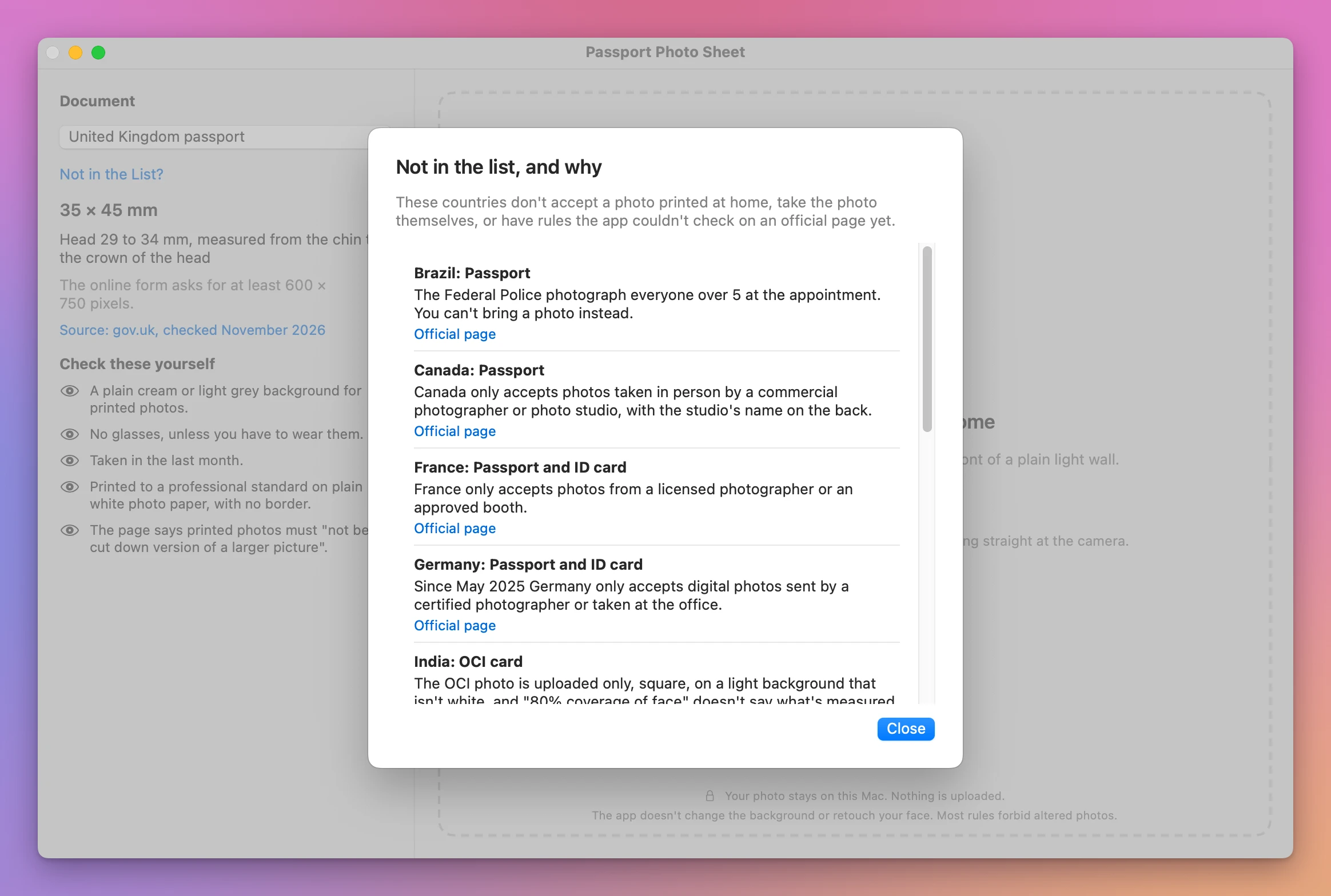
Some countries you might look for aren’t there, and the app tells you why when you click Not in the List?. Canada only accepts photos taken by a commercial photographer. France wants a licensed photographer or an approved booth. Germany only takes digital photos sent by a certified photographer. Brazil, the Philippines and several others take the photo at the office.
Two countries in the list warn about photos made this way, and the app shows their words next to the other reminders. The United Kingdom’s page says printed photos must “not be a cut down version of a larger picture”. Australia’s page says: “We do not recommend using an online passport photo service or a mobile app. These may put you in danger of identity fraud.” Passport Photo Sheet uploads nothing, but read both before you choose.
The app doesn’t change the background or retouch your face. Most rules forbid altered photos, so what you take is what gets printed, cropped and sized. And whether a photo is accepted is always the passport office’s decision, never the app’s. The app checks what it can measure, and you check the rest.
How it works
- Take the photo. Stand in front of a plain light wall, about a meter from the camera, and look straight at it. Ask someone else to take it. Leave space around your head and shoulders.
- Pick the document and open the photo. Drop it on the window, or click Choose a Photo….
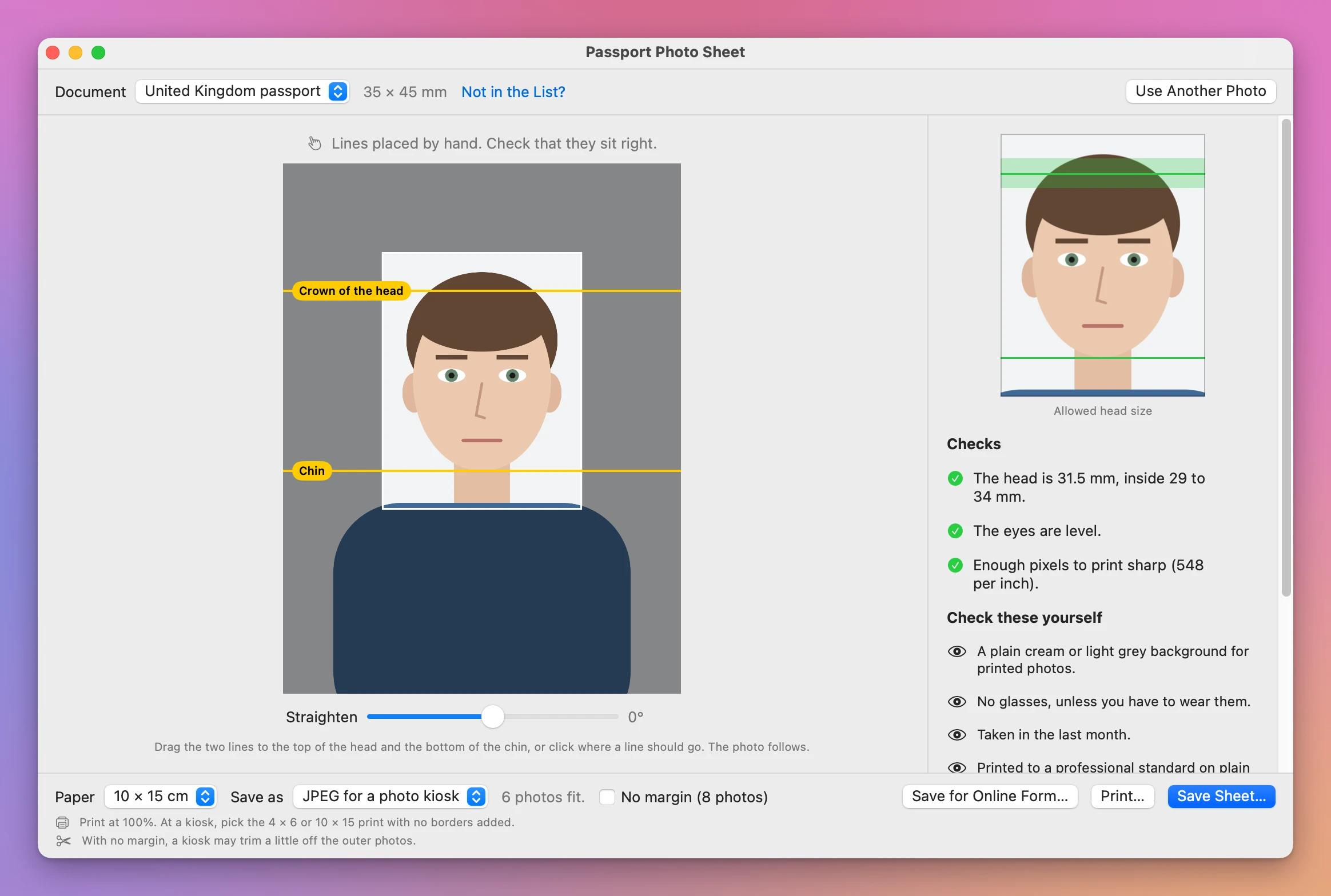
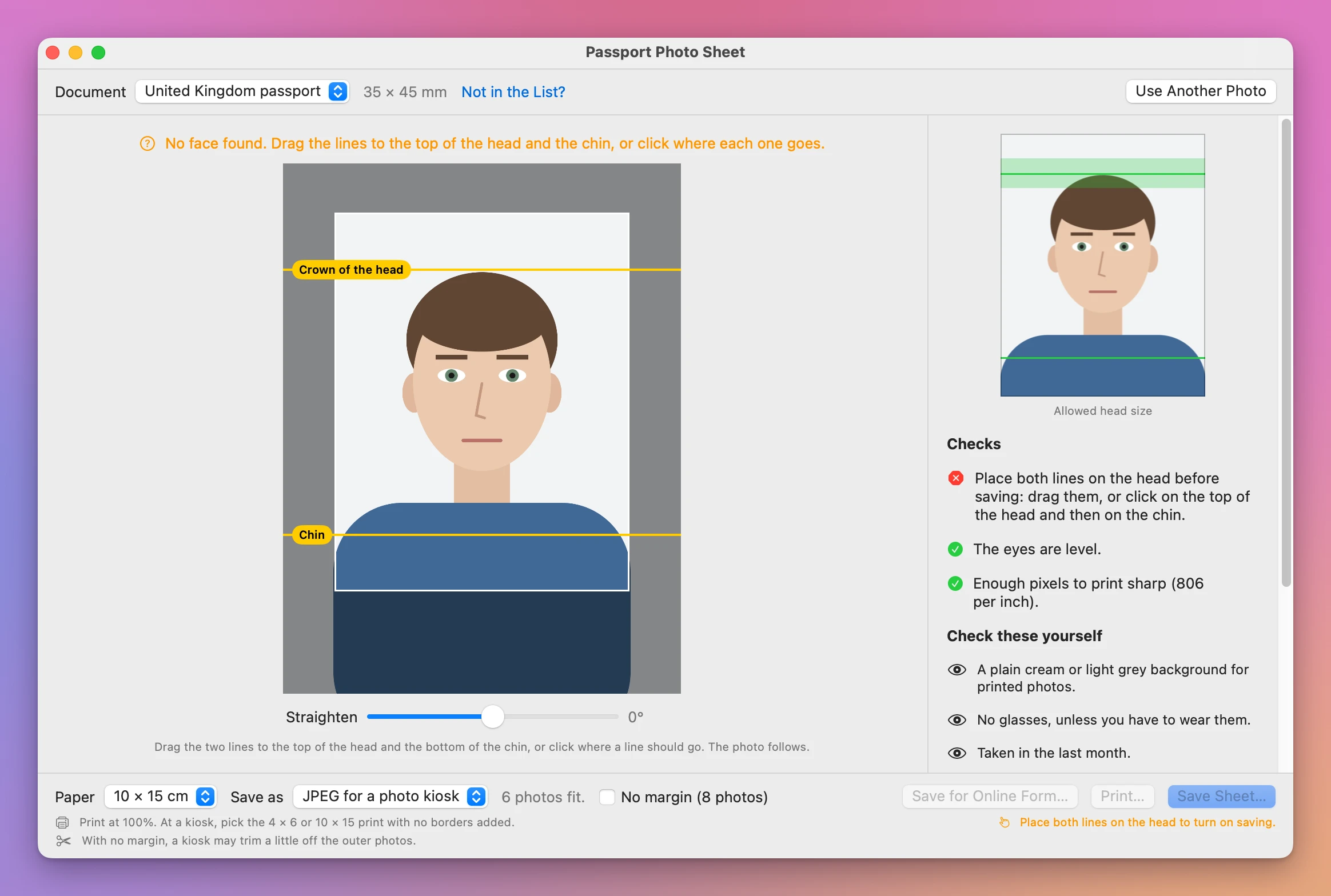
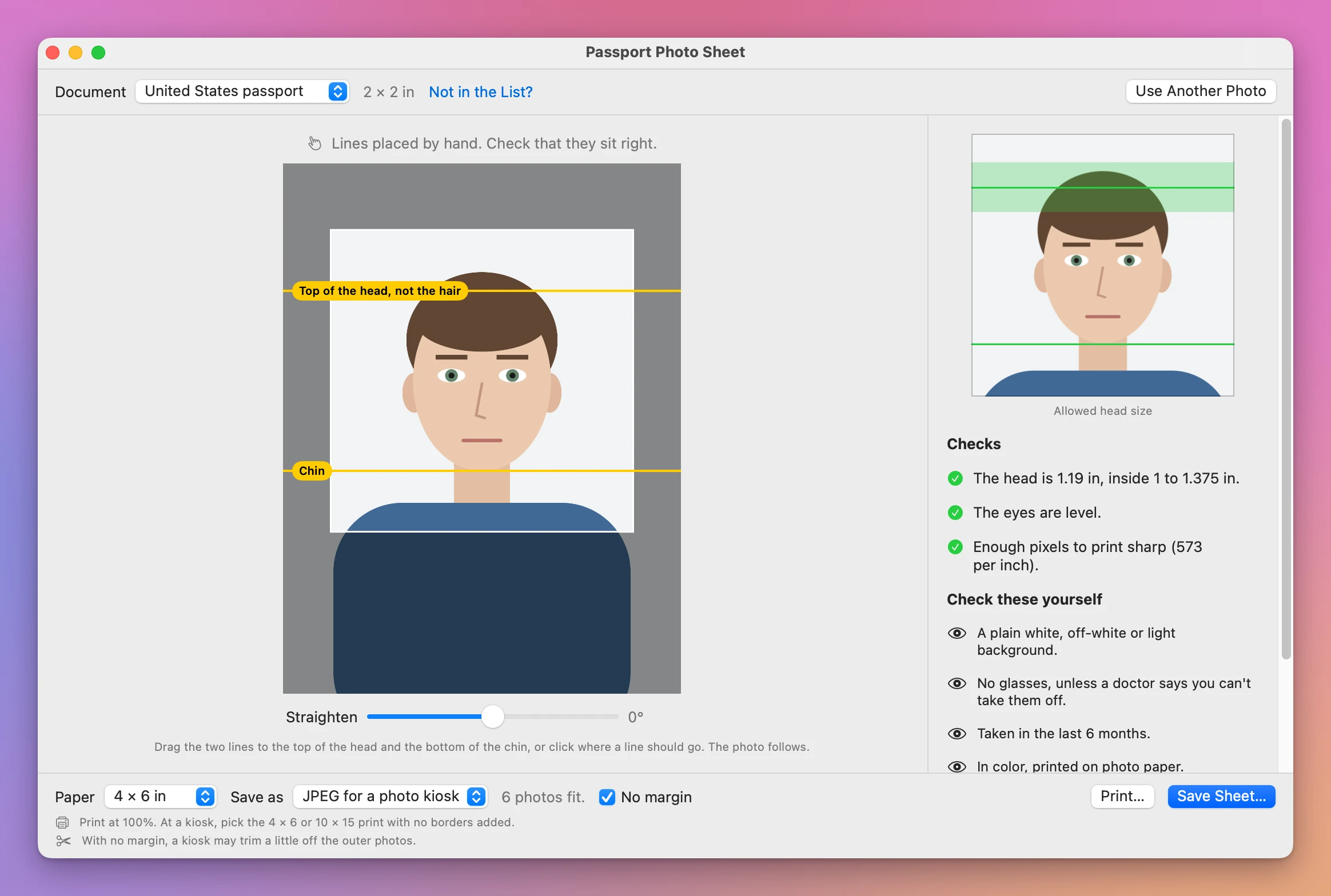
- Place the two lines. One goes on the top of the head, the other on the chin. When the app finds your face, it places them for you, and you check them. When it doesn’t, you click on the top of your head, then on your chin, and the app waits until you have. Drag either line to fine-tune it. The rule decides what “top of the head” means, and the line says it. For the United States, South Korea and the Schengen visa it’s the top of the head, not the hair. For Japan it’s the top of the hair.
- Save the sheet. Pick the paper (4 × 6 in, 10 × 15 cm, A4 or Letter) and click Save Sheet…. Take the JPEG to a photo kiosk or a shop, or save a PDF, or click Print….
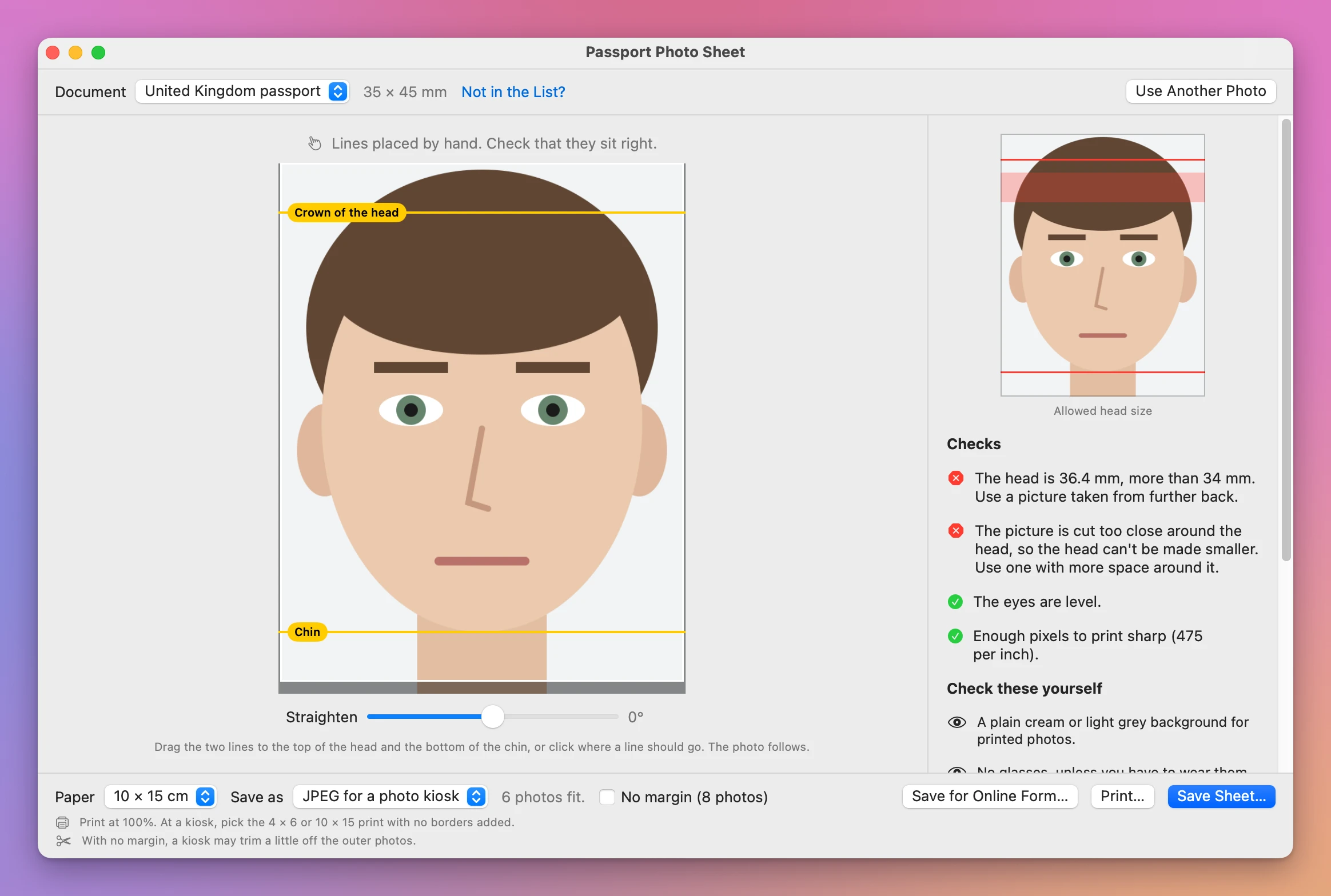
The photo follows the lines. The app turns it so the eyes are level, makes the head the middle of the allowed size, and centers it. On the right you see the finished photo with a band where the top of the head may be, green when it’s inside and red when it isn’t. Straighten turns the photo a few degrees by hand.
The checks
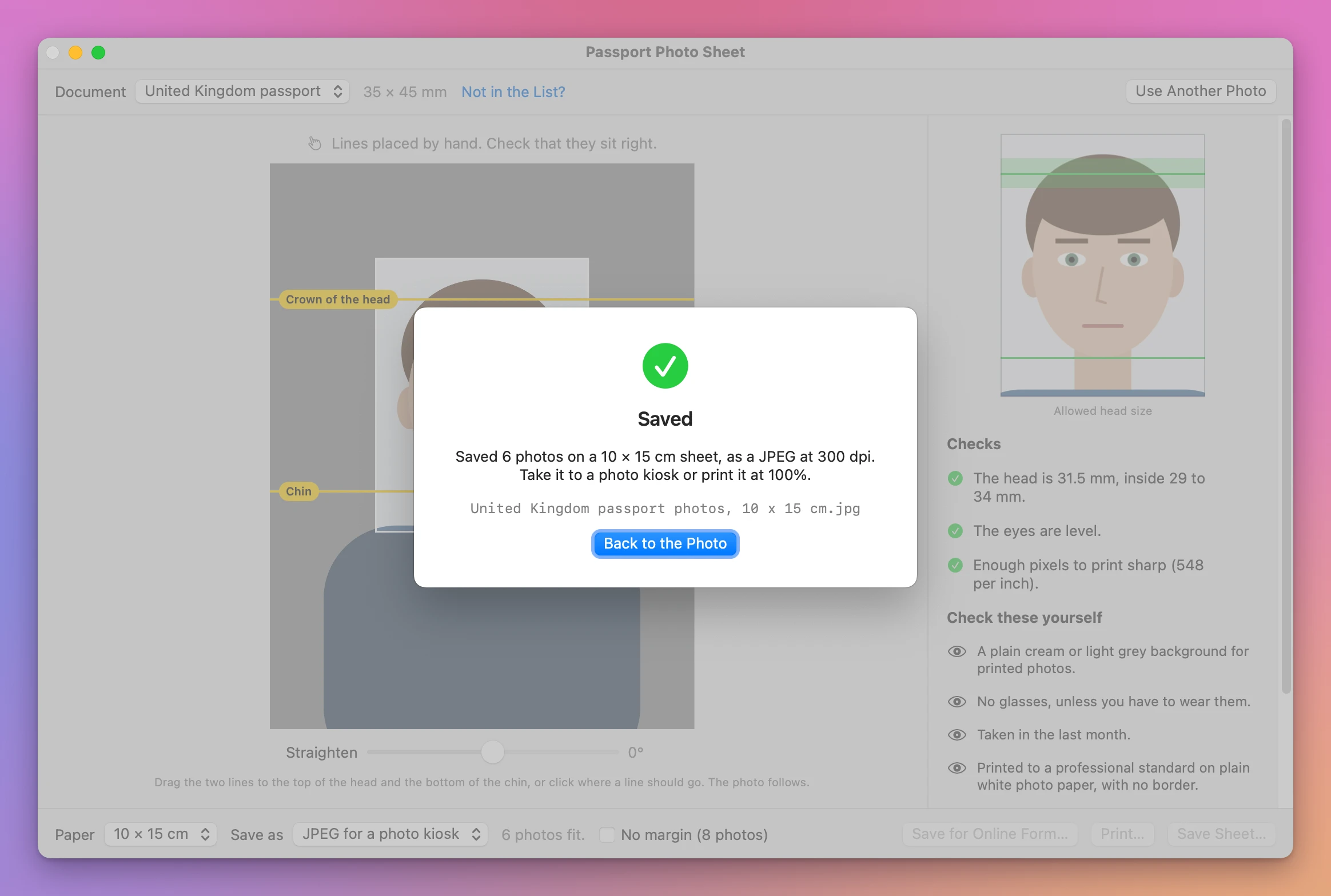
- Head size: “The head is 31.5 mm, inside 29 to 34 mm.”
- Room around the head: a picture cut too close can’t be made smaller, and the app says so instead of padding it with white.
- Eyes level: after straightening.
- Enough pixels: “Enough pixels to print sharp”, or a warning that it will look soft or blurry.
Then a short list the app can’t check, from the document’s own page: the background, glasses, how recent the photo must be, the paper.
The sheet
The app puts as many copies as fit on the paper, with thin cut marks, and turns the sheet sideways when that fits more. A JPEG is 300 dpi, or 400 for the Netherlands and 600 for the Schengen visa, as their rules ask. A PDF’s page is the paper’s exact size.
By default the app keeps 3 mm from the edge of a 4 × 6 or 10 × 15 print, because a kiosk may trim a little off the edges. That fits two 2 × 2 inch photos on a 4 × 6. No margin uses the whole paper with the photos touching, and fits six. Cut where they meet.
For the United Kingdom, Ireland and South Korea, Save for Online Form… saves one photo at the pixel size their online application asks for, and checks the file size the form allows (at least 50 KB for the United Kingdom).
When the file is saved, the app reads it back and tells you what’s in it.
By hand, or with Passport Photo Sheet
| A photo editor | Passport Photo Sheet | |
|---|---|---|
| The size | You look it up and hope the page is current | From the government’s page, with the month it was checked |
| The head size | You measure on screen | Two lines on the head, and a green or red band |
| What “top of the head” means | Easy to get wrong | The line says it: crown, top of the hair, or not the hair |
| Copies on one print | You lay them out yourself | As many as fit, with cut marks |
| Printing at the right size | Depends on the export settings | A JPEG at the dpi the rule asks for, or a PDF the paper’s exact size |
Good to know
Passport Photo Sheet is my own app. It’s not made by, affiliated with or endorsed by any government or passport office, or by Apple.
Your photo stays on your Mac. The app finds the face on the Mac itself, reads only the photo you open, never changes it, and saves only the files you choose. It asks before it replaces a file.
The face finding uses the Mac’s own face detection, and I haven’t been able to test it on a real person’s photo yet: all my tests use a drawn portrait, which it doesn’t recognize as a face. So expect to check the two lines, and sometimes to place them yourself. That takes two clicks. The printed sizes are tested: a saved 4 × 6 JPEG measures 1200 × 1800 pixels at 300 dpi, and a sheet printed to PDF from the print window comes out at 4 × 6 inches with each 2 × 2 inch photo at full size.
Print at 100%, or “actual size”, never “fit to page”, which changes the size.
Buy Passport Photo Sheet and get started
Passport Photo Sheet costs $20 including tax, paid once. There’s no subscription.
After buying, your receipt has the app and a license key. Unzip the app and drag Passport Photo Sheet to your Applications folder. It runs on macOS 14 Sonoma or later, on Apple silicon and Intel Macs. It’s signed with my Apple Developer ID and checked by Apple, so it opens like any other app you download.
Enter the license key in Passport Photo Sheet → License… to get updates automatically. A key works on 3 Macs. Once a day, the app checks for a new version, shows what’s new, and installs it with Install and Relaunch. Your receipt always has the latest version, too.