
An app by Flavio
Photo Date Fixer
A Mac app that finds the real date of photos saved from WhatsApp, scans of old prints and photos from a camera with the wrong clock, and writes it into the photo and onto the file, so they sort on the right day in Photos and in the Finder.
Buy Photo Date Fixer · $20One-time purchase. Tax included.
macOS 14 or later · Apple silicon and Intel
You scan a box of old prints from your parents’ house. Or you save the photos a cousin sent on WhatsApp over the last two years. You import them into Photos, and they all land on the same day: the day you saved them. Your 1987 holiday sits next to last Tuesday’s groceries.
The real date is often right there. WhatsApp puts the day in the file name, like IMG-20230514-WA0007.jpg. Phones and screenshots do the same. For a scan, you know roughly when it was taken. Nothing on your Mac uses that.
$20 including tax, paid once.
Your photos stay safe
Photo Date Fixer changes your files, and they’re family photos. So it’s careful:
- The picture is never re-compressed. Only the date inside the photo changes. The rest stays as it was: the place, the camera, which way up it goes, the colors.
- Each new file is checked before it takes the original’s place. The app writes it next to your photo, reads it back, and compares it pixel by pixel with the original, along with every other detail of the photo. If anything is different, your photo is left alone and the app tells you why.
- The old dates are saved first. Before it changes anything, the app writes down the old dates of every photo. If it can’t, nothing changes.
- One click puts them back. Put the Old Dates Back undoes the last fix, even after you quit and reopen the app.
- Or fix copies. Fix Copies in a New Folder… makes fixed copies and leaves your photos as they are. It never replaces a file that’s already there.
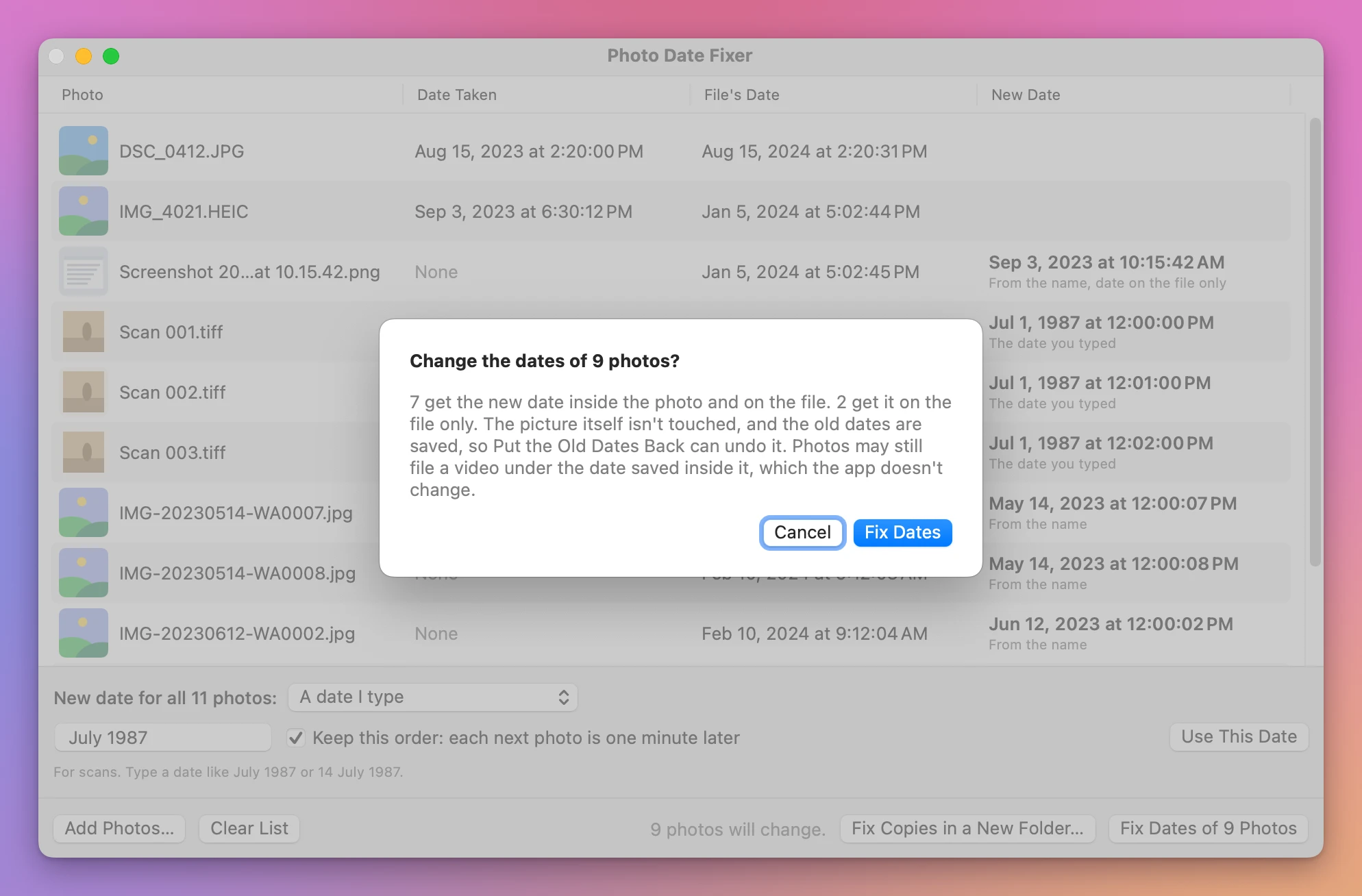
Nothing changes until you click Fix Dates, and the app asks first, saying how many photos will change.
Where the new date comes from
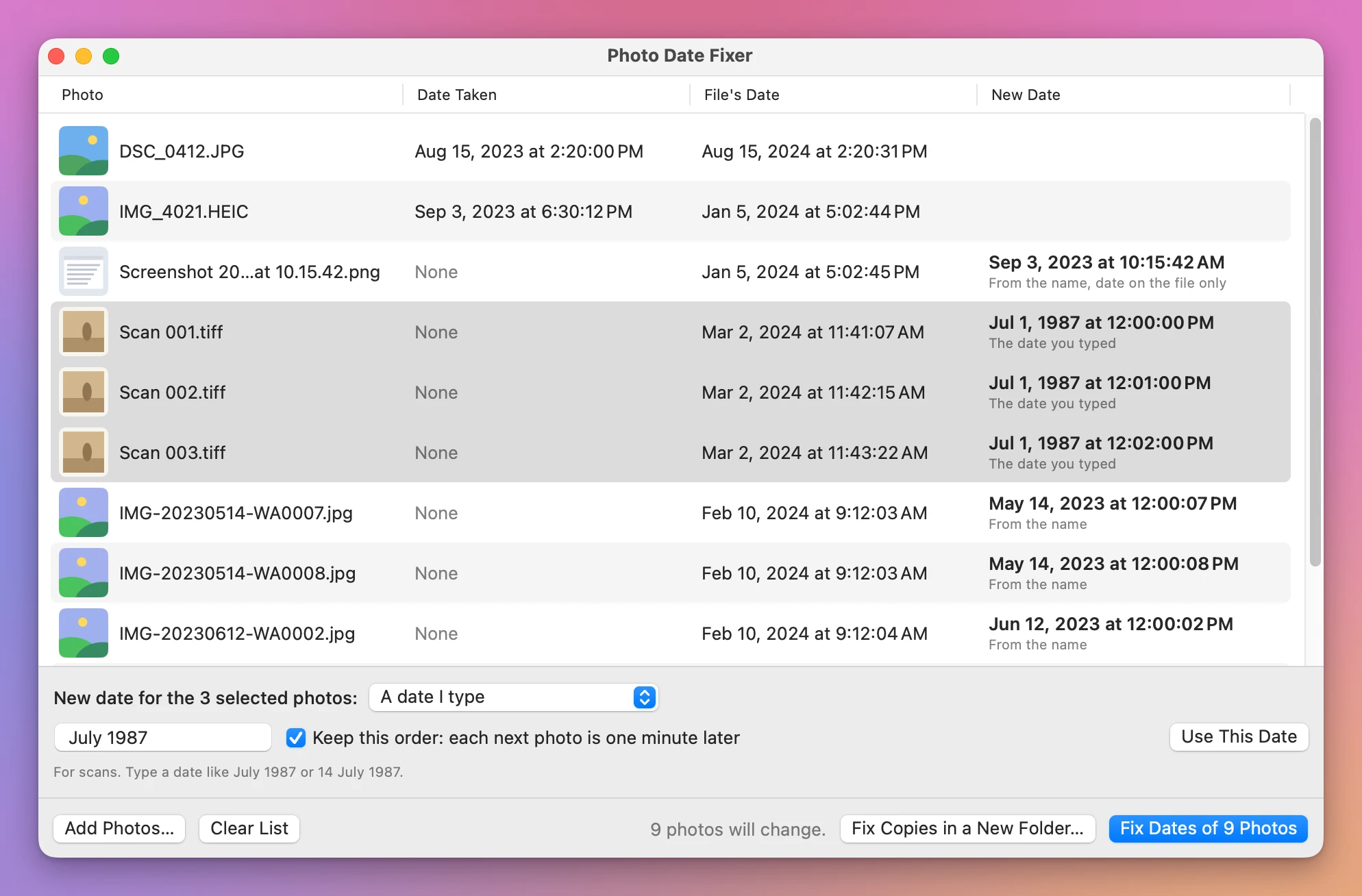
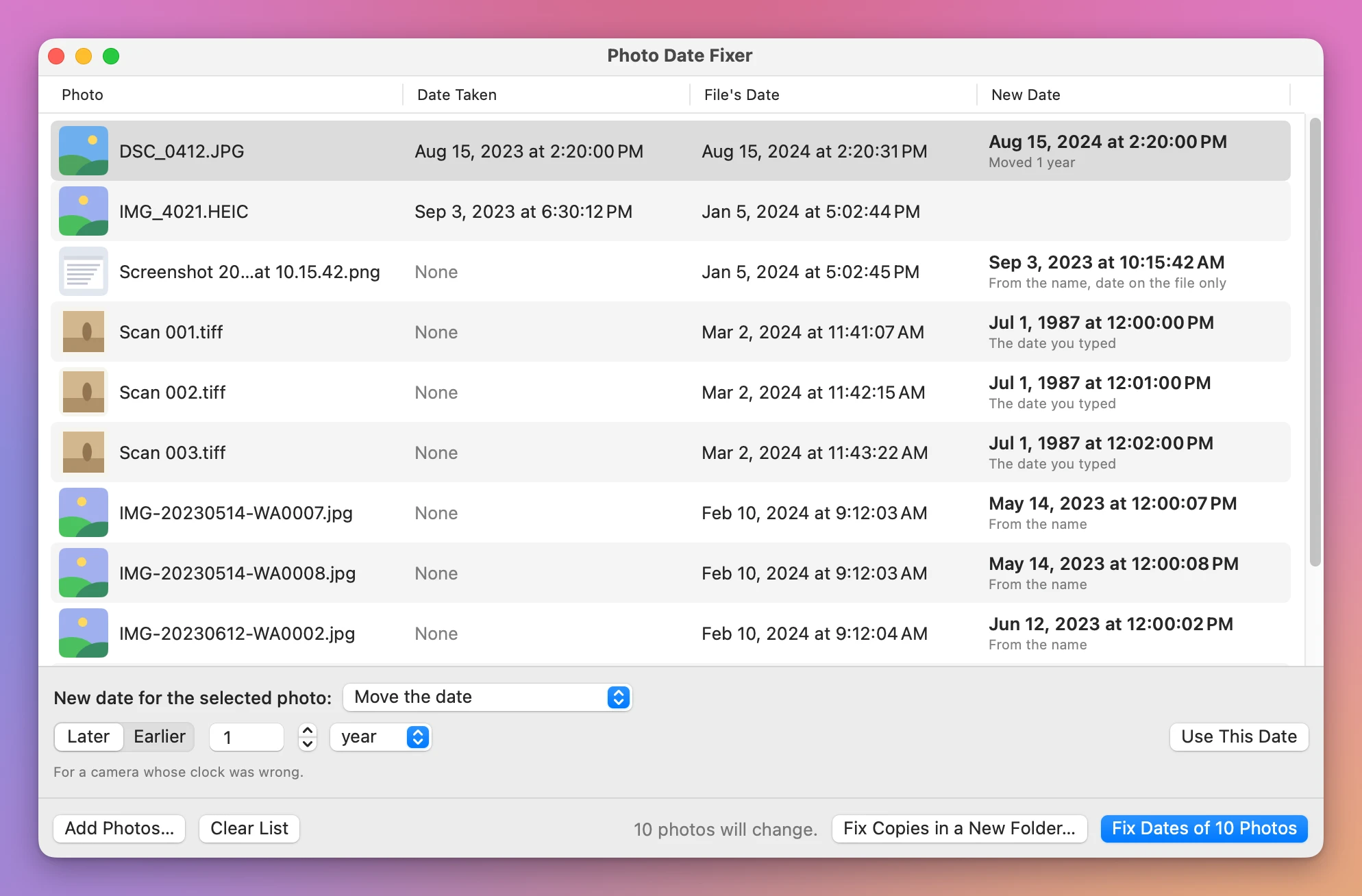
Drop photos or a folder on the window. Each row shows the picture, the date inside the photo (the date taken), the file’s date, and the new date with where it comes from.
- The file’s name. Photos saved from WhatsApp and Android phones, Mac and Android screenshots, and most cameras that put the date in the name get it right away. WhatsApp names have the day but no time. So those photos are set to noon of that day, a few seconds apart in the order WhatsApp numbered them, and they keep their order.
- A date you type, for scans. Type “July 1987” or “14 July 1987”. With Keep this order, each next photo is one minute later, so the scans stay in the order you see them.
- Move the date, for a camera whose clock was wrong: later or earlier by minutes, hours, days or years.
- The file’s date, into the photo, or the date taken, onto the file.
How to use it
- Drop photos or a folder on the window, or click Choose Photos….
- Photos with a date in their name already show the new one. Select the others, pick where their date comes from, and click Use This Date.
- Click Fix Dates, and confirm.
- Import the photos into Photos. They land on the right day.
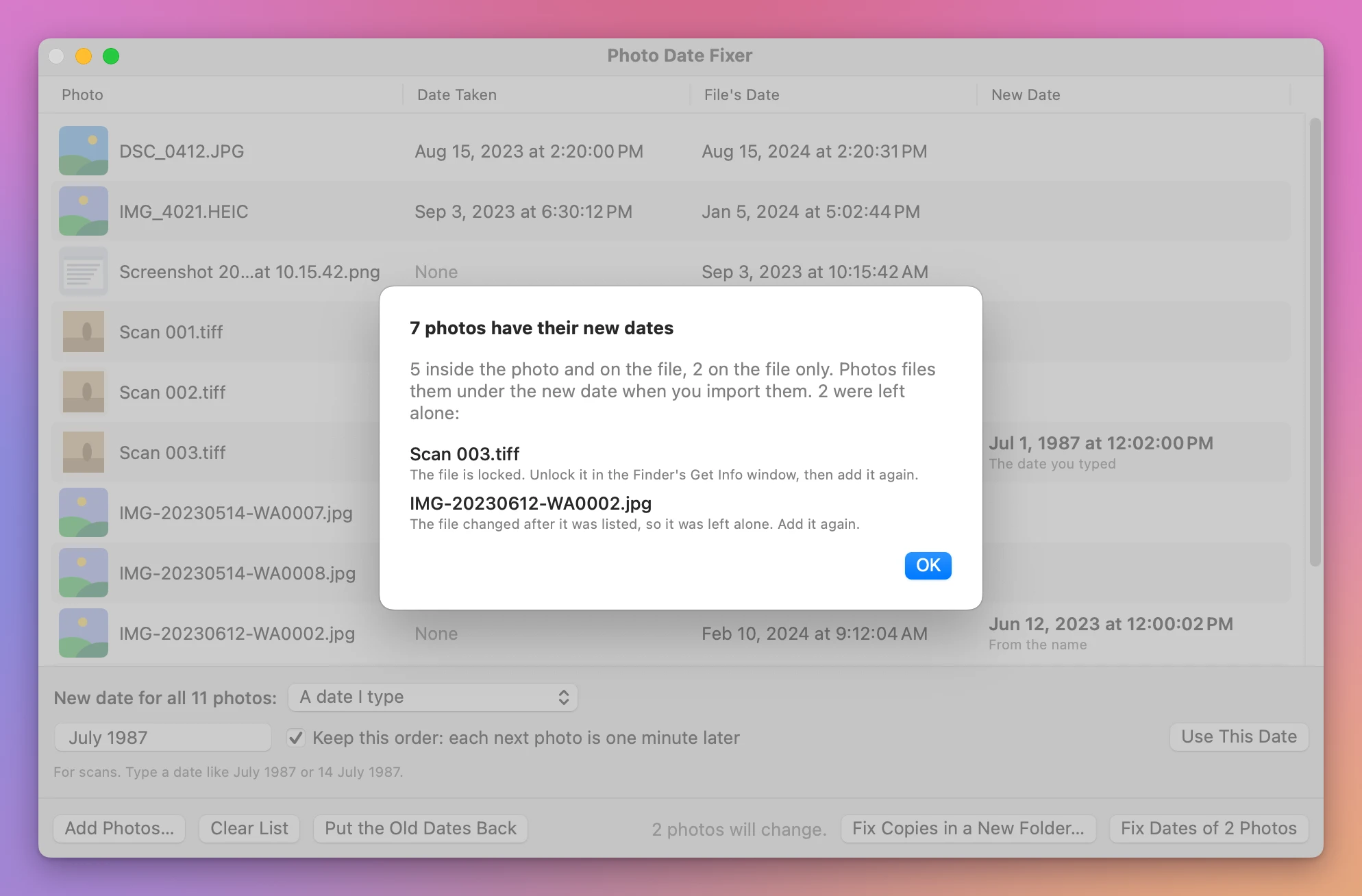
A photo the app can’t change is left alone, and the report says why: a locked file, a drive you can only read, a folder you’re not allowed to change, or a photo that changed after you added it.
What it doesn’t do
JPEG, HEIC and TIFF photos get the new date inside the photo and on the file. PNG and GIF files, RAW files and videos get it on the file only, and their row says so. Photos uses the file’s date for a PNG with no date inside, which I checked. For a video, Photos uses the date saved inside the video when it has one, and the app doesn’t change that, so a video can still land on another day in Photos.
When a photo gets its new date inside, the app writes a new file in its place. So the Finder’s Date Added becomes the time of the fix. Date Created and Date Modified, the ones that matter for sorting, get the new date.
The app never changes your Photos library itself. Fix the photos before you import them. For photos already in Photos, export them first, fix them, and import them again. If you drop a Photos library on the window, it says so and leaves it alone.
I tested it on made-up photos drawn for the purpose, in every format, on a test Mac with its own Photos library. I couldn’t test it with photos from a real phone. One kind of Android name, starting with PXL_, is read as UTC time, which is how those phones are known to write it, but I haven’t checked it on a real phone.
What it needs
macOS 14 Sonoma or later, on Apple silicon and Intel Macs. The app reads only the photos you drop on it or choose, so macOS doesn’t ask for anything when you use it. If you click Put the Old Dates Back after reopening the app, macOS may ask once whether it can change files in your Desktop, Documents or Downloads folder. Click Allow.
Everything happens on your Mac, and your photos never leave it.
Photo Date Fixer is my own app. It’s not made by, affiliated with or endorsed by Apple, WhatsApp or Meta.
Buy Photo Date Fixer and get started
Photo Date Fixer costs $20 including tax, paid once. There’s no subscription.
After buying, your receipt has the app and a license key. Unzip the app and drag Photo Date Fixer to your Applications folder. It’s signed with my Apple Developer ID and checked by Apple, so it opens like any other app you download.
Enter the license key in Photo Date Fixer → License… to get updates automatically. A key works on 3 Macs. Once a day, the app checks for a new version, shows what’s new, and installs it with Install and Relaunch. Your receipt always has the latest version, too.