
Mac & Windows app by Flavio
Podcast Ad Break Checker
Open a podcast episode and the times planned for its midroll ads. See which ones cut into a word, a breath or a music bed, move them to the nearest clean pause, listen to every seam with the real ad read, and export a cue sheet with verified times for your host.
Buy Podcast Ad Break Checker for Mac · $19Buy Podcast Ad Break Checker for Windows · $19Buy once, use forever. Up to 3 computers you own (license). Plus tax where it applies. Mac and Windows versions are sold separately.
macOS 14 or later (Apple silicon and Intel) · Windows 10 and Windows 11 (x64 and ARM64)
Latest Mac version 1.0.0, released November 28, 2026
The episode is mixed, and the sponsor list says three midrolls: 12:41, 24:08 and 37:55. Those times came from a rough cut, or from someone’s notes, or from the host saying “around the 12-minute mark”. Your podcast host will insert the ads at exactly those milliseconds.
If 12:41 falls in the middle of “workbench”, every listener hears “work-” then a coffee ad then “-bench”. Checking by hand means jumping to each time in your editor, zooming in, playing a few seconds before and after, moving the marker, and writing the new time down. For three breaks that’s ten minutes. For a back catalog where every episode gets new ad slots, it’s an afternoon.
Podcast Ad Break Checker does the looking for you. It tells you what each cut lands on, moves it to the nearest clean pause with one click, plays the seam with the real ad read so you hear what listeners will hear, and saves the verified times in the format ad hosts ask for.
Watch a 30-second demo of Podcast Ad Break Checker:
Who it’s for
- Independent podcasters selling their own midrolls. You read the Cedar Roasters spot once, upload it to your host, and type the break times into its dynamic ad insertion form. You want each one in a real pause before 40,000 downloads hear it.
- Producers who hand times to a network or ad team. They ask for a CSV with
HH:MM:SS.mmmand seconds. You send one that’s been checked, with a PDF saying which breaks moved and by how much. - Editors working from a client’s notes. The client writes “ad after the listener question, around 24 minutes”. You import their list, snap it to clean pauses, and send back the report.
- Shows refreshing ads in the back catalog. New sponsor, new slots, 60 old episodes. You open each episode, paste the times, export, and move on.
- Hosts who edit in Audacity or REAPER. Your markers are already in the project. Import them, check them, and import the verified ones back.
How it works
- Click Choose an Episode…, or drag the episode, the ad read and a list of times onto the window together. WAV, AIFF, M4A, MP3, FLAC and CAF all open. To try it first, click Try Example Episode.
- Add the break times: type one in Add a break and press Return, click Paste Times…, or click Import Markers… for a CSV, Audacity labels or REAPER markers.
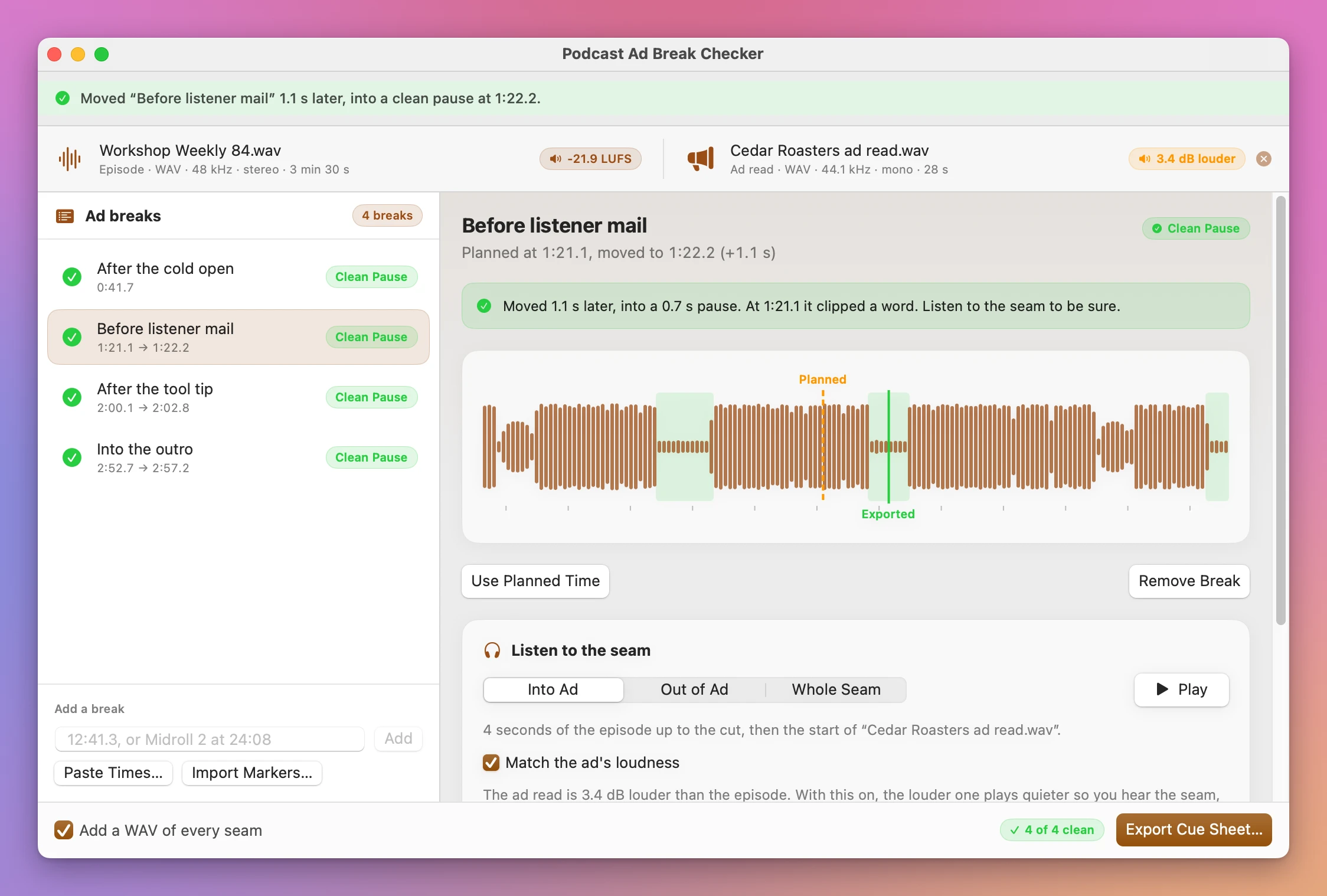
- Each break gets a verdict: Clean Pause, Clips a Word, Mid-Breath or Music Bed Jump. Click one to see the sound around the cut.
- Click Snap to Clean Pause, or snap them all with the button at the bottom.
- Under Listen to the seam, pick Into Ad, Out of Ad or Whole Seam and click Play.
- Click Export Cue Sheet… and pick a folder.
What you get
A verdict for every cut
The app reads the episode once and measures its level every 10 milliseconds. A cut inside at least a quarter of a second of quiet, close to the room tone between your phrases, is a Clean Pause. Soft, airy sound between the room and your voice is a breath, so a cut there is Mid-Breath. When the gaps between words stay filled with steady sound, there’s music under the voice, and a cut there is a Music Bed Jump: the music stops dead before the ad and jumps back in after it. Anything else is Clips a Word.
Each break shows the sound six seconds on each side, with the clean pauses shaded green, the planned time and the nearest clean pause marked.
Snap to Clean Pause
For every break that isn’t clean, the app looks up to 5 seconds each way for the nearest pause long enough for an ad, with nothing playing under it. Snap to Clean Pause moves the break there. Use Planned Time moves it back. The list shows both times, like 1:21.1 → 1:22.2.
Hear the seam before your listeners do
Into Ad plays 4 seconds of the episode up to the cut, then the start of your ad read. Out of Ad plays the end of the ad read, then 4 seconds from the cut. Whole Seam plays all of it. Without an ad read, a second of silence stands in for the ad.
The app also measures the loudness of the episode and the ad read. If the ad is 3.4 dB louder, it says so, and with Match the ad’s loudness on it plays the louder one quieter, so you judge the cut and not the jump in volume. Hosts that insert ads don’t always even out the level, so check it before you send the ad file.
A cue sheet for your host
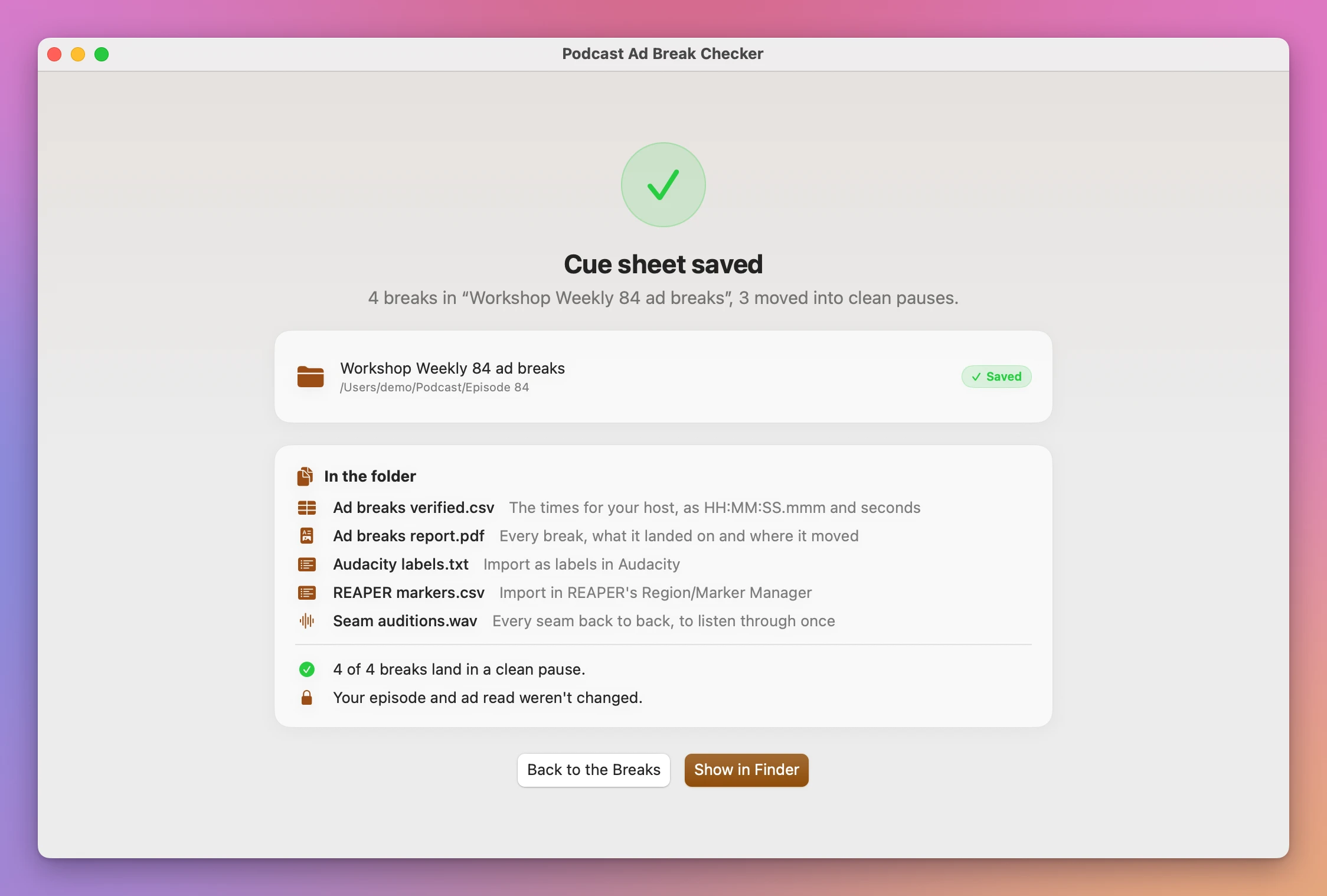
Export Cue Sheet… makes a new folder inside the one you pick (the panel opens next to your episode), with:
- Ad breaks verified.csv, with each break’s original and verified time as
HH:MM:SS.mmmand as seconds, the shift, and what each time landed on. - Ad breaks report.pdf, the same as a page you can send to the sponsor or the ad team.
- Audacity labels.txt and REAPER markers.csv, to put the verified markers back into your project.
- Seam auditions.wav, if you want it: every seam back to back, to listen through once before you publish.
Why not do it by hand
Any editor can check an ad break. Jump to 12:41, zoom in, play from 12:37, look at the waveform, drag the marker into the gap, write down the new time, and do it again for the next one. In Audacity you can even import the times as a label track and export the moved labels.
That works. It’s also the part that gets skipped when the episode goes out at 6 a.m., and it’s easy to get wrong: a marker that looks like it’s in a gap can sit on a breath, and a cut under a music bed looks fine on a waveform until you hear the music stop. Nothing in an editor plays the ad right after the cut, at matched loudness, unless you build that session yourself.
| By hand in your editor | Podcast Ad Break Checker | |
|---|---|---|
| Finds what’s under each cut | You, by eye and ear | A verdict for every break |
| Finds the nearest clean pause | You scrub for it | Within 5 seconds, one click |
| Hears the cut with the real ad | Only if you paste the ad in | Into Ad, Out of Ad, Whole Seam |
| Loudness of the ad against the episode | You measure it | Shown, and matched while you listen |
| Times for the host | Typed by hand | CSV with HH:MM:SS.mmm and seconds |
| A record of what moved | No | PDF report, Audacity labels, REAPER markers |
What it doesn’t do
- It doesn’t put the ads into your episode or upload anything to your host. You paste or upload the verified times yourself.
- It doesn’t edit your audio. Your episode and ad read are only read.
- It listens to the sound, not the words. It can’t tell a sentence that ends from a speaker who takes a long pause mid-thought, so listen to every seam.
- With music under the whole episode, or a speaker who never stops, there may be no clean pause within 5 seconds. The app says so and keeps your planned time.
- The times are from the start of the file you open. If your host adds an intro or trims silence when you publish, check against the published file.
- One ad read at a time is used for the auditions.
Questions
Is my episode uploaded anywhere?
No. Everything happens on your computer. The app connects to my update server only to check for new versions.
Which files does it open?
Episodes and ad reads in WAV, AIFF, M4A, MP3, FLAC and CAF. Break times as typed or pasted lines (12:41.3, 00:12:41.300, 761.3, Midroll 2 at 24:08), a CSV with a time column, Audacity labels, or REAPER’s marker CSV.
Will the CSV work with my podcast host?
It has each time as HH:MM:SS.mmm and as seconds, which covers the forms ad insertion tools ask for. Hosts take times in their own form or field, so you copy them from the CSV into it. Podcast Ad Break Checker isn’t made by, affiliated with or endorsed by Audacity, Cockos (REAPER), any podcast host or Apple.
What does it need?
macOS 14 Sonoma or later, on an Apple silicon or Intel Mac. It asks for no permission.
Buy Podcast Ad Break Checker
$19 plus tax where it applies, paid once. You get the app as a download, signed and notarized by Apple, and a license key for updates. The app opens and works without the key: it asks for it once, the first time it installs an update.