How to download every episode of a podcast on a Mac
By Flavio
Podcast apps download episodes for listening inside the app. To keep your own copy of a whole show as files, with dates in the names and the show notes, archive its feed into a folder.
A show you love is ending, and the host says the feed will come down in a few months. Or you’d just like your own copy of a podcast, as files on your Mac, before an episode or two quietly disappear.
The short answer: every podcast has a feed, a list of every episode with a link to its audio file. You can download those files one by one from the show’s website, or have an app read the feed and download them all into a folder. Podcast Archive Collector is the app I built for that.
Can’t Apple Podcasts download the episodes?
It can, for listening. Apple Podcasts on the Mac downloads episodes so you can play them offline. Those downloads are meant to be played inside the Podcasts app. You don’t choose the folder they go in, and the show notes stay in the app.
That’s fine if all you want is to listen on a plane. It’s not a copy you keep and manage yourself, in a folder you can back up, copy to another drive or open in ten years.
Episodes you pay for inside Apple Podcasts are a different story. They aren’t in a feed you can download from, and nothing in this article gets them.
How do I download podcast episodes for free?
Many shows have a website with a page for each episode, and some of those pages have a download link. In Safari, Control-click the link and choose Download Linked File. The file lands in your Downloads folder.
This works, and it costs nothing. For a show with 200 episodes, it has some catches:
- It’s one episode at a time. 200 episodes is 200 pages and 200 clicks.
- The names don’t help. Files often arrive as
episode.mp3, or a name full of tracking codes, with no date. Sorting them by date means renaming each one. - The show notes stay on the website. If the site goes away, so do the descriptions and links.
- A failed download is easy to miss. You find out months later that one episode never finished.
- Next month you start over, working out which episodes are new.
Not every show has download links on its site. Every podcast has a feed, though, because that’s how podcast apps find the episodes.
Where do I find a podcast’s feed address?
On the show’s website, look for a link labeled RSS or Feed. Some podcast apps can also copy a show’s feed address. It often ends in .xml or /feed, or has rss in it.
Members-only feeds, the kind a show gives you with a paid membership, are feed addresses too, with a private key in them.
How do I download every episode at once?
Podcast Archive Collector reads the feed, shows you every episode before anything downloads, and saves the ones you pick into a folder named after the show. It costs $19, paid once.
The show in these screenshots is made up: “The Tidewater Workshop”, nine short episodes served from a test server on the Mac, so the addresses start with 127.0.0.1. A real feed has the show’s own address. The screens are from macOS 15.
- Copy the feed address and click Paste Feed Address, or type it in the Podcast feed field.
- Click Choose… under Save archives in and pick a folder, like
Podcastsin your home folder. - Click Show Episodes.
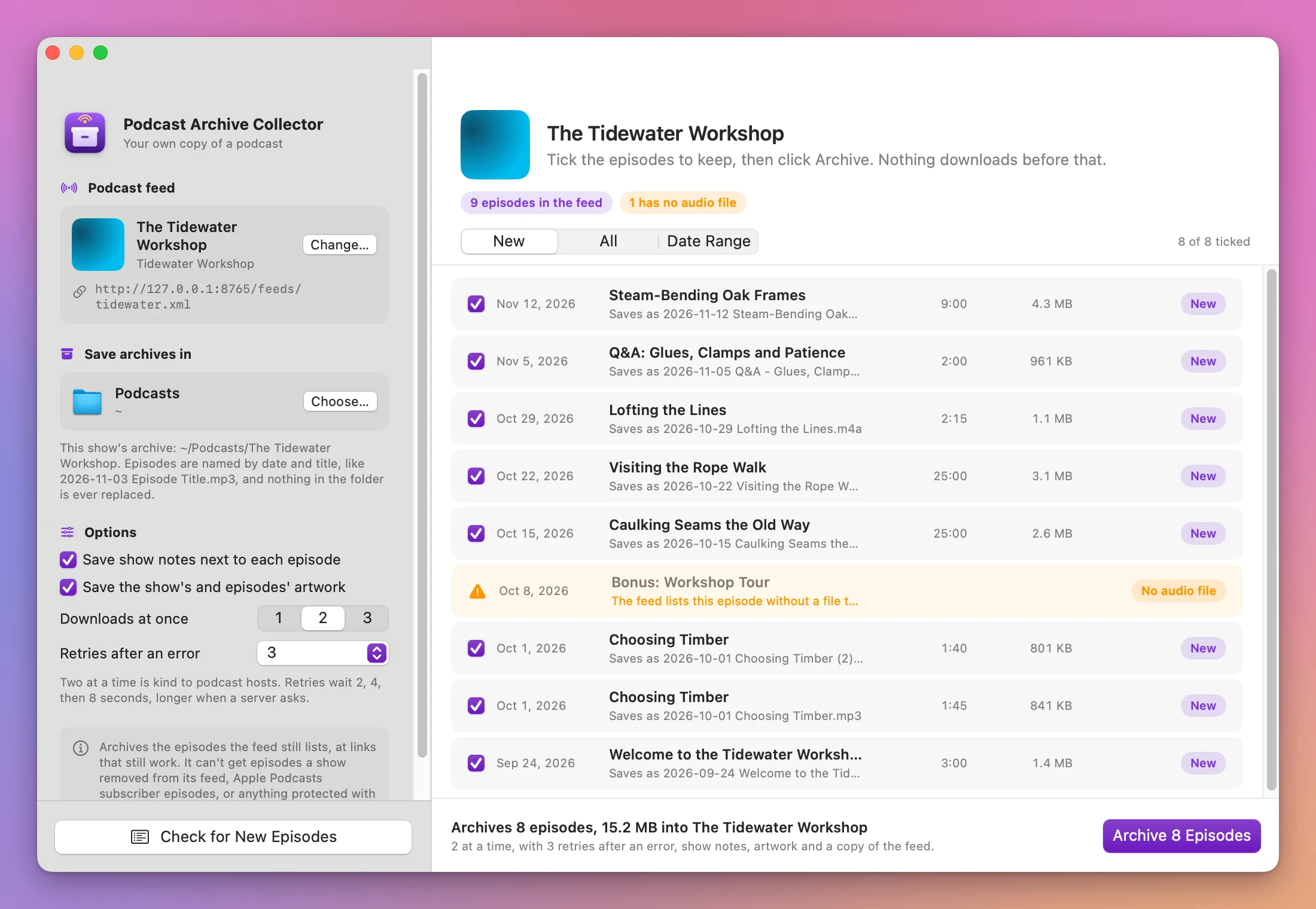
Nothing has downloaded yet. Each row says what the file will be called: the date first, then the title. New ticks everything you don’t have, All ticks every episode, and Date Range ticks a season between two dates. Here, one episode is a bonus that the feed lists without any audio, so there’s nothing to download for it.
- Click Archive 8 Episodes.
Two episodes download at a time, so the show’s server isn’t flooded. When a server has a hiccup, the app waits a few seconds and tries again:
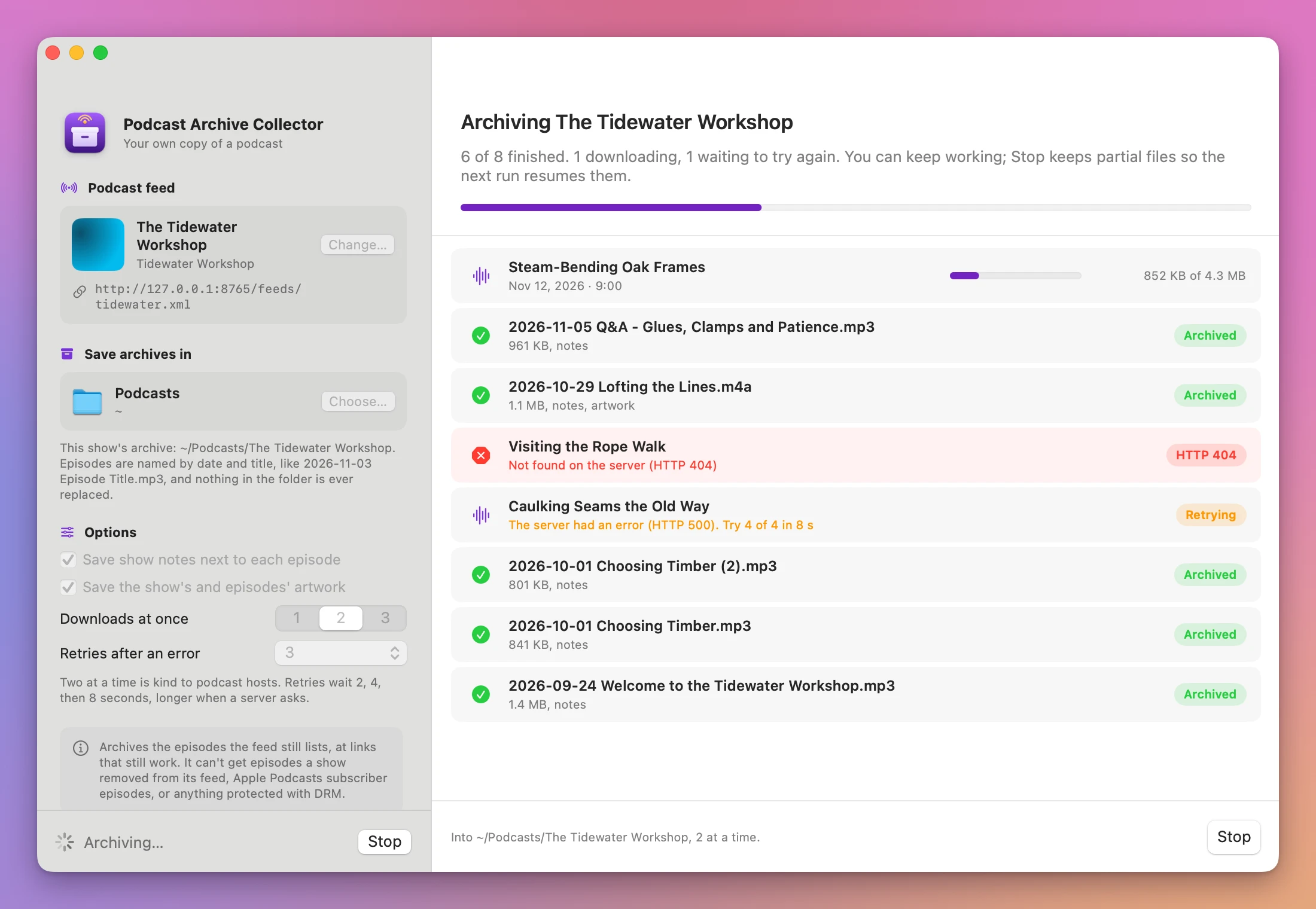
The test server was set up to fail on purpose for two episodes: one file is gone, and one server keeps answering with an error. The result screen lists them first, with the reason, and Try 2 Failed Episodes Again gives them another go:
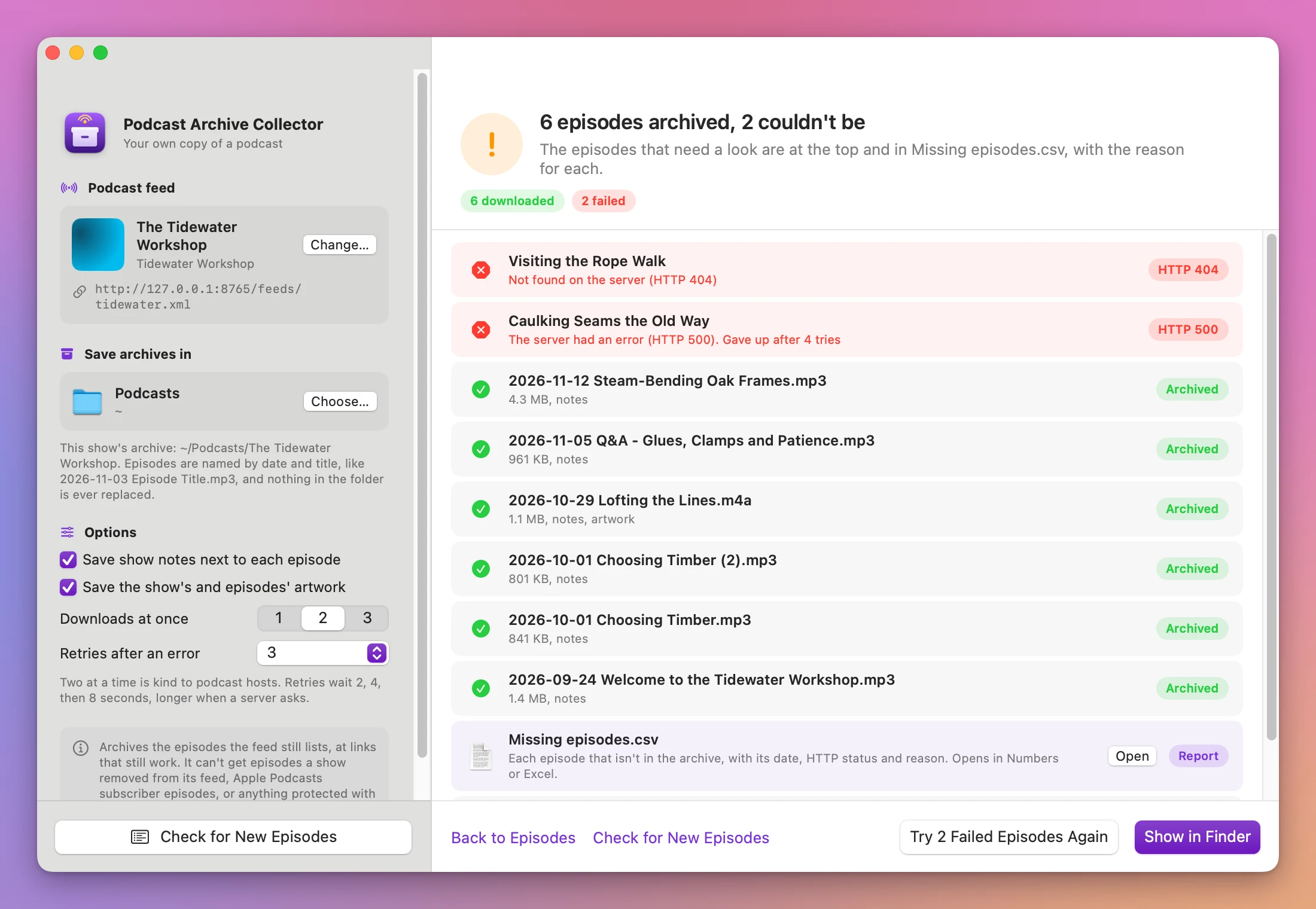
The app made a folder for the show, Podcasts/The Tidewater Workshop, and Show in Finder opens the Episodes folder inside it. Next to Episodes are the show’s artwork (cover.jpg), a copy of the feed (feed.xml) and Missing episodes.csv. The episodes look like this:
2026-09-24 Welcome to the Tidewater Workshop.mp32026-09-24 Welcome to the Tidewater Workshop.html2026-10-01 Choosing Timber.mp32026-10-01 Choosing Timber (2).mp32026-10-29 Lofting the Lines.m4a2026-10-29 Lofting the Lines.html2026-10-29 Lofting the Lines.jpg
Each .html file is the episode’s show notes, which open in any browser. The .jpg is the episode’s own artwork. Two different episodes were both called “Choosing Timber” on the same day, so the second one got (2) instead of replacing the first.
Missing episodes.csv opens in Numbers and has one row for each episode you don’t have:
| Date | Episode | Result | Reason |
|---|---|---|---|
| 2026-10-22 | Visiting the Rope Walk | Not archived | Not found on the server (HTTP 404) |
| 2026-10-15 | Caulking Seams the Old Way | Not archived | The server had an error (HTTP 500). Gave up after 4 tries |
| 2026-10-08 | Bonus: Workshop Tour | No audio file in the feed | The feed lists this episode without an audio or video file |
How do I get only the new episodes later?
The show’s folder remembers what’s in it. Here, the test feed then changed: a new episode was added, and the Q&A episode was removed. Check for New Episodes ticked only what was missing:
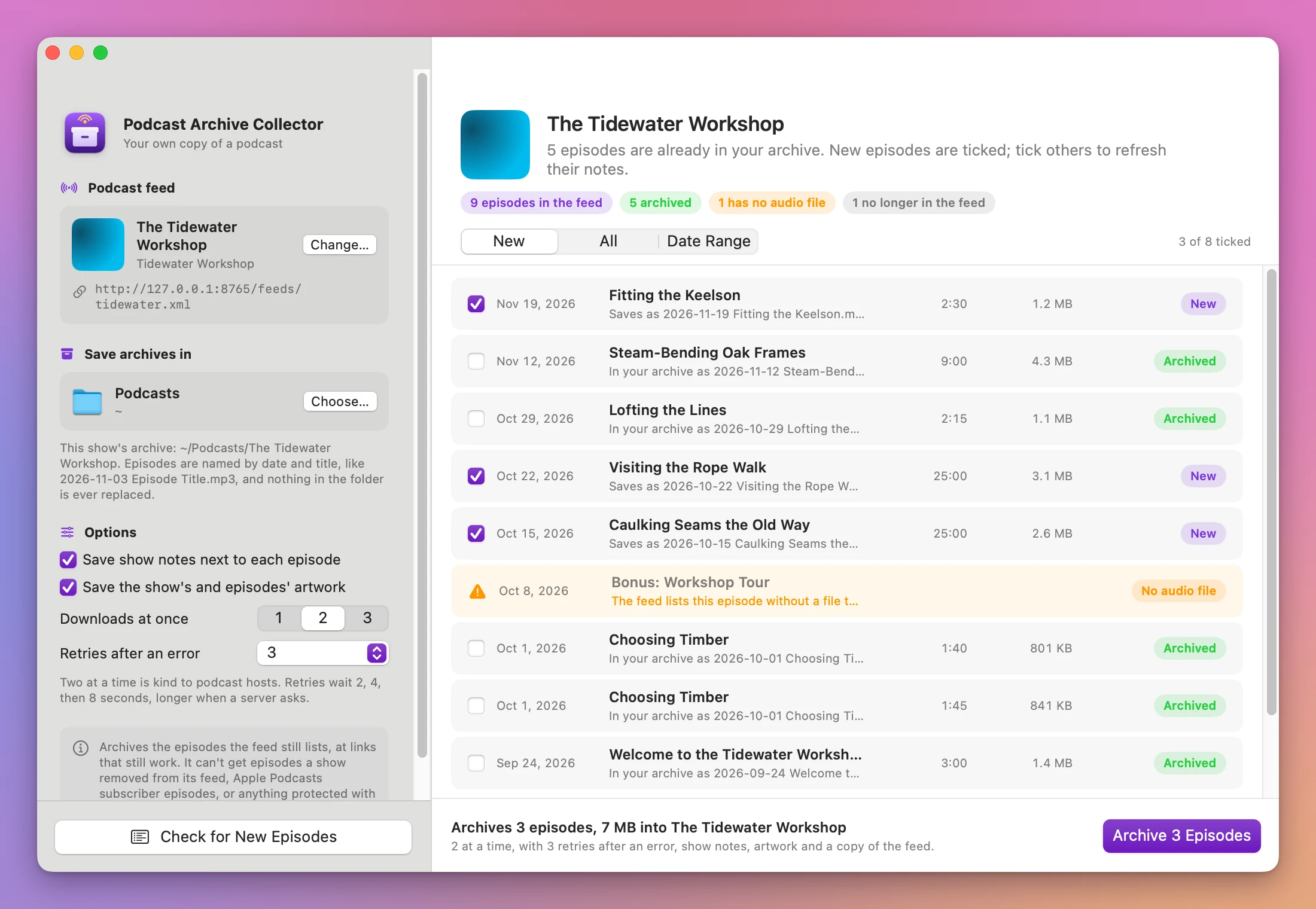
The removed Q&A episode stayed in the folder, and the preview lists it as kept. After quitting the app, Open Archive… reopens the show’s folder without pasting the feed again.
Which way should I use?
| Download links on the website | Podcast Archive Collector | |
|---|---|---|
| Where the episodes go | Downloads folder | A folder per show, where you choose |
| File names | Often episode.mp3, no date | 2026-10-29 Lofting the Lines.m4a |
| Show notes | On the website | .html file next to each episode |
| 200 episodes | 200 clicks, if the site has links | One click |
| Failed downloads | You notice, maybe | Retried, then listed with the reason |
| New episodes later | Work out which ones are new | Check for New Episodes |
| Cost | Free | $19, paid once |
For listening, keep using your podcast app. For two or three episodes, the website’s download links are enough. When you want the whole show as files you keep, archive the feed.
What it can’t download
The app gets what the feed still lists, at links that still work. If a show already removed old episodes from its feed, those are gone for the app too, and some feeds only list the newest episodes. Episodes you pay for in Apple Podcasts, and anything with copy protection, can’t be downloaded. A member feed works when its private key is part of the feed address, which the app then hides on screen.
To download a list of files that isn’t a podcast, see how to download all the files in a list of links.
Get Podcast Archive Collector
Paste a podcast's feed address and download every episode it still lists into one folder, named by date and title, with show notes and artwork. Later runs get only the new episodes, and a CSV lists what's missing and why.
See Podcast Archive Collector → · Read the docs · $19. See the app page for tax details.
Want me to talk about your product? You can sponsor this site.