Find orphan and weakly linked pages, and add internal links where they fit
By Flavio
Updated
Run SEO Bot's Internal Links check, read the suggested source page, anchor and paragraph for each link, skip the ones that don't fit, and let the follow-up check what changed.
An orphan page is a page no other page on your site links to. Google can still find it through the sitemap, but readers never land on it from another post. A weakly linked page is close to that: one or two links from other pages’ content, and nothing else.
SEO Bot finds both with its Internal Links check. It crawls the site and, for each weak page, looks for a paragraph on another page that already mentions its topic. Then it tells you which words to turn into a link.
I’ve run it on flaviocopes.com since October. The numbers in this tutorial come from those reports.
Run Internal Links
Internal Links needs no account. In the app, add the site with File → Add Site… (⌘N), open Internal Links in the sidebar and click Run.
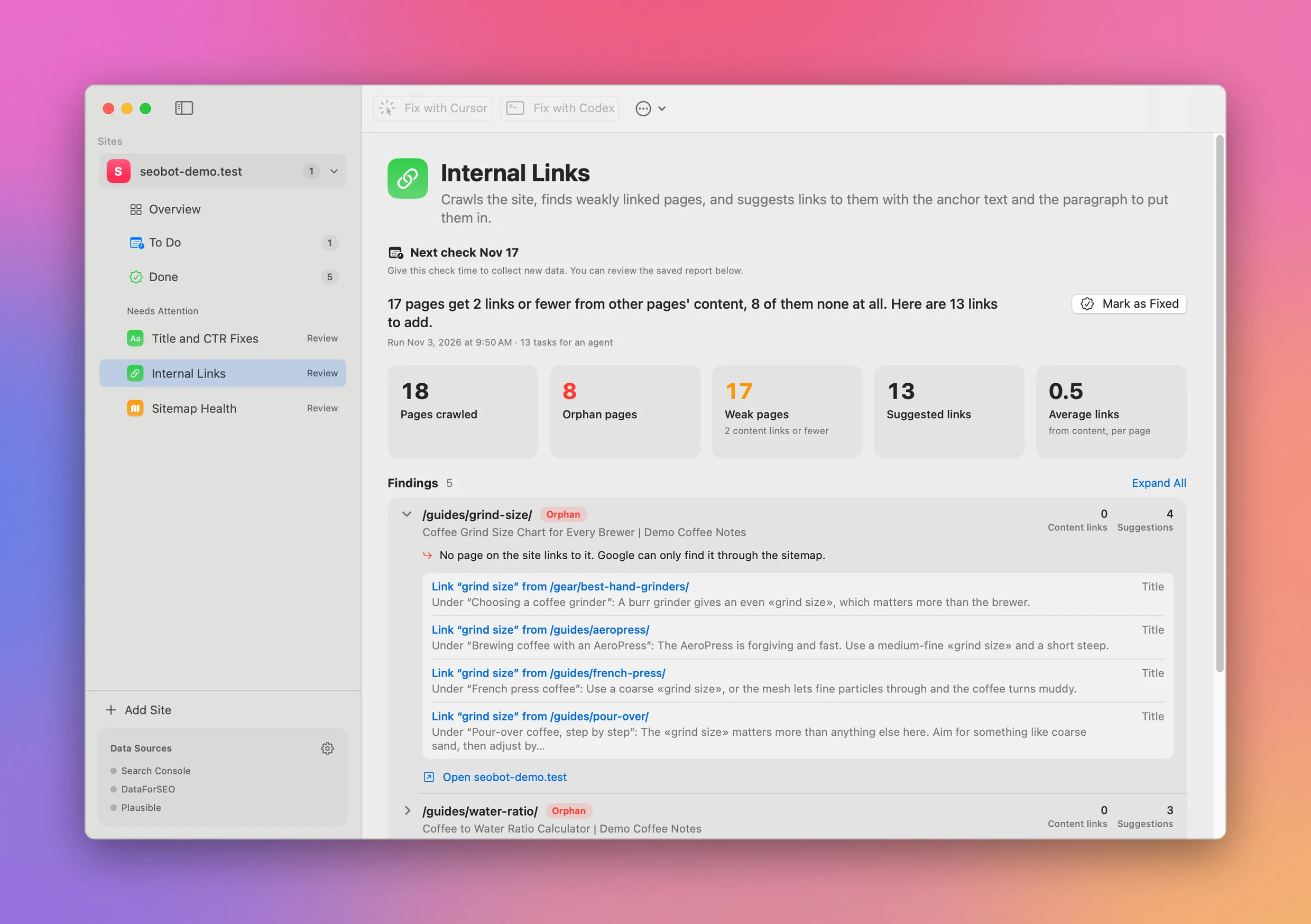
The same check runs in the terminal. Choose SEO Bot → Install Command Line Tool… in the menu bar, which links seobot at ~/.local/bin/seobot, then:
seobot run internal-links --site flaviocopes.comThe crawl stops at 5,000 pages. Pass --max-pages 10000 for a bigger site.
If the site has a source folder linked in Site Settings (or seobot add with --source) and it’s an Astro 7.2 or later project, SEO Bot builds it and crawls a local preview instead of the live site. That way you can check links you haven’t deployed yet.
Connect Search Console in the app’s Settings and the report gets better in two ways. Suggested anchors come from the searches Google already shows the page for, before falling back to its title. And pages with more impressions go to the top of the list.
Read the report
Every run is saved. List the ones for a site:
seobot reports --site flaviocopes.com --tool internal-links --limit 4ID SITE TOOL DATE FIXED SUMMARY
0d3d52f3 flaviocopes.com internal-links 2026-11-02 00:30 fixed Nov 2 2,320 pages get 2 links or fewer from other pages' content, 51 of them none at a
b40a086e flaviocopes.com internal-links 2026-10-21 01:02 fixed Oct 26 2,326 pages get 2 links or fewer from other pages' content, 50 of them none at a
98fe8443 flaviocopes.com internal-links 2026-10-14 11:01 fixed Oct 14 2,342 pages get 2 links or fewer from other pages' content, 49 of them none at a
4e5cf47a flaviocopes.com internal-links 2026-10-14 10:35 2,842 pages get 2 links or fewer from other pages' content, 8 of them none at alPrint the newest one as Markdown:
seobot report latest --site flaviocopes.com --tool internal-linksIt starts with the totals:
2,320 pages get 2 links or fewer from other pages' content, 51 of them none at all. Here are 82 links to add.

## Numbers

- Pages crawled: 4,879
- Orphan pages: 51
- Weak pages: 2,320 (2 content links or fewer)
- Suggested links: 82
- Average links: 9.3 (from content, per page)
Links in the menu, header, footer and sidebar don’t count as content links. An orphan has no links at all, not even from a menu.
Then there’s one section per page. This is a lesson Google showed 468 times, linked from only 2 other pages:
### /courses/linux-basics/ubuntu-releases-and-lts/

https://flaviocopes.com/courses/linux-basics/ubuntu-releases-and-lts/
File: src/course-content/linux-basics/ubuntu-releases-and-lts.md
2 links · Ubuntu releases and LTS
Content links: 2 · Suggestions: 1 · Impressions: 468

- Only 2 pages link to it from their content.
- Google already shows it: 468 impressions at position 18.5 in the last 28 days. More links can move it up.

  - **Link “Ubuntu LTS” from /secure-vps/** (Search): Under “What you need”: Use a spare «Ubuntu LTS» VPS for the first run. The shell commands in the server sections assume Bash, sudo, and… <https://flaviocopes.com/secure-vps/>
The suggestion names the source page, the heading it sits under, and the words to link, between « ». (Search) means the anchor came from a search the target page gets. (Title) means it came from the page title.
Each page gets up to 5 suggestions. The list has up to 40 pages with suggestions, followed by up to 10 pages that Google shows but that no other page mentions. Those you link by hand.
On a site this size the list fills up with weak pages that already get impressions, so the 51 orphans are counted but none of them made it into the list. On a small site like the demo in the screenshot, orphans show up with an Orphan tag.
Keep the suggestion, or skip it
SEO Bot matches words. You check the meaning. Open the paragraph and ask if the anchor, in that sentence, means the page it would point to.
Here’s one I skipped in the November 2 report:
- **Link “browser task” from /tinyfish/** (Title): Under “Create an account and try the playground”: Create an account at the TinyFish dashboard. The playground lets you try a «browser task» before writing code. <https://flaviocopes.com/tinyfish/>The target was the event loop lesson, titled “Browser task queues and a responsive page”. In the TinyFish post, a browser task is a job you hand to TinyFish’s browser automation, something else entirely.
The first Internal Links fix on flaviocopes.com, on October 6, added 49 links from the report and skipped 53 suggestions. The note on that fix lists why:
| Why the suggestion was skipped | Count |
|---|---|
| The anchor meant something else | 26 |
| The page would link to its own copy in a course lesson | 10 |
| It wouldn’t help a reader | 10 |
| Already linked in the same spot | 4 |
| Duplicate anchor | 2 |
| The paragraph was plain text in a data file, not a page | 1 |
The same fix added 8 links by hand to pages the report couldn’t match.
Edit the files, or hand them to an agent
The report also has a Tasks section with the exact text to search for. With a source folder linked, it’s grouped by file:
### src/posts/secure-vps.md

Page: https://flaviocopes.com/secure-vps/

- [x] Link “Ubuntu LTS” to /courses/linux-basics/ubuntu-releases-and-lts/, in the section “What you need”.
  Find: “Use a spare Ubuntu LTS VPS for the first run. The shell”
That’s enough to make the edit yourself. Or click Fix with Cursor or Fix with Codex in the report’s toolbar. From the terminal:
seobot prompt latest --site flaviocopes.com --tool internal-links --codexThat opens a new Codex chat in the site’s folder with the prompt filled in. Codex doesn’t run it until you send it. --cursor does the same in Cursor’s Agents window. Review the diff the same way you’d review the suggestions, since the agent works from the same matches.
Mark it fixed and wait a week
Once the links are live, mark the report fixed. Use Mark as Fixed in the app, or seobot fixed with a note. Pass --skip for every finding you didn’t act on:
seobot fixed latest --site flaviocopes.com --tool internal-links \
  --skip /courses/git/what-a-remote-is/ \
  --note "Added 23 links. Skipped git remote: the changelog paragraph names a different page."
The --skip part matters for the follow-up. Marking a report fixed adds a to-do to run Internal Links again 7 days later and count how many of the fixed findings are gone. Every finding you didn’t skip counts as one you fixed.
On October 26, the October 21 report was marked fixed with 50 findings, but links went in for 7 of them. This is how the follow-up read in seobot todo:
Overdue
  Nov 2   0480fda1  flaviocopes.com  Run Internal Links again and check whether the new links are live and the pages are better linked, for the 50 fixes from Oct 26.
    The run on Nov 2 no longer flags 18 of the 50 fixed findings. 32 are still there.
Skipping the 43 untouched findings would have made that number mean something. While the app is open, it runs these follow-ups on its own when they’re due, and the Dock icon counts what’s waiting.
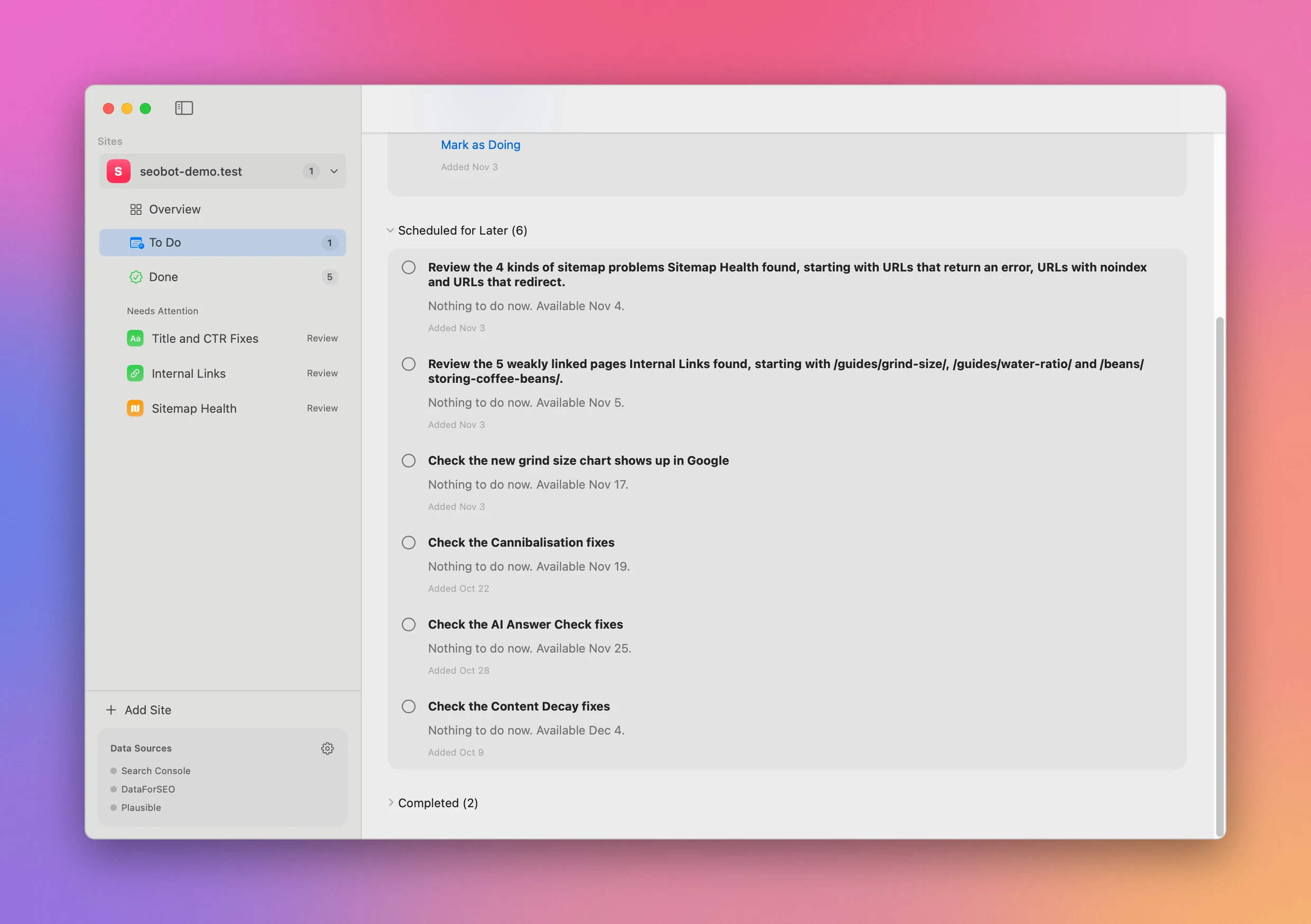
If a page is still flagged after a week, check that the deploy went out, then open the new report. Its page section shows the current number of content links, so you can see if your link was counted.
Get SEO Bot
Run 16 SEO checks on your websites and turn each report into concrete work for you, Cursor or Codex. Includes a native Mac app, CLI and full MIT source.
See SEO Bot → · Read the docs · $20. See the app page for tax details, with full source code.
Want me to talk about your product? You can sponsor this site.