.Spotlight-V100, .fseventsd and .Trashes: the hidden folders a Mac puts on a USB drive
By Flavio
A Mac leaves three hidden folders at the top of every USB stick and memory card it uses. Here's what each one holds, how big they were on a test stick, which ones come back, and which ones you can remove.
If a Windows PC shows folders you never made at the top of your USB stick, called .Spotlight-V100, .fseventsd and .Trashes, your Mac made them. It makes the first two when you plug the stick in, and the third the first time you delete something from it.
| Folder | What it is | Made when |
|---|---|---|
.fseventsd | macOS’s log of what changed on the stick | Every time the stick is plugged in |
.Spotlight-V100 | Spotlight’s index of the stick, so you can search it | When Spotlight indexes the stick |
.Trashes | The stick’s own Trash | The first time you move a file from the stick to the Trash |
What does the Finder show?
I used a stand-in USB stick: a disk image formatted FAT32 like most sticks, named CAR USB, with a Road trip folder of six made-up songs, on macOS Sequoia. On the Mac it acts like a real stick, except that plugging it in and taking it out is opening and closing a file. Spotlight was off on that test Mac, so I turned it on for the stand-in.
I’d moved one song, 04 Petrol Station Blues.mp3, to the Trash. Then I pressed Command-Shift-Period, which shows hidden files in the Finder:
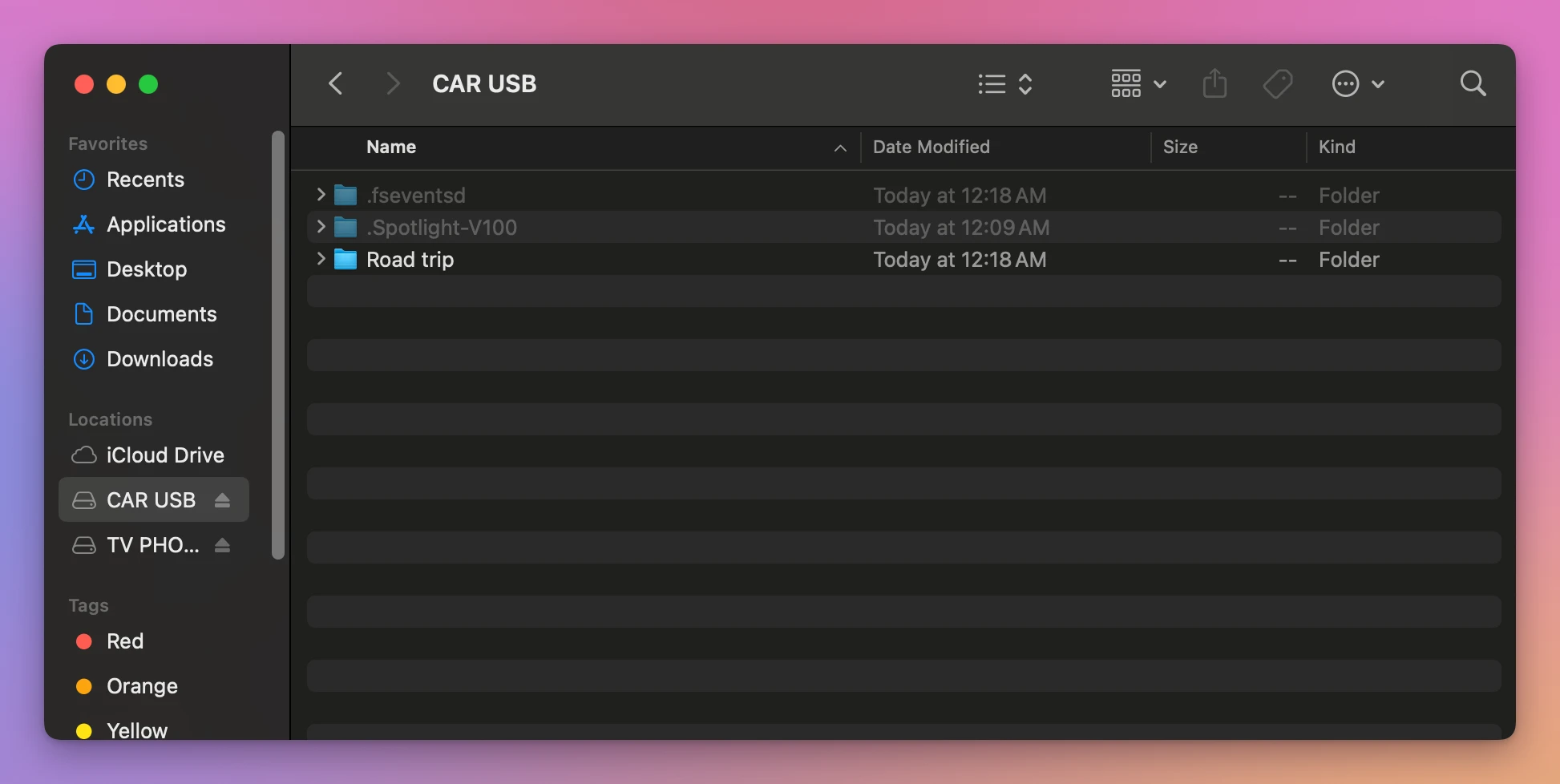
Two of the three show up, dimmed. .Trashes doesn’t, even though it held the song. The tutorial about hidden files on a USB drive has what else that shortcut leaves out.
.fseventsd
Apple’s documentation for developers says macOS keeps its record of file changes in a .fseventsd folder at the top of each volume, readable only by the system (File System Events Programming Guide). Apps use that record to find out what changed while they weren’t running.
On the stand-in it was tiny: one file of 36 bytes. And it came back. Every time I plugged the stick in, a new .fseventsd was there, even right after removing it.
I selected it in the Finder and chose File > Move to Trash. The Finder didn’t ask anything, and the folder moved into the stick’s own Trash, so it was still on the stick. The next time I plugged it in, there was a new one at the top.
.Spotlight-V100
This is where Spotlight keeps what it learned about the files on the stick, so they show up when you search. With hidden files on, I selected it and chose File > Get Info:
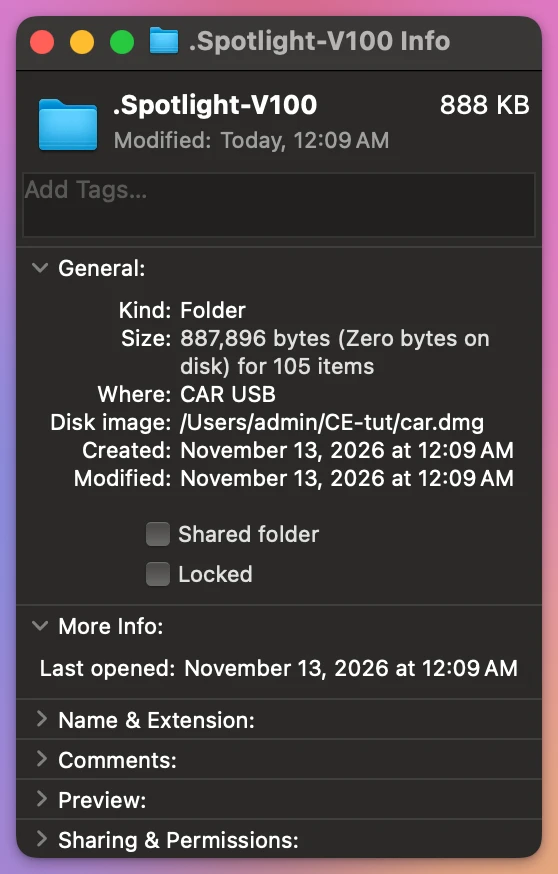
888 KB in 105 items, for a stick with six songs on it. Spotlight writes it, and the way to keep it from doing that is Spotlight’s own setting, not the Trash: you tell Spotlight to leave the stick alone.
.Trashes
When you move a file on a stick to the Trash, the Mac doesn’t move it to your Mac. It moves it into .Trashes on the stick, where it keeps taking space. I selected the song in the Trash window and chose File > Get Info. The Where line says it plainly:
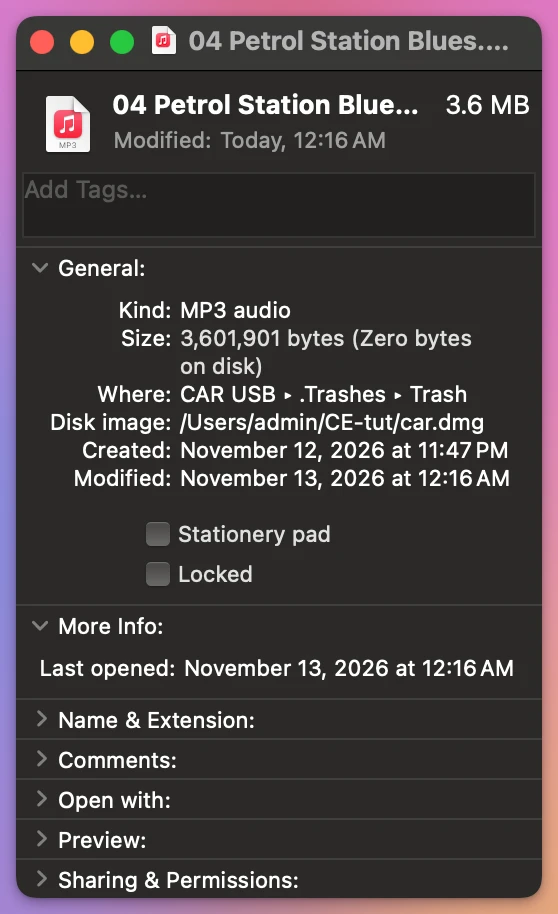
The space comes back when you empty the Trash with the stick plugged in. The tutorial about a card that’s still full after deleting shows how to empty the Trash of a card without emptying your Mac’s.
Here’s the three side by side, as I found them on the stand-in:
| Folder | Size on the stand-in | Shown with ⇧⌘. | Comes back |
|---|---|---|---|
.fseventsd | 1 file, 36 bytes | Yes | Every time you plug the stick in |
.Spotlight-V100 | 888 KB, 105 items | Yes | While Spotlight indexes the stick |
.Trashes | The trashed song, 3.6 MB | No | Next time you trash a file on the stick |
Clean all three before you eject
Clean Eject is a Mac app I made for this. It costs $20, paid once. Clean & Eject lists what the Mac left on a stick and removes it when you confirm, right before it ejects the stick, so .fseventsd is gone when the stick goes into the PC.
On CAR USB it listed all three, each in its own way:
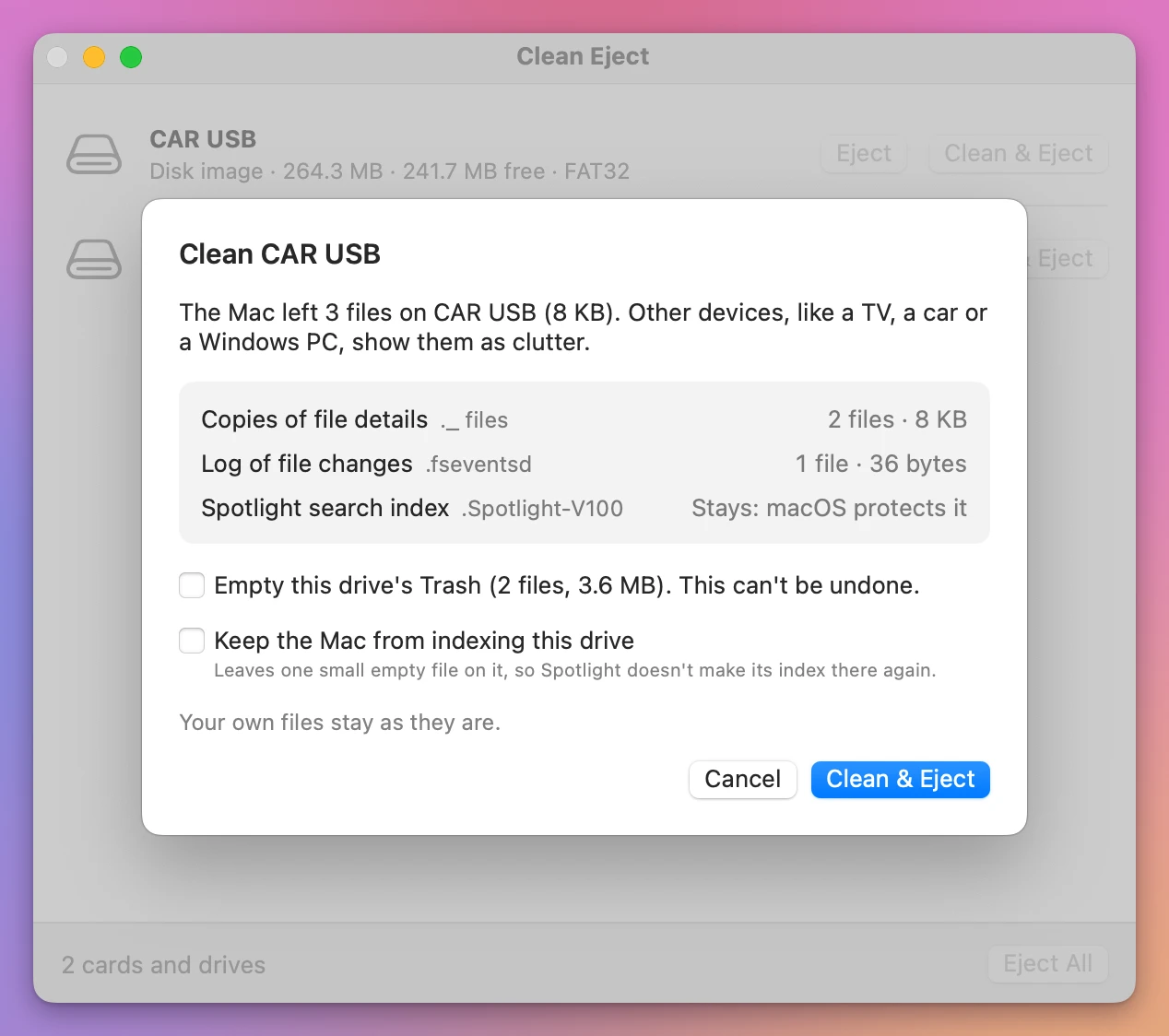
.fseventsdis “Log of file changes”, and it goes..Spotlight-V100is “Spotlight search index”, marked “Stays: macOS protects it”. The app doesn’t touch it. Keep the Mac from indexing this drive leaves a small empty file on the stick that tells Spotlight to stay away..Trashesis the box Empty this drive’s Trash (2 files, 3.6 MB). It’s off unless you tick it, and it says it can’t be undone. The 2 files are the song and a 4 KB file the Mac put in the Trash with it.
Get Clean Eject
Remove the hidden files your Mac leaves on memory cards and USB drives, the ._ and .DS_Store files a TV, a car or a Windows PC shows, then eject. When a drive won't eject, see which apps are using it and quit them.
See Clean Eject → · Read the docs · $20. See the app page for tax details.
Want me to talk about your product? You can sponsor this site.